
Bulk URL Status and Redirect Chain Checker API
Pricing
from $0.40 / 1,000 checked urls
Bulk URL Status and Redirect Chain Checker API
Check the status code, redirect chain, canonical and indexing signals of every URL in a list, with the final destination and a loop flag. robots.txt obeyed, no personal data, and you pay only for URLs checked, never for blocked or disallowed ones.
Pricing
from $0.40 / 1,000 checked urls
Rating
0.0
(0)
Developer

Rowcraft
Maintained by CommunityActor stats
0
Bookmarked
2
Total users
1
Monthly active users
4 days ago
Last modified
Categories
Security
Limited permissionsShare
Check the HTTP status and the full redirect chain of every address in a list. This bulk URL checker asks each URL politely, follows every redirect hop by hop, and returns one row per URL: the final status code, the final destination, every hop with its type (301, 302, 303, 307, 308 or meta refresh), a redirect-loop flag, whether the URL moved to https, gained or lost www, gained or lost a trailing slash, how fast the server answered, the main response headers, and the canonical link, meta robots tag and title of the final page. Results come as JSON, CSV or Excel.
It is built for the jobs where a list of URLs has to be proved right or wrong: a site migration (does every old URL reach its new address in one hop?), an https rollout, a link audit from a crawl or a Search Console export, a canonical check, and a weekly watch on the URLs that matter. With Only new rows a scheduled run delivers, and charges, only the URLs whose status, destination or redirect chain changed since the last run.
What you get
Price: $0.60 per 1,000 URLs on the Free plan, $0.40 on the Business plan, paid per row delivered; the $5 monthly credit of a free Apify account covers about 8,300 URLs. Details in Pricing below.
One row per URL:
- The answer:
statusCodeandstatusTextof the final response,ok(true for a 2xx answer), and the address that answered (finalUrl). A dead address is an answer too: its row hasstatusCodenull and anerrorsuch asdns_error,timeout,tls_errororconnection_refused. - The whole chain:
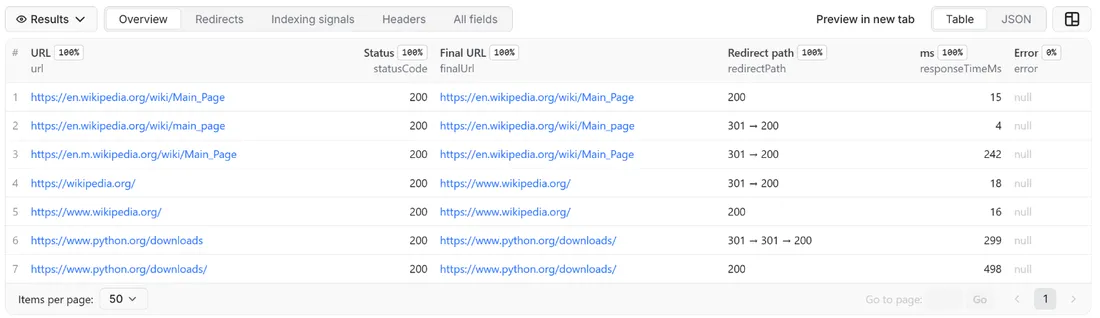
redirectChainlists every redirect on the way with the URL that redirected, its status code, thelocationit pointed to and thetype(301,302,303,307,308ormeta-refresh).redirectPathwrites the same chain as one short text (301 → 302 → 200), so it reads well in a table and in a spreadsheet column.redirectCountis the length of the chain, andredirectLoopis true when the chain came back to an address it had already visited. - What the redirects did:
httpsUpgrade(started on http, ended on https),wwwChange(the host gained or lostwww.) andtrailingSlashChange(the path gained or lost its final slash), so a migration can be filtered with one column. - Speed and headers of the final response:
responseTimeMs(time to the first response headers),contentType,contentLength,server,cacheControl,hstsandxRobotsTag. - Indexing signals of the final page:
canonical,canonicalMatchesFinal,metaRobotsandtitle, read from the first 256 KB of an HTML answer. - When:
checkedAt, in UTC.
The run also writes a COVERAGE record with the URLs that were not delivered and why (blocked, disallowed by robots.txt, invalid, not checked), and a RUN_SUMMARY with counts by status class, redirected URLs, loops and the reason the run stopped.
Why this actor
- The chain, not only the end. Every hop is a row entry with its own status code, target and type. A chain from https to http and back to https (a real one, below) or a 302 where a 301 was meant is visible at once.
- Migration monitoring built in. Only new rows remembers the state of every URL it delivered: final status, final address and chain. A schedule then costs only the URLs that changed, and a webhook tells you when something did.
- robots.txt on every host of the chain. Before a request goes to a host, its robots.txt is read once and obeyed for that exact path, including the hosts a redirect leads to.
- Honest about blocks. An anti-bot page, a 403 or a 429 is reported in
COVERAGEwith the protection's name when it can be recognised, and never charged. The actor does not rotate proxies, solve CAPTCHAs or disguise itself. - Light on the sites it checks. HEAD requests by default, one request per host and second, several different hosts at the same time, a clear user agent with a link to Rowcraft.
- Rows in the order of your list. Several URLs are checked at once, but the dataset keeps the order you gave, so it lines up with your spreadsheet.
- Pay only for answers. No charge for blocked, disallowed, invalid, repeated or unchanged URLs.
- No personal data. Links such as
mailto:andtel:are skipped, e-mail addresses inside URLs and titles are masked, and the row holds no text of the page apart from its title.
How to use it
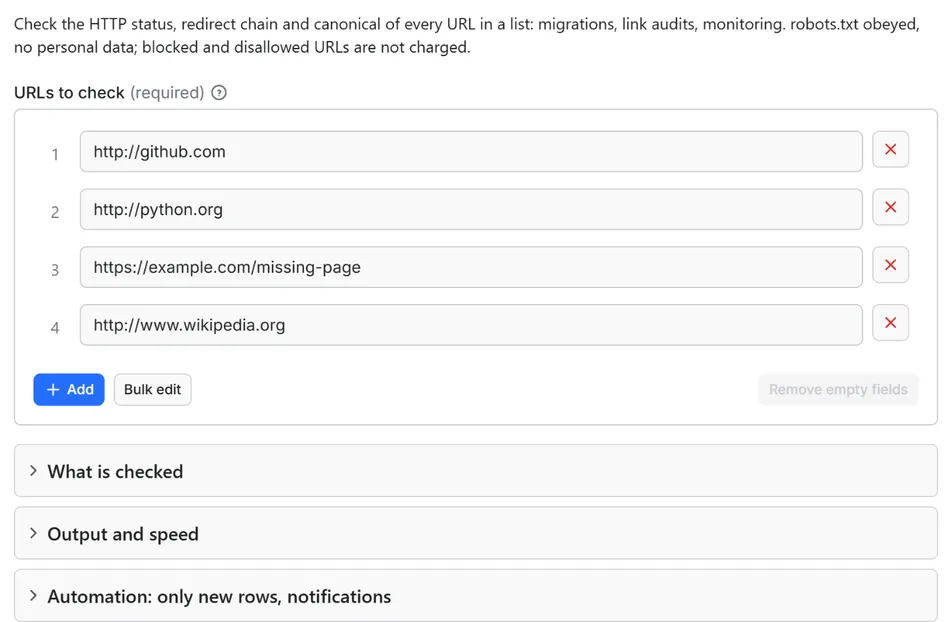
- Open the Actor and paste your URLs into URLs to check, one per line. A column copied from a spreadsheet works. An address without
http://orhttps://is checked ashttps://. - Keep the defaults for a first try: HEAD requests with a GET fallback, up to 10 redirects followed, the page head read.
- Click Start. The status line shows progress; the run stops cleanly at your maximum or at the charge limit you set in the run options.
- Open the Dataset tab. The Overview, Redirects, Indexing signals and Headers views show the main columns. Download JSON, CSV, Excel, XML or HTML, or send the rows to Google Sheets, Slack, Make, n8n or Zapier from the Integrations tab.
- Open the
COVERAGErecord in the key-value store to see which URLs were not delivered and why. - To watch a list over time, run it on a schedule with Only new rows since the last run turned on, and put a webhook address in Notify this URL when the run ends.
Input
Quick start. This input is ready to run (it is also the example in the API tab):
One real row it returns (long texts shortened here):
| Field | What it does |
|---|---|
urls | URLs to check, one per line. Duplicates, invalid entries and links such as mailto: are skipped and never charged; a #fragment is dropped because browsers never send it. Up to 100,000 per run. |
method | HEAD (default) asks for the headers only; a URL that answers 4xx or 5xx to HEAD, or drops the connection, is asked again with GET, because many servers mishandle HEAD. GET uses GET for every URL. |
followRedirects | On by default. Off shows only the first answer of each URL; its Location is still listed as one entry of redirectChain. |
maxRedirects | Default 10. A longer chain ends with error: too_many_redirects. |
readHtmlSignals | On by default: for HTML answers the first 256 KB are read for the title, canonical, meta robots and an instant meta refresh. Off uses headers only. |
maxItems | Stop after this many delivered rows. 0 = the whole list. |
onlyNew, stateName | Deliver a URL only when its status, final address or redirect chain changed since the last run with the same state name |
notifyUrl, notifyWhenEmpty | A webhook that receives one message when the run ends; see Automation below |
requestIntervalMs | Pause between two requests to the same host, default 1000 ms, minimum 250 ms |
Example: four URLs, one row each.
Example: a weekly check of a redirect map after a migration, delivering only the URLs that changed, with a Slack message.
Example: a fast status pass over a long list, headers only and no redirect following.
Output
25 fields per row. Empty values are null, never missing, so CSV and Excel columns are stable.
| Field | Type | Example |
|---|---|---|
url | string | http://github.com/ |
finalUrl | string | https://github.com/ |
statusCode | integer | 200 |
statusText | string | OK |
ok | boolean | True |
redirectCount | integer | 1 |
redirectChain | array | [{"url": "http://github.com/", "statusCode": 301, "location": "http… |
redirectPath | string | 301 → 302 → 200 |
redirectLoop | boolean | False |
httpsUpgrade | boolean | True |
wwwChange | boolean | False |
trailingSlashChange | boolean | False |
responseTimeMs | integer | 161 |
contentType | string | text/html; charset=utf-8 |
contentLength | integer | 11155 |
server | string | nginx |
cacheControl | string | max-age=0, private, must-revalidate |
hsts | string | max-age=31536000; includeSubdomains; preload |
xRobotsTag | string | noindex, nofollow |
canonical | string | https://github.com/ |
canonicalMatchesFinal | boolean | True |
metaRobots | string | noindex, follow |
title | string | Welcome to Python.org |
error | string | Why no normal answer came: dns_error, timeout, tls_error, connection_refused, connection_error, request_error, redirect_loop, too_many_redirects, invalid_redirect or private_address; null when the server answered |
checkedAt | string | 2026-10-14T17:34:32.601Z |
How to read the fields
statusCodeandfinalUrlalways describe the same response: the last one the actor received. When a redirect target cannot be reached,finalUrlis that target,statusCodeis null anderrorsays why; the chain still lists the hops that worked.okis true only for a 2xx answer without an error. A 404, a 410 or a 500 isok: falsewith its status code anderror: null, because the server did answer.redirectChainholds one object per redirect:url,statusCode,locationandtype. For a meta refresh the status code is that of the page that carried the tag (200). With Follow redirects off the chain holds the first redirect only, andfinalUrlstays the URL you gave.redirectPathis the chain as plain text: the type of every redirect in order, then the final status code, or the error when no answer came (301 → 200,302 → 302 → redirect_loop,301 → dns_error). A URL that did not redirect shows just its status code. With Follow redirects off it shows the first answer only (301). It is one text column, so it exports to CSV and Excel without splitting;redirectChainstays a list of objects for code that needs every hop.canonicalMatchesFinalcompares the canonical URL with the final URL after the usual URL clean-up (lower-case host, default port removed, fragment dropped); a differentwww, scheme or trailing slash counts as different. It is null when the page announces no canonical. A canonical sent in the HTTPLinkheader counts as well as the tag.metaRobotsis the content of the robots meta tag (the googlebot tag when there is no robots tag).xRobotsTagis the header with the same job. Together they show whether the final page asks not to be indexed.responseTimeMsis the time from the request to the first response headers, measured from the Apify data center that ran the actor. It includes the connection set-up when a new connection was needed, so use it to compare URLs of one run, not as a speed test of your site for your visitors.contentLengthis theContent-Lengthheader: null when the server sends none, and the compressed size when the answer is compressed.
Values of error
error | Meaning |
|---|---|
dns_error | The host name does not exist (or could not be resolved after one retry). |
connection_refused | The host answered, but nothing listens on that port. |
timeout | No answer within 20 seconds. |
tls_error | The secure connection failed: an expired or self-signed certificate, a name mismatch, or a server that does not speak TLS on that port. |
connection_error | The connection was reset or dropped (retried once). |
redirect_loop | The chain came back to an address it had already visited. |
too_many_redirects | The chain was longer than Maximum redirects. |
invalid_redirect | A redirect status without a usable Location, or one that points to a non-web address such as mailto:. |
private_address | A redirect led to a private or local network address, which is never requested on the platform. |
request_error | Any other failure of the request itself. |
Example rows
Two real rows from a run (long texts shortened here, complete in the dataset):
Results can be downloaded as JSON, CSV, Excel, XML or HTML from the Dataset tab, or read through the Apify API.
Pricing
Pay per result. You pay for each URL checked and delivered to your dataset, nothing else: no subscription and no minimum. A row is charged whenever the check produced an answer, and a dead address or a 404 is an answer. Nothing is charged for URLs behind an anti-bot page, a 403 or a 429, URLs that robots.txt disallows, invalid or repeated entries, mailto: and tel: links, or URLs skipped by Only new rows because nothing changed.
| Your Apify plan | Price per 1,000 rows | Price per row |
|---|---|---|
| Free plan | $0.60 | $0.0006 |
| Starter plan | $0.55 | $0.00055 |
| Scale plan | $0.50 | $0.0005 |
| Business plan and above | $0.40 | $0.0004 |
Example: 1,000 URLs cost $0.60 on the Free plan and $0.40 on the Business plan. Platform usage of the run (compute and storage) is included in that price and is not billed to you separately; the actor runs in 256 MB and spends most of its time waiting between requests.
A start event of $0.00005 is charged once per run (Apify default).
Cap your spend: set Maximum total charge in the run options. The actor stops cleanly when the cap is reached and you keep everything delivered until then. The run summary (RUN_SUMMARY in the key-value store) says why a run stopped.
Automation: only new rows, notifications, schedules
Only new rows since the last run. Turn on onlyNew and the actor remembers, for every URL it delivered to you, a short fingerprint of its state: the final status code, the final address, the redirect chain (each hop's status and target) and the error. The memory lives in a key-value store named rowcraft-url-status-redirect-checker-state in your Apify account. The next run with the same stateName still checks every URL, but delivers and charges a URL again only when that state changed: a 301 that became a 302, a redirect target that moved, a page that started to answer 404 or went back to 200, a host that stopped resolving. Response times, headers, titles and canonicals do not count as a change. The first run delivers every URL it can check. Use a different stateName for each list so they keep separate memories.
Notification when the run ends. Put a webhook address in notifyUrl and the actor sends one JSON POST with the number of delivered rows, links to the dataset (JSON and CSV) and the run. It works with Slack and Discord incoming webhooks (the message is in text and content), with Make, n8n and Zapier catch hooks, and with your own endpoint. By default it is sent only when at least one row was delivered; notifyWhenEmpty sends it every time.
Schedules. Create a schedule in Apify Console (hourly, daily, weekly or cron) with onlyNew on. After a migration, a daily schedule over the old URLs gives you a feed of every redirect that changed, for the price of those rows only.
Integrations. Send the results to Make, n8n, Zapier, Google Sheets, Slack, Google Drive, Airtable or any webhook from the Integrations tab of the Actor, with no code.
API, SDKs and AI agents. Every run is available through the Apify API and the official JavaScript and Python clients; the Actor can also be called by AI agents through the Apify MCP server. The example input in the API tab is a working call.
Use with AI agents (MCP). Add the Apify MCP server to Claude, Cursor, VS Code or any MCP client and the agent can run this Actor as a tool:
Call it from a shell or any language. One request runs the Actor with the input below and returns the rows as JSON:
Python (pip install apify-client):
JavaScript / Node.js (npm install apify-client):
Use cases
- Site migration: list every old URL, run the checker before and after the switch, and filter
redirectCountgreater than 1,statusCodenot 200,redirectLooptrue orerrornot null. Keep the schedule on with Only new rows for the weeks after launch. - https rollout: paste the http version of your pages and filter
httpsUpgradefalse to find the ones that never redirect, then readhststo see which hosts send the header. - Link audit: check the URLs exported from a crawl, a sitemap or a Search Console report, and sort by
statusCodeto get the 404s and 5xx answers and the redirect hops that can be shortened. - Canonical audit: filter
canonicalMatchesFinalfalse for pages whose canonical points somewhere else than the page itself, andmetaRobotsorxRobotsTagcontainingnoindexfor pages that ask not to be indexed. - www and trailing-slash consistency:
wwwChangeandtrailingSlashChangeshow which variants redirect and which answer on their own, so duplicate versions of a page can be removed. - Backlink and campaign targets: run the landing pages of your campaigns or the targets of your backlinks and learn when one starts to redirect, answer 404 or change its destination.
- Affiliate and partner links: check a list of outgoing links for chains that are too long, loops and dead destinations.
Ready-made examples, each with the input filled in (open one and press Start, or save it as your own task):
What this actor does not do
- Find URLs: it checks the list you give and does not crawl a site or read a sitemap.
- Run JavaScript: a redirect made by a script, or a page that is empty until its scripts run, shows the status and head of the first answer only. An HTML
<meta http-equiv="refresh">tag with a delay of up to 5 seconds is followed; a longer delay is a reload timer and is not. - Judge the content: it does not detect soft 404 pages (a 200 answer whose text says "not found"), compare pages or check broken links inside a page.
- Log in, accept cookie banners, rotate proxies, solve CAPTCHAs or hide behind another identity: a 403, a 429 or an anti-bot page is reported as blocked and not charged.
- Measure page speed:
responseTimeMsis the time to the first byte, from one data center, with no page rendering. - Collect contacts: no e-mail addresses, phone numbers, names of people or social profiles.
Limits and fair use
- One request per second to a host by default (minimum 250 ms), and up to five URLs in flight at once on different hosts. A URL takes one request for a redirect, two for an HTML page with a HEAD request (the answer and then the page head) and one more for the robots.txt of each new host. A list that sits on one host therefore runs at about one request per second at the default interval, which is one to three seconds per URL; lower the interval to 250 ms for your own sites. In our test run 1,500 URLs spread over 20 local test hosts at 250 ms took about 90 seconds, and the actor stayed under 125 MB of memory.
- robots.txt is obeyed for every address the chain touches, with the
rowcraftgroup first and*after it. A URL disallowed on any host of its chain is listed asrobots_disallowedand not charged. If a robots.txt answers with a server error the host is not read, as the standard (RFC 9309) requires, and the URL is listed asrobots_unavailable. Staging sites often disallow everything for all robots: if your list is on one, the result will be empty. - Redirects: up to 10 by default, 30 at most. Each hop checks DNS and robots.txt of its host first.
- Answers that count as blocked: a 403, a 429, and the challenge pages of the common bot-protection services (Cloudflare, DataDome, Akamai, Imperva, HUMAN, AWS WAF, Sucuri, Vercel). After three such answers from one host the rest of that host's URLs are listed as blocked without being requested, and after ten blocked URLs in a row from different hosts the run stops with a warning in the run summary. A plain 404, 410, 500 or 522 is never taken for a block.
- Time limits: 20 seconds per request, 90 seconds per URL, one retry on a dropped connection and on 502, 503, 504 (a 429 with a
Retry-Afterof up to 20 seconds is waited for once). The run stops 90 seconds before its own timeout and saves its summary, its coverage and the Only new rows memory. - Size: up to 100,000 URLs per run, up to 2,048 characters per URL; the page head is read from the first 256 KB of an HTML answer.
- Private addresses (localhost, 10.x.x.x, 192.168.x.x and similar) are never requested on the platform.
Data source and licence
The data is what each server sends to any visitor who asks for that address: the status line, the response headers, and the head of the HTML page. The actor sends a normal request after reading robots.txt, with the user agent Rowcraft Bulk URL Status and Redirect Checker (+https://apify.com/rowcraft), and keeps only the fields listed in the Output section. It does not store page text, images, cookies or the values of any header other than the ones listed.
Rowcraft is independent: this actor is not provided, endorsed or authorised by the websites it checks. You decide which URLs go on the list and are responsible for having the right to check them, the way you would be for a link checker you ran yourself.
Privacy: no personal data
Rowcraft actors are built not to collect personal data:
- The row holds the URL, the status, the chain, a few headers and four head tags. The only page text is the title, cut at 200 characters, with e-mail addresses and phone numbers masked.
mailto:,tel:,sms:and similar links in your list are skipped completely: not requested, not delivered, not counted as broken and not written anywhere.- An e-mail address inside a URL (a query such as
?email=...) is replaced by[email removed]in every field, including the chain. Credentials written in front of a host (user:password@) are dropped and never sent. - Cookies are neither sent nor read. An entry that is not a URL and contains spaces is not repeated in
COVERAGE; its position in your list is.
You are responsible for using the data in line with the law that applies to you.
Other Rowcraft actors
Related Rowcraft actors. All of them read official or public sources, deliver flat rows without private contact details and support only-new runs and notifications; the full list is on the Rowcraft profile:
- Broken Link Checker: Find 404s — Pay per crawled page, not per link: crawl a site within robots.txt and check every link on each page for 404s, 5xx errors, DNS and TLS failures and redirects.
- Lighthouse Audit API: Core Web Vitals and Performance Scores — Run Lighthouse on any public page and get Performance, Accessibility, Best Practices and SEO scores, lab Core Web Vitals and the biggest savings.
- SEO Audit Tool for Any Website — Audit the on-page SEO of any list of pages or websites: titles, meta descriptions, headings, canonicals, indexing, links, images and structured data, with a score and the issues found per page.
- Sitemap URL Extractor: Every Page with Last-Modified Dates — Get every page a site lists in its sitemaps, with last-modified dates, from robots.txt through sitemap indexes and .gz files.
- Structured Data Extractor: JSON-LD, Schema.org, Open Graph — Pull the schema.org JSON-LD, Microdata, RDFa and Open Graph of any page list into flat rows: types, product price, availability, ratings, organization, breadcrumbs, with validation issues.
- Google Autocomplete Suggestions Scraper – Keyword Ideas — Get Google search suggestions for a list of keywords in bulk: a-z, question and preposition expansion, any language and country.
FAQ
Which URLs does it accept? Addresses with http:// or https://, and bare domains or paths such as example.com/page, which are checked as https://. Links with other schemes (mailto:, tel:, ftp:, javascript:) are skipped, and so are #fragment-only entries.
What is the difference between HEAD and GET here? HEAD returns the headers without the page, so it is lighter for the sites you check. Some servers answer HEAD with a 403, 404 or 405 and GET with a 200; the actor therefore asks again with GET whenever HEAD gets a 4xx or 5xx answer or fails, and uses the GET answer. For HTML pages with Read the page head on, a GET follows a successful HEAD to read the title and canonical. Choose GET to use GET for everything.
Why is a URL missing from the dataset? It was blocked (an anti-bot page, a 403 or a 429), disallowed by robots.txt on its host or on a host of its chain, invalid, a duplicate, a mailto: or tel: link, or unchanged with Only new rows. The COVERAGE record and the counts in RUN_SUMMARY say which, and none of them is charged.
Why is the result empty? Every URL was disallowed, blocked, invalid or unchanged, or the list was empty. Staging servers that disallow all robots, sites behind a bot-protection service and a second run with Only new rows are the usual causes. COVERAGE gives the reason per URL, and nothing is charged for them apart from the start event.
Is a 404 or a dead domain charged? Yes: it is the answer you asked for. A URL whose host does not exist, refuses the connection, times out or fails the TLS handshake is delivered as a row with statusCode null and an error. Only URLs that could not be checked at all (blocked, disallowed, invalid) are free.
Why is a 403 not a row? A 403 or a 429 usually means the site refuses automated readers, and the actor does not try to get around that. It is listed in COVERAGE with its status code and not charged. A 401 (login required) is delivered as a normal row.
What does canonicalMatchesFinal: false mean? The page announces a canonical URL that is not the address it was served from, for example /wiki/Main_Page announced by a page served from /wiki/Main_page. It is a signal to look at, not always an error.
Does it follow JavaScript redirects? No. It follows HTTP redirects and an HTML meta refresh with a delay of up to 5 seconds. A redirect made by a script is not seen.
Is it legal? The actor asks each server for the address you gave it, as any visitor or link checker does, obeys robots.txt on every host, keeps to one request per second per host by default and collects headers and four head tags, not personal data or page content. Whether you may check a given site is for you to judge; use the actor only on lists you have the right to check. How you use the results is your responsibility under the law that applies to you.
Does it collect personal data? No personal data: no e-mail addresses, phone numbers, people's names or cookie values. See the Privacy section.
Can I check my own site faster? Yes: set Delay between requests to one host to 250 ms, which is four requests per second per host. Different hosts are checked at the same time anyway.
How do I monitor a migration? Run the list once with Only new rows and a state name, fix what the first run shows, then schedule the same input daily or weekly. Each later run costs only the URLs whose status, destination or chain changed, and notifyUrl sends one message when there is something to look at.
Support and reviews
Problems, missing fields, questions: open an issue on the Issues tab of this Actor. We answer within one working day and fix confirmed bugs in the next release; the changelog lists every change.
If this Actor saved you time, a short review on its page helps other users find it and helps us keep improving it.


