

Sitemap URL Extractor: Every Page with Last-Modified Dates
Pricing
from $0.30 / 1,000 sitemap urls
Sitemap URL Extractor: Every Page with Last-Modified Dates
Get every page a site lists in its sitemaps, with last-modified dates, from robots.txt through sitemap indexes and .gz files. Track new pages of competitors with Only new rows. robots.txt obeyed, no personal data, pay only per URL delivered.
Pricing
from $0.30 / 1,000 sitemap urls
Rating
0.0
(0)
Developer

Rowcraft
Maintained by CommunityActor stats
0
Bookmarked
2
Total users
1
Monthly active users
9 days ago
Last modified
Categories
Security
Limited permissionsShare
Get every page a sitemap lists, with its last-modified date, from just a domain name. Give the actor a domain, a robots.txt address or a sitemap address; it finds the sitemap files, follows sitemap indexes down to their files, unpacks .xml.gz files, reads the XML as a stream and returns one row per page address, as JSON, CSV or Excel. Track the new pages of competitors: turn on Only new rows and schedule the run, and every run delivers, and charges, only the addresses that were not in the sitemap the last time.
Key limits, up front: the default Maximum URLs delivered is 1,000 (raise it, or use 0 for everything). Up to 500 sitemap files are read per site (adjustable), indexes are followed up to 5 levels deep, and a single file is read up to 60 MB (the standard allows 50 MB). One request per second to the same host by default. robots.txt is obeyed on every host, including a CDN that serves the sitemap. A sitemap behind an anti-bot page is reported as blocked and never charged.
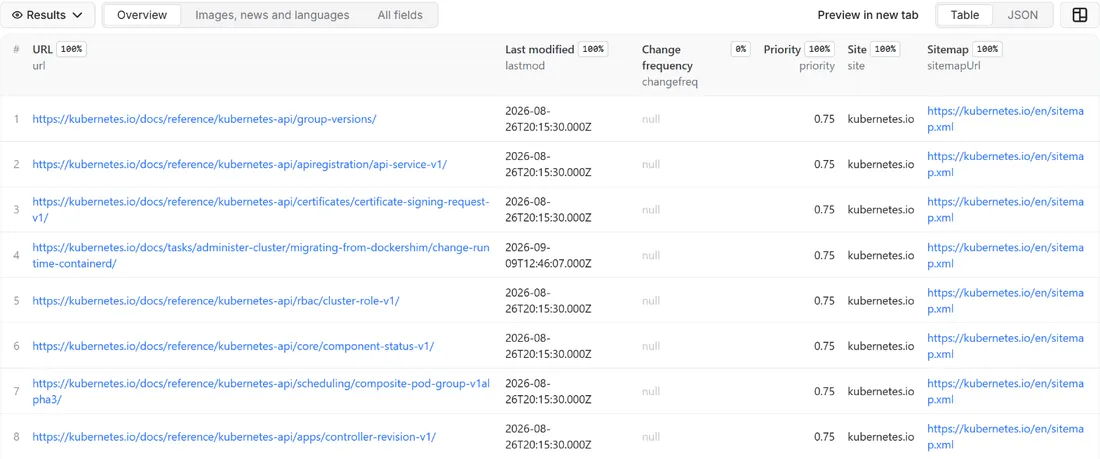
What you get
Price: $0.40 per 1,000 URLs on the Free plan, $0.30 on the Business plan, paid per row delivered; the $5 monthly credit of a free Apify account covers about 12,000 URLs. Details in Pricing below.
One row per page address, delivered once however many sitemaps list it:
- The address and its source: the
url, the sitemap file it was read from (sitemapUrl) and the kind of file (sitemapType: an XMLurlset, atextlist with one address per line, or anrssfeed or Atom feed used as a sitemap) - When it changed:
lastmodas the sitemap gives it (a date, or an ISO 8601 time converted to UTC),nullwhen the sitemap gives none or gives something that is not a date - The sitemap hints:
changefreqandpriority, normalised (nullwhen missing or out of range) - Media and news: the number of images and videos listed for the page in image and video sitemaps, and the headline and publication date from Google News sitemaps
- Language versions:
alternates, the hreflang entries (xhtml:link) of the page as a list of objects, each with the language code (hreflang) and the address (url); an empty list when the page has none - The site and the run:
site(the domain of the entry you gave, so a list of many sites stays filterable),firstSeenAt(with Only new rows on: the time of the run that first delivered the address) andextractedAt
The run also writes a COVERAGE record with one line per entry of your list (ok, no_sitemap, blocked, robots_disallowed, not_found, error or not_checked, with the sitemap files read, the files that failed and the reason) and a RUN_SUMMARY with the counts: addresses delivered, repeated addresses skipped, addresses dropped by your filters, files read and files that could not be read.
Why this actor
- Domain in, pages out. You do not need to know where the sitemap is. The actor reads the
Sitemap:lines of robots.txt, and when a site names none it tries/sitemap.xml,/sitemap_index.xmland/wp-sitemap.xml. - Indexes, gzip and feeds handled. A sitemap index with hundreds of files,
.xml.gzfiles (also when the server forgets to say they are compressed), plain text lists and RSS or Atom feeds are all read the same way. - New pages since the last run. Only new rows remembers the addresses delivered to you and charges only for the difference, which is the cheapest way to watch what a competitor publishes.
- Dates you can filter on. Changed after keeps only pages modified since a day you choose, such as
2026-10-01or7 days, and skips the sitemap files of an index whose own date is older, so a large site costs a few requests instead of thousands. - Streaming, not loading. Sitemap files are read chunk by chunk. A sitemap of 48 MB with 300,000 addresses was read in a local test with the memory heap capped at 128 MB, so the actor runs in 256 MB.
- Pay only for URLs delivered. Repeated addresses, addresses dropped by your filters, addresses already delivered with Only new rows, count-only runs and files that could not be read cost nothing.
- Polite by design. robots.txt first on every host, one request per second per host, a clear user agent, no proxies, no CAPTCHA solving.
How to use it
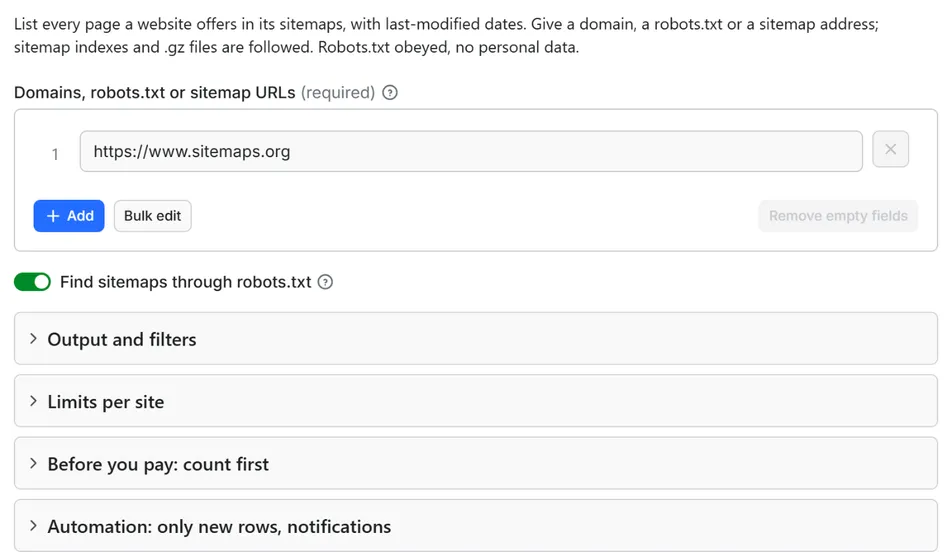
- Open the Actor and paste your domains into Domains, robots.txt or sitemap URLs, one per line. A domain such as
example.comis enough; a full robots.txt address or a sitemap address also works. - For a first try leave Maximum URLs delivered at its default. To see the size of a site before paying, tick Count only (free check) and start once: you get the number of matching URLs and the estimated cost, and nothing is delivered.
- Optional: keep only the pages you need with Keep only URLs that contain (for example
/blog/), drop others with Drop URLs that contain, or use Changed after to keep only recently modified pages. - Click Start. The status line shows the URLs delivered and the sitemap files read.
- Open the Dataset tab: the Overview view lists address, last-modified date, change frequency, priority, site and source file; the Images, news and languages view shows the media and hreflang columns. Download JSON, CSV, Excel, XML or HTML, or send the rows to Google Sheets, Slack, Make, n8n or Zapier with the Integrations tab.
- Open the
COVERAGErecord in the key-value store to see, for each entry of your list, which sitemap files were read, which failed and why. - To watch a site, create a schedule with Only new rows since the last run turned on, and put a Slack or Discord webhook in Notify this URL when the run ends.
Input
Quick start. This input is ready to run (it is also the example in the API tab):
One real row it returns (long texts shortened here):
| Field | What it does |
|---|---|
startUrls | Domains (example.com), robots.txt addresses (https://example.com/robots.txt) or sitemap addresses (https://example.com/sitemap.xml, .xml.gz, a text list or a feed), one per line. Up to 10,000 entries per run. |
discover | Default on. For a domain or a robots.txt address: read the Sitemap: lines, and when there are none try /sitemap.xml, /sitemap_index.xml and /wp-sitemap.xml (the first one that is a sitemap wins). Off: try only /sitemap.xml. |
maxItems | Stop after this many URLs are delivered. Default 1,000. 0 = no limit. |
urlIncludes | Keep a URL only when its path or query contains one of these texts, for example /products/. A line that starts with re: is a regular expression, for example re:/20(25|26)/. A line with :// is matched against the whole address. |
urlExcludes | Drop a URL when its path or query matches any of these lines (same syntax). |
lastmodAfter | Keep only URLs whose last-modified date is on or after this day. YYYY-MM-DD, or a relative value: 7 days, 2 weeks, 24 hours. |
maxUrlsPerSite | Stop reading one entry of the list after this many URLs. Default 0 = no limit. |
maxSitemapFiles | Stop after this many sitemap files of one site. Default 500. |
countOnly | Count matching URLs and estimate the cost; deliver nothing. |
onlyNew, stateName | Deliver only addresses not delivered to you in an earlier run with the same state name. |
notifyUrl, notifyWhenEmpty | A webhook that receives one message when the run ends; see Automation below. |
requestIntervalMs | Pause between two requests to the same host, default 1000 ms, minimum 250 ms. |
Example: every page of one site, as far as the first 1,000 addresses.
Example: a weekly watch on three competitors that delivers only product and blog pages that appeared since the last run, with a Slack message.
Example: every page modified in the last two weeks, from one sitemap address.
Output
15 fields per row. Empty values are null, never missing, so CSV and Excel columns are stable.
| Field | Type | Example |
|---|---|---|
id | string | https://nginx.org/en/docs/http/ngx_http_core_module.html |
url | string | https://nginx.org/en/docs/http/ngx_http_core_module.html |
lastmod | string | 2026-09-30 |
changefreq | string | monthly |
priority | number | 0.8 |
sitemapUrl | string | https://nginx.org/sitemap.xml |
sitemapType | string | urlset |
imageCount | integer | 0 |
videoCount | integer | 0 |
newsTitle | string | Example headline |
newsPublicationDate | string | 2026-10-14T08:00:00.000Z |
alternates | array | [{"hreflang": "de", "url": "https://developers.google.com/search?hl… |
site | string | nginx.org |
firstSeenAt | string | 2026-10-14T18:40:12.000Z |
extractedAt | string | 2026-10-14T18:40:12.000Z |
Example rows
Two real rows from a run (long texts shortened here, complete in the dataset):
Results can be downloaded as JSON, CSV, Excel, XML or HTML from the Dataset tab, or read through the Apify API.
Pricing
Pay per result. You pay for each URL delivered to your dataset, nothing else: no subscription, no minimum, no charge for rows your filters drop or for the requests behind them.
| Your Apify plan | Price per 1,000 rows | Price per row |
|---|---|---|
| Free plan | $0.40 | $0.0004 |
| Starter plan | $0.35 | $0.00035 |
| Scale plan | $0.32 | $0.00032 |
| Business plan and above | $0.30 | $0.0003 |
Example: 1,000 URLs cost $0.40 on the Free plan and $0.30 on the Business plan. Platform usage of the run (compute, storage) is included in that price and is not billed to you separately (pay per event: the actor covers it).
A start event of $0.00005 is charged once per run (Apify default).
Cap your spend: set Maximum total charge in the run options. The actor stops cleanly when the cap is reached and you keep everything delivered until then. The run summary (RUN_SUMMARY in the key-value store) says why a run stopped.
Check before you pay: turn on Count only to see how many rows match and what they would cost at your tier. That run delivers nothing and costs only the start event.
A page address is counted once per run, however many sitemaps list it. What is not charged: repeated addresses, addresses dropped by Keep only URLs that contain, Drop URLs that contain or Changed after, addresses skipped by Only new rows, count-only runs, and every sitemap file that could not be read (anti-bot page, robots.txt, not found, errors).
Automation: new pages since the last run, notifications, schedules
Only new rows since the last run. This is the main way to use the actor on a schedule. With onlyNew on, the actor remembers a short fingerprint of every address it delivered to you (in a key-value store named rowcraft-sitemap-url-extractor-state in your Apify account, one memory per stateName, up to the latest 1,000,000 addresses). The next run with the same state name delivers only the addresses that were not there before, so a daily schedule on a site that publishes ten pages a day costs ten rows a day, not the whole sitemap. The first run delivers every matching address and builds the memory: treat it as the baseline, and use Changed after instead when you want to look back in time. A page that is removed from the sitemap and added again is not delivered twice. Addresses skipped because of Maximum URLs delivered or the charge limit are not remembered, so they come in the next run. A count-only run never changes the memory.
Notification when the run ends. Put a webhook address in notifyUrl and the actor sends one JSON POST with the number of delivered rows, links to the dataset (JSON and CSV) and the run. It works with Slack and Discord incoming webhooks (the message is in text and content), with Make, n8n and Zapier catch hooks, and with your own endpoint. By default it is sent only when at least one row was delivered; notifyWhenEmpty sends it every time.
Schedules. Create a schedule in Apify Console (hourly, daily, weekly or cron) with onlyNew on. Use one state name per list, so lists that differ keep separate memories.
Count first. countOnly reads the sitemaps without delivering anything and reports the number of matching URLs and the cost at your plan in RUN_SUMMARY (countOnly.matching, countOnly.estimatedCostUsd). Filters, Changed after and the per-site limit apply to the count, the overall maximum does not.
Integrations. Send the results to Make, n8n, Zapier, Google Sheets, Slack, Google Drive, Airtable or any webhook from the Integrations tab of the Actor, with no code.
API, SDKs and AI agents. Every run is available through the Apify API and the official JavaScript and Python clients; the Actor can also be called by AI agents through the Apify MCP server. The example input in the API tab is a working call.
Use with AI agents (MCP). Add the Apify MCP server to Claude, Cursor, VS Code or any MCP client and the agent can run this Actor as a tool:
Call it from a shell or any language. One request runs the Actor with the input below and returns the rows as JSON:
Use cases
- Competitor monitoring: schedule a daily run with Only new rows on a competitor's domain and get the product, category and blog pages they publish, the day they appear in the sitemap.
- SEO audits and migrations: list every indexable page a site declares, with its last-modified date, before a redesign or a migration, and compare the list with what you crawled or what the search console reports.
- Content inventory: group the addresses by folder (
/blog/,/products/,/docs/) with the include filters, count pages per section and see which sections are updated and which are stale. - Crawl lists for other scrapers: feed the addresses to a product or article scraper without crawling the site's menus. Filter to the part of the site you need first, and use Count only to size the job.
- International sites: read the hreflang alternates to see which language and region versions of each page exist, and which pages have none.
- News and media: read Google News sitemaps for headlines, publication dates and image counts of recent articles.
- Lead and research lists: a quick map of how large a company's site is, how fresh it is and how it is organised, from a list of domains.
Ready-made examples, each with the input filled in (open one and press Start, or save it as your own task):
What this actor does not do
- Crawl a website: it reads robots.txt and sitemap files only, never the pages themselves, so it cannot find pages that no sitemap lists.
- Fetch page content: no titles, texts, prices or links of the pages; only what the sitemap says about each address. Use a scraper on the addresses for that.
- Check that the addresses work: a sitemap can list pages that are gone or redirected; the status of each address is not requested.
- Collect contacts or people: no e-mail addresses, phone numbers, names or social profiles;
mailto:,tel:andsms:entries are ignored, and author and user sitemaps are not read. - Log in, run JavaScript, use proxies or solve CAPTCHAs: a sitemap behind a bot challenge is reported as blocked and not charged.
- Give the date a page was really published:
lastmodis what the site declares, and many sites set it to the build date or leave it out.
Limits and fair use
- One request per second to the same host by default (minimum 250 ms). One request per sitemap file plus one robots.txt per host: a site with 100 sitemap files takes a bit under two minutes, a site with 2,000 files about half an hour. Several sites in one list are read one after the other.
- Up to 500 sitemap files per site by default (
maxSitemapFiles, up to 100,000). A very large site such as a marketplace can name thousands; the run says inCOVERAGEwhen the limit stopped it. Indexes inside indexes are followed up to 5 levels deep. - 60 MB per file. A file is read as a stream up to 60 MB after unpacking (the standard allows 50 MB); a longer one is cut there and flagged in the warnings.
- Maximum URLs delivered defaults to 1,000. The status line and the run summary say when the maximum stopped the run. Set it to 0 to get everything, and set a Maximum total charge in the run options if you want a hard cost cap.
- robots.txt is obeyed for the host of every file, including a CDN host that serves the sitemap. If robots.txt disallows the sitemap path the file is
robots_disallowed; if robots.txt answers with a server error the site is not read, as the robots.txt standard (RFC 9309) requires. - Anti-bot pages. A site that answers with a bot challenge or a 403 is reported as
blocked, not retried and not charged. In our tests some large news and media sites, protected by a CDN, answered 403 for their sitemap. After 10 blocked entries in a row the run stops and says why in the run summary. - Last-modified filters need dates. With Changed after on, addresses that have no valid
lastmodare dropped (and counted in the summary), because their age cannot be known. Sitemap files of an index whose own date is older than your day are not opened; if a site keeps old dates on its index files while it changes them, leave the filter off. - The run stops 90 seconds before its timeout with the summary, the coverage and the Only new rows memory saved; for long lists raise the timeout, use a filter or split the list.
Data source and licence
The data is what the site publishes for crawlers: its robots.txt and the sitemap files it names, in the formats of the sitemaps protocol (sitemaps.org), Google's sitemap extensions for images, video and news, and the hreflang annotation. The actor reads those files once, as a crawler would, after checking robots.txt, and keeps only the address, the dates and hints, the counts of media, the news headline and date, the language versions and the name of the file they came from.
Sitemaps are published so that search engines and other tools can find a site's pages. How you may use a given site's list is your responsibility under that site's terms and the law that applies to you; the actor reads the lists as they are served to every visitor and does not bypass any protection.
Rowcraft is independent and not affiliated with or endorsed by the sites it reads. Site names and trademarks belong to their owners and are used only to say which site an address belongs to.
Privacy: no personal data
Rowcraft actors are built not to collect personal data:
- The row holds page addresses, dates, hints, counts, a news headline and language versions. No e-mail addresses, phone numbers, names of people or social profiles are requested or stored as fields.
mailto:,tel:andsms:entries in a sitemap are skipped, an e-mail address inside an address (for example in a query string) is replaced by[email removed], and phone-like text in a news headline is masked.- Sitemaps that exist to list people's pages (the WordPress users sitemap, author sitemaps) are not read.
- A page address is delivered as the site publishes it: it can contain words, for example the slug of an article about a person in the news. The actor adds no information about anyone, and you can drop such addresses with Drop URLs that contain.
- The actor sends no cookies, fills no forms and never logs in.
You are responsible for using the data in line with the law that applies to you.
Other Rowcraft actors
Related Rowcraft actors. All of them read official or public sources, deliver flat rows without personal data and support only-new runs and notifications; the full list is on the Rowcraft profile:
- Broken Link Checker – Find 404s and Dead Links API — Pay per crawled page, not per link: crawl a site within robots.txt and check every link on each page for 404s, 5xx errors, DNS and TLS failures and redirects.
- Lighthouse Website Auditor API: Core Web Vitals, Page Speed — Run Lighthouse on any public page and get Performance, Accessibility, Best Practices and SEO scores, lab Core Web Vitals and the biggest savings.
- SEO Audit Tool: Titles, Meta Tags, Headings and Links API — Audit the on-page SEO of any list of pages or websites: titles, meta descriptions, headings, canonicals, indexing, links, images and structured data, with a score and the issues found per page.
- Structured Data Extractor: JSON-LD, Schema.org, Open Graph — Pull the schema.org JSON-LD, Microdata, RDFa and Open Graph of any page list into flat rows: types, product price, availability, ratings, organization, breadcrumbs, with validation issues.
- Bulk URL Status and Redirect Chain Checker API — Check the status code, redirect chain, canonical and indexing signals of every URL in a list, with the final destination and a loop flag.
- Google Autocomplete Suggestions Scraper – Keyword Ideas — Get Google search suggestions for a list of keywords in bulk: a-z, question and preposition expansion, any language and country.
FAQ
How do I find new pages on a competitor's website? Run the actor on their domain with Only new rows on and Maximum URLs delivered set to 0. The first run delivers the whole sitemap and remembers it. Put the same input on a daily or weekly schedule with the same state name: each later run delivers only the addresses that were not in the sitemap before, and you pay only for those.
What happens when I give only a domain? The actor reads robots.txt of that domain and uses the Sitemap: lines it finds, which may be several files on several hosts. When robots.txt names no sitemap, it tries /sitemap.xml, /sitemap_index.xml and /wp-sitemap.xml in that order and uses the first one that is a real sitemap. When none exists the entry is reported as no_sitemap in COVERAGE, with the addresses that were tried.
Why is the result empty? Look at COVERAGE and RUN_SUMMARY. The usual reasons: the site has no sitemap (no_sitemap), its sitemap is behind an anti-bot page (blocked) or disallowed by robots.txt (robots_disallowed), the address does not exist (not_found), or your filters dropped everything (filteredSkipped in the summary shows how many addresses each filter removed; with Changed after on, addresses without a last-modified date are dropped too). With Only new rows on, addresses delivered in an earlier run are skipped as well. Nothing is charged for any of this, apart from the start event.
Is it legal? The actor reads robots.txt and sitemap files, which sites publish for crawlers and serve to every visitor, obeys robots.txt on every host and collects page addresses and dates, not personal data or page content. Whether and how you may use the results (for example for marketing or monitoring) depends on the site's terms and the law that applies to you.
Does it collect personal data? No personal data: no e-mail addresses, phone numbers or names of people are collected, and sitemaps of author and user pages are not read. See the Privacy section.
Do I pay for sitemaps that cannot be read? No. Blocked, robots-disallowed, not found and damaged files, invalid entries and repeated addresses are never charged. You pay for the addresses delivered to your dataset.
Why do some rows have no lastmod? The sitemap does not give one for that address, or gives something that is not a valid date (for example 0000-00-00 or a day that does not exist). The value is null, never a guess. Many sites leave lastmod out, and some set every page to the same date; the field is only as good as the site's own data.
Does it read compressed sitemaps? Yes. Files ending in .gz and files served with gzip compression are unpacked as they download, also when the server sends them without the header that announces the compression. A compressed file that is cut or damaged is read up to the break; the addresses before it are delivered and the file is flagged in COVERAGE.
What is the difference between Only new rows and Changed after? Changed after keeps addresses by the lastmod date the site declares, which is only as reliable as the site. Only new rows keeps addresses by what you have already received, so it finds pages that appeared since your last run even when the site gives no dates. For watching competitors use Only new rows; to look back at the last weeks use Changed after.
Can I filter the addresses? Yes. Keep only URLs that contain and Drop URLs that contain take plain text matched against the path and query (case-insensitive), or a regular expression when the line starts with re:. Filters run before anything is charged, so dropped addresses cost nothing.
Why is a sitemap file missing from my results? Open COVERAGE: every entry lists the files read and the files that failed with a status and a reason. A file can fail because it does not exist, is behind an anti-bot page, is disallowed by the robots.txt of the host that serves it, answers with a web page instead of a sitemap, or is too deep or beyond the file limit. An index file whose own date is older than Changed after is skipped on purpose.
Does it check whether the pages are still online? No. It reports what the sitemap lists. A sitemap can contain pages that no longer exist; to check them, run a status checker on the addresses.
Support and reviews
Problems, missing fields, questions: open an issue on the Issues tab of this Actor. We answer within one working day and fix confirmed bugs in the next release; the changelog lists every change.
If this Actor saved you time, a short review on its page helps other users find it and helps us keep improving it.


