

Structured Data Extractor: JSON-LD, Schema.org, Open Graph
Pricing
from $0.70 / 1,000 page extracteds
Structured Data Extractor: JSON-LD, Schema.org, Open Graph
Pull the schema.org JSON-LD, Microdata, RDFa and Open Graph of any page list into flat rows: types, product price, availability, ratings, organization, breadcrumbs, with validation issues. robots.txt obeyed, no personal data, pay per page.
Pricing
from $0.70 / 1,000 page extracteds
Rating
0.0
(0)
Developer

Rowcraft
Maintained by CommunityActor stats
0
Bookmarked
2
Total users
1
Monthly active users
4 days ago
Last modified
Categories
Security
Limited permissionsShare
Pull the structured data of web pages into flat rows. Paste product pages, articles, event pages or whole domains and get one row per page with the schema.org JSON-LD, Microdata and RDFa the page publishes, plus its Open Graph and Twitter Card tags: the types found, the product name, price, currency, availability and rating, the organization, the breadcrumb, the article headline and dates, the event name, date and place, and a list of validation issues. Turn on Add more pages of the same site and the actor finds pages through the sitemap and the internal links, up to the page limit you choose.
Every page is read politely and once: robots.txt first, then one request for the page. People are never read: the author of an article, the person who rated a product or the founder of a company stays out of the row. The issue codes follow rules that are written down in this README, so you can check any result against the fields of the row.
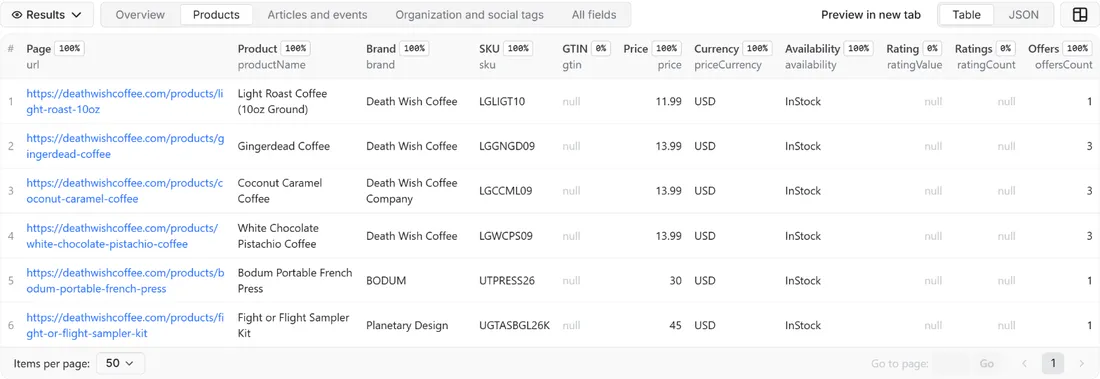
What you get
Price: $1.00 per 1,000 pages on the Free plan, $0.70 on the Business plan, paid per row delivered; the $5 monthly credit of a free Apify account covers about 5,000 pages. Details in Pricing below.
One row per page that was read:
- Identity and fetch: the address you gave (
url), the final address after redirects (finalUrl), the HTTP status, and the link depth (0 for a page you listed, 1 or more for a page the actor found) - What the page contains: the number of JSON-LD blocks, Microdata items and RDFa items, the formats found (
json-ld, microdata, rdfa, opengraph, twitter) and the schema.org types as text (for exampleOrganization, Product, BreadcrumbList) - Open Graph and Twitter Card: title, type, image, address, site name and a shortened description, the card type and the site handle
- Product: name, SKU, GTIN, MPN, brand, price as a number, currency, availability, item condition, rating value, number of ratings and number of offers
- Organization: name, website, logo and the domains of its profiles (
facebook.com, linkedin.com, never the profile addresses) - Breadcrumb: the trail as text in position order, for example
Home > Shoes > Blue Shoe - Article: headline, publication date and modification date, as written in the page (the author is never read)
- Event: name, start date and the place as text (venue, city, country; never a street address)
- FAQ and how-to: the number of questions in FAQ markup and the number of steps in how-to markup
- Validation:
validationIssues(short codes as text, for exampleoffer_price_missing, recommended_product_image_missing) andrichResultEligible, the types whose markup has the minimum properties Google asks for - Optional raw data: the cleaned JSON-LD of the page, when you turn on Include the raw JSON-LD
- Change tracking:
dataHash, a short fingerprint that changes when the structured data of the page changes
The run also writes a COVERAGE record with one line for every page you asked for (ok, filtered, blocked, robots_disallowed, not_found, not_html, skipped, error or not_checked, with the reason) and a RUN_SUMMARY with counts, the most frequent types and issues and the number of pages that pass the minimum for rich results.
Why this actor
- Three syntaxes and the social tags in one row. JSON-LD, Microdata and RDFa Lite are read into the same flat columns, next to Open Graph and Twitter Card, so a shop that uses one syntax and a blog that uses another end up in one table.
- Plain columns, not nested JSON. Price, currency, availability and rating are their own columns, ready for a spreadsheet or a database. Empty values are
null, never missing, so CSV and Excel exports keep the same columns from run to run. Need the full objects? Turn on the raw JSON-LD. - Validation you can check. Every issue code is explained below with the rule behind it, and each rule can be read off the fields of the row. The checks follow the required properties in the Google documentation for product, article, event, FAQ and breadcrumb markup.
- A domain or a list, your choice. Read the exact pages you care about, or let the actor find more pages of the same site through its sitemap and internal links, up to a page limit per site.
- Pay only for pages delivered. Pages behind an anti-bot page, disallowed by robots.txt, missing, not HTML, invalid, repeated in your list or left out by your filter are never charged.
- Polite by design. robots.txt is read and obeyed on every host before any other request, a Crawl-delay is respected, the default is one request per second, and the actor identifies itself with a clear user agent.
- Change tracking built in. With Only new rows since the last run a scheduled run delivers a page again only when its structured data changed: a new price, a product that went out of stock, a markup that broke.
How to use it
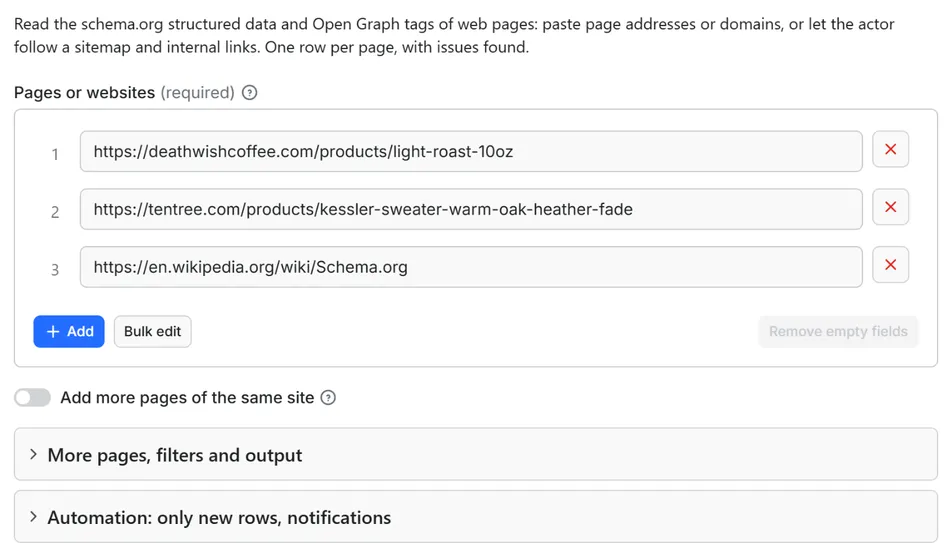
- Open the Actor and paste page addresses or domains into Pages or websites, one per line. A column copied from a spreadsheet works, and so do entries separated by commas.
- For a first try keep the list short, or set Maximum pages delivered to a small number. The pre-filled input reads three real pages in about fifteen seconds.
- Optional: turn on Add more pages of the same site and set Maximum pages per site to read a domain beyond the pages you listed. Add Deliver only pages that have structured data to skip pages without markup.
- Click Start. The status line shows progress; the run stops cleanly at your maximum or at the charge limit you set in the run options.
- Open the Dataset tab. The Overview, Products, Articles and events and Organization and social tags views show the main columns. Download JSON, CSV, Excel, XML or HTML, or send the rows to Google Sheets, Slack, Make, n8n or Zapier with the Integrations tab.
- Open the
COVERAGErecord in the key-value store to see which pages could not be read and why. - To watch pages over time, run the actor on a schedule with Only new rows since the last run turned on.
Input
Quick start. This input is ready to run (it is also the example in the API tab):
One real row it returns (long texts shortened here):
| Field | What it does |
|---|---|
startUrls | Page addresses (https://example.com/product/blue-shoe) or domains (example.com), one per line. Each entry is read as the page it points to; a domain means its home page. The #fragment is ignored. Up to 100,000 per run. |
crawlSameSite | Off by default: only the pages you list are read. On: the sitemap named in robots.txt (or /sitemap.xml) and the internal links of each page are used to find more pages of the same site, robots.txt obeyed. |
maxPagesPerSite | Used only with crawlSameSite. The most pages read per site, counting the pages you listed. Default 20, up to 1,000. |
onlyPagesWithData | Off by default. On: pages without any JSON-LD, Microdata or RDFa are read (their links still count) but not delivered and not charged. |
includeRawJsonLd | Off by default. On: each row also holds the cleaned JSON-LD of the page in rawJsonLd. |
maxItems | Stop after this many delivered rows. 0 = no limit. |
onlyNew, stateName | Deliver a page again only when its structured data changed since the last run with the same state name |
notifyUrl, notifyWhenEmpty | A webhook that receives one message when the run ends; see Automation below |
requestIntervalMs | Pause between requests, default 1000 ms, minimum 250 ms. A longer Crawl-delay in a site's robots.txt wins. |
Example: three product pages, one row each.
Example: read up to 50 pages of a news site, starting from its home page, and keep only pages that carry markup.
Example: a daily price watch that delivers only the product pages whose data changed, with a Slack message.
Output
49 fields per row. Empty values are null, never missing, so CSV and Excel columns are stable.
| Field | Type | Example |
|---|---|---|
id | string | https://shop.example/products/blue-shoe |
site | string | shop.example |
depth | integer | 0 |
url | string | https://shop.example/products/blue-shoe |
finalUrl | string | https://shop.example/products/blue-shoe |
httpStatus | integer | 200 |
jsonLdBlocks | integer | 2 |
microdataItems | integer | 0 |
rdfaItems | integer | 0 |
formats | string | json-ld, opengraph, twitter |
types | string | Organization, Product, BreadcrumbList, Offer |
ogTitle | string | Blue Shoe |
ogType | string | product |
ogImage | string | https://shop.example/img/blue.jpg |
ogUrl | string | https://shop.example/products/blue-shoe |
ogSiteName | string | Shoe Co |
ogDescription | string | Light blue running shoe with a recycled sole. |
twitterCard | string | summary_large_image |
twitterSite | string | @shoeco |
productName | string | Blue Shoe |
sku | string | BS-1 |
gtin | string | 5901234123457 |
mpn | string | MPN-77 |
brand | string | Shoe Co |
price | number | 89.9 |
priceCurrency | string | EUR |
availability | string | InStock |
itemCondition | string | NewCondition |
ratingValue | number | 4.5 |
ratingCount | integer | 12 |
offersCount | integer | 2 |
orgName | string | Shoe Co |
orgUrl | string | https://shop.example/ |
orgLogo | string | https://shop.example/logo.png |
sameAsDomains | string | facebook.com, linkedin.com |
breadcrumb | string | Home > Shoes > Blue Shoe |
headline | string | Rates rise again |
datePublished | string | 2026-10-01T08:00:00+02:00 |
dateModified | string | 2026-10-02T09:30:00+02:00 |
eventName | string | Night Concert |
startDate | string | 2026-12-01T20:00 |
location | string | Grand Hall, Oslo, NO |
faqQuestions | integer | 3 |
howToSteps | integer | 0 |
validationIssues | string | product_offers_rating_missing |
richResultEligible | string | Product, BreadcrumbList |
rawJsonLd | array | The cleaned JSON-LD of the page (only when Include raw JSON-LD is on; persons reduced to their type, no telephone or e-mail), else null |
dataHash | string | a3f19c0b7d21 |
checkedAt | string | 2026-10-15T21:30:00.000Z |
Example rows
Two real rows from a run (long texts shortened here, complete in the dataset):
Results can be downloaded as JSON, CSV, Excel, XML or HTML from the Dataset tab, or read through the Apify API.
How the flat fields are read
A page can hold many objects (a listing page has dozens of products). The flat fields describe the first object of each kind, and the counts and the types tell you there is more. Turn on the raw JSON-LD when you need every object.
- Types: the type names of the top-level objects first, then the nested ones, each once, up to 40. Type names are written without the schema.org prefix. A nested
Personshows up as a type name only; nothing inside it is read. - Product: the first
Product,ProductGroup,IndividualProductorProductModel. The price comes from the first offer:price, elselowPriceof anAggregateOffer, else the price in apriceSpecification; for a product group without its own offer, from the first variant. Prices written as text are turned into numbers (1.299,00and1,299.00both give 1299; a value that is not a number givesnull). The currency is upper-cased.availabilityanditemConditionlose the schema.org prefix (InStock,NewCondition).offersCountis theofferCountof anAggregateOfferor the number of offers listed. - Rating:
ratingValueandratingCountcome from the aggregate rating of the product (the count of ratings the page gives). Individual ratings written by users are not read. - Organization: the first organization among the top-level objects (
Organizationand its common subtypes such asCorporation,LocalBusiness,Store,NewsMediaOrganization, schools, hotels and restaurants), else the first nested one. Its telephone, e-mail, contact points and street address are never read. Profile links insameAsare reduced to their domains. - Breadcrumb: the list items in position order; names come from the item or from the object it points to.
- Article: the first
Article,NewsArticle,BlogPosting,TechArticleor similar. Dates are copied as the page writes them, usually in ISO 8601 with a time zone. - Event: the first event of any type whose name ends in
Event(MusicEvent,SportsEvent) orFestival.locationis the name of the place plus its city and country when the page gives them, or the text the page uses; a virtual location without a name readsOnline. A street address is never read. - Texts: HTML entities that publishers write into JSON-LD (
Rivian’s) are decoded, white space is collapsed, and an e-mail address or phone number inside a text is replaced by a mask. - Microdata and RDFa: the same fields are filled from Microdata (
itemscope,itemtype,itemprop) and from RDFa Lite (vocab,typeof,property). Only schema.org terms are read from RDFa; other vocabularies are ignored.
The issue codes
validationIssues lists what is missing from the markup, errors first and then recommendations (codes that start with recommended_). The rules follow the required and recommended properties in the Google documentation for product snippets, articles, events, FAQ pages and breadcrumbs. They are Rowcraft's reading of those pages. They are not the Google Rich Results Test, and a page without issues is not promised a rich result. The checks can be stricter than Google's: for articles Google lists no required property at all, and Rowcraft treats a missing headline as an error, because an article row without a headline says nothing, and a missing publication date or image as a recommendation.
| Code | Reported when |
|---|---|
invalid_json_ld | a JSON-LD block is not valid JSON, is empty, or is not an object or a list (the block is still counted in jsonLdBlocks) |
no_structured_data | the page has no JSON-LD, Microdata or RDFa at all (Open Graph and Twitter tags alone do not count) |
product_name_missing | a product has no name |
product_offers_rating_missing | a product has no offers, no aggregate rating and no ratings by users |
offer_price_missing | an offer has no price |
offer_price_invalid | an offer has a price that is not a number |
offer_currency_missing | an offer has no price currency |
rating_value_missing | an aggregate rating has no usable rating value |
rating_count_missing | an aggregate rating has no usable rating count |
article_headline_missing | an article has no headline |
event_name_missing | an event has no name |
event_start_date_missing | an event has no start date |
event_location_missing | an event has no location |
faq_questions_missing | an FAQ page has no questions |
faq_question_text_missing | an FAQ question has no text |
faq_answer_missing | an FAQ question has no answer text |
breadcrumb_items_missing | a breadcrumb list has fewer than two items |
breadcrumb_name_missing | a breadcrumb item has no name |
breadcrumb_position_missing | a breadcrumb item has no position |
recommended_offer_availability_missing | an offer has no availability |
recommended_product_image_missing | a product has no image |
recommended_article_date_published_missing | an article has no publication date |
recommended_article_image_missing | an article has no image |
richResultEligible lists the types among Product, Article, Event, FAQPage and BreadcrumbList for which at least one object on the page has no error (recommendations do not count). Google has limited FAQ rich results to a small set of sites and no longer shows how-to rich results, so for those two types treat the markup counts as data, not as a promise.
Pricing
Pay per result. You pay for each page delivered to your dataset, nothing else: no subscription, no minimum, no charge for pages that could not be read (anti-bot page, robots.txt, not found, not HTML, errors), for invalid or repeated entries, for pages left out by Deliver only pages that have structured data, or for pages skipped by Only new rows because nothing changed.
| Your Apify plan | Price per 1,000 rows | Price per row |
|---|---|---|
| Free plan | $1.00 | $0.001 |
| Starter plan | $0.90 | $0.0009 |
| Scale plan | $0.80 | $0.0008 |
| Business plan and above | $0.70 | $0.0007 |
Example: 1,000 pages cost $1.00 on the Free plan and $0.70 on the Business plan. Platform usage of the run (compute and storage) is included in that price and is not billed to you separately; the actor runs in 256 MB and spends most of its time waiting between requests.
A start event of $0.00005 is charged once per run (Apify default).
Cap your spend: set Maximum total charge in the run options. The actor stops cleanly when the cap is reached and you keep everything delivered until then. The run summary (RUN_SUMMARY in the key-value store) says why a run stopped.
Automation: only new rows, notifications, schedules
Only new rows since the last run. Turn on onlyNew and the actor remembers, for every page it delivered to you, the fingerprint of its structured data (in a key-value store in your Apify account, holding a short hash of the address and the fingerprint, not the page). The next run with the same stateName delivers a page again only when its fingerprint changed; pages with the same fingerprint are skipped and not charged. The fingerprint covers the address, the counts, the types, the Open Graph and Twitter tags, every flat field and the validation result, so a new price, a new availability, a changed headline or a broken markup all count. Text of the page that is not in the markup does not. The first run delivers every page it can read. Use a different stateName for each list so they keep separate memories. With Add more pages of the same site on, unchanged pages are still read, so that new links are found.
Notification when the run ends. Put a webhook address in notifyUrl and the actor sends one JSON POST with the number of delivered rows, links to the dataset (JSON and CSV) and the run. It works with Slack and Discord incoming webhooks (the message is in text and content), with Make, n8n and Zapier catch hooks, and with your own endpoint. By default it is sent only when at least one row was delivered; notifyWhenEmpty sends it every time.
Schedules. Create a schedule in Apify Console (daily, weekly, monthly or cron) with onlyNew on, and you get a feed of the pages of your list whose structured data changed, for the price of those rows only.
Integrations. Send the results to Make, n8n, Zapier, Google Sheets, Slack, Google Drive, Airtable or any webhook from the Integrations tab of the Actor, with no code.
API, SDKs and AI agents. Every run is available through the Apify API and the official JavaScript and Python clients; the Actor can also be called by AI agents through the Apify MCP server. The example input in the API tab is a working call.
Use with AI agents (MCP). Add the Apify MCP server to Claude, Cursor, VS Code or any MCP client and the agent can run this Actor as a tool:
Call it from a shell or any language. One request runs the Actor with the input below and returns the rows as JSON:
Python (pip install apify-client):
JavaScript / Node.js (npm install apify-client):
Use cases
- Price and stock watch: list the product pages of a shop, yours or a competitor's, and schedule the actor with Only new rows. A row arrives when a price, a currency or an availability changes.
- Markup audit before and after a release: read the pages of a template (product, article, event) and look at
validationIssues. A price that disappeared from the markup, a missing currency or a broken JSON-LD block show up as codes. - Product feed checks: compare the
gtin,sku,mpn,brandandpricecolumns with your own catalogue to find pages whose markup disagrees with the feed. - News and blog inventory: follow a site through its sitemap with Deliver only pages that have structured data and list headlines, publication dates, modification dates and publishers.
- Event listings: read event pages into a table of names, start dates and places, then filter by city or by date.
- Agency reports: read the key pages of each client every month, export the Overview view, and show which page types have markup and which have issues.
- Social preview check: the Open Graph and Twitter Card columns show the title, image and card type a page will present when someone shares it, so missing images are easy to find.
- Lead research: run a list of prospect domains and open with concrete findings, such as a shop whose product pages have no price markup.
Ready-made examples, each with the input filled in (open one and press Start, or save it as your own task):
What this actor does not do
- Run JavaScript. It reads the HTML the server sends. Markup that a page adds in the browser (for example through a tag manager) is not in that HTML and is not seen.
- Validate against every rule. The checks cover the required and recommended properties for products, articles, events, FAQ pages and breadcrumbs. Other types (recipes, videos, jobs, local businesses) are read into
typesand, where they are organizations, into the organization columns, but have no issue codes. - Predict what Google shows.
richResultEligiblesays that the markup has the minimum properties, not that a search result will use it. - Read people. Authors, raters, founders, employees and performers are skipped, and so are individual ratings written by users.
- Collect contacts: no e-mail addresses, telephone numbers, street addresses or social profiles, and no page text apart from the fields listed above.
- Check that the markup matches the visible page. A price in the markup that differs from the price on screen is reported as it is written in the markup.
- Use proxies, solve CAPTCHAs, log in, fill forms or accept cookie banners. A page behind an anti-bot page is reported as
blockedand not charged.
Limits and fair use
- One request per second by default (minimum 250 ms), across all sites of the run, and never faster than a site's own Crawl-delay (up to 10 seconds is applied). A page takes one request, plus one robots.txt request per site, one per redirect to a new host and, with Add more pages of the same site, one to four sitemap files per site. In our test runs six product pages took 15 seconds and twelve pages of a news site found through its sitemap 16 seconds, so plan for roughly 1,500 to 2,500 pages an hour at the default.
- Page limit per site. With Add more pages of the same site the actor stops at Maximum pages per site (default 20, up to 1,000) and says so in the run summary and the warnings. Pages you listed yourself are always read, and count towards the limit.
- How more pages are found. The sitemaps named in robots.txt, or
/sitemap.xmlwhen none is named, come first: up to four files per site, and for a sitemap index the children that look like product, article, post, news or event pages are read before the others, while children named like users, authors, members, profiles, staff, images or videos are skipped. Then the internal links of each page, in document order. Not followed: links marked nofollow, links with a query string, links to files that are not pages (PDF, images, archives, scripts, feeds) and links that redirect to another site. Sitemap files of up to 10 MB are read, compressed or not. - Anti-bot pages. A site that answers with an anti-bot or access-denied page (Cloudflare, Akamai, DataDome and similar, or HTTP 401, 403, 429) is reported as
blockedand not charged. After three such pages in a row on one site the rest of that site is not requested, and after ten in a row anywhere the run stops and says why in the run summary. - robots.txt is obeyed for every address the visit touches, including redirect targets, sitemap files and followed links. If robots.txt disallows a page it is
robots_disallowed; if robots.txt answers with a server error the site is not read, as the robots.txt standard (RFC 9309) requires. - Page size and markup limits: the first 5 MB of a page are read. Up to 200 JSON-LD blocks per page are parsed (the rest are counted), and a single block larger than 1.5 MB is counted as invalid. The raw JSON-LD of one page is limited to about 200,000 characters; blocks that do not fit are left out and counted in the warnings. Answers that are not HTML (PDF, images, JSON) are not read at all and are listed as
not_html. - Up to 100,000 entries per run. The run stops 90 seconds before its timeout with the summary, the coverage and the Only new rows memory saved; for long lists raise the timeout or split the list.
Data source and licence
The data is what each page sends to every visitor: the HTML of the page, including the structured data blocks and the Open Graph and Twitter Card tags in it. The actor reads the page once, as a browser does on the first visit, after checking robots.txt, and keeps only the extracted values: texts, numbers, counts, flags and issue codes. The page body, images and cookies are not stored or delivered, and the raw JSON-LD is delivered only when you turn it on.
You choose the pages, so you are responsible for reading only pages you may read. The terms of each site cannot be checked one by one by the actor; read your own sites, your clients' sites with their agreement, and public pages for the purposes the site allows. Structured data is published for machines to read, but a site's terms and the rights in its content still apply to what you do with the values.
Rowcraft is independent and not affiliated with or endorsed by Google, Meta, X, schema.org or any of the websites you read. The names of standards and products appear only to say what a field contains, for example schema.org (schema.org), Open Graph (ogp.me), JSON-LD (W3C) and the Google search documentation on structured data.
Privacy: no personal data
Rowcraft actors are built not to collect personal data:
- Person objects are never read: the author of an article, the person who rated a product, the founder or employees of an organization and the performers of an event are skipped, so their names are not in any column. In the raw JSON-LD each person is replaced by
{"@type":"Person"}. - From an organization the telephone, e-mail address, contact points and street address are never read, and in the raw JSON-LD they are removed. Profile links are reduced to their domains.
mailto:,tel:andsms:links are skipped completely: they are not read, not counted and not delivered.- An e-mail address or phone number inside a delivered text (a title, a name, a description) is replaced by a mask before the row is saved. Addresses in the URL fields are cleaned in the same way.
- A product name, a headline or a venue name is page text, so on a personal site it can still contain a name that the owner chose to publish; the actor does not look for names and cannot remove them from free text.
- The actor sends no cookies, fills no forms and never logs in.
You are responsible for using the data in line with the law that applies to you.
Other Rowcraft actors
Related Rowcraft actors. All of them read official or public sources, deliver flat rows without private contact details and support only-new runs and notifications; the full list is on the Rowcraft profile:
- Broken Link Checker: Find 404s — Pay per crawled page, not per link: crawl a site within robots.txt and check every link on each page for 404s, 5xx errors, DNS and TLS failures and redirects.
- Lighthouse Audit API: Core Web Vitals and Performance Scores — Run Lighthouse on any public page and get Performance, Accessibility, Best Practices and SEO scores, lab Core Web Vitals and the biggest savings.
- SEO Audit Tool for Any Website — Audit the on-page SEO of any list of pages or websites: titles, meta descriptions, headings, canonicals, indexing, links, images and structured data, with a score and the issues found per page.
- Sitemap URL Extractor: Every Page with Last-Modified Dates — Get every page a site lists in its sitemaps, with last-modified dates, from robots.txt through sitemap indexes and .gz files.
- Bulk URL Status and Redirect Chain Checker API — Check the status code, redirect chain, canonical and indexing signals of every URL in a list, with the final destination and a loop flag.
- Google Autocomplete Suggestions Scraper – Keyword Ideas — Get Google search suggestions for a list of keywords in bulk: a-z, question and preposition expansion, any language and country.
FAQ
What does the actor read from a page? The schema.org structured data in JSON-LD, Microdata and RDFa, and the Open Graph and Twitter Card tags. It fills flat columns for products, organizations, breadcrumbs, articles, events, FAQ and how-to markup, and lists the issue codes. The Output section says how each column is read.
Which products does a row describe when the page has many? The first one. A listing page with forty products still gives one row, with jsonLdBlocks and types telling you what is there. To get every object, turn on Include the raw JSON-LD, or list the product pages themselves.
Can I read a whole website? Yes, within a limit: turn on Add more pages of the same site, give the home page, and set Maximum pages per site (up to 1,000). The actor uses the sitemap first and then the internal links, and stops at the limit. With Deliver only pages that have structured data you pay only for pages that carry markup.
What is the difference between the three syntaxes? JSON-LD is a block of JSON in a script tag, Microdata puts itemscope, itemtype and itemprop attributes on the visible HTML, and RDFa Lite does it with vocab, typeof and property. Search engines read all three. The actor reads all three into the same columns; formats tells you which ones a page uses.
What does richResultEligible mean? For each type among Product, Article, Event, FAQPage and BreadcrumbList it says that at least one object on the page has all the properties Google lists as required. It is not a promise: Google decides what to show, and its documentation changes. Use it to find pages that cannot qualify, not to predict the ones that will.
Why is the result empty? Every page of the list could not be read or was filtered. The COVERAGE record gives the reason per page: an anti-bot page (blocked), robots.txt (robots_disallowed), a missing page or domain (not_found), an address that is not HTML (not_html), an invalid entry or a connection problem (error), or filtered when Deliver only pages that have structured data is on and the page has none. With Only new rows on, pages whose data did not change are skipped too. Nothing is charged for those, apart from the start event.
Why does a page show no structured data although the Rich Results Test shows some? Some sites add their markup in the browser, for example through a tag manager. The actor reads the HTML the server sends and does not run JavaScript, so it sees what a basic crawler sees. Check the page source (not the inspector): markup that is not there is not seen.
Is it legal? The actor reads public pages, one request each, obeys robots.txt and keeps only the extracted values, not personal data or page content. Whether and how you may read a given site, and what you do with the results, depends on the site's terms and on the law that applies to you.
Does it collect personal data? No personal data: no authors, raters, founders, e-mail addresses, phone numbers, street addresses or social profiles. See the Privacy section.
Do I pay for pages that block the actor? No. Blocked, robots-disallowed, missing, non-HTML and invalid entries are never charged, and neither are duplicates in your list, pages that redirect to an address already read in the run, or pages left out by your filter.
Why is the price null on a product page? The markup has no price, the price is not a number, or it sits in a place the actor does not read, for example a text such as "from the shop". The row then carries offer_price_missing or offer_price_invalid in validationIssues.
How does Only new rows work here? The actor remembers the fingerprint of every page delivered to you. The next run with the same state name delivers a page only when the fingerprint changed, so a daily schedule costs only the pages whose data changed.
Can I follow links to other websites? No. Following more pages stays on the site of the page it started from; links that redirect to another site are not followed. To read another site, add it to the list.
How fast is it? At the default, roughly 1,500 to 2,500 pages an hour (a list of different sites is slower than the pages of one site, because every site also needs its robots.txt). Sites with a Crawl-delay in robots.txt are read more slowly, as the site asks. Lower requestIntervalMs only for sites you own.
Support and reviews
Problems, missing fields, questions: open an issue on the Issues tab of this Actor. We answer within one working day and fix confirmed bugs in the next release; the changelog lists every change.
If this Actor saved you time, a short review on its page helps other users find it and helps us keep improving it.


