Airbnb Scraper - Market Signals, Pricing Position & Monitor
Pricing
from $1.50 / 1,000 record emitteds
Airbnb Scraper - Market Signals, Pricing Position & Monitor
Stateful Airbnb market monitoring engine. Each run returns a ranked attention queue - what changed, what matters, what to review - with comp-set pricing position, revenue estimates, and supply-surge detection. Drop-in compatible with tri_angle/airbnb-scraper.
Pricing
from $1.50 / 1,000 record emitteds
Rating
0.0
(0)
Developer

Ryan Clinton
Maintained by CommunityActor stats
0
Bookmarked
5
Total users
1
Monthly active users
2 months ago
Last modified
Categories
Share
Airbnb Scraper - Market Signals, Pricing Position & Monitor Mode
In one sentence
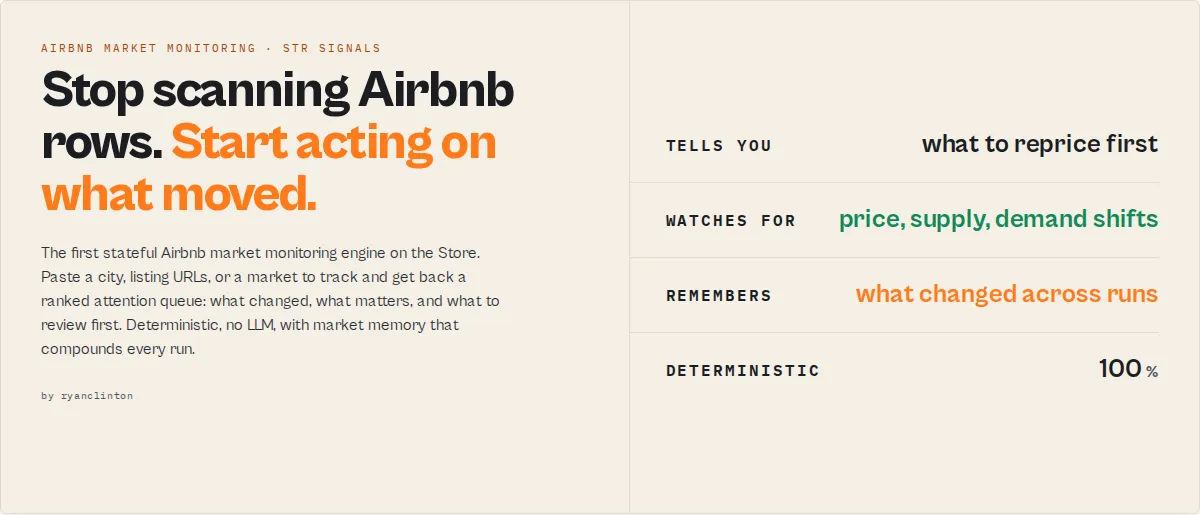
Airbnb Scraper is a stateful Airbnb market monitoring engine on Apify that scrapes a city, a set of listing URLs, or a market you track over time, and returns a ranked attention queue answering three questions: what changed, what matters, and what should I review.
Category: Airbnb scraper. STR (short-term rental) market monitoring. Vacation rental pricing and supply intelligence. Primary use case: Rank a market's listings by where each sits in its comp set and what just moved, then schedule a daily run so the market memory compounds. Can also be used for one-shot comp-set pricing checks, multi-market comparison, and host-portfolio tracking.
Also known as: airbnb scraper, airbnb market monitor, str pricing tool, vacation rental data scraper, airbnb comp set analysis, airbnb revenue estimator
What this actor does
- What it is: A stateful Airbnb market monitoring engine that turns a scrape into a ranked list of what to review first.
- What it checks: Where each listing sits in its comp set, what moved since the last run (price, supply, availability), and how the market is trending.
- What it returns: An attention queue per listing (
attentionIndex,watchStatus,whyNow,decisionRoute,recommendedAction), a market profile, fenced revenue and occupancy estimates, and market memory that compounds every run. - What it does NOT do: It does not provide licensed booking data like AirDNA, it does not measure real bookings (revenue and occupancy are estimates), and it performs no in-Airbnb actions (no booking, no messaging hosts, no setting platform prices).
- Who it's for: STR hosts, property managers, short-term rental investors, acquisition scouts, and market analysts.
Overview
Airbnb Scraper is an Apify actor that answers a question raw scrapers leave on the table: of all these Airbnb listings, which ones should I look at first? Paste a city and the actor returns the top listings ranked by a single composite score, each row carrying a plain-English reason and a recommended action, in about 60 seconds. It functions as an Airbnb market intelligence API, not a row dump.
The moat is not the scrape. Airbnb Scraper accrues an interpretation history for every market you run, so the same input gets smarter over time. The first run finds your comp outliers. Run 3 unlocks price and supply trajectory. Run 10 unlocks persistent-signal classification, the structural read no one-shot scrape can give you. Every run compounds the market memory, and that memory clock cannot be backfilled.
To monitor an Airbnb market, paste a city, a list of /rooms/<id> URLs, or a market to track. You get back a ranked attention queue with comp-set pricing position, revenue estimates, supply-surge detection, and a recommended action per listing. Same input shape as tri_angle/airbnb-scraper, drop-in migration, and the decision layer that scrapers do not ship.
In short: Same input as a standard Airbnb scraper. Same output, plus what to do about it.
The feel: an Airbnb market command center. One screen tells you what changed, what matters, and what needs your attention now, so you stop scanning rows and start acting on the few that move.
What it does - Scrapes an Airbnb market and returns a ranked attention queue with a reason and action per listing. Best for - Daily market monitoring, comp-set pricing checks, multi-market comparison, host-portfolio tracking. Speed - A default market run returns its attention queue in about 60 seconds. Pricing - $0.0015 per record ($1.50 per 1,000) plus $0.30 per market query. Platform compute is separate. Output - JSON, CSV, or Excel. Attention queue, market profile, pricing position, fenced estimates, market memory.
Key limitation: Revenue and occupancy are estimates inferred from the public availability calendar, never measured bookings. What it is not: Not a licensed STR database like AirDNA, not a booking tool, and not a replacement for legal or investment advice. Does not include: Real booking counts, guest contact details, private host data, or any in-Airbnb action. Results may be incomplete when: A market exceeds Airbnb's 240-result cap, anti-bot challenges trip the circuit breaker, or a listing is private or removed.
Why this engine exists
Most Airbnb scrapers return rows. Most short-term-rental dashboards return charts. The stateful Airbnb market monitoring engine returns prioritized decisions with accumulated market memory.
It exists to answer three questions on every run:
- What changed in this market since the last run.
- What matters enough to need a human right now.
- What should I review first, with the reason and the action attached.
The market memory is the moat: it compounds every run and cannot be backfilled, so the longer the engine watches a market, the more it knows that a fresh scrape never can.
Ready-to-run examples
Don't want to build an input from scratch? Each of these is a published, one-click example (see all) — open it, see real output, run it:
- Airbnb Scraper — rank a city's listings into an attention queue: pricing position vs comp set, what to review first and why
- Airbnb Listing Scraper — scrape specific room URLs: room type, host (name, superhost, profile), guest capacity, rating and forward availability
- Airbnb Revenue Estimator — estimate monthly revenue per listing in a market: occupancy proxy × nightly rate as a fenced range band
What you get from one call
Input: { "market": "Austin, TX", "mode": "market", "rankBy": "attention", "enableMarketMemory": true }
Returns:
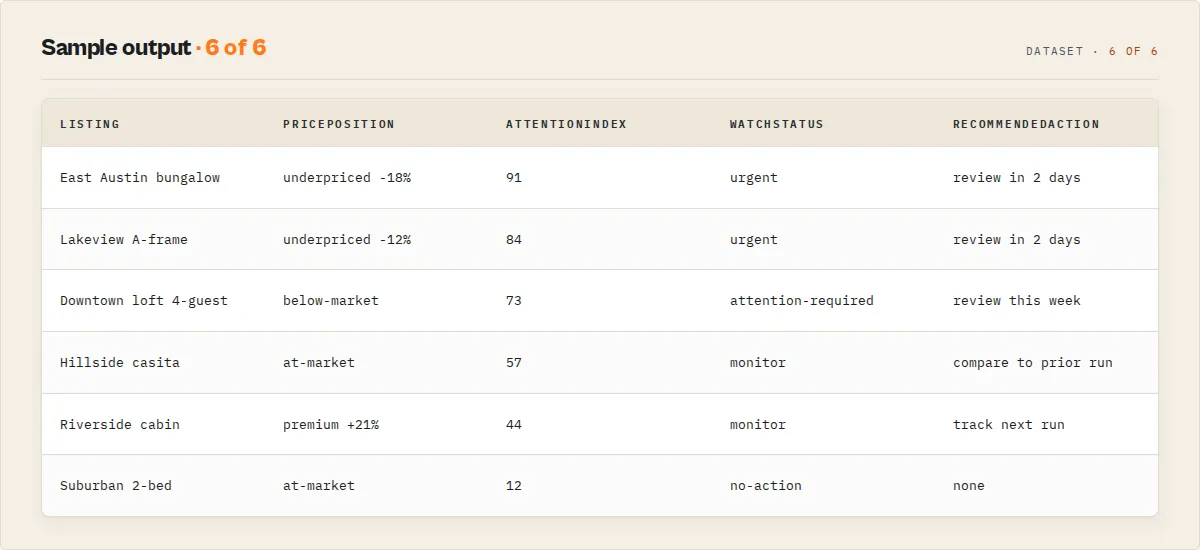
- A ranked attention queue: each listing with
attentionIndex(0-100),watchStatus,whyNow,decisionRoute, andrecommendedAction - A market record:
signalProfile(archetype),marketHealth(direction),marketConfidence(grade), andmarketMemory - Per-listing
pricePosition(comp band, percentile, label) and a fencedrevenueEstimate(range band, marked as an estimate) - A run summary with
runOutcome,dailyBriefing,topActions, andattentionBudget
Typical time to first result: about 60 seconds for a default market run. Typical time to integrate: minutes if you already read a standard Airbnb scraper's output, since the substrate fields match.
What makes this different
- Pricing position, not a row dump - every listing arrives ranked by where it sits in its comp set, with a band and a percentile.
- Market memory that compounds - Airbnb Scraper accrues per-market interpretation history across runs, so trajectory and persistent-signal classification unlock as you keep running it.
- An honest decision layer - every listing carries a reason (
whyNow) and a recommended action, and every inferred metric travels with its believability grade.
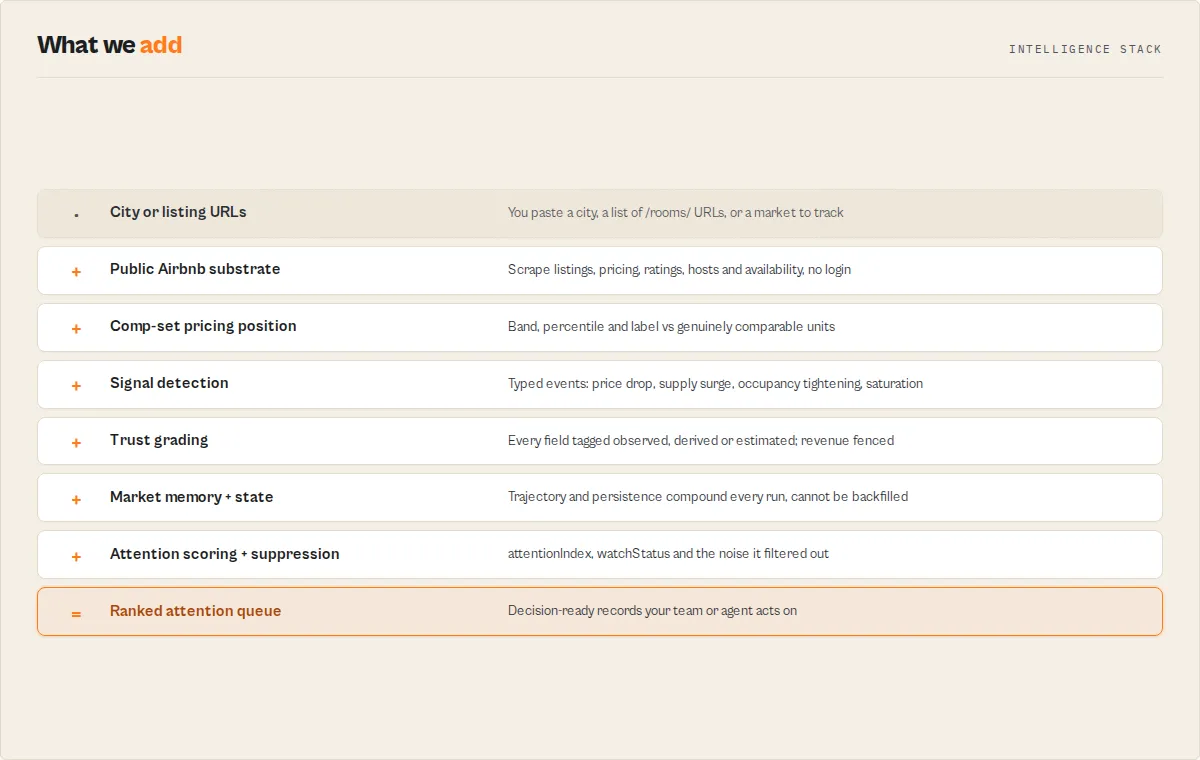
If you were building this yourself, you would need a comp-set engine, a cross-run state store keyed per market, a signal-detection layer, an attention-scoring model, and a trust layer that fences estimates from observations. The stateful Airbnb market monitoring engine produces decisions for pricing reviews, supply monitoring, and market selection.
Jobs the Airbnb market monitoring engine solves
Each job below maps to a mode and the fields you read for the answer.
Reprice Airbnb listings faster
Run market mode with rankBy: "pricingOpportunity". Each listing returns pricePosition with a band, a percentile, and an underpriced or overpriced label versus genuinely comparable units.
Detect Airbnb market saturation before competitors
Run monitor mode daily. The engine detects new_listing_surge and market_saturation against prior runs and reports marketShiftClassification once memory matures.
Compare short-term-rental markets side by side
Run compare mode across 2 or more cities. One ranked record carries archetype (signalProfile), direction (marketHealth), and confidence (marketConfidence.grade) per market.
Monitor Airbnb supply growth over time
Run monitor mode on a city with enableMarketMemory: true. Supply trajectory unlocks at run 3; you get back only what changed since the last run.
Build an Airbnb comp set automatically
Run market or listings mode. The engine groups comparable listings by market, room type, and capacity, and shows the comp set with compSetAudit.
Estimate Airbnb revenue from public data
Enable estimateRevenue (on by default). Each listing returns a fenced revenueEstimate with a range band, marked metricClass: estimated and measuredByAirbnb: false. It is a directional proxy, never a booking ledger.
Track competitor hosts
Run host mode. Each host returns hostMomentum (scaling or contracting) and superhost positioning.
Route only important market changes to humans
Branch your automation on decisionRoute and watchStatus. Only attention-required, urgent, and critical rows need a human; the rest are suppressed and counted in attentionBudget.
Which mode should I use?
| Need | Best mode |
|---|---|
| Reprice listings against the comp set | market |
| Track a market for deterioration over time | monitor |
| Compare candidate cities | compare |
| Audit specific listing URLs | listings |
| Track competing host portfolios | host |
Quick answers
What is it? Airbnb Scraper is a stateful Airbnb market monitoring engine that ranks a market's listings by what to review first and tracks how the market moves across runs.
How do I monitor an Airbnb market over time? Run Airbnb Scraper on a city with enableMarketMemory: true (the default), then schedule a daily run. Each run returns what changed and compounds the market memory.
What makes it different? It ships a decision layer on top of the scrape: comp-set pricing position, signal detection, an attention queue, and accumulated market memory, instead of raw rows.
What data sources does it use? Public Airbnb search pages, room pages, and host pages, fetched over residential proxies. It uses no login and accesses no private data.
What does it return? An attention queue per listing, a market profile, comp-set pricing position, fenced revenue and occupancy estimates, and market memory, in JSON, CSV, or Excel.
How much does it cost? $0.0015 per emitted record ($1.50 per 1,000) plus $0.30 per market query. Apify's free tier ($5 in monthly credits) covers roughly 3,300 records.
Is it a drop-in replacement for an existing Airbnb scraper? Yes. It accepts the same locationQueries input and ships the same output substrate; the signal layer is additive.
At a glance
Quick facts:
- Input: A city (
market), a list of/rooms/<id>URLs (listings), host URLs (hosts), or multiple cities (markets). - Output: Attention queue, market profile, pricing position, fenced revenue estimate, market memory, run summary.
- Pricing: $0.0015 per record ($1.50/1k) plus $0.30 per market query.
- Batch size: Up to 240 listings per market (Airbnb's own result cap);
coverage.marketRepresentativenessreports the sample fraction. - Modes: market, monitor, listings, host, compare.
- Output profiles: signals (default), compat, agent, minimal, debug.
- Personas: generic, host, investor, analyst.
- Data source: Public Airbnb pages over residential proxies. No login.
Input to output:
- Input: a market, listing URLs, or host URLs.
- Process: scrape substrate, build comp sets, detect signals against prior runs, score attention, fence estimates, persist market memory.
- Output: a ranked attention queue plus a market profile and a run summary.
Best fit: Daily Airbnb market monitoring, comp-set pricing reviews, multi-market selection, host-portfolio momentum. Not ideal for: Licensed booking-volume data, guest PII, in-Airbnb actions, or markets where you need a full census above 240 listings. Does not include: Real booking counts, measured occupancy, private data, or investment verdicts.
Problems this solves:
- How to rank Airbnb listings by pricing opportunity instead of Airbnb's native sort.
- How to detect when a market's supply surges or availability tightens.
- How to estimate Airbnb revenue and occupancy from public data, honestly fenced.
- How to monitor an Airbnb market over time and get back only what changed.
Data trust: Substrate fields (price.amount, rating.*, isSuperHost) are observed. Comp metrics are derived. Revenue and occupancy are estimated from the public availability calendar and always carry metricClass: estimated, measuredByAirbnb: false, and a range band. A blocked night may be a booking or a host block; the two are indistinguishable from public data.
Lead with the three questions
Sophisticated machinery, simple surface. Airbnb Scraper exists to answer three buyer questions on every run:
- What changed? Signal events fire when a listing's price moves, a market's supply surges, or availability tightens versus the prior run.
- What matters? A composite
attentionIndex(0-100) and awatchStatusrank the noise down to the handful of rows that need a human. - What should I review? Each row carries a
decisionRoute(a flat enum your automation can branch on) and a plain-EnglishrecommendedAction.
The percentiles, comp-set math, and trajectory models live under the hood. The surface is five rows that answer the question you came with.
Why suppression matters
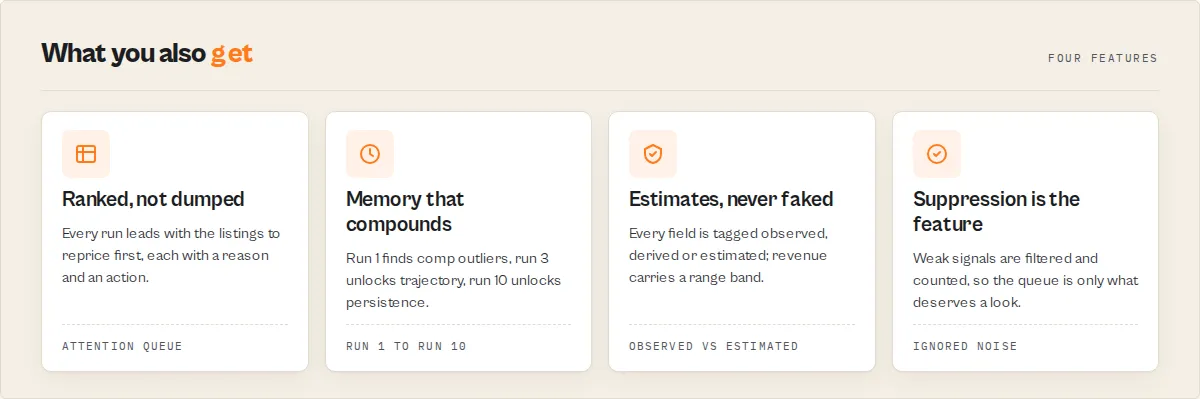
Most monitoring tools create more alerts. The stateful Airbnb market monitoring engine suppresses weak signals and surfaces only what deserves human attention. Suppression is the feature, not more alerts.
Every run reports an attentionBudget: how many signals were evaluated, how many were suppressed as noise, and the resulting attention-reduction percentage. A price wobble inside a market's normal volatility is filtered out with a reason; a structural shift is escalated. The point of the engine is less cognitive load, not another dashboard to scan.
Drop-in migration from tri_angle/airbnb-scraper
Switching from tri_angle/airbnb-scraper is frictionless because three things hold:
- Same input shape. Paste your existing
locationQueriesJSON with the same filters and it runs. Airbnb Scraper mapslocationQueriesto market mode automatically. - Same output substrate. Every field a standard Airbnb scraper ships (
id,url,coordinates,roomType,isSuperHost,personCapacity, the 7-axisratingblock,host,price.breakDown,amenities) ships here with identical name and type. Code readingitem.price.amountworks unchanged. - The signal layer is additive. The default
outputProfile: "signals"adds pricing position, revenue estimates, signals, and routing on top. If you want the exact original field set with validated URLs and resolvable IDs, setoutputProfile: "compat".
Same input, same output, plus what to do about it.
Choose your output
The outputProfile input controls how much of the envelope each record carries:
| Profile | What it returns | Best for |
|---|---|---|
signals (default) | Full envelope: substrate + pricing position + revenue estimate + signals + attention routing + market profile + delta | Most users who want the decision layer |
compat | Exact original tri_angle field set, validated URLs and IDs, no signal fields | Verifying migration parity |
agent | agentContract + attentionIndex + whyNow + pricing summary, diagnostics stripped | MCP, AI agents, and pricing tools that want decisions |
minimal | IDs, URLs, and nightly price only | Lightweight pulls |
debug | Full diagnostics, parsing detail, partialOutputPolicy, skip reasons | Debugging |
The market memory moat
The reason buyers stay is the accumulated interpretation history. With enableMarketMemory: true (the default for market and monitor modes), Airbnb Scraper creates and updates a named market-memory store on every run, keyed per market. The state compounds:
- Run 1 finds your comp outliers and the current market profile.
- Run 3 unlocks price and supply trajectory (
signalTrajectory,marketHealthdirection). - Run 10 unlocks persistent-signal classification (
persistenceClass), the structural read no one-shot scrape can give you.
Every run compounds the market memory, and the clock cannot be backfilled. The marketMemory block reports its own depth honestly (memoryDepth, runsObserved, availableSignals, notYetAvailable), so you always know what the current history can and cannot support. Schedule a daily run to build it.
The five modes
One actor, five entry points. Pick a mode and one set of targets.
Mode: market (default)
Rank a city's listings by pricing and revenue opportunity. The 10-second first run:
Mode: monitor
Track a market over time and get back only what changed. The retention mode.
Mode: listings
Explain where specific room URLs sit versus their comp set.
Mode: host
Surface host-portfolio momentum and superhost positioning.
Mode: compare
Rank 2 or more markets side by side on revenue, occupancy, supply, and ADR.
Revenue and occupancy estimates (clearly fenced)
Airbnb does not publish booking data. When estimateRevenue is on (the default), each listing carries a revenueEstimate block derived from the public availability calendar. This is honest about its own limits:
- It always carries
metricClass: "estimated"andmeasuredByAirbnb: false. It is never presented as measured fact. - It returns a range band (
estimatedRevenueRangeUsd), never a single false-precision number. - A blocked night may be a real booking or a host block. The two are indistinguishable from public data, so occupancy is a proxy for demand, not a count.
- Each estimate carries a
confidenceGrade,confidenceReasons, andlimitations.
Revenue estimation is a supporting feature, not the headline. The headline is the attention queue. Treat the estimate as a directional signal you sanity-check, not a booking ledger.
How the Airbnb market monitoring engine handles uncertainty
Most STR tools blur inference into fact. This one makes uncertainty visible on every field, which is what lets you trust the numbers it does assert.
Revenue and occupancy are estimates inferred from public availability data, not measured bookings. A blocked night may be a real booking or a host block, and the two are indistinguishable from public data.
Every analytical field declares its source class with metricClass:
- observed - read directly from the Airbnb page (
price.amount,rating.*,isSuperHost). - derived - computed deterministically from observed values (comp-set median,
pricePosition). - estimated - inferred via a proxy, never measured (
revenueEstimate,occupancyRateEstimate). Always paired withmeasuredByAirbnb: falseand a range band. - historical - from accumulated cross-run memory (
marketMemory,signalTrajectory). - insufficient - not enough data yet; the field says so rather than guessing.
Every estimate also carries a confidenceGrade (a data-sufficiency grade from comp-set size, calendar depth, and coverage, not a backtested accuracy claim), confidenceReasons, and limitations. The run grades its own reliability in runReliability, and coverage.marketRepresentativeness reports the sampled fraction of a market. Nothing is presented as more certain than the public data supports.
Reranking and market comparison
Airbnb's native sort is not what buyers want. Hosts want comp outliers; investors want revenue leaders; analysts want supply movers. The rankBy input reorders the attention queue by attention (composite), pricingOpportunity, revenue, occupancy, rating, or relevance. Each listing carries airbnbSortRank, rerankedRank, a rerankReason, and a full rerankAxes block so you can see where it sits on every axis at once.
In compare mode, the same engine runs across multiple markets and emits one ranked comparison record carrying both the static archetype (signalProfile) and the direction it is moving (marketHealth). An investor reads "this market is emerging and improving, at B confidence" in a single row.
Features
The stateful Airbnb market monitoring engine layers a five-part intelligence envelope on a faithful Airbnb substrate. The substrate matches a standard Airbnb scraper field-for-field; the layers below add the decisions. Each layer has its own section so you can jump to the one you need.
Scrapes a faithful Airbnb substrate
- Faithful substrate:
id, validatedurl,coordinates,roomType,isSuperHost,personCapacity,bedrooms, the 7-axisratingblock,host,pricewithbreakDown,amenities,availability. - Validated links: no broken or mismatched rows. A listing whose URL does not resolve to its
idis dropped, not emitted. - locationQueries alias: accepts the original
tri_angle/airbnb-scraperinput field and maps it to market mode.
Ranks listings by comp-set pricing position
- Comp-set pricing position per listing:
pricingBand(low, median, high),marketPercentile,positionLabel(underpriced, market-aligned, premium, overpriced), anddeltaVsMedianPct. - compSetAudit shows exactly which listings were included or excluded from the comp set, so the percentile is auditable, not a black box.
Detects market shifts as typed signals
- 11 signal event types: price drop, price surge, market price shift, new listing surge, market saturation, occupancy tightening or loosening, revenue outlier, superhost emergence, rating decline or surge. Each detects a shift across runs and carries evidence and a decay status.
- 9 market archetypes (
signalProfile, market records only): emerging-market, premium-stable, oversupplied, saturated, cooling, and more.
Routes attention to the few rows that matter
- Composite attention index: a single 0-100 score per record with a
breakdownand the top 3drivers. This is the sort column for the queue. - Decision route: a flat enum (
review-pricing,investigate-revenue,monitor-supply,benchmark-market,review-data-quality,no-action) your automation branches on, plus a humanrecommendedAction.
Suppresses noise and reports how much
- Noise suppression: weak or noisy signals move to
suppressedSignalswith a reason instead of cluttering the queue. - attentionBudget: the run summary reports how many signals were evaluated, how many were suppressed, and the attention-reduction percentage. Suppression is the feature, not more alerts.
Accumulates market memory across runs
- Market memory: per-market interpretation history that compounds every run, keyed per market.
- Persistence classification: signals are classed transient, recurring, persistent, or dormant once memory matures.
Grades its own trust and reliability
- metricClass discipline: every analytical block declares whether it is observed, derived, estimated, historical, or insufficient.
- Coverage and data quality:
coverage.marketRepresentativeness,coverageGrade, and a per-recorddataQualitycontract. - Run reliability: the run grades itself (
runReliability) and emits partial output before any hard timeout (partialOutputPolicy).
Use cases for Airbnb market monitoring
Best for daily market monitoring
Use when you manage listings or capital in one or more cities and need to know each morning what moved. Schedule a daily run in monitor mode; the dailyBriefing and topActions give you a five-second read, and STR hosts use the queue to decide which listings to reprice first. Key outputs: runOutcome, dailyBriefing, topActions, sinceLastReview.
Best for comp-set pricing reviews
Use when you want to know whether a listing is underpriced or overpriced versus genuinely comparable units. Run market or listings mode; each listing carries pricePosition with a band, a percentile, and a label. Key outputs: pricePosition.positionLabel, pricingBand, deltaVsMedianPct, compSetAudit.
Best for short-term rental market selection
Use when an investor or acquisition scout is choosing between cities. Run compare mode across 2 or more markets and read archetype plus direction plus confidence in one ranked record. Key outputs: signalProfile, marketHealth.direction, marketConfidence.grade, revenueEstimate.
Best for supply and saturation tracking
Use when you need early warning that a market is filling up. Airbnb Scraper detects new_listing_surge and market_saturation against prior runs. Key outputs: signalEvents, marketHealth, marketShiftClassification.
Best for host-portfolio tracking
Use when you watch competing operators. Host mode surfaces whether a portfolio is scaling or contracting and its superhost positioning. Key outputs: hostMomentum.classification, listingCountTrend, superhostStatus.
When to use Airbnb Scraper
Best for:
- Monitoring 1 to a handful of markets daily or weekly and acting on what changed.
- Repricing decisions where comp-set position matters more than a raw price list.
- Choosing between candidate STR markets on revenue, occupancy, supply, and ADR.
- Feeding an AI agent or pricing tool decisions via
outputProfile: "agent".
Not ideal for:
- Licensed booking-volume data with measured occupancy. Use a paid STR database for that.
- A full census of a market above 240 listings; Airbnb caps the sample and the actor reports the fraction honestly.
- Guest contact data or any private field; this actor reads public content only.
How to monitor an Airbnb market
- Enter your target - type a city in the
marketfield (for example,Austin, TX), or paste/rooms/<id>URLs for specific listings. - Configure options - leave
modeasmarketandenableMarketMemoryastruefor the recommended first run; optionally setrankBytopricingOpportunityorrevenue. - Run the actor - click Start. A default market run returns its attention queue in about 60 seconds.
- Download results - open the Dataset tab and export JSON, CSV, or Excel. The default view is the attention queue, sorted by
attentionIndex.
First run tips
- Start with the demo market - leave the fields empty or paste
{ "market": "Austin, TX", "mode": "market", "rankBy": "attention", "enableMarketMemory": true }to see a ranked queue before you scale. - Keep market memory on -
enableMarketMemorydefaults to true; leaving it on means the moat starts compounding from run 1 without touching watchlists. Turning it off forfeits trajectory and persistence reads. - Don't expect trajectory on run 1 -
signalTrajectoryandpersistenceClassneed history. Run 1 gives you comp outliers; the deeper reads unlock at run 3 and run 10. ThemarketMemory.notYetAvailablelist tells you what is still locked. - Treat revenue as an estimate - the
revenueEstimateblock is a fenced proxy with a range band, not a booking figure. Read itslimitations. - Cap spend with maxResults - a market emits up to 240 records; lower
maxResultsto control the per-run record charge while testing.
Typical performance
Observed in internal testing (May 2026, small sample). Values vary by market size, filters, and Airbnb anti-bot conditions.
| Metric | Typical value |
|---|---|
| Records per market run | 1 market record plus up to 240 listing records |
| Run time (default market) | about 60 seconds to first attention queue |
| Run time (240-listing market) | a few minutes |
| Market sample fraction when capped | reported in coverage.marketRepresentativeness |
| Cost per default market run (100 records) | about $0.45 ($0.15 records + $0.30 query) |
Input parameters
| Parameter | Type | Required | Default | Description |
|---|---|---|---|---|
mode | string | No | market | Entry point: market, monitor, listings, host, or compare. |
market | string | Conditional | Austin, TX (prefill) | City or destination for market and monitor modes. |
markets | array | Conditional | [] | 2+ cities for compare mode. |
listings | array | Conditional | [] | Airbnb /rooms/<id> URLs for listings mode. |
hosts | array | Conditional | [] | Airbnb /users/show/<id> URLs for host mode. |
rankBy | string | No | attention | Sort axis: attention, pricingOpportunity, revenue, occupancy, rating, relevance. |
maxResults | integer | No | 100 | Max listings per market (Airbnb caps a market at 240). |
roomType | string | No | any | any, entire_home, private_room, shared_room, hotel_room. |
minBedrooms | integer | No | 0 | Minimum bedrooms. |
minPrice | integer | No | 0 | Lower nightly price bound. |
maxPrice | integer | No | 0 | Upper nightly price bound. |
adults | integer | No | 2 | Guests used to size the search (1-16). |
estimateRevenue | boolean | No | true | Add a fenced revenue and occupancy estimate per listing. |
enableMarketMemory | boolean | No | true | Accrue per-market interpretation history across runs. |
watchlistName | string | No | "" | Stable name for a monitor-mode watchlist; renaming resets the memory clock. |
trackListings | array | No | [] | Listing IDs to track over time in monitor mode. |
deltaWindowDays | integer | No | 7 | Comparison window for delta intelligence (1-90). |
lastReviewedAt | string | No | "" | ISO timestamp your dashboard last surfaced this market; drives sinceLastReview. |
persona | string | No | generic | Buyer lens: generic, host, investor, analyst. |
outputProfile | string | No | signals | signals, compat, agent, minimal, debug. |
analysisDepth | string | No | standard | fast, standard, deep. |
explainability | string | No | standard | standard or full diagnostics. |
calendarDepthDays | integer | No | 90 | Forward calendar days used for the occupancy proxy (7-365). |
maxRuntimeSeconds | integer | No | 3600 | Soft runtime budget; auto-clamps and emits partial output before timeout. |
locationQueries | array | No | [] | Drop-in migration alias; mapped to market mode. |
proxyConfiguration | object | No | RESIDENTIAL | Apify proxy; residential is required for Airbnb. |
Input examples
- Recommended first run (market):
{ "market": "Austin, TX", "mode": "market", "rankBy": "attention", "enableMarketMemory": true } - Scheduled monitor:
{ "mode": "monitor", "market": "Austin, TX", "watchlistName": "austin-portfolio", "deltaWindowDays": 7, "rankBy": "attention" } - Minimal listings check:
{ "mode": "listings", "listings": ["https://www.airbnb.com/rooms/14926879"], "outputProfile": "minimal" }
Input tips
- Start with defaults - market mode with market memory on covers most pricing and monitoring needs.
- Name your watchlist consistently - monitor mode keys state on
watchlistName; a stable name keeps the memory clock running, a rename starts a fresh one. - Lower maxResults to control cost - fewer records means a smaller per-run record charge while you test.
- Use the agent profile for tools -
outputProfile: "agent"returns decisions without the full diagnostic envelope.
Output example
A single listing record from a market run (default signals profile, abbreviated):
The market record adds signalProfile, marketHealth, marketConfidence, marketFingerprint, and marketMemory. The run summary adds runOutcome, dailyBriefing, topActions, attentionBudget, runReliability, and coverage.
Output fields
| Field | Type | Description |
|---|---|---|
recordType | string | listing, market, host, comparison, summary, or error. |
attentionIndex.value | number | Composite 0-100 score; the queue sort column. |
attentionIndex.drivers | array | Top 3 paste-ready reasons for the score. |
watchStatus | string | no-action, monitor, attention-required, urgent, critical. |
whyNow | array | Plain-English reasons this record needs attention now. |
decisionRoute | string | Flat enum for automation to branch on. |
recommendedAction | string | Human-readable next step. |
pricePosition.positionLabel | string | underpriced, market-aligned, premium, overpriced, unclassified. |
pricePosition.pricingBand | object | Comp-set low, median, high, and this listing's price. |
pricePosition.deltaVsMedianPct | number | Percent above or below comp-set median. |
revenueEstimate.metricClass | string | Always estimated (or insufficient); the fabrication fence. |
revenueEstimate.estimatedRevenueRangeUsd | array | Honest range band, never a single false number. |
revenueEstimate.measuredByAirbnb | boolean | Hard-wired false; Airbnb does not publish this. |
signalEvents | array | Typed, evidenced shift events with strength and decay. |
signalProfile | string | Market archetype (market records only). |
marketHealth.direction | string | weakening, stable, improving, mixed, unknown. |
marketConfidence.grade | string | A-F confidence in the market read. |
marketMemory.memoryDepth | string | insufficient, building, or mature. |
marketMemory.runsObserved | number | How many runs of history this market has. |
coverage.marketRepresentativeness | number | Scraped fraction of the estimated market (0-1). |
dataQuality.status | string | clean, minor-issue, or conflicted. |
freshness.recommendedRecheckIntervalHours | number | When to run again. |
How much does it cost to scrape and monitor an Airbnb market?
Airbnb Scraper uses pay-per-event pricing - you pay $0.0015 per emitted record ($1.50 per 1,000) plus $0.30 per market query (one charge per market, monitor, or compare execution, regardless of result count). Apify platform compute is billed separately by Apify and is not included in these event prices. Every record carries the full signal layer at that price; there is no host add-on or per-signal upsell.
| Scenario | Records | Market queries | Total event cost |
|---|---|---|---|
| Quick test | 10 | 1 | $0.32 |
| Small market | 50 | 1 | $0.38 |
| Default market | 100 | 1 | $0.45 |
| Full market | 240 | 1 | $0.66 |
| Compare 3 markets | 720 | 3 | $1.98 |
Set a spending limit on the actor to cap costs; the actor stops emitting once the limit is reached and logs why. Apify's free tier ($5 in monthly credits) runs roughly 3,300 records here. A migrator running 50,000 records pays $75 plus query charges and gets the decision layer included.
Scrape Airbnb using the API
Python
JavaScript
cURL
How Airbnb Scraper works
Mental model: Airbnb pages to substrate, substrate to comp sets, comp sets to signals against prior runs, signals to an attention score, score to a routed decision, all wrapped in a trust layer.
1. Fetch the substrate
Airbnb Scraper fetches public search, room, and host pages over residential proxies (required for Airbnb's anti-bot layer). It parses each listing into the faithful substrate, validates that every url resolves to its id, and drops any record with an unresolvable link rather than emitting a broken row.
2. Build comp sets and pricing position
For each market it groups comparable listings (same market, room type, capacity), computes the comp-set band and median, and derives each listing's pricePosition with a percentile, a label, and a compSetAudit of what was included or excluded.
3. Detect signals against history
When market memory is active, Airbnb Scraper loads the prior snapshot for each market and listing from a named state store and detects shifts: price moves, market price shifts, supply surges, saturation, and availability changes. Weak or noisy signals are suppressed and reported in the attentionBudget.
4. Score attention and route a decision
Each record gets a composite attentionIndex, a watchStatus, an attentionWindow, a flat decisionRoute, and a human recommendedAction. Persona weights reshape what escalates. The market memory and snapshots are then persisted for the next run.
Tips for best results
- Schedule a daily run. Market memory only compounds if you run it. A daily cadence unlocks trajectory by run 3 and persistence by run 10.
- Pick rankBy to match the job. Use
pricingOpportunityfor repricing,revenuefor acquisition scouting,occupancyfor demand reads. - Set a persona.
investorweights revenue and occupancy;hostweights pricing position and price moves;analystweights supply and saturation. - Read coverage before trusting a market read.
coverage.marketRepresentativenesstells you how much of the market the sample covers. - Combine with monitoring. Pipe the attention queue into the actors below to push only the rows that need a human into a CRM, sheet, or alert.
Combine with other Apify actors
| Actor | How to combine |
|---|---|
| Website Change Monitor | Track host websites alongside the Airbnb attention queue. |
| Website Contact Scraper | Enrich host portfolios with contact details from their own sites. |
| Company Deep Research | Research the operator behind a scaling host portfolio. |
| Trustpilot Review Analyzer | Pull sentiment on property managers surfaced in host mode. |
| HubSpot Lead Pusher | Push attention-flagged listings or hosts into your CRM. |
| WHOIS Domain Lookup | Resolve ownership of host-linked domains. |
What this does NOT do
- Not a licensed STR database. Airbnb Scraper uses public Airbnb data only. It is not AirDNA or Mashvisor and does not provide their licensed, modelled booking datasets.
- Revenue and occupancy are estimates, not measured bookings. They are inferred from the public availability calendar, always fenced with a range band, and never presented as fact.
- No in-Airbnb actions. It does not book, message hosts, leave reviews, or set platform prices. It is a read-only actor.
- Descriptive, not advisory. It describes market state. It does not give investment advice or guarantee returns; consult a professional for financial decisions.
- No private data. No login, no CAPTCHA bypass, no guest PII, no access to anything behind authentication.
Why use Airbnb Scraper instead of a spreadsheet or a closed dashboard?
Pricing a market by hand means scraping rows, building comp sets in a spreadsheet, and re-checking weekly. It is slow, it goes stale, and the comp logic lives in one analyst's head. Closed dashboards like AirDNA and Mashvisor solve the analysis but cost $50-200 per month, lock the data behind their UI, and are built for human-driven browsing rather than automation. Pricing tools handle one narrow job and keep no memory across checks.
The real competitor is not another scraper. It is the spreadsheet, or your AirDNA seat. Airbnb Scraper is built for automation-first workflows: it returns finished, structured decisions with accumulated market memory, priced per record and per query rather than per seat.
Key difference: Airbnb Scraper ships the decision layer and the accumulated market memory that raw scrapers and closed dashboards do not put in your pipeline.
| Feature | Airbnb Scraper | Raw Airbnb scrapers | AirDNA / Mashvisor |
|---|---|---|---|
| Data source | Public Airbnb pages | Public Airbnb pages | Licensed, modelled datasets |
| Comp-set pricing position | Yes, per listing | No | Yes, in dashboard |
| Attention queue and routing | Yes | No | Not a core feature |
| Revenue and occupancy | Estimated, fenced with a band | Not a core feature | Modelled, often presented as figures |
| Cross-run market memory | Yes, compounds every run | No | Internal to the product |
| Output format | JSON, CSV, Excel, API | Raw rows | Dashboard, varies by plan |
| Automation and scheduling | Native on Apify | Varies | Limited, UI-first |
| Pricing | $1.50/1k records + $0.30/query | Varies | Roughly $50-200/mo, varies by plan |
| Best for | Automated monitoring and repricing | Bulk row collection | Human-driven analysis |
Pricing and features based on publicly available information as of May 2026 and may change.
Why use this instead of AirDNA?
AirDNA is better for licensed historical booking datasets and dashboard-driven exploration. The Airbnb market monitoring engine is better for automation-first workflows: scheduled monitoring, machine-readable routing (decisionRoute), and market memory that compounds, priced per record and query rather than per seat. It uses public data and fenced estimates, not licensed datasets, so reach for it where automatable, honest reads beat a per-seat dashboard.
Why use this instead of PriceLabs or Beyond?
Dynamic-pricing tools automate one narrow job, set a nightly rate, and keep no cross-run market memory. This engine is the layer above: it tells you where a listing sits in its comp set and how the whole market is moving, then routes the few rows that need a human. Feed its pricePosition into your pricing tool; it does not replace the pricing engine, it informs it.
Why use this instead of a raw Airbnb scraper?
A raw scraper returns rows; you still build the comp sets, the monitoring, and the triage by hand. This engine ships those as output: comp-set pricing position, an attention queue, signal detection, and market memory. Same input shape and same substrate fields, plus the decision layer.
Why use this instead of manual comp analysis?
Manual comp analysis lives in one analyst's spreadsheet, goes stale between checks, and cannot watch a market while you sleep. The engine rebuilds the comp set every run, detects what changed since the last one, and accumulates a market memory the spreadsheet cannot.
Best for: automation-first workflows, scheduled market monitoring, comp-set pricing analysis, machine-readable routing into CRMs and pricing tools. Reach for a licensed product instead when: you need measured historical booking volumes, modelled occupancy, or a full census above Airbnb's 240-per-market cap.
Responsible use
- Airbnb Scraper extracts publicly available listing, market, and host data from Airbnb. It does not bypass authentication, CAPTCHAs, or access restricted content, and it performs no in-platform actions.
- Users are responsible for ensuring their use complies with applicable laws and platform terms, including data protection regulations in their jurisdiction.
- Revenue and occupancy figures are estimates from public availability data, not measured bookings; do not present them as fact or use them as the sole basis for a financial decision.
- For guidance on web scraping legality, see Apify's guide.
Limitations
- Public data only. No login, no private host or guest data, no booking history.
- Revenue and occupancy are estimates. A blocked night may be a booking or a host block; the two cannot be told apart from public data.
- Market sample caps at 240. Airbnb limits results per market;
coverage.marketRepresentativenessreports the fraction sampled. - Trajectory needs history.
signalTrajectoryandpersistenceClassrequire multiple runs; they return insufficient until memory matures. - Anti-bot conditions vary. Heavy challenge rates can trip the circuit breaker; the run emits partial output and flags it in
truncatedReason. - Renaming a watchlist resets memory. State is keyed on
watchlistName; a new name starts a fresh memory clock. - No seasonal reads. Seasonality and cyclical classification are reserved and return as not-yet-available.
Integrations
- Zapier - schedule a daily market run so the market memory compounds, and route the attention queue onward.
- Make - branch on
decisionRouteto fire alerts only for rows that need a human. - Google Sheets - append the daily attention queue to a tracking sheet.
- Apify API - run Airbnb Scraper from any HTTP client and read the dataset.
- Webhooks - push run completion into your own pipeline.
- LangChain / LlamaIndex - feed the
agentoutput profile to an AI agent or pricing tool.
Common Airbnb market-monitoring questions
How do I detect underpriced Airbnb listings?
Run market mode with rankBy: "pricingOpportunity". Each listing returns pricePosition.positionLabel (underpriced, market-aligned, premium, overpriced) and deltaVsMedianPct versus its comp set.
How do I monitor Airbnb supply growth?
Run monitor mode on a city daily with enableMarketMemory: true. The engine fires new_listing_surge and market_saturation when active listing counts rise across runs.
How do I estimate Airbnb revenue from public data?
Enable estimateRevenue (on by default). Each listing returns a fenced revenueEstimate with an estimatedRevenueRangeUsd band, metricClass: estimated, and measuredByAirbnb: false.
How do I compare two Airbnb markets?
Run compare mode with a list of markets. One ranked record returns archetype, direction, and confidence per city, charged as one market query each.
How do I track a competitor's Airbnb listings?
Run host mode with the host's /users/show/<id> URL, or monitor mode with the listing IDs in trackListings. You get hostMomentum and per-listing deltas across runs.
How do I get only what changed since my last check?
Run monitor mode with a stable watchlistName, and optionally pass lastReviewedAt. The record's sinceLastReview and changeFlags report new and resolved signals since that point.
How do I send Airbnb market alerts to Slack or a CRM?
Use the agent output profile and branch your Zapier, Make, or webhook flow on decisionRoute so only attention-required and above fire an alert.
FAQ
What is the difference between an Airbnb scraper and an Airbnb market monitor? A scraper returns raw rows. Airbnb Scraper runs as a market monitoring engine: it ranks listings by what to review first, detects what changed across runs, and accumulates market memory, so you get a decision rather than a dataset.
How do I monitor an Airbnb market over time? Run market or monitor mode with enableMarketMemory: true, give a monitor run a stable watchlistName, and schedule a daily run. Each run returns what changed and compounds the history.
Can I use Airbnb Scraper to find underpriced listings? Yes. Set rankBy: "pricingOpportunity"; each listing carries pricePosition with a positionLabel of underpriced, market-aligned, premium, or overpriced versus its comp set.
Does this actor measure real bookings? No. Revenue and occupancy are estimates inferred from the public availability calendar, always carrying metricClass: estimated and measuredByAirbnb: false, with a range band. A blocked night may be a booking or a host block.
What does the attention queue actually contain? Each row carries a composite attentionIndex (0-100), a watchStatus, the reasons (whyNow), a decisionRoute your automation can branch on, and a human recommendedAction.
How is Airbnb Scraper a practical alternative to AirDNA for market selection? AirDNA is a closed, paid dashboard built for human browsing. Airbnb Scraper returns structured market reads (archetype, direction, confidence) per query, in JSON or CSV, for automation-first workflows, with market memory that compounds. It uses public data and estimates, not licensed datasets, so use it where automatable, fenced reads beat a per-seat dashboard.
Can I migrate from my existing Airbnb scraper without changing my code? Yes. Paste your locationQueries input and set outputProfile: "compat" for the exact original field set with validated URLs. The signal layer is additive on the default profile.
What is market memory and why does it matter? It is the per-market interpretation history that accrues every run. Run 1 finds comp outliers; run 3 unlocks trajectory; run 10 unlocks persistent-signal classification. The clock cannot be backfilled, so the value compounds the longer you run it.
Can I use it for multiple cities at once? Yes. Use compare mode with a list of markets to rank cities side by side on revenue, occupancy, supply, and ADR, each charged as one market query.
How much does a typical run cost? A default 100-record market run costs about $0.45 ($0.15 in records plus the $0.30 market query), separate from Apify platform compute.
What happens if a run hits the timeout? The actor reserves emit time and pushes partial output before any hard kill, flagging it in partialOutputPolicy and truncatedReason so a timed-out run is still usable and diagnosable.
Is it legal to scrape Airbnb data? Airbnb Scraper accesses only public content and performs no in-platform actions. Whether your specific use is permitted depends on your jurisdiction and intended use, including data protection rules; consult legal counsel for your situation. See Apify's guide on scraping legality.
Help us improve
If you encounter issues, you can help us debug faster by enabling run sharing in your Apify account:
- Go to Account Settings > Privacy
- Enable Share runs with public Actor creators
This lets us see your run details when something goes wrong, so we can fix issues faster. Your data is only visible to the actor developer, not publicly.
Support
Found a bug or have a feature request? Open an issue in the Issues tab on this actor's page. For custom solutions or enterprise integrations, reach out through the Apify platform.