

Personal Data Exposure Report — Privacy Operations Intelligence
Pricing
from $1,000.00 / 1,000 exposure reports
Personal Data Exposure Report — Privacy Operations Intelligence
A Privacy Operations Intelligence API. Per subject, one call returns where data is exposed, a severity risk score, the threat scenarios it enables, a remediation queue ranked by impact-per-minute, and monitoring that tracks whether removals stick. For privacy and executive-protection teams.
Pricing
from $1,000.00 / 1,000 exposure reports
Rating
5.0
(1)
Developer

Ryan Clinton
Maintained by CommunityActor stats
2
Bookmarked
65
Total users
4
Monthly active users
2 months ago
Last modified
Categories
Share
Personal Data Exposure Report — Privacy Operations Intelligence API
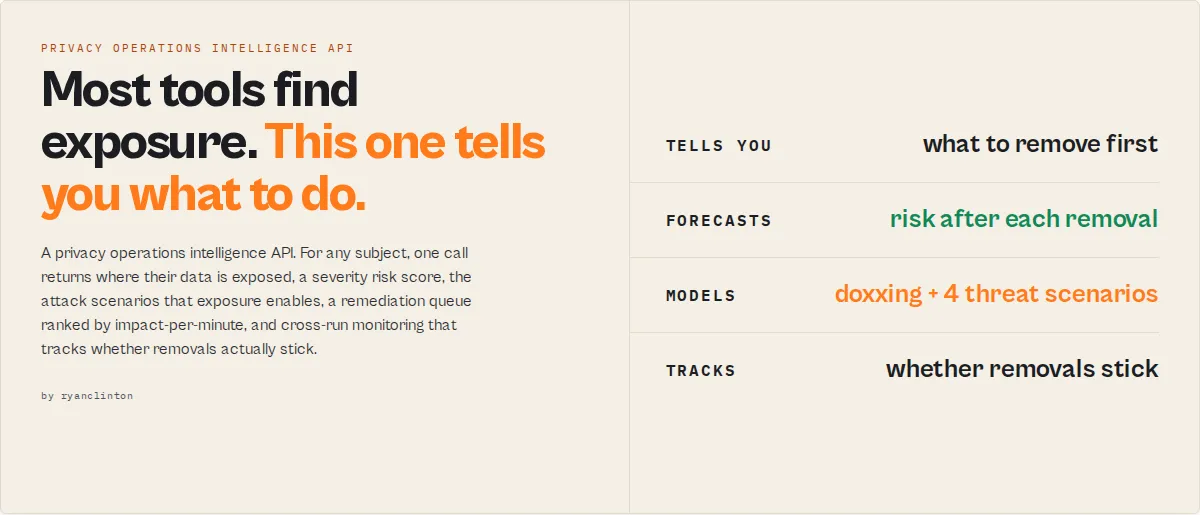
Find exposure. Quantify risk. Prioritize remediation. Track whether removals stick. A Privacy Operations Intelligence API for privacy consultancies, executive-protection teams, identity-protection providers, and security programs.
Personal Data Exposure Report is a privacy operations intelligence API. For any subject (name, plus optional state, city, email, phone) it identifies where their data is exposed across data broker and people-search sites, quantifies the resulting risk, prioritizes remediation by impact-per-minute, models the attack scenarios that exposure enables, and tracks whether removals actually stick over time.
Most privacy tools tell you where data exists. This actor tells you which exposure matters, what to do next, how much risk that removes, and whether the problem is getting better over time.
From exposure to action in one API call
Most privacy tools answer one question: where is this person exposed? This actor answers the five that follow:
How exposed are they, why does it matter, what should be removed first, how much risk will that remove, and is the situation improving over time?
One API call returns decision-ready JSON. No analyst is required to interpret it, no UI, no portal, no client login. Run it through the Apify API, the Apify Console, Zapier, Make, or any HTTP client, then drop the output straight into your client report, security dashboard, CRM, or case file.
Risk reduction forecasting
Most tools tell you that you have risk. This one tells you how much disappears, and how fast:
riskScore, projectedRiskAfterQuickWins, and projectedRiskAfterFullRemediation turn a removal plan into a forecast a client can sign off in seconds. The remediationQueue ranks each removable unit by risk-reduction-per-hour so the first ten minutes go to the highest-leverage work.
Example outcome
One API call, one removal workflow, a 69% risk reduction the client can see.
The pipeline
Each stage adds a decision layer the raw scan doesn't have: confidence and risk on the findings, attack scenarios on the risk, impact-per-minute on the remediation, change and escalation on the monitoring.
Why this exists
Most privacy products answer one question: where is this person's data exposed? The real operational questions are different:
- Which exposure matters most?
- Which removal creates the largest risk reduction for the least effort?
- Is exposure getting better or worse over time?
- Did the previous removals actually stick, or did the data come back?
- Which people in my portfolio need attention today?
This actor was built to answer those questions, deterministically, in one API call.
What happens after the scan
The scan is step one of a workflow, not the deliverable:
- Prioritize with the
remediationQueue(impact-per-minute) andactionabilityScore. - Remove using the per-site
howToRemove,verificationType, and parent-company grouping. - Monitor by re-running with a
watchlistName:changeFlag,velocity,lifecycle. - Escalate on
changesSinceLastScan.escalationwhen high-impact data newly appears. - Report straight from the
executiveSummaryblock.
Why agencies switch
| Most broker scanners | This actor |
|---|---|
| List exposed sites | Prioritizes what to remove first, by impact-per-minute |
| Report findings | Quantifies risk, density, and attack scenarios |
| One-off scans | Continuous monitoring with trend, velocity, and escalation |
| Raw data | Remediation queue with effort and cost estimates |
| Manual analysis required | Decision-ready output (verdict, top action, projected risk) |
| Exposure visibility | Exposure intelligence: confidence, lifecycle, reappearance |
What clients actually buy
Nobody buys an exposure report. Clients buy reduced doxxing risk, reduced executive and family exposure, reduced social-engineering risk, faster remediation workflows, and ongoing monitoring. This actor exists to deliver those outcomes as structured, deterministic JSON, with no LLM in the scoring path.
What makes this different
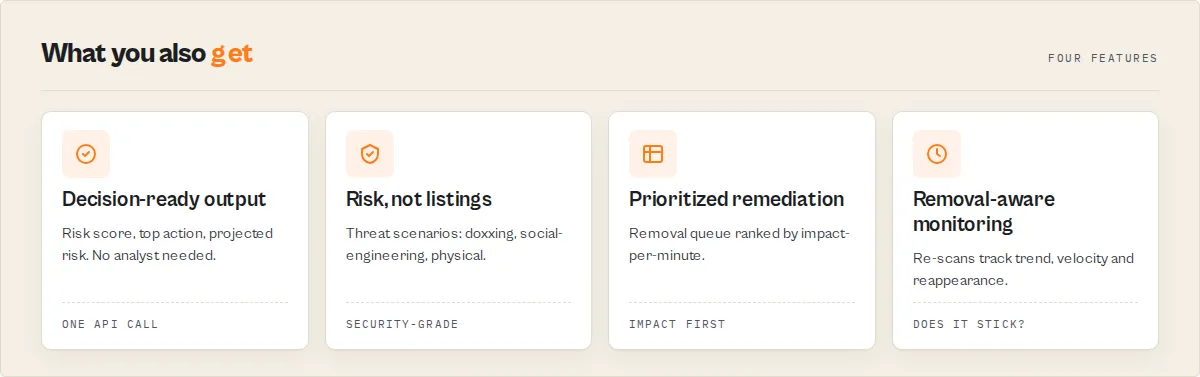
Most exposure tools stop at detection. A typical output is { "site": "Spokeo", "found": true }. This actor returns the decision around it:
And it reports risk, not listings. A scanner says { "site": "Radaris", "found": true }; this actor says { "scenario": "doxxing", "risk": 70, "drivers": ["home address", "family members"] }. Security teams buy risk, not a list of sites.
- Decision-ready output. No analyst needed to determine what matters, what to remove first, the expected impact, or the expected effort.
- Built for recurring monitoring, not just one-off audits: watchlists, trend, velocity, and impact-weighted escalation.
- Designed for portfolio management, not just single scans: per-subject benchmarking and risk percentiles across your book.
- Removal-aware intelligence, not just exposure detection: a remediation queue, projected-risk-after-removal, and reappearance tracking.
- Executive-protection aware, not just privacy scanning: threat scenarios, doxxing and physical-security risk, and an executive threat model.
Compared to a typical exposure scanner
| Capability | Typical scanner | This actor |
|---|---|---|
| Detect listings | Yes | Yes |
| Match confidence (is it really them?) | Partial | Yes |
| Severity risk scoring | Basic | Yes |
| Threat scenarios (doxxing, social-engineering) | No | Yes |
| Removal prioritization by impact-per-minute | No | Yes |
| Reappearance / removal-lifecycle tracking | No | Yes |
| Portfolio benchmarking | No | Yes |
| Executive-protection scoring | No | Yes |
| Decision-ready output (verdict + top action) | No | Yes |
This is a B2B intelligence tool. The broker and breach coverage below is the supporting evidence, not the headline.
What it does: Returns a privacy operations report for any subject: per-site exposure with match confidence, a severity risk score, threat scenarios, a prioritized remediation queue, and cross-run monitoring. Who it's for: Privacy consultancies, identity-protection providers, executive-protection / corporate security teams, M&A due-diligence firms, OSINT shops, white-label privacy products. Pricing: $1.00 per exposure report (pay-per-event). No subscription, no seat fees, no minimum commit. Pay only for scans you actually run. Throughput: 2-5 minutes per subject. Run in parallel via Apify API. Typical agency throughput is 50-500 subjects per hour depending on concurrency settings. Output: JSON dataset (one row per broker site) + key-value store summary with exposure score and counts. Webhook on completion. Export to S3, Google Sheets, Zapier, Make.
Why agencies use this instead of building in-house
Building a broker-scanning service in-house means covering many broker and people-search sites, keeping that coverage working as the sites change, handling the sites that resist automated access, integrating breach databases, and writing and maintaining the removal-instruction copy for every site. It's a quarter of an engineer's time on an ongoing basis, plus the infrastructure spend.
Personal Data Exposure Report bundles all of that as a billable line item. $1 per subject scanned. The actor maintains the coverage, the broker definitions, and the removal instructions. You consume the JSON.
| Approach | Setup cost | Per-subject cost | Maintenance |
|---|---|---|---|
| Personal Data Exposure Report (this actor) | $0 (Apify account) | $1.00 | None (actor is maintained) |
| Build broker scanners in-house | ~$30-60k engineering | $0.10-0.40 (proxies + APIs) | Ongoing (sites change layout, brokers get added/removed) |
| License enterprise removal API (Incogni/OneRep/Optery enterprise tiers) | Multi-month sales cycle | Seat-based, typical $5-15k/yr minimum commits | Vendor handles |
| Manual analyst checking | $0 | ~$30-60 (analyst time, 2-4 hours per subject) | None |
The actor sits between "build it yourself" and "sign a $10k/yr enterprise contract." For agencies running 50-2,000 subject scans per month, that gap is exactly where it earns its keep.
How customers monetize this actor
Privacy consultancy — client onboarding and monthly monitoring
Privacy consultancies sell a "we'll get your data off the internet" service to individuals or families. The first deliverable is an exposure audit. The actor produces that audit in 2-5 minutes per client at $1 of COGS, with structured per-site output you can render into a branded client PDF. Monthly re-scans become a recurring monitoring product at a known unit cost.
Typical economics: bill the client $100-300 for the initial audit, $20-50/month for monitoring. Your COGS is $1 per scan.
Identity-protection providers — white-label exposure intelligence
If you already sell credit monitoring, dark-web scanning, or identity-theft insurance, broker exposure is a logical adjacent feature. Add it via the Apify API. Pass subject details from your customer record, get JSON back, surface the result in your existing UI under your own brand. The actor is the supplier; the customer never sees it.
Executive protection and corporate security
Public exposure of executives, board members, and high-profile employees is a documented social-engineering and physical-threat surface. Run the actor across your protected-persons list quarterly, surface high-exposure individuals, prioritize remediation. Subject lists of 20-200 people are typical; the actor handles the whole list for $20-$200 per quarterly audit.
The exposure score and per-site found status feed cleanly into a security dashboard. Pair with a webhook to alert when an executive's exposure score crosses a threshold.
M&A and pre-IPO due diligence
When a target company is being evaluated, exposure of the founders, executives, and key holders can be a deal factor (doxxing risk, family privacy, post-deal exec recruiting). Run the actor against the target's executive roster as part of standard due diligence. Output goes into the diligence report.
Legal, investigative, and OSINT firms
Investigators and litigation-support firms routinely need to know what's publicly available about a subject before deeper inquiry. The actor is a cheap first sweep: who has them, what categories of data, with direct profile URLs as evidence. Output is a clean evidentiary record (timestamped, source-attributed) that can attach to a case file.
For OSINT work it's often the cheapest way to confirm presence on a known list of brokers without paying for an analyst's manual checks.
HR / compliance — pre-hire and offboarding privacy audits
For sensitive roles (executive hires, security-cleared positions, public-facing positions), an exposure audit is part of the onboarding package. On offboarding, departing employees in regulated industries may need an exposure baseline. The actor produces both in one call per subject.
Summary
- Input: firstName + lastName required. Optional: country, city, state/province, email, phone, Brave API key (free tier), HIBP API key.
- Output: One dataset row per broker site (typically 23-50 rows). Key-value store SUMMARY object with exposure score and counts.
- Sources: 23 broker and people-search sites, plus breach databases (DataBreach.com, and Have I Been Pwned with a key). An optional key expands coverage further. Every site's detection rule is verified against both a listed subject and an unlisted one, so a site is only reported when it genuinely holds a record — several sites answer any name with a page of similar-sounding strangers, and those are excluded rather than counted.
- Limitations: Detection and guided-removal data only. The actor does NOT submit opt-out forms. Deepest for US subjects; for other countries it covers the multinational people-search brands evidenced to hold them, not native local directories (see Coverage outside the United States). A small number of sites may not resolve on a given run — those are reported as unchecked, never as clear.
- What a zero means:
coverage.canAssertCleanis true only when every source that can vouch for an absence actually returned a readable answer. If any did not, a zero exposure count is reported as inconclusive, not as an all-clear, and the headline says so. - Compliance posture: Public-data only. Not an FCRA consumer report. Not for employment screening, stalking, harassment, or surveillance without subject consent. See Responsible use.
What the actor returns
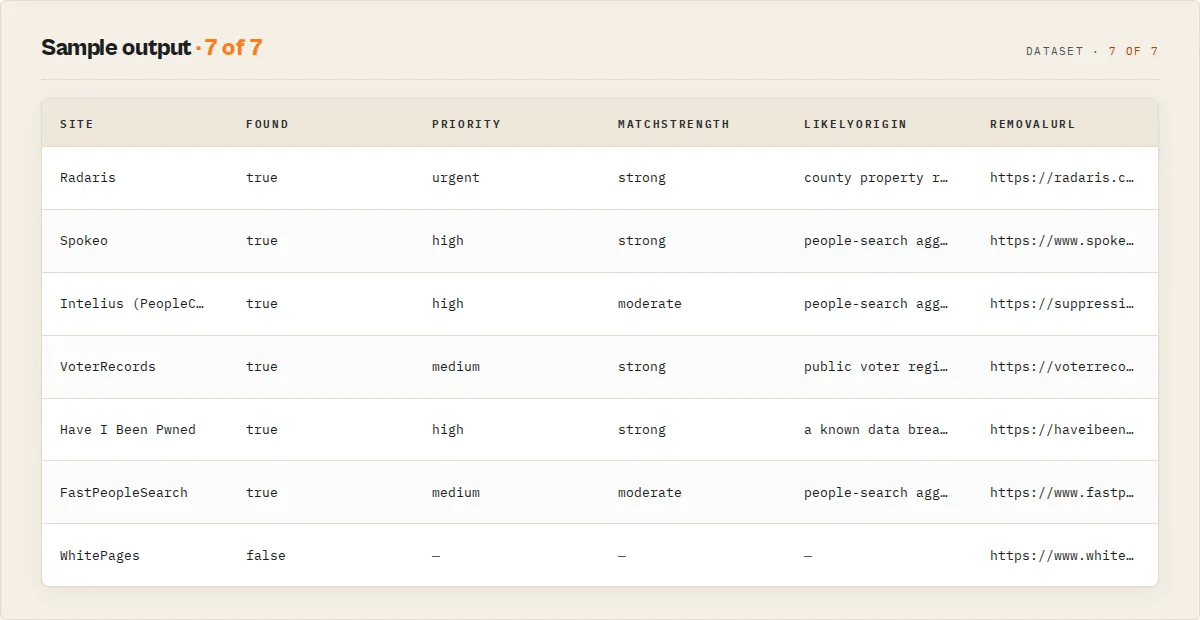
Every dataset row carries a recordType: "site" (one broker/source) or "summary" (the run-level report). Per-site (recordType: "site") fields:
| Field | Type | Description |
|---|---|---|
recordType | string | "site" for per-broker rows, "summary" for the run-level report |
schemaVersion | string | Output contract version (e.g. "1.1.0") |
site | string | Name of the data broker or source (e.g. "Spokeo", "DataBreach.com (breach database)") |
found | boolean | Whether the subject's data was detected on this site |
scanStatus | string | found | clean (confirmed not listed) | blocked (the check couldn't complete this run) | error (request failed). Lets you tell a confirmed-clean site from one that couldn't be checked. |
difficulty | string | Removal difficulty: easy (online form), medium (email/phone verify), hard (complex process) |
priority | string | null | Remediation priority for exposed sites: urgent | high | medium | low (data sensitivity weighed against removal ease). Null when not found. |
priorityRank | integer | null | 1-based position in the work-these-first queue across exposed sites. Null when not found. |
matchConfidence | integer | null | 0-100: how confidently this listing belongs to the subject, from which of their input fields appear on the matched page. Null when not found. |
matchStrength | string | null | strong (phone/email matched, or name+state+city) | moderate | weak. The common-name disambiguation signal. Null when not found. |
matchedSignals | string[] | Which of the subject's own input fields (name/state/city/phone/email) were found on the matched page: the evidence the listing is theirs. |
brokerAuthority | string | Broker reach/redistribution tier: high | medium | low. High-reach brokers (Whitepages, Radaris, PeopleConnect) carry more risk weight than niche sites. |
countryApplicability | string | Whether this source applies to the subject's country: confirmed (a listing was found, or the source is US-native and the subject is US) | likely (a multinational brand evidenced to index non-US residents) | unknown (checked for breadth, not counted as applicable coverage). Sources evidenced not to apply are not scanned at all. |
brokerVolatility | integer | null | 0-100: how prone this broker is to re-listing data (reach + removal difficulty + prior reappearances for this subject). Null when not found. |
verificationType | string | What the opt-out requires: email | phone | account | document | none. Route removals by verification method. |
verificationNeeded | boolean | Whether removing this listing needs an identity/contact verification step. |
likelyOrigin | string | null | "Why am I on this site": the probable upstream source of the data (public voter records, a data breach, county property records, people-search aggregation). Null when not found. |
lifecycle | object | null | Watchlist mode: { ageDays, status, reappearanceCount } where status is new / persistent / reappeared / resolved: proves whether removals stuck. |
howToRemove | string | Pre-written removal instructions: steps, estimated time, required credentials |
removalUrl | string | Direct link to the broker's opt-out page |
profileUrl | string | null | Direct link to the subject's listing on the broker. Null when not found. |
changeFlag | string | null | Watchlist mode only: NEW | RESOLVED | UNCHANGED | FIRST_SCAN since the last scan. Null when watchlist is off. |
firstSeenAt | string | null | Watchlist mode: ISO timestamp the subject was first seen on this site. |
hasName | boolean | Name exposed on this site |
hasAddress | boolean | Address exposed |
hasPhone | boolean | Phone number exposed |
hasEmail | boolean | Email exposed |
hasRelatives | boolean | Relative names exposed |
parentCompany | string | null | Parent company if one removal covers multiple sites (e.g. "PeopleConnect") |
scannedAt | string | ISO 8601 timestamp |
The summary record (also mirrored to the SUMMARY key in the run's key-value store):
Two scores, two questions: exposureScore is breadth, (sites with data / total scanned) * 100. riskScore (0-100, with riskLevel band) is severity: it weights what is exposed (address/phone/relatives/breach data count for more than a bare name) and how persistent the exposure is (hard-to-remove listings score higher). The summary record leads the dataset (it's pushed first), so the verdict shows in the preview before the per-site rows. decisionReadiness is actionable (exposure found, removals available), monitor, or no-exposure. Fields that can be null: profileUrl, parentCompany, priority/priorityRank/matchConfidence/matchStrength/changeFlag/firstSeenAt (per-site, when not applicable).
Exposure intelligence (beyond find/not-found)
- Headline scores.
scoresgives the three numbers that drive a decision:risk(how bad),actionability(best single move),reappearance(will it stick). Everything below is supporting data. - Threat scenarios.
threatScenarios[]speaks risk, not sites: named attack narratives (doxxing,social-engineering,physical-location,family-targeting,identity-fraud), each scored with thedrivers[]that enable it. A home address plus relatives plus property is categorically worse than ten phone listings, and the scenario scoring reflects that combination, not just a per-site tally. - Match confidence. Detection finds a broker results page;
matchConfidence+matchStrength+matchedSignalsthen report which of the subject's own input fields (name / state / city / phone / email) actually appear on that page. Astrongmatch (phone or email present) is the listing is almost certainly theirs; aweakmatch (name only) is the common-name caveat made explicit, critical when scanning subjects with common names. - Remediation queue.
remediationQueue[]ranks removable units (parent-company groups and standalone sites) by risk-reduction-per-hour (riskReduction ÷ removal effort × 60), so the client report leads with the highest-leverage fix.projectedRiskAfterQuickWinsshows where the risk score lands after the easy removals + the PeopleConnect suppression, so you can tell a client "do these and your risk drops from 58 to 18." - Exposure categories.
exposureCategoriesbreaks the risk into four operator axes (0-100):contactability(phone/email),locatability(address),familyExposure(relatives),identityRisk(breach + criminal/court records). - Executive-protection mode.
profileType: "executive"reweights scoring so address, relatives, property, voter and court records dominate, so the same scan reads as a physical-security risk picture for protected persons. - Risk trend (watchlist). On a re-scan,
changesSinceLastScanaddsriskDelta,exposureTrend(improving/worsening/stable),trendScore, andnewHighRiskListings: board-report-friendly "is this getting better since last month?". - Coverage quality.
coveragesplitsdirectChecksfromserpChecks(sites confirmed via optional expanded search) and reports acoverageConfidence: how much of the requested surface was actually checked vs blocked. It also carriescanAssertClean, the field to read before quoting a zero. It is false whenever any source that could have vouched for an absence went unread — one is enough, because the claim being made is about absence and an unread source is not evidence of absence. Sites that can report a listing but have no observable empty state are counted in neither the numerator nor the denominator, so they can never pin the contract false or inflate it (presenceOnlySources). A result found via the expanded search is only counted as exposure once its live page has been opened and confirmed to be an individual profile naming the subject, with a corroborating detail (city, state, phone suffix or email fragment) present in the page's own content; unconfirmed candidates carry anevidenceStateand are never counted. - Country applicability.
geoCoverageanswers a different question fromcoverage: not how much of the surface was checked, but how much of it applies to this subject at all.sitesApplicablecounts only sources evidenced to reach the subject's country; sources with unknown applicability are still scanned for breadth but never counted, and US-only sources are excluded outright for a non-US subject rather than reported as clean. It also carries thelegalBasisto cite and whether automated removal filing is available in that market. See Coverage outside the United States. - Source authority. Each finding carries a
brokerAuthoritytier (high/medium/low reach) that feeds the risk score: a listing on Whitepages or Radaris weighs more than one on a niche site, because high-reach brokers redistribute data further. - Benchmark percentile. When you've scanned enough subjects, the summary's
benchmarkreports where this subject's risk sits versus the others scanned on your account (riskPercentile, plus a same-profileTypeprofilePercentile): "more exposed than 87% of your monitored subjects". It's account-scoped portfolio context (not cross-customer) and is sample-gated: percentiles staynulluntil the pool is large enough, never faked. - Velocity (watchlist). Over several runs,
velocityreportsnewExposuresPerMonthvsresolvedPerMonthand adirection: the "are we winning?" rate recurring-monitoring buyers actually track. - Likely origins.
likelyOriginsmaps the exposed data categories back to their probable upstream sources (public records, breaches, marketing databases, credit-header aggregation): the "why is this happening?" answer, derived deterministically from what was found. - Removal verification + cost. Per site,
verificationTypesays what the opt-out needs (email/phone/account/document). The summary'soperationalEstimatetotals removal minutes × youranalystHourlyRateso you can quote the work.projectedRiskAfterFullRemediationshows the residual risk floor once every listing is removed (breach exposure persists). - Executive summary.
executiveSummaryconsolidates the headline, bottom line, top exposures and top remediation actions into one block you can paste straight into a client report. - Industry profiles. Beyond
executive, theprofileTypelens supportsjournalist,public-official,healthcareandlegal: each reweights the scan for that persona's threat model. - Reappearance risk.
reappearanceRisk(0-100 + band + factors) answers the question every monitoring buyer asks ("we removed it, will it come back?"), deterministically from persistence factors: public-records data re-publishes, breach data is permanent, more aggregators re-propagate faster. It's a forward-looking heuristic, not a dated forecast. - Removal lifecycle (watchlist). Each found site carries a
lifecycle(ageDays,status= new/persistent/reappeared/resolved,reappearanceCount) so an agency can prove a removal stuck, or flag a listing that came back. - Per-site origin. Every finding carries a
likelyOrigin("why am I on this site"): the per-listing version oflikelyOrigins, derived from the broker's nature and the data it carries. - Exposure graph.
exposureGraphcounts how many exposed sites carry each data dimension (address/email/phone/relatives/breach): the relationship view, in honest site-counts (the actor never extracts raw PII values). - Analyst work package.
workPackage(estimatedMinutes,taskCount,easyTasks/mediumTasks/hardTasks) is the labour-reduction view a consultancy hands to a junior analyst; the ordered task list is theremediationQueue. - Executive threat model. With
profileType: "executive", the summary addsexecutiveThreatModel(homeAddressExposure,familyExposure,propertyRecordExposure,voterRecordExposure,highRiskBrokerCount) plusdoxxingRiskandphysicalSecurityRiskscores: the report executive-protection teams actually want. - Exposure density.
exposureDensity(0-100) measures how much data each exposure carries: 7 name-only listings and 7 listings leaking address+phone+relatives+breach both read as "7 sites", but they're very different risk; density separates them. - Concentration.
concentrationreports what share of total risk comes from the single worst broker (topBrokerContribution) and the worst cluster (topClusterContribution+topClusterLabel): "36% of your exposure is one ecosystem" makes a client report instantly clearer. - Actionability. Each
remediationQueueitem carries anactionabilityScore(0-100) blending impact, removal ease and match-confidence: the "perfect target" is high-impact, low-effort, and we're sure it's the subject. - Broker volatility. Per site,
brokerVolatility(0-100) flags brokers prone to re-listing (high reach + hard removal + prior reappearances) so you know where removals won't stick. - Threat escalation (watchlist).
changesSinceLastScan.escalationweights what newly appeared, not just how much: a newly-exposed address or family link escalates tohighwith namedreasons, while a duplicate name listing stays quiet. The alert-fatigue fix for scheduled monitoring.
Monitoring across runs (watchlist)
Set watchlistName to track a subject over time. First run on a new watchlist name: every site is a baseline, so changeFlag is FIRST_SCAN and changesSinceLastScan.firstScan is true (logged at run start). Every run after that: each site is compared to the prior scan and flagged NEW (newly listed), RESOLVED (your removal worked / it dropped off), or UNCHANGED, and the summary's changesSinceLastScan lists exactly what changed. State is held in a private named key-value store per watchlist name, so re-scans are diffed without re-supplying history. Restricted-permission tokens fall back to a stateless scan (logged, no failure). changesSinceLastScan is null when watchlistName is unset.
Data trust
Every detection result comes from a live check against the source. Nothing is inferred, estimated, or padded: a site is marked found: true only on a positive match for the subject, and confirmed clean otherwise. Removal instructions are maintained per broker against each site's current opt-out process.
Pricing for agencies
Pay-per-event: $1.00 per exposure report. No subscription, no minimum, no seat fees. Platform compute is included in the per-event price.
| Use pattern | Subjects | Cadence | Monthly cost | Notes |
|---|---|---|---|---|
| Privacy consultancy — small | 50 clients | Monthly monitoring | $50/mo | 50 monitoring scans |
| Privacy consultancy — mid | 200 clients | Monthly monitoring | $200/mo | 200 monitoring scans |
| Identity-protection provider — white-label | 5,000 subjects | Quarterly | $5,000/quarter | Customer base monitoring |
| Executive protection program | 100 protected persons | Quarterly | $100/quarter | Plus targeted re-scans on alerts |
| OSINT / due-diligence firm | 50 subjects | Per matter | $50/matter | Charged through to client matter |
| M&A advisory | 10-30 execs per deal | Per deal | $10-30/deal | Standard line in diligence package |
Set a per-run maximum spending limit in the Apify run options to hard-cap accidental cost spikes. The actor stops cleanly when the budget is reached.
Managing many subjects (portfolio)
The actor scans one subject per run, parallelized at the Apify API level (run many subjects concurrently). It does not return a single cross-subject ranking record. Instead, each subject's summary carries its own portfolio context, and you assemble the portfolio view from those records:
benchmarkplaces each subject's risk against the other subjects scanned on your account (riskPercentile, plus a same-profileTypeprofilePercentile): "more exposed than 87% of your monitored subjects".velocityandchangesSinceLastScantell you who is improving and who is worsening across runs.changesSinceLastScan.escalationflags who picked up high-impact exposure since the last run.
Collect the recordType: "summary" rows into your own dashboard, sheet, or warehouse and sort by riskScore, scores.actionability, or changesSinceLastScan.riskDelta to get highest-risk / most-actionable / fastest-worsening views across hundreds of people. (A dedicated cross-subject ranking actor is the right tool if you want that computed server-side rather than in your dashboard.)
How to call the actor from your stack
The actor is stateless: every call is a self-contained subject scan. Run in parallel via the Apify API for batch throughput. Default Apify account concurrency lets you run multiple subjects simultaneously; enterprise accounts can raise the ceiling further.
Python — single subject
Python — batch across a client list
JavaScript
cURL
Webhooks for completion handling
Configure an Apify webhook on ACTOR.RUN.SUCCEEDED to push results to your backend when each scan finishes. For batch workflows this avoids polling: your handler receives the run ID, pulls the dataset and summary, and writes to your client record.
Input parameters
| Parameter | Type | Required | Description |
|---|---|---|---|
firstName | string | Yes | First name as it appears on public records |
lastName | string | Yes | Last name as it appears on public records |
city | string | No | City. Helps disambiguate common names. |
country | string | No | ISO country, US by default. Selects the applicable source set and the privacy right reported for the subject. See Coverage outside the United States. |
state | string | No | Region code: a US state (CA, NY, TX) when country is US, or a Canadian province (ON, QC, BC) when country is CA. Strongly recommended for US subjects: most broker sites filter by state. Leave blank for other countries. |
email | string | No | Email address. Required to enable DataBreach.com and HIBP breach checks. |
phone | string | No | Phone number (any format). Adds phone to the search. |
removeMyData | boolean | No | Default false. When on, in addition to the scan, files opt-out / deletion requests to the brokers to have your own information removed. Charged separately. Requires dateOfBirth and removalConsent. |
dateOfBirth | string | No | YYYY-MM-DD. Required for removal only — brokers match records by name and date of birth. Not used for the scan. |
removalConsent | boolean | No | Required to file removals. Confirms the data is your own and authorises removal requests on your behalf as your authorised agent. |
braveApiKey | string | No | Optional Brave Search API key to expand coverage. Free tier at https://api.search.brave.com/ gives 2,000 queries/month. |
hibpApiKey | string | No | Have I Been Pwned API key ($3.50/month at https://haveibeenpwned.com/API/Key). |
watchlistName | string | No | Track this subject across runs. On the next scan with the same name, each site gets a changeFlag (NEW / RESOLVED / UNCHANGED), and the summary reports what changed plus the risk trend (riskDelta, exposureTrend) since last time. Turns one-off scans into monitoring. |
outputProfile | string | No | minimal (exposed sites + summary only), standard (default, all sites), or full (adds raw diagnostics: matched indicator, HTTP status, raw data types). |
deepScan | boolean | No | Default true. A deeper pass for higher coverage on sites that resist a quick check. Set false for a faster, lighter scan. |
profileType | string | No | Scoring lens for the subject's threat model. standard (default) weights data evenly; executive, journalist, public-official, healthcare, legal each reweight physical-locatability and family data for that persona. Same scan, different risk interpretation. |
analystHourlyRate | integer | No | Your analyst's hourly rate (USD, default 50). Drives the operationalEstimate removal-cost figure so you can quote work instantly. |
proxyConfiguration | object | No | Proxy settings. Residential proxies strongly recommended for broker coverage. |
Recommended input for agency workflows
The combination of state + email + Brave key + residential proxy gives the broadest, most accurate coverage. For high-volume monitoring runs where breach data isn't critical, you can drop the HIBP key and the email, which trims roughly 30 seconds per scan.
Coverage outside the United States
People-search exposure is not a US-only problem: the large multinational brokers index non-US residents too. Set country and the scan adapts to the subject instead of assuming a US person.
What changes when country is not US:
- US-only sources are skipped, not reported as clean. US voter registration records and US phone directories cannot hold a non-US subject, so checking them and reporting "no data found" would be false reassurance. They are excluded from the scan and counted in
geoCoverage.sitesExcluded. - Region codes stop being forced into US searches. The people-search sites that filter by region index US states, so a foreign region code produces dead URLs. For a non-US subject the search runs on name (plus city, via the Brave SERP pass) instead.
- Every source carries an applicability verdict. Each site row gets
countryApplicability:confirmed(a listing was actually found, the strongest evidence there is),likely(a multinational brand evidenced to index non-US residents), orunknown(checked anyway for breadth, never counted as coverage). - The reported coverage figure stays honest.
geoCoverage.sitesApplicablecounts onlyconfirmed+likely. Sources with unknown applicability are still scanned, but they never inflate the number.
What each market gets today:
country | What the scan covers now | Removal filing |
|---|---|---|
US | Full native surface: US people-search sites and public-record sources | Available, under US state consumer privacy law |
CA | Multinational people-search brands evidenced to index Canadians | Not yet enabled; per-site self-serve steps are included |
GB | Multinational brands evidenced to hold non-US residents; UK GDPR erasure and objection are the basis to cite | Not yet enabled; per-site self-serve steps are included |
IE, EU/EEA | Multinational brands evidenced to hold non-US residents; EU GDPR erasure and objection are the basis to cite | Not yet enabled; per-site self-serve steps are included |
AU | Multinational brands evidenced to hold non-US residents. Australian privacy law grants no right to delete accurate personal information, so removal is a voluntary suppression request | Not yet enabled; per-site self-serve steps are included |
| Anywhere else | Multinational brands, best effort, under each site's own opt-out process | Not yet enabled; per-site self-serve steps are included |
Be clear about what this is for a non-US subject: it finds and prices the exposure that sits on the big global people-search brands, and tells you the right you can assert. It is not a sweep of the directories native to your country. geoCoverage.note in the summary record states this on every run, so it can be passed straight to an end user.
Automated removal filing (removeMyData) runs for US subjects. For any other country the request is declined before anything is filed and you are not charged for removal — a US-framed opt-out would assert a right the subject does not hold.
Output example
Interpretation guide
found: truewithdifficulty: easy: highest-priority remediation. Online forms, 2-3 minutes each. Surface these first in client reports.parentCompany: "PeopleConnect": Intelius, ZabaSearch, Instant Checkmate, AnyWho, and Addresses.com share one removal flow at suppression.peopleconnect.us. Group them in client reports to avoid duplicating work.difficulty: hard: Radaris requires account creation and possibly phone verification. VoterRecords offers only partial opt-out (voter registration is a public record in most states). Set client expectations accordingly.- Exposure score (SUMMARY): 0-20 low, 20-40 moderate, 40+ high. Useful as a single triage number across a client portfolio.
Coverage
The coverage is the supporting evidence under the intelligence, not the product. In short:
- 18 broker and people-search sites covered directly
- Optional expanded coverage with a Brave Search key (additional broker domains)
- 2 breach-intelligence sources
The full per-site detail (data exposed, removal difficulty, removal time) follows.
Tier 1 — Free people-search sites
| Site | Data exposed | Removal difficulty | Removal time |
|---|---|---|---|
| TruePeopleSearch | Name, address, phone, age, relatives | Easy | 2-3 min |
| FastPeopleSearch | Name, address, phone, email, relatives | Easy | 2-3 min |
| ThatsThem | Name, address, phone, email, IP | Easy | 2 min |
| CyberBackgroundChecks | Name, address, phone, criminal records | Easy | 2 min |
| Nuwber | Name, address, phone, email, age | Easy | 3-5 min |
| USPhoneBook | Name, address, phone | Easy | 2 min |
| SearchPeopleFree | Name, address, phone, age | Easy | 2 min |
Tier 2 — Paywalled sites
| Site | Data exposed | Removal difficulty | Removal time |
|---|---|---|---|
| Spokeo | Name, address, phone, email, social, court records | Easy | 3-5 min |
| WhitePages | Name, address, phone, relatives, age | Medium | 5-10 min |
| Radaris | Name, address, phone, email, court, property records | Hard | 10-30 min |
| PeopleFinders | Name, address, phone, age, relatives | Easy | 3 min |
| Intelius (PeopleConnect) | Name, address, phone, email, relatives | Medium | 5-10 min |
| Instant Checkmate (PeopleConnect) | Name, address, phone, criminal records | Medium | 5-10 min |
Tier 3 — Smaller / niche sites
| Site | Data exposed | Removal difficulty | Removal time |
|---|---|---|---|
| ZabaSearch (PeopleConnect) | Name, address, phone | Medium | 5-10 min |
| AnyWho (PeopleConnect) | Name, address, phone | Medium | 5-10 min |
| Addresses.com (PeopleConnect) | Name, address, phone | Medium | 5-10 min |
| CocoFinder | Name, address, phone | Easy | 3 min |
| VoterRecords | Name, address, party affiliation | Hard | 5 min |
Breach databases
| Source | What it checks | Requires |
|---|---|---|
| DataBreach.com | Email in known data breaches | Email address in input |
| Have I Been Pwned | Email breach exposure + breach names | Email + HIBP API key ($3.50/month) |
Optional expanded coverage
With an optional Brave Search key, the actor also checks the subject's name across additional broker domains: TruePeopleSearch, FastPeopleSearch, Spokeo, WhitePages, Radaris, BeenVerified, Intelius, PeopleFinders, ThatsThem, Nuwber, USPhoneBook, CyberBackgroundChecks, SearchPeopleFree, MyLife, TruthFinder, InstantCheckmate, ZabaSearch, Addresses.com, AnyWho, CocoFinder, VoterRecords, PublicRecordsNow, IdTrue, USSearch, Peekyou, FamilyTreeNow, AdvancedBackgroundChecks, and NeighborWho.
Throughput and accuracy guidance for agency operators
Accuracy
Accuracy is highest when you provide state and email in addition to name. The state filter eliminates most cross-person false positives on common names; email unlocks the breach databases. For executive-protection programs against people with very common names (Smith, Johnson, Garcia), provide city as well as state.
When a site can't be confirmed on a given run, the actor reports found: false rather than guessing. This is a deliberate conservative posture: false negatives are recoverable on a re-run; false positives in a client report are not.
Throughput
A single subject scan takes 2-5 minutes with all sources enabled, 1-3 minutes for name-only. The actor is stateless and parallelizable. Default Apify account limits allow several concurrent runs; raise concurrency on a paid Apify plan if you need to push through hundreds of subjects per hour.
For very large batches (1,000+), the recommended pattern is: enqueue all subjects to a queue, run a controller that triggers actor runs with a target concurrency (e.g. 10-20 simultaneous), collect dataset IDs into a results table, post-process when all runs complete. Use Apify webhooks rather than polling.
Cost predictability
Per-event pricing means you know the exact unit cost before you scan. For agency cost modelling: monthly_cost = subjects × scans_per_subject_per_month × $1.00. A 200-client privacy practice on monthly monitoring is $200/month of COGS. No surprises.
Set a per-run maxSpend in the Apify run options for hard-cap protection on accidental runaway batches.
Limitations
- Detection and guided removal only. The actor returns where data is listed and how to remove it. It does NOT submit opt-out forms on the subject's behalf. Pair with manual analyst work or a removal-submission service for end-to-end removal.
- US-focused coverage. Coverage is primarily US people-search engines. International broker coverage is limited.
- Point-in-time coverage. A small number of sites may not resolve on a given run; re-running with residential proxies picks up most of them.
- Point-in-time snapshot. Data brokers continuously re-aggregate from public records. A clean scan does not guarantee data won't reappear. Recommend re-scanning monthly or quarterly.
- Common-name false positives. For very common names without state filtering, results may include listings belonging to other people with the same name.
- No raw personal data in output. The actor does NOT return the subject's actual address, phone number, or other PII content. It reports which sites have listings and links to those listings. This is intentional: it keeps the output safe to log, store, and share inside your agency's normal data-handling boundary.
- Removal instructions may drift. Broker sites occasionally change their opt-out processes. If instructions don't match what's currently on the site, check the broker's removal page directly.
Integrations
- Zapier: trigger scans from a CRM record creation, push results into client tracking spreadsheets, fire Slack alerts on high-exposure subjects.
- Make: orchestrate monthly batch scans of your client list, route results to email, Slack, or your DB.
- Google Sheets: append exposure reports to a shared sheet for client-facing dashboards.
- Apify API: programmatic batch runs from your backend.
- Webhooks: get notified when a scan completes; ideal for batch processing without polling.
- LangChain / LlamaIndex: feed exposure data into AI workflows for automated risk assessments.
Combine with other Apify actors
| Actor | How agencies combine it |
|---|---|
| WHOIS Domain Lookup | Verify domain ownership of broker sites in case you need to escalate removal disputes |
| Website Contact Scraper | Pull broker site DPO / privacy contact emails for direct removal escalation |
| Bulk Email Verifier | Validate breach-database email hits are still active |
| Website Change Monitor | Watch broker profile pages for re-listing after removal requests are submitted |
| Website Content to Markdown | Archive broker listing pages as markdown evidence before submitting removal requests |
| B2B Lead Qualifier | Score business contacts that appear alongside personal data in broker listings |
Use in Dify
Drop this actor into Dify workflows via the Apify plugin's Run Actor node. Each scan returns scored, classified, and recommended as structured JSON: decisionReadiness (actionable / monitor / no-exposure), riskLevel (critical / high / moderate / low / minimal), and per-site priority / scanStatus / changeFlag plus the removal plan your downstream node branches on. A raw broker scraper pointed at the same sites returns HTML; this returns decisions.
- Actor ID:
ryanclinton/personal-data-exposure-report - Sample input (agency client onboarding + monthly monitoring):
- Branching example. Read the
recordType: "summary"record (it's the first row) and route anif/elsenode ondecisionReadiness:decisionReadiness == "actionable"→ kick off the removal workflow; therecommendedActions[]array is usable verbatim as the task list (no LLM rewriting needed), andpeopleConnectGroupHit == truecollapses five removals into one suppression step.decisionReadiness == "monitor"→ schedule a re-scan; nothing quick to remove yet.decisionReadiness == "no-exposure"→ mark the client clean and log the date.
- Per-site fan-out. Iterate the
recordType: "site"rows and branch onpriority == "urgent"for the quick high-impact wins,matchStrength == "strong"to act only on listings confirmed as the subject's (skip common-name false positives), orscanStatus == "blocked"to flag listings that need a residential-proxy re-run rather than a removal. TheremediationQueue[]on the summary is pre-ranked by risk-reduction-per-hour if you'd rather drive the workflow off the summary than the per-site rows. - Monitoring mode. With
watchlistNameset, a re-scan tags each sitechangeFlag(NEW/RESOLVED/UNCHANGED); branch onchangeFlag == "NEW"to alert on fresh exposures andchangeFlag == "RESOLVED"to confirm a removal worked, turning a one-off audit into a recurring monitoring product.
Responsible use
- The actor accesses publicly available data broker websites and search APIs. It does not bypass authentication or scrape paywalled content.
- Use only with proper authorization: for the subject's own data, or for clients, employees, and investigation subjects with appropriate legal basis or consent.
- This is NOT an FCRA-compliant consumer report and must not be used for employment-screening decisions, tenant screening, credit decisions, or any other FCRA-covered use.
- Do not use for stalking, harassment, doxxing, unauthorized surveillance, or building personal-information databases for sale.
- Comply with GDPR, CCPA, and other applicable data-protection laws in the subject's jurisdiction.
- For web scraping legal context see Apify's guide.
Agencies running the actor under their own client engagements remain responsible for their own legal basis (consent, legitimate interest, etc.), client data handling, and reporting practices.
FAQ
Is there a minimum commit or seat fee? No. Pay-per-event at $1.00 per scan. No subscription, no minimum monthly spend, no seat-based pricing. You can run one scan a month or ten thousand, same unit cost.
How is this priced relative to Incogni / DeleteMe / OneRep / Optery? Those are consumer-subscription products at ~$90-200/year per person, or enterprise tiers under custom contract. This actor is per-event, no commitment, designed for agencies that want API access to exposure intelligence without an enterprise contract. The product is also narrower (detection + removal guidance, not automated opt-out submission), which is the tradeoff.
Can I white-label this inside my own product? The actor is the supplier; how you present output to your customer is your choice. Standard Apify Store TOS apply. For high-volume white-label use, contact through Apify and we can discuss volume terms.
How many subjects can I scan in parallel? Depends on your Apify account concurrency. Default accounts support a handful of concurrent runs; paid Apify plans raise the ceiling significantly. For sustained high-throughput batch workflows (hundreds per hour), an Apify Team or Enterprise plan is typical.
Does the actor submit removal requests for me? It can, for your own data. By default the actor only detects exposure and returns the removal URL and step-by-step instructions per broker. If you enable "Also remove my data", tick the authorisation, and provide your date of birth, the actor also files formal opt-out / deletion requests to the brokers on your behalf, under your consumer privacy rights, for a separate charge. This is only for removing your own information — you must be the person named in the search. Removals proceed within the statutory window (up to 45 days). If you leave it off, nothing is submitted and you just get the detection report and instructions.
What about subjects outside the US? Coverage is limited. It's primarily US people-search engines. UK, EU, and other international broker sites are not currently in scope. Subjects with US public-records history will get useful results; subjects with no US footprint will mostly get empty scans.
How do I handle a client whose data is on sites that block automated access?
The actor already handles most sites that restrict automated access. For the best coverage, run with residential proxies (apifyProxyGroups: ["RESIDENTIAL"]). A small number of sites may still not resolve on a given run; re-running can catch them.
Can I store results in my own database? Yes. The output is plain JSON from the Apify API. Pipe it into Postgres, BigQuery, your CRM, your client report system, wherever your normal client data lives. The actor returns no raw PII content (only "found on this site, here are the categories"), which makes the output safe to log inside your normal client-data boundary.
What if a broker site changes its layout and detection breaks? The actor is maintained. Detection is updated as broker sites change. The conservative bias (mark uncertain results as not-found) means changes cause under-counting rather than false positives in a client report.
Can I use the actor as a step inside a larger compliance / privacy SaaS? Yes. The Apify API makes the actor a callable backend service. Agencies and product builders use it as the "exposure intelligence" step in pipelines that also include consent capture, removal-request submission, evidence archival, and client reporting.
Is there a free trial? Apify gives all new accounts $5 platform credit, which covers the first ~5 exposure reports without payment setup. Beyond that, pay-per-event at $1 per scan.
Support
For bug reports or feature requests, open an issue in the Issues tab on this actor's page. For volume pricing discussions, white-label arrangements, or custom integration work, reach out through Apify Console messaging.
Help us debug faster
If a run fails or returns unexpected results, you can let the actor developer see your run details by enabling run sharing:
- Go to Account Settings > Privacy
- Enable Share runs with public Actor creators
Run details are visible only to the actor developer, not publicly.


