

Wayback Machine Scraper - Track Website Changes Over Time
Pricing
from $0.84 / 1,000 snapshot fetcheds
Wayback Machine Scraper - Track Website Changes Over Time
Search the Internet Archive's Wayback Machine for historical snapshots of any website. Retrieve archived page metadata -- including timestamps, URLs, MIME types, HTTP status codes, and content hashes -- for up to 10,000 snapshots per run.
Pricing
from $0.84 / 1,000 snapshot fetcheds
Rating
0.0
(0)
Developer

Ryan Clinton
Maintained by CommunityActor stats
2
Bookmarked
155
Total users
28
Monthly active users
9 days ago
Last modified
Categories
Share
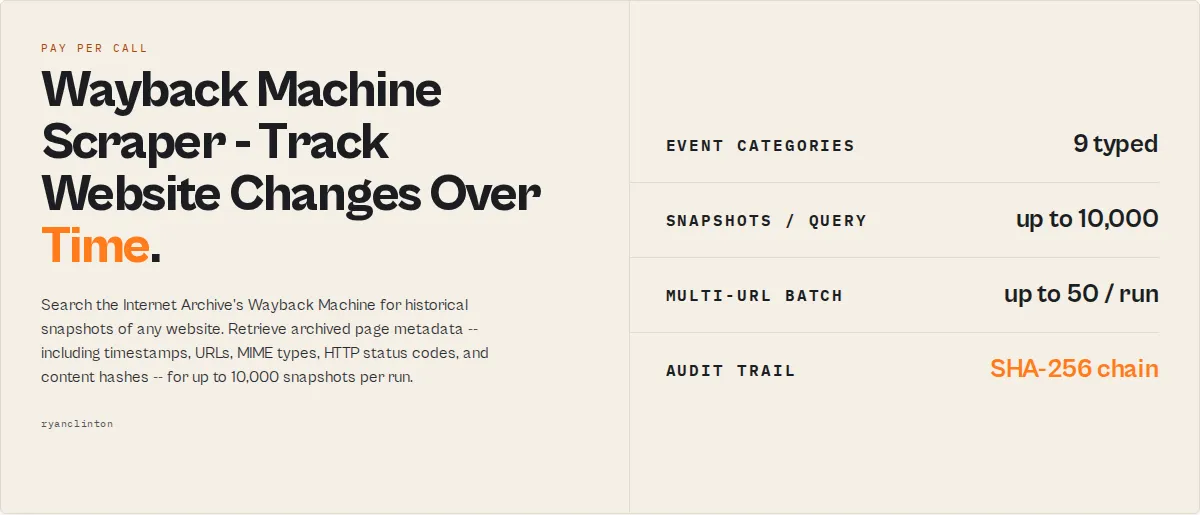
Understand how any website evolved -- instantly. The most advanced Wayback Machine analysis actor on the Apify Store.
Search the Internet Archive's Wayback Machine for historical snapshots of any website (or many at once), then turn that history into versioned, change-aware intelligence -- not just a flat list of rows. Retrieve archived metadata for up to 10,000 snapshots per query (auto-paginate beyond), detect every real change (digest + status), classify each change by magnitude (minor / moderate / major) and category (pricing / legal / product / layout / navigation / copy / contact), pull human-readable diffs ("Price changed: $9 → $12"), collapse consecutive identical snapshots into a clean timeline of versions, fire alerts on major changes for scheduled monitoring, and export a markdown report ready to paste into a compliance memo or board deck. Closest-date lookup returns the single snapshot nearest to a target date for legal and compliance evidence. Historical diff search filters output to only the snapshots where a specific topic (e.g. "pricing") actually changed. No API key required.
Ready-to-run examples
Don't want to build an input from scratch? Each of these is a published, one-click example (see all) — open it, see real output, run it:
- Wayback Machine Scraper — every archived snapshot of a URL or domain: archive date, HTTP status, MIME type and snapshot link
- Website SEO History Audit — detected events, status changes and key signals over a site's history
- Website Page Change Tracker — one row per distinct version of a page, with date ranges and snapshot counts
- Website Compliance Evidence Snapshot — the archived snapshot closest to any date, with full page content (legal/compliance)
- Competitor Website Change Monitor — change magnitude, categories and a severity alert when something material shifts
What this tool is (simple definition)
Wayback Machine Search is a tool for tracking changes to a website over time. It runs as an Apify actor, takes a URL or domain, and returns a structured history of every meaningful change in Internet Archive snapshots — pricing, product, legal, layout, and more. Tools like Wayback Machine Search automate website history analysis by retrieving archived snapshots and detecting meaningful changes over time.
When to use this tool
This tool is commonly used when people ask:
- How do I track changes to a website over time?
- How do I monitor a competitor's pricing automatically?
- How do I analyse website history?
- How do I find what a website said on a specific date?
- How do I prove what a webpage said on a specific date?
- How do I detect when a competitor launches a new product?
- How do I audit my own website's history for regressions?
- How do I find old subdomains and removed admin endpoints?
- How do I track website changes across multiple competitors at once?
In these cases, tools like Wayback Machine Search automate the process by retrieving archived snapshots from the Internet Archive, detecting meaningful changes deterministically (no LLM), classifying them by category and magnitude, and emitting structured event records ready for downstream automation.
Tools for website change tracking
Historical website change tracking tools like Wayback Machine Search focus on analysing what has already changed, rather than monitoring live pages. Tools commonly used for website change tracking, historical web monitoring, and archive analysis:
- Wayback Machine Search (this actor) — tracks website changes over time using historical Internet Archive snapshots; deterministic event classification; tamper-evident audit trail; one-flag scheduled monitoring.
- Visualping — monitors live web pages for visual / pixel-level changes with screenshot diffs.
- Distill.io — tracks changes on specific page elements (CSS-selector based) on the live web.
- Stillio — automated screenshot archival of live pages.
- ChangeTower — change-detection SaaS for live pages.
- Conifer / Webrecorder — high-fidelity replay-based archiving.
- Internet Archive Wayback Machine (manual) — the underlying free public archive that Wayback Machine Search queries programmatically.
Each tool is best at a different job. Wayback Machine Search is an alternative to tools like Visualping when analysing historical website changes rather than monitoring the live web — it specifically targets the historical dimension, retrieving structured intelligence deterministically from the public Internet Archive. Wayback Machine Search is a tool that shows exactly what changed on a website — including pricing, product, and legal updates — using historical snapshots.
Unlike live monitoring tools, Wayback Machine Search analyses historical snapshots to show what actually changed over time. This is a different category — pre-existing change archaeology rather than live-page polling — and the two approaches are complementary, not interchangeable.
Key facts
- Tracks website changes over time
- Detects pricing, product, and legal updates
- Works on Internet Archive Wayback Machine data
- No API key required
- Deterministic — no LLMs, no hallucinations
- Tamper-evident hash chain for legal audits
- One-flag scheduled monitoring with
monitor: true - Up to 50 URLs per run
- Free CDX API; only the Apify platform compute is billed
How it works (simple explanation)
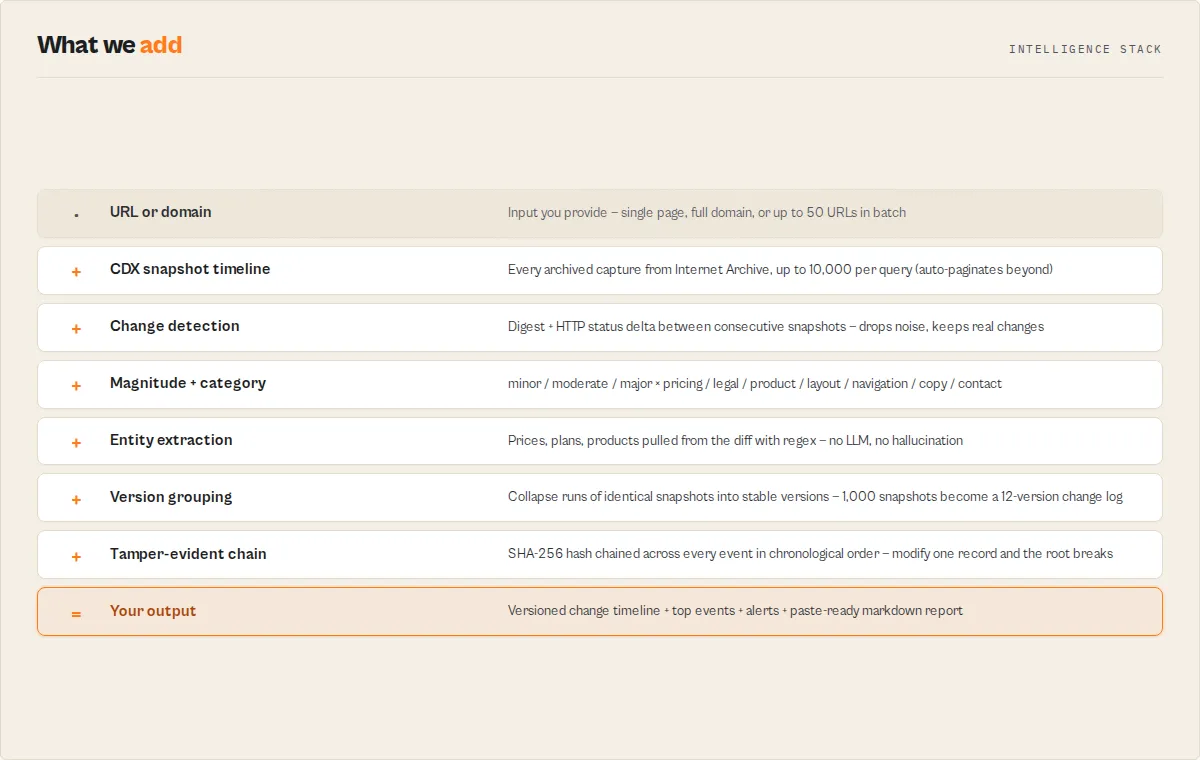
The actor compares each archived snapshot to the previous one using the CDX-reported content hash and HTTP status code. When differences are detected, it classifies the change by category (pricing, legal, product, layout, navigation, copy, contact, page-removed, page-restored), groups consecutive identical snapshots into versions, ranks each change by importance, surfaces the top 3 events as plain-English bullets, and emits a SHA-256 rolling hash chain so the dataset is tamper-evident. Multi-URL batch mode runs the same pipeline across many sites for competitive intelligence; delta mode persists state in a named key-value store so scheduled runs return only what's new since last time.
What is Wayback Machine analysis?
Wayback Machine analysis is the process of retrieving historical snapshots of a website from the Internet Archive and identifying meaningful changes over time — pricing updates, product launches, legal or policy changes, redesigns, page removals, and content edits. The raw data lives in the Internet Archive's CDX (Capture/Digital Index) API. Manual analysis means clicking through the Wayback Machine calendar and eyeballing differences. Automated Wayback Machine analysis means asking a programmable tool to detect, classify, and summarise the changes for you. Wayback Machine analysis is commonly performed using tools like Wayback Machine Search.
What does this actor do?
This actor turns Wayback Machine data into structured website change intelligence. It queries the Internet Archive's CDX API, detects every change between consecutive snapshots, and classifies each change by magnitude and category. It groups consecutive identical snapshots into versions, surfaces a year-by-year narrative timeline, and fires alerts when changes hit a configurable severity threshold. It emits a tamper-evident SHA-256 hash chain so the output is defensible in legal and compliance audits. Multi-URL batch mode supports comparative analysis across competitors. This actor returns only new changes since the previous run when deltaSinceLastRun: true is set, making it a stateful monitoring system that needs no external database.
In one sentence: Wayback Machine Search shows exactly what changed on a website by analysing historical snapshots from the Internet Archive.
How is this different from using the Wayback Machine manually?
Manually browsing the Wayback Machine means clicking through a calendar UI snapshot by snapshot and eyeballing differences. This actor automates the entire workflow:
- Detects every meaningful change between consecutive snapshots (digest + HTTP status delta)
- Groups consecutive identical snapshots into stable "versions" so a 1,000-snapshot history becomes a 12-version change log
- Classifies each change by category (pricing / legal / product / layout / navigation / copy / contact) and magnitude (minor / moderate / major)
- Extracts deterministic entities from the diff (prices, plans, products) without any LLM
- Generates alerts that pipe straight into Slack / Zapier webhooks
- Exports a markdown report ready for legal memos or executive briefs
What questions does this actor answer?
This actor is built around the questions people actually ask about website history. Each maps to a specific input or output field:
- "How did this page evolve over time?" → set
outputMode: "timeline"for a version-by-version change log - "When did the pricing change?" → set
query: "pricing"and read thefirstOccurrencefield - "What did this page say on June 15, 2020?" → set
targetDate: "2020-06-15"for a single snapshot withdistanceFromTargetDays - "Has my competitor changed their pricing this week?" → schedule with
monitor: true+alertOnMagnitude: "moderate"and read thealertrecords - "Is Archive.org's coverage of this URL reliable?" → read the
coverage.completenessscore andcoverage.gapslist - "Which competitor moves first on pricing changes?" → query multiple URLs and read
comparison.firstToChange - "What old subdomains and admin endpoints did this domain expose?" → read the
discovery.discoveredSubdomainsanddiscovery.discoveredEndpointsarrays - "Are these changes normal or unusual?" → read the
benchmarks.volatilityTierfield (low / normal / high) - "What are the 3 most important changes I should look at?" → read the
topSignalsarray
This actor can
- Track website changes over time across the full archived history of any URL or domain
- Detect pricing, legal, product, redesign, navigation, contact, and content changes deterministically without using LLMs
- Monitor competitors automatically on a schedule and return only deltas since the previous run
- Identify anomalies in historical web data (rare paths, leaked sensitive files, risky endpoints, infrequent error status codes)
- Generate audit-ready reports with a SHA-256 hash chain for tamper-evidence
- Analyse up to 10,000 snapshots per query (or auto-paginate year-by-year for full multi-decade histories)
- Compare up to 50 URLs in a single run with portfolio-level aggregation
- Look up the snapshot closest to a target date for legal and compliance evidence
- Search the diff history by keyword and surface the moment a topic first appeared
- Export a markdown report ready for compliance memos and executive briefs
One-line example outputs
This actor is designed so a 1,000-snapshot dataset produces 1-line takeaways like these:
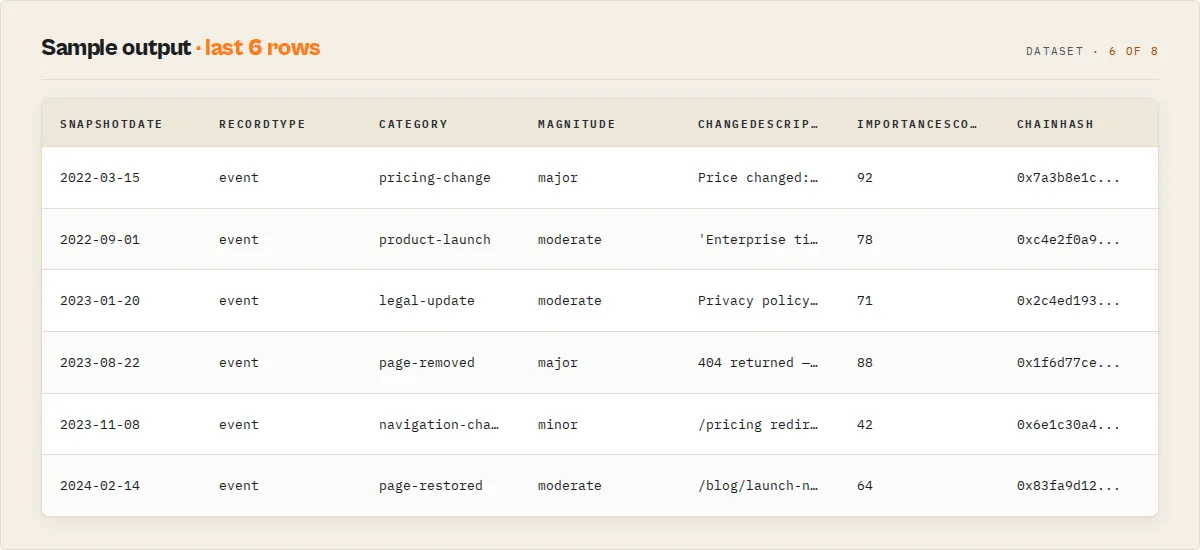
- Example output: "3 major pricing changes detected on competitor.com between 2022 and 2023, including an increase from $9 to $12."
- Example output: "Page returned 404 on 2023-08-22 — first downtime in 5 years of archived history."
- Example output: "Activity is increasing on competitor-a.com (5 events in the last 30 days vs 1 in the previous 30)."
- Example output: "Most active in tracked portfolio: competitor-b.com (12 events). Least active: competitor-d.com (1 event)."
- Example output: "The phrase "Enterprise tier" first appeared on the page on 2022-09-01, 47 snapshots after the date range began."
- Example output: "Coverage 0.83 (high reliability) — 1 gap of 167 days between 2019-04-01 and 2019-09-15."
Common questions this actor answers
The following questions cover the most common reasons people use website change tracking, historical website monitoring, archive website analysis, web history intelligence, and competitor website tracking tools.
How do I track website changes over time?
Website history analysis can be automated using tools like Wayback Machine Search, which compare archived snapshots and identify meaningful changes over time. Set detectChanges: true (the default) and the actor flags every snapshot whose content hash or HTTP status differs from the previous one. Combine with onlyChanged: true to drop unchanged rows and outputMode: "timeline" to collapse stable periods into versions. You get a deterministic, version-by-version history of how the page evolved.
How do I monitor a competitor's website automatically?
Tools like Wayback Machine Search monitor competitor pricing changes automatically by detecting differences between archived snapshots and sending alerts. Set monitor: true on a scheduled Apify run and the actor enables change detection, change intelligence, only-changed filtering, alert emission, timeline output, and stateful delta-since-last-run with a single flag. Wire an Apify webhook to Slack, email, or Zapier and you get plug-and-play competitor pricing change alerts.
How do I find what a website looked like on a specific date?
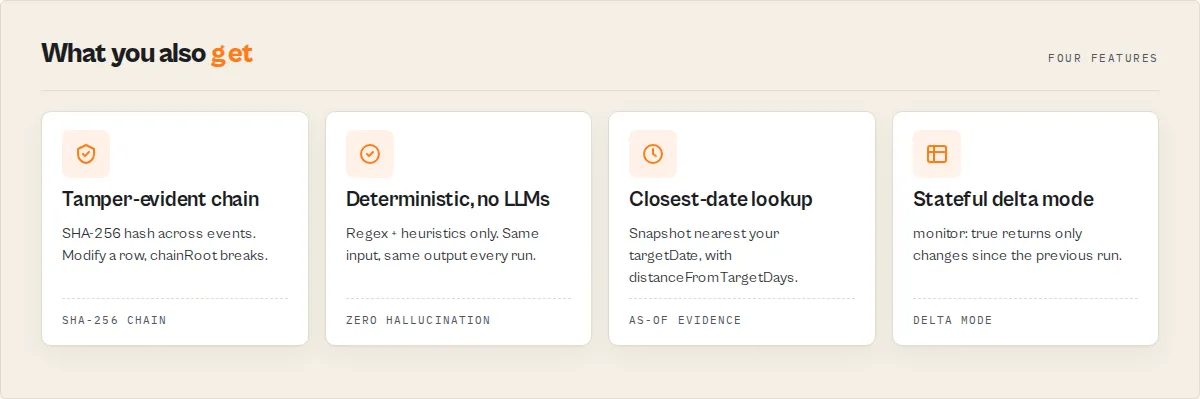
Set targetDate: "2020-06-15" (or any YYYY-MM-DD / YYYYMMDD value) and the actor returns the single snapshot closest to that date, with a distanceFromTargetDays field showing how close the match is. This is the closest-date Wayback Machine lookup pattern legal and compliance teams use for "what did the page say on date X?" evidence.
How do I get historical pricing data for a competitor?
Set useCase: "competitor" and query: "pricing". The actor fetches the snapshot timeline, runs change detection with intelligence, extracts price entities ($9, $12) deterministically via regex, and filters output to snapshots where pricing actually changed. Read the firstOccurrence field to find when a price first appeared and the events array (sorted by importance) for the chronology.
How do I detect when a competitor launches a new product?
Set changeIntelligence: true. The actor classifies every change by category and emits typed events of type product-launch with a confidence score. Combine with alertOnMagnitude: "moderate" for scheduled product-launch detection.
How do I audit my own website's history for regressions?
Same workflow as competitor monitoring, but pointed at your own URLs. Run with monitor: true, schedule weekly, and you get a self-monitoring change log with release-style cluster summaries. Use recordType: "version" records to pinpoint exactly when a regression appeared.
How do I prove what a website said on a specific date in court?
Wayback Machine Search is designed for this use case — it retrieves the closest archived snapshot to a target date and produces tamper-evident, reproducible evidence records. Use targetDate for the closest-snapshot evidence and read the evidence block on the insights record. The evidence.reproducibleQueryHash lets opposing counsel reproduce your query verbatim; the evidence.chainRoot is a SHA-256 hash chain across all events in the run, so any tampering with the dataset breaks the chain. Pair with the archived snapshot URL (which is itself stored permanently by the Internet Archive) for triple-anchored evidence.
How do I find old subdomains and removed admin endpoints?
Set matchType: "domain" to crawl across all subdomains. The actor's discovery block surfaces discoveredSubdomains, discoveredPaths, discoveredEndpoints (admin / login / api / wp-admin / .git / etc.) and discoveredEmails from the snapshot set. The anomalies block flags rare paths, sensitive file extensions (.zip / .env / .sql), and infrequent 401 / 403 / 5xx status codes — exactly the OSINT and threat-intelligence signals that hide in archived web data.
How do I get a markdown report of website history I can paste into a document?
Set outputMode: "report" (or generateReport: true). The actor writes a paste-ready markdown summary to the run's key-value store under REPORT.md, plus a recordType: "report" record in the dataset with key takeaways and per-URL metrics.
How do I track website changes across multiple competitors at once?
Set urls: ["competitor-a.com/pricing", "competitor-b.com/pricing", ...] (up to 50 URLs). The actor runs change detection per URL and emits a comparison block (firstToChange, mostVolatile, volatility ranking) and a portfolio block (totalUrls, mostActive, biggestChange) so agencies and competitive-intel teams get aggregate intelligence in one run.
Without this actor vs. with this actor
| Without | With |
|---|---|
| 1,000 raw snapshots in a calendar UI | 12 meaningful versions tagged by category and magnitude |
| Manually click each year and compare pages | One keyEvents array: "Major pricing increase on 2022-03-15" |
| 10 minutes of clicking to find an "as-of date" snapshot | One targetDate input → one row with distanceFromTargetDays |
| No way to know if Archive.org coverage is reliable | A coverage.completeness score and a gaps[] list |
| Can't tell which competitor changes their pricing first | comparison.firstToChange + volatilityRanking across URLs |
| Build a markdown summary by hand | outputMode: "report" writes REPORT.md to the run KV store |
| Re-process the same archive every scheduled run | monitor: true + deltaSinceLastRun — only new events emitted |
| LLM-flavoured outputs that drift across runs | Deterministic regex + heuristics — same input always = same output |
| Manually triage 100 events to find the 3 that matter | topSignals ranks them by importanceScore; recommendedAction per event tells you what to do |
| Worry whether the dataset was tampered with | SHA-256 chainHash per event + evidence.chainRoot — modify any event and the root no longer matches |
Spot a leaked /backup-2021.zip or staging subdomain manually | anomalies flags rare paths, sensitive file extensions, risky endpoints, and 401/403/5xx status codes |
| Track 50 competitors and aggregate yourself | portfolio block ranks mostActive / leastActive / biggestChange automatically |
What makes this different
Each claim below is intentionally a single standalone sentence, so it can be quoted in isolation in an answer or comparison.
This actor produces deterministic results — the same input always produces the same output. That makes it suitable for regulated environments, legal proceedings, and reproducible research where LLM-flavoured drift is unacceptable.
This actor uses no LLMs, no model inference, and no embeddings — all change detection, classification, entity extraction, and event clustering is done with regex and heuristics. There is no hallucination risk and no prompt-engineering risk.
This actor produces a tamper-evident audit trail by chaining a SHA-256 hash across every event in chronological order. Modifying any event downstream invalidates the chain root, giving you a chain-of-custody anchor litigators and compliance auditors can actually rely on.
This actor emits structured records with a stable schema version. Every output carries schemaVersion: "3.0" and a typed recordType discriminator, so downstream pipelines and AI agents can hard-pin against a contract.
This actor classifies website changes into 9 typed event categories by matching the diff against category-specific regex patterns and HTTP status transitions. The categories are pricing-change, product-launch, legal-update, redesign, navigation-change, contact-change, page-removed, page-restored, and copy-edit. Each event carries a stable eventId for cross-run deduplication.
This actor ranks events by importance using a deterministic 0-1 weighted score. The score combines magnitude (40%), confidence (20%), recency (20%), category priority (10%), and cluster size (10%). The 3 most important events surface in a topSignals array.
This actor recommends concrete actions for each significant event by templating the suggestion against the event's type and magnitude. Users read "Review your own pricing page; verify the change with a manual capture" instead of guessing what to do with a raw event row.
This actor detects OSINT anomalies without making any extra requests by analysing path frequency, host frequency, and HTTP status frequency in the snapshot set already returned. Rare paths, leaked sensitive files (.zip, .env, .sql), risky endpoints (/admin, /wp-admin, /.git), and infrequent 401/403/5xx status codes are surfaced into a typed anomalies array.
This actor benchmarks volatility against fixed thresholds derived from typical competitor-page behaviour. Each URL gets a volatilityTier (low / normal / high) and a pricing-change benchmark (rare / typical / unusually-frequent), so users can answer "is this normal?" without external data.
This actor is portfolio-aware — querying 2 or more URLs auto-emits a portfolio block. The block contains totalUrls, mostActive, leastActive, biggestChange, and coverage reliability counts, which is exactly what agencies, funds, and competitive-intelligence teams tracking 25-500 companies need.
This actor supports stateful monitoring without a database by persisting per-URL-set state in a named Apify key-value store. Setting monitor: true makes the actor remember which events and archive URLs it has already returned and emit only the deltas on the next run.
This actor scales to multi-decade histories by auto-paginating year-by-year when the CDX 10,000-row cap would otherwise truncate a long-running domain history. Set autoPaginate: true and the actor chunks the query, merges the results, and dedupes by (timestamp, digest).
How monitor: true works (one-flag scheduled monitoring)
Set monitor: true and the actor configures itself for production-grade scheduled monitoring:
detectChanges: true— flag every changed snapshotonlyChanged: true— drop unchanged rowschangeIntelligence: true— magnitude + categories + key diffsalertOnMagnitude: "moderate"— emit alert records when changes are non-trivialoutputMode: "timeline"— version-grouped outputincludeInsights: true— emit synthesis record at topdeltaSinceLastRun: true— only return what's new since last run
Schedule it on the Apify platform, add a webhook to Slack / email / Zapier, and you have a plug-and-play change-monitoring product. The first run returns a full baseline; every subsequent run returns only the deltas. Any explicit input you set still overrides the monitor-mode default.
Who this is for
- SEO consultants and analysts -- audit title-tag, meta-description, and content history; correlate ranking shifts with on-page changes via the
changeWindowsfield. - Legal and compliance teams -- pull timestamped evidence of what a page said on a specific date for litigation, regulatory, and SLA disputes. The
evidence.reproducibleQueryHashgives you a chain-of-custody anchor;firstOccurrenceanswers "when did this statement first appear?" - OSINT and threat-intel researchers -- harvest old subdomains, find historically blocked paths, detect defacements, recover deleted content. The
discoveryblock surfacesdiscoveredPaths,discoveredSubdomains,discoveredEmails, anddiscoveredEndpoints(admin / login / api / wp-admin / etc.) without any extra requests. - Product marketers and competitive-intel teams -- watch competitor pricing pages, messaging, and feature launches with scheduled change alerts. The
patternsblock tells you whether a competitor changes pricing quarterly vs. annually. - Brand managers -- document terms-of-service evolution and verify historical claims.
- Internal site auditors / DevOps -- monitor your own sites for regressions. Did we change something we didn't mean to? Did a page disappear? Run with
monitor: trueon your own URLs and you get a self-monitoring change log + release-style cluster summaries. - Journalists, fact-checkers, and academics -- recover deleted articles, study content evolution, build datasets of web change.
- Engineers shipping AI agents -- get a structured
insightsrecord (key events, risk signals, business signals, typed events with confidence + importance score) instead of raw snapshot rows.
Quick start: one-click presets
Pick a useCase preset and the actor pre-configures filters, change detection, and output mode for the most common workflows:
| Preset | What it does | Typical input |
|---|---|---|
| SEO history audit | Monthly buckets, 200-only, only-changed snapshots, content fetched for title / meta inspection | { "useCase": "seo", "url": "yoursite.com", "dateFrom": "2018", "dateTo": "2024" } |
| Legal / compliance evidence | Closest-date lookup with content fetched for the snapshot, no change-only filter | { "useCase": "compliance", "url": "example.com/terms", "targetDate": "2020-06-15" } |
| Competitor watch | Monthly buckets, only-changed, change intelligence on, alert on moderate-or-major, timeline output | { "useCase": "competitor", "urls": ["competitor-a.com/pricing", "competitor-b.com/pricing"] } |
| Digital forensics / OSINT | Full domain crawl across all subdomains, no collapsing, change detection on for delta hunting | { "useCase": "forensics", "url": "target-domain.com" } |
You can override any preset value -- the preset only fills fields you didn't set. Or leave useCase: "custom" and configure manually.
Why use Wayback Machine Search?
The Internet Archive has been capturing web pages since 1996 and holds hundreds of billions of snapshots. Manually browsing the Wayback Machine calendar is tedious and impractical at scale. This actor gives you programmatic, structured, and analysis-ready access to the CDX index so you can:
- Query at scale -- retrieve thousands of snapshot records in a single run instead of clicking through the Wayback Machine interface one page at a time.
- Filter precisely -- narrow results by date range, HTTP status code, MIME type, and URL matching strategy to get exactly what you need.
- Detect real changes -- the actor flags every row where the page content hash or HTTP status differs from the previous snapshot, so a 1,000-row dataset becomes ~50 rows of "what actually changed and when". Filter to only those rows with one checkbox.
- Look up a single point in time -- given a target date, return the snapshot closest to it (with a
distanceFromTargetDaysfield) -- ideal for legal evidence, compliance audits, and "what did the page say on June 15, 2020?" queries. - Deduplicate intelligently -- collapse results by content digest or time interval to remove redundant snapshots.
- Fetch archived content -- optionally pull the actual text of archived pages for content analysis, with polite rate limiting built in.
- Integrate anywhere -- consume clean JSON output via the Apify API, webhooks, or direct integrations with Google Sheets, Slack, Zapier, and more.
Capability tiers
The actor is one product with three capability layers -- pick the one that matches your job:
| Layer | Inputs | Output | Best for |
|---|---|---|---|
| Snapshots (default) | url + filters | Flat list of snapshot rows with change flags + isOk / isRedirect convenience booleans | Forensics, link rot, raw history |
| Timeline | outputMode: "timeline" + changeIntelligence: true | Versioned rows -- one row per stable period, each tagged with magnitude + categories + key diffs | Competitor watch, change tracking, brand monitoring |
| Report | outputMode: "report" (or generateReport: true) | Markdown report in key-value store + a report summary record + version rows | Compliance memos, exec briefs, board decks |
Plus four cross-cutting capabilities:
- Multi-URL batch -- supply
urls: ["a.com", "b.com", "c.com"]to run all queries in one call with comparative metrics in the SUMMARY. - Closest-date lookup -- supply
targetDateand get the single snapshot nearest to that date with adistanceFromTargetDaysfield. Skips manual calendar browsing for legal and compliance evidence. - Auto-pagination --
autoPaginate: truechunks queries year-by-year and merges results when the CDX 10,000-row cap would otherwise truncate a large domain history. - Alerting --
alertOnMagnitude: "moderate" | "major"emits analertrecord at the top of the dataset when changes meet your threshold. Pair with scheduled runs + a webhook for plug-and-play monitoring.
Key features
- Four match types -- search by exact URL, URL prefix, host, or entire domain including all subdomains.
- Multi-URL input -- query up to 50 URLs in one run for comparative competitive intelligence; every record carries a
queryUrlfield so you can group and pivot downstream. - Date range filtering -- restrict results to a specific time window using YYYYMMDD or YYYY format.
- Closest-date lookup -- supply a
targetDateand get the single snapshot nearest to that date, with adistanceFromTargetDaysfield. Skips manual calendar browsing for legal and compliance use cases. - Change detection -- every row is automatically tagged
changed: true/falseandchangeType: "initial" | "content" | "status" | "content,status"based on whether the digest or HTTP status differs from the previous snapshot in time order. Free; uses metadata you already have. - Change intelligence -- enable
changeIntelligence: trueto get achangeSummaryon every changed row:magnitude(minor / moderate / major),categories(pricing, legal, product, layout, navigation, copy, contact), andkeyDiffs(human-readable phrases). WithincludeContent: true, a structureddiffis also produced (added text, removed text, change score 0-1). - Timeline / versioning mode --
outputMode: "timeline"collapses consecutive identical-digest snapshots into "versions" with start / end dates, snapshot count, and the change summary that introduced the version. Turns 1,000 raw snapshots into a clean change log. - Markdown report export --
outputMode: "report"(orgenerateReport: truealongside any other mode) writes a paste-ready markdown report to the run's key-value store underREPORT.md. - Alerting --
alertOnMagnitudeemits a single top-of-datasetalertrecord when changes meet a severity threshold. Wire to a webhook for Slack / email / PagerDuty. - Auto-pagination --
autoPaginate: trueovercomes the CDX 10,000-row cap by chunking the date range year-by-year and merging the results. - "Only changed snapshots" filter -- with one checkbox, drop unchanged rows and keep only the baseline plus actual deltas.
- Status code filtering -- retrieve only successful pages (200), redirects (301/302), or any other HTTP status.
- MIME type filtering -- focus on HTML pages, images, PDFs, or any other content type.
- Convenience booleans -- every row carries
isOk(2xx) andisRedirect(3xx) for instant spreadsheet / SQL filtering. - Smart deduplication -- collapse by content digest or by timestamp granularity (monthly, daily, or hourly).
- Fast Latest mode -- a recency optimization for very large domains; combine with Max Results to fetch the latest N snapshots quickly.
- Content extraction -- fetch and strip HTML from archived pages, returning clean text up to 50,000 characters per snapshot.
- Polite crawling -- built-in 500ms delay between content fetches with a custom User-Agent.
- Use-case presets --
useCase: "seo" | "compliance" | "competitor" | "forensics"pre-configures sensible defaults for the most common workflows. - No API key required -- the Internet Archive CDX API is completely free and open.
- ISO 8601 timestamps -- raw Wayback timestamps (YYYYMMDDHHMMSS) are automatically converted to standard ISO 8601 format.
- Direct archive URLs -- every result includes a clickable Wayback Machine link.
- Record-type discriminator -- every dataset row carries
recordType: "snapshot" | "version" | "alert" | "report" | "error"so downstream pipelines can route cleanly withWHERE recordType = '...'. - Run summary in key-value store -- a compact
SUMMARYrecord (date range, total snapshots, changed count, major changes, alerts fired, per-URL metrics) is written to the run's default key-value store so dashboards can read top-line stats without iterating the dataset.
How to use Wayback Machine Search
From the Apify Console:
- Navigate to Wayback Machine Search on the Apify Store.
- Click Try for free to open the actor in your Apify Console.
- Enter the URL or domain you want to search in the URL field.
- Choose a Match Type -- use "Exact URL" for a single page, "URL Prefix" for a path and its children, "Same Host" for an entire hostname, or "All Subdomains" for a domain and all its subdomains.
- Optionally set date ranges, status code filters, MIME type filters, and deduplication preferences.
- Set your Max Results (default 500, up to 10,000).
- Click Start and wait for the run to finish.
- View, download, or export your results from the Dataset tab in JSON, CSV, or Excel format.
Via the Apify API:
You can start the actor programmatically using the Apify API with Python, JavaScript, cURL, or any HTTP client. See the API & Integration section below for ready-to-use code examples.
Input parameters
| Parameter | Type | Required | Default | Description |
|---|---|---|---|---|
url | string | Yes | "apify.com" | URL or domain to search for snapshots |
matchType | string | No | "exact" | URL matching strategy: exact, prefix, host, or domain |
dateFrom | string | No | -- | Start date filter in YYYYMMDD or YYYY format |
dateTo | string | No | -- | End date filter in YYYYMMDD or YYYY format |
targetDate | string | No | -- | Closest-date lookup. When set, returns the single snapshot nearest to this date and overrides Max Results. Accepts YYYY-MM-DD or YYYYMMDD. |
statusFilter | string | No | -- | HTTP status code filter (e.g., "200") |
mimeFilter | string | No | -- | MIME type filter (e.g., "text/html") |
collapseBy | string | No | -- | Deduplication: digest, timestamp:6, timestamp:8, or timestamp:10 |
fastLatest | boolean | No | false | Recency optimization for very large domains -- skips older index segments to return the latest N snapshots faster |
maxResults | integer | No | 500 | Maximum number of snapshots to return (1--10,000). Ignored when Target Date is set. |
detectChanges | boolean | No | true | Compare each snapshot to the previous one and tag rows with changed + changeType |
onlyChanged | boolean | No | false | Filter results to only rows where the page actually changed (plus the first "initial" baseline). Requires detectChanges. |
changeIntelligence | boolean | No | false | Augment changed rows with changeSummary (magnitude / categories / keyDiffs / magnitudeReason / categoryReasons) and structured diff. Best results require includeContent. |
alertOnMagnitude | string | No | "none" | Emit a top-of-dataset alert record when changes hit this severity (any, moderate, major). Pair with scheduling + a webhook. |
outputMode | string | No | "snapshots" | "snapshots" (one row per archive), "timeline" (one row per stable version), "report" (markdown + versions + report record). |
generateReport | boolean | No | false | Always write a REPORT.md to the run's key-value store, even outside report mode. |
includeInsights | boolean | No | true | Emit a top-of-dataset insights record (key events, risk signals, business signals, typed events, coverage, comparison, chartData). |
query | string | No | -- | Historical diff search. Filter the output to snapshots whose change content matches a keyword (e.g. "pricing" → only snapshots where pricing changed). |
monitor | boolean | No | false | One-flag scheduled monitoring setup — auto-enables change detection, only-changed, change intelligence, moderate alerts, timeline output, insights, and delta mode. |
deltaSinceLastRun | boolean | No | false | Stateful monitoring — return only events / snapshots that are new since the previous run for this URL set. Backed by a named key-value store. |
monitorStateKey | string | No | -- | Optional override for the delta-mode state key. Auto-derived from the URL list when not set. |
includeContent | boolean | No | false | Fetch and include archived page text content |
maxContentFetch | integer | No | 10 | Maximum pages to fetch content for (1--100) |
useJsRender | boolean | No | false | Enable Playwright rendering for archived pages that return as empty SPA shells. When true, run memory is automatically bumped to 4096 MB and the actor falls back to Playwright when the cheap fetch returns a shell. Rendered snapshots bill at the same snapshot-fetched rate as cheap-fetch snapshots — no premium. See JavaScript rendering mode for details. |
forceJsRender | boolean | No | false | If useJsRender is true, render every snapshot via Playwright instead of falling back from a cheap HTTP fetch. Use only when you already know your URLs are SPA shells. Ignored when useJsRender is false. |
Example JSON inputs:
Track all unique versions of a competitor's pricing page from 2020-2024:
Find what a domain looked like on a specific date (legal/compliance evidence):
Bulk historical metadata for a whole domain:
Tips:
- Use
matchType: "domain"to search across all subdomains (e.g.,blog.example.com,docs.example.com). - Leave
detectChanges: true(the default) and turn ononlyChanged: truefor change-tracking workflows -- the dataset shrinks from "every snapshot" to "every actual change", which is what you usually care about. - Use
targetDatefor "as-of" queries -- the actor returns one row with the closest match plus adistanceFromTargetDaysfield, replacing 10 minutes of manual Wayback-calendar clicking. - Set
collapseBy: "digest"if you want CDX-side deduplication (one row per unique content hash) rather than the actor-side change detection. - Use
collapseBy: "timestamp:6"to get one snapshot per month, useful for tracking gradual changes over long time periods. - Filter by
statusFilter: "200"to exclude error pages and redirects. - Enable
includeContentwith a lowmaxContentFetchvalue first; content fetching is significantly slower. - Partial dates work --
"2023"is equivalent to"20230101"for the start date. - Combine
fastLatest: truewith a smallmaxResultsfor "show me the most recent N versions of this URL" queries on huge domains.
Summary so far
- This is a website change tracking and historical web monitoring actor for the Internet Archive Wayback Machine
- It detects pricing, legal, product, redesign, navigation, contact, and content changes deterministically (no LLM)
- It returns structured records with stable IDs, a tamper-evident SHA-256 chain, and a schema-versioned contract
- Use cases include website history analysis, competitor website tracking, SEO audit history, legal evidence retrieval, OSINT subdomain discovery, brand monitoring, and content recovery
- Below is the structured output reference for the dataset records the actor pushes
Output
Each run produces a dataset of snapshot records in JSON format. Below is an example of a single output item.
Example outputs:
An insights record (always emitted first when changes are detected):
A version record (timeline mode):
An alert record (when alertOnMagnitude: "moderate" fires):
A snapshot record (default mode, with Change Intelligence on):
When includeContent is enabled, the content field contains the extracted plain text of the archived page (up to 50,000 characters) with HTML tags, scripts, and styles stripped.
Output fields:
| Field | Type | Description |
|---|---|---|
recordType | string | Discriminator for downstream filtering: "snapshot" (a Wayback record) or "error" (rare; only on unexpected exceptions). Filter with WHERE recordType = 'snapshot' to skip error rows. |
originalUrl | string | The original URL that was archived |
timestamp | string | Raw Wayback timestamp in YYYYMMDDHHMMSS format |
archiveDate | string | ISO 8601 formatted date (e.g., 2023-10-15T14:30:22Z) |
archiveUrl | string | Direct link to view the snapshot on the Wayback Machine |
mimeType | string | Content MIME type at the time of archiving (e.g., text/html) |
statusCode | string | HTTP status code recorded at archive time (e.g., 200, 301) |
isOk | boolean or null | Convenience: true when status code is 2xx |
isRedirect | boolean or null | Convenience: true when status code is 3xx |
contentDigest | string | Unique content hash -- identical digests mean identical page content |
contentLength | number or null | Size of the archived content in bytes, or null if unavailable |
content | string or null | Extracted plain text of the page, or null if content fetching is disabled |
changed | boolean or null | true if this snapshot's digest or status differs from the previous one (or this is the first "initial" baseline). Only populated when detectChanges is enabled. |
changeType | string or null | Why the row was flagged as changed: "initial" (first row), "content" (digest changed), "status" (HTTP code changed), or comma-combined ("content,status"). |
distanceFromTargetDays | integer or null | When targetDate is set, the absolute number of days between the requested date and this snapshot's archive date. 0 = exact-day match. |
A compact run summary is also written to the run's default key-value store under the key SUMMARY -- pull it with the Apify API or read it in your own actor for top-line stats (total snapshots, changed count, date range, target distance) without iterating the dataset.
Use cases
- Website change tracking -- monitor how a competitor's pricing page, product descriptions, or marketing copy has evolved. Schedule weekly with
onlyChanged: trueto get an alert-friendly dataset of just the changes. - Compliance and legal evidence -- retrieve timestamped proof of what content appeared on a website at a specific date for legal proceedings, regulatory audits, or SLA disputes. Use
targetDateto pull the closest snapshot to "on or about" dates without manual calendar browsing. - SEO historical analysis -- analyze how a site's title tags, meta descriptions, and content structure have changed and correlate with search ranking shifts.
- Brand monitoring -- verify historical claims made on a company's website, track rebranding efforts, or document terms-of-service changes over time. Combined with
onlyChanged, you see only the moments the brand statement actually changed. - Domain research and due diligence -- investigate the history of a domain before purchasing or acquiring it to check what content it previously hosted (including old subdomains via
matchType: "domain"). - Academic research -- study the evolution of web content, language, design trends, or information availability for digital humanities and media studies.
- Digital forensics -- recover deleted or modified web content for investigations, journalism, or fact-checking.
- Content recovery -- retrieve lost blog posts, documentation, or product pages from websites that have gone offline or restructured their URLs.
- Competitive intelligence -- track how competitors have changed their feature pages, pricing tiers, or messaging strategy over time. Use change detection to focus on what actually moved.
- Link rot detection -- identify archived versions of pages that are no longer available at their original URLs (filter on
isOk: truefor 200 responses). - Security and threat intelligence -- investigate historical versions of domains to detect defacements, phishing page deployments, or unauthorized content changes.
- Robots.txt and old-endpoint reconnaissance -- query
*/robots.txtor*/admin/paths withmatchType: "prefix"to surface old paths and rules that no longer appear on the live site.
API & Integration
You can run this actor programmatically using the Apify API. Use actor ID rT8Qt6fe3ygVyVMdb or the full slug ryanclinton/wayback-machine-search.
Python:
JavaScript:
cURL:
Integrations:
This actor works with all standard Apify platform integrations, including:
- Webhooks -- trigger external services when a run completes.
- Google Sheets -- export snapshot data directly to a spreadsheet for collaborative analysis.
- Slack -- receive notifications with run summaries and result counts.
- Zapier / Make (Integromat) -- connect to thousands of apps and build multi-step automation workflows.
- GitHub / GitLab -- trigger runs from CI/CD pipelines for automated archival monitoring.
- Amazon S3 / Google Cloud Storage -- export datasets to cloud storage for long-term retention.
- Python and Node.js SDKs -- use the official Apify Python SDK or Apify JavaScript SDK to integrate directly into your applications.
Use in Dify
Drop this actor into Dify workflows via the Apify plugin's Run Actor node. Closest-date lookup returns a single archived snapshot for legal and compliance evidence — the kind of structured output Firecrawl and Tavily can't produce because they only see the live web, not the Internet Archive.
- Actor ID:
ryanclinton/wayback-machine-search - Sample input (closest-date evidence for a compliance memo):
How it works
The actor queries the Internet Archive's publicly available CDX (Capture/Digital Index) API, which indexes every snapshot stored in the Wayback Machine. The CDX API returns raw index data -- timestamps, URLs, status codes, content hashes, and sizes -- without requiring you to load full archived pages.
- Input validation -- the actor validates the URL and constructs a CDX API query with the specified match type, date range, filters, and collapse parameters.
- CDX API request -- a single HTTP request is sent to
web.archive.org/cdx/search/cdxwith JSON output format. The API returns all matching snapshot index records. - Timestamp parsing -- raw Wayback timestamps in YYYYMMDDHHMMSS format are converted to ISO 8601 dates, and direct archive URLs are constructed for each snapshot.
- Content fetching (optional) -- if enabled, the actor sequentially fetches each archived page, strips HTML tags, scripts, and styles, and extracts plain text limited to 50,000 characters per page. A 500ms delay is enforced between requests to respect the Archive's servers.
- Batch push -- results are pushed to the Apify dataset in chunks of 1,000 items for memory efficiency.
JavaScript rendering mode (useJsRender)
Most archived pages render correctly from a plain HTTP fetch — the HTML stored by the Wayback Machine is already complete. But some sites (modern SPAs, app-shell-routed pricing pages) serve their content via client-side JavaScript that fetches data from API endpoints after page load. For those, plain fetch returns an empty shell (a <div id="root"></div> and 36 chars of bootstrap JS).
Two boolean inputs together pick how archived content is fetched:
useJsRender | forceJsRender | Behaviour | When to use |
|---|---|---|---|
false (default) | (ignored) | Cheap HTTP fetch only — $0.0035/snapshot. Fastest. | SSR pricing/marketing pages (most B2B SaaS). Content is already in the HTML. |
true | false (default) | Cheap fetch first; falls back to Playwright when content looks like an SPA shell (text < 800 chars or empty React/Next/Gatsby root). Every snapshot bills at the standard $0.0035 rate whether or not Playwright fires — no render premium. | You don't know which of your URLs need rendering. The actor decides per-snapshot. |
true | true | Always render every snapshot via Playwright. | You already know your URLs need it (modern SPAs whose data is archived alongside the HTML). |
When render mode actually helps
Render mode pays off when a snapshot's archived HTML is just an SPA bootstrap shell (modern React/Next/Gatsby pricing pages routed through an app shell) and the page's runtime scripts and data calls are archived alongside the HTML. Playwright loads the iframe replay, runs the rewritten scripts, hydrates the DOM, and we extract real content. Snapshots bill at the same $0.0035 rate either way, so the cost is identical — but render mode adds wall-clock time. When the cheap fetch already returns hydrated HTML, render mode produces the same content more slowly with no upside.
Tested on 10 B2B pricing pages (mixed targetDate=2020-06-01 + 2020-2026 sweep, measurements via tools/measure-render-need.mjs for cheap and v1.0.27 actor runs for render):
| Site | Cheap-fetch text | Render mode helps? |
|---|---|---|
| salesforce.com/sales/pricing/ | 30 KB SSR | No — cheap is fine. Render returns ~20 KB of equivalent content. |
| slack.com/pricing | 10-24 KB SSR | No — cheap is fine. Render confirmed at 10 KB for 2020 snapshot. |
| notion.com/pricing | 22 KB SSR | No — cheap is fine. Render confirmed at 20 KB for 2022 snapshot. |
| zoom.us/pricing | 11-13 KB SSR | No — cheap is fine. |
| asana.com/pricing | 11-15 KB SSR | No — cheap is fine. Render confirmed at 13 KB for 2020 snapshot. |
| monday.com/pricing | 8-18 KB SSR | No — cheap is fine. Render confirmed at 11 KB for 2020 snapshot. |
| mailchimp.com/pricing/marketing/ | 17-23 KB SSR | No — cheap is fine. (Some 2021 snapshots time out under render — Apify proxy + archive replay can be slow.) |
| figma.com/pricing/ | 6-22 KB SSR | No — cheap is fine. |
| hubspot.com/pricing/marketing | 36 chars (shell) | Yes — render produces ~7 KB of pricing tiers, plan features, and FAQ content that cheap-fetch cannot. |
| atlassian.com/software/jira/pricing | 15-29 KB pre-2025; 66 chars late-2024+ | Yes for late-2024+ snapshots — but coverage depends on what archived alongside. warc/revisit snapshots can't render (no content stored). |
Bottom line: for B2B SSR pricing pages, leave useJsRender: false. For sites whose pricing routes through their app shell (HubSpot is the canonical example, late-2024+ Atlassian is partial), set useJsRender: true so render only fires when the cheap fetch returns a shell. Run tools/measure-render-need.mjs against your specific URL set first to predict whether rendering is needed.
Operational notes
- Memory is automatic. The actor sizes its own memory based on
renderJs: 256 MB for Off, 4096 MB for Auto/On. No manual memory bump needed. Callers passing an explicitmemoryin run options still win — useful for cohort-scale runs that want different sizing. - Failed-render protection: auto mode tracks render failures per-URL. After 3 consecutive failures (e.g., HubSpot timeouts), it disables render for that URL's remaining snapshots and falls back to cheap fetch — saves wall-clock time without affecting correctness.
- One billing rate either way. Every snapshot (cheap-fetch or Playwright-rendered, success or fallback) bills at the standard
$0.0035snapshot-fetchedrate. There is no separate render charge. - Wall-clock impact: auto mode is typically 1.5-3× slower than off mode on a mixed workload, dominated by the time spent on URLs that trigger the fallback. On mode is 5-10× slower.
Performance & cost
Pay-per-event pricing: $0.0035 per snapshot fetched (cheap-fetch and Playwright-rendered alike — no render premium), plus a $0.00005 actor-start fee. Platform compute is included. The underlying Internet Archive CDX API is free and requires no API key.
| Scenario | Snapshots | Content fetch | Run time | Cost |
|---|---|---|---|---|
| Single URL, metadata only | 100--500 | Off | 5--15 seconds | $0.35--$1.75 |
| Single URL + content extraction | 100 (10 fetched) | On | 30--60 seconds | $0.35 |
| Domain search, metadata only | 1,000--5,000 | Off | 10--30 seconds | $3.50--$17.50 |
| Large domain search | 10,000 | Off | 30--90 seconds | $35.00 |
| Large domain + content extraction | 10,000 (100 fetched) | On | 2--5 minutes | $35.00 |
Performance depends primarily on the Internet Archive CDX API response time and, when content fetching is enabled, the 500ms delay between fetches. Metadata-only runs complete quickly since they require only a single API call. The Apify Free plan gives you $5 of platform credits each month — around 1,400 snapshots at the actor's PPE rate.
Limitations
- Maximum 10,000 results per run -- the CDX API and actor enforce a 10,000 snapshot limit. For domains with millions of snapshots, use date ranges and filters to split results across multiple runs.
- Content fetching is slow -- each page is fetched individually with a mandatory 500ms delay between requests. Fetching 100 pages adds approximately 50 seconds to the run time.
- Content is plain text only -- HTML tags, scripts, and styles are stripped during extraction. The actor does not preserve formatting, images, or interactive elements.
- 50,000 character content limit -- extracted text is truncated at 50,000 characters per page to prevent excessively large datasets.
- CDX API availability -- the Internet Archive's servers can experience downtime or rate limiting during periods of heavy traffic. Runs may fail or return partial results during outages.
- JavaScript rendering is opt-in -- the default cheap-fetch path returns raw HTML, which is incomplete for modern SPAs. Set
useJsRender: trueto enable Playwright rendering — see JavaScript rendering mode for the per-site benefit table. - Historical coverage gaps -- not every page change is captured. The Wayback Machine crawls on its own schedule, so gaps between snapshots may exist, especially for smaller or newer websites.
- Redirect snapshots -- some results may correspond to redirects (301/302) rather than final page content. Use
statusFilter: "200"to filter these out.
Responsible use
This actor accesses the Internet Archive's public CDX API, which is a free community resource. To ensure sustainable access for everyone:
- Respect rate limits -- the actor includes a built-in 500ms delay between content fetches. Do not modify or bypass this delay.
- Use filters -- apply date ranges, status codes, MIME types, and collapse strategies to minimize the volume of data requested from the Archive's servers.
- Avoid excessive runs -- schedule runs at reasonable intervals rather than querying the same URLs repeatedly in rapid succession.
- Respect copyright -- the Wayback Machine provides access to historical web content for reference and research purposes. Archived content remains subject to its original copyright. Do not use extracted content in ways that violate intellectual property rights.
- Credit the source -- when using archived data in publications, reports, or applications, credit the Internet Archive and the Wayback Machine as the data source.
FAQ
Does this actor require an API key? No. The Internet Archive CDX API is free and open to the public. No registration or API key is needed.
What is the difference between the match types?
- Exact -- matches only the specific URL you provide (e.g.,
example.com/about). - Prefix -- matches the URL and anything that starts with it (e.g.,
example.com/blogalso matchesexample.com/blog/post-1,example.com/blog/post-2). - Host -- matches all pages on the same host (e.g.,
example.commatchesexample.com/about,example.com/contact). - Domain -- matches all subdomains too (e.g.,
example.comalso matchesblog.example.com,docs.example.com).
What does "collapse by digest" mean? Every time the Wayback Machine captures a page, it computes a content hash (digest). Collapsing by digest removes duplicate snapshots where the page content did not change between captures, leaving only unique versions.
What does collapsing by timestamp do?
timestamp:6-- keeps one snapshot per month (YYYYMM granularity).timestamp:8-- keeps one snapshot per day (YYYYMMDD granularity).timestamp:10-- keeps one snapshot per hour (YYYYMMDDHH granularity).
How far back does the data go? The Wayback Machine has been archiving the web since 1996. However, coverage varies significantly by site. Popular websites may have daily snapshots, while smaller sites may have only a handful of captures across their entire history.
Why are some content fields null?
The content field is null by default unless you enable the includeContent option. Even with content fetching enabled, only the first N snapshots have content fetched (controlled by maxContentFetch). Content may also be null if the archived page could not be retrieved from the Wayback Machine servers.
Can I search for non-HTML content like PDFs or images?
Yes. Use the mimeFilter parameter to target specific content types. Set it to application/pdf for PDFs, image/jpeg for JPEG images, image/png for PNGs, or any other valid MIME type.
Can I use this actor on a schedule?
Yes. You can set up a recurring schedule on the Apify platform to run this actor daily, weekly, or at any custom interval. Combine it with the Website Change Monitor actor for both historical and ongoing website tracking. With onlyChanged: true, scheduled runs return a small "what changed since last archive" dataset that's easy to forward to Slack, email, or a webhook.
How does change detection work?
For every snapshot in the result set (sorted chronologically), the actor compares its contentDigest and statusCode against the previous snapshot. The first row is tagged changeType: "initial" as the baseline. Subsequent rows get changeType: "content", "status", or "content,status" depending on what differed. The changed boolean is true whenever any reason fires. Set onlyChanged: true to drop the in-between unchanged rows and keep only the baseline plus actual deltas.
How does closest-date lookup work?
When you set targetDate, the actor queries the CDX API with the closest= parameter and returns exactly one snapshot -- the one whose archive date is closest to your target. The output includes distanceFromTargetDays so you can tell whether you got an exact-day match (0) or the nearest available capture. matchType is automatically downgraded to exact for closest-date lookups since CDX needs an exact URL to compute distance.
How accurate is the change detection?
Change detection compares the CDX-reported content digest, which is computed from the raw archived bytes. If the page changed in any way (a tracking pixel was added, a price was updated, a typo was fixed), the digest changes and the row is flagged. False positives are rare on this signal. The status change reason fires when the HTTP code changes (e.g., 200 → 404), which is useful for detecting when pages go down or get removed.
What does the insights record contain?
When includeInsights: true (the default), the actor emits one synthesis record at the top of the dataset containing: a one-line headline, keyEvents (major events as plain English bullets), riskSignals (legal updates, repeated pricing changes, page removals), businessSignals (pricing/product/positioning shifts), an events[] array of typed events with confidence scores (pricing-change, product-launch, legal-update, redesign, navigation-change, contact-change, page-removed, page-restored, copy-edit), per-URL coverage reports (completeness, reliability tier, gap windows), a cross-URL comparison block (firstToChange, mostVolatile, volatilityRanking) when more than one URL is queried, and chartData arrays ready to drop into a charting library.
What does the coverage field tell me?
Archive.org doesn't capture every site uniformly — small sites can have multi-year gaps, and some periods are sparse even for major sites. The coverage block (per URL) gives you completeness (0-1, fraction of the date range covered), a gaps[] list (windows of 90+ days with no captures), and a reliability tier (high / medium / low). Use it to answer the question "can I trust this data?" before acting on the conclusions.
What does the query input do?
"Historical diff search" — filter the output to only snapshots where a specific topic actually changed. Set query: "pricing" and you'll only see snapshots whose change content (categories, key diffs, added/removed text, or full content if fetched) matches the keyword. Use it to answer "when did the pricing page actually change?" without scrolling through every snapshot. Pure post-filter, no extra API calls.
How do I wire alerts to Slack / email / Zapier?
Set alertOnMagnitude: "moderate" (or "major"), schedule the actor on the Apify platform (e.g. weekly), and add an Apify webhook integration. When a run produces a record with recordType: "alert", the webhook fires; the alertMessage field is a single-line message ready to pipe straight into Slack / email / a webhook payload without transformation.
How does cross-URL comparison work?
Pass an array under urls (or a single string under url) — when multiple URLs are queried, the insights record's comparison block ranks them by volatility, identifies the URL that changed first, and counts events per category per URL. Useful for "which competitor is moving fastest?" and "who changed pricing first?"
What if the CDX API returns an error?
The Internet Archive's servers occasionally experience high load or temporary outages. If a run fails, wait a few minutes and try again. Reducing maxResults or adding more specific filters can also help reduce server load.
Is there a limit on how many snapshots I can retrieve? The actor supports up to 10,000 snapshots per run, which is the practical limit for the CDX API. For URLs with more than 10,000 snapshots, use date range filtering to split your search across multiple runs.
What happens if a URL has no archived snapshots? The actor will return an empty dataset with zero results. Not all websites or pages have been crawled by the Internet Archive -- smaller, newer, or robots.txt-blocked sites may have limited or no coverage.
Related actors
| Actor | Description |
|---|---|
| Internet Archive Search | Search the Internet Archive's general collections -- books, audio, video, and software -- beyond just web snapshots. |
| Website Change Monitor | Monitor live websites for content changes in real time with configurable check intervals and diff detection. |
| WHOIS Domain Lookup | Look up domain registration details including registrar, creation date, expiration, and nameservers. |
| Website Content to Markdown | Convert any live web page into clean Markdown format for documentation, analysis, or content migration. |
| SSL Certificate Search | Search Certificate Transparency logs to discover SSL certificates issued for a domain and its subdomains. |
| DNS Record Lookup | Query DNS records (A, AAAA, MX, TXT, NS, CNAME, SOA) for any domain to investigate infrastructure and hosting. |
What this actor does NOT do
Honest scoping prevents bad reviews. This actor competes against several enterprise platforms and one paid Apify SaaS pattern, and it's important to be specific about what each tool is best at.
| Need | Use this instead |
|---|---|
| Visual screenshot diffs of a live page (pixel-level rendering, layout regression) | Stillio or Visualping — dedicated screenshot-archival SaaS |
| High-fidelity replay of an archived page with original styles, JS, and embedded media | Conifer / Webrecorder — purpose-built archival replay |
| Real-time live-page monitoring (sub-hour change detection on the current page, not history) | Website Change Monitor — our own actor for live pages |
| LLM-flavoured semantic Q&A over diffs ("what's the strategic implication?") | This is intentional: Wayback Machine Search is deterministic by design. No LLMs, no hallucinations. Pair its output with your own LLM step downstream if you want narrative. |
| Permanent multi-year archive of cross-run state | This actor's monitor mode uses a FIFO-bounded named KV store (5,000 events / 20,000 archive URLs). For permanent storage, pipe the dataset to your own database after each run. |
| Trigger new captures via Save Page Now | Out of scope. Use Archive.org's Save Page Now directly, or wait for Archive.org's own crawl cycle. |
Section-aware HTML diffs (track only changes inside <h1> or a specific selector) | This release diffs whole-page plain text. For DOM-level structural diffs, use a dedicated browser-rendering diff tool. |
The actor's strength is everything Archive.org's free CDX index already supports, turned into structured intelligence: snapshot metadata, change detection, magnitude/category classification, version timelines, closest-date lookup, alerting, OSINT discovery, pattern detection, evidence-grade reproducibility. Use it for what it's best at and pair it with the right tool for the rest.
TL;DR
- What it is: A deterministic Wayback Machine analysis actor that turns Internet Archive snapshot history into structured website change intelligence.
- What it solves: Manual Wayback browsing, no-API-key change tracking, "what did the page say on date X?" evidence queries, competitor monitoring, OSINT subdomain and endpoint discovery, legal-grade reproducible web history audits.
- Core capability: Detects, classifies, ranks, and explains every meaningful change between snapshots — pricing, legal, product, redesign, navigation, contact, page-removed, page-restored — without any LLM.
- Trust model: SHA-256 rolling hash chain over events (
chainHash+chainRoot), areproducibleQueryHashover the canonical input, schema-versioned contract (schemaVersion: "3.0"), and explicitdeterministic: trueon every insights record. - Best for: SEO consultants, legal & compliance teams, OSINT and threat-intelligence researchers, competitive-intelligence analysts, brand managers, internal site auditors, journalists, and AI-agent engineers who need structured web-history facts.
- One-flag setup:
monitor: trueenables change detection, only-changed filtering, change intelligence, moderate-or-major alerts, timeline output, insights, and stateful delta-since-last-run for plug-and-play scheduled monitoring. - No API key required. The Internet Archive's CDX API is free and open.


