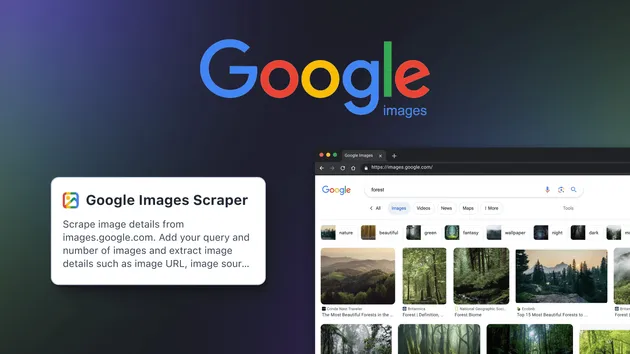
Google Images Scraper
Pricing
$19.99/month + usage
Google Images Scraper
🔎 Google Images Scraper collects image URLs, titles, alt text, thumbnails, dimensions & source page links from Google Images SERPs. ⚙️ Run by keyword at scale, paginate, and export to CSV/JSON. 🚀 Perfect for datasets, SEO, e‑commerce, and creative research.
Pricing
$19.99/month + usage
Rating
0.0
(0)
Developer
Scrapium
Maintained by CommunityActor stats
0
Bookmarked
2
Total users
0
Monthly active users
7 hours ago
Last modified
Categories
Share
Google Images Scraper
Google Images Scraper is a headless browser Google Images scraper that collects image URLs, titles, thumbnails, dimensions, and source page links directly from Google Images SERPs. It solves the challenge of reliably extracting structured image results at scale, letting marketers, developers, data analysts, and researchers scrape Google Images by keyword without an API and build visual datasets fast. With a Playwright-powered, Python Google Images scraper core and smart proxy fallback, it enables consistent, automated collection you can export from the Apify dataset for analysis, enrichment, and creative research.
What data / output can you get?
Below are the exact output fields this Google image search scraper pushes to the Apify dataset. You can export your results and download Google Image search results as structured data for further processing.
| Data type | Description | Example value |
|---|---|---|
| query | Search query that produced the image | "technology" |
| imageUrl | Direct URL of the high-resolution image | "https://example.com/images/hero.jpg" |
| title | Title or heading from the result context | "Is Technology Making Our Lives Better?" |
| imageWidth | Natural width of the image in pixels | 1400 |
| imageHeight | Natural height of the image in pixels | 1025 |
| thumbnailUrl | Thumbnail image URL (defaults to imageUrl if not available) | "https://encrypted-tbn0.gstatic.com/images?q=tbn:ABC123" |
| thumbnailWidth | Thumbnail width in pixels (or a fallback value) | 300 |
| thumbnailHeight | Thumbnail height in pixels (or a fallback value) | 200 |
| contentUrl | Source page URL where the image appears | "https://medium.com/.../article" |
| origin | Hostname/domain of the source page | "medium.com" |
Notes:
- When the source domain cannot be resolved, origin is set to "unknown".
- Width/height can be null if Google doesn’t expose the dimensions for a given result.
- Data is stored in the Apify dataset, which you can export to common formats for downstream workflows.
Key features
-
🔁 Proxy fallback & resilience – Automatic fallback from direct connection to datacenter, then residential proxy with retries when blocks are detected. Keeps your Google images scraping tool running smoothly.
-
🧠 Block detection & consent handling – Detects CAPTCHA/unusual traffic pages and best-effort accepts Google consent dialogs to maintain flow.
-
🖱️ Click-based extraction for accuracy – Opens thumbnails, waits for the large image, and extracts precise fields (imageUrl, title, dimensions, source links) while filtering duplicates and non-usable URLs (e.g., gstatic).
-
⚙️ Configurable scale per query – Control how many images you collect per query with maxImages. Run multiple queries in one task for bulk Google images downloader-style workflows.
-
🗂️ Real-time dataset updates – pushToDatasetRealtime streams each record to the Output table, so you can follow progress live or disable it to push in bulk at the end.
-
🧩 Headless browser Google Images scraper (Python) – Built with Playwright/Chromium for robust, repeatable scraping in a production environment.
-
🧼 Memory-optimized runs – Fresh browser context per query, resource blocking for non-essential assets, and stability-oriented navigation/scroll routines.
How to use Google Images Scraper - step by step
- Sign up or log in to Apify.
- Open the Google Images Scraper actor.
- Add your input:
- Enter one or more search queries in queries.
- Set maxImages to control how many images to collect per query.
- Configure proxyConfiguration according to your needs.
- Leave headless enabled for production runs.
- Decide whether to enable pushToDatasetRealtime for live output.
- Click Start to run the scraper.
- Watch results stream into the actor’s Dataset (if pushToDatasetRealtime is true).
- When finished, open the Dataset tab to download/export your results for analysis or use another workflow to download the actual files.
Pro Tip: Use this serp image scraper for Google alongside a downstream downloader to fetch bulk image files from the exported imageUrl list.
Use cases
| Use case name | Description |
|---|---|
| AI/ML image dataset assembly | Build large image corpora from public Google image search results for model training and experimentation. |
| SEO & marketing visuals analysis | Track visual trends and competitor imagery by keyword to inform campaigns and creative strategy. |
| Brand monitoring & research | Discover how brand assets appear across web sources via origin and contentUrl fields. |
| E‑commerce & product scouting | Collect product imagery and source links for catalogs and price/feature comparisons. |
| Creative inspiration & moodboards | Curate thumbnails and high-res links to inform design sprints, storyboards, and creative briefs. |
| Academic & data research | Gather reproducible public datasets for studies that need structured image references and source pages. |
| Automation pipelines (API) | Orchestrate recurring runs and export datasets to downstream systems as part of a larger enrichment workflow. |
Why choose Google Images Scraper?
This Google image scraper focuses on precision, resilience, and production-readiness—without brittle extensions or manual scripts.
- ✅ Reliable extraction using a headless browser Google Images scraper with Playwright
- ✅ Scaling across multiple queries with configurable maxImages
- ✅ Real-time dataset pushing for live monitoring or batch-save at the end
- ✅ Smart block handling and proxy fallback to datacenter and residential
- ✅ Developer-friendly data model with clear, consistent fields
- ✅ Safe by design: collects public SERP data (URLs, titles, dimensions, sources)
- ✅ Ideal alternative to a Google images scraper without API when you need structured outputs
In short, it’s a robust Google images scraping bot built for consistent, structured extraction and scalable workflows.
Is it legal / ethical to use Google Images Scraper?
Yes—when done responsibly. This tool extracts publicly available metadata from Google Images SERPs (links, titles, dimensions, and related context). Users are responsible for:
- Scraping only public data and respecting Google’s terms.
- Avoiding commercial use of copyrighted images without permission.
- Ensuring compliance with applicable regulations (e.g., GDPR, CCPA) and internal policies.
- Verifying use cases with their legal team for edge cases.
This actor does not access private data or authenticated pages.
Input parameters & output format
Example JSON input
Parameters
- queries (array, required)
- Description: List of search queries or keywords to scrape images for. Can be single query or multiple queries.
- Default: ["nature"] (prefill)
- maxImages (integer)
- Description: Maximum number of images to scrape per query (1-100).
- Default: 10
- proxyConfiguration (object)
- Description: Choose which proxies to use. If Google rejects the proxy, a residential proxy will be used as a fallback.
- Default: {"useApifyProxy": false} (prefill)
- headless (boolean)
- Description: Run browser in headless mode (recommended for production)
- Default: true
- pushToDatasetRealtime (boolean)
- Description: If enabled, each scraped image is saved to the actor Output table immediately (recommended). If disabled, all results are saved at the end.
- Default: true
Example JSON output
Notes:
- origin may be "unknown" if the source cannot be parsed.
- imageWidth/imageHeight can be null when dimensions aren’t available.
- thumbnailUrl falls back to imageUrl if a distinct thumbnail isn’t present.
FAQ
Is there a limit to how many images I can collect per query?
Yes. Use maxImages to control volume per query. The default is 10, and you can increase it within the allowed range to fetch more results.
Does this download actual image files?
No. It extracts structured data (imageUrl, thumbnailUrl, dimensions, titles, source links). To download files in bulk, use the exported URLs with a separate downloader.
Do I need to provide login or cookies?
No. This is a Google Images scraper without API or login. It uses a headless browser to interact with public SERPs.
How does it handle Google blocks or CAPTCHAs?
The actor detects block indicators and automatically falls back from direct connection to datacenter, then residential proxy with retries. It also attempts to accept consent dialogs when they appear.
Can I follow results in real time?
Yes. Enable pushToDatasetRealtime to stream each record to the Output table as it’s found. If disabled, records are pushed at the end.
What fields are included in the output?
Each record includes query, imageUrl, title, imageWidth, imageHeight, thumbnailUrl, thumbnailWidth, thumbnailHeight, contentUrl, and origin.
Is it built with Python?
Yes. This is a Python Google Images scraper powered by Playwright/Chromium, optimized for headless operation on Apify.
Where do results go after a run?
Results are saved to the actor’s Dataset for export, and a grouped JSON file ("output.json") is written to the run’s storage.
Closing CTA / Final thoughts
Google Images Scraper is built for structured, resilient extraction of Google Images SERP data at scale. It delivers clean fields (URLs, titles, dimensions, sources) via a headless, Playwright-based workflow that handles blocking and updates datasets in real time.
Whether you’re a marketer, developer, analyst, or researcher, you can use this Google image search scraper to assemble datasets, analyze visual trends, or power enrichment pipelines. Run it on Apify, export from the Dataset, and integrate the results into your automation or analysis stack. Start extracting smarter image insights—at scale and with confidence.