

Discord Scraper | Servers, Member Counts and Invites
Pricing
from $0.38 / 1,000 servers
Discord Scraper | Servers, Member Counts and Invites
Discord scraper that turns the public server directory and any invite link into structured data: member and online counts, boosts, category, tags, language, creation date, invite link, icon and banner for every server. No Discord account needed, built for partnership research and market mapping.
Pricing
from $0.38 / 1,000 servers
Rating
0.0
(0)
Developer

SilentFlow
Maintained by CommunityActor stats
0
Bookmarked
6
Total users
4
Monthly active users
16 days ago
Last modified
Categories
Security
Limited permissionsShare
Discord Scraper
Turn Discord's server directory and any invite link into a table: every public server with its member and online counts, boosts, category, tags, language, creation date, invite link, icon and banner. 100 servers in 14 seconds, no Discord account needed.
How it works
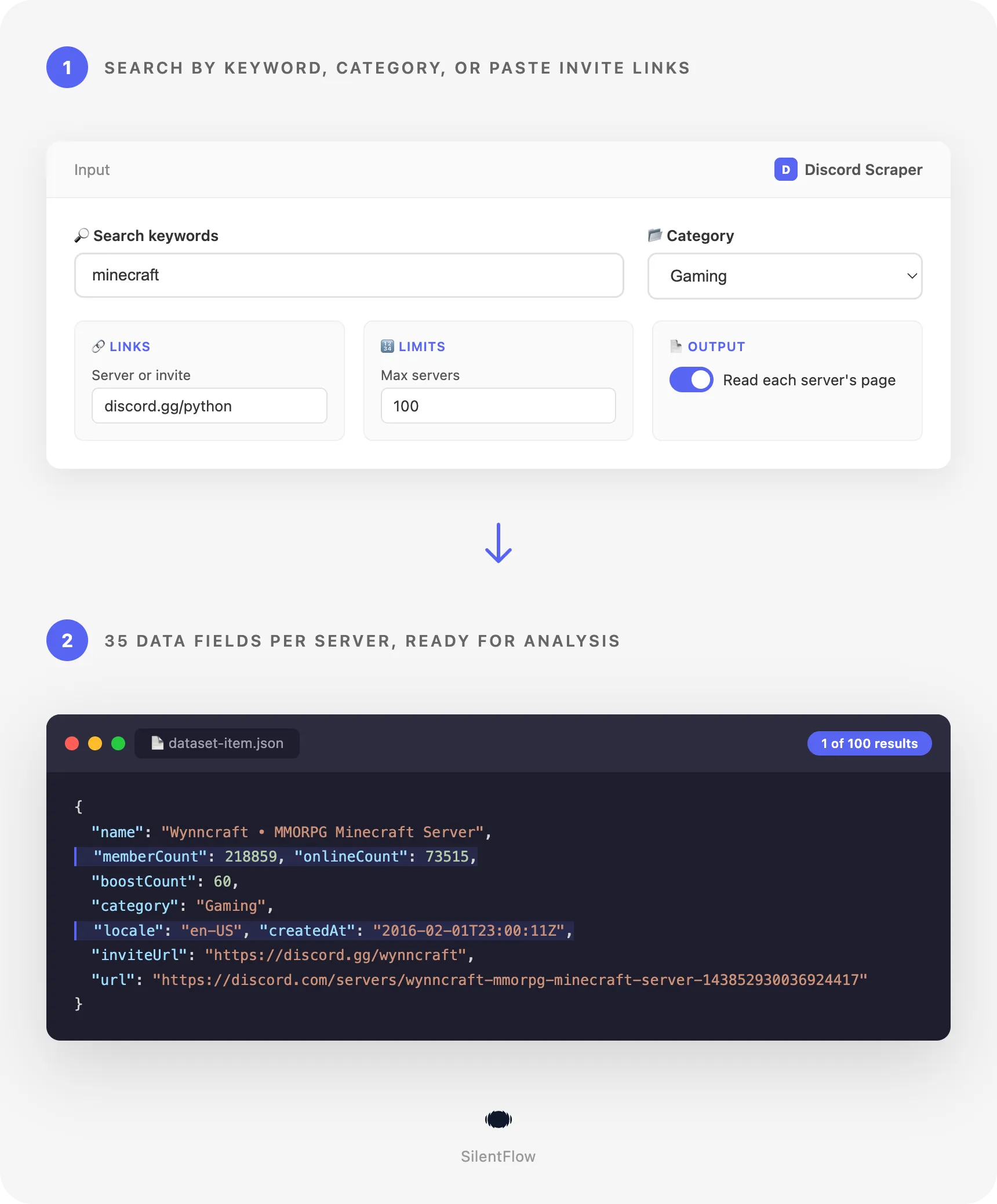
- You type a keyword, pick a category, or paste links. A keyword (
minecraft,anime,crypto) searches Discord's own directory of 52,000 discoverable servers, largest first. A category (Gaming, Music, Entertainment, Education) lists it or narrows the search. A server page, a directory search URL, an invite link (discord.gg/python) or a bare invite code reaches one server, listed in the directory or not. - Each server is read from Discord itself. Member and online counts as the directory shows them at run time, boosts, primary category and all categories, tags, enabled features, language, the vanity invite, icon, banner and splash. Switch on the server page and the row also carries the long description, the reasons to join, the social links and the full feature list.
- One row comes back per server. 35 fields, flat, with
nullwhere Discord has nothing: numbers as numbers, dates in RFC 3339, a stableidandurl, the creation date computed from the id, and how the row was found (foundBy,keyword,position,totalResults). Ready for a spreadsheet, a database or an AI pipeline.
✨ Why teams choose this over other Discord scrapers
Clicking through the directory 12 servers at a time to build a partnership list? Paying a fee per run start for a scraper that reads a third-party index with last month's counts? Getting back raw nested blobs with 29 translations per category and no creation date?
- 🔢 28 fields filled on every row, not 22 keys of raw output. Measured on the default run of 100 Minecraft servers: 28 of the 35 fields carry a value on every row, among them
memberCount,onlineCount,boostCount,locale,createdAt,inviteUrl,category,categories,keywords,featuresand five flat flags such asisVerifiedandisPartnered. The most used directory scraper returns the raw directory hit: 22 keys, several of them search-highlighting noise and translation tables, no creation date, no flat flags. - 🔀 Four ways in, one run. Keywords, a category browse, a server page or directory search URL, and an invite link or code. The most used directory scraper takes keywords and a category; none of the three most used ones resolves an invite.
- 🌍 Every public server, not only the directory. The directory lists 52,816 discoverable servers (23 Sep 2026). An invite link reaches any public server beyond it, with fields the directory does not show: verification level, NSFW level and boost tier. The most used scrapers read the directory, or a third-party index, only.
- 🏷️ A lower price per server than the most used Discord server scraper, and nothing per run start. Two of the three most used scrapers add a fee every time a run starts. Here a run that finds nothing bills nothing. The exact figure is on the Monetization tab of this page.
- ⚡ 100 servers in 14 seconds, 30 in 5. No browser loads a page: the run reads the data Discord's own pages carry and moves on. A whole category of 500 servers takes about a minute and a half.
- 📅 Server age on every row.
createdAtcomes from the server id itself, so every row says when the server was created, with no extra request. A young server with 100,000 members and a ten-year-old one read differently in an outreach list. - 🧹 Clean rows an integrator can trust.
memberCountis a number, not"1.2M";createdAtandscrapedAtare RFC 3339 in UTC;idis the server id andurlits permanent directory page; a field Discord does not have isnull, never an empty string. Field names follow the ones the market already uses:memberCount,onlineCount,boostCount,inviteUrl,vanityUrl,iconUrl,bannerUrl,features,keywords. - 🔓 No account, no token, no login. Type a keyword and run. Your own Discord account is never involved.
🎯 What you can do with Discord data
| Team | What they build |
|---|---|
| Partnerships | The 200 largest gaming or anime servers with their online counts and invite links, ranked for sponsorship outreach |
| Game and product marketing | A weekly scheduled run over the servers around a title, with member and online counts compared week to week |
| Community management | A map of a category by size, language and creation date, to find where a community is missing |
| Web3 and crypto research | Every server matching a token, exchange or protocol name with its size, activity and age, to separate live communities from dead ones |
| Influencer and creator agencies | Servers of the Content Creator and Fandom categories with member counts and social links, to match creators with sponsors |
| Data and AI | A dataset of thousands of servers with descriptions, tags, categories, features and languages, for classification or research |
| Sales | A list of invite links from a CRM enriched with server names, ids, counts, verification levels and creation dates |
| Trust and safety research | NSFW flags, verification levels and boost tiers of a set of servers resolved from their invites |
📥 Input parameters
Essentials
| Parameter | Type | Description |
|---|---|---|
keywords | array | Words to search in the directory: minecraft, anime, crypto, study. Matched against names, descriptions and tags, largest servers first. Up to 3,000 servers per keyword (the directory's limit). |
category | string | gaming, music, entertainment, education, or empty for all categories. Narrows a keyword search, or lists the category when there is no keyword and no link. |
startUrls | array | Server pages (https://discord.com/servers/midjourney-662267976984297473), directory search pages (https://discord.com/servers/gaming?query=rpg), invite links (https://discord.gg/python, discord.com/invite/xyz) or bare invite and vanity codes (python). Objects {"url": ...} work too. |
🔢 Limits
| Parameter | Type | Description |
|---|---|---|
maxItems | integer | Servers to deliver in total across keywords, categories and links. Default 100. No fixed limit. |
📄 Output
| Parameter | Type | Description |
|---|---|---|
includeDetails | boolean | Read each server's own page for about, reasonsToJoin, socialLinks and the full features list. One page per server, about two seconds each. Default false. |
⚙️ Advanced
| Parameter | Type | Description |
|---|---|---|
debugMode | boolean | Detailed logs of every request and connection change. Default false. |
With no keyword, no category and no link, the run lists the whole directory, largest servers first.
📊 Output data
A server found by keyword in the directory:
A server resolved from an invite link:
The features list above is shortened; a real row lists every feature the server has enabled, often 40 or more.
🗂️ Data fields
35 fields per server. A directory row fills 28 of them on every row; an invite row adds verificationLevel, nsfwLevel and boostTier; a server page adds about, reasonsToJoin and socialLinks.
| Group | Fields |
|---|---|
| Identity | id (server id, stable), url (directory page, or the invite link for a server outside the directory), name, description, slug |
| Content | category (primary), categories[], keywords[] (tags set by the server), features[] (Discord feature flags), isVerified, isPartnered, isDiscoverable, isCommunity, isNsfw, verificationLevel (0 to 4, invites only), nsfwLevel (0 to 3, invites only) |
| Measures | memberCount, onlineCount (members present when the page was read), boostCount (Nitro boosts), boostTier (0 to 3, invites only) |
| Place and time | locale (server language, en-US, pt-BR), createdAt (RFC 3339, from the server id) |
| Links and media | inviteUrl (vanity invite of a directory server, or the invite you gave), vanityUrl, iconUrl, bannerUrl, splashUrl, socialLinks[], reasonsToJoin[], about (the last three with includeDetails or a server page) |
| Meta | foundBy (keyword, category, directory, url, invite), keyword, position (rank in the listing, 1 = largest), totalResults (servers matching the search), scrapedAt |
Usability facts:
urlis permanent for a directory server: any page address ending with the server id resolves, and the row carries the canonical one.iconUrl,bannerUrlandsplashUrlstay valid as long as the server keeps that image; an animated icon or banner is a.gif.inviteUrlof a directory server is its vanity link, which Discord grants to every discoverable server. An invite you paste may expire; a dead one gives no row and is counted in the run summary.memberCountandonlineCountare the approximate counts Discord shows;onlineCountis a snapshot of the moment the page was read.- The
keywordsfield is the server's own tags. Your search keyword is inkeyword.
🚀 Examples
Get the largest Minecraft servers
List the top 500 gaming servers
Search anime servers inside Entertainment with their full pages
Resolve a list of invite links
Read a directory search copied from the browser
Cover a market with several keywords in one run
Map the whole directory, largest servers first
🤖 Copy to your AI assistant
Paste this block into Claude, ChatGPT or Cursor to give it full context about this scraper:
💻 Integrations
Build a partnership outreach list in Python
Track the growth of your market's servers every week in Node.js
Export a category to CSV from the command line
📈 Performance
| Run | Result | Time measured |
|---|---|---|
Default input, keyword minecraft, 100 servers | 100 rows, 28 fields filled on every row | 14 seconds |
Category music, 30 servers | 30 rows | 5 seconds |
Keyword anime in Entertainment with includeDetails, 15 servers | 15 rows with about, social links and full features | 28 seconds |
| Two invites, one server page and a directory search, 30 servers | 30 rows | 9 seconds |
| A whole category, 500 servers | 500 rows | about 90 seconds |
| The whole directory, 1,000 servers | 1,000 rows | about 3 minutes |
Memory: 256 MB is enough for any run. The directory serves 12 servers per page and stops at 3,000 servers per search; the run reads one page every second or two, which is the rhythm the directory accepts from one connection.
💾 Data export
Every run's dataset is available on the Storage tab of the run as JSON, CSV, Excel, XML, HTML table or RSS, and through the API:
Replace csv with json, xlsx or xml. Add &fields=name,memberCount,onlineCount,inviteUrl to keep only the columns you need, and &clean=true to drop empty values.
💡 Tips for best results
- Start with a category when the keyword is broad.
minecraftalone matches 4,457 servers andgaming38,454; the directory stops at 3,000 per search, sokeywords: ["rpg"]withcategory: "gaming"reaches deeper thanrpgalone. - Use several precise keywords instead of one vague one.
["genshin", "honkai", "zenless"]in one run returns each franchise's servers, deduplicated across the three searches. - Rank on
onlineCount, not onlymemberCount. A server with 500,000 members and 3,000 online is quieter than one with 60,000 members and 8,000 online.positiongives the directory's own ranking by members. - Leave
includeDetailsoff for discovery, on for the shortlist. The directory row already carries counts, tags, language and the invite link; the page adds the long description, reasons to join and social links at about two seconds per server. Discover with 1,000 rows, then run the 50 servers you keep with details. - Schedule the same input weekly and compare
memberCountbyid. The id never changes, the name sometimes does.createdAttells you whether a fast-growing server is new or established.
❓ FAQ
What does this scraper extract? Public Discord servers, one row each: name, description, member and online counts, boosts, category and categories, tags, enabled features, language, creation date, invite link, icon, banner and splash, plus the reasons to join, social links and long description when a server page is read.
How do I find servers? Four ways: a keyword searched in Discord's directory, a category browsed by size, a server page or a directory search URL pasted from the browser, and an invite link or code. They combine in one run and the rows are deduplicated by server id.
Do I need a Discord account? No. The scraper reads the public server directory and the public invite preview. No login, no token, nothing of yours is used.
How fresh are the numbers?
Live: every run reads the directory pages and invite previews at run time, nothing is cached. memberCount and onlineCount are the approximate counts Discord shows at that moment.
Which servers can it find? Every server Discord lists in its directory, 52,816 on 23 September 2026, by keyword or category. Any other public server is reachable through its invite link, including servers that never applied to the directory.
Is there a limit per search?
The directory answers at most 3,000 servers for one keyword or category, 12 per page. Narrow a broad keyword with a category or split it into precise ones. maxItems caps the run and has no fixed limit.
Why is category empty on some rows?
A server resolved from an invite carries no category: the invite preview does not include it. Directory rows always have one. The same goes for keyword, position and totalResults, which describe a search.
Which categories exist?
The directory has four browseable categories: Gaming, Music, Entertainment and Education. Other categories such as Science & Tech, Creative Arts or Finance appear in categories on every row but have no page of their own; search them with a keyword.
Can I get member lists or messages? No. This scraper delivers servers. Member lists and message history need a logged-in Discord account and are out of scope.
Do keyword and category combine?
Yes. keywords: ["rpg"] with category: "gaming" returns the RPG servers of the Gaming category only, largest first, and reaches past the 3,000-server limit of a plain rpg search.
Do the links expire?
url, iconUrl, bannerUrl and splashUrl stay valid as long as the server keeps its page and images. The vanity inviteUrl of a directory server is permanent; an invite you paste may expire, in which case the run reports it and delivers no row for it.
Can I run several keywords at once?
Yes. Every keyword is searched in turn, the rows are deduplicated across searches, and maxItems applies to the whole run.
What is discord.com/servers? Discord's own server directory, where community servers apply to be discoverable. It is public, ranked by member count, and searchable by keyword and category. This scraper reads it directly.
⚖️ Legal
This Actor extracts publicly available data from Discord's server directory and public invite previews. It does not bypass any login, paywall or CAPTCHA, and never uses a user account. Users are responsible for complying with Discord's terms of service and applicable data protection laws (GDPR, CCPA, and PIPL where relevant). The output describes servers, not people; server names and descriptions may mention individuals, and users must handle such data accordingly. The data returned is informational; verify accuracy for regulated use cases.
🔗 Related scrapers
- YouTube Channel Scraper: channels with subscribers, views and recent videos, for the same creators' other communities.
- TikTok Scraper: videos, profiles and hashtags with engagement counts.
- Instagram Engagement Scraper: likes and comments of any public post.
- Facebook Search Scraper: pages, groups and posts found by keyword.
📬 Support
Need something this scraper doesn't do yet? We ship features fast.
- Feature requests go straight to our backlog
- Enterprise needs? We do custom integrations and high-volume plans
- Pricing questions? Check the Monetization tab on the actor page
Response time: usually under 24 hours.
Check out our other scrapers: silentflow on Apify


