

Naver Scraper | Shopping Products, Prices and Reviews
Pricing
from $2.55 / 1,000 products
Naver Scraper | Shopping Products, Prices and Reviews
Scrape Naver Shopping for product prices, discounts, ratings, stock, brand and category, plus the Smart Store or Brand Store behind every seller: company name, CEO and sales count. Search by keyword or paste a store or product address, and pull the latest buyer reviews too. No login needed.
Pricing
from $2.55 / 1,000 products
Rating
0.0
(0)
Developer

SilentFlow
Maintained by CommunityActor stats
0
Bookmarked
30
Total users
17
Monthly active users
7 days ago
Last modified
Categories
Security
Limited permissionsShare
Naver 네이버 Scraper
Turn Naver Shopping into a table: the products Naver shows first for any keyword, the popular products of any Smart Store or Brand Store, or any product you paste, with price, store, rating, stock and the latest buyer reviews on every row. 100 products for two keywords in 5 seconds, no Naver account needed.
How it works
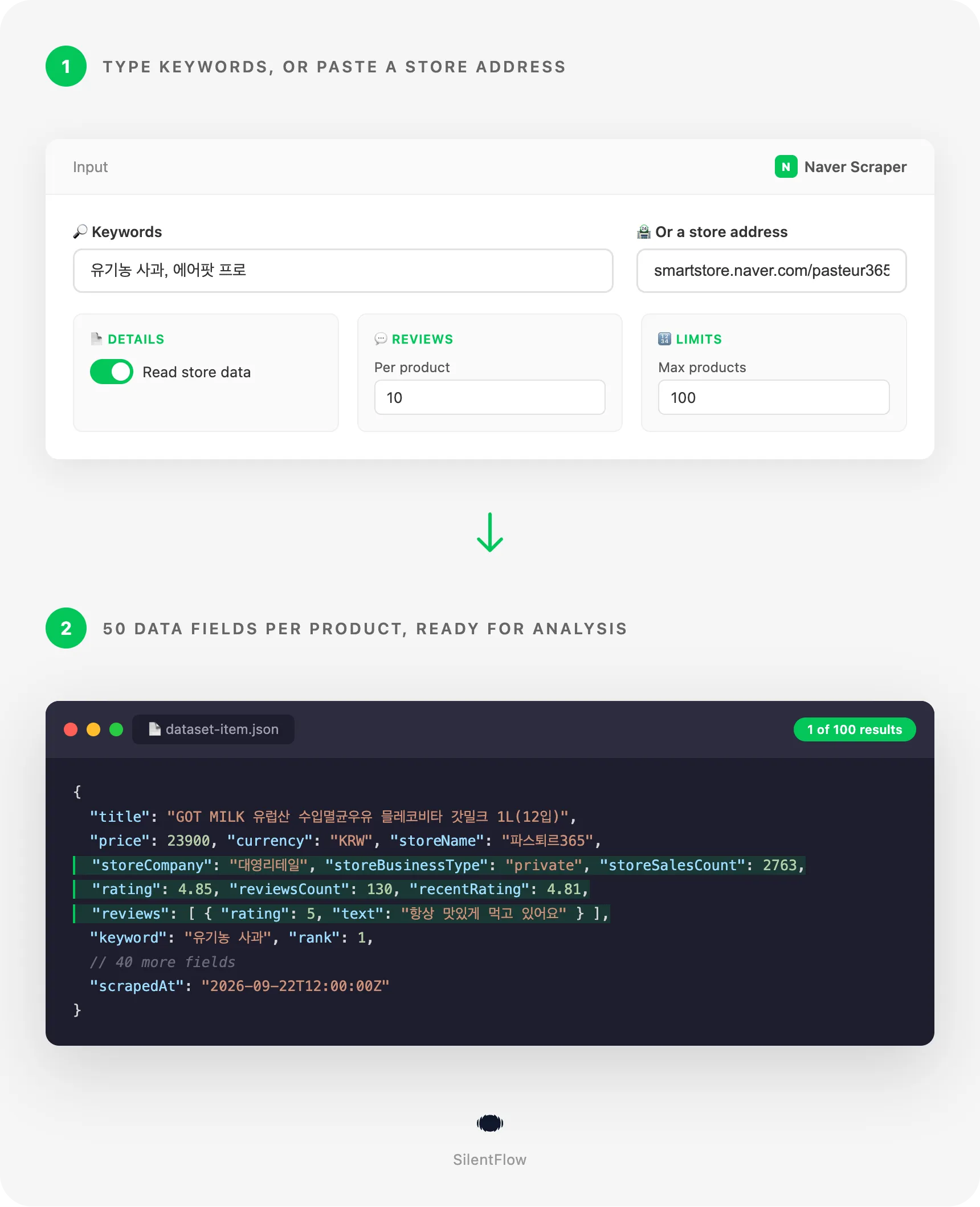
- You type keywords or paste store and product addresses. Korean keywords match best (
유기농 사과,에어팟 프로), brand and model names work in English (iphone 16 case,nike 운동화). A Smart Store address (https://smartstore.naver.com/pasteur365) reads the whole store, a product address (.../products/11150965069) reads one product. - Each keyword returns the 50 to 90 products Naver ranks first. The same price comparison catalogs, Smart Store products and sponsored products a shopper in Korea sees, with the store of every Smart Store and Brand Store product read for its company, stock and reviews.
- One row comes back per product. 50 fields: identity, price and discount in won, store with company name and sales count, rating with the score distribution, purchase and wishlist counts, stock, category path, delivery, images, the latest reviews with the option each buyer chose, the keyword and the rank. Ready for a spreadsheet, a database or an AI pipeline.
✨ Why teams choose this over other Naver scrapers
Running one tool for Naver products and another for their reviews, and paying two bills? Getting 24 listing fields and no idea whether the store behind a product is a company or a private seller? Translating Naver pages by hand to check a price?
- 🛒 Products and their reviews on the same row. Other Naver scrapers make you choose: a product scraper with 24 fields and no reviews, or a review scraper that needs product links you must find elsewhere. Here every Smart Store and Brand Store row carries its latest reviews, its score distribution and its recent rating.
- 🏪 The store behind every product. Company name, CEO, business type (corporation, private business or individual), store sales count and whether it is a Brand Store. Qualify a seller before you contact it, from the same run that found its products.
- 🔀 Three ways in, one run. Keywords for the market view, store addresses for a seller's popular products, product addresses for the ones you follow. The keyword-only scrapers of the Store take one, the review scrapers another; none reads a whole store.
- 🔢 43 fields filled per row, not 24. Measured on a keyword run with store data: 43 of the 50 fields carry a value on the average row, against the 24 fields of the most used Naver product scraper. Prices are numbers in won with the currency in its own field, counts are integers, dates are RFC 3339 in UTC, ids are stable.
- 🎯 Ads and catalogs told apart. Sponsored products are flagged
isAd, price comparison catalogs are typedcatalogwith their seller count, single-store products are typedproduct. Filter the market view the way you need it. - ⚡ Fast when you want a listing, complete when you want the store. 100 listing rows for two keywords in 5 seconds. With store data and 5 reviews per product, 120 rows in 71 seconds and a store's 40 popular products in 24 seconds.
- 🔓 No account, no API key. Type a keyword and run. The Naver open API needs a developer key and returns 15 fields; this returns 50.
🎯 What you can do with Naver Shopping data
| Team | What they build |
|---|---|
| Pricing | Track the price, discount and coupon price of competing products on Naver for a keyword list every morning and alert on any drop |
| Market entry | Map who sells a category in Korea: stores, companies, sales counts, ratings and price bands across dozens of keywords in one run |
| Sourcing | Find Smart Store sellers of a product, read their company name, CEO and sales count, and shortlist the ones with a 4.8 rating and stock |
| Brand protection | List every store selling your brand on Naver, with prices, and keep the list current with a scheduled run |
| Review analytics | Pull the latest reviews of a product line with the option each buyer chose and feed them to a sentiment model |
| Cross-border sellers | Watch what a Korean keyword sells most, at what price and with what delivery promise before listing on Coupang or Naver yourself |
| Ad monitoring | See which products buy the sponsored slots of a keyword and how their prices compare with the organic ones |
| Data and AI | Give an LLM one row per product with reviews and store data and ask what buyers praise, complain about and pay |
📥 Input parameters
| Field | Type | Default | Description |
|---|---|---|---|
keywords | array | ["유기농 사과", "에어팟 프로"] | What to search on Naver, one keyword per line. Each keyword returns the 50 to 90 products Naver shows first. |
productUrls | array | Single Smart Store or Brand Store products: a product address (https://smartstore.naver.com/pasteur365/products/11150965069, https://brand.naver.com/lumena/products/13244298880) or a bare product id. | |
storeUrls | array | Whole stores: a Smart Store or Brand Store address (https://smartstore.naver.com/pasteur365, https://brand.naver.com/lumena) or its slug. Each store gives its popular products, up to about 80. | |
maxItems | integer | 100 | How many rows to save for the whole run. Keywords, stores and products count together. |
includeDetails | boolean | true | Read the store of every Smart Store and Brand Store product: company, CEO, sales count, stock, brand, category path, delivery company, tags, score distribution. Turn off for a faster listing. |
maxReviews | integer | 10 | How many of the latest reviews to attach to each Smart Store and Brand Store product. 0 attaches none. |
debugMode | boolean | false | Adds detailed lines to the run log. |
Keywords, stores and product addresses can be combined in one run. A product already returned by a keyword is never read twice.
📊 Output data
One row per product. A Smart Store product found by keyword, with its store data and reviews:
A price comparison catalog found by keyword, the same fields with the store ones empty:
A field the source does not give is null, never an empty string. Lists are empty lists.
🗂️ Data fields
50 top-level fields per row. reviews holds up to maxReviews objects of 9 fields each, scoreDistribution 5 counts.
| Group | Fields |
|---|---|
| Identity (6) | id (Naver search id, or the store's product id when the product came from a store), url, title, type (catalog for a price comparison, product for a single store), isAd, channelProductId |
| Content (7) | brand, manufacturer, model, categoryId, categoryPath, categoryIds (the four Naver category levels), tags |
| Store (11) | storeName, storeId, storeUrl, storeCompany, storeCeo, storeBusinessType (corporation, private, individual), storeSalesCount, isSmartStore, isBrandStore, isIndividualSeller, sellersCount (catalogs) |
| Measures (20) | price, originalPrice, discountRate, couponPrice, currency, rating, reviewsCount, recentReviewsCount, recentRating, scoreDistribution, purchaseCount, keepCount, stock, deliveryFee, isFreeShipping, deliveryType, deliveryCompany, isOverseas, isHotDeal, promotions |
| Reviews (1 list, 9 fields each) | id, rating, text, option (the variant the buyer chose), author (masked by Naver), publishedAt, isRepurchase, type (normal, after_use), images |
| Media (2) | imageUrl, images |
| Meta (3) | keyword, rank (position in the keyword listing), scrapedAt |
Which rows carry what:
- Every row: identity, category ids, price, rating and review count, purchase and wishlist counts, delivery, image, keyword and rank.
- Smart Store and Brand Store rows with
includeDetailson: the content group, the store group, stock, delivery company, score distribution and recent rating, plus reviews whenmaxReviewsis above zero. - Catalog rows (
type: catalog): the price is the lowest price across the sellers,sellersCountsays how many sell it,urlopens the comparison page. - Products of other malls (Coupang, Gmarket, 11st): the listing fields, with
storeNameandstoreUrlnaming the mall.
url and id are stable. Product images stay valid for months; review photos are served by Naver's own CDN and stay reachable as long as the review exists.
🚀 Examples
Get the products Naver shows for a keyword
Watch competing prices for a product line, listing only
Read the popular products of two stores with their latest reviews
Follow a handful of products every day
Qualify the sellers of a category before contacting them
Mine every recent review of one product
🤖 Copy to your AI assistant
Paste this block into Claude, ChatGPT or Cursor to give it full context about this scraper:
💻 Integrations
Build a daily price watch in Python
Shortlist Smart Store sellers in Node.js
Export the reviews of a product to CSV
📈 Performance
Measured on 22 September 2026.
| Run | Rows | Time |
|---|---|---|
| Two keywords, listing only | 100 | 5 seconds |
| One keyword with store data and 5 reviews per product | 53 | 54 seconds |
| Two keywords with store data and 5 reviews per product | 120 | 71 seconds |
| One store, popular products with 2 reviews each | 40 | 24 seconds |
| Three product addresses with 5 reviews each | 3 | 31 seconds |
A keyword costs one read whatever its size. Store data costs one read per store plus one batch per 20 products of that store; reviews cost one read per 30 reviews per product. There is no fixed limit on the number of rows per run.
💾 Data export
Every run's dataset can be downloaded from the Apify Console as JSON, CSV, Excel, XML, HTML or RSS, and pulled by API:
The overview view shows title, price, store, rating, reviews, keyword and url; the stores view shows the company, CEO, business type, sales count and stock behind each row. Both views are available in the Console and through ?view=overview or ?view=stores on the API.
💡 Tips for best results
- Search in Korean.
유기농 사과returns 50 Smart Store products with reviews;organic applereturns a handful. Brand and model names work in either language. - Combine keywords with
maxItems. Each keyword adds 50 to 90 rows, so setmaxItemsto the number of keywords times 90 when you want every keyword in full. - Turn
includeDetailsoff for price tracking. A listing run finishes in seconds and still carries price, discount, store name, rating and review count. - Keep
maxReviewssmall on big runs. Ten reviews per product is one read per product; three hundred is ten. Use a product address run when you want all the reviews of a few products. - Filter on
typeandisAd. Catalogs give the market price across sellers, products give a single store's price, ads show who pays for the slot. Most analyses want one of the three.
❓ FAQ
Do I need a Naver account or a developer key? No. Everything returned is what a visitor of Naver sees. There is nothing to log into and nothing to renew.
What is Naver Shopping, and what are Smart Store and Brand Store? Naver is Korea's main search engine and Naver Shopping its product search, the Korean counterpart of Google Shopping. Smart Store is Naver's marketplace where any seller opens a store, Brand Store its version for brands. Price comparison catalogs group the same product across malls, including Coupang and Gmarket.
How many products does a keyword return? The 50 to 90 products Naver shows first for it: the same catalogs, store products and sponsored products a shopper sees. There is no page two; use several keywords, or a store address, to go further.
Why do some rows have no store company, stock or reviews? Only Smart Store and Brand Store products have a store behind them. Price comparison catalogs and products of other malls keep their listing fields: price, store name, rating, review count, category, delivery and image.
What does a store address return? The store's popular products, up to about 80, with the store's company name and sales count on every row. A store with thousands of products is not read in full.
Are the prices current?
Yes. Every run reads Naver at run time; nothing is cached. price is the price after the seller's discount, originalPrice the list price, couponPrice the price after a coupon when Naver shows one.
In what order are reviews returned?
Newest first, up to maxReviews per product. Each review carries its rating, text, the option the buyer chose, a masked author, the date in UTC, whether it is a repurchase and its photos.
Can I run it on a schedule? Yes. Save the input as a task in the Apify Console and schedule it hourly, daily or weekly. Each run writes a new dataset you can diff against the previous one.
What happens when a keyword has no products? The run finishes with a message saying that Naver had nothing for it, distinct from the message shown when Naver could not be read. An empty run never looks like a plain success.
Does it work with English keywords?
It does, with fewer results. Naver matches Korean text; English brand names (nike, iphone) match well because sellers write them in Latin letters.
⚖️ Legal
This Actor extracts publicly available data from Naver Shopping, Smart Store and Brand Store pages. It does not bypass any login, paywall or CAPTCHA. Users are responsible for complying with Naver's terms of service and applicable data protection laws (GDPR, CCPA and Korea's PIPA where relevant). The output contains personal data: masked reviewer names and the names of store representatives as published on the store's legal notice; handle it accordingly. The data returned is informational; verify it for regulated use cases.
🔗 Related scrapers
- Taobao Scraper: Taobao and Tmall products by keyword with seller scores and the latest review.
- TikTok Shop Scraper: TikTok Shop products across ten markets.
- 1688 Scraper: wholesale prices from 1688.com.
- All actors: silentflow on Apify
📬 Support
Need something this scraper doesn't do yet? We ship features fast.
- Feature requests go straight to our backlog
- Enterprise needs? We do custom integrations and high-volume plans
- Pricing questions? Check the Monetization tab on the actor page
Response time: usually under 24 hours.
Check out our other scrapers: silentflow on Apify


