

JD Products Scraper | JD.com Prices, Brands and Barcodes
Pricing
from $1.86 / 1,000 products
JD Products Scraper | JD.com Prices, Brands and Barcodes
JD.com (京东) products scraper: search 京东商品 by keyword, shop page or SKU id and get the real CNY price, brand, model, UPC barcode, shop, review count and good rate, variants, stock and delivery promise. 50 products in 30 seconds, 67 fields each. No JD account needed, export to CSV, Excel or JSON.
Pricing
from $1.86 / 1,000 products
Rating
0.0
(0)
Developer

SilentFlow
Maintained by CommunityActor stats
0
Bookmarked
3.8K
Total users
1K
Monthly active users
3 days ago
Last modified
Categories
Share
JD Products Scraper (京东) | Prices, Barcodes and Shop Catalogs (2026)
From SilentFlow. Creators of Pinterest Scraper (#1 for “pinterest pins scraper” in Apify Store search) and Leboncoin Scraper Ppe, with 260,000+ combined lifetime runs.
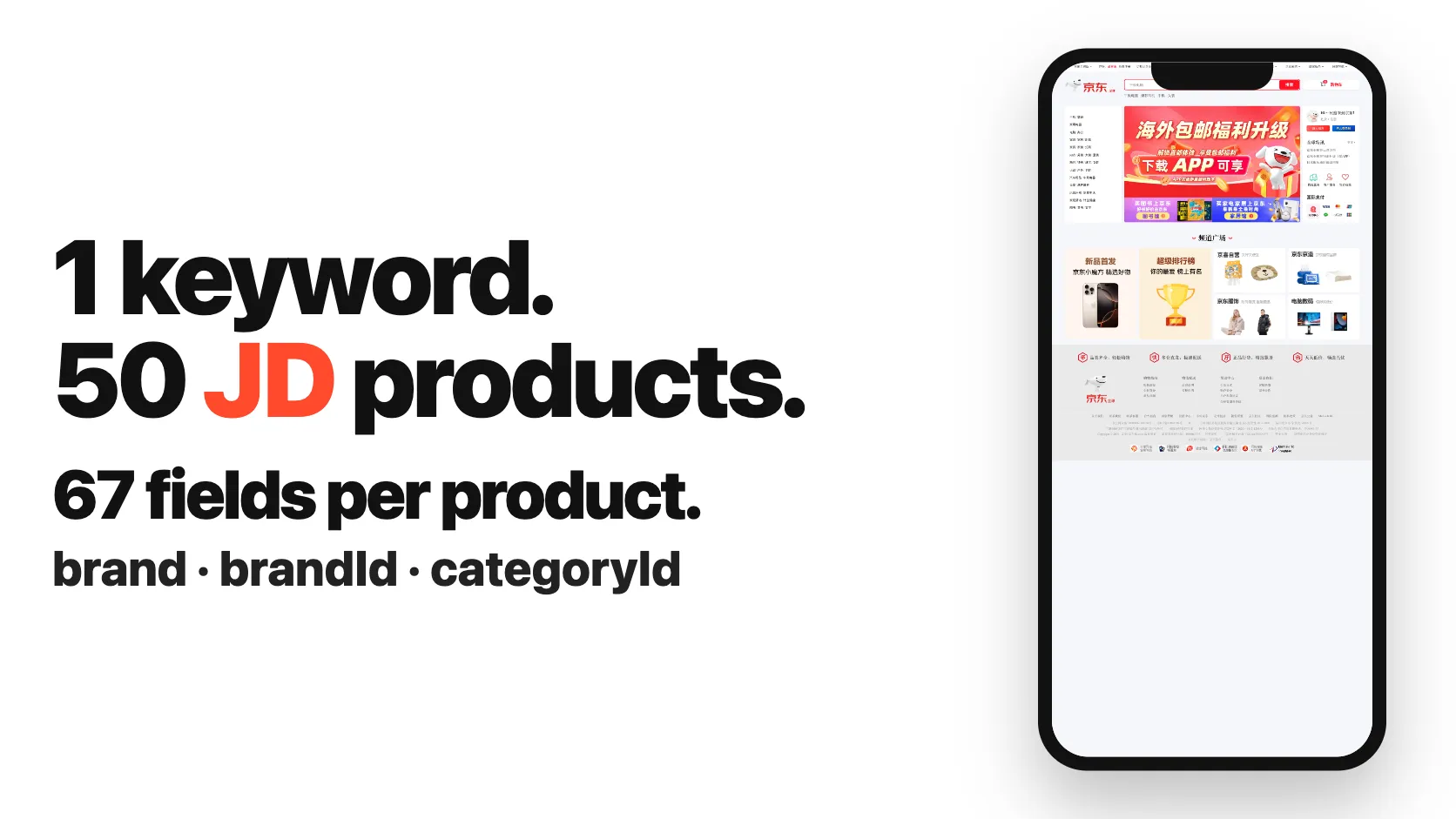
Turn JD.com (京东), China's largest retailer, into a clean product table: every product of a search or of a whole JD shop, with its real price in yuan, brand, model, UPC barcode, shop, review count and good rate, all its variants, stock, delivery promise, return policy, sales rank, size, weight and photos. Type 华为手机 and press Start: 50 products, each completed from its own JD product page, in 31 to 32 seconds on our test runs. Paste a shop address instead and get that shop's catalog the same way: 50 products of 华为京东自营旗舰店 in 41 seconds. No JD account, no Chinese needed to read the columns.
Why choose this actor?
Copying JD (京东商品) prices into a spreadsheet one tab at a time? Opening a product page only to find the price masked as 6??9? Getting a price from one tool and the brand, barcode and stock from another, then matching them by hand?
- The search price and the product page in the same row. On our 50-product
华为手机run of 5 October 2026, 68 data fields were filled on at least half the rows: price, installment offer, subsidy badges, review count and good rate from the search, plus brand, model, UPC barcode, color, size, every variant SKU, stock state and quantity, delivery promise, shipping fee, return policy, warranty, service guarantees, sales rank, weight, dimensions and photos from the product page. All 50 rows had a price and a brand, 47 a model, 41 a barcode. The most used JD actor on the Store declares 60 fields. - Barcodes and model numbers you can match. The same run listed 777 variant SKUs across the 50 products, each with its color and size, and 41 EAN/UPC barcodes, so a JD listing can be joined to your own catalogue, an Amazon or Tmall listing, or a distributor price file without guessing from Chinese titles.
- A whole JD shop, priced and completed, in one run. Paste a shop address or give its shop id and every product the shop lists becomes a full row. On our run of 6 October 2026, 华为京东自营旗舰店 (476 products listed that day) gave 50 products in 41 seconds, 50 with their real price, 50 with brand and model from their product page, 55 data fields filled on at least half the rows. The most used JD actor's shop catalog returns the item id, title and address only.
- Keywords, addresses, SKU ids and shop ids, in the same run. Type keywords in Chinese or English, paste JD addresses (product pages, search pages with their price filter, shop pages), give SKU ids, or give shop ids. A list of 30 SKU ids with the product pages turned off came back priced in 23 seconds, 30 of 30 with their live price, review count and good rate. The most used JD actor takes one keyword or one id per run, and one operation per run.

Try your first JD product list
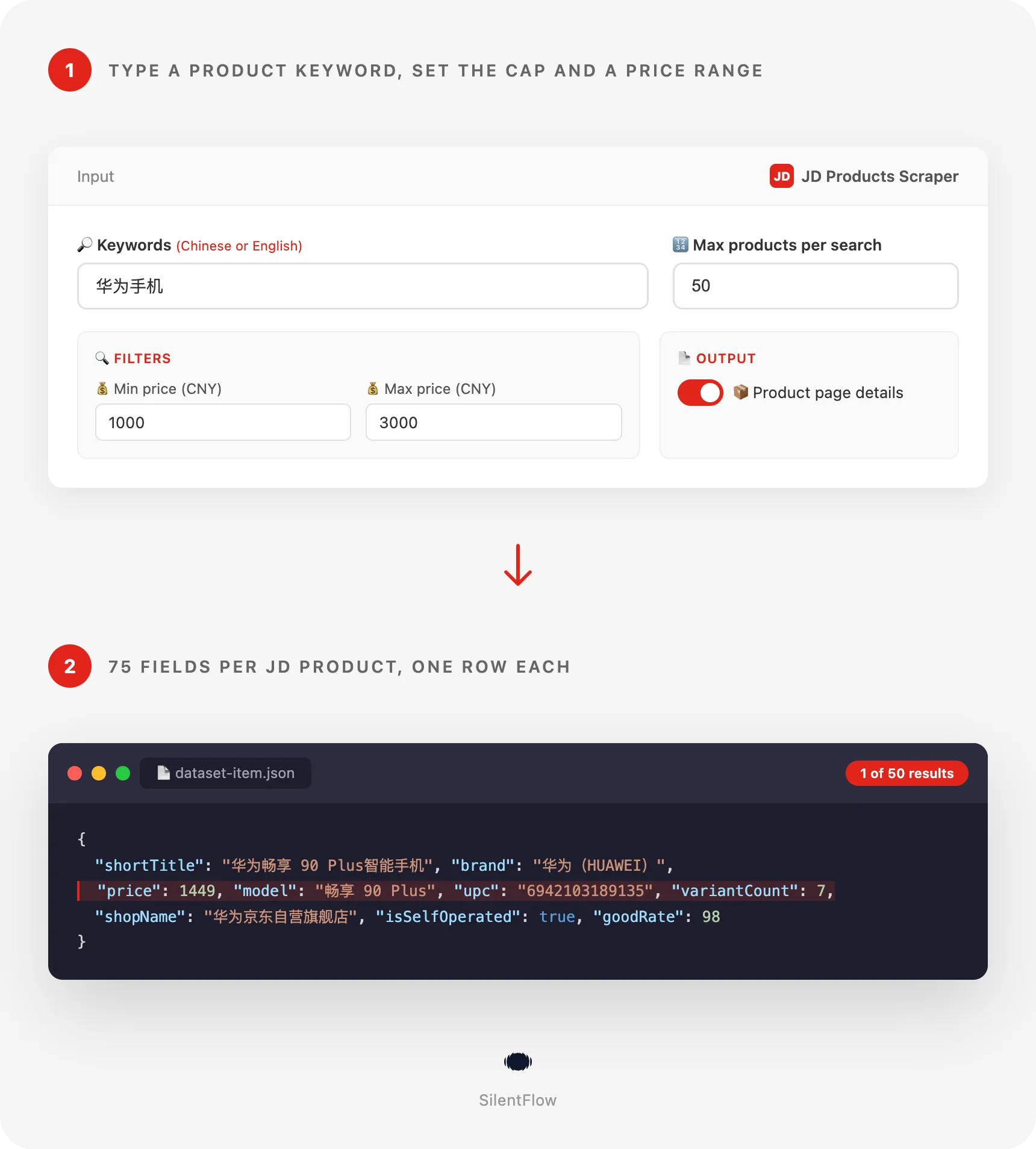
Paste this input in the JSON tab, or keep the prefilled form and press Start. It lists the first 50 Huawei phones JD shows for 华为手机, from the Mate 80 Pro and Pura 90 to the Enjoy 90 series, each with its price, barcode and stock. It took 31 to 32 seconds on our test runs.
Runs on the Apify Free plan: sign up, open the actor, press Start. Each product lands as one row of the dataset, which you can open as a table, download as CSV, Excel or JSON, or read from the API. Change 华为手机 for any product words (iphone 17, lego, 奶粉, 茅台, dyson), and run again.
Copy to your AI assistant
Paste this block into Claude, ChatGPT or Cursor to give it the full picture of this scraper before you ask it to write code or plan a dataset:
How to scrape JD.com product prices and barcodes
Three inputs, from the simplest to a full brief. Each one runs as it is.
List the products JD shows for a keyword
English works: JD matches it against its titles. On our test run, iphone 17 returned iPhone 17 listings from Apple-focused stores and phone resellers first, with a few other flagship phones JD ranks next to them. Chinese words (苹果手机) match the way JD shoppers search and give the widest results.
List every product of a JD shop
The shop's catalog in the order the shop shows it, one row per product, each with its live price, review count and good rate, and with brand, model, barcode, variants, stock and delivery from its product page. Huawei's JD self-operated store (华为京东自营旗舰店) listed 476 products that day: this input returned the first 50 in 41 seconds on our test run. shopIds: ["1000004259"] does the same with the bare id.
Refresh the price of products you already track
Each SKU id or product address gives one row with the real price a shopper sees, not the masked one of the product page, plus its review count and good rate. With the product pages turned off, 30 SKU ids came back in 23 seconds on our test run, 30 of them priced. Leave includeDetails on to add the brand, barcode, stock and delivery of each.
Input parameters
| Field | Type | Default | What it does |
|---|---|---|---|
keywords | array of strings | ["华为手机"] (prefill) | Words to search on JD, one search per line, Chinese or English. A SKU number is read as a product id. |
startUrls | array of URLs | none | JD product pages, JD search pages and JD shop pages. A search address keeps its own price range; a shop address gives the shop's catalog. |
productIds | array of strings | none | JD SKU ids, one row each, with the live price. |
shopIds | array of strings | none | JD shop ids (1000004259), the shop's whole catalog each. |
maxItems | integer | 50 | Products saved per keyword, search address or shop, up to 5,000. A product id or product address always gives one row. |
minPrice | integer (CNY) | none | Lowest price kept by keyword searches and shops. |
maxPrice | integer (CNY) | none | Highest price kept by keyword searches and shops. |
includeDetails | boolean | true | Opens each product page for the brand, model, barcode, variants, stock, delivery, returns, warranty, sales rank, size, weight and photos. Off: price, shop and review fields only, faster. |
No field is required: the form opens on 华为手机 and returns rows as it is.
Accepted inputs
- Keywords: any words, in Chinese (
华为手机,奶粉,乐高42232) or English (iphone 17,sony wh-1000xm6,dyson v15). A brand plus a model number (乐高42232) narrows the search to a few hundred products. - Product pages:
https://item.jd.com/100320690657.html,https://item.m.jd.com/product/100320690657.html,https://item.m.jd.com/ware/view.action?wareId=100320690657, JD International pages (https://npcitem.jd.hk/{id}.html,https://item.jd.hk/{id}.html) and WeChat product links (https://wqitem.jd.com/item/view?sku={id}). Tracking parameters after the?are ignored. - Search pages:
https://search.jd.com/Search?keyword=茅台&enc=utf-8(with or without itsev=...exprice_1000-3000price filter),https://re.jd.com/search?keyword=lego,https://so.m.jd.com/ware/search.action?keyword=lego. - Shop pages:
https://mall.jd.com/index-1000004259.html, the shop's product list (https://mall.jd.com/view_search-…html), mobile shop links (https://shop.m.jd.com/shop/home?shopId=1000004259) and brand domains (https://huawei.jd.com/). - SKU ids: the 6 to 15 digit number of a product address, the same as the
idcolumn of the results. - Shop ids: the number of a shop address (
1000004259inmall.jd.com/index-1000004259.html), the same as theshopIdcolumn of the results. A shop's vendor id (venderId) is a different number and does not open the shop. - Lines that are none of these (another site, the JD home page) are skipped with a message in the log, and the rest of the run goes on.
What data can you extract from JD?
Each row is one product SKU (one color and size of a phone, one pack size of a milk powder). The 75 fields come in groups:
| Group | Fields |
|---|---|
| Identity | id (SKU), productId (the product group shared by its variants), url, mobileUrl, title, shortTitle |
| Product | brand, brandId, model, upc (EAN/UPC barcode), seriesId, categoryId, categoryIds, color, size, variantAttributes, variantCount, variants |
| Seller | shopId, shopName, shopUrl, venderId, isSelfOperated (sold by JD itself, 京东自营), isFlagshipStore, isJdSupermarket |
| Price and promotions | price, currency, installmentOffer, installmentMonths, isInterestFree, isLowestPrice, isGovernmentSubsidy (国补), isBillionSubsidy (百亿补贴), isFlashSale, isPresale, promoTags, vatRatePercent, purchaseType |
| Reviews | reviewsCount, reviewsCountText, goodRate, reviewTags, sellingPoints |
| Stock and delivery | isOnSale, inStock, stockState, stockQuantity, maxOrderQuantity, purchaseLimit, deliveryPromise, shippingFee, isFreeShipping, returnPolicy, isSevenDayReturn, services, serviceTags, warranty |
| Badges and rank | isNewArrival, isSuperNewLaunch, isLiveStreaming, isCrossBorder, salesRank, salesRankPosition |
| Size | weightKg, lengthMm, widthMm, heightMm |
| Media | imageUrl, images, badgeUrl, hasVideo |
| Time and context | listedAt, searchQuery, position, scrapedAt |
How full the rows are depends on the category and the seller. On our 50-product phone run, 68 of the 72 data fields were filled on at least half the rows; the four below half were the warranty, the promotion tags, the per-customer purchase limit and the selling points, which JD only shows on some products. Across categories the barcode varies most: 41 of the 50 phones had one, 18 of the 40 iPhone and LEGO rows of another run. A product with no reviews yet has a null review count.
Good to know when you use the data:
idis JD's SKU and never changes;urlandmobileUrlare built from it and stay valid as long as the product is listed.priceis in Chinese yuan (CNY), the price a signed-out shopper sees on JD. It does not include coupons applied at checkout.- A shop's rows follow the shop's own order:
positionis the product's rank in the shop's list andsearchQuerythe shop address. Search-only badges (installments, low-price and subsidy badges, promotion and review tags) staynullon shop rows unless JD's search lists the product. reviewsCountturns JD's rounded counts into numbers (5万+becomes 50000);reviewsCountTextkeeps JD's own wording.listedAtandscrapedAtare RFC 3339 dates in UTC; JD shows China time.- Image links point to JD's image servers at full size and stay valid as long as the seller keeps the photo.
- Text values (titles, shop names, delivery promises, return policies) are in Chinese, as JD shows them. Field names, ids, numbers and booleans read the same in any language.
Output example
One complete row from our 华为手机 run of 5 October 2026:
Advanced usage
Watch your brand's resellers every morning
Schedule this input daily from the actor's Schedules tab. Group the rows by shopName and isSelfOperated: you see who sells your products on JD besides your official store, at which price, with which installment offer and stock state, and which listings carry your real barcode (upc) or not.
Match JD listings to your own catalogue by barcode
Give the SKU ids you already know (from a previous run, a supplier sheet or a JD address) and join the rows to your product master on upc and model. Each id returns one row with its current price, stock, delivery promise and all its variant SKUs, so one id is enough to discover the other colors and sizes of the same product.
Sweep a large category fast with the search fields only
With product pages turned off, each row keeps the price, shop, seller type, review count, good rate, review tags, installment offer, low-price and billion-subsidy badges, category ids, listing date and photo, and the run reads only search pages: 茅台 gave 25 products in 5 seconds this way on our test run. Use it to size a category first, then rerun the SKUs that matter with productIds and the details on.
Map a competitor's JD shop inside a price band
Huawei's and Honor's JD self-operated stores, every product they list between 1,000 and 3,000 yuan, with price, review count, good rate, model, barcode and stock. Schedule it weekly and compare two runs on id to see which products a competitor added, dropped or repriced. A JD search address you built on the site works too: paste it in startUrls and its keyword and price range are kept.
Export the subsidy-eligible phones of a price band to a spreadsheet
China's national trade-in subsidy (国补) moves phone and appliance prices; isGovernmentSubsidy tells which listings carry it, so you can compare subsidized and unsubsidized prices of the same model.
FAQ
What is JD.com? JD.com (京东, Jingdong) is China's largest retailer by revenue: it sells its own stock (京东自营, "self-operated") and hosts marketplace sellers, much like Amazon does outside China. It leads in electronics, appliances and branded groceries.
Do I need a JD account or a Chinese phone number? No. The actor reads what any signed-out visitor sees. No login, no session to copy, no API key.
Is the price the real one?
Yes. JD hides the price on product pages from signed-out visitors (it shows 6??9), so the actor takes the price from JD's search, where it is shown in full, and from JD's own price page for products of a shop or asked for by id. On our runs the two gave the same price, review count and good rate for the same SKU. When JD does not show a price this time, the row ships without one (null) and every other field filled, and the log says how many.
Can I scrape a whole JD shop?
Yes. Paste the shop's address (mall.jd.com/index-1000004259.html, its mobile link or its brand domain such as huawei.jd.com) or give its shop id in shopIds. The actor reads the shop's product list 60 products a page, in the shop's order, up to maxItems per shop, and completes each product like a search result. Big brand shops list several hundred products (476 for Huawei's self-operated store); a small reseller a few dozen.
Can I get the text of the reviews?
No. JD shows individual review texts and photos only to signed-in shoppers, and this actor runs without an account. Each row carries what JD shows everyone: the review count (reviewsCount), the good rate (goodRate) and, for search results, the review tags shoppers pick most (reviewTags).
Can I search in English?
Yes. JD matches English words against its titles: in our tests lego returned LEGO sets from JD's own LEGO flagship store and sony wh-1000xm6 put Sony's WH-1000XM6 headphones first. Chinese words match the way JD shoppers search and usually give more results, and titles, shop names and delivery texts come back in Chinese, as JD shows them.
How many products can one keyword return?
JD shows a count for each search (7,657 for 华为手机, 236 for 乐高42232) and the actor reads its results page after page until your maxItems cap, the end of the results, or three pages in a row with nothing new. A broad keyword easily gives several hundred unique products; a brand plus a model number gives a few dozen.
Can I run several keywords, addresses, ids and shops together?
Yes, in any mix. Each keyword, search address or shop gets its own maxItems, and a product found twice (by two keywords, by a keyword and its shop, or by a keyword and its id) is saved once.
Can I filter by price?
Yes. minPrice and maxPrice keep the products of a band, in yuan, for every keyword and shop of the run. A run with iphone 17 and lego between 300 and 8,000 yuan returned 40 products in 27 seconds, priced from 359 to 7,999 yuan. A JD search address keeps the price filter it was built with.
What happens when a product page does not load?
Now and then JD does not show a product's page. That product still ships as a row with its price, shop, reviews and photo, and the page fields (brand, model, barcode, stock, delivery) stay null. The log says how many rows were saved that way.
How fresh is the data? Live: every run reads JD at the moment it runs, with no cache. Prices on JD change during promotions (618, Double 11), so schedule a run as often as you need a fresh price.
What do isSelfOperated, isGovernmentSubsidy and isBillionSubsidy mean?
isSelfOperated is true when JD itself sells and ships the product (京东自营). isGovernmentSubsidy marks listings eligible for China's national trade-in subsidy (国补). isBillionSubsidy marks JD's 百亿补贴 discount program.
Are the image and product links permanent? Product links are built from the SKU and work as long as JD lists the product. Image links point to JD's image servers at full size and stay valid while the seller keeps the photo; download them if you need an archive.
More SilentFlow scrapers
🛒 E-commerce
 Pinterest - Pinterest Scraper | Pins, Boards and Profiles
 Leboncoin Ppe - Leboncoin Scraper Ppe
 Back Market - Back Market Scraper | Refurbished Prices
 Leboncoin - Leboncoin Ad Details Scraper
 1688 Wholesale - 1688 Wholesale Scraper
 TikTok Shop - TikTok Shop Scraper
 Udemy Course - Udemy Course Scraper
 ImportYeti - US Customs Records, Suppliers & Trade Data - ImportYeti Scraper - US Customs Records, Suppliers & Trade Data
 Bring a Trailer - Bring a Trailer Scraper
 Store Leads - Store Leads Scraper | Shopify Data
 Naver - Naver Products Scraper | Shopping Prices, Sellers and Ratings
 Naver - Naver Scraper | Shopping Products, Prices and Reviews
 Taobao - Taobao Scraper | Products, Prices and Sellers
 Vinted Marketplace - Vinted Marketplace Scraper
 Walmart - Walmart Product Scraper
 Agoda - Agoda Scraper | Hotel Prices and Guest Ratings
 Alibaba - Alibaba Products Scraper | Wholesale Prices and MOQ
 AliExpress - AliExpress Reviews Scraper | Feedback, Ratings and Photos
 AliExpress - AliExpress Scraper | Products, Prices and Sales
 Allegro - Allegro Scraper | Products, Prices and Sellers
 Amazon Seller - Amazon Seller Scraper | Emails, Phones and Ratings
 CARFAX - CARFAX Scraper | Used Cars, Prices and History
 Coupang - Coupang Detail Scraper | Product Prices and Options
 Europages - Europages Scraper | Suppliers and B2B Companies
 Google Hotels - Google Hotels Scraper | Prices, Offers and Ratings
 Homedepot - Homedepot Reviews Scraper | Customer Reviews and Ratings
 Lowes - Lowes Products Scraper | Prices, Stock and Specs
 Mobile.de - Mobile.de Scraper
 Naver - Naver Reviews Scraper | Shopping Product Reviews
 Alibaba - Alibaba Scraper | Products, Prices and Suppliers
 Amazon Marketplace - Amazon Marketplace Scraper
 AutoScout24 - AutoScout24 Scraper
 Avito - Avito Scraper | Listings, Prices and Sellers
 Ctrip - Ctrip Scraper | Attractions, Tickets and Reviews
 eBay Listings - eBay Listings Scraper
 Mercari - Mercari Scraper | Listings, Sold Prices and Sellers
 Trip - Trip Scraper | Hotels, Prices and Reviews
💼 Jobs
 ZipRecruiter - ZipRecruiter Jobs Scraper | Salary, Company & Location Filters
 Indeed - Indeed Company Reviews Scraper
 Multi Board - Multi Board Job Scraper
 Glassdoor Job Listings - Glassdoor Job Listings Scraper
 LinkedIn Job Search - LinkedIn Job Search Scraper | Salaries & Seniority
 ATS - ATS Jobs Scraper | Greenhouse, Lever and Ashby
 🔥 Glassdoor - 🔥 Glassdoor Scraper
 Indeed Jobs Ppr - Indeed Jobs Scraper Ppr
 Jora - Jora Jobs Scraper
 Malt - Malt Scraper | Freelance Profiles
 Welcome to the Jungle - Welcome to the Jungle Job Scraper
 Arbeitsagentur - Arbeitsagentur Jobs Scraper
 Dice Tech - Dice Tech Jobs Scraper
 Naukri & NaukriGulf - Naukri & NaukriGulf Jobs Scraper
 Seek - Seek Job Scraper
 StepStone - StepStone Scraper
🏠 Real estate
 SeLoger - SeLoger Scraper | Real Estate Listings
 Realtor Rental Listings - Realtor Rental Listings Scraper
 Zillow - Zillow Scraper
 Airbnb Pro Host Contact & - Airbnb Pro Host Contact & Email Scraper
 Bien'ici - Bien'ici Scraper | Property Listings
 Rightmove - Rightmove Scraper
 Trulia Rental Listings - Trulia Rental Listings Scraper
 Airbnb Search - Airbnb Search Scraper
 Anjuke - Anjuke Scraper | Rental Listings, Prices and Agents
 Idealista - Idealista Scraper
 Realestate.com.au - Realestate.com.au Scraper
📣 Social media
 Facebook Search - Facebook Search Scraper
 LinkedIn Post Search - LinkedIn Post Search Scraper | Keywords, Hashtags & Profiles
 LinkedIn Leads - LinkedIn Leads Scraper | Sales Navigator Export
 OnlyFans - OnlyFans Profile Scraper
 Instagram Engagement - Instagram Engagement Scraper
 Instagram - Instagram Story Scraper | Stories & Highlights
 TikTok - TikTok Scraper
 Meta Ad Library - Meta Ad Library Scraper
 YouTube - YouTube Channel Scraper | Videos, Shorts and Views
 Skool Community - Skool Community Scraper
 Facebook Search - Facebook Search Profiles Scraper | People by Name or Keyword
 Kuaishou - Kuaishou Scraper | Videos, Comments and Creator Stats
 Reddit - Posts, Comments, Communities & - Reddit Scraper - Posts, Comments, Communities & Users
 TikTok Trend - TikTok Trend Scraper | Trending Hashtags and Videos
 Weibo - Weibo Scraper | Posts, Profiles and Engagement
 Bilibili - Bilibili Scraper
 Discord - Discord Scraper | Servers, Member Counts and Invites
 Facebook Business Page - Facebook Business Page Scraper
 Snapchat - Snapchat Ads Scraper | Ad Library, Impressions & Targeting
 YouTube - YouTube Transcript Scraper
🏢 Business data
 LinkedIn People Search - LinkedIn People Search Scraper | Profiles & Companies
 Company Data - Company Data Scraper | Emails, Phones and Tech Stack
 Justdial - Justdial Companies Scraper | Business Leads, Phones and Emails
 OpenTable - OpenTable Reviews Scraper | Restaurant Reviews and Ratings
 Teachable - Courses, Prices & Instructors - Teachable Scraper - Courses, Prices & Instructors
 Trustpilot - Trustpilot Enricher
 Website Tech Stack - Website Tech Stack Scraper
✈️ Travel
 Google Maps - Google Maps Scraper
 Booking.com Hotel - Booking.com Hotel Scraper
 Flight Price - Flight Price Scraper
 Trip - Trip Reviews Scraper | Hotel Reviews and Ratings
🎯 Lead generation
 Northdata - Northdata Company Scraper
 Dealroom - Dealroom Scraper | Companies and Investors
 SIRET - SIRET Company Enricher
 ZocDoc - Pay Per Result - ZocDoc Scraper - Pay Per Result
 Google Ads Transparency - Google Ads Transparency Scraper
 UK Companies House - UK Companies House Enricher
 BuiltWith - BuiltWith Scraper | Tech Stacks and Top Sites
 CNPJ Brazilian - CNPJ Brazilian Company Enricher
 Domain - Domain Enricher
 French Company Prospector - French Company Prospector
 SEC - SEC Scraper | EDGAR Filings and Company Data
 ThomasNet Suppliers - ThomasNet Suppliers Scraper
 USPTO - USPTO Scraper | Trademark Search and Status
 Clutch Agency - Clutch Agency Scraper
 G2 - G2 Reviews Scraper
 PagesJaunes - PagesJaunes Business Scraper
🔎 SEO
 Similarweb - Similarweb Scraper | Website Traffic, Rankings and Competitors
 Google News - Google News Scraper
 Apple - Apple Scraper | App Store Apps, Ratings and Charts
📈 Marketing
 Pexels -
 🧰 More tools
 Apple -
 Support
Need something this scraper doesn't do yet? We ship features fast.
- Feature requests go straight to our backlog
- Enterprise needs? We do custom integrations and high-volume plans
- Pricing questions? Check the Monetization tab on the actor page
Response time: usually under 24 hours.
Legal compliance
This Actor extracts publicly available product data from JD.com: prices, product details, shop catalogs, shop names and aggregated review figures. It does not bypass any login, paywall or CAPTCHA, and it does not collect personal data about shoppers or reviewers. Users are responsible for complying with JD.com's terms of service and applicable data protection laws (GDPR, CCPA, and China's PIPL where relevant). The data returned is informational; verify prices and specifications before using them for regulated or contractual purposes.
JD Products Scraper is built and maintained by SilentFlow. JD.com and 京东 are trademarks of their owner; this actor is not affiliated with JD.com.


