

Weibo Scraper | Posts, Profiles, Followers and Engagement
Pricing
from $17.00 / 1,000 posts
Weibo Scraper | Posts, Profiles, Followers and Engagement
Weibo scraper for public profiles: get every post with exact publish time, reposts, comments, likes, pictures, videos and the original of each repost, plus author followers and verification on every row. No login or cookie needed. Filter by date to monitor KOLs, brands and state media daily.
Pricing
from $17.00 / 1,000 posts
Rating
0.0
(0)
Developer

SilentFlow
Maintained by CommunityActor stats
0
Bookmarked
2
Total users
0
Monthly active users
a day ago
Last modified
Categories
Share
Weibo 微博 Scraper
Turn any public Weibo profile or keyword search into a table: every post with its exact publish time, reposts, comments and likes, its pictures and videos, and the author on each row. 50 posts with full text in 13 seconds, no Weibo account needed.
How it works
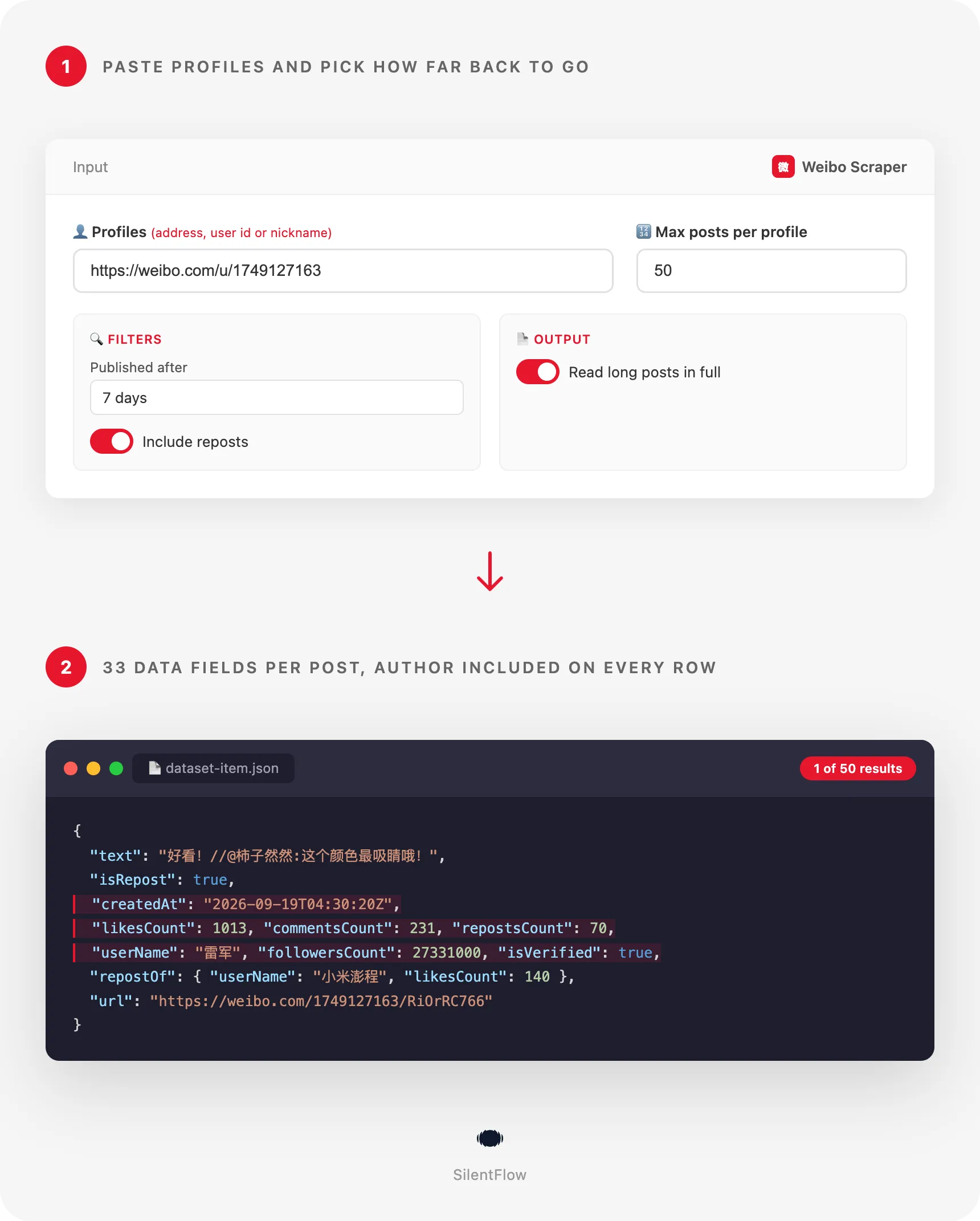
- You paste profiles, keywords, or both. A profile address, a numeric user id or a nickname all work, in the same field. Keywords search what Weibo's public search says about a topic, post addresses read single posts.
- The timeline is read newest first. Long posts are read in full, reposts come with the post they quote, and a date floor stops the run at the first post older than the day you pick.
- One row comes back per post. 33 fields: the post with its exact numbers and media, the original it reposts, and the author with followers, verification and bio. Ready for a spreadsheet, a database or an AI pipeline.
✨ Why teams choose this over other Weibo scrapers
Hitting a login wall after two pages of a Weibo profile? Pasting your logged-in browser session into a scraper and hoping it still works tomorrow? Getting "2733.1万" followers and "9月19日 22:21" back as text, then cleaning them by hand?
- 🔓 Public profiles and searches without an account. No login, no browser session to paste, no phone number. Paste a profile or a keyword and press Start. The most used Weibo scraper on the Store asks for your logged-in session before it reads a timeline.
- 📅 Dates you can sort and filter. Every row carries the exact publish time in RFC 3339 UTC (
2026-09-19T04:30:20Z), not "昨天 12:30" in Beijing time. Filter a week, chart a cadence, join on a calendar, no cleaning needed. - 🏷️ Keyword search without an account. Type
雷军or小米汽车and every post of the public search comes back as a row, with the author, counts, pictures and videos, and the region it was posted from. Profiles, keywords and single posts mix in one run. - 🔢 Numbers as numbers. Reposts, comments and likes are integers on every row, the exact values Weibo shows for the post.
27331000followers, not "2733.1万". - 📄 Long posts in full. Weibo cuts a long post after about 140 characters with "展开全文". This scraper reads it again in full by default, and brings back the region it was posted from with it.
- 🔁 Reposts with what they quote. A repost is a row with
isRepost: trueandrepostOf: the original's author, text, pictures, counts and time. Measure the spread of a post, or turn reposts off with one switch. - 👤 The post and its author in the same row. 22 post fields and 11 author fields together: name, verification, bio, gender, followers, following, total posts, avatar. One dataset answers both "how did this post do" and "how big is this account".
- ⏱️ Built for daily monitoring. Set
publishedAfterto1 dayon a schedule and each run returns only the new posts. The timeline is newest first, so the run stops at the first older post and watching 100 accounts stays quick. - 🧹 A clean dataset, every time. One row is one real post. An unknown profile or a deleted post produces no row and a clear message on the run. Unknown values are
null, never an empty string, and no post appears twice.
🎯 What you can do with Weibo data
| Team | What they build |
|---|---|
| China market research | A weekly digest of what 50 KOLs published, with likes per post and the topics they used |
| Brand and PR | A spread report of a campaign post: every account that reposted it, with their followers and the text they added |
| Investor relations and equity research | A daily feed of every post by listed-company executives and official accounts, pushed to a database |
| Newsrooms | A monitor of state and regional media accounts (人民日报, 央视新闻), with full text and pictures, minutes after publication |
| Influencer marketing | A vetting sheet per creator before a deal: engagement of the last 50 posts, share of reposts, posting cadence, verification |
| Social listening | A watchlist of 200 accounts read every morning with publishedAfter: 1 day, new posts only |
| Data and AI | A corpus of Chinese social text with topics, mentions, dates and engagement, for classification, sentiment or fine-tuning |
📥 Input parameters
Essentials
| Field | Type | Description |
|---|---|---|
profiles | array | Profiles to read, one per line. Accepts a profile address (https://weibo.com/u/1749127163, https://weibo.com/leijun, https://m.weibo.cn/u/1749127163), a numeric user id (1749127163) or a nickname (雷军). |
postUrls | array | Single posts to read, one per line: a post address (https://weibo.com/1749127163/RiOrRC766, https://m.weibo.cn/detail/5344838319083750) or a post id. Each becomes one row. |
keywords | array | Keywords to search, one per line (雷军, 小米汽车). Each keyword becomes one search read, newest posts first, every post a row. |
maxItems | integer, default 50 | Maximum rows per profile or keyword. Posts read by address do not count. |
🔍 Filters
| Field | Type | Description |
|---|---|---|
publishedAfter | string | Keep only posts published after a date (2026-01-31) or within an age (7 days, 2 weeks, 3 months, 1 year). The run stops at the first older post. |
includeReposts | boolean, default true | On: reposts are rows too, with the original in repostOf. Off: only the profile's own posts. |
📄 Output
| Field | Type | Description |
|---|---|---|
includeFullText | boolean, default true | On: a post the timeline cuts short is read again in full, with its region. Off: a faster listing that keeps the preview text of long posts. |
⚙️ Advanced
| Field | Type | Description |
|---|---|---|
debugMode | boolean, default false | Adds detailed lines to the run log. Leave it off for normal runs. |
📊 Output data
Each row is one post. A pinned video post of a personal account looks like this:
A repost keeps the same 33 columns and carries the post it quotes in repostOf (author block shortened here):
🗂️ Data fields
33 fields per row: 3 identity, 7 content, 11 author, 3 measures, 2 place and time, 4 media, 1 repost, 2 meta. repostOf is the only nested field, with 12 fields of its own.
| Group | Fields |
|---|---|
| Identity | id (the numeric post id, or mid), bid (the short id in the address), url |
| Content | text (plain text, line breaks kept), isLongText, isRepost, isPinned, topics (the #话题# tags), mentions (the @names), source (the app or device the post was sent from) |
| Author | userId, userName, userUrl, userDescription, isVerified, verifiedReason, userGender, followersCount, followingCount, postsCount, userAvatarUrl |
| Measures | repostsCount, commentsCount, likesCount |
| Place and time | location (the region Weibo shows, 北京), createdAt (RFC 3339, UTC) |
| Media | images (large size), videoUrl, videoCoverUrl, videoDuration (seconds) |
| Repost | repostOf: id, bid, url, userId, userName, text, images, videoUrl, repostsCount, commentsCount, likesCount, createdAt |
| Meta | input (the profile, post or keyword as you typed it), scrapedAt (RFC 3339, UTC) |
Good to know when you store the data:
idis Weibo's permanent post id anduserIdthe permanent user id.url(https://weibo.com/{userId}/{bid}) anduserUrlare built from them and are permanent. A nickname or a custom address can change; the ids do not.createdAtis the publish time converted to UTC. Weibo shows Beijing time (UTC+8); add 8 hours to read it as a Chinese reader does.locationis the region Weibo attaches to a post (北京,广东, or a country for posts sent from abroad). It is read with the full text of long posts, and always for posts read by address and for posts found by keyword search. Rows read from a profile timeline only carrynull.imagesare the large versions of the pictures, on Weibo's image servers. They stay valid as long as the post keeps them.videoUrlis a signed link that expires within hours: download it in the same pipeline, or keepvideoCoverUrlandurlfor later.followersCountis rounded by Weibo itself (27331000for "2733.1万",158000000for "1.58亿"). Post counts are exact.- A row found by keyword search carries the author's name, avatar and verification mark; follower counts and bio are read on profile rows. Join on
userIdwhen a search row needs the account behind it. verifiedReasonis the line Weibo shows under a verified name.userDescriptionis the bio, which many verified accounts leave empty.isPinnedmarks the post a profile keeps at the top of its timeline; it can be older than the posts below it.topicsandmentionsare read from the text and never contain the#or@sign.
🚀 Examples
Get the 50 latest posts of a profile
Pull only what a watchlist published since yesterday
Put this on a daily schedule. Each run returns the new posts and nothing else.
Search what Weibo says about a topic right now
Every post of the public search, newest first, with the author, counts and media on each row.
Read three posts by address, with their originals and regions
Export an account's own posts of the last quarter, reposts left out
List a media account as fast as possible, preview text only
Compare the engagement of two executives
🤖 Copy to your AI assistant
Paste this block into Claude, ChatGPT or Cursor to give it full context about this scraper:
💻 Integrations
Vet a creator before a campaign (Python)
Post new items from a watchlist to Slack (JavaScript)
Build a topic table of an account's last 300 posts (Python, CSV export)
📈 Performance
Measured on 20 September 2026 on real profiles.
| Run | Rows | Time |
|---|---|---|
| 1 personal profile, 50 latest posts, long posts read in full (the default input) | 50 | 13 seconds |
| 1 media profile, 12 own posts, preview text, plus 2 posts by address | 14 | 5 seconds |
| 1 media profile, every post of the last day, long posts read in full | 35 | 14 seconds |
| Metric | Value |
|---|---|
| Fields per row | 33 |
| Posts per timeline page | 45 |
| Columns filled on the default run | all, except location (long posts and posts by address), userDescription (accounts with a bio) and the media and repost fields that depend on the post |
| Limit per run | no fixed limit: the cap is per profile, and you choose it |
💾 Data export
Every run stores its rows in a dataset you can download as JSON, CSV, Excel, XML or HTML from the Storage tab, or pull from the API:
The dataset has two ready-made table views: Posts (post, author, published, likes, comments, reposts, URL) and Author stats (author, verified, verification, followers, following, posts, gender, profile URL). Schedules, webhooks and the Apify integrations (Google Sheets, Slack, Zapier, Make, n8n) work on top of the same dataset.
💡 Tips for best results
- Monitoring? Use
publishedAfterwith an age."publishedAfter": "1 day"on a daily schedule reads only the top of each profile and returns only new posts. - Use user ids for long-lived pipelines. A nickname or a custom address can change. The numeric id never does, and every row gives it to you in
userId. - Keep full text on when the text matters. Long posts, the region and exact counts come with it. Turn it off only for a fast inventory of what an account posted.
- Turn reposts off to measure an account's own voice. Engagement on a repost belongs partly to the original.
includeReposts: falsekeeps the rows the account wrote itself. - Download videos in the same run.
videoUrlexpires within hours.url,imagesandvideoCoverUrlare the links to keep. - Group rows by
userIdfor account-level reports. The author block is identical on every row of a profile, so the first row of each group is the account's profile.
❓ FAQ
What does this scraper extract? Every public post of the profiles you list and of the keywords you search, one row each, with 33 fields: the post (text, exact time, reposts, comments, likes, topics, mentions, source, region, pictures, video), the original it reposts, and its author (name, verification, bio, gender, followers, following, total posts, avatar). It also reads single posts by address.
What can I type in the profile field?
A profile address in any form (weibo.com/u/{id}, weibo.com/{alias}, weibo.com/n/{nickname}, m.weibo.cn/u/{id}, m.weibo.cn/profile/{id}), a numeric user id or a nickname. Anything else is skipped and named in the run log.
Do I need a Weibo account? No. The scraper reads public profiles, posts and searches. There is no login, no browser session and no key to manage.
How fresh is the data?
Live. Every run reads Weibo at run time, nothing is served from a cache. scrapedAt tells you when each row was read.
Is there a limit on the number of posts?
No fixed limit. maxItems is per profile or keyword, and a run walks a timeline or a search page by page until that cap, the date floor or the end of the source.
Can I scrape many profiles and keywords in one run? Yes. List as many as you need, and mix them freely. A source named twice, for instance a keyword once in Chinese and once as the same word with spaces around, is read once, and no post is ever delivered twice in a run.
How do the filters combine?
They stack. publishedAfter: "30 days" with includeReposts: false and maxItems: 100 returns up to 100 posts the account wrote itself in the last 30 days, newest first.
Why is location null on most rows?
Weibo shows the region of a post on the post's own page, not in the timeline. It is read together with the full text of long posts and for every post read by address. For the region of a specific short post, put its address in postUrls.
Does it search by keyword, read comments or the hot search board?
Keyword search yes: list keywords in the keywords field and every post of the public search comes back, no account needed. Comments and the trending board are different products, not offered here.
What if a profile does not exist, is private or has no post? No row is written for it. The run log names the profile, and a run that ends with no rows at all says why on the run itself. Your dataset never contains error rows. An account that restricts its timeline to logged-in visitors is reported as not found.
Are the URLs permanent?
url and userUrl are permanent. Picture links stay valid as long as the post keeps them. videoUrl is signed and expires within hours.
What is Weibo? Weibo (微博, Sina Weibo) is China's public conversation platform, the domestic counterpart of X (Twitter), with government, media, company and celebrity accounts followed by hundreds of millions of readers. A post is a 微博 (a "weibo"), a repost a 转发, a like a 赞.
⚖️ Legal
This Actor extracts publicly available data from Weibo. It does not bypass any login, paywall or CAPTCHA, and it does not download video files. Users are responsible for complying with Weibo's terms of service and with applicable data protection laws (GDPR, CCPA, and PIPL, China's Personal Information Protection Law). The output contains author information that account holders publish themselves (name, bio, gender, avatar) and the names of mentioned users; when you process it as personal data, handle it accordingly. The data returned is informational; verify accuracy for regulated use cases.
🔗 Related scrapers
- Douyin Scraper: videos and profiles from Douyin, China's TikTok.
- X Tweet Scraper: the tweets of any public X (Twitter) profile.
- YouTube Channel Scraper: every video, short and live stream of a channel.
- TikTok Scraper: videos and profiles from TikTok.
📬 Support
Need something this scraper does not do yet? We ship features fast.
- Feature requests go straight to our backlog
- Enterprise needs? We do custom integrations and high-volume plans
- Pricing details live on the Monetization tab of the actor page
Response time: usually under 24 hours.
Check out our other scrapers: silentflow on Apify


