

LinkedIn Post Search Scraper | Keywords, Hashtags & Profiles
Pricing
from $1.25 / 1,000 results
LinkedIn Post Search Scraper | Keywords, Hashtags & Profiles
Search LinkedIn posts by keyword or hashtag and export the full text, author, reactions, comments, images and posting date. Also works from a profile or a company page, or from exact post links you already have. No login and no cookies needed, in any language LinkedIn publishes and country.
Pricing
from $1.25 / 1,000 results
Rating
0.0
(0)
Developer

SilentFlow
Maintained by CommunityActor stats
3
Bookmarked
246
Total users
58
Monthly active users
11 days ago
Last modified
Categories
Share
LinkedIn Post Scraper
From SilentFlow. Creators of Pinterest Scraper and Leboncoin Scraper, with 410,000+ combined lifetime runs.
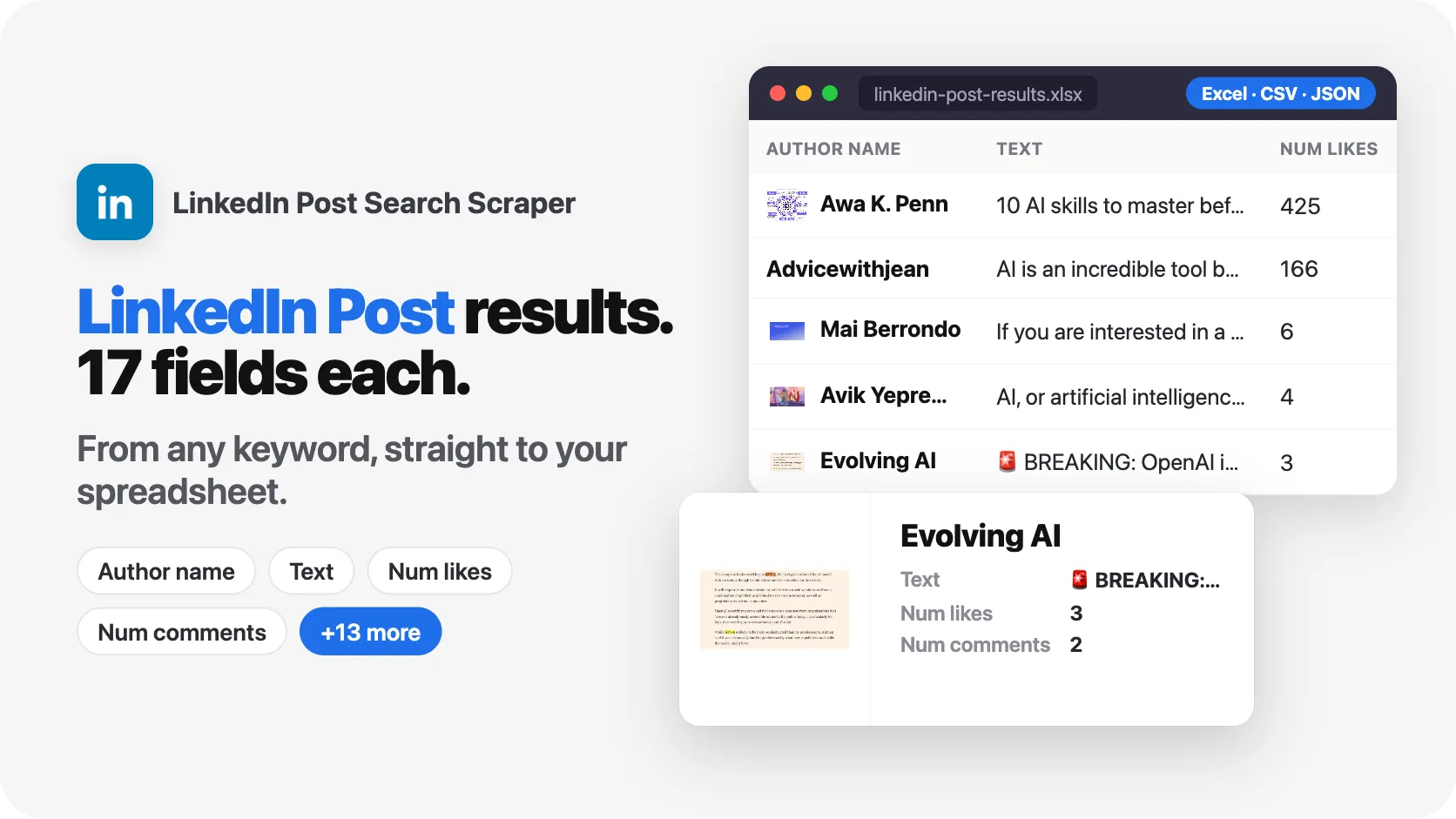
Search LinkedIn posts by keyword, by profile, by link or by post ID, and get back the post text, its author, its date and its reactions in one structured row per post. A default run brings back 10 posts with their full content in about 40 seconds.
No login. No account. Paste a keyword, press Start, get a spreadsheet.
✨ Why teams choose this over other LinkedIn post scrapers
Copying posts by hand, one browser tab at a time? Ending a run with a file full of links and no idea what the posts actually said? Losing an afternoon to a scraper that asked you to sign in first?
- 📝 The post text comes back on every run. Every row carries what the post actually says, who wrote it, when, and how many people reacted. There is no option to hunt for and no faster mode that quietly drops the content you came for.
- 🚫 Rows with nothing to read are never delivered. If a post is found but its content cannot be opened, it is left out of your results instead of shipping as a link with an empty text column, and it is never charged.
- 🔎 Four ways in. Search by keyword or hashtag, follow a profile or a company page, paste exact post links, or paste the post IDs you already have. One actor covers all four.
- 🔓 No login, no account, no personal data of yours involved. You never hand over LinkedIn credentials to run this.
- 🌍 Any language, any country. Posts are read as LinkedIn publishes them, in Spanish, German, Portuguese, Japanese or anything else, with the original text preserved.
- 📊 Stable columns. Every advertised field exists on every row, empty when a post genuinely has no images or no hashtags. Your spreadsheet formulas and your database import do not break between runs.
- ⏱️ You can watch it work. While the run is going, the number it shows you is the number of rows already in your dataset, not the number of pages it opened, and it ends with a sentence saying what it delivered.

🎯 What you can do with LinkedIn post data
| Team | What they build |
|---|---|
| Content marketing | A weekly board of the highest-reaction posts on your topic, to see which angles travel |
| Demand generation | A watchlist of competitor company pages, so every launch post lands in Slack the day it goes out |
| Sales | A list of prospects who posted about a pain your product solves, with the exact sentence to quote in the first email |
| Recruiting | A feed of "we are hiring" posts in a niche, before the role reaches the job boards |
| Product research | A corpus of what users say about a category, ranked by reactions, to feed a positioning study |
| Investor relations | A timeline of what a portfolio company publishes, archived with dates and engagement counts |
📥 Input parameters
| Parameter | Type | Description | Default |
|---|---|---|---|
keywords | Array | Search terms or hashtags. Each one runs its own search. | ["AI"] |
postUrls | Array | Exact post links to read, in /posts/ or /feed/update/ form. | [] |
postIds | Array | Post IDs to read, such as 7130134007584808962 or urn:li:activity:7130134007584808962. The postId column of a previous run works too. | [] |
profileUrls | Array | Profile or company page links to collect posts from. | [] |
dateFilter | Enum | past-week, past-month, or any time. | Any time |
limit | Integer | Maximum posts per keyword or per profile, 1 to 100. | 10 |
proxy | Object | Connection settings. Residential is recommended. | Apify Residential |
Every run opens the posts it finds and returns their content. There is no faster mode that returns links only, because a row without the post is not worth a row.
📊 Output data
One row per post:
🗂️ Data fields
✅ means the column is on 100% of rows, measured on 55 rows collected from keywords, profile pages and exact links. The Notes say when a value inside it can be empty. ⚠️ means the column appears only on the rows that have it.
| Field | Type | Column on every row | Notes |
|---|---|---|---|
postId | string | ✅ | Identifier of the post. Filled on 55 rows out of 55. |
url | string | ✅ | Direct link to the post. Filled on 55 out of 55. |
text | string | ✅ | What the post says. Filled on 55 out of 55. Can be empty on a post made of an image with no caption. |
type | string | ✅ | text, image, video, article or document. Filled on 55 out of 55. |
postedAt | string | ✅ | Publication date and time. Filled on 55 out of 55. |
postedAtISO | string | ✅ | Same date in ISO 8601. Filled on 55 out of 55. |
authorName | string | ✅ | Person or company who published. Filled on 55 out of 55. |
authorProfileUrl | string | ✅ | Link to that author. Filled on 55 out of 55. |
authorProfileId | string | ✅ | Author identifier, stable across runs. Filled on 55 out of 55. |
authorImage | string | ✅ | Avatar link. Empty when the page does not show one, on 13 rows out of 55. |
authorHeadline | string | ⚠️ | Tagline under the author name, only when the post page shows it |
authorType | string | ⚠️ | Person or Company, when the post page says which |
numLikes | number | ✅ | Reactions counted on the post page. 0 when the post has none. |
numComments | number | ✅ | Comments counted on the post page. LinkedIn often hides this count: 0 on 22 rows out of 55. |
numShares | number | ✅ | Reposts. LinkedIn hides this count on public pages: 0 on all 55 rows. |
images | array | ✅ | Empty list when the post has no image, on 12 rows out of 55. |
video | string | ⚠️ | Present on video posts |
hashtags | array | ✅ | Empty list when the post has none, on 32 rows out of 55. |
mentions | array | ⚠️ | People and pages tagged in the post |
isRepost | boolean | ✅ | Whether the post repeats someone else's |
isSponsored | boolean | ✅ | Whether the post is an ad |
articleTitle | string | ⚠️ | Title of the article a post links to |
articleUrl | string | ⚠️ | Link the post points to |
scrapedAt | string | ✅ | When the row was collected. Filled on 55 out of 55. |
🚀 Examples
Get the latest posts about a topic
Track what a company published this week
Read exact posts you already have links for
Read posts from their IDs
Watch several competitors at once
Find recent hiring posts in a niche
Posts take a few days to become searchable, so the freshest results you can expect are about three days old. Ask for a period only when you would rather have fewer posts than older ones.
| SilentFlow · LinkedIn Post Search suite | |
 LinkedIn Post Search Scraper LinkedIn Post Search ScraperYou are here |  LinkedIn Hashtag & Post Scraper LinkedIn Hashtag & Post ScraperNo Cookies |
🤖 Copy to your AI assistant
💻 Integrations
Run it from Python:
Run it from JavaScript:
Send new posts to Slack, Google Sheets, Airtable or a webhook straight from the Apify Integrations tab, or schedule the run every morning and read the dataset from your warehouse.
📈 Performance
| What | Measured |
|---|---|
| Default run, 10 posts with full text | 41 seconds |
| Five sources at once, 30 posts delivered | 48 seconds |
| One keyword, 100 posts asked for | 100 delivered in 2 minutes 27 |
| Posts per keyword or per profile | up to 100 |
| Keywords, profiles and links per run | no fixed limit |
Every figure above is a count of rows delivered to your dataset, not of pages the run opened.
💾 Data export
Every run writes a dataset you can download as JSON, CSV, Excel, XML or HTML from the Storage tab, read from the API, or pipe into another tool through Integrations.
💡 Tips for best results
- Start with 5 posts. Check the text and the dates on a small run before scaling to 100.
- Prefer company pages for profile mode. Company pages publish publicly and are indexed far better than personal profiles.
- For a person, search their name as a keyword instead of passing their profile link. It reaches more of what they published.
- Use
dateFilterwhen recency matters. Without it, a search can return posts from several years back, which is fine for research and wrong for monitoring. - Give keywords two or three words. A single very common word returns whatever is most indexed, not what you meant.
- Add keywords rather than raising the limit. Each keyword has a finite pool of public posts. Three keywords at 50 collect more than one keyword at 150.
⚠️ What this scraper cannot do
- Private and connection only posts stay private. Only what LinkedIn shows publicly can be collected.
- Personal profiles are thinly indexed. A personal profile link often returns few posts or none. Searching the person's name as a keyword works better.
- Reaction counts are what the post page shows. Comment counts are frequently absent on LinkedIn's public pages and come back as 0, and share counts are usually hidden.
- Some posts cannot be opened. When that happens the row is dropped rather than delivered empty, so a run can return fewer posts than the limit you set. The run says so in its final message.
❓ FAQ
Do I need a LinkedIn account or password? No. Nothing is required beyond the keyword, link or post ID you type in.
Why did I get fewer posts than my limit? The limit is a ceiling, not a promise. What LinkedIn publishes publicly for a narrow keyword runs out, the date filter may exclude some, and posts that could not be opened are left out rather than delivered empty. When a run falls short it says so in its final message, with both numbers. Running the same keyword again returns the same posts; adding keywords is what collects more.
Why is numComments 0 on many posts?
LinkedIn's public post pages often show the reaction count without the comment count. When the number is not on the page, the row keeps 0 instead of inventing one.
Can I get the comments themselves? No. This actor returns posts. Comment text is not part of the output.
Does it work for non English posts? Yes. The post text is returned exactly as published, in any language and any country.
What is the difference between keywords and profileUrls?
keywords searches across all of LinkedIn for a topic. profileUrls collects what one specific person or company published.
Can I pass a hashtag?
Yes, put it in keywords, with or without the #.
How do I get one specific post?
Put its link in postUrls, or its ID in postIds. It is read directly, no search involved.
Where do I find a post ID?
It is the long number in a post link, after activity (for example 7130134007584808962), or the postId column of a previous run. Paste either one into postIds to read the post again, for instance to refresh its reaction count.
Can I schedule it? Yes. Use the Schedules tab in Apify to run it every hour, every day or every week, and connect the output to Slack, Sheets or a webhook.
Can I get a faster run that returns only the links? No. Every run opens the posts and returns their content. A list of links with no text is not what a post scraper is for, and you would be paying per row for it.
⚖️ Legal
This actor collects only publicly visible LinkedIn content, the same pages any visitor can open without signing in. It does not access private profiles, connection only posts, or anything behind a login. You remain the controller of the data you collect: if your use involves personal data, make sure it has a lawful basis and respects GDPR, CCPA, PIPL and the local rules that apply to you, including retention limits and deletion requests. Use it for research, monitoring and analysis, not for spam or harassment.
🔗 Related scrapers
More LinkedIn actors, for profiles, company pages, jobs and ads, are published on the SilentFlow profile in the Apify Store.
More SilentFlow scrapers
🛒 E-commerce
 Pinterest - Pinterest Scraper | Pins, Boards and Profiles
 Leboncoin - Leboncoin Scraper | Classified Ads, Prices and Sellers
 Leboncoin - Leboncoin Ad Details Scraper
 Back Market - Back Market Scraper | Refurbished Prices
 ImportYeti - US Customs Records, Suppliers & Trade Data - ImportYeti Scraper - US Customs Records, Suppliers & Trade Data
 1688 Wholesale - 1688 Wholesale Scraper
 TikTok Shop - TikTok Shop Scraper | Products, Sellers and Creator Videos
 Udemy Course - Udemy Course Scraper
 Naver - Naver Scraper | Shopping Products, Prices and Reviews
 JD - JD Products Scraper | Prices, Brands and Barcodes
 Store Leads Ecommerce - Store Leads Ecommerce Scraper
 Amazon Seller - Amazon Seller Scraper | Emails, Phones and Ratings
 Bring a Trailer - Bring a Trailer Scraper
 Naver - Naver Reviews Scraper | Shopping Product Reviews
 Store Leads - Store Leads Scraper | Shopify Data
 Avito - Avito Scraper | Listings, Prices and Sellers
 Leboncoin - Leboncoin Scraper
 Lowes - Lowes Products Scraper | Prices, Stock and Specs
 Mobile.de - Mobile.de Scraper
 Naver - Naver Products Scraper | Shopping Prices, Sellers and Ratings
 Taobao - Taobao Scraper | Products, Prices and Sellers
 Udemy - Udemy Scraper
 Agoda - Agoda Scraper | Hotel Prices and Guest Ratings
 Alibaba - Alibaba Products Scraper | Wholesale Prices and MOQ
 AliExpress - AliExpress Reviews Scraper | Feedback, Ratings and Photos
 AliExpress - AliExpress Scraper | Products, Prices and Sales
 Allegro - Allegro Scraper | Products, Prices and Sellers
 Avito - Avito Profiles Scraper | Sellers, Ratings and Reviews
 Back Market - Back Market Scraper | Refurbished Electronics Prices
 CARFAX - CARFAX Scraper | Used Cars, Prices and History
 Coupang - Coupang Detail Scraper | Product Prices and Options
 Ctrip - Ctrip Scraper | Attractions, Tickets and Reviews
 eBay Marketplace - eBay Marketplace Scraper
 Europages - Europages Scraper | Suppliers and B2B Companies
 Google Hotels - Google Hotels Scraper | Prices, Offers and Ratings
 Homedepot - Homedepot Reviews Scraper | Customer Reviews and Ratings
 Leboncoin - Leboncoin Details Scraper
 Mercari - Mercari Scraper | Listings, Sold Prices and Sellers
 Vinted Marketplace - Vinted Marketplace Scraper
 Walmart - Walmart Product Scraper
 Alibaba - Alibaba Scraper | Products, Prices and Suppliers
 Amazon - Amazon Product Scraper
 Amazon Marketplace - Amazon Marketplace Scraper
 AutoScout24 - AutoScout24 Scraper
 BAUHAUS - BAUHAUS Scraper | Product Prices, EAN and Specs
 eBay Listings - eBay Listings Scraper
 Europages Deep Dive Extractor - Europages Deep Dive Extractor
 Eventim - Eventim Scraper | Events, Ticket Prices and Venues
 GasBuddy - GasBuddy Scraper | Gas Prices by Station
 Pinterest - Pinterest Scraper
 Trip - Trip Scraper | Hotels, Prices and Reviews
 Vinted - Vinted Scraper
 Walmart - Walmart Products Scraper
💼 Jobs
 ZipRecruiter - ZipRecruiter Jobs Scraper | Salary, Company & Location Filters
 Indeed - Indeed Company Reviews Scraper
 Multi Board - Multi Board Job Scraper
 Glassdoor Job Listings - Glassdoor Job Listings Scraper
 🔥 Glassdoor - 🔥 Glassdoor Scraper
 LinkedIn Job Search - LinkedIn Job Search Scraper | Salaries & Seniority
 ATS - ATS Jobs Scraper | Greenhouse, Lever and Ashby
 Dice Tech - Dice Tech Jobs Scraper
 Jora - Jora Jobs Scraper
 Malt Freelancer - Malt Freelancer Scraper
 Malt - Malt Scraper | Freelance Profiles
 Welcome to the Jungle - Welcome to the Jungle Job Scraper
 All - All Jobs Scraper
 Arbeitsagentur - Arbeitsagentur Jobs Scraper
 Dice - Dice Jobs Scraper
 Glassdoor - Glassdoor Jobs Scraper
 iimjobs - iimjobs Scraper | Jobs, Companies and Recruiters
 Indeed - Indeed Jobs Scraper | Job Listings in 73 Countries
 Jora Job Listings - Jora Job Listings Scraper
 StepStone - StepStone Scraper
 YCombinator - YCombinator Jobs Scraper | Startup Jobs, Salaries and Founders
 Arbeitsagentur - Arbeitsagentur Jobs Scraper
 Cutshort - Cutshort Jobs Scraper | Salaries, Skills and Companies
 Indeed - Indeed Companies Scraper
 Indeed Jobs - Enhanced Edition - Indeed Jobs Scraper - Enhanced Edition
 LinkedIn - LinkedIn Jobs Scraper
 Naukri & NaukriGulf - Naukri & NaukriGulf Jobs Scraper
 Seek - Seek Job Scraper
 Welcome to the Jungle - Welcome to the Jungle Scraper
 Ziprecruiter - Ziprecruiter Scraper
🏠 Real estate
 SeLoger - SeLoger Scraper | Real Estate Listings
 Anjuke - Anjuke Scraper | Rental Listings, Prices and Agents
 Realtor Rental Listings - Realtor Rental Listings Scraper
 Airbnb Pro Host Contact & - Airbnb Pro Host Contact & Email Scraper
 Bien'ici - Bien'ici Scraper | Property Listings
 Airbnb Professional Host - Airbnb Professional Host Scraper | Emails, Phones, SIRET
 Rightmove - Rightmove Scraper
 Trulia Rental Listings - Trulia Rental Listings Scraper
 Airbnb Search - Airbnb Search Scraper
 Bienici - Bienici Scraper
 Idealista - Idealista Scraper
 Realestate.com.au - Realestate.com.au Scraper
 SeLoger - SeLoger Scraper | French Property Listings and Agencies
 Zillow - Zillow Scraper
 Airbnb Search - Airbnb Search Scraper
 Idealista - Idealista Scraper
 Realtor Rental - Realtor Rental Scraper
 Trulia Rental - Trulia Rental Scraper
📣 Social media
 Facebook Search - Facebook Search Scraper
 Instagram - Instagram Story Scraper | Stories & Highlights
 LinkedIn Leads - LinkedIn Leads Scraper | Sales Navigator Export
 TikTok - TikTok Scraper
 YouTube - YouTube Channel Scraper | Videos, Shorts and Views
 Instagram Engagement - Instagram Engagement Scraper
 OnlyFans - OnlyFans Profile Scraper
 Facebook Search - Facebook Search Profiles Scraper | People by Name or Keyword
 Meta Ad Library - Meta Ad Library Scraper
 TikTok Trend - TikTok Trend Scraper | Trending Hashtags and Videos
 OnlyFans - OnlyFans Creator Scraper
 Skool Community - Skool Community Scraper
 Bilibili - Bilibili Scraper
 Facebook Thread - Facebook Thread Profiles Scraper | Followers, Bios & Engagement
 Kuaishou - Kuaishou Scraper | Videos, Comments and Creator Stats
 LinkedIn Event - LinkedIn Event Scraper
 Reddit - Reddit Scraper | Posts, Comments and Subreddits
 Reddit - Reddit Scraper | Comments, Posts and Users
 Snapchat - Snapchat Contacts Scraper | Phones, Emails and Websites
 Weibo - Weibo Scraper | Posts, Profiles and Engagement
 Xigua - Xigua Scraper | Videos, Creators and Downloads
 Discord - Discord Scraper | Servers, Member Counts and Invites
 Facebook - Facebook Company Scraper
 Facebook Business Page - Facebook Business Page Scraper
 Kwai - Kwai Scraper | Videos, Creators and Hashtags
 LinkedIn Ads Library - No Cookies - LinkedIn Ads Library Scraper - No Cookies
 Skool Group - Skool Group Scraper
 Snapchat - Snapchat Ads Scraper | Ad Library, Impressions & Targeting
 YouTube - YouTube Transcript Scraper
🏢 Business data
 LinkedIn People Search - LinkedIn People Search Scraper | Profiles & Companies
 Tencent - Tencent Scraper | Maps Places, Phones and Ratings
 LinkedIn Company Search - LinkedIn Company Search Scraper | Profiles & Firmographics
 Company Data - Company Data Scraper | Emails, Phones and Tech Stack
 FanDuel - FanDuel Scraper | Odds, Spreads and Player Props
 ForexFactory - ForexFactory Scraper | Economic Calendar and Forecasts
 Justdial - Justdial Companies Scraper | Business Leads, Phones and Emails
 Kakao - Kakao Scraper | Map Places, Reviews and Phones
 OpenTable - OpenTable Reviews Scraper | Restaurant Reviews and Ratings
 SoftwareAdvice - SoftwareAdvice Scraper | Reviews, Ratings and Pros & Cons
 Teachable Course - Teachable Course Scraper
 Zomato - Zomato Reviews Scraper | Restaurant Ratings and Replies
 2GIS - 2GIS Reviews Scraper | Ratings, Photos and Owner Replies
 LinkedIn Sales Navigator (Legacy, retires Oct 2026) - LinkedIn Sales Navigator Scraper (Legacy, retires Oct 2026)
 Teachable - Courses, Prices & Instructors - Teachable Scraper - Courses, Prices & Instructors
 Trustpilot - Trustpilot Scraper | Reviews, Ratings and Company Contacts
 Website Tech Stack - Website Tech Stack Scraper
✈️ Travel
 Google Maps - Google Maps Scraper
 Booking.com Hotel - Booking.com Hotel Scraper
 Flight Price - Flight Price Scraper
 Trip - Trip Reviews Scraper | Hotel Reviews and Ratings
 Booking - Booking Scraper | Hotel Prices, Photos, Availability
🎯 Lead generation
 Northdata - Northdata Company Scraper
 ZocDoc - ZocDoc Scraper | Doctors, Reviews and Availability
 UK Companies House - UK Companies House Enricher
 Dealroom - Dealroom Scraper | Companies and Investors
 CNPJ Brazilian - CNPJ Brazilian Company Enricher
 Google Ads Transparency - Google Ads Transparency Scraper
 SIRET - SIRET Company Enricher
 BuiltWith - BuiltWith Scraper | Tech Stacks and Top Sites
 Domain - Domain Enricher
 French Company Prospector - French Company Prospector
 SEC - SEC Scraper | EDGAR Filings and Company Data
 USPTO - USPTO Scraper | Trademark Search and Status
 ZocDoc - ZocDoc Scraper
 Clutch - Clutch Scraper
 Clutch Agency - Clutch Agency Scraper
 Dealroom Startup Data - Dealroom Startup Data Scraper
 G2 - G2 Reviews Scraper
 PagesJaunes France - PagesJaunes France Scraper
 PagesJaunes - PagesJaunes Business Scraper
 SIRET French - SIRET French Company Enricher
 ThomasNet Suppliers - ThomasNet Suppliers Scraper
🔎 SEO
 Similarweb - Similarweb Scraper | Website Traffic, Rankings and Competitors
 Google News - Google News Scraper
 Apple - Apple Scraper | App Store Apps, Ratings and Charts
📈 Marketing
 Pexels -
 🧰 More tools
 Apple - Apple Reviews Scraper | App Store Reviews and Ratings
 PrizePicks - PrizePicks Scraper | Player Props, Lines and Projections
📬 Support
Rate the actor and leave a review on its Apify Store page. Reviews are read and acted on, and they shape what gets fixed next.
Made by SilentFlow


![LinkedIn Posts Scraper - Keyword & Hashtag [NO COOKIES] ✅ avatar](https://images.apifyusercontent.com/lm3D8sWH7kDwZlj2xMmsok9U5yz3qJt21mCq7viMVq0/rs:fill:76:76/cb:1/aHR0cHM6Ly9hcGlmeS1pbWFnZS11cGxvYWRzLXByb2QuczMudXMtZWFzdC0xLmFtYXpvbmF3cy5jb20vc0NDU2R3bm1LTUoxUTJzVG4tYWN0b3ItTkRqOGZmQ2N0WGNqS2xyQmQtNkl3Q2Zsdm1KeS1wbmctY2xpcGFydC1jb21wdXRlci1pY29ucy1saW5rZWRpbi1sb2dvLWF0cmlvLXN5c3RlbXMtaW5jLWxpbmtl.webp)


