
PDF to Markdown - PDF Text Extractor with OCR, Tables & RAG
Pricing
from $1.40 / 1,000 pdf converteds
PDF to Markdown - PDF Text Extractor with OCR, Tables & RAG
Convert PDF URLs to clean Markdown or text for LLMs and RAG: headings, tables, multi-column layouts and scanned pages (OCR in 16 languages). One row per document, page or token-sized chunk with page numbers. Also finds every PDF linked from a web page.
Pricing
from $1.40 / 1,000 pdf converteds
Rating
0.0
(0)
Developer

Sonic Scraper
Maintained by CommunityActor stats
0
Bookmarked
2
Total users
1
Monthly active users
35 minutes ago
Last modified
Categories
Features
Share
Convert any PDF URL into clean Markdown or plain text for LLMs, RAG pipelines and AI agents. Headings, lists and ruled tables are kept, two- and three-column layouts are read in the right order, running headers and page numbers are removed, and scanned pages are read with OCR in 16 languages. Get one row per document, per page, or per token-sized chunk with its section path and page numbers. It can also find and convert every PDF linked from a web page.
Paste PDF links (or arXiv, journal and landing pages, Google Drive and Dropbox share links) and run. No API key, no browser, no setup.
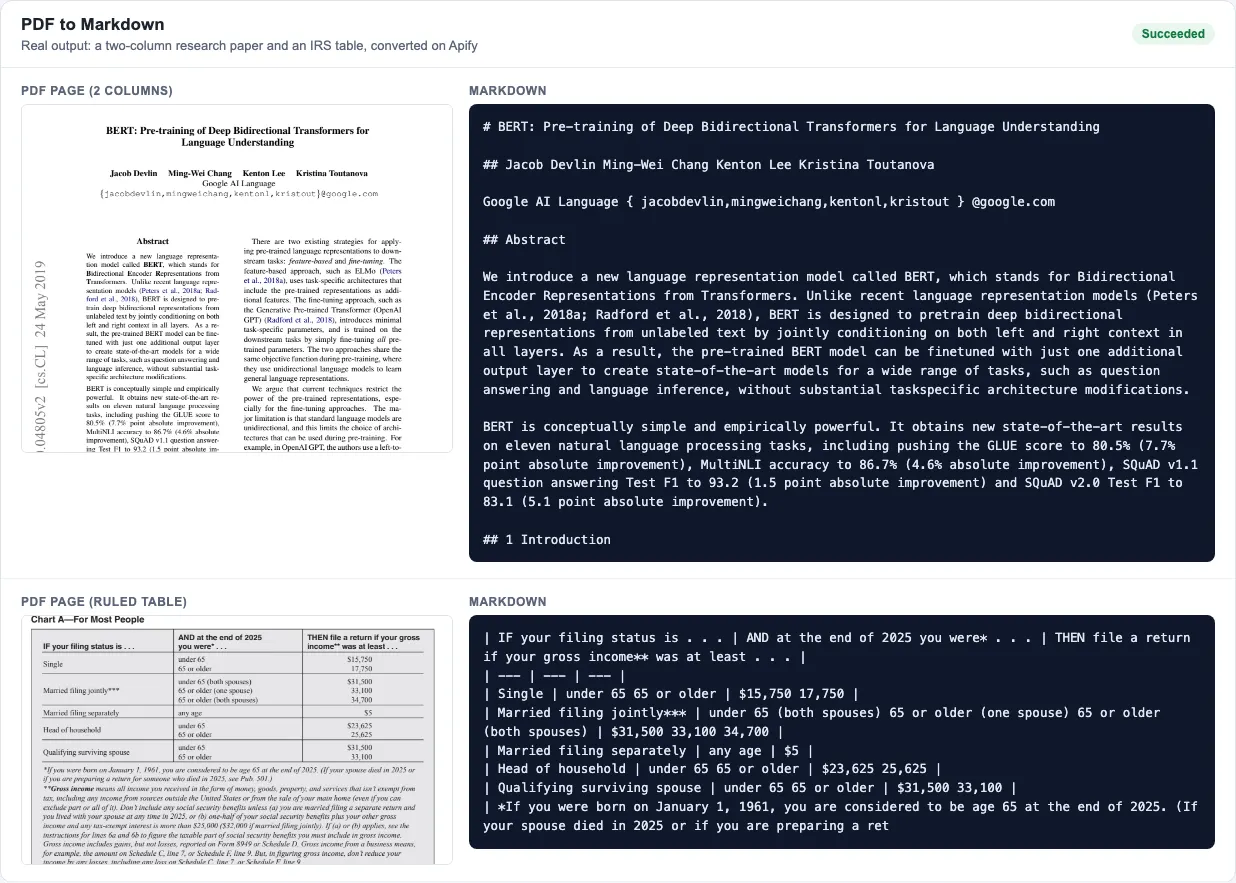
Real output from runs of PDF to Markdown: a two-column arXiv paper and a ruled table from the IRS Form 1040 instructions.
What makes it different
- Reading order that survives columns. Two- and three-column pages (papers, newsletters, government booklets) are read column by column, while titles and abstracts that span the page stay in place.
- Real structure, not a text dump. Headings are detected from font size, weight and section numbering (
## 1 Introduction,### 2.1 ...), bullets become Markdown lists, ruled tables become Markdown tables, and words hyphenated across lines are joined. - Noise removed. Repeated running headers and footers, page numbers, printer's marks outside the page and sideways margin stamps (like arXiv's) are dropped.
- Scanned pages too. Pages with no text layer are read with Tesseract OCR, automatically, in up to 4 of 16 languages. Pages that have text are never billed as OCR.
- Ready for RAG. Chunk mode splits each document into pieces of about N tokens that start at section boundaries and carry their
headingPath(for example["Attention Is All You Need", "3 Model Architecture"]) andpageStart/pageEnd, so answers can cite pages. - Built for agents. Runs on an empty input (it converts a sample, free), returns a status row for every failed URL instead of an empty dataset, and keeps one flat JSON shape.
Quick start
Convert two PDFs into one Markdown row each:
Chunks of about 500 tokens for a vector database:
Every PDF linked from a reports page, first 20 pages each:
A scanned French and English document, one row per page:
What you get
| Field | Example |
|---|---|
status, error | ok, or error with a reason (download failed, not a PDF, password-protected...) |
url, finalUrl, foundOn | The URL you gave, where it redirected, and the web page it was found on |
title, author, subject, keywords, creator, producer | From the PDF's metadata; the title falls back to the first heading |
createdAt, modifiedAt | 2019-05-28T00:07:51 |
fileName, fileSizeBytes, pageCount, pagesConverted | 1810.04805v2.pdf, 775166, 16, 16 |
ocrPages, tableCount, wordCount | 0, 3, 10700 |
markdown and/or text | The converted content |
pageNumber, ocr, pageTables | Page mode |
chunkIndex, chunkCount, headingPath, pageStart, pageEnd, tokenEstimate | Chunk mode |
markdownFileUrl | Download link of a .md file (with saveMarkdownFiles, and always for documents over 1 million characters) |
warnings | For example "only the first 500 of 812 pages were converted (maxPagesPerPdf)" |
Shortened chunk row from a real run:
The Documents view lists status, title, pages, OCR pages, tables and words; the Markdown view shows the content. Export as JSON, CSV or Excel, or send rows to a vector database, Google Sheets or a webhook with Apify integrations, Make, Zapier or n8n.
Options
| Field | What it does |
|---|---|
pdfUrls | PDF links. Article and landing pages are followed to their PDF (citation metadata or the first PDF link); arXiv /abs/ links, Google Drive and Dropbox share links are converted to downloads. |
pageUrls, maxPdfsPerPage | Web pages whose PDF links should all be converted. |
splitBy | document (default), page or chunk. |
chunkSize, chunkOverlap | Chunk size and overlap in tokens (about 4 characters per token). |
outputFormat | markdown (default), text (tables as tab-separated rows) or both. |
pageRange, maxPagesPerPdf | Pages to convert, for example 1-5, 8, 20-. |
ocrMode, ocrLanguages | auto (pages without a text layer), off or force; up to 4 languages. |
includeTables, includePageMarkers | Markdown tables on/off; <!-- page N --> markers in document Markdown. |
saveMarkdownFiles | Also save each document as a .md file and return its link. |
maxPdfs, maxFileSizeMb, pdfPassword, maxConcurrency, proxyConfiguration | Limits, protected PDFs, parallel files and an optional proxy. |
How it works
The Actor downloads each PDF over plain HTTP, reads every page's words with their position, font size and weight (pdfplumber and pdfium), and rebuilds the reading order: it finds column gutters, groups words into lines and paragraphs, detects headings, lists and ruled tables, and removes repeated headers, footers and page numbers. Pages without a text layer are rendered at 300 DPI and read with Tesseract OCR. Everything runs inside the Actor; your documents are not sent to any third-party API or language model.
A text page takes about half a second at the default 4 GB of memory, and a scanned page a few seconds.
Use with AI agents / MCP
Connect the Apify MCP server at https://mcp.apify.com?tools=sonic_scraper/pdf-to-markdown in Claude Desktop, Cursor, VS Code or any MCP client. Example prompt: "Read this annual report PDF and list the revenue figures by segment: https://example.com/annual-report.pdf". With splitBy: "chunk" an agent gets section-tagged pieces it can quote with page numbers.
Pricing
Pay per use, on the free plan:
| Event | Price |
|---|---|
| PDF converted | $2 per 1,000 PDFs ($0.002 each) |
| Text page converted | $0.30 per 1,000 pages |
| Scanned page read with OCR | $4 per 1,000 pages |
Paid Apify plans get lower rates (see the Pricing tab). Failed downloads, files that are not PDFs, password errors and the free sample run are not charged, and a page is billed either as a text page or as an OCR page, never both.
Examples: a 20-page report costs $0.008; 1,000 reports of 20 pages cost $8; a 50-page scanned contract costs $0.20. The Actor stops before your run's maximum charge.
Limits
- Tables need ruling lines. Tables drawn with lines (most forms, statements and government documents) become Markdown tables. Tables laid out only with spacing, like many academic tables, come out as text lines in reading order.
- Figures are not described. Images, charts and diagrams are skipped; their text labels may appear as short lines.
- Math is kept as plain text with subscripts inline (
x 1for x₁), not LaTeX. - Complex forms and posters with text boxes scattered across the page convert in a readable but imperfect order.
- OCR quality follows scan quality. Clear 200-300 DPI scans read well; photos, handwriting and very small print less so.
- Some sites block automated downloads. If a host refuses, try
proxyConfiguration; files behind a login cannot be fetched.
FAQ
How do I convert a PDF to Markdown?
Put the PDF's URL in pdfUrls and start the Actor. Each PDF comes back as one row with its Markdown in the markdown field, plus title, author, page count and table count.
Can it read scanned PDFs?
Yes. With ocrMode: "auto" (the default), pages that have no text layer are read with OCR. Set ocrLanguages to the document's languages, for example ["deu", "eng"].
How do I prepare PDFs for RAG or a vector database?
Use splitBy: "chunk" with a chunkSize that suits your embedding model (300-800 tokens is common). Each chunk has a headingPath and page range you can store as metadata.
Can I convert all PDFs on a website page?
Yes. Put the page in pageUrls; every PDF it links to (up to maxPdfsPerPage) is converted, and each row shows the page it was found on in foundOn.
Can I upload a PDF from my computer?
Upload it somewhere that gives a direct link (an Apify key-value store, Google Drive or Dropbox share link, S3) and use that link in pdfUrls.
Does it extract images?
No. It extracts text, structure and tables. Images and charts are skipped.
Related actors
- AI Web Crawler for RAG: crawl websites into Markdown for LLMs.
- Website Screenshot API: full-page screenshots and PDF captures of web pages.
- SEC Form D Filings: recently funded companies from SEC filings.
Questions or a PDF that converts badly? Open an issue on the Issues tab with the PDF URL and your run ID.


