

YouTube Scraper: Videos, Channels & Search
Pricing
from $0.40 / 1,000 videos
YouTube Scraper: Videos, Channels & Search
Extract YouTube videos from keywords, channels and video URLs. Get views, subscribers, dates, duration and thumbnails, with optional comments and related links. Export JSON, CSV or Excel. No YouTube API key required. See README for pricing by Apify plan.
Pricing
from $0.40 / 1,000 videos
Rating
5.0
(2)
Developer

Steafanie Braid
Maintained by CommunityActor stats
16
Bookmarked
986
Total users
22
Monthly active users
4 days ago
Last modified
Categories
Share
Bulk YouTube video data for search and channel research
Collect public YouTube video metadata from keywords, channel URLs, handles, and individual video links. Compare views and channel subscribers, then export JSON, CSV, or Excel. No YouTube Data API key is required.
Use this Actor to research a topic, compare channel catalogs, or collect video datasets for your own analysis. Optional comments and related video links stay inside each video record.
Try the Actor · See example Tasks
Free-plan pricing change — November 13, 2026: The price for Apify Free-plan users increases to $2.00 per 1,000 saved videos. Until the change takes effect, the price remains $0.50 per 1,000 videos. Paid-plan prices remain $0.50 for Bronze, $0.45 for Silver, and $0.40 for Gold, Platinum, and Diamond. The startup charge is unchanged. See Pricing for the effective time and details.
Quick start
- Open the Actor input page.
- Enter a keyword, a channel handle, or a video URL in Queries or URLs.
- Set Max results to the maximum number of videos for each search or channel.
- Select Start.
- Open the Output tab to inspect the results.
- Select Export to download JSON, CSV, or Excel.
The result limit is a ceiling. YouTube can return fewer videos. The default input collects metadata for the public video “Me at the zoo”.
Watch the sample workflow
This short recording shows the public sample Task, its saved video, and the CSV export controls.
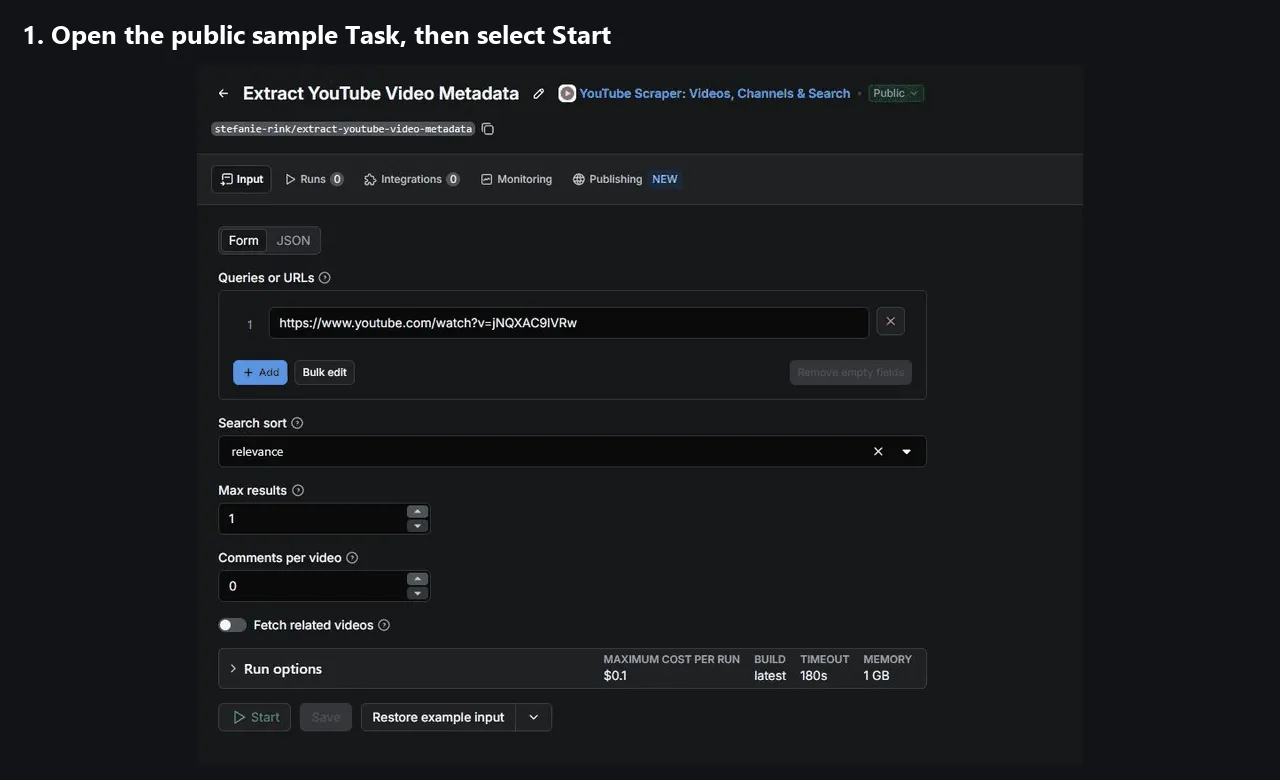
Open the recording · Open the sample Task
Examples and saved Tasks
Export YouTube search results to CSV
Compare videos about electric cars with relevance sorting:
Each result includes the video title, views, channel, and available subscriber count. The same input accepts several keywords.
Example record observed on October 21, 2026:
Find the most viewed videos for a keyword
YouTube supplies the search order. These are the returned search results, not an exhaustive ranking of every matching video.
Example record observed on October 21, 2026:
Export videos from a YouTube channel
Channel handles and channel URLs open the Videos tab. sort_by applies to keyword searches only. A channel can expose fewer videos than the requested limit.
Example record observed on October 21, 2026:
Extract metadata from a video URL
Direct watch URLs, youtu.be links, and direct /shorts/VIDEO_ID URLs are accepted. Direct Shorts support does not include browsing channel Shorts tabs or discovering Shorts separately.
Output example
This record was observed on October 21, 2026. Public counts change over time.
Output fields
The Actor saves one dataset record per collected video. Every record has these fields:
| Field | Type | Meaning |
|---|---|---|
title | string | Video title. |
views | integer or null | Public view count. |
url | string | Canonical watch URL. |
publication_date | string or null | Available calendar date or relative text, such as 3 months ago. |
subscribers | integer or null | Public channel subscriber count. |
channel_link | string or null | Public channel URL. |
channel_name | string or null | Channel name. |
comments | array of strings | Requested top-level comment text. |
related_videos | array of strings | Requested related video URLs. |
data_date | string | UTC extraction timestamp in ISO format. |
video_id | string | YouTube video identifier. |
duration_seconds | integer or null | Video duration in seconds. Live videos can have no duration. |
thumbnail_url | string or null | Public thumbnail URL. |
null means that the value was unavailable. Empty comment and related-video arrays can mean not requested, unavailable, disabled, or blocked.
A result can also contain enrichment_errors, an array of reasons why optional video-page data was unavailable. JSON preserves the nested arrays for further processing.
Pricing
The Free-plan increase takes effect on November 13, 2026, at 01:15:39 UTC (04:15:39 in Istanbul). It supports continued operation and maintenance of the Actor. Apify covers Free-plan platform usage, so this increase is not a separate platform-usage fee.
| Apify plan | Before the change, per 1,000 saved videos | From the effective time, per 1,000 saved videos |
|---|---|---|
| Free | $0.50 | $2.00 |
| Bronze | $0.50 | $0.50 |
| Silver | $0.45 | $0.45 |
| Gold, Platinum, and Diamond | $0.40 | $0.40 |
For example, 10,000 saved videos cost Free-plan users $5.00 before the change and $20.00 after it, plus the startup charge. Paid-plan totals remain $5.00 for Bronze, $4.50 for Silver, and $4.00 for Gold, Platinum, and Diamond, plus the startup charge.
The startup event costs $0.00005 per started GB of allocated memory, with a minimum of one event. A run with no results can still incur this charge.
Comments and related links inside a video record have no separate event charge. Fetching those related URLs in another run creates separately charged video records.
The Actor stops when the remaining run budget cannot cover another video. The Console pricing page shows the applicable price before a run.
Input reference
| Input | Default | Behavior |
|---|---|---|
queries | The sample video URL | Required list of keywords, channel URLs, handles, or video URLs. |
sort_by | relevance | Keyword search order: relevance, view, date, or rating. |
max_results | 10 | Maximum videos per keyword or channel. Minimum 1. |
num_comments | 0 | Requested top-level comments per video. Minimum 0. Best effort. |
related_videos | false | Collect related video links. Best effort. |
The legacy clean input remains accepted but has no effect. Comments and related links require extra video-page requests and can increase run time.
Limits and run behavior
- Playlists and transcripts are unsupported.
- Subscriber counts can be
nullwhen YouTube does not expose them. - Relative publication dates retain their original precision. The Actor does not invent exact dates.
- Comments contain text only. Comment replies, authors, and dates are not part of the output.
- Comments and related links can be empty when YouTube blocks access or does not expose them.
- Basic search and channel runs use listing data and cached subscriber lookups. They do not open every video page.
- Duplicate input entries are removed. Different keywords can return the same video and produce separate records.
- After a server migration, the Actor resumes saved progress and reconciles pending output before it writes more rows.
- If a source input fails, the run fails and keeps its saved output.
RUN_SUMMARYlists completed, empty, and failed inputs. - A valid search with no results succeeds with an empty dataset.
- The Actor does not expose a customer proxy input. Contact support for recurring access errors.
Related-video research in two runs
This workflow links seed videos to the metadata of their recommendations. It uses the existing related-URL output.
- Run a few seed video URLs with
related_videos: true. - Collect their
related_videosURLs. - Remove duplicate URLs before the second run.
- Run those URLs with
related_videos: false. - Join the metadata to each seed using the related video URL.
Related links inside the first run have no separate charge. Each saved video in the second run has the normal video charge.
The recommendations come from signed-out public pages with the current US/English request settings. Time and network location can affect them. They do not reveal personalized recommendations or prove how YouTube ranks videos.
This Python example uses apify-client 3.x and an APIFY_TOKEN environment variable. It limits the second run to 50 unique related URLs.
edges is the output of this example script, not a new Actor output format. An empty related list produces no second run.
Frequently asked questions
How do I scrape YouTube without a YouTube API key?
Use a keyword, channel handle, or public video URL as input. The Actor reads public YouTube pages. Apify API calls still require your Apify token.
How do I export YouTube videos to CSV or Excel?
Open the completed run and select Export in the Output tab. Select CSV or Excel. JSON is available for nested data.
Can I get every video from a channel?
The Actor paginates the public Videos tab up to max_results. YouTube can limit the available results. Complete channel coverage is not guaranteed.
How do I collect comments?
Set num_comments to a positive number. The Actor attempts to collect top-level comment text. The requested count is a ceiling.
How do I get subscriber counts?
Subscriber counts are included when available. They can come from video pages, channel headers, or cached channel lookups. Missing counts remain null.
How much do 10,000 videos cost?
The video charge for 10,000 saved videos is $4.00–$5.00 on paid plans, plus the startup charge. Free-plan users pay $5.00 before the pricing change and $20.00 after it, plus the startup charge. Optional embedded comments and related links have no separate charge.
Can I use the Actor through an API or an AI agent?
Yes. The Console API button provides API examples. The Apify MCP server also exposes Actors to compatible clients.
Example request: “Use stefanie-rink/youtube-scraper to collect up to 20 videos about electric cars with views and subscriber counts.”
What happens when a run fails or moves to another server?
Saved rows remain in the dataset. Migration recovery resumes stored progress. RUN_SUMMARY contains cumulative counts and input outcomes.
If recovery detects inconsistent stored rows, it stops before another write. Contact support with the run ID.
Support
Open an issue with the run ID and a short description of the problem. Shared run access helps us investigate.
For other inquiries, contact tnot2652@gmail.com.


