

Instagram Reels Transcript API - Speech to Text & Screen Text
Pricing
from $12.00 / 1,000 reel transcripts
Instagram Reels Transcript API - Speech to Text & Screen Text
Get the transcript of an Instagram reel or video: paste reel links, usernames or a dataset and get the spoken words as text with timestamps, the 3-second hook, on-screen text, caption, views and likes. New reels only for schedules. No login. $30 per 1,000 reels; reels without speech are free.
Pricing
from $12.00 / 1,000 reel transcripts
Rating
0.0
(0)
Developer

Tenfold Fleet
Maintained by CommunityActor stats
0
Bookmarked
14
Total users
8
Monthly active users
a day ago
Last modified
Categories
Features
Share
What does Instagram Reels Transcript do?
Instagram Reels Transcript turns the speech in public Instagram reels into text. Paste reel links or shortcodes, or just a username, and you get the full transcript, timestamped segments, the hook (the words of the first 3 seconds), the detected language and the reel's caption, views, likes, comments, duration and post date in one clean row per reel. It can also read the on-screen text (titles and burned-in captions), take its reels from the dataset of another Actor, and on a schedule transcribe only the reels that are new since the last run.
It is an Instagram transcript API that needs no login, no cookies and no Instagram account: it reads only what Instagram shows any logged-out visitor, extracts the audio and runs AI speech recognition (Whisper) on it. Reels without spoken words are detected and not charged.
Not affiliated with Instagram or Meta. Instagram is a trademark of Meta Platforms, Inc.
Why use an Instagram reel transcript tool?
- ✍️ Content repurposing: turn reels into blog posts, threads, newsletters and captions.
- 🔎 Creator and competitor research: see what a creator or brand actually says across their latest reels, and search it like text.
- 🎣 Hook research: every row carries the spoken hook of the first 3 seconds, and optionally the text shown on screen, so you can compare openers across hundreds of reels.
- ⏰ Monitoring: schedule a run with New reels only and get just the reels a creator posted since your last run.
- 🔗 Pipelines: point it at the dataset of an Instagram scraper or of Instagram Reels Search and it transcribes every reel listed there.
- 🤖 AI pipelines: feed transcripts into an LLM for summaries, hooks, topic tagging or a RAG knowledge base.
- 📈 Marketing analysis: compare the scripts of reels with high and low views.
- ♿ Accessibility and subtitles: get timestamped text you can turn into captions.
It runs on the Apify platform, so you also get an API, scheduling, webhooks and integrations with Make, Zapier, n8n, LangChain and LlamaIndex.
What data can it extract?
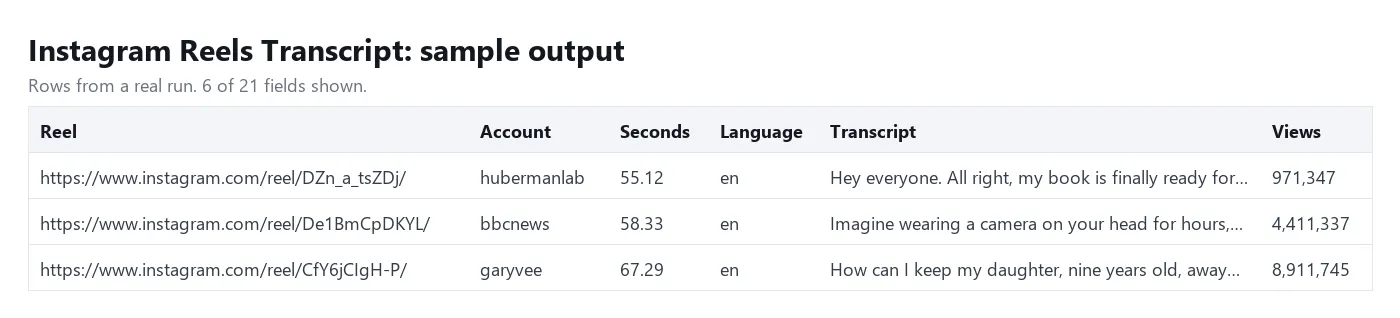
| Field | Example |
|---|---|
url, shortcode | https://www.instagram.com/reel/CfY6jCIgH-P/, CfY6jCIgH-P |
ownerUsername, ownerFullName | garyvee, Gary Vay-Ner-Chuk |
caption | the reel's caption text |
postedAt | 2022-06-29T12:32:37.000Z |
durationSec | 67.29 |
viewCount, playCount | views shown on the reel; plays (filled for reels found through a username) |
likeCount, commentCount | 768690, 11713 |
language | en (ISO 639-1, detected from the speech) |
transcript | the full spoken text |
hook | the words spoken in the first 3 seconds, e.g. Hey everyone. All right, my book is finally ready; null when nothing is said that early |
onScreenText | text visible in the video (titles, burned-in captions), one block per line; filled when On-screen text is on, otherwise null |
segments | [{ "start": 0, "end": 4.2, "text": "..." }], one sentence each, times in seconds |
wordCount | number of words in the transcript |
noSpeech | true when the reel has no spoken words (music only, silence); free |
chargedReels | how many reel charges this row used (1 for reels up to 3 minutes) |
thumbnailUrl | cover image URL |
error | why a reel was skipped (private, removed, too long, ...), otherwise null |
How to get the transcript of an Instagram reel
- Click Try for free.
- Paste reel links (
/reel/,/p/and/tv/links all work) or shortcodes into Reel URLs or shortcodes, one per line. - Optional: add Usernames to transcribe each account's newest reels, and set Reels per profile (up to 12). Turn on New reels only if you run it on a schedule.
- Optional: pick a Dataset of reels produced by another Actor instead of pasting links.
- Leave Spoken language on
auto, or give a code such asesas a hint. Turn on On-screen text if you also want the words shown in the video. - Click Start, then download the results as JSON, CSV, Excel or HTML, or read them through the API.
Started with an empty input ({}, as some agents and API calls do), the Actor transcribes one sample reel and says so in the log, so the run returns a real row instead of failing. The sample is billed like any other reel. An input with no reels, usernames or dataset that carries a field the Actor does not read (for example url or startUrls) is not treated as empty: the run fails with a message naming that field, and no reel is charged.
How much does it cost?
$30 per 1,000 transcribed reels ($0.03 per reel), pay per event. You only pay for reels where speech was found and transcribed. These are free: reels with no speech, private, removed or age-restricted reels, photos and carousels, videos over 10 minutes, and any failure.
Videos longer than 3 minutes count as one reel for every started 3 minutes (a 7-minute video counts as 3 reels), because transcription cost grows with length. The chargedReels field shows this on every row.
The hook, on-screen text, dataset input and New reels only cost nothing extra: the price stays $0.03 per transcribed reel. With New reels only, reels an earlier run already transcribed are skipped and not charged.
Free Apify plan: each run transcribes up to 3 reels of up to 3 minutes, because every transcription costs the developer a speech-to-text fee. Other reels in the run come back as free rows with a note. Any paid Apify plan removes the limit.
Input
Chain it after another Actor. Give the ID of a dataset in your account: the default dataset ID of the other Actor's run, or pick the dataset in Dataset of reels in Apify Console. Each row needs a reel link or shortcode in one of url, inputUrl, postUrl, reelUrl, videoUrl, shortCode, shortcode or code; other rows are skipped, duplicates are transcribed once, and the first 5,000 rows are read. The Actor gets read access to that one dataset only.
Monitor creators on a schedule. Save this input as a task and add a schedule (for example once a day). The first run transcribes each account's newest reels; every later run transcribes only reels it has not transcribed before, and skips the rest at no charge.
Output
Download the dataset as JSON, CSV, Excel, XML or HTML from the run page, or fetch it with the Apify API.
Tips
- Turn off Timestamped segments if you only need the text; the full transcript is still returned.
- A language hint helps with short reels and with mixed-language speech. Transcripts stay in the spoken language; nothing is translated.
- For a whole account, use Usernames: Instagram shows logged-out visitors an account's 12 newest reels, so up to 12 per profile.
- Tracking creators over time? Turn on New reels only and schedule the run: the Actor keeps the newest 500 transcribed reels per username in a key-value store named
instagram-reels-transcript-seenin your account and skips them, free, on later runs. A reel that failed is tried again next time; delete the store to start over. For many accounts, several separate watch lists or SRT and VTT subtitle files, use Instagram Profile Transcript Monitor. - On-screen text is read from up to 4 frames spread over the reel, so it catches titles and a sample of the burned-in captions, not every caption line. It is filled for transcribed reels; a reel without speech stays free and comes back without it. If the vision step fails, the field is
nulland the transcript is delivered as usual. - The hook comes from the word timestamps of the speech model, so it is returned even with Timestamped segments off.
- Set a maximum cost per run in the run options; the Actor stops cleanly when it is reached.
- Bulk runs: paste hundreds of reel links in one run. At the default settings it handles about 30 reels per minute (36 reels took 68 seconds in our test of 11 November 2026), so 450 reels finish in about 15 minutes. With On-screen text on it is slower, about 13 reels per minute (24 reels took 110 seconds in our test of 21 November 2026).
Use it with AI agents (MCP)
Give Claude, ChatGPT, Cursor or any MCP client this Actor as a tool through Apify's MCP server: add https://mcp.apify.com?tools=tenfoldfleet/instagram-reels-transcript as a remote MCP server and sign in with your Apify account. The agent fills in the input, runs the Actor and reads the transcripts itself; you pay the same per-event price as a normal run.
FAQ
Do I need an Instagram account, cookies or a login?
No. The Actor only reads public reels the way a logged-out visitor sees them. It never logs in.
Which languages are supported?
The Whisper speech model knows about 100 languages, including English, Spanish, Portuguese, Hindi, French, German, Italian, Indonesian, Arabic, Turkish, Russian, Japanese, Korean and Chinese. The language field tells you what was detected.
Can it read the text shown in a reel, not only the speech?
Yes. Turn on On-screen text and each transcribed reel also returns onScreenText: the titles, burned-in captions and stickers an AI vision model reads in up to 4 frames of the video. There is no extra charge for it.
How do I transcribe only new reels of an account?
Add the account under Usernames, turn on New reels only and schedule the run. Reels that an earlier run of yours transcribed are skipped and cost nothing, so each run returns just what was posted since the last one (among the 12 newest reels Instagram shows logged-out visitors).
What happens with reels that only have music?
A reel with only instrumental music, sound effects or silence normally returns noSpeech: true and is free. The Actor also removes the filler phrases speech models tend to invent on silent or musical stretches, such as a lone "Thank you." Sung lyrics are words to a speech model, so a reel whose audio is a song with vocals can come back with the lyrics as its transcript.
How accurate are the transcripts?
They are made by AI speech recognition (Whisper) and are usually close to word for word on clear speech, with punctuation. Heavy music, crosstalk, strong accents or very noisy audio can cause mistakes, and timestamps are approximate (within about a second).
Can it transcribe private or age-restricted reels?
No. Those need a logged-in account, so they come back as free rows with an error.
Is it legal to transcribe Instagram reels?
The Actor only processes publicly available content. You are responsible for how you use the transcripts: respect copyright, Instagram's terms and privacy laws such as the GDPR, and don't use personal data without a legitimate reason. If unsure, ask a lawyer.
More tools from Tenfold Fleet
All 122 tools: apify.com/tenfoldfleet. If this Actor saves you time, save it (the bookmark on its Store page) and leave a review: both help other people find it. Found a bug or need another field? Tell us on the Issues tab of this page.


