

Instagram Video Downloader - Reels & Posts to MP4, MP3
Pricing
from $5.00 / 1,000 video saveds
Instagram Video Downloader - Reels & Posts to MP4, MP3
Download Instagram videos: paste public reel or video post links and get each MP4 saved to your Apify storage with a lasting file link, optional MP3 audio, plus caption, owner, duration, likes and views. No login. $10 per 1,000 saved videos, $4 per 1,000 links only; failed posts are free.
Pricing
from $5.00 / 1,000 video saveds
Rating
0.0
(0)
Developer

Tenfold Fleet
Maintained by CommunityActor stats
0
Bookmarked
2
Total users
1
Monthly active users
a day ago
Last modified
Categories
Features
Share
What does Instagram Video Downloader do?
Instagram Video Downloader takes links to public Instagram reels and video posts and gives you the video files. Each MP4 is copied into your Apify key-value store, so the row you get back has a file link that keeps working after Instagram's own link has expired. Turn on one switch and you also get an MP3 of the sound track. Every row carries the caption, owner, duration, size, likes and views.
Not affiliated with Instagram or Meta. The actor reads only what Instagram shows to a visitor who is not logged in: no login, no cookies, no account.
Use it from the Apify Console, on a schedule, through the Apify API, or as a tool for an AI agent through the Apify MCP server.
This actor returns files. If you need something else from a reel or post, use one of these instead:
- Instagram Reels Transcript returns the spoken words of a reel as text with timestamps.
- Instagram Post Details returns the numbers and details of a post (likes, comments, tagged users, carousel items) without downloading anything.
Why use it
- Archive your own or a client's reels before a campaign ends or an account is cleaned up.
- Repurpose video: pull the MP4 into an editor, or the MP3 into a podcast or voice-over workflow.
- Feed a pipeline: a stored file link can be handed to a transcription, captioning or analysis step hours later, when Instagram's link would already be dead.
- Research and moderation: keep a copy of the exact file you reviewed.
- Bulk work: paste hundreds of links in one run instead of saving videos one by one.
What data can it extract?
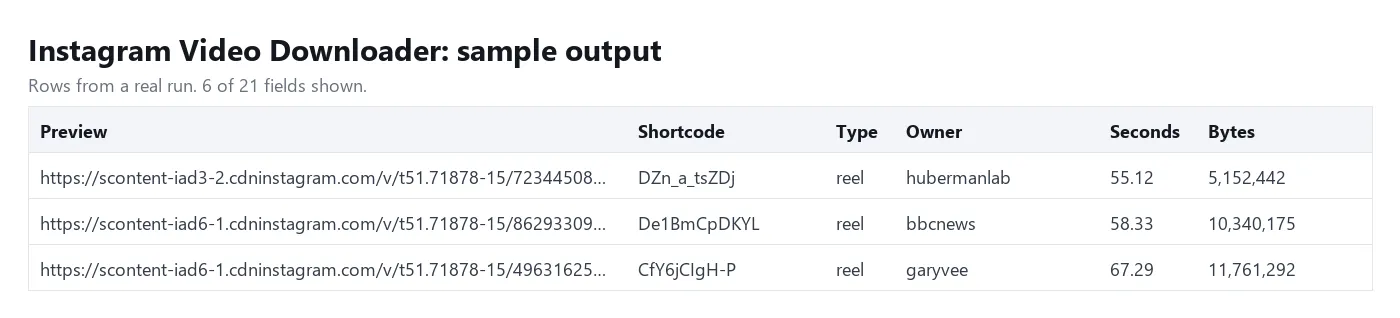
| Field | What it holds |
|---|---|
storedVideoUrl | Link to the MP4 in your Apify key-value store (save mode) |
storedAudioUrl | Link to the MP3 in the same store (when "Also make an MP3" is on) |
videoUrl | Instagram's own file link; it stops working after some hours |
fileSizeBytes | Size of the stored MP4 |
durationSec, width, height | Length and frame size of the video |
type | reel or post |
ownerUsername, ownerFullName | Who posted it |
caption | Full caption text |
likeCount, viewCount | When Instagram shows them |
takenAt | When it was posted (ISO date) |
thumbnailUrl | Cover image |
videoIndex | Position inside a carousel (empty for a single video) |
inputUrl, shortcode, note, error, scrapedAt | The link you gave, its code, remarks, the failure reason, and the time of the run |
How to download Instagram videos
- Open the actor and paste your reel or post links into Reel or post URLs, one per line.
- Keep Mode on "save" to store the MP4 files, or pick "link" if Instagram's own link and the details are enough.
- Turn on Also make an MP3 if you want the audio as a separate file.
- Click Start. When the run ends, open the Output tab: each row has the link to its stored file. All files are also listed under Storage > Key-value store.
- Download the table as JSON, CSV or Excel, or fetch it through the API.
How much does it cost to download Instagram videos?
You pay per video delivered, plus a tiny start fee per run. Apify platform usage is included.
| Event | Price | Per 1,000 |
|---|---|---|
| Video saved (MP4 stored, MP3 included if asked) | $0.01 | $10 |
| Video link (link mode, or a file above your size limit) | $0.004 | $4 |
| Actor start | $0.00005 |
Free: private, deleted or age-restricted posts, posts with photos only, links Instagram would not serve without a login, and downloads that failed. They appear as rows with an error and cost nothing. A carousel is charged once for each video it actually delivers.
Free Apify plan: up to 5 videos per run. Any paid Apify plan removes the limit.
Set a maximum cost per run in the run options and the actor stops when it is reached.
Input
urls: reel, post or tv links, up to 5,000 per run. Duplicates are skipped.mode:save(default) stores the file;linkreturns Instagram's link and the details only.extractAudio: adds an MP3 for each saved video. Save mode only.maxVideoMb: a video larger than this is not stored; you get its link at the link price. Default and maximum 200.storeName: optional name of a key-value store in your account to save into (see Tips).proxyConfiguration: optional. Leave it alone unless you want Instagram pages requested through your own proxy URLs first.
Output
One row per video. You can download the dataset as JSON, CSV, Excel, XML or HTML.
Files are named after the post's shortcode: DZn_a_tsZDj.mp4, DZn_a_tsZDj.mp3, and <shortcode>_<n>.mp4 for the n-th item of a carousel.
Tips
- How long the stored link lasts. By default the files sit in the run's own key-value store, and Apify removes that store together with the run once your plan's data retention period is over. To keep files until you delete them yourself, type a name into Named storage: the actor then saves into a named store in your account, which Apify does not expire. Stored files count toward your Apify storage.
- Quality. The actor saves the MP4 that Instagram serves to visitors who are not logged in, usually 720 pixels wide and sometimes 1080. It does not upscale or re-encode the video.
- Views and likes are filled in when Instagram shows them; accounts can hide them.
- Large batches. Videos are handled six at a time. In our test, 50 reels (350 MB) were saved with their MP3s in under 3 minutes; without the MP3 it is faster. That is roughly 1,000 videos an hour, so for a longer list raise the run timeout in the run options (the default is 1 hour). A run that is resurrected, or moved to another server by Apify, picks up where it left off instead of starting over. On the free Apify plan videos are handled one at a time.
- Only need the text or the numbers? The transcript and post details actors linked at the top cost less than downloading files.
FAQ
Can it download private reels or stories?
No. It works on public reels and video posts only and never logs in. Private, deleted and age-restricted posts come back as free rows with an explanation in error.
Does it download photos?
No. A post with photos only is returned as a free row saying so. In a mixed carousel the videos are saved and the photos are skipped.
Why did a row come back with a link but no stored file?
Either the run was in link mode, or the file was larger than Max video size. The note field says which. The actor stores files up to 200 MB; a longer video comes back as a link at the link price.
Is the MP3 the original sound?
It is the sound track of the downloaded video, encoded as a 128 kbps MP3. A video without sound has no MP3, and note says so.
Can I call it from code or from an AI agent?
Yes. Start it through the Apify API or the Apify clients for JavaScript and Python, or add it as a tool through the Apify MCP server. The input is the JSON shown above.
Is it legal to download Instagram videos?
The actor fetches publicly available videos. What you may do with a video depends on its copyright and on the laws that apply to you: download your own content or content you have the right to use, and ask the owner before republishing someone else's work.
Disclaimer
This actor is an independent tool and is not affiliated with, endorsed by or sponsored by Instagram or Meta. It collects only publicly available content. Videos remain the property of their creators; you are responsible for how you use the files, including copyright, platform terms and privacy laws such as GDPR when a video shows identifiable people.
More tools from Tenfold Fleet
All 122 tools: apify.com/tenfoldfleet. If this Actor saves you time, save it (the bookmark on its Store page) and leave a review: both help other people find it. Found a bug or need another field? Tell us on the Issues tab of this page.


