
Bilibili Transcript - Video to Text with SRT & Translation
Pricing
from $125.00 / 1,000 video transcripts
Bilibili Transcript - Video to Text with SRT & Translation
Get the transcript of a Bilibili video as text: paste video links, b23.tv short links or BV IDs and get the spoken words by speech to text, with timestamps, SRT and VTT subtitles and an optional English translation. $0.25 per video up to 20 minutes; failed, private and silent videos are free.
Pricing
from $125.00 / 1,000 video transcripts
Rating
0.0
(0)
Developer

Tenfold Fleet
Maintained by CommunityActor stats
0
Bookmarked
2
Total users
1
Monthly active users
a day ago
Last modified
Categories
Features
Share
What does Bilibili Transcript do?
Bilibili Transcript turns the speech of any public Bilibili (bilibili.com) video into text. Paste video links, b23.tv short links or BV IDs and get, for each video, the full transcript, timed segments, ready-made SRT and VTT subtitle files and, if you want, an English translation (or one of 19 other languages) as text and as a timed SRT file. It works as a Bilibili transcript API: call it from code, from an AI agent or on a schedule and read the results as JSON.
Not affiliated with Bilibili. This is an independent tool that reads public video pages the way a logged-out visitor does.
Most Bilibili videos have no subtitle track, and the AI subtitles that do exist are shown to logged-in users only. This Actor does not depend on them: it listens to the audio and writes down what is said (speech to text), so it also works for videos that never had subtitles.
Why use it?
- Research and monitoring: read what Chinese creators say about a product, a brand or a topic without watching hours of video.
- Translation and localisation: get an English draft of a Mandarin video, line by line, with timestamps you can load into a subtitle editor.
- Subtitles: download SRT or VTT files for re-uploads, clips and accessibility.
- AI and RAG pipelines: feed clean transcripts to an LLM for summaries, search or training data.
- Courses and lectures: transcribe every part of a multi-part video (P1, P2, ...) in one run.
What data can Bilibili Transcript extract?
| Field | Meaning |
|---|---|
bvid, cid, part, partTitle, partCount | Video ID, part ID, part number, part name and how many parts the video has |
title, uploader, uploaderMid | Video title, uploader name and uploader ID |
durationSec, publishedAt, viewCount, url | Length of the part, publish time, views and link |
language | Language of the transcript (zh, yue, ja, en, ...) |
transcript | The whole transcript as plain text |
segments | Timed lines: start, end (seconds) and text |
srt, vtt | Subtitle files as text, ready to save |
translatedTo, translation, translationSrt, translationError | Translation language, translated text, translated SRT, and a note when lines could not be translated |
minutesBilled | Started minutes of audio that were transcribed |
status, error | ok, or why the video was skipped (always free) |
scrapedAt | When the row was made |
How to get the transcript of a Bilibili video
- Open the Actor and paste one or more Bilibili video links, b23.tv short links or BV IDs into Bilibili video links or BV IDs.
- For a multi-part video, choose All parts if you want every part. A link with
?p=3transcribes part 3 only. - Leave Spoken language on
zhfor Mandarin videos, or setyue,ja,enorauto. - Pick a language under Translate to if you want a translation.
- Click Start. When the run finishes, download the results as JSON, CSV or Excel, or read them through the API.
How much does it cost to transcribe Bilibili videos?
- $0.25 per video transcribed ($250 per 1,000 videos). This covers the first 20 minutes of audio, the timed segments, SRT, VTT and the translation. If the translation fails, you still get the transcript at the same price and
translationErrorsays why. - $0.006 per extra audio minute beyond 20 minutes. A 30-minute video costs $0.25 + 10 x $0.006 = $0.31.
- A tiny start fee of $0.00005 per run.
- Free: deleted, private, members-only and region-locked videos, videos with no speech, videos longer than your limit, and anything that fails. They come back as a row with an
errorand are never charged.
Each part of a multi-part video is one transcript. Set Longest video to transcribe and the run's max charge to keep full control of the bill.
Free Apify plan: 3 videos per run, up to 20 minutes each. Any paid plan lifts both limits.
Silent videos are free, so a run stops starting new videos once more than an hour of its audio has come back without a transcript. The rest return as free rows.
Input
Output
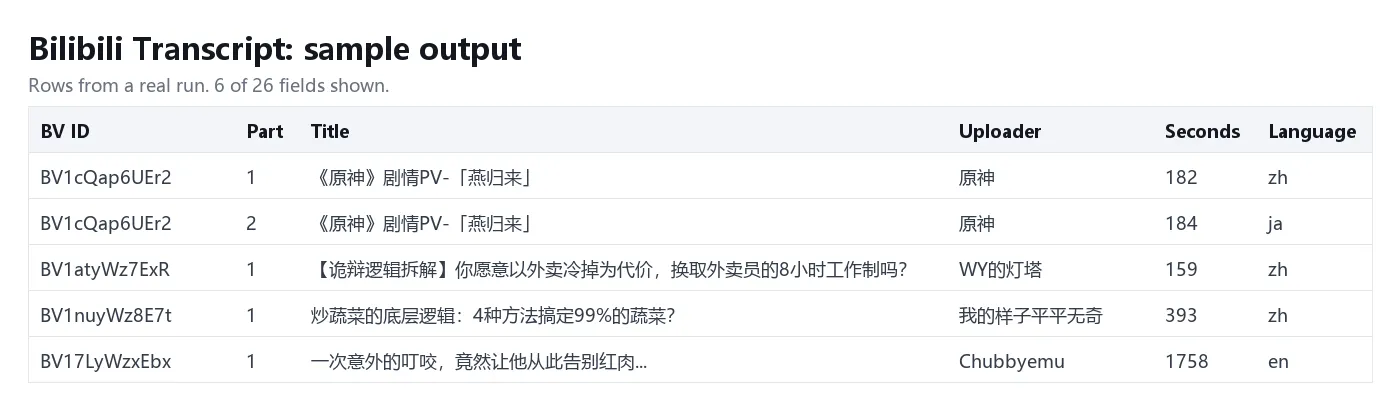
One row per video part. You can download the dataset as JSON, CSV, Excel or HTML.
Tips
- Language: the default
zhsuits Mandarin. For Cantonese setyue; for mixed playlists useauto. Thelanguagefield tells you what the text is actually written in. - Long videos: the default limit is 60 minutes per video and the maximum is 180. Longer videos come back as a free
too_longrow. - Courses: a video can have hundreds of parts. Most parts per video (default 20) stops a single link from becoming a large bill.
- Songs and music videos: speech to text is made for talking. Lyrics over loud music come out patchy, and pure music returns a free
no_speechrow. - Names and jargon: speech to text can mishear rare names, brand names and dialect. Check important quotes against the video.
- Translated subtitles: the transcript is translated a passage at a time (about a minute of speech) and then shared out over the original lines.
translationreads as normal text; a line intranslationSrtcan be a few seconds early or late, because a sentence is ordered differently in another language.
How is it different from our other Actors?
- Bilibili Scraper returns metadata only: search results, video details, comments and danmaku. It does not transcribe. Use it to find videos, then pass their BV IDs to this Actor.
- Video Transcriber is a general transcriber for TikTok, Instagram, YouTube, X and direct media files. It does not open Bilibili links. This Actor is built for Bilibili: BV IDs, short links, multi-part videos and Bilibili's own audio streams.
FAQ
Does the video need subtitles?
No. The transcript is made from the audio, so any public video with speech works.
Do I need a Bilibili account or cookies?
No. The Actor reads public videos as a logged-out visitor. Videos that need a login, a membership or a payment are returned as free error rows.
Which languages can it transcribe?
Mandarin, Cantonese, Japanese, English, Korean and about 90 more. Translation is available into English, Chinese (Simplified and Traditional), Spanish, Portuguese, French, German, Italian, Russian, Arabic, Turkish, Vietnamese, Indonesian, Thai, Japanese, Korean, Hindi, Polish, Dutch and Malay.
How accurate is it?
Clear speech is transcribed well. Background music, several people talking at once, strong accents and rare names lower the accuracy. Spoken Chinese often comes back with few punctuation marks; the timed segments show where each phrase starts and ends.
How long does a run take?
A 3-minute video takes about half a minute and a 30-minute video about 2 minutes; a translation adds a few seconds. Three videos are processed at a time.
Can I use it from an AI agent or my own code?
Yes. Call it through the Apify API, the Apify MCP server or any Apify integration, and read the dataset as JSON.
Is it legal to transcribe Bilibili videos?
The Actor reads only public videos and no private data. The videos and their words belong to their creators: use transcripts for research, analysis, accessibility and other fair purposes, and respect copyright and Bilibili's terms when you publish or reuse them. If unsure, ask a lawyer.
More tools from Tenfold Fleet
| Actor | Output |
|---|---|
| Bilibili Scraper - Videos, Comments, Danmaku & Search | video or comment |
| Snapchat Transcript - Spotlight & Story Video to Text | video transcript |
| Twitter Video Transcript - X Video to Text & SRT | video transcript |
| Video Breakdown for Reels & TikTok: Hook, Script, Scenes, CTA | video analyzed |
| YouTube Shorts Transcript Scraper by Channel - Text per Short | shorts transcript |
| YouTube Transcript Downloader - Captions, Subtitles & Timing | transcript |
| YouTube Video Details Lookup: Views, Likes & Tags by URL | video details |
| Facebook Ads Transcript - Spoken Hook, CTA, Offer & Angle | video ad transcript |
| Facebook Reels Transcript - Facebook Video to Text, No Login | reel transcript |
| Instagram Profile Transcript Monitor - New Reels to Text | new reel transcript |
| Instagram Reels Transcript - Speech to Text for Public Reels | reel transcript |
| Instagram Video Downloader - Reels & Posts to MP4, MP3 | video saved |
All 122 tools: apify.com/tenfoldfleet. If this Actor saves you time, save it (the bookmark on its Store page) and leave a review: both help other people find it. Found a bug or need another field? Tell us on the Issues tab of this page.


