

YouTube Shorts Transcript Scraper by Channel - Text per Short
Pricing
from $2.00 / 1,000 shorts transcripts
YouTube Shorts Transcript Scraper by Channel - Text per Short
Get the transcript of every recent YouTube Short of a channel in one run: paste @handles or Shorts URLs, get one row per Short with transcript text, timed segments, language, title, views, likes and date. New-only monitor mode. $4 per 1,000 transcripts; a Short with no captions costs nothing.
Pricing
from $2.00 / 1,000 shorts transcripts
Rating
0.0
(0)
Developer

Tenfold Fleet
Maintained by CommunityActor stats
0
Bookmarked
2
Total users
2
Monthly active users
a day ago
Last modified
Categories
Features
Share
What does YouTube Shorts Transcript Scraper by Channel do?
YouTube Shorts Transcript Scraper by Channel turns the Shorts of any YouTube channel into text. Give it one or more channel @handles (or a list of Shorts links) and it returns one row per Short with its transcript, the timed caption segments, the caption language and the Short's title, views, likes, duration and publish date.
Not affiliated with YouTube or Google. It reads public pages only: no login, no cookies, no API key.
You do not have to collect video links first. One run reads the newest Shorts of every channel you list, and the new-only monitor returns each Short's transcript once, so a daily schedule costs you only what was published since the last run.
It works as a YouTube Shorts transcript API on plain HTTP requests (no browser): $4 per 1,000 transcripts, and you pay only for Shorts that come back with a transcript.
Which of our YouTube Actors should I use?
| You have | You want | Use |
|---|---|---|
| A channel @handle or Shorts links | The transcript of every Short | This Actor |
| Links of individual videos (long or short) | Transcripts in several languages | YouTube Captions Downloader: it takes video links only, not channels |
| A channel or #hashtag | Shorts statistics: views, likes, comments, hashtags | YouTube Shorts Analytics Scraper: it returns no transcripts |
This Actor handles Shorts only. For long-form videos, pass their links to the Captions Downloader.
Why get YouTube Shorts transcripts by channel?
- Competitor and creator research: read what a channel says in its Shorts, find hooks and recurring topics.
- Content repurposing: turn your own Shorts into posts, captions, newsletters and scripts.
- AI and LLM workflows: feed Shorts transcripts into summaries, RAG pipelines or trend classifiers.
- Monitoring: schedule a run and get the text of every new Short of the channels you follow.
- Brand and product mentions: search the spoken words of a channel's Shorts.
It runs on the Apify platform, so you get an API, scheduling, webhooks and integrations with Make, Zapier, n8n and LangChain.
What data can it extract?
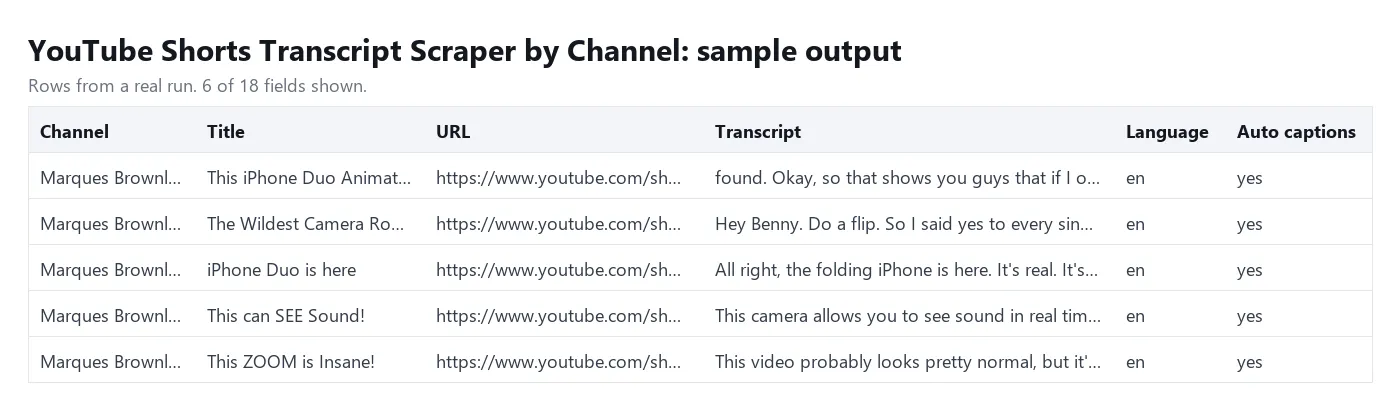
| Field | Example |
|---|---|
channel, channelId | Marques Brownlee, UCBJycsmduvYEL83R_U4JriQ |
videoId, url | ai1gIWacf0I, https://www.youtube.com/shorts/ai1gIWacf0I |
title | This can SEE Sound! |
publishedAt | 2026-10-27 (date) |
views, likes | 2758266, 77374 |
durationSec | 90 |
transcript | the whole transcript as one string |
segments | [{ "start": 0.32, "dur": 3, "text": "This camera allows you to see sound in" }] (seconds) |
captionLanguage, isAutoGenerated | en, true for YouTube's speech-recognition captions |
hasCaptions | true, false (the Short has no captions) or null (the lookup failed) |
isNew | with a monitor: true if no earlier run returned this Short; null without a monitor |
input | the channel or Shorts link the row came from |
scrapedAt, error | time of the lookup; why a row has no transcript, otherwise null |
How to get the transcripts of a channel's YouTube Shorts
- Click Try for free.
- Add channels to Channels:
@mkbhd,https://www.youtube.com/@NASAor aUC...channel ID. Or paste individual links into Shorts URLs or video IDs. - Set Max Shorts per channel (default 50). The newest Shorts come first.
- Optional: set Preferred caption language (
en,es,de...). Without it you get each Short's original language. - Click Start, then download the results as JSON, CSV, Excel or HTML, or read them through the API.
Monitor a channel for new Shorts
Turn on Only new Shorts and schedule the same input (daily or weekly). The first run returns the recent Shorts; every later run returns and charges only Shorts that earlier runs did not return. Give the monitor a Monitor name to keep its memory when you add or remove channels (a name without Only new Shorts only fills the isNew column; every Short is still returned and charged). Shorts already returned are skipped for free. A Short that has no captions yet is checked again for 48 hours, because YouTube often adds automatic captions a few hours after upload.
Call it from the API
How much does it cost to scrape YouTube Shorts transcripts?
You pay per Short returned with a transcript: $4 per 1,000 transcripts ($0.004 each), plus $0.00005 per run start. Proxy costs are included.
These rows are free:
- Shorts without captions (music only, no speech, or captions turned off), and Shorts whose captions hold only sound labels such as
[Music] - Shorts a new-only monitor already returned
- Lookups YouTube blocked after all retries
- Channels that do not exist or have no Shorts, and invalid links
- Links of videos longer than a Short (over about 3 minutes): this Actor reads Shorts only
On the Apify free plan the price is the same and comes out of your free monthly credit; there is no other limit. Set a max cost per run and the Actor stops there.
Input
Output
A Short without captions comes back as a free row with hasCaptions: false, transcript: null and an error text. Download everything as JSON, CSV, Excel or HTML.
Tips
- Filter the free rows out with
error = nullif you only want transcripts. - Large runs: a run reads roughly 90 Shorts a minute (100 Shorts took 66 seconds in our test). With the default 1-hour run timeout that is about 5,000 Shorts; for more, raise the timeout in the run options. Shortly before the timeout the Actor stops cleanly and tells you how many Shorts it did not read.
- Turn off Include timed segments when you only need the text: rows get much smaller.
- The same Short found through a channel and a link is returned (and charged) once.
likesorpublishedAtcan benullon a few rows when YouTube does not send them; the transcript is still complete.- Transcripts come from the captions YouTube publishes (the creator's own or automatic ones). Shorts with only music have none, and this Actor does not transcribe audio itself.
Use it with AI agents (MCP)
Give Claude, ChatGPT, Cursor or any MCP client this Actor as a tool through Apify's MCP server: add https://mcp.apify.com?tools=tenfoldfleet/youtube-shorts-transcript-by-channel as a remote MCP server and sign in with your Apify account. The agent fills in the input, runs the Actor and reads the transcripts itself; you pay the same per-event price as a normal run.
FAQ
Can I get the transcripts of all Shorts of a channel at once?
Yes. Put the channel's @handle in Channels and raise Max Shorts per channel to as many as you need (up to 5,000). Every Short with captions comes back as one row.
Does it work for long YouTube videos?
No, this Actor reads Shorts only: a channel's Shorts tab, or links of single Shorts. A link of a longer video comes back as a free row without a transcript. For long videos use YouTube Captions Downloader with the video links.
Why does a Short have no transcript?
YouTube has no captions for it: it is music only, has no speech, the creator turned captions off, or it was uploaded minutes ago and automatic captions are not ready. These rows are free.
Which language do I get?
The Short's original language by default. Set Preferred caption language to get, for example, the English track when the creator published one.
Do I need a YouTube API key or account?
No. The Actor reads public YouTube data without a login, cookies or API quota.
Where is the monitor memory kept?
In a key-value store named youtube-shorts-transcript-monitors in your own Apify account, one record per monitor. Delete a record to start that monitor again from scratch.
Disclaimer
This Actor collects only publicly available data from YouTube. You are responsible for how you use the transcripts, including copyright and YouTube's terms. It is not affiliated with, endorsed by or sponsored by YouTube or Google.
More tools from Tenfold Fleet
All 122 tools: apify.com/tenfoldfleet. If this Actor saves you time, save it (the bookmark on its Store page) and leave a review: both help other people find it. Found a bug or need another field? Tell us on the Issues tab of this page.


