YouTube Rank Checker - Keyword Positions for Videos & Channels
Pricing
from $1.50 / 1,000 keyword checks
YouTube Rank Checker - Keyword Positions for Videos & Channels
Check where a YouTube video or channel ranks in YouTube search for your keywords, by country and language. Get the rank, all positions, the matched video, the change since your last run and the top 10. $3 per 1,000 keyword checks; failed searches and invalid targets are free.
Pricing
from $1.50 / 1,000 keyword checks
Rating
0.0
(0)
Developer

Tenfold Fleet
Maintained by CommunityActor stats
0
Bookmarked
2
Total users
1
Monthly active users
a day ago
Last modified
Categories
Features
Share
What does YouTube Rank Checker do?
YouTube Rank Checker tells you where your video or channel shows up in YouTube search for each keyword you care about. Give it a list of keywords and a list of targets (video links, video IDs, channel IDs, @handles or channel URLs) and it returns one row per keyword and target with the rank, every position the target holds, the matched video, the change since your last run and the top 10 videos that beat you or sit next to you.
YouTube is a trademark of Google LLC. Not affiliated with YouTube or Google.
It works like a YouTube keyword ranking API: no API key, no quota, no login. You pick the country (gl), the language (hl), how deep to look (top 20, 50 or 100) and whether to rank among all results, long videos only or Shorts only. Schedule it daily or weekly and it becomes a YouTube rank tracker that reports which keywords moved up, moved down, entered or dropped out.
Need the full list of videos for a keyword instead of positions for your own? Our YouTube Search Scraper returns every result with views, duration and upload date. This actor is for a different buyer: creators, agencies and marketers who track their own positions and want one compact row per keyword, not hundreds of result rows.
Why use a YouTube rank checker?
- 📈 YouTube SEO tracking: see if a new title, thumbnail or description moved your video up for its target keywords.
- 🏢 Agency reporting: track every client channel across its keyword set and country, and export a weekly table of rank changes.
- 🥊 Competitor checks: add a competitor's channel as a second target and compare positions keyword by keyword; the top 10 list shows who holds the slots above you.
- 🌍 Market comparison: run the same keywords for US, GB, DE or IN and see where a video travels well.
- 🤖 AI agents and automations: one call returns a clean JSON answer to "what position is this video for this keyword?", ready for Make, Zapier, n8n, Google Sheets or the Apify MCP server.
What data can it extract?
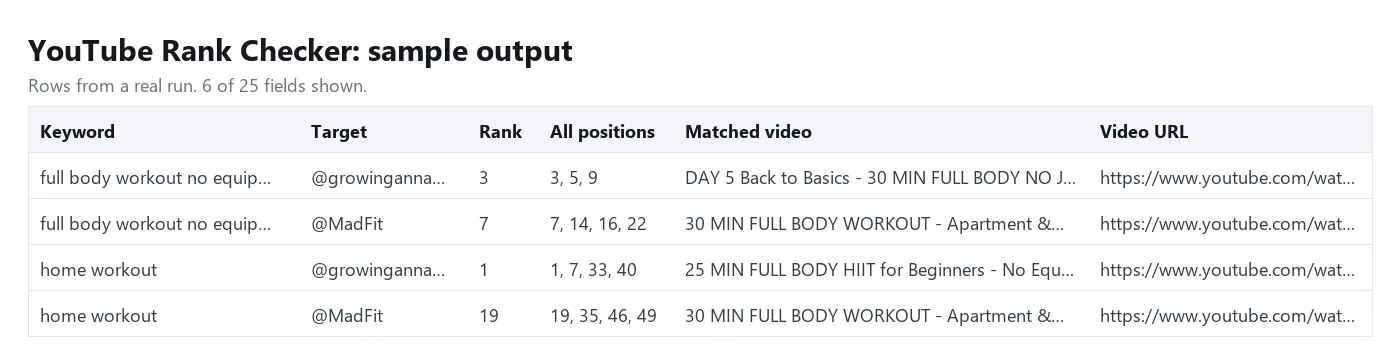
| Field | What it holds |
|---|---|
keyword, target | the search phrase and the video or channel you gave |
targetType, targetVideoId, targetChannelId | video or channel, and the resolved ID (handles and custom URLs are looked up to a channel ID) |
rank, isRanked | the best position of the target, or null when it is not in the scanned results |
allPositions | every position the target holds, e.g. [3, 11, 27] for a channel with three videos ranking |
matchedVideoId, matchedVideoUrl, matchedVideoTitle, matchedChannelName, matchedViewCount | the best-ranked video of the target |
shelfAppearances | the target's videos found in Shorts shelves or other shelves, which do not count for the rank |
previousRank, rankChange, movement, previousCheckedAt | comparison with the previous run: up, down, same, new, lost, not-ranked or first-check |
top10 | the first 10 results: position, video, title, channel, views, Short flag |
totalResultsScanned, depth | how many results were read, and how many you asked for |
country, language, resultType, checkedAt | the market and the time of the check |
How to check YouTube rankings for your keywords
- Open the actor and click Try for free.
- Paste your keywords, one per line (up to 100 per run).
- Paste your targets: a video link, a video ID, a channel ID, an @handle (a channel name without the @ works too) or a channel URL (up to 20).
- Set the country, language, depth and result type.
- Leave Compare with the previous run on and pick a history store name for this project.
- Click Start, then download the table as JSON, CSV or Excel, or schedule the actor to run every day or week.
How much does it cost to check YouTube ranks?
You pay per keyword check: one keyword checked for one target, at $3 per 1,000 checks ($0.003 each), plus a tiny start fee of $0.00005 per run. 10 keywords x 3 targets = 30 checks = $0.09. The price is the same at depth 20, 50 or 100.
A target that is not in the top N is a real answer ("not ranked") and is charged. These are free: searches YouTube blocked or answered with no results, targets that are not a valid video or channel (video IDs are checked before the run), a country or language code YouTube does not know, and checks that stopped early before the target was found. The same keyword typed twice with different capitals is checked once.
On the Apify free plan, the monthly free credit covers about 1,500 keyword checks.
Input
Output
One row per keyword and target. Download the dataset as JSON, CSV, Excel, XML or HTML, or read it through the Apify API.
How positions are counted
- The rank is the position among the standalone results of the search, the list a viewer scrolls through.
- Ads are skipped and never take a position.
- Shelves are skipped: the horizontal Shorts shelf, "People also watched" and similar rows do not take positions. If your video only appears inside a shelf,
rankisnulland the shelf is listed inshelfAppearanceswith the rank it sits after. - Channel cards, playlists and mixes do not take positions.
- With result type Shorts only, the Shorts grid is the result list, so each Short counts.
- A video that YouTube repeats on a later page is counted once.
- Some searches end early for logged-out viewers: YouTube serves only 15-50 videos for them and then shows "No more results". The actor reads everything YouTube serves, up to your depth, and
totalResultsScannedtells you how far it got. A target that is not in those results getsrank: null.
Tips
- Use one history store per project or client so rank changes compare like with like.
- Keep the same country, language and result type between runs; the history is saved per keyword, target and market.
- YouTube search is not identical for every viewer, so expect small moves of 1-3 places between checks. Look at the trend over several runs.
- A channel target answers "where is my best video for this keyword?"; a video target answers it for one video.
FAQ
Is there a YouTube API for search rankings?
The YouTube Data API has a search endpoint with a daily quota and results that often differ from what viewers see. This actor reads the public search results page the way a logged-out viewer gets it, for the country and language you set.
Does it need my YouTube login or an API key?
No. It reads public search results only, with no login, no cookies and no API key.
Why is my rank different from what I see in my browser?
Your own YouTube search is personalised by your watch history, subscriptions and location. The actor sees logged-out results for the country you choose, which is closer to what a new viewer sees.
Can I track Shorts?
Yes. Set the result type to Shorts only to rank among Shorts, or keep All results to rank among standalone results and see Shorts shelf appearances separately.
Why is totalResultsScanned lower than my depth?
For some keywords YouTube gives logged-out viewers a short result list, sometimes only 15-50 videos, and then stops loading more. The actor scans everything YouTube serves up to your depth and reports the count in totalResultsScanned, so a rank of null means "not in the results YouTube shows", not "position 101 or lower".
How many keywords can I check?
Up to 100 keywords and 20 targets per run. For bigger lists, start several runs or use separate schedules.
Disclaimer
This actor reads publicly available YouTube search results. It does not log in and does not collect private data. You are responsible for using the data in line with YouTube's terms and the laws that apply to you. YouTube is a trademark of Google LLC; this actor is not affiliated with, endorsed by or sponsored by YouTube or Google.
More tools from Tenfold Fleet
All 122 tools: apify.com/tenfoldfleet. If this Actor saves you time, save it (the bookmark on its Store page) and leave a review: both help other people find it. Found a bug or need another field? Tell us on the Issues tab of this page.