

LinkedIn Company Jobs Scraper - Every Opening, No Login
Pricing
from $1.00 / 1,000 results
LinkedIn Company Jobs Scraper - Every Opening, No Login
LinkedIn jobs scraper tool that takes a company and returns every job it has open, with full descriptions, seniority, and applicant counts. No login or cookies.
Pricing
from $1.00 / 1,000 results
Rating
0.0
(0)
Developer

Thodor
Maintained by CommunityActor stats
0
Bookmarked
3
Total users
0
Monthly active users
3 months ago
Last modified
Categories
Security
Limited permissionsShare
A LinkedIn jobs scraper tool that works by company, not keyword. Paste linkedin.com/company/vercel, get back every job Vercel has open, and load the postings into a spreadsheet as CSV, Excel, or JSON. Full description, seniority, and applicant count on every row. No login, no cookies, no LinkedIn account.
Keyword scrapers answer "who is hiring a Rust engineer in Berlin". This one answers "what is this specific company doing": each company is walked to exhaustion, so the 1,000-result ceiling LinkedIn puts on job searches never applies, and every row arrives with the employer's industry, headcount, and HQ already attached.
📋 How to export LinkedIn jobs to a spreadsheet
- Put your companies in the Companies field. Three formats work:
- A) Company page URL:
https://www.linkedin.com/company/vercel - B) Country subdomain:
https://be.linkedin.com/company/vercel - C) Bare slug:
vercel
- A) Company page URL:
- Click Start.
- Open the Output tab and click Export for CSV, Excel, JSON, or HTML.
🎁 So what do you get?
| 💼 Job title | 📝 Full job description | 👥 Amount of applicants |
|---|---|---|
| 📍 Location | 📅 Posted and expiry dates | 🎖️ Seniority level |
| 🏢 Company headcount, industry, HQ | 💶 Salary, when published | 🛠️ Job function |
| ⏳ Employment type | 🎓 Required skills and education | 📊 Months of experience required |
| 🔗 Original LinkedIn URL | 🆔 Stable job and requisition IDs | ⚡ Easy-apply flag |
⚖️ Compared to keyword job scrapers
| Keyword job scrapers | This actor | |
|---|---|---|
| 🔍 Input | Keyword + location | The company itself |
| 📜 Coverage | ⚠️ 1,000-result search ceiling | ✅ Each company walked to exhaustion |
| 🏢 Employer details | ❌ Second scraper plus a join | ✅ Headcount, industry, HQ on every row |
| 🔑 Your LinkedIn account | ⚠️ Cookie scrapers put it at risk | ✅ Never used, nothing to ban |
🎯 Three things people run this for
| How | |
|---|---|
| 🚀 Catch hiring pushes the day they start | Daily run on a Schedule with Posted within at Past 24 hours. A webhook drops new postings into Slack, Airtable, or your CRM |
| 🗺️ Map a competitor's roadmap | Job specs name the stack, the team, and the problem before any announcement does. Feed description_text to an LLM and extract them at scale |
| 📈 Track headcount direction | Same companies, same schedule; the job count per company becomes a growth or contraction signal |
📥 Input
companies: slugs or full LinkedIn URLs, mixed freelypostedWithin: defaultany, or24h,7d,30d. LinkedIn applies it before any paging, so narrow windows run faster and cheapermaxJobsPerCompany:0= every opening, which is what most real runs want. The default10just keeps a first run quick
🕵️ Every opening at one company
📰 A daily feed of new postings
Put this on a daily Schedule and each run returns only what appeared since the last one, a feed of new openings instead of a full re-scrape.
⚡ A quick sample of an account list
The default cap of 10 jobs per company keeps a first look fast and cheap.
📤 Output
One flat row per job. Results stream into the dataset while the run is going, so partial exports work immediately.
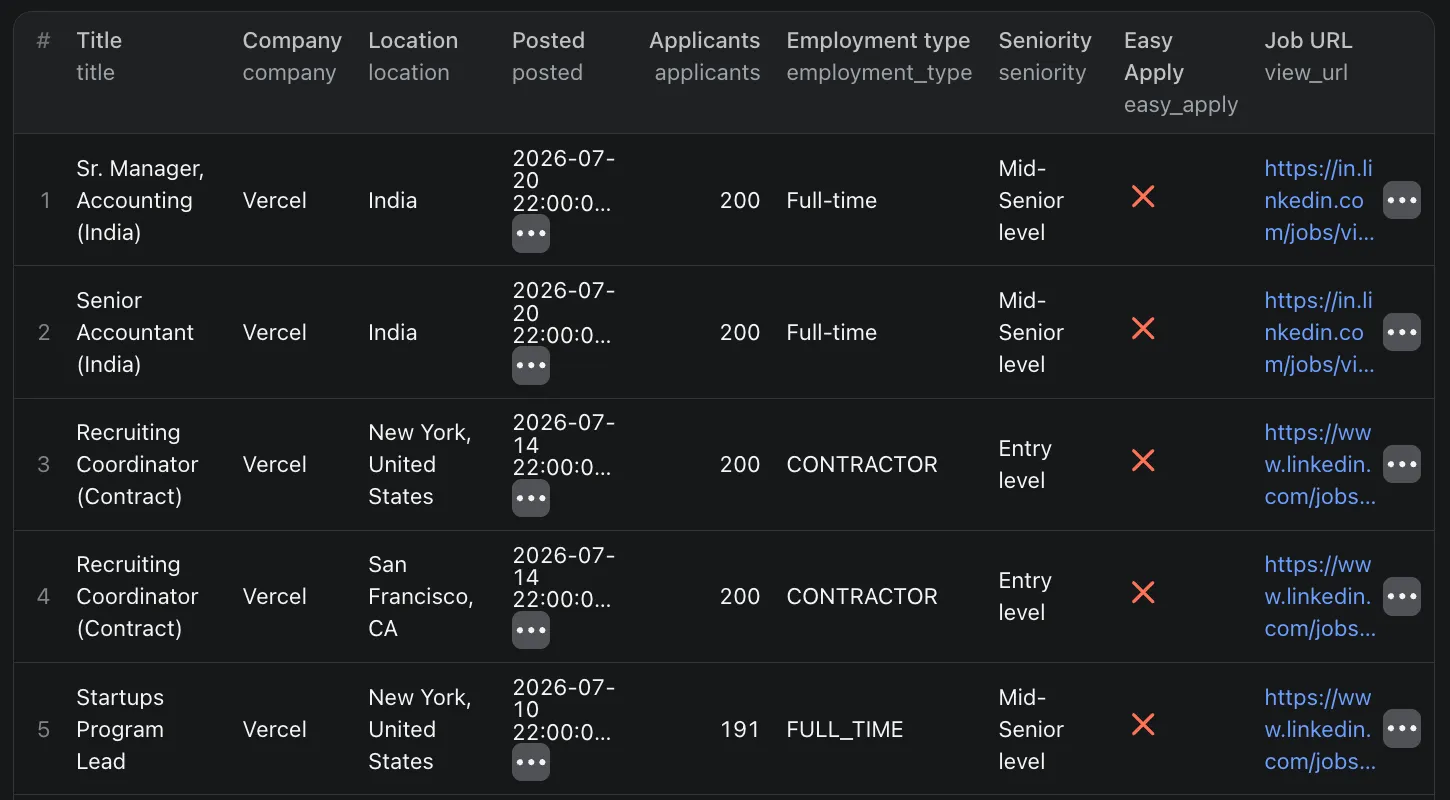
⚠️ Jobs are not returned newest first. LinkedIn orders them by its own relevance ranking, so a posting from the 29th can land eighth in the list. Sort on
date_postedfor chronology, and know thatmaxJobsPerCompanytakes an arbitrary slice rather than the most recent postings.
Fields
| Field | Notes |
|---|---|
job_id, view_url | Stable LinkedIn identifiers. Use job_id to deduplicate across runs and detect new postings |
title, location, posted | The basics, on every row |
date_posted, valid_through | Exact timestamps from LinkedIn's structured data, more precise than the listing's date |
applicants | Capped by LinkedIn at 200. A row showing 200 means "200 or more", and applicants_raw keeps the original wording |
seniority, job_function, industries, employment_type | Always in English, for every company in every country |
months_of_experience | Required experience as a number, so 24 means two years. Filter on it directly instead of parsing the description |
employer_job_id | The employer's own requisition ID, separate from LinkedIn's job_id. Use it to join against a careers page or ATS |
base_salary | Populated when LinkedIn publishes structured pay, which is uncommon. Usually null |
description_html, description_text | Full posting body as HTML and as plain text. Feed either to an LLM to pull out tech stack, salary, or team structure |
skills, education, hiring_org, job_location | Present when LinkedIn publishes them, null when it does not |
company_details | The hiring company's industry, exact employee count, follower count, HQ, website, founded year, type, specialties, and address, on every row |
detail_error | null on success. Set when a detail page failed, so you can retry those rows without rerunning the company |
⚙️ Use it as a LinkedIn jobs API
Every run is an HTTP endpoint: POST the same JSON as the form and the jobs come back in the response body.
Python
Node.js
curl
Swap run-sync-get-dataset-items for runs to fire async and collect results by webhook; a watch over many large companies can outlive the 5-minute sync window. The apify-client SDK works too, in Python and JavaScript, and the n8n, Make, Zapier, Google Sheets, and Slack integrations take the same input.
💡 Tip: no need to write the JSON by hand. Fill in the form on the Input tab, switch the editor from Form to JSON, and copy the result into your code.
💰 How much does it cost to scrape LinkedIn jobs?
Billing is per job returned, at the per-1,000 rate on the price card on this page. There is no charge per company or per page fetched, so maxJobsPerCompany doubles as a hard cost cap, and a company with no open jobs costs next to nothing to check.
The 44-job Vercel run above bills as 44 jobs, a few cents at any plan tier. A daily watch of 50 accounts that surfaces 100 new postings a day stays in single-digit dollars a month.
❓ FAQ
Do I need a LinkedIn account or cookies? No.
Can I scrape LinkedIn jobs for free? Yes. Registering on Apify comes with $5 of free platform credit every month, no credit card needed, which covers a few thousand jobs here.
Is there an official LinkedIn jobs API? LinkedIn's Talent APIs are open to approved partners only. This actor is the practical alternative: POST a company, get JSON back, no partnership application.
Can I search by keyword or location instead? Not here, the company is the input. For keyword and location searches across all of LinkedIn, use the LinkedIn Job Scraper API.
Does it include the recruiter who posted the job? No. LinkedIn shows the job poster only to logged-in members. Login-gated fields are left out rather than filled with guesses.
Why did a company return 0 jobs? It has no public postings right now. A zero is a real zero rather than a filter hiding results.
How many jobs can one run get from a single company? Everything, for most companies. Giants with thousands of openings hit a ceiling of roughly 700 to 800 unique jobs per run, which is LinkedIn's limit on what it serves one IP, not this actor's.
What happens when LinkedIn blocks a request? The actor retries through a US proxy on a fresh IP, up to 5 times. If 15 requests fail back to back, the run stops with an explanation instead of grinding on, and everything scraped so far stays in the dataset.
Is this legal? It collects only publicly visible job postings, published deliberately so people can find and apply to them. No private data, no logins. You are responsible for how you use the output, and GDPR applies if you store personal data an employer wrote into a description.
🛟 Support
Something not working, or a field missing? Message me in the Issues tab and I'll look into it quickly. I'm a solo dev, so don't hesitate.
Researching the company itself rather than its jobs? The LinkedIn Company Scraper pulls profiles, posts, and competitors.
- Thodor


