

Vocal Remover & AI Stem Splitter — Karaoke, Acapella, Stems
Pricing
from $48.00 / 1,000 minute separateds
Vocal Remover & AI Stem Splitter — Karaoke, Acapella, Stems
Remove vocals or extract them from any song with Meta's Demucs AI: instrumental (karaoke) and acapella tracks, or split into 4/6 stems (vocals, drums, bass, guitar, piano). Remove background music from videos and keep the voice. MP3, WAV, FLAC. Links, uploads or datasets.
Pricing
from $48.00 / 1,000 minute separateds
Rating
0.0
(0)
Developer

tidydata
Maintained by CommunityActor stats
0
Bookmarked
2
Total users
1
Monthly active users
5 days ago
Last modified
Categories
Features
Share
🎤 Vocal Remover & AI Stem Splitter — karaoke, acapella, 4/6 stems
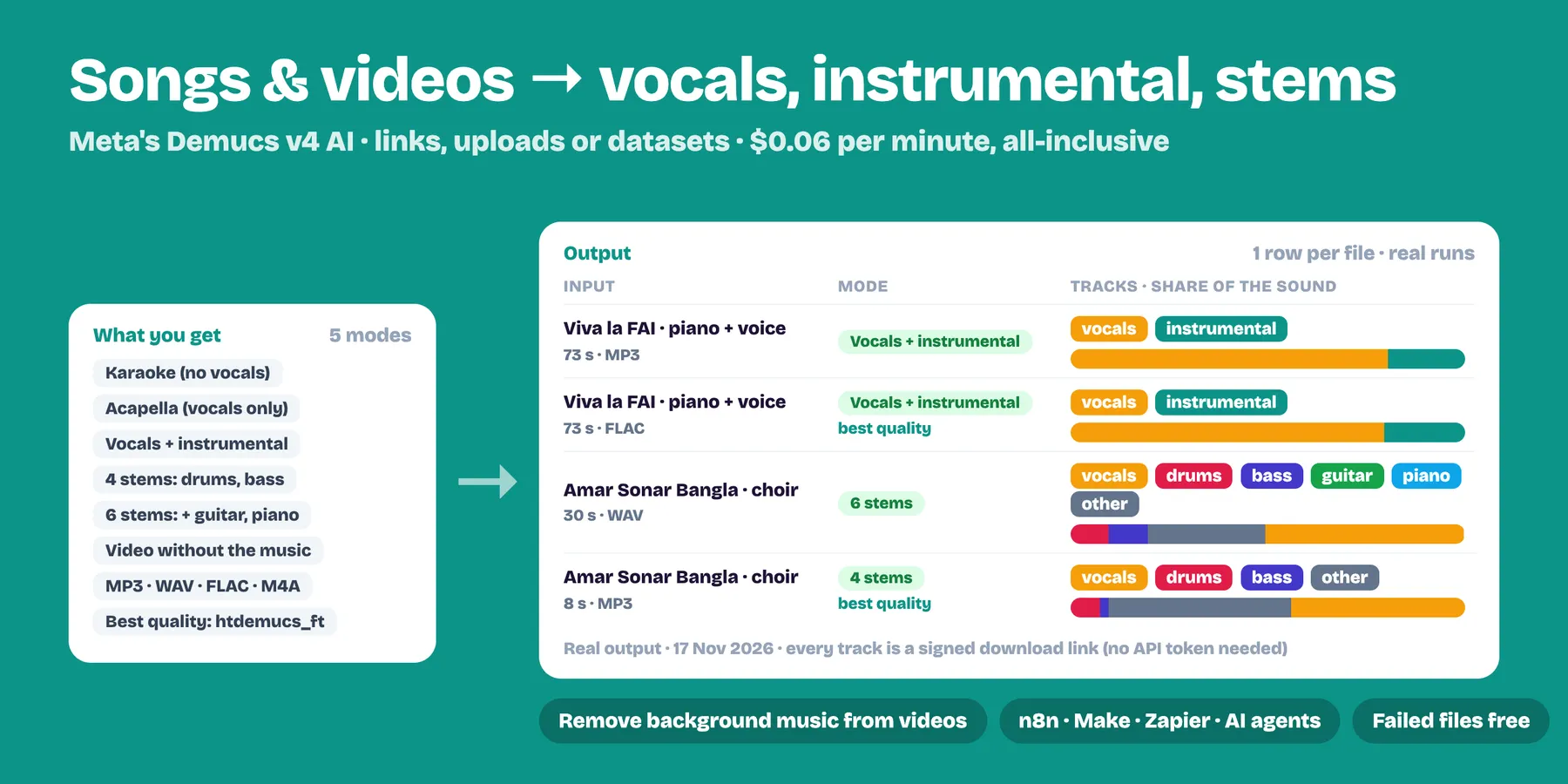
Remove the vocals from any song, or extract them, with Meta's Demucs v4 AI — the open model behind most paid stem-splitting apps. Get a clean instrumental (karaoke) track and an acapella (vocals only) track, or split the music into 4 stems (vocals, drums, bass, other) or 6 stems (+ guitar, piano). For videos, get the video back with the background music removed and only the voice kept — or with the vocals removed.
$0.06 per minute of audio, all-inclusive. No subscription, no credits that expire, no API key. Failed files are free.
- ✅ Vocals + instrumental in one run (two files), or only one of them
- ✅ 4 stems (vocals, drums, bass, other) and 6 stems (+ guitar, piano)
- ✅ Best quality mode with the fine-tuned vocals model (
htdemucs_ft) - ✅ Remove background music from a video, keep the voice (vlogs, interviews, reels, tutorials)
- ✅ MP3 320 kbps, WAV (16/24-bit), FLAC or M4A
- ✅ Songs, podcasts, voice memos and videos: MP3, WAV, FLAC, M4A, OGG, Opus, MP4, MOV, MKV, WebM…
- ✅ Direct links, Google Drive, Dropbox, OneDrive, file uploads, a key-value store or a dataset column of another Actor
- ✅ Separate only a part (start/end time) and pay only for that part
- ✅ Ready for n8n, Make, Zapier, the API and AI agents: every track comes back as a download link
What can I use it for?
| You want… | Mode |
|---|---|
| A karaoke / backing track | Instrumental only |
| An acapella for a remix, mashup or DJ edit | Vocals only |
| Remove the music from a video and keep the speech (e.g. before re-uploading, or to dub it) | Vocals only (video input) |
| Clean speech for transcription (music under the voice confuses speech-to-text) | Vocals only |
| Practise an instrument over the song without it (drumless, bassless) | 4 or 6 stems |
| Samples, stems for remixing and music production | 4 or 6 stems, WAV |
| Study a part (bass line, piano) on its own | 6 stems |
How to use it
- Paste one or more links (or upload files).
- Choose what you want: vocals + instrumental, instrumental only, vocals only, 4 stems or 6 stems.
- Pick the format (MP3, WAV, FLAC, M4A) and run.
- Open the Results tab: one row per file with a download link per track.
Input example (API, n8n, Make):
Output example
Download links open without an API token (signed links), so you can pass them straight to the next step of your workflow. vocalsPercent tells you how much of the sound was voice (near 0 = the song is instrumental). 4/6-stem runs also return drumsUrl, bassUrl, otherUrl, guitarUrl, pianoUrl; video inputs return videoUrl.
Pricing
Pay only for what is separated, per started minute of audio:
| What | Price |
|---|---|
| Standard (any mode: 2, 4 or 6 stems) | $0.06 / minute |
| Best quality, vocals + instrumental | $0.07 / minute |
| Best quality, 4 stems (four fine-tuned models, ~4× the computing) | $0.25 / minute |
A 3:20 song = 4 minutes = $0.24 (standard). The video with the new soundtrack is free. Failed or skipped files are never charged, and the run stops cleanly before it goes over your maximum cost per run. Apify Store discounts apply on higher plans.
Quality: standard or best?
- Standard — Demucs v4 hybrid transformer (
htdemucs). Very good on most music; fast. - Best — the fine-tuned Demucs v4 (
htdemucs_ft). Cleaner vocals with fewer artifacts (less "bleed" of cymbals and synths into the acapella). For vocals/instrumental it costs only a cent more per minute. - 6 stems uses
htdemucs_6s. Guitar and piano are harder to isolate than vocals, drums and bass; expect some bleed.
Speed
The AI runs on CPU. With the default 4 GB memory (1 CPU core) a 3-minute song takes about 7 minutes; give the run 8 GB (about 2× faster) or 16 GB (about 3× faster) (the price per minute does not change). Files are processed one after another. Long files (DJ mixes, podcasts): raise Max minutes per file (default 30) and the run timeout.
Limits and good to know
- Links to YouTube, TikTok, Instagram, Spotify, SoundCloud, Facebook, X or Vimeo are refused: their terms forbid downloading. Use your own files or files you have the right to process.
- Copyright: separating a song does not give you any rights over it. Use the tracks for practice, study and your own content, or with the rights holder's permission.
- No streams (.m3u8, .mpd), no DRM files. Max file size 1 GB by default.
- The audio is processed at 44.1 kHz stereo (mono files are returned as stereo).
FAQ
Is this the same AI as paid vocal remover apps? Many of them run Demucs or similar open models. Here you get the model directly, pay per minute and can automate it.
Can I separate many songs at once? Yes: paste a list of links, point it to a Google Drive folder, or pass a dataset column from another Actor.
Does it work for speech with background music? Yes. "Vocals only" keeps the voice and drops the music; for videos you also get the video with the clean voice.
Related Actors
- Audio & Video Transcription — turn the clean vocals into text and subtitles
- FFmpeg Video Converter & Compressor — convert, compress, trim and extract audio
- Audio Noise Remover — remove background noise (fans, traffic, hum) from the clean vocals or any voice recording
- Bulk File Downloader — download many files from links and datasets
Questions or a file that fails? Open an issue on the Issues tab: we answer quickly.


