

GitHub Scraper - Repos, Users, Orgs, Trending & Search
Pricing
from $0.45 / 1,000 repositories
GitHub Scraper - Repos, Users, Orgs, Trending & Search
Scrape GitHub repositories, developer and organisation profiles from search, links, logins and trending: stars, forks, language shares, topics, license, contributors, used-by, followers, socials and the email shown on the profile. Monitor mode, no token. $0.45 per 1,000 rows.
Pricing
from $0.45 / 1,000 repositories
Rating
0.0
(0)
Developer

Top Api
Maintained by CommunityActor stats
0
Bookmarked
1
Total users
1
Monthly active users
10 days ago
Last modified
Categories
Features
Share
What does GitHub Scraper do?
GitHub Scraper turns GitHub into rows: repositories, developer profiles and organisation profiles, from a GitHub search, any GitHub link, owner/repo names, logins or the trending pages. Each repository row carries stars, forks, language shares, topics, license, dates, latest release, contributor count and used-by count; each developer row carries name, bio, company, location, website, social accounts, followers, organisations and the email shown on the public profile. Recruiters, devtool sales teams, investors and researchers can use it to find projects and the people behind them. No GitHub token, no login, no browser.
GitHub Scraper - GitHub Repository Scraper - GitHub Profile Scraper - GitHub Trending Scraper - GitHub Search API alternative.
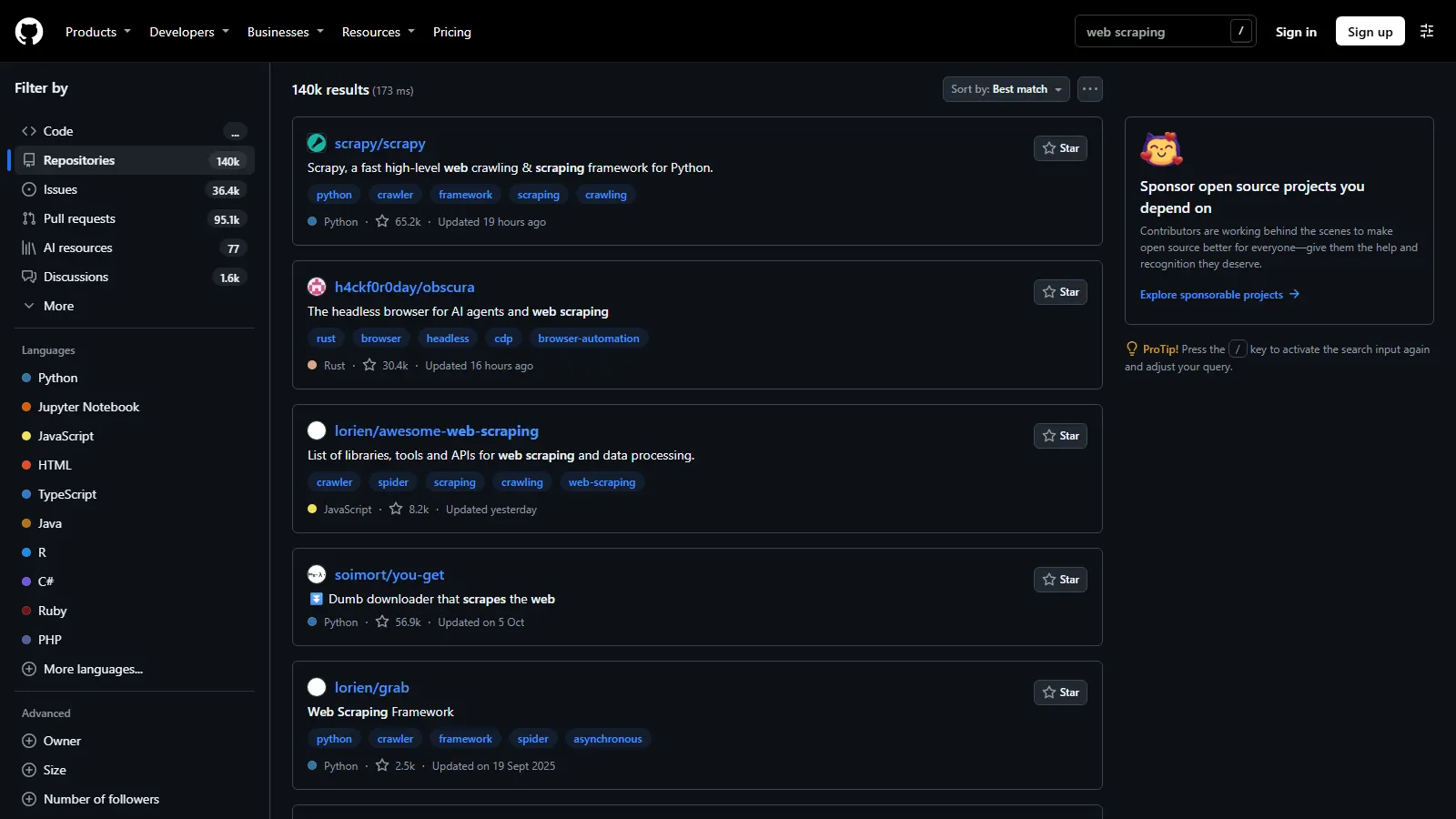
- Search like GitHub does: plain words plus GitHub's own qualifiers (
language:,stars:,topic:,location:,followers:), or the filters in the form. Up to 1,000 results per search, and more: a bigger search is split by creation date automatically. - Every input in one actor: repositories, users, organisations, trending repositories and developers, topics, an owner's repositories, an organisation's public members, a user's followers or following, a repository's contributors.
- Repository details GitHub's search does not give: language shares in percent, contributor count and top contributors, latest release, "used by" count; README, commit count, watchers and open pull requests with one switch.
- Developer leads: social accounts (LinkedIn, X, Bluesky, Mastodon...), the email a developer shows on the public profile, a 0-100 lead score with its reasons and the best contact channel.
- Monitor mode for schedules: only repositories and accounts you have not seen before, or also the ones whose stars, forks or followers moved, with the change.
- Pay per row: $0.45 per 1,000 rows. Filtered rows, duplicates and links GitHub does not serve are never charged.
What data can you get from GitHub?
📦 Repository fullName, owner, ownerType | ⭐ stars, forks, watchers | 🐞 openIssues, openPullRequests |
💻 language + languages (share in %) | 🏷️ topics | 📜 license, licenseSpdxId |
📅 createdAt, updatedAt, pushedAt | 🚀 latestRelease, releasesCount | 🧑💻 contributorsCount, topContributors |
🔗 dependentsCount ("used by") | 📄 readme, commitCount | 🤖 isAiRelated |
🔥 Trending rank, starsInPeriod, builtBy | 👤 Developer login, name, bio | 🏢 company, location, organizations |
📧 email, emailSource, emails | 🌐 website, linkedin, twitterUsername, socialAccounts | 👥 followers, following, publicRepos |
🗓️ createdAt (joined), hireable | 🏅 achievements, pinnedRepositories | 🎯 leadScore, leadTier, bestContact |
📈 contributionsLastYear, totalStars, topLanguages | 🏛️ Organisation email, isVerified, verifiedDomains | 🔁 monitorStatus, starsChange |
How to scrape GitHub with GitHub Scraper
- Create a free Apify account (it comes with free monthly credit).
- Open GitHub Scraper and type a search (e.g.
web scraping), or paste GitHub links,owner/reponames or logins. - Pick Search for: Repositories, or Users and organisations. Add filters if you want (language, stars, location...).
- Set Max results per input and turn on any extra data (README, owner details, contributors, followers...).
- Click Start. A 50-repository search takes about 5 seconds.
- Download the rows as JSON, CSV, Excel or HTML, or read them over the API.
Input
| Parameter | Type | Description |
|---|---|---|
| 🔍 What to scrape | ||
searchQueries | array | Searches in GitHub's syntax, one per line, e.g. "llm agent language:python stars:>500". Prefilled with "web scraping". |
searchType | string | repositories (default) or users (people and organisations). |
startUrls | array | Any GitHub link: repository, profile, search page, trending page, topic, /orgs/<org>/people, ?tab=followers, ?tab=repositories, /graphs/contributors. |
repositories | array | owner/repo names or links. |
usernames | array | Logins or profile links; a person becomes a user row, an organisation an organisation row. |
trending, trendingType, trendingLanguages, trendingSince, spokenLanguageCode | GitHub's trending repositories or developers, per language, today / this week / this month. | |
| 🎯 Search filters (added to every search as GitHub qualifiers) | ||
language, topics, minStars, maxStars, minForks, license | Repository filters. | |
createdAfter, createdBefore, pushedAfter | date | Absolute (2026-01-01) or relative (30 days). |
owner, includeForks, excludeArchived | Only one owner's repositories; forks in or out; archived out. | |
location, minFollowers, minRepos, accountType | User search filters. | |
sort, order, splitLargeSearches | Best match, stars, forks, updated, help-wanted issues, followers, repositories, joined; past 1,000 results (default on). | |
| ✂️ Refine results (applied before the charge) | ||
withEmailOnly, withWebsiteOnly, hireableOnly, minLeadScore | Keep only the developer rows you can use. | |
excludeForks, filterTopics, aiOnly | Drop forks, keep topics, keep AI repositories (also on trending and owner lists). | |
| ➕ Extra data (included in the price) | ||
includeDetails | boolean | Language shares, contributors, latest release, used-by. Default on. |
includeReadme | boolean | README text, commit count, watchers, releases, tags, open issues and pull requests apart; profile README. |
includeOwnerDetails, includeRestFields, includeContributions, includeRepoStats, includeStarred, includeLeadScore, verifyEmail | boolean | Owner profile on repository rows; join date and gists; contributions in the last year; stars over a developer's repositories; starred repositories; lead score (default on); email domain check. |
| 👥 Related rows (each a row of its own) | ||
includeRepositories + maxRepositoriesPerOwner | Each delivered account's repositories (most-starred first). | |
includeMembers, includeFollowers, includeFollowing + maxPeoplePerSource | An organisation's public members, a user's followers / following. | |
includeContributors + maxContributorsPerRepo | Each delivered repository's top contributors (bots left out). | |
| 🔁 Monitoring | ||
monitorMode, monitorChanges, monitorStoreName, resetMonitor | Only new rows (and changed ones) since the last run of the same store; a row delivered before without an add-on this run asks for comes back once with it (monitorStatus: "details"). | |
| 📦 Output | ||
maxResults | integer | Rows per search, list or trending page (default 100, prefill 50). GitHub serves 1,000 per search and 25 per trending list. 0 = no limit. |
maxItems, compact, dedupe | Run total; core fields only (for sheets, AI agents and MCP); one row per record (default). | |
| ⚙️ Advanced | ||
proxyConfiguration, maxConcurrency | Default: the platform's own connection first, then an Apify datacenter session, then residential. |
Field names of other GitHub actors are accepted too (query, queries, type, repos, repoFullNames, profileUrls, githubIds, orgs, since, timeframe, maxItems...), so switching is a copy-paste.
Input JSON
Output
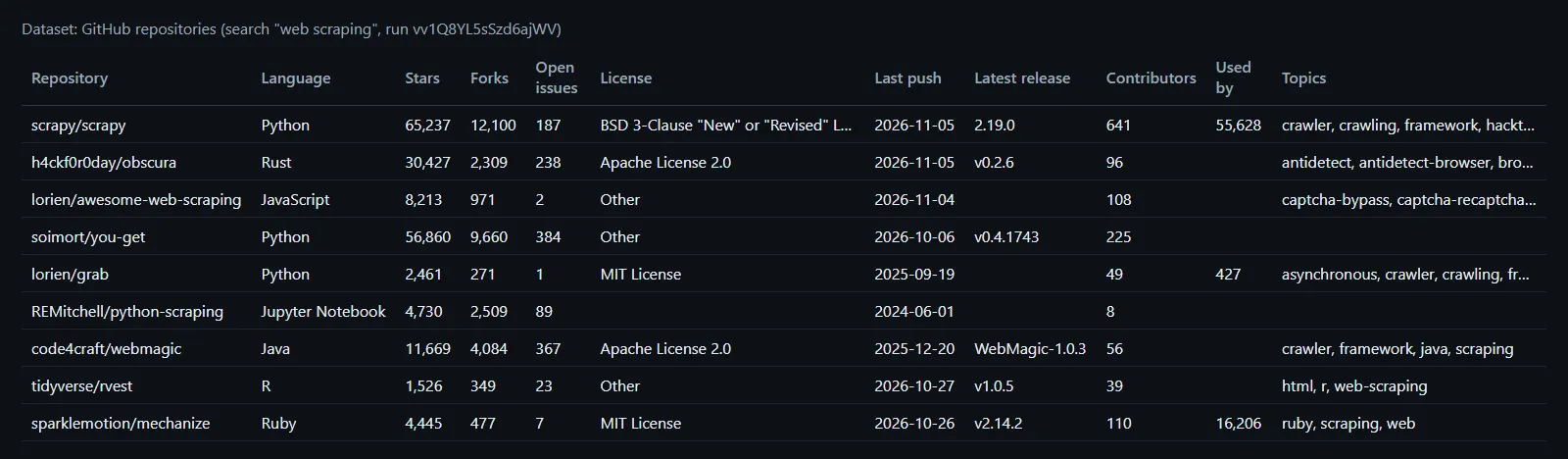
A repository row (search web scraping, run vv1Q8YL5sSzd6ajWV, shortened):
A developer row (login schacon, run Ob57hc53Mo2s8QGUS, shortened):
Fields and how often they are filled
Measured on real runs: a 1,000-repository search (database, run SKfWGDsGWk2fFtFMo), 96 developer rows (user search, add-on runs) and 4 organisations.
| Row | Field | Filled |
|---|---|---|
| Repository | id, fullName, stars, forks, openIssues, defaultBranch, createdAt, updatedAt, pushedAt, sizeKb, contributorsCount | 100% |
| Repository | description 94% · language / languages 88% · license 79% · topics 61% · latestRelease 50% · homepage 47% · dependentsCount 16% (GitHub shows "used by" only for packages) | as GitHub has them |
| Repository (README on) | readme, commitCount, watchers, releasesCount, tagsCount 100% · openPullRequests 79% | 33 rows |
| Developer | followers, following, publicRepos, leadScore 99-100% · pinnedRepositories 93% · name 84% · achievements 83% · location 73% · bio 69% · company 65% · website 53% · socialAccounts 53% · organizations 46% · twitterUsername 33% · linkedin 16% · email 5% | 96 rows |
| Developer (REST fields) | createdAt, publicGists 74% (GitHub answers 60 of these lookups an hour per IP) · hireable 11% (true only when the developer says so) | |
| Organisation | name, description, followers, publicRepos, isVerified, topLanguages 100% · website 75% · email 50% | 4 rows |
| Trending | rank, starsInPeriod, starsGrowthPercent, builtBy 100% | 10 rows |
Every field is described in the dataset schema (Output tab). A field GitHub does not show a signed-out visitor is null, never a made-up value.
How can I use GitHub data?
- 🧑💼 Recruiters: developers by location, language and followers, with their public email, LinkedIn, contributions and top languages.
- 💼 Devtool sales and DevRel: the maintainers and contributors of the projects your product plugs into, with company and best contact.
- 📈 Investors and analysts: trending repositories with stars gained per day, week or month; monitor mode for star growth.
- 🔍 Open-source research: every repository on a topic or language with license, release cadence, contributors and used-by count.
- 🤖 AI and agents: README text for RAG,
isAiRelatedto find AI projects, compact rows for MCP tools. - 🛡️ Supply-chain checks: license, archived flag, last push and latest release for a list of dependencies.
How much does it cost to scrape GitHub?
$0.45 per 1,000 rows: $0.00045 per repository, user or organisation row. No start fee. Apify platform usage is included in this price; there is nothing else to pay.
| Rows | Price |
|---|---|
| 10 | $0.0045 |
| 100 | $0.045 |
| 1,000 | $0.45 |
| 10,000 | $4.50 |
The extra data switches are included in the row price. Related rows (an owner's repositories, members, followers, contributors) are rows like any other. Duplicates, filtered rows, rows seen in an earlier monitor run and links GitHub does not serve are not charged. Set a spending limit on the run and it stops there (measured: a $0.01 limit delivered 22 rows and charged 22).
Integrations, API, scheduling & MCP
- Schedule it: Apify Schedules run it daily or hourly; with monitor mode on, each run returns only what is new.
- Webhooks notify your system when a run ends; Make, Zapier, n8n, Google Sheets, Slack and other integrations pick the rows up.
- API: start runs and read rows with the Python or JavaScript client, or plain HTTP.
- MCP: AI agents can call GitHub Scraper as a tool through Apify's MCP server;
compactkeeps the rows small.
More scrapers from TopApi
| 🧰 Website Technology Scraper - the tech stack behind a company's website | 📝 Website Content Crawler - docs and sites as clean text and Markdown for RAG | 💼 Indeed Jobs Scraper - who is hiring developers, with salary |
| 🐦 Twitter Profile Scraper - the X profiles behind a developer's handle | 🦋 Bluesky Scraper - posts, profiles and followers on Bluesky | 📰 Substack Scraper - newsletters and their authors' socials |
All TopApi actors: apify.com/topapi.
Limits & empty runs
- Per search: GitHub returns at most 1,000 results; with Go past 1,000 results on (default), a bigger search is split by creation date.
- Search speed: GitHub allows 10 searches a minute per IP without a token (100 rows each). The run waits for GitHub's reset instead of failing; a 1,000-row search took 92-95 s on runs that did not wait.
- Repository details: GitHub answers about 1,000 detail requests per IP before it refuses them for several minutes; at the first refusal the run moves those requests to an Apify datacenter connection (then residential on bigger runs). A small run gives that detour about 1.5 seconds; if it is slower, or GitHub still refuses, the row is delivered without languages, contributors and release (the status message counts them).
- REST fields (join date, gists, hireable): 60 lookups an hour per IP, so large runs fill them for the first ~55 people.
- Emails: GitHub shows a developer's profile email only to signed-in visitors. This actor reports an email when the developer wrote it on the public profile (bio or profile README) and an organisation's listed email. It does not read emails out of commits.
- Not available signed out: stargazer lists and code search.
- Empty runs end with a status that says why ("GitHub found nothing for this search", "nothing new since the last monitor run"); nothing is charged.
FAQ
How much does GitHub Scraper cost?
$0.00045 per row ($0.45 per 1,000), no start fee. A 50-repository search costs $0.0225.
How many GitHub repositories can GitHub Scraper return?
Up to 1,000 per search from GitHub, more when the search is split by date, as many searches per run as you like. Trending pages hold up to 25 repositories or developers each.
Does GitHub Scraper need a GitHub token or a login?
No. It reads what GitHub shows a signed-out visitor and GitHub's public search, with no token, cookie or account.
Can GitHub Scraper find developers' emails?
It returns the email a developer published on the public profile page (in the bio or profile README) and an organisation's public email, with emailSource saying where it came from. In our test rows 5% of developers and half of the organisations had one; withEmailOnly keeps only those.
Can I monitor GitHub repositories with GitHub Scraper on a schedule?
Yes. Turn on monitor mode and schedule the run: each run returns only new repositories or accounts, and with Also changed rows the ones whose stars, forks or followers moved, with starsChange and previous. A poll with nothing new delivers no rows, so nothing is charged.
Can GitHub Scraper scrape GitHub trending?
Yes: trending repositories or developers, any language, today, this week or this month, with rank, starsInPeriod, starsGrowthPercent and builtBy.
Can I use GitHub Scraper with the Apify API?
Yes. Start a run with the input JSON above and read the dataset with the Python or JavaScript client, or connect it to Make, Zapier or n8n.
Can AI agents use GitHub Scraper through MCP?
Yes, through Apify's MCP server. Use compact for short rows.
Why did GitHub Scraper return no results?
The search matched nothing, every row was filtered out, or (monitor mode) nothing was new. The status message says which, and nothing is charged.
Can GitHub Scraper get a repository's contributors or an organisation's members?
Yes: paste the repository's contributors link or the organisation's people link, or turn on Contributors / Organisation members under Related rows.
Your feedback
Something missing or wrong? Open an issue on the Issues tab and we will look at it.


