

Hiring Velocity Signals: Company Growth from Job Posts
Pricing
from $2.50 / 1,000 company signal rows
Hiring Velocity Signals: Company Growth from Job Posts
One row per company: open roles, new roles in 7/30 days, hiring trend vs the prior window, department and seniority mix, new cities and regions, and a 0-100 hiring score. Reads public ATS boards (Greenhouse, Lever, Ashby, Workable, SmartRecruiters, Recruitee) and LinkedIn guest job search. No login.
Pricing
from $2.50 / 1,000 company signal rows
Rating
0.0
(0)
Developer

Detroit Web Agent - Open Data
Maintained by CommunityActor stats
0
Bookmarked
2
Total users
1
Monthly active users
7 hours ago
Last modified
Categories
Share

| Price per 1,000 companys | Free plan | Starter | Scale | Business |
|---|---|---|---|---|
| This Actor | $4.00 | $3.50 | $3.00 | $2.50 |
Hiring Velocity Signals turns a list of companies into one row per company that says how fast each one is hiring, which teams are growing, and where. It reads public careers boards (Greenhouse, Lever, Ashby, Workable, SmartRecruiters, Recruitee) and LinkedIn's public job search, then works out the numbers for you: new roles in the last 7 and 30 days, the trend against the previous window, the department and seniority mix, new cities and regions, and a 0-100 hiring score with the reason behind it.
You do not get a pile of job listings to sort through. You get the answer a sales team, an investor or a competitor analyst actually wants: "Acme posted 31 roles in the last 30 days, up 140% on the 30 days before, 60% of them in sales, and it opened its first roles in Europe."
- Input: company names, website domains, LinkedIn company URLs, careers-board URLs, or a job title to find companies hiring for it
- Output: one flat row per company, with a one-line
signalsummary, ahiringScore, flags such asHIRING_SURGEorNEW_REGION, and the counts behind them - Sources: public ATS board APIs and LinkedIn's logged-out job search. No login, no cookies, no personal data
- Price: from $0.0025 per company row. Companies with no jobs found are free
- Monitor mode: schedule it, and later runs charge only for companies whose hiring changed
What it does
For every company you give it, the actor:
- Finds where the company posts jobs. A careers-board URL or a
vendor:slugtoken is used directly. For a website domain it looks for an embedded board on the company's careers page (robots.txt respected), then tries the six board APIs with slugs guessed from the name. For names it tries the board APIs and checks that the board's company name matches before using it. LinkedIn company URLs go straight to LinkedIn. - Reads every open role from the board API (one request per board on most vendors), or, when no public board exists, the company's LinkedIn postings from the last two lookback windows.
- Classifies each role by department (engineering, data/AI, product/design, sales, marketing, customer success, operations, people/finance/legal), by seniority (intern to director and above), by region (North America, EMEA, APAC, LATAM) and by city, using the title, the board's own department label and the location text.
- Computes the signals: how many roles were posted in the window and in the window before it, the weekly pace, which teams surged, whether there is leadership hiring, whether the company is hiring in a city or region where it had no older open roles, and an overall score.
- Writes one row per company, sorted by hiring score, with a plain-English
signalline you can paste into a CRM note or an email.
There is also a discovery mode: give it a job title such as account executive and a location, and it first finds the companies that posted matching jobs on LinkedIn in the window, then scores each of them the same way.
Who it is for
A sales team looking for accounts with budget. Maya sells onboarding software to scale-ups. Companies that are hiring 20 salespeople this quarter will need her product soon. She pastes her 300 target accounts into the actor every Monday with the sales-prospecting preset. Accounts with a hiring score under 30 are dropped and not charged. The rest land in a sheet sorted by score, each with a signal line such as "sales surge +180% (14 vs 5 roles); go-to-market build-out: 64% of new roles are sales, marketing or customer success". Her SDRs open their week with the top 20.
An investor watching a portfolio. Dev runs platform at a seed fund with 40 portfolio companies and 200 companies on a watch list. He wants to know when a company starts hiring hard (often right after a raise) or stops hiring (often before a bad quarter). He schedules the vc-portfolio-watch preset weekly. The first run saves a baseline of every company. After that he is only charged for companies whose open roles changed, and each changed row says how many roles were added and closed since last week. A HIRING_FREEZE or HIRING_SLOWDOWN flag is a reason to call the founder.
A strategy or product team tracking competitors. Lena tracks six competitors. She uses the competitor-expansion preset (60-day window, LinkedIn always added) and looks at three columns: newRegions, newLocations and the department mix. When a competitor posts its first sales roles in Germany, or starts hiring machine-learning engineers in a team that never had them, she sees it in the next run instead of in a press release six months later.
Recruiting agencies use the same rows the other way round: a company with an engineering surge and no recruiters on its own board is a warm lead for a placement pitch.
Input examples
The defaults are filled in, so you can press Start with no changes. The run scores five example companies in under a minute.
Score a list of companies (mix any input types):
Sales prospecting: only keep accounts with real hiring momentum:
Find US companies that posted account executive roles in the last 14 days, then score them:
Or set the discovery fields yourself:
Weekly portfolio watch (schedule this; see Monitor mode below):
ATS boards only, no LinkedIn (fastest, and the cheapest in compute):
Input fields
| Field | Default | What it does |
|---|---|---|
companies | 5 examples | Names, domains, LinkedIn company URLs, board URLs or vendor:slug tokens. One per line. |
preset | custom | Fills settings for a use case. Only changes fields you left at their default. |
keywords / location | empty | Turns on discovery mode (find companies posting matching jobs on LinkedIn). |
lookbackDays | 30 | Roles posted in this many days count as new. The trend compares it with the window before. |
maxCompanies | 25 | Upper limit on companies scored per run. |
minHiringScore | 0 | Companies below this score are skipped and not charged. |
monitorKey | empty | Turns on monitor mode (see below). |
linkedinMode | fallback | fallback uses LinkedIn only when no board is found, always adds it for every company, off never uses it. |
linkedinMaxPages | 5 | Pages of 10 LinkedIn postings read per company. |
atsDetection | true | Look for a public careers board behind names and domains. |
includeNoJobRows | true | Add a free row for each company where nothing was found. |
timeBudgetSecs | 240 | LinkedIn requests stop after this, and the run finishes with what it has. |
Output example
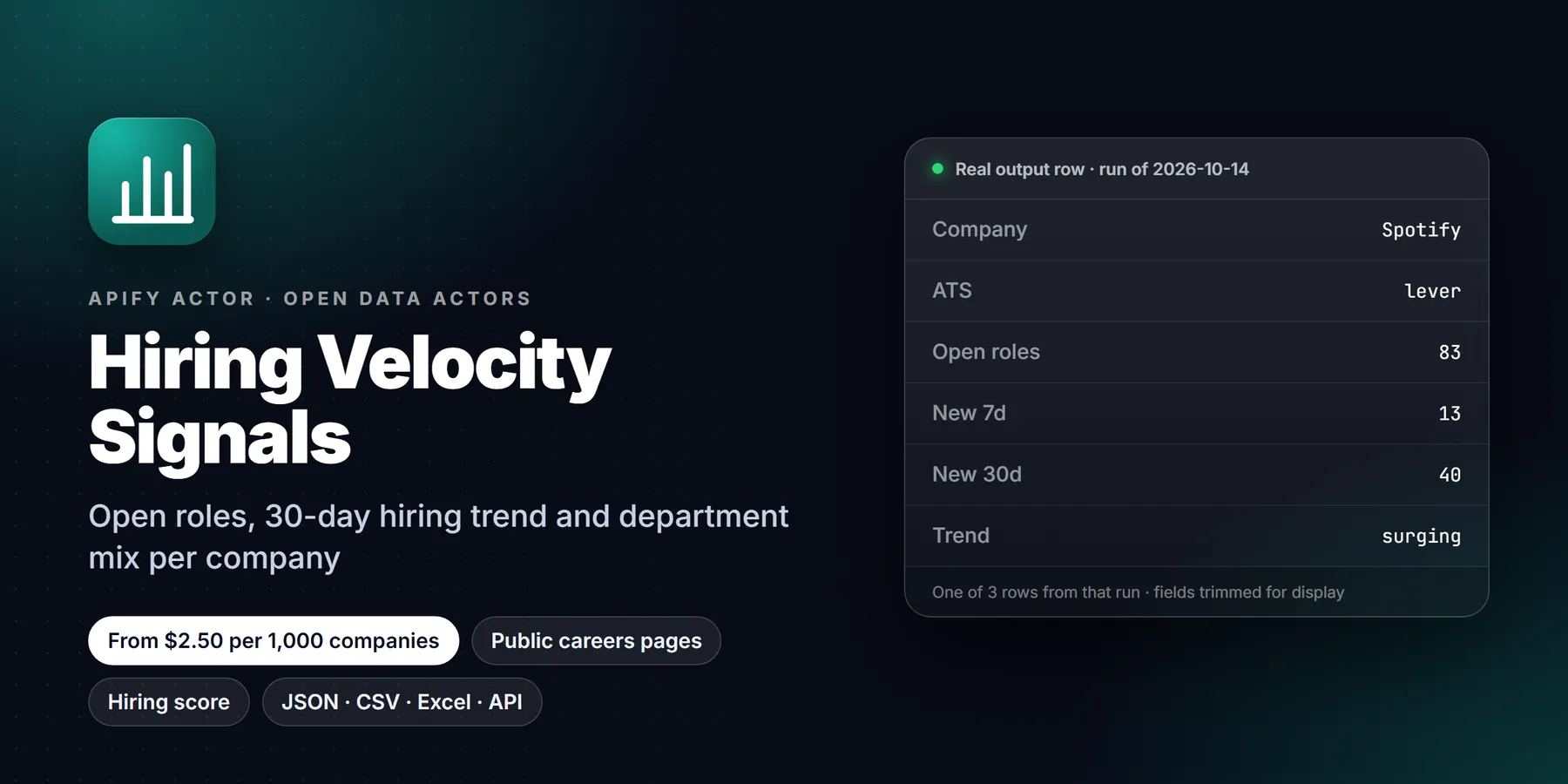
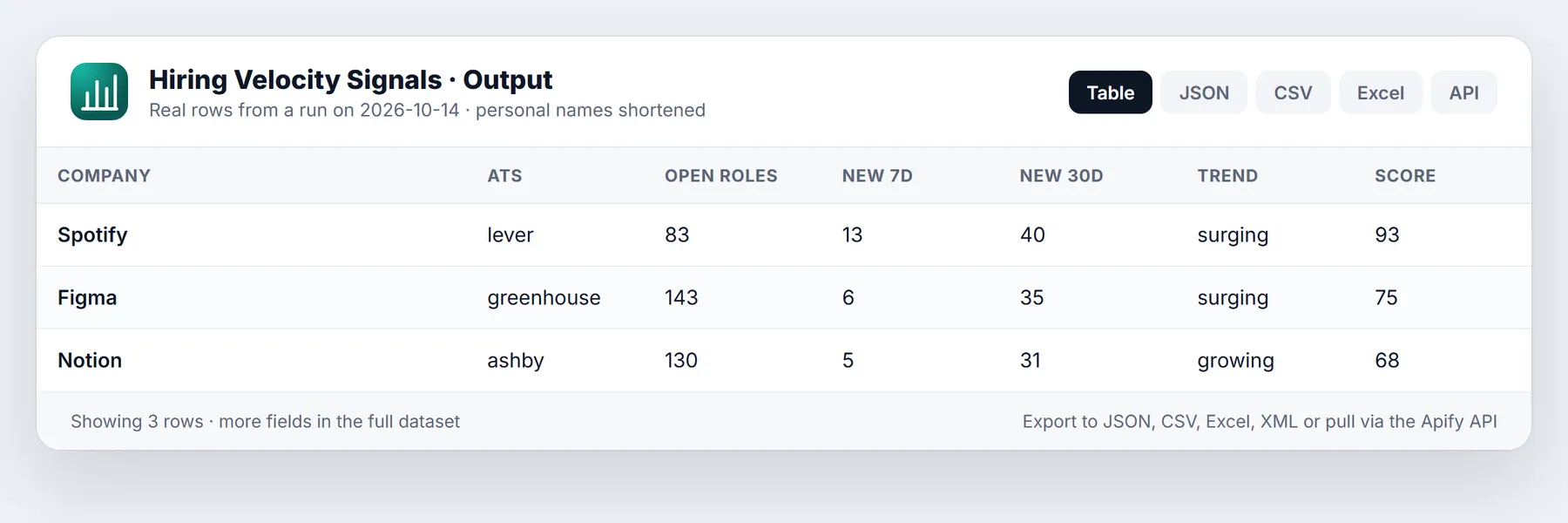
One row per company. This is a real row from a test run (trimmed: the dataset also has the full department, seniority and region breakdowns and the top roles).
The Company hiring signals table view shows the columns most people sort by: company, score, trend, open roles, new roles, the trend percentage, top team, go-to-market share and the signal line. The All fields view has everything, including departmentMix, seniorityMix, regionMix, topLocations and topRoles (the five newest titles with their department, seniority and link).
Signals explained
| Flag | When it fires |
|---|---|
HIRING_SURGE | New roles in the window are at least 50% above the window before, with at least 5 new roles. |
HIRING_SLOWDOWN | New roles fell by half or more, from at least 5 in the window before. |
HIRING_FREEZE | No new roles in the window, although some roles are still open. |
DEPT_SURGE | A team posted at least 5 new roles and grew 50% or more (or had none before). Up to two teams are named. |
GTM_BUILDOUT | Most new roles are in sales, marketing or customer success. Often the step after a funding round or a product launch. |
LEADERSHIP_HIRING | New director, VP, head-of or C-level roles in the window. |
NEW_REGION | First roles in a region (North America, EMEA, APAC, LATAM) where none of the older open roles were. |
FIRST_TEAM_IN_REGION | First role of a team in a region where the company already has a footprint, for example first sales hire in EMEA. |
NEW_CITY | New roles in cities that none of the older open roles mention. |
ROLES_CHANGED | Monitor mode only: roles were added or closed since the last run. |
NO_JOBS_FOUND | Nothing was found. The row is free. |
The hiring score (0-100) adds five parts, and scoreExplained shows each one:
- Volume, up to 35: how many roles were posted in the window, on a log scale, so 5 roles and 50 roles are both visible.
- Momentum, up to 25: the change against the window before.
- Breadth, up to 15: how many different teams are hiring.
- Expansion, up to 15: new regions, new cities and first team-in-region roles.
- Leadership, up to 10: director-and-above and people-manager roles.
Expansion is only claimed with enough history. On a first run, "new" means present among recent roles and absent from older roles that are still open. The actor needs at least 5 older roles before it calls anything a new city or region, and at least 5 older roles in a region before it calls a team's role there a first. In monitor mode, every city, region and team-region pair seen on earlier runs is remembered too, so the claims get sharper each week.
Where the dates come from. Greenhouse's first-published date, Lever's created date, Ashby's published date, and the posting date on LinkedIn. Roles without a date count as open but not as new (undatedRoles).
Pricing
Pay per event. You pay for the company rows you get, not for compute or for companies that returned nothing.
| Event | Free plan | Bronze | Silver | Gold and above |
|---|---|---|---|---|
| Company signal row | $0.004 | $0.0035 | $0.003 | $0.0025 |
| Actor start (once per run) | $0.00005 | $0.00005 | $0.00005 | $0.00005 |
What that looks like:
| Job | Rows | Cost on the free plan | Cost on Gold |
|---|---|---|---|
| Score 100 target accounts once | 100 | $0.40 | $0.25 |
| Score 1,000 accounts once | 1,000 | $4.00 | $2.50 |
| Weekly watch of 200 companies, about 60 change each week | 200 + 60/week | $0.80, then about $0.24 a week | $0.50, then about $0.15 a week |
| Discovery run, 25 companies found and scored | 25 | $0.10 | $0.06 |
Never charged:
- companies where no board and no LinkedIn postings were found (
status: no_jobs_found) or whose board lists zero open roles - companies below your
minHiringScore - in monitor mode, companies whose open roles did not change since the last run
- errors
Spending limit. If you set a maximum charge for the run, the actor checks it before it starts and only scores as many companies as the limit allows. It never pushes a row it cannot charge.
Monitor mode and scheduling
Set monitorKey to any short name (for example q4-accounts) and run the same input on a schedule.
- Run 1 saves a baseline snapshot of every company's open roles and returns a full row for each, marked
monitorStatus: "baseline". These rows are charged, because they are already useful: they carry the full trend, mix and score. - Later runs compare each company with its snapshot. A company with roles added or closed gets a row marked
changed, withrolesAdded,rolesClosed, the firstaddedTitlesandpreviousCheckAt, plus theROLES_CHANGEDflag. A company with no change is skipped and not charged. - Snapshots are stored in a named key-value store in your account,
hiring-velocity-signals-monitor, one record per monitor key and company. Use a different key for each list. Delete the store to start fresh.
Schedule recipe.
- Save your input as a task (Console, Saved tasks, or start from the
vc-portfolio-watchpreset). - Open Schedules, create a schedule, pick weekly (for example Monday 07:00 in your time zone) and add the task.
- Optional: add an integration on the task, such as a Slack message, an email, a webhook to your CRM, or Google Sheets, so changed companies reach you without opening Apify.
Weekly is usually right. Companies rarely change their hiring plan faster than that, and a weekly run keeps LinkedIn requests low.
Use via API / MCP
Run it from code with the Apify API or the client libraries. The run's default dataset holds the rows.
MCP. AI assistants can call the actor as a tool through the official Apify MCP server. Add this URL to any MCP client (Claude Desktop, Claude Code, Cursor, VS Code, ChatGPT connectors):
Example prompts: "Which of these 30 accounts are hiring salespeople fastest?", "Has any competitor started hiring in Europe this month?", "Find US companies that posted data engineer jobs in the last two weeks and rank them by hiring score."
The signal field was written for this use. It is one line with the numbers and the reason, so an assistant can quote it without reading the whole row.
Limits and honest caveats
- Classification is rule-based. Departments and seniority come from job titles and the board's own department labels. "Solutions Engineer" counts as sales, "Account Manager" is not treated as a people manager, and odd titles fall into
other. Expect a few misfiled roles per company. The counts are good for comparing companies and spotting change, not for headcount planning. - Open roles, not hires. A posting is intent to hire. Evergreen postings, reposts and roles posted in several cities can inflate counts. Greenhouse roles posted in several cities usually appear once per city, as the company publishes them.
- "Prior window" uses roles that are still open. ATS boards list open roles only, so roles from the previous window that were already filled are not counted. That can overstate a trend for fast-hiring companies. Monitor mode fixes this over time, because it remembers what it saw.
- LinkedIn is used carefully. Requests go one at a time with a pause between them through Apify Proxy, and a company is read for at most
linkedinMaxPagespages of 10 postings. LinkedIn sometimes rate-limits; the actor retries and then works with what it has. When the page cap is hit,countsAreLowerBoundistrueand the open-role count shows a+. For large employers, the ATS board is the better source. - LinkedIn rows cover a 2x window, not all open roles. When a company is scored from LinkedIn,
openRolesmeans postings in the last two lookback windows (openRolesBasissays so). - Board detection can miss. Companies on Workday, iCIMS, SuccessFactors, Taleo, BambooHR or a custom careers site have no public board API this actor reads. With
linkedinModeonfallbackthey are scored from LinkedIn instead. Name guessing for Lever and Ashby cannot check the company name (those APIs do not return it), so a generic name may match the wrong board; pass the board URL when it matters.atsMatchtells you how each board was found. - Discovery mode is LinkedIn-only and finds companies from at most
discoveryPagesx 10 postings, so it finds the most active posters in the window, not every company. - No people data. Recruiter and poster names are never read or stored.
- Not investment advice. Hiring signals are one input among many.
Run in 30 seconds
- Open the Actor in Apify Console and click Try for free (or Start if you already have an account).
- Open the Input tab, switch to JSON, and paste the example below. It is small on purpose, so the first run is quick and cheap.
- Click Start. Most small runs finish in well under two minutes.
- Open the Output tab to read the Overview table, or use Export to download JSON, CSV or Excel.
Once the sample looks right, replace the example values with your own list and raise the limits.
Example API call
A run on a short company list scores each board independently, so the result is one row per company with a hiring score and the signals behind it. Start the Actor from code with the Apify client, or with curl. Replace the placeholder token and username.
Tips to keep runs short and cheap
- Start with
linkedinModeset tooffwhen your companies use Greenhouse, Lever or Ashby. The ATS boards are the fastest source. - Lower
maxCompanieswhile you test, and raise it once the output shape suits your workflow. - Use
minHiringScoreto drop quiet accounts before they reach your CRM. - Set
includeNoJobRowstofalseif you only want companies with visible openings. - Keep
timeBudgetSecsat its default unless a large list is cut short.
FAQ
Do I need a LinkedIn account, cookies or an API key? No. The board APIs are public, and LinkedIn is read through its logged-out job search pages. You only need an Apify account.
What should I put in companies?
The most precise input wins. A board URL (https://boards.greenhouse.io/figma) or token (greenhouse:figma) is exact. A domain (figma.com) works well because the actor checks the careers page. A plain name works for distinctive names. A LinkedIn company URL is exact for LinkedIn.
Why was a company not charged?
Either nothing was found (status: no_jobs_found), the board lists zero roles, the score was under minHiringScore, or, in monitor mode, nothing changed. The run's OUTPUT record lists counts for each case.
How long does a run take?
ATS boards answer in a second or two each, three at a time, so 100 board companies take about a minute. LinkedIn companies take about 5-10 seconds each because requests are paced. Use linkedinMode: "off" for big lists of known board companies.
Can I get the individual job postings?
This actor returns one row per company, with the five newest roles in topRoles. For full job listings use ATS Open Roles or LinkedIn Public Jobs (below).
How is this different from a job scraper? A job scraper gives you thousands of postings and leaves the counting to you. This actor does the counting, the time windows, the classification and the comparison, and returns one ranked row per company.
Can I change the score weights?
Not in this version. Every part of the score is in its own column (scoreVolume, scoreMomentum, scoreBreadth, scoreExpansion, scoreLeadership), so you can re-weight them in a sheet.
Which countries does it work for? Any. Regions and cities are read from location text in any language the boards use, with the best coverage for English place names.
Related actors
- ATS Open Roles: every open job from Greenhouse, Lever, Ashby, Workable, SmartRecruiters and Recruitee boards, one row per job, with descriptions and salaries.
- LinkedIn Public Jobs: LinkedIn job search results and job details without login, one row per posting.
- Remote Jobs Aggregator: remote jobs from six job-board APIs, deduped, with salary parsing.
- LinkedIn Company Scraper: public LinkedIn company pages (size, industry, headquarters) to enrich the companies you score here.
Questions or a missing field? Open an issue on the Issues tab with your run URL.
New to Apify? Create a free account and run this Actor in under a minute. Some links are affiliate links.


