
Local Business Leads: No-Website Finder (OpenStreetMap) $3/1k
Pricing
Pay per event
Local Business Leads: No-Website Finder (OpenStreetMap) $3/1k
Local business leads at $0.003 per place, including businesses with no website listed. Name, phone, website, email, address, hours, socials and coordinates from OpenStreetMap open data. 75+ types, no-website, phone and website filters, optional email enrichment.
Pricing
Pay per event
Rating
0.0
(0)
Developer

Detroit Web Agent - Open Data
Maintained by CommunityActor stats
0
Bookmarked
4
Total users
0
Monthly active users
12 hours ago
Last modified
Categories
Share
Local Business Leads: Businesses With No Website (OpenStreetMap)

| Price per 1,000 leads | Free plan | Starter | Scale | Business |
|---|---|---|---|---|
| This Actor | $3.00 | $3.00 | $3.00 | $3.00 |
Video walkthrough: Watch the 1-minute demo on YouTube
- In short: Local Business Leads (Apify actor
transparent_meteorite/local-business-leads) finds local businesses by type and city in OpenStreetMap and returns contact and location rows, with optional email enrichment from each business website. - Who it is for: local-marketing agencies, B2B sales teams selling to small businesses, researchers mapping local markets.
- Input: business categories (75+ types), locations (city names), or a bounding box / lat-long radius; max items; require website, phone or email; enrich from website.
- Output: name, category, phone, website, email, street address, city, postcode, opening hours, socials, latitude, longitude, OSM link.
- Price: $0.003 per place, $0.002 per website enrichment, $0.00005 per run start. Pay per result, no subscription; Apify's free plan credit covers a first test.
- Limits: coverage is whatever OpenStreetMap volunteers have mapped, which is thinner than Google Maps for some trades and towns; no reviews or ratings.
Key facts
- Actor name: Local Business Leads
- Actor ID:
transparent_meteorite/local-business-leads - Store page: https://apify.com/transparent_meteorite/local-business-leads
- Data source: OpenStreetMap (open data, ODbL licence) via the Overpass API
- Pricing model: pay per event (
apify-actor-start$0.00005,place-returned$0.003,website-enriched$0.002) - Output formats: JSON, CSV, Excel, XML, HTML table, RSS (Apify dataset)
- Access: Apify Console, REST API, JavaScript/Python clients, schedules, webhooks, Apify MCP server
- Login or third-party API key needed: no, only an Apify account
- Also known as: businesses without a website, no-website lead finder, local business leads, business directory scraper, OpenStreetMap places API, local leads with email
- Maintainer: transparent_meteorite (independent developer)
- Last updated: 2026-10-07
Turn "dentists in Austin, TX" into a clean lead list with phone, website, email, address, opening hours and social profiles, from open OpenStreetMap data. $3 per 1,000 places, no Google scraping, no proxies, no login.
Local business leads by type and city from OpenStreetMap open data: pick a category such as dentist, plumber or cafe, add one or more cities, and get one row per place with whatever contact details are mapped, including the ones with no website on record.
Run it now. Paste this into the Input tab (JSON view) and press Start:
At most 50 places x $0.003 plus a $0.00005 start fee = about $0.15 for this input. Measured: default-input test runs on 2026-10-11 (dentists in Austin, 5 places) took 7.1 to 18.8 seconds of run time.
Why choose this over alternatives
- Built to find businesses with no website on record (
onlyWithoutWebsite), plus phone and website filters. - OpenStreetMap open data (ODbL), so results are reusable under that license.
- 75+ business types, optional email enrichment, 69 automated tests passing.
- Map-listing scrapers built on Google Maps usually return more businesses and add reviews; expect thinner coverage here in some areas.
| This actor | Typical alternatives | |
|---|---|---|
| Price per place | $0.003 | $0.004 to $0.005 |
| Data source | OpenStreetMap | Google Maps |
Measured 2026-10-09 (source: Apify Store public pricing of the most-used listings in this category).
What does it do
You give it business types (dentist, plumber, restaurant, lawyer, hair salon, or any of 75+ types) and places (a city, county, state, ZIP code, a map rectangle or a point plus radius). It returns one row per business with:
- name, category, brand and operator
- phone, website and email (when the business or a mapper has published them)
- full address plus street, house number, unit, city, state, postcode, country
- opening hours, cuisine, wheelchair access, description
- Facebook, Instagram, X/Twitter, LinkedIn, YouTube, TikTok, Yelp, TripAdvisor links
- latitude and longitude, a Google Maps link to the coordinates, and the OpenStreetMap ID, URL and last-edited date
Turn on Only places with NO website listed to get a prospect list for web design, SEO or local-marketing offers: businesses whose OpenStreetMap entry has no website. It usually means the business has no site, but a mapper may simply not have added it, so check before you pitch.
Turn on Enrich from website and it also visits each business's own homepage and contact page and adds the emails, phone numbers and social links the business publishes there.
Why use it
- Legal, licensed data. Everything comes from OpenStreetMap under the Open Database License (ODbL). There is no scraping of Google, no terms-of-service risk and no captcha games.
- Cheap and predictable. $0.003 per place, $0.002 per enriched website. Duplicates and places removed by your filters are never charged.
- Fast. The default run (50 dentists in Austin) finishes in about 15 seconds.
- Real boundaries. "Austin, TX" means inside the official city boundary, not a rough rectangle.
- Filters that save money. Ask for only places with a website, a phone or an email.
- Plain words in. "hair salon", "car repair", "attorney" or "cpa" just work. Power users can pass raw OpenStreetMap tags such as
shop=bakeryorcraft=*.
Honest note on coverage
OpenStreetMap is built by volunteers. In big cities, coverage of shops, restaurants, clinics, dentists, banks and hotels is often good. It is weaker for home-based trades such as plumbers, roofers and cleaners, and for small towns. In our test, Austin has 100+ dentists and 100+ restaurants in OSM but only a handful of plumbers. In small towns many entries carry only a name and address: in a test of Ferndale, MI, all 6 mapped dentists had no phone or website. Use Only places with a phone number if you need phones. Phones appeared on 46 of 50 dentist rows, websites on 47 and emails on 15 before enrichment. If you need every single listing Google shows, plus reviews and ratings, use a Google Maps scraper. If you want a legal, cheap, fast base list with real contact fields, this actor is built for that.
How to use
- Click Try for free.
- Enter one or more Business types, e.g.
dentist,plumber,restaurant. - Enter one or more Locations, e.g.
Austin, TX,Travis County, Texasor78701, USA. You can use a bounding box or a latitude/longitude plus radius instead. - Set Max places, and optionally turn on the website, phone or email filters and Enrich from website.
- Click Start, then download the results as CSV, Excel, JSON or HTML, or read them through the API.
Input example
Supported business types include: dentist, doctor, clinic, hospital, pharmacy, optician, physiotherapist, chiropractor, veterinarian, restaurant, cafe, bar, fast_food, bakery, hotel, plumber, electrician, hvac, roofer, carpenter, painter, builder, locksmith, gardener, cleaning, car_repair, car_dealer, car_wash, tyres, gas_station, hairdresser, beauty_salon, nail_salon, barber, spa, tattoo, gym, yoga, lawyer, accountant, insurance, real_estate, financial, bank, architect, it_services, marketing_agency, employment_agency, travel_agency, supermarket, convenience, clothes, shoes, jewelry, florist, furniture, hardware, electronics, pet_shop, pet_grooming, bookstore, bicycle, butcher, alcohol, cannabis, photographer, printing, storage, funeral, childcare, school, driving_school, language_school, music_school, place_of_worship and coworking, plus common synonyms such as attorney, cpa, realtor, mechanic, salon, daycare and coffee shop. Anything else: use an OpenStreetMap tag like key=value.
Output
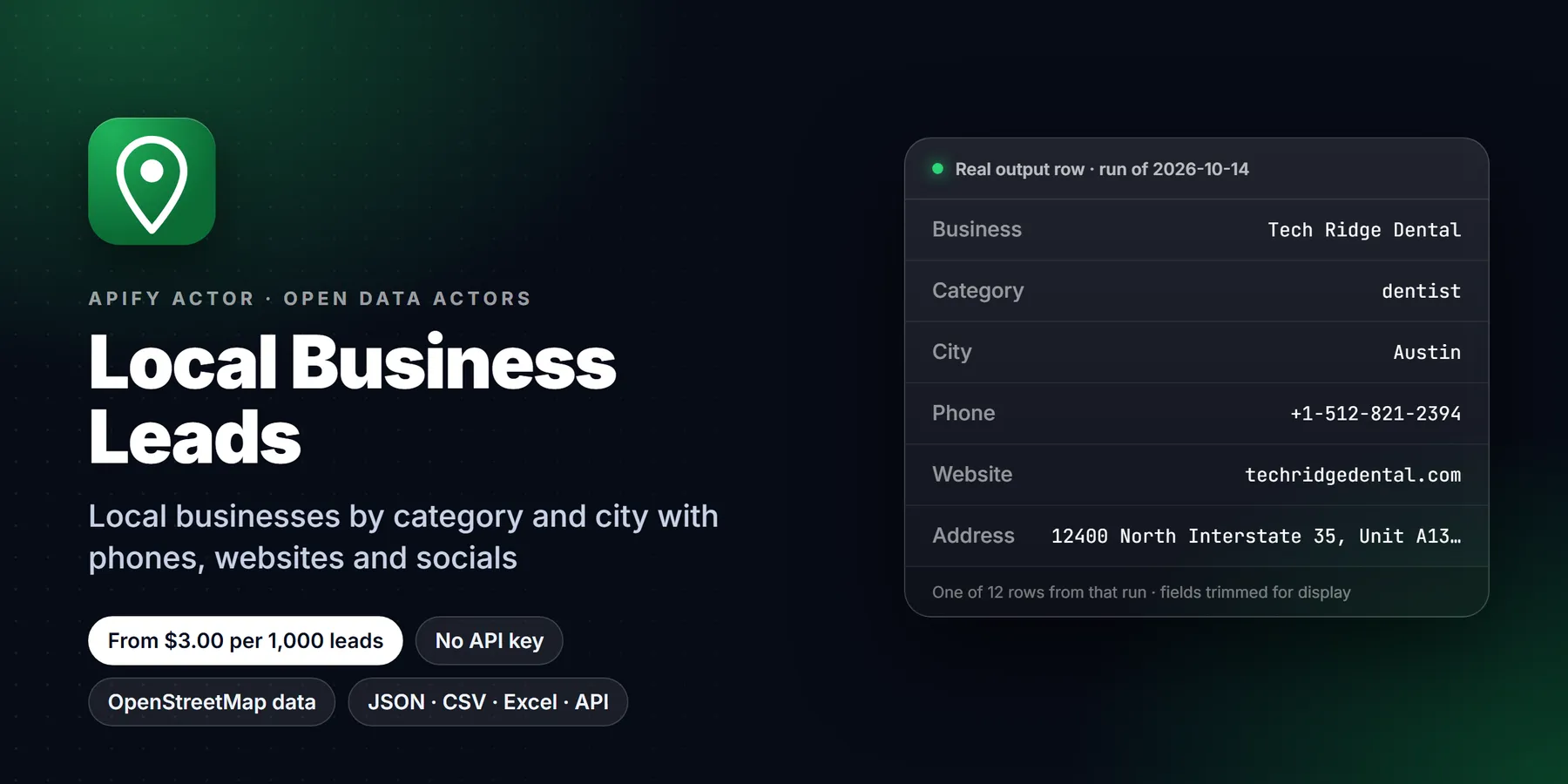
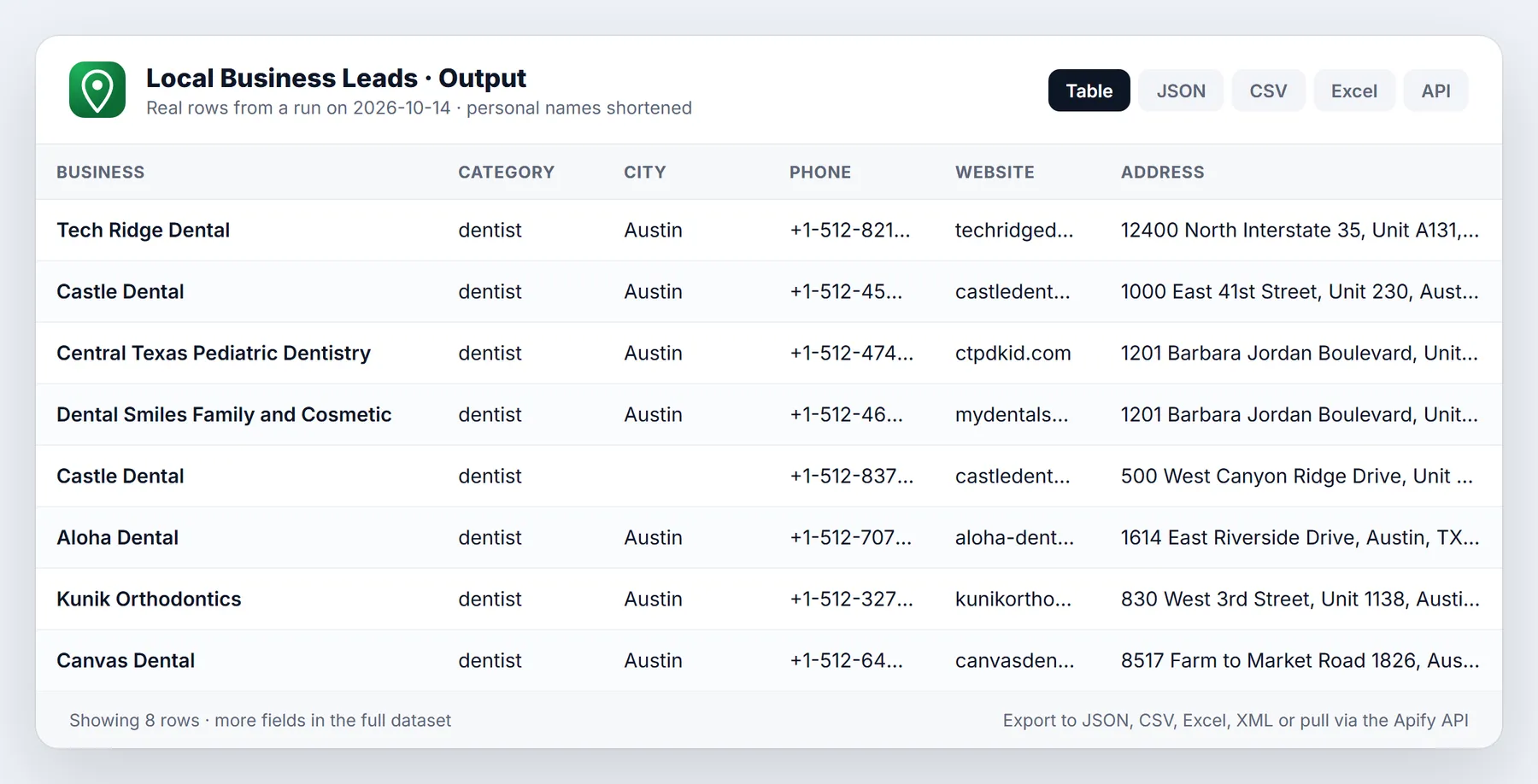
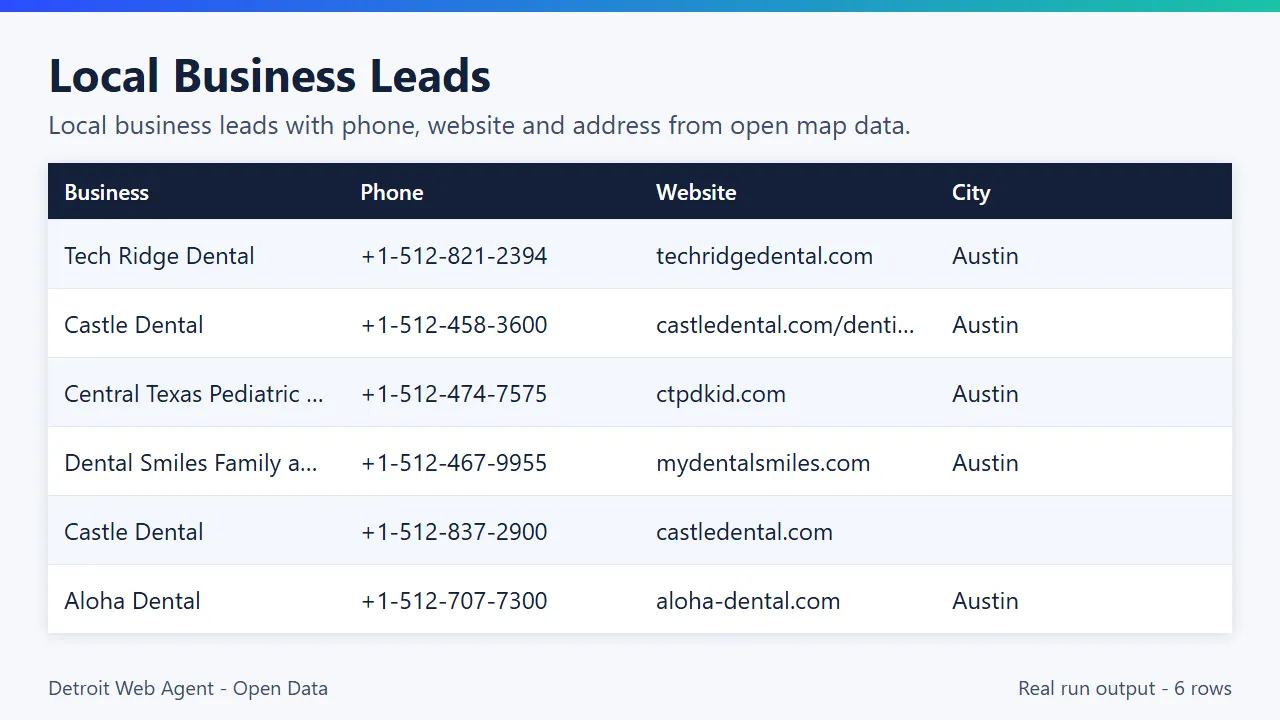
Sample from a real platform run (default input: dentists in Austin, TX, 50 rows in 14 seconds):
| Name | Phone | Website | Address | Opening hours |
|---|---|---|---|---|
| Tech Ridge Dental | +1-512-821-2394 | https://www.techridgedental.com/ | 12400 North Interstate 35, Unit A131, Austin, TX 78753 | Mo-Fr 07:30-16:30 |
| Castle Dental | +1-512-458-3600 | https://www.castledental.com/dentist-near-me/austin-dentist/35080 | 1000 East 41st Street, Unit 230, Austin, TX 78751 | Mo 08:00-17:00; We-Fr 08:00-17:00; Sa 07:00-13:00 |
| Central Texas Pediatric Dentistry | +1-512-474-7575 | https://www.ctpdkid.com/ | 1201 Barbara Jordan Boulevard, Unit 1430, Austin, TX 78723 | Mo,Tu,Th 09:00-14:30 |
| Dental Smiles Family and Cosmetic | +1-512-467-9955 | https://mydentalsmiles.com/ | 1201 Barbara Jordan Boulevard, Unit 1435, Austin, TX 78723 | Mo,We 08:00-17:00; Tu,Th 07:00-15:00; Fr 07:00-13:00 |
| Aloha Dental | +1-512-707-7300 | https://www.aloha-dental.com/ | 1614 East Riverside Drive, Austin, TX 78741 | Mo 08:00-17:00; Tu 09:00-18:00; ... |
One full item (restaurant in Detroit, with Enrich from website on; empty fields omitted):
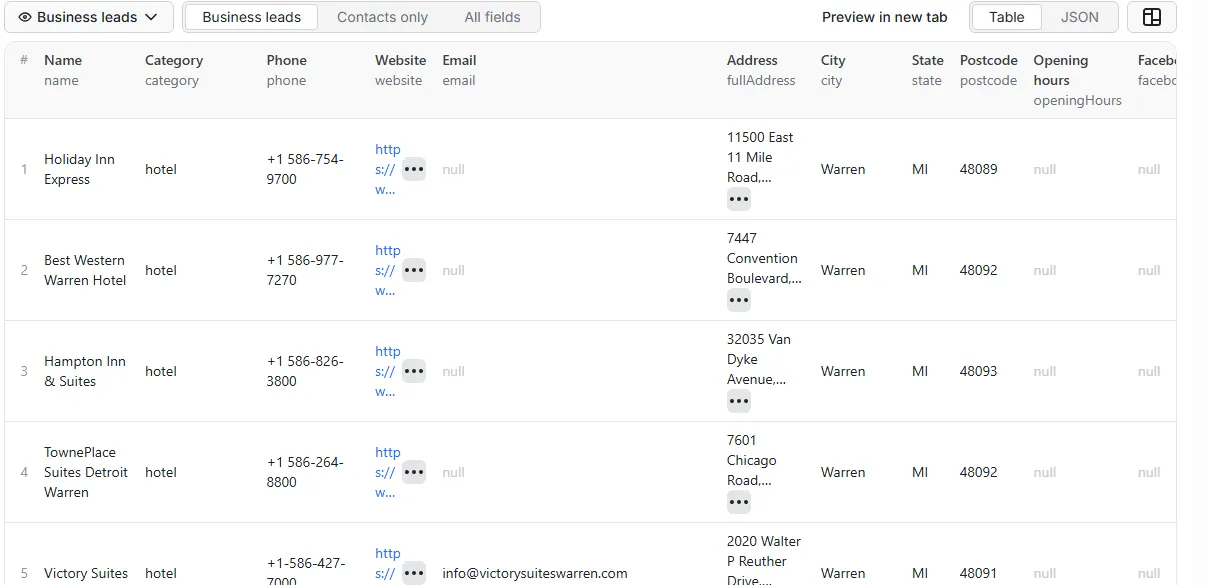
The dataset has two ready views: Business leads (overview table) and Contacts only. A RUN_SUMMARY record in the key-value store lists places returned, duplicates, filtered-out places, enriched sites and any warnings (such as an unknown business type or a location that could not be found).
Sample output (real run, truncated)
Pricing
Pay per event, no monthly fee:
| Event | Price |
|---|---|
| Actor start | $0.00005 per run |
| Place returned | $0.003 per business row ($3 per 1,000) |
| Website enriched (only if you turn it on) | $0.002 per website that loaded |
Worked example: 1,000 restaurants across three cities with Enrich from website on, where 700 of them have a website that loads: 1,000 x $0.003 + 700 x $0.002 = $4.40. The same list without enrichment costs $3.00. Set a maximum charge on the run and the actor stops cleanly when it is reached.
Apify's free plan includes $5 of monthly platform credit, which covers about 1,000 local businesses with this actor (at $0.003 per result, plus small platform usage).
Use cases
- Local business leads with emails: turn on
enrichFromWebsiteto read the emails, phones and social links each business publishes on its own website ($0.002 per site that loads). - Territory lists: several cities in
locationsand several types incategoriesin one run.
- Web design agencies: find local businesses that have no website on record (
onlyWithoutWebsite). - Local marketing: lists of businesses by type and city with phone and address when mapped.
- B2B sales to small businesses: build territory lists from open data.
- Market mapping: count businesses of a type in an area (
bboxor radius).
Use from AI agents (MCP, ChatGPT, Claude, Perplexity)
Local Business Leads works as a tool for AI assistants through the official Apify MCP server. Add this server URL to any MCP client (Claude Desktop, Claude Code, Cursor, ChatGPT connectors, VS Code):
Claude Desktop / Cursor config:
Then ask in plain language, for example: "Find dentists in Austin, TX that have no website listed."
Call it directly over HTTP (runs the actor and returns the dataset items in one request):
Python:
The same actor works in n8n, Make, Zapier, LangChain, LlamaIndex and CrewAI through their Apify integrations.
Questions people ask
How do I find local businesses that have no website? Turn on "Only places with NO website listed". You get businesses whose OpenStreetMap entry has no website, at $3 per 1,000 places. Missing in OpenStreetMap usually, but not always, means no site, so check before you pitch.
How do I get emails for local businesses? Turn on enrichFromWebsite; the actor visits each business website and adds emails it finds.
Does it include reviews or ratings? No, OpenStreetMap has no reviews.
Use it from code
Small real input: it returns only a couple of rows, so a test run costs very little (see Pricing). Set the APIFY_TOKEN environment variable to your token from Apify Console > Settings > API & Integrations.
Python (pip install apify-client)
JavaScript / Node.js (npm install apify-client)
curl (runs the actor and returns the dataset items in one call)
Send results to Google Sheets, Zapier, Make or n8n
- Google Sheets: every run's dataset has a CSV export link:
https://api.apify.com/v2/datasets/<DATASET_ID>/items?format=csv&clean=true(the dataset ID is on the run's Storage tab). In Sheets,=IMPORTDATA("<that link>")loads it. Anyone with the link can read that dataset, so share it carefully. To export to Google Drive automatically, use the Google Drive integration on the actor's Integrations tab. - Zapier: in the Apify app, use the trigger Finished Actor run (or Run Actor as an action) with
transparent_meteorite/local-business-leads, then Fetch dataset items and pass the rows to Google Sheets, a CRM or Slack. - Make: the Apify app has Watch Actor Runs, Run an Actor and Get Dataset Items modules; connect them to any Make app.
- n8n: install the Apify node (
@apify/n8n-nodes-apify) and use Run an Actor and get dataset, or the On new Apify event trigger. - Schedule and webhooks: create a Task with your input, add a Schedule in Apify Console, and add a webhook if you want a call when a run finishes.
See the Apify integrations docs for setup steps.
Integrations
API (curl):
Python:
JavaScript:
No-code: connect it to Make, Zapier or n8n with the Apify integration, push results to Google Sheets, HubSpot or your CRM, trigger a webhook when a run finishes, and use Schedules to refresh a territory every week.
New to Apify? Create a free account and run this Actor in under a minute. Some links are affiliate links.
Related actors
More tools from the same publisher that fit this workflow:
- Google Maps Scraper: search any category and city for places, phones, websites and reviews
- Website Email Extractor: pull emails, phones and socials from each business website
- Company Enrichment by Domain: enrich a domain with socials, emails and tech stack
- Website Tech Stack Detector: detect the CMS, frameworks and hosting behind any site
- Shopify Leads & Store Scraper: Shopify store leads with apps, products and contacts
- WHOIS & Domain Lookup: WHOIS/RDAP, DNS, subdomains and SSL for a domain
Use from AI agents: every actor here is callable through the Apify MCP server (mcp.apify.com) and our open-data-actors MCP endpoint.
FAQ
How many local business leads will I get for a city?
As many as OpenStreetMap has mapped for that type and area, up to maxItems. Coverage is thinner than Google Maps in some towns, so run a small test first (5 places cost about $0.015).
Are these local business leads from Google Maps?
No. They come from OpenStreetMap open data (ODbL), so there is no Google scraping and no proxy cost. Some businesses that are on Google Maps are not mapped in OpenStreetMap.
Is this legal?
Yes. The data comes from OpenStreetMap, which is published under the Open Database License (ODbL 1.0). You may use it commercially as long as you credit "© OpenStreetMap contributors" and share any database you build from it under the same terms if you publish that database. Every row carries this attribution in its source field. Website enrichment reads only public pages of the business's own website, the contact details it chooses to publish. Using contact data for outreach is still subject to your local rules (for example CAN-SPAM, GDPR or TCPA), so follow them.
How does it compare with scraping map listings?
Google has more listings, plus reviews, ratings and photos. This actor does not scrape Google at all, so it has no ToS risk, no blocked requests and a lower price. For many business types in larger cities, OSM gives you a solid list with phones and websites. For home-based trades and small towns, expect fewer results.
Why did I get fewer results than I expected?
Only businesses that are mapped in OpenStreetMap and have a name are returned. Try a related type (for example builder as well as roofer), a wider area such as the county, or a raw tag like craft=*. The run summary tells you how many places were filtered out by your filters.
How fresh is the data?
Queries run live against the public Overpass API, which is usually minutes behind OpenStreetMap. Each row has lastEdited, the date that place was last changed in OSM.
Where do emails come from?
Either from the OSM record itself (email or contact:email) or, with Enrich from website on, from the business's own homepage and contact page. Placeholder addresses (like ones from website builders) are filtered out. No guessing, no third-party email databases.
What locations can I use?
Any place name that OpenStreetMap Nominatim can find: cities, counties, states, ZIP or postal codes, neighbourhoods, in any country. Cities and counties use the real boundary. For a precise area, use the bounding box or latitude/longitude plus radius.
Am I charged for duplicates or filtered places?
No. Only rows saved to your dataset are charged. A business mapped twice (for example as a point and a building) is de-duplicated.
Can I edit or fix missing data?
Yes, and it helps everyone: every row has an osmUrl. Anyone can improve OpenStreetMap at openstreetmap.org.
More questions
How do I find businesses without a website?
Turn on onlyWithoutWebsite. Note that a missing website in OpenStreetMap is not proof the business has none, so check before outreach.
Why did I get fewer results than expected? Coverage is what OpenStreetMap volunteers have mapped, which is thinner for some trades and towns.
Where do emails come from?
From the OpenStreetMap record or, with enrichFromWebsite, from the business's own website.
Does it include reviews or ratings? No.
Can I require a phone number?
Yes, with requirePhone.
How this compares
Map-listing scrapers usually return more businesses plus reviews and ratings. This actor uses OpenStreetMap open data (ODbL), so results are reusable under that license, and it is built for one job: finding businesses with no website on record. Expect thinner coverage in some places.
Limits
- Results depend on OpenStreetMap coverage, which varies by place and business type.
- The public Overpass servers are shared and sometimes busy. The actor retries and falls back across several public instances; on a very busy day a large area can take longer.
- Up to 50 locations and 50,000 places per run. Max places applies to the whole run, and types and locations are processed in the order you enter them.
- Website enrichment reads at most two pages per site (homepage plus a contact or about page), skips private network addresses and does not run JavaScript.
- Geocoding follows the Nominatim usage policy of one request per second.
Reliability
Last 30 days, measured from Apify run records (all runs, including our own daily health checks): 38 of 41 finished runs succeeded (92.7%), median run time 75.6 s (90th percentile 417.2 s). Aborted runs (7) are not counted.
Updated 2026-10-11 automatically every week from the run history. Report any failure on the Issues tab with the run URL.
More resources
- Guide & examples: mamoo85.github.io/open-data-actors/local-business-leads.html
- Sample output and example input on GitHub (masked sample CSV): github.com/Mamoo85/apify-actor-samples/local-business-leads
- Workflow templates: n8n, Make, Zapier recipe
Changelog
- 2026-10-07: Launched on OpenStreetMap data with optional website email enrichment.
- 2026-10-09: Repositioned as a no-website finder with the new
onlyWithoutWebsiteinput; faster, more reliable map-server handling; coverage note; Output tab table view. - 2026-10-09: Input sections, status messages, examples.
- 2026-10-09: Branding: maintained by Detroit Web Agent - Open Data.
- 2026-10-09: README free-credit note; clear log line and status when your Maximum cost per run is reached.
- 2026-10-11: Closing log line points to the Issues tab; Reliability section added to this README.
- 2026-10-11: Store title, search description and README intro reworded around how buyers search; added a ready-to-run example input with its maximum cost and measured test-run timing.
- 2026-10-13 (0.2): new inputs
city,state,country(structured location, geocoded); new fieldslinkedin,mapUrl; empty input now runs a 5-result demo; default max items 25. Latitude/longitude + radius already supported. Pricing unchanged. price_1107 note: $0.003/place vs leader $0.0019, consider tiered pricing at the 2026-11-07 review.
Support
Found a bug or need a business type added? Open an issue on the Issues tab of this actor. We usually reply within a day.
Data © OpenStreetMap contributors, available under the Open Database License (ODbL).
Works well with
Other actors from Detroit Web Agent - Open Data that pair with this one:
- Website Contact Extractor: emails and social links for the businesses that do have a website.
- Technical SEO Page Audit: audit the sites you find, for web and SEO outreach.
- Website Tech Stack Detector: see which platform each business site runs on.
- New Business Filings: brand-new LLCs and corporations in CO, NY, OR and CT.
- Building Permits Leads: permit data for the same markets: contractors and projects behind new businesses.
What the free plan gets you
Free plan: about 1,670 local business listings from your $5 monthly Apify credit (at $0.003 each, today's price); default settings return about 5 rows. Website enrichment is an extra $0.002 per place when switched on. Need more? Upgrade your Apify plan or set a higher result limit in the input.
Need more than the data?
This actor is built by Detroit Web Agent, a small Detroit studio that builds websites, lead pages and simple data tools for small businesses. If you want these results turned into a working website, a landing page or a CRM import, or you need a field this actor does not cover yet, open an issue on the Issues tab or visit detroitwebagent.com.
Built and maintained by Detroit Web Agent - Open Data (Detroit, Michigan). Questions, bugs or a field you need: open an issue on this Actor's Issues tab and we will reply there.


