

Website Technology Versions & Confidence: Tech Stack
Pricing
$2.00 / 1,000 site analyzeds
Website Technology Versions & Confidence: Tech Stack
Detect the technology behind any website, with versions, confidence score and evidence for each: CMS, ecommerce, frameworks, analytics, CDN and hosting, 2,392 technologies. Build technographic lead lists or get only what changed since the last run.
Pricing
$2.00 / 1,000 site analyzeds
Rating
0.0
(0)
Developer

Detroit Web Agent - Open Data
Maintained by CommunityActor stats
0
Bookmarked
2
Total users
1
Monthly active users
14 hours ago
Last modified
Categories
Share
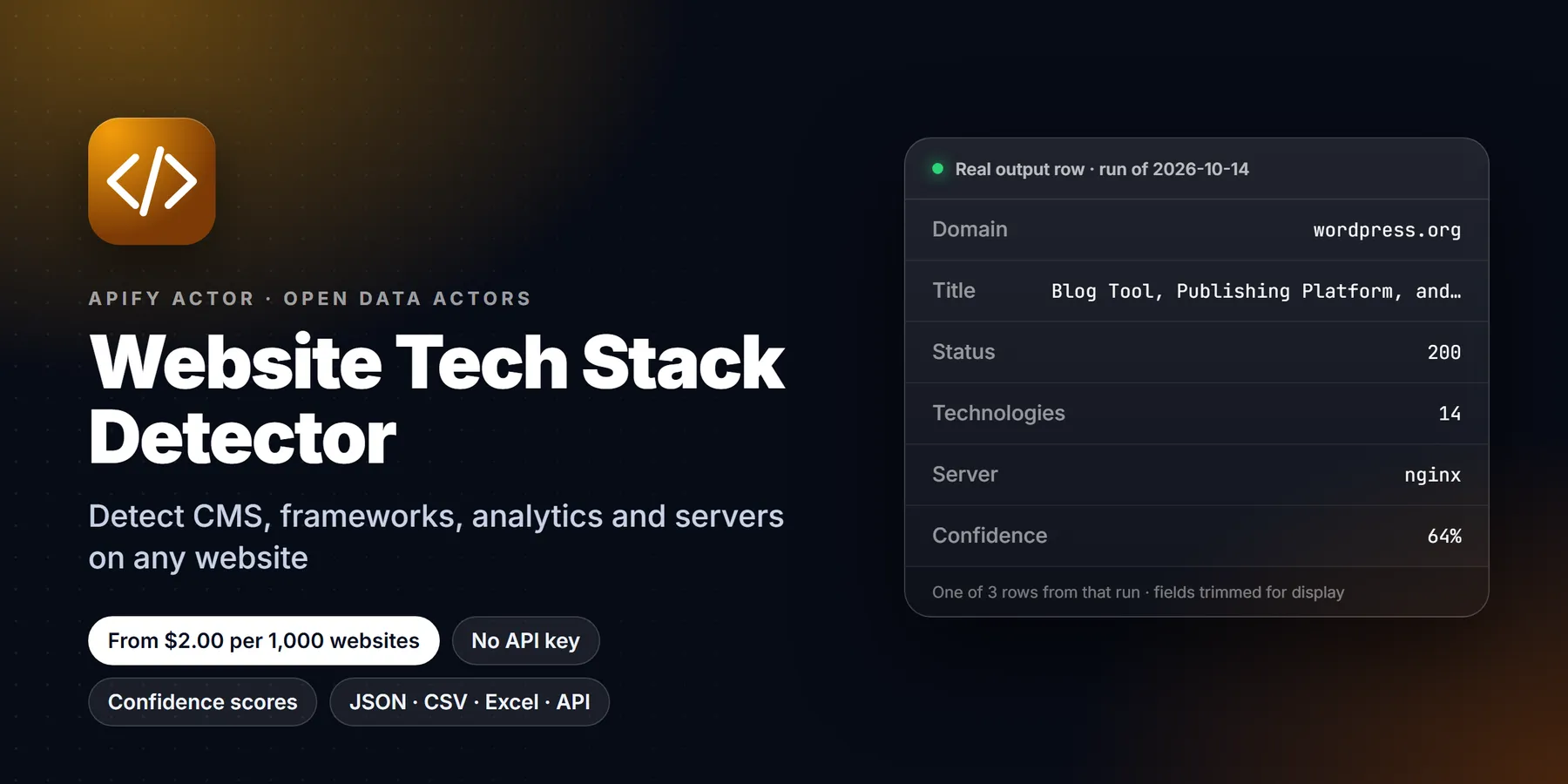
Tech stack detector for a list of domains: for each site get the CMS, ecommerce platform, JavaScript frameworks, analytics, tag managers, CDN, hosting, payment and marketing tools, from 2,392 technologies checked, with versions when shown, a confidence score and the evidence.

| Price per 1,000 websites | Free plan | Starter | Scale | Business |
|---|---|---|---|---|
| This Actor, today | $2.00 | $2.00 | $2.00 | $2.00 |
| This Actor, from Oct 30, 2026 | $2.00 | $2.00 | $1.70 | $1.40 |
Video walkthrough: Watch the 1-minute demo on YouTube
Paste a list of domains. Get back, for every site, the CMS, ecommerce platform, JavaScript frameworks, analytics and tag managers, CDN, hosting, payment and marketing tools it runs, with the version when the page shows it, a confidence score, and the exact evidence behind each detection.
- What you get: one row per website with 2,392 possible technologies checked, grouped by category, plus ready-to-filter columns such as
cms,ecommerce,analytics,cdn,hostingandisEcommerce. - Who it is for: sales and growth teams building technographic lead lists, agencies qualifying prospects before outreach, and analysts comparing the stacks of a market or a competitor set.
- Price: $0.002 per website analyzed, which is $2.00 per 1,000 websites. Sites that fail, block us or are disallowed by robots.txt are not charged.
- Speed: a plain HTTP check of each homepage, no browser. A 3-site run usually finishes in a few seconds.
One real row (shopify.com, from our scheduled run on Oct 19, 2026, trimmed):
| domain | ecommerce | cdn | frameworks | techCount | avgConfidence | server | isHttps |
|---|---|---|---|---|---|---|---|
| shopify.com | Shopify | Cloudflare | Tailwind CSS (4.1.18) | 9 | 66 | cloudflare | true |
- In short: Website Tech Stack Detector (Apify actor
transparent_meteorite/website-tech-stack-detector) detects the technologies a website uses (CMS, ecommerce platform, JavaScript frameworks, analytics, tag managers, CDN, hosting and more, 2,392 technologies in total) with evidence and confidence for each detection. - Who it is for: sales teams building technographic lead lists, agencies qualifying prospects, competitive and market researchers.
- Input: a list of domains or URLs, max sites, whether to respect robots.txt and include evidence; optional technology and category filters and a monitor mode.
- Output: one row per site: detected technologies grouped by category, version where visible, evidence, confidence, final URL, status, role columns, SEO meta basics and security headers.
- Price: $0.002 per site analyzed ($2.00 per 1,000); sites that fail to load are not charged. Pay per result, no subscription; Apify's free plan credit covers a first test.
- Limits: detects from public HTML, headers, scripts and cookies of the home page, so server-side-only tools can be missed.
Key facts
- Actor name: Website Tech Stack Detector
- Actor ID:
transparent_meteorite/website-tech-stack-detector - Store page: https://apify.com/transparent_meteorite/website-tech-stack-detector
- Data source: the public website itself (HTTP fetch, no third-party database)
- Pricing model: pay per event (
site-analyzed$0.002) - Output formats: JSON, CSV, Excel, XML, HTML table, RSS (Apify dataset)
- Access: Apify Console, REST API, JavaScript/Python clients, schedules, webhooks, Apify MCP server
- Login or third-party API key needed: no, only an Apify account
- Also known as: tech stack lookup, website technology checker, technology detector API, technographics data, "what is this site built with", CMS detector, ecommerce platform checker
- Maintainer: transparent_meteorite (independent developer)
- Last updated: 2026-10-19
2,392 technologies across more than 90 categories (847 hand-written fingerprints plus 1,545 imported from open-source MIT-licensed technology definition data, license text in third_party/), detected from one plain HTTP request per homepage. Only rules that work on a plain HTTP response are used (headers, cookies, meta tags, script URLs, HTML); rules that need a browser to read JavaScript globals are not included. No browser, no proxies, no AI guessing: every result comes with the header, script URL, cookie or HTML snippet that triggered it, plus a confidence score. Sites that fail or block us are not charged.
What is Website Technology Versions & Confidence: Tech Stack?
Detect the technology behind any website, with versions, confidence score and evidence for each: CMS, ecommerce, frameworks, analytics, CDN and hosting, 2,392 technologies. Build technographic lead lists or get only what changed since the last run. Run it from the Apify Console, the API or a schedule, and export the results as JSON, CSV, Excel or HTML.
Run in 30 seconds
- Open the prefilled run (free Apify account; it creates a saved task with a working input).
- Press Start. The input is small on purpose, so the first run is quick and costs a few cents at most.
- Open the Output tab, switch to Table view, download as CSV, Excel or JSON.
Prefilled input:
Ready-made presets by use case (each opens as a saved task you can edit):
Sample output
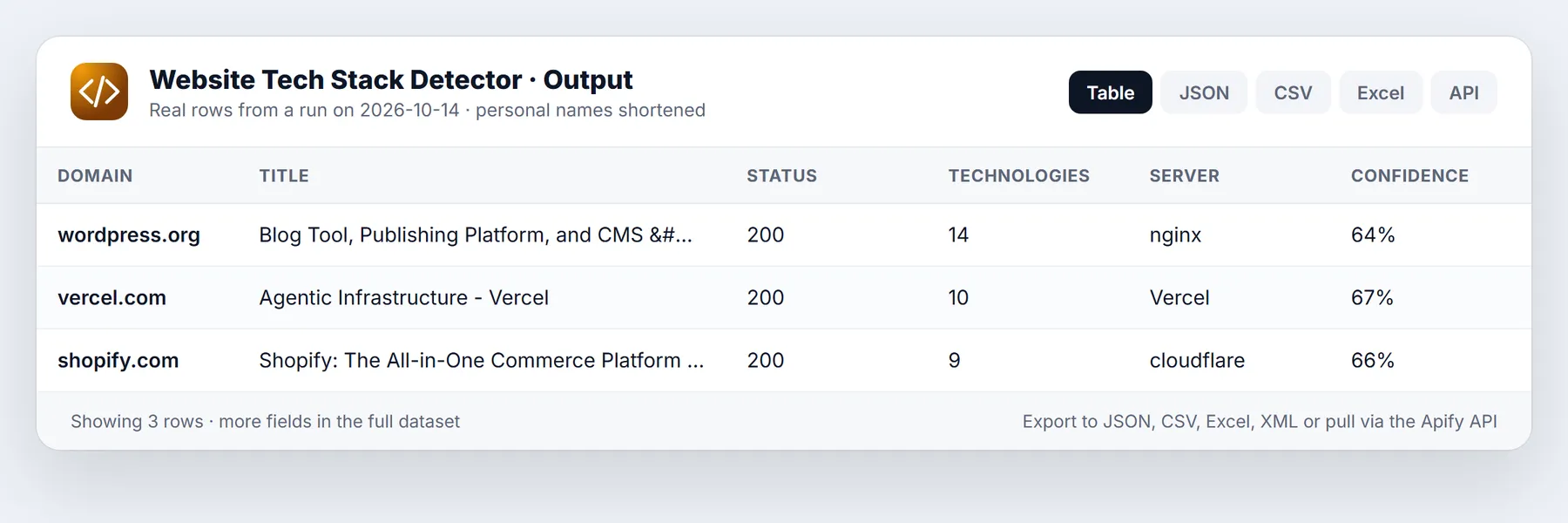
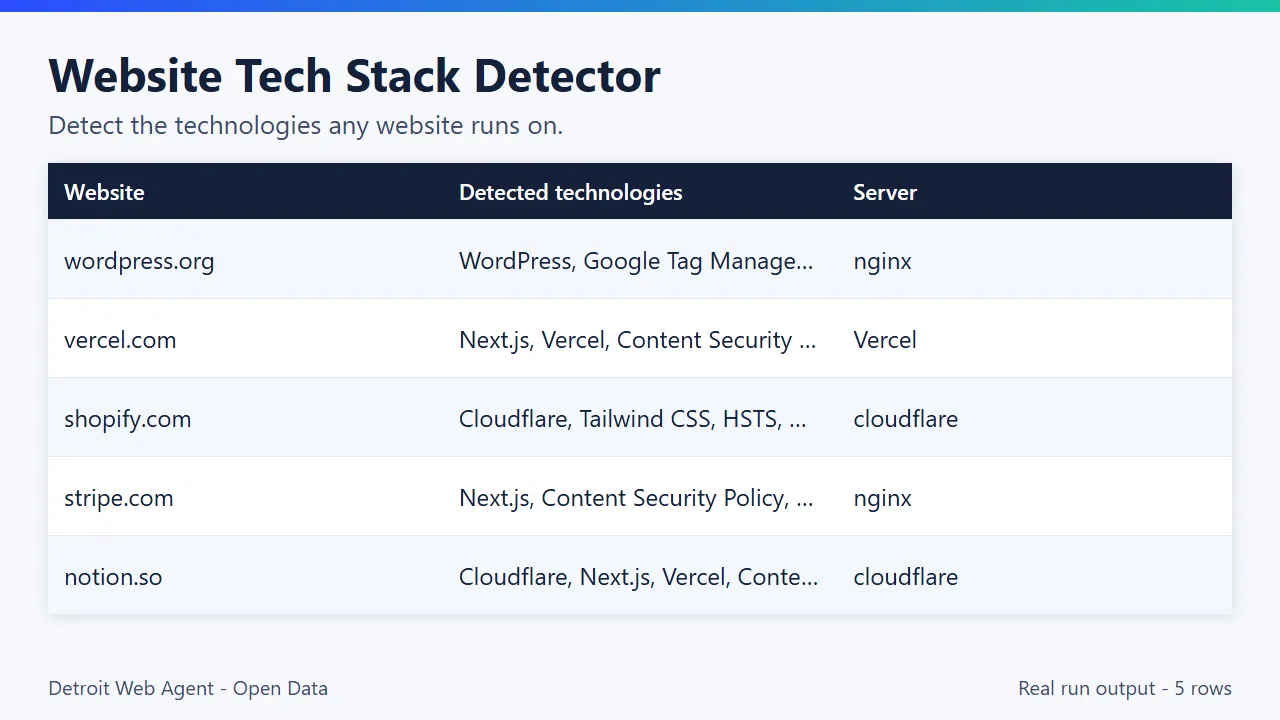
Real results from our run of Oct 11, 2026 (10 sites, categoriesSummary shown, a few categories trimmed for width):
| Site | CMS, ecommerce, site builder | Frameworks and libraries | Hosting / CDN / Server | Analytics, marketing, testing |
|---|---|---|---|---|
| allbirds.com | Shopify, Shopify Section Rendering | GSAP, Swiper, Video.js | Cloudflare | Google Tag Manager, Google Search Console |
| gitlab.com | Nuxt, Vue.js | Cloudflare, Cloudinary | Marketo, Mutiny, Optimizely, OneTrust | |
| notion.so | Contentful (CMS), Borderfree (ecommerce) | Next.js, React | Vercel, Cloudflare | |
| stripe.com | Next.js, React | Nginx | Google Search Console | |
| wordpress.org | WordPress, Gutenberg Blocks, Jetpack | PHP | Nginx | Google Tag Manager, Google Search Console |
| ghost.org | Hugo | Alpine.js | Netlify | FirstPromoter |
| cloudflare.com | Astro | Cloudflare | Google Analytics, Cloudflare Web Analytics | |
| basecamp.com | Stimulus | Cloudflare | Bing Webmaster Tools |
And one full row from our scheduled run on Oct 19, 2026 (trimmed: the technologies list shows 3 of 9 entries, evidence strings shortened):
What you get
One row per input site:
| Field | What it is |
|---|---|
url, finalUrl | The URL you gave (normalized) and where it landed after redirects |
status, title, server | HTTP status, page title, Server header |
technologies | List of { name, category, version, confidence, evidence[] } |
categoriesSummary | Technology names grouped by category, easy to filter in a spreadsheet |
fetchedAt | When it was checked |
error | null, or invalid_url, robots_disallowed, http_403 (etc.), not_html, fetch_failed: CODE |
More fields per row (all derived from the same one page request, no extra cost):
| Field | What it is |
|---|---|
domain | Hostname without www |
techCount, techNames | Number of detections and a flat list of names for spreadsheets |
cms, ecommerce, analytics, cdn, hosting, frameworks, payment, marketing, webServers | Detected names bucketed by role, so you can filter without parsing technologies |
isEcommerce | true when an ecommerce platform was detected |
versionedTechCount, avgConfidence, lowConfidenceCount | Version coverage and confidence summary for the row |
matchesTechnologiesFilter | true/false when technologiesFilter is set |
changeStatus, addedTechnologies, removedTechnologies, versionChanges | Monitor mode only: new, changed or unchanged plus the diff |
metaDescription, generator, language, canonicalUrl, hasViewportMeta | Homepage SEO and meta basics |
isHttps, redirected, responseTimeMs, htmlBytes | Transport facts for the fetch |
security | Which security headers are present: hsts, csp, xFrameOptions, xContentTypeOptions, referrerPolicy, permissionsPolicy |
Version and confidence. version is filled when the matching rule can read it (for example a generator meta tag, a Server or X-Powered-By header, or a versioned CDN URL); otherwise it is null. confidence is 1-100: 60 for one clear signal, +20 per extra independent signal, +10 when a version was read; patterns the source data marks as weaker start lower (40), and technologies only implied by another one are 50.
Input categoriesFilter (array, default empty = every category): return only technologies in the listed categories, for example ["CMS", "Ecommerce", "Analytics"]. Case-insensitive. It changes the technologies and categoriesSummary of each row; the per-site charge is unchanged.
Categories covered: CMS, ecommerce, analytics, tag managers, CDN, hosting, web servers, JavaScript frameworks and libraries, UI frameworks, payment, chat and support, marketing automation, advertising, A/B testing, security, page builders, WordPress plugins, authentication, video, fonts, SEO, CRM and many more (over 90 in total). Shopify, WooCommerce, Magento, BigCommerce, Wix, Squarespace, Webflow, WordPress, HubSpot, Klaviyo, Stripe, Intercom, Segment, Hotjar, Google Analytics, React and Next.js are all included.
Quick start
Press Start with the prefilled form (shopify.com, 1 site): $0.002, done in seconds. Clear the urls field and the actor runs its built-in 3-site sample (shopify.com, wordpress.org, vercel.com) for $0.006.
Check a lead list:
Only sites that run Shopify or WooCommerce (others are not charged):
Large list, faster, smaller rows:
Input
| Input | Type | Default | What it does |
|---|---|---|---|
urls | list | built-in 3-site sample | Domains or URLs, homepage only. Leave empty and the actor runs a sample (shopify.com, wordpress.org, vercel.com) so a first run always returns rows. |
maxSites | integer | 100 | Upper bound on sites processed (1 to 10,000). |
includeEvidence | boolean | true | Add the header, script URL, cookie or HTML snippet behind each detection. |
respectRobots | boolean | true | Skip sites whose robots.txt disallows us (not charged). |
categoriesFilter | list | empty | Return only technologies in these categories, e.g. CMS, Ecommerce, Analytics. |
minConfidence | integer 0-100 | 0 | Drop detections below this confidence. 60 keeps only clearly evidenced ones. |
technologiesFilter | list | empty | Technology names to look for (e.g. Shopify, HubSpot). Adds matchesTechnologiesFilter to every row. |
onlyMatching | boolean | false | Push only sites that use at least one technology from technologiesFilter. Others are not pushed and not charged. |
monitorMode | boolean | false | New since last run: compare with the previous snapshot and add changeStatus, addedTechnologies, removedTechnologies, versionChanges. |
onlyChanges | boolean | false | In monitor mode, push only new or changed sites. Unchanged sites are not pushed and not charged. |
monitorName | string | default | Name of the snapshot, so you can track several site lists separately. |
concurrency | integer 1-20 | 5 | Sites fetched in parallel. |
Monitor mode in practice: schedule the actor daily or weekly with monitorMode and onlyChanges on. The snapshot lives in the named key-value store tech-stack-monitor-state in your account. The first run marks every site new; later runs return only sites whose stack changed (a competitor adds Klaviyo, a prospect leaves Magento, WordPress goes from 6.4 to 6.5).
Pricing
$0.002 per site analyzed ($2.00 per 1,000 sites). No subscription, no start fee.
| You check | You pay |
|---|---|
| 1 site (the prefilled Start) | $0.002 |
| 3 sites (the built-in sample) | $0.006 |
| 1,000 sites | $2.00 |
| 10,000 sites | $20 |
From Oct 30, 2026, paid Apify plans get a tiered discount on the same event, down to $1.40 per 1,000 sites (Free and Starter stay at $2.00).
Not charged: DNS errors, timeouts, refused connections, 4xx/5xx answers (including bot-blocking 403s), non-HTML responses, invalid URLs and sites whose robots.txt disallows us. Those rows still appear with an error so you know what happened. No proxy, browser or AI costs are added, and your run's maximum-charge limit is respected: when it is reached the run stops cleanly with the rows already found and a clear log line.
Apify's free plan includes $5 of monthly platform credit, which covers about 2,000 websites with this actor (at $0.002 per result, plus small platform usage).
What makes the output easy to use
- Evidence on every detection. Each technology comes with the header, script URL, cookie name or HTML snippet that matched, so a sales rep or analyst can verify a result in seconds instead of trusting a black box.
- Version and confidence. When the page exposes a version (generator tag,
ServerorX-Powered-Byheader, versioned CDN path) you get it. Every detection carries a 1-100 confidence score you can filter on withminConfidence. - Spreadsheet-ready columns. Besides the full
technologieslist, each row has flat role columns (cms,ecommerce,analytics,cdn,hosting,frameworks,payment,marketing,webServers) and atechNameslist, so you can filter in Sheets or Excel without parsing JSON. - Lead-list mode. Give
technologiesFiltera list such as["Shopify", "WooCommerce"]and turn ononlyMatching: only sites that use one of them are returned, and only those are charged. - Change monitoring.
monitorModecompares each site with its previous snapshot and tells you what was added, removed or upgraded. - You only pay for answers. DNS errors, timeouts, 403 bot blocks, non-HTML responses and robots.txt refusals are listed with an
errorvalue and cost nothing.
Use cases and n8n automation ideas
Run this actor from an n8n workflow with the Apify node or an HTTP Request node, then read the dataset items in the next step. Ideas:
- Technographic lead lists. Detect the CMS, ecommerce platform, analytics and hosting behind a list of prospect sites, then filter to the ones running the platform you serve.
- Competitor stack tracking. Run it on a schedule with monitor mode and send the added and removed technologies to Slack or email.
- Agency prospecting. Pick out sites on an outdated CMS or without analytics and add them to a CRM as outreach targets.
Use cases
Technographic lead lists. You sell a Shopify app, a WordPress plugin, a payments integration or a migration service. Load a list of prospect domains, set technologiesFilter to the platforms you serve and turn on onlyMatching. The dataset that comes back contains only qualified accounts, and you paid only for those rows. Pair it with a contact extractor to add emails and phones.
Agency prospecting. Before a cold email, know whether the prospect runs an old WordPress version, has no analytics, has no tag manager, or ships a site without HSTS or a Content Security Policy. Those are concrete opening lines. The security, generator, hasViewportMeta and responseTimeMs fields give you more of them from the same request.
Competitive and market research. Run every company in a market map and count which CMS, ecommerce platform, A/B testing tool or marketing automation suite each one uses. Because every row has flat role columns, a pivot table in Sheets answers "how many of these 500 brands are on Shopify?" in a minute.
Stack change alerts. Schedule a weekly run with monitorMode and onlyChanges. You get a row only when a watched site adds or drops a technology or changes a version: a competitor adds an A/B testing tool, a prospect leaves Magento, a client's WordPress version jumps. Unchanged sites are not pushed and not charged.
CRM enrichment. Push your account list through the API from Clay, n8n, Make or Zapier and write cms, ecommerce and analytics back to each company record, so reps can segment by stack.
Migration and audit work. Find sites still on an older platform version, sites missing basic security headers, or sites that redirect to a different domain, then prioritize outreach or remediation.
Use with the API, n8n, Make, Zapier, Clay or AI agents
API (returns the rows in one call):
Python
- Clay: add an HTTP API column that sends each row's domain to the run-sync endpoint and returns the stack, then filter your table to "uses Shopify" or "no analytics".
- n8n, Make, Zapier: use the Apify app's "Run Actor" step with actor
transparent_meteorite/website-tech-stack-detector, then writecategoriesSummaryinto your CRM. - AI agents (MCP): connect
https://mcp.apify.com?tools=transparent_meteorite/website-tech-stack-detectorto Claude, Cursor or any MCP client, and ask "what is acme.com built with?".
Use from AI agents (MCP, ChatGPT, Claude, Perplexity)
Website Tech Stack Detector works as a tool for AI assistants through the official Apify MCP server. Add this server URL to any MCP client (Claude Desktop, Claude Code, Cursor, ChatGPT connectors, VS Code):
Claude Desktop / Cursor config:
Then ask in plain language, for example: "Which of these 20 domains run Shopify, and what analytics do they use?"
Call it directly over HTTP (runs the actor and returns the dataset items in one request):
Python:
The same actor works in n8n, Make, Zapier, LangChain, LlamaIndex and CrewAI through their Apify integrations.
Questions people ask
What is a low-cost technology-detection API? This actor checks each site against 2,392 technologies at $0.002 per site, in bulk, through the Apify API, with no subscription.
How do I find which websites use Shopify or WordPress?
Give it your domain list with technologiesFilter: ["Shopify", "WordPress"] and onlyMatching: true, or filter the output on the ecommerce or cms column.
Does it need an API key? No third-party key. You only need an Apify account.
Use it from code
Small real input: it returns only a couple of rows, so a test run costs very little (see Pricing). Set the APIFY_TOKEN environment variable to your token from Apify Console > Settings > API & Integrations.
Python (pip install apify-client)
JavaScript / Node.js (npm install apify-client)
curl (runs the actor and returns the dataset items in one call)
Send results to Google Sheets, Zapier, Make or n8n
- Google Sheets: every run's dataset has a CSV export link:
https://api.apify.com/v2/datasets/<DATASET_ID>/items?format=csv&clean=true(the dataset ID is on the run's Storage tab). In Sheets,=IMPORTDATA("<that link>")loads it. Anyone with the link can read that dataset, so share it carefully. To export to Google Drive automatically, use the Google Drive integration on the actor's Integrations tab. - Zapier: in the Apify app, use the trigger Finished Actor run (or Run Actor as an action) with
transparent_meteorite/website-tech-stack-detector, then Fetch dataset items and pass the rows to Google Sheets, a CRM or Slack. - Make: the Apify app has Watch Actor Runs, Run an Actor and Get Dataset Items modules; connect them to any Make app.
- n8n: install the Apify node (
@apify/n8n-nodes-apify) and use Run an Actor and get dataset, or the On new Apify event trigger. - Schedule and webhooks: create a Task with your input, add a Schedule in Apify Console, and add a webhook if you want a call when a run finishes.
See the Apify integrations docs for setup steps.
Related actors
More tools from the same publisher that fit this workflow:
- Meta Ad Library Scraper: Facebook and Instagram ads from the Meta Ad Library
- Company Enrichment by Domain: enrich a domain with socials, emails and tech stack
- Website Email Extractor: pull emails, phones and socials from each business website
- Local Business Leads: find local businesses with no website from OpenStreetMap, a cheap complement to Maps data
- Shopify Leads & Store Scraper: Shopify store leads with apps, products and contacts
- WHOIS & Domain Lookup: WHOIS/RDAP, DNS, subdomains and SSL for a domain
Use from AI agents: every actor here is callable through the Apify MCP server (mcp.apify.com) and our open-data-actors MCP endpoint.
Live check, not a historical index
This actor does not keep a web-wide database of past scans. It does a live check of the sites you give it, at the moment you run it, with its own fingerprint set and the evidence for each match, and you pay per site analyzed. Use it when you want a current answer for your own list. If you need history for your list, run it on a schedule with monitorMode and it will build that history for you, one snapshot per run.
Limitations
- Homepage only, one request plus one retry. Tools used only on inner pages, checkout or app subdomains are not seen.
- No JavaScript execution. Tools injected at runtime by a tag manager, and fully client-rendered sites with no framework hint in the HTML, are under-reported.
- Bot protection: sites that answer non-browser clients with 403/429 or a challenge page come back with an error, uncharged.
- Redirects: detection describes the page we landed on (
finalUrl), which can be a regional or different domain. - Server-side stacks behind a CDN that strips headers cannot be seen from outside. Versions appear only when the site exposes them.
- The first 2 MB of HTML is read. Sites whose robots.txt disallows all bots are skipped when
respectRobotsis on.
Missing a technology? Open an issue on the Issues tab with the site and what it uses, and we will add a rule.
Reliability
Last 30 days, measured from Apify run records (all runs, including our own daily health checks): 32 of 32 finished runs succeeded (100.0%), median run time 2.6 s (90th percentile 3.5 s). Aborted runs (0) are not counted.
Updated 2026-10-11 automatically every week from the run history. Report any failure on the Issues tab with the run URL.
More resources
- Guide & examples: mamoo85.github.io/open-data-actors/website-tech-stack-detector.html
- Sample output and example input on GitHub (masked sample CSV): github.com/Mamoo85/apify-actor-samples/website-tech-stack-detector
- Workflow templates: n8n, Make, Zapier recipe
Works well with
Other actors from Detroit Web Agent - Open Data that pair with this one:
- Shopify Store Leads: for Shopify sites: installed apps, theme, catalog stats and contacts.
- Website Contact Extractor: add emails, phones and social links for the sites that match your target stack.
- Technical SEO Page Audit: pair a stack lookup with an on-page SEO and broken-link check.
- Company Enrichment by Domain: turn the same domain list into company rows.
- Sitemap Link Inventory: inventory every URL of a site first, then audit the pages that matter.
- Developer Signals (Hacker News, npm, PyPI): see which technologies developers are discussing before you check who uses them.
- Domain Intelligence Lookup: add registration, DNS and SSL facts to each detected stack.
- Local Business Leads (no-website finder): check which platform each local business site runs on.
FAQ
How can I tell what technology a website uses?
Add its domain to urls and run the actor. Each result lists the detected technologies with a category, version when exposed, a confidence score and the evidence.
How do I check whether a website is built on Shopify or WordPress?
Run the domains and look at the ecommerce and cms columns (or the Ecommerce and CMS entries in categoriesSummary). Shopify, WordPress, WooCommerce, Wix, Squarespace, Webflow, Magento and BigCommerce are all detected.
Is this a free technology-detection tool?
It is pay per use: $0.002 per site that loads, nothing for sites that fail, no subscription. Apify's free monthly credit covers roughly 2,000 sites, so you can test it on a real list before paying anything.
How is this different from a browser extension that shows a site's technologies?
A browser extension checks the one page you are looking at, inside a real browser, and can read things that only appear after JavaScript runs. This actor checks a list of sites from a server, in bulk, using static rules on the raw HTTP response, and returns the result as data you can export or call from an API. Use an extension to look at one site by hand; use this actor when you have tens, hundreds or thousands of domains.
How accurate is the tech stack detection?
Every detection is a deterministic rule with visible evidence, so you can check any result. Confidence starts at 60 for one signal and rises with each extra independent signal, plus 10 when a version is read. Set minConfidence to 60 to keep only detections backed by at least one clear signal. Tools that only appear after JavaScript runs can be missed; see Limitations.
Can I look up thousands of websites at once?
Yes. Put up to 10,000 sites in one run and raise concurrency to 15-20. Each request goes to a different site.
How many technologies does it detect, and where do the fingerprints come from?
2,392 technologies in more than 90 categories. 847 fingerprints are original; 1,545 come from open-source MIT-licensed technology definitions, converted to static rules (full license text in the repo under third_party/). Detections that would need a real browser (JavaScript globals, DOM queries) are not part of this actor, so some technologies visible only that way will be missed.
Can I get only the CMS or only the analytics tools?
Yes. Set categoriesFilter to for example ["CMS", "Analytics"]. Only matching technologies are returned. You are still charged per analyzed site.
Can I get only the sites that use a specific tool?
Yes. Set technologiesFilter (for example ["HubSpot"]) and turn on onlyMatching. Sites that do not use it are not returned and not charged.
Does it collect personal data?
No. It reads public homepage HTML and headers only. No IP addresses, emails or cookie values are stored.
This Actor vs nexgendata/wappalyzer-replacement: that one is the most-used tech stack detector in the store search. Choose this one for the evidence and confidence behind each detection, ready-to-filter columns such as cms, ecommerce and cdn, and a monitor mode for scheduled runs.
More questions
How can I tell what CMS a website is using?
Add the domain to urls. Each row lists detected technologies grouped by category, with the evidence for each.
Can I check thousands of sites in one run?
Yes. Pass a long urls list and set maxSites; concurrency controls speed.
Does it need an API key for a third-party database? No. It fetches the public site itself and matches its own fingerprints; there is no external lookup.
Why was a tool I know they use not detected? Detection uses the public HTML, headers, scripts and cookies of the home page. Server-side-only tools leave no public trace there, so they can be missed.
Am I charged when a site does not load? No. Sites that fail to load are not charged.
What the free plan gets you
Free plan: about 2,000 analyzed websites from your $5 monthly Apify credit (at $0.002 each, today's price, plus small platform usage); the prefilled form returns 1 row (one sample site; add more URLs to scale). Need more? Upgrade your Apify plan or set a higher result limit in the input.
Built and maintained by Detroit Web Agent - Open Data (Detroit, Michigan). Questions, bugs or a field you need: open an issue on this Actor's Issues tab and we will reply there.
Feedback: if this Actor was useful, or if it fell short, an honest review on the Reviews tab helps other users decide. Problems or feature requests: please open an Issue and we usually reply within one business day.
Changelog
- 2026-10-05: Listing rewrite and real example input.
- 2026-10-06: Fingerprint set expanded with several hundred new signatures (CMS, ecommerce, JS libraries, hosting, marketing tools).
- 2026-10-06: Fingerprints 307 to 847.
- 2026-10-07: Price set to $0.002 per site.
- 2026-10-09: Title and README cleaned up; Output tab table view.
- 2026-10-09: Input sections, status messages, examples.
- 2026-10-09: Branding: maintained by Detroit Web Agent - Open Data.
- 2026-10-09: v0.2: fingerprints 847 to 2,392 (1,545 imported from open-source MIT-licensed data), weak-pattern confidence tuning.
- 2026-10-09: README free-credit note; clear log line and status when your Maximum cost per run is reached.
- 2026-10-11: Closing log line points to the Issues tab; Reliability section added to this README.
- 2026-10-13: Added a Run in 30 seconds section with a one-click prefilled run link, saved use-case presets, cross-links to pairing actors and Store title and search description reworded around how buyers search.
- 2026-10-13: v0.3: monitor mode (new since last run),
technologiesFilter+onlyMatching,minConfidence, 30+ new row fields (role buckets, security headers, SEO meta, timing), empty input runs a built-in sample. - 2026-10-19: README rewritten: one real row on the first screen, real 10-site sample from a recorded run, lead-list and monitoring use cases, upcoming paid-plan discount noted.
- 2026-10-25: Listing refresh: new Store icon, README reorganised (overview, data fields, pricing, FAQ) and changelog tab added. No code change.


