

Google Ads Transparency Scraper: New & Stopped Competitor Ads
Pricing
from $1.40 / 1,000 ads
Google Ads Transparency Scraper: New & Stopped Competitor Ads
Google Ads scraper for the Ads Transparency Center, Google's ad library. Paste competitor names, domains or links; get every ad with dates, regions, images, video and ad copy where Google shows it. Schedule it for only new, changed, stopped and proven ads. $2 per 1,000 ads, less on paid plans.
Pricing
from $1.40 / 1,000 ads
Rating
0.0
(0)
Developer

Waffleiron
Maintained by CommunityActor stats
0
Bookmarked
2
Total users
1
Monthly active users
2 days ago
Last modified
Categories
Features
Share
Monitor your competitors' Google ads: every ad they run, with dates, countries, images and video. $2 per 1,000 ads, less on paid plans.
Paste competitor names or websites. Run it every morning and get only what changed: new ads, stopped ads, and new ads still running two weeks later.
🔍 What does Google Ads Transparency Scraper do?
Google publishes every ad an advertiser runs in its Ads Transparency Center, Google's ad library. Google Ads Transparency Scraper reads it for many advertisers at once and hands back one row per ad.
- Only what changed. Run it on a schedule and get just the new ads, the ads that stopped, and the ads whose content or countries changed. A quiet day costs almost nothing.
- Who advertises on your website. Watch your domain and get told when a new advertiser account starts running ads for it, plus the lookalike domains Google lists with your brand in them (for
shopify.com:propershopify.com,lojas-shopify.comand more). Free. - A launch-pace summary per advertiser, free. Active ads, new ads per week for 12 weeks, a surge flag, format mix and the longest-running ads.
- Where a competitor is expanding, free. The summary lists each advertiser's countries, and on a schedule the countries it started showing ads in since the last run.
- Clean fields, tested every day. Load the rows straight into a sheet or database without cleaning them. A live test and a data check run on this Actor every day, and we read every issue.
- No login, no Google account. It reads only public pages. A leading
=or@is removed from ad text, so a spreadsheet never runs it as a formula. - Take it anywhere. Download CSV or Excel, or send results to Google Sheets, Make, Zapier or an AI agent. Developers also get JSON, XML and the API.
Why use Google Ads Transparency Scraper?
- "Changed" means changed. An ad counts as changed only when its versions or countries change, not because Google refreshed its "last shown" date overnight.
- Proven ads. A new ad still running 14 days later is flagged once: the ads a competitor is putting money behind.
- Full details in the price. Countries shown, versions, how often it was shown (impressions, for ads shown in the EU or Turkey) and audience targeting come in the base price, where Google publishes them, not sold as an extra.
- Honest about ad text. Google shows most text ads as pictures. You get the headline and body where Google publishes them, and a status saying why when it does not.
- How often depends on the advertiser: about six in ten of Nike's text ads, and under one in ten of Shopify's and Samsung's (data check, November 14, 2026).
- The right advertiser. Names match exactly by default, so a similar name does not pull in another company.
- Every advertiser accounted for. Each count is checked against Google's own. A name that matches nobody, or a blocked request, is reported and costs nothing.
- Fast, and never times out empty-handed. About 390 ads a minute, or 70 to 130 with ad text (measured November 12, 2026). Near the time limit it stops cleanly and keeps every ad it read.
📋 What data can I get from the Google Ads Transparency Center?
Real rows from a run on November 12, 2026 (six advertisers, ad text on):
| Advertiser | Format | First shown | Last shown | Headline |
|---|---|---|---|---|
| Nike, Inc. | Text | 2026-11-08 | 2026-11-12 | Black Friday Starts Early - Nike® Official Site |
| Samsung Electronics America | Text | 2026-10-07 | 2026-11-12 | Samsung Galaxy Tab S12+ - S Pen Included With Purchase |
| Shopify Inc. | Video | 2026-07-02 | 2026-11-12 | Reporting for duty |
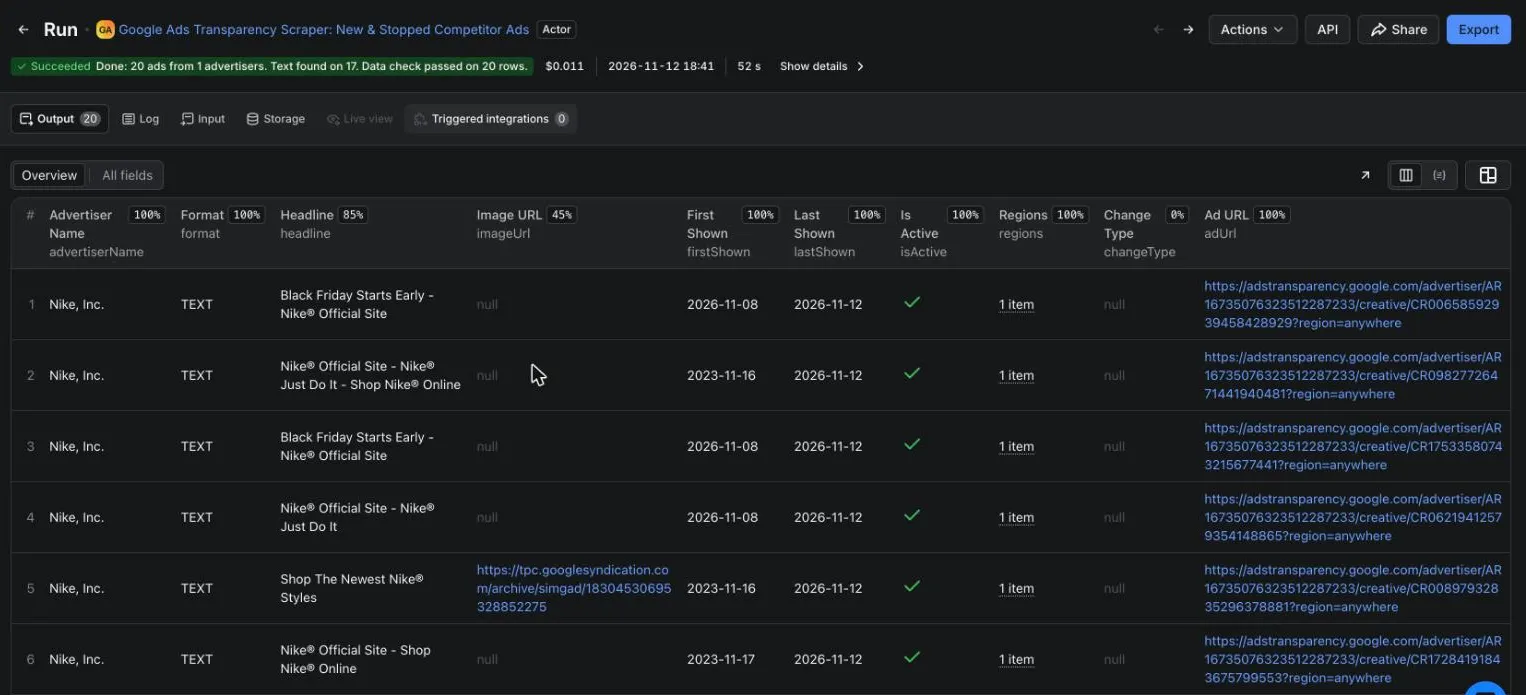
Each row also gives you:
- Links: the ad on the Transparency Center, the image, the YouTube video and the landing page.
- Dates: first and last shown, days running, and whether it is still active.
- Reach: each country it ran in, with the last date shown there (and the first, where Google gives it).
- EU and Turkey ads: the impressions range, in total, per country and per platform in each country (Google Search, Shopping, YouTube), and which audience categories it targeted (demographics, locations, interests, customer lists), where Google publishes them.
- Copy: headline, description, call to action and display link, where Google publishes them.
- Local Services ads: the business each card shows, by name, with ad text on. On an agency's or reseller's account this is often one of its clients. Free.
- Advertiser: name, ID and country.
- Changes: with a schedule, whether the ad is new, changed, stopped or proven.
How complete is the data?
Google does not publish every field for every ad. This is what we measured on real advertisers, so treat it as a guide, not a promise. We re-measure it every time we update the scraper.
Ad text varies most. Most text ads are pictures, so the Text column's headline share is low:
- Per advertiser: from 0% to about 60% of text ads.
- From run to run: it moves by up to 20 points (Nike: 59% to 78% across our runs, November 12 to 14, 2026).
| Share of ads with | Image | Text | Video |
|---|---|---|---|
| Ads measured (advertisers) | 81 (4) | 292 (6) | 27 (3) |
| Headline | 53% | 11% | 89% |
| Image | 85% | 88% | 93% |
| YouTube video | 0% | 0% | 93% |
| Landing domain | 28% | 11% | 81% |
| Countries shown | 100% | 100% | 100% |
| Audience targeting | 20% | 19% | 52% |
Last refreshed 2026-11-18, from 400 ads on 6 advertisers' Transparency Center pages.
Every run also checks up to 500 of its own rows (formats, stray spaces, malformed links, impossible dates) and saves the result in the run's storage as DATA_QA.
The full list of columns is under "Field reference" at the end.
How do we check the data?
- Against each ad's own page: on November 16, 2026, 15 ads drawn at random were compared field by field with each ad's page on Google's Transparency Center: 45 fields matched and 6 did not. Two were the checker's error; the other 4 were ad text we missed, fixed on November 17.
- Success rate: on November 13, 2026, 8 of 8 advertisers came back read with no failure, 565 ads in all, including 2 advertisers we had never tuned on.
Read this before you buy
- Set a memory name (
memoryName) before you start a feed. Without one, editing the advertiser list or any filter starts a fresh memory, and the next run charges every ad from the last 30 days again. - A feed's first run returns every ad from the last 30 days. For a very large advertiser that is up to 5,000 ads, $10 at the Free plan price. A per-advertiser limit (
maxAdsPerAdvertiser) of 100 makes it 20 cents. - Most text ads are pictures. Google publishes a headline for only part of them (see the table above). The rest come back with a status saying why, and ad text is charged only where found.
- Impressions and audience targeting are for ads shown in the EU or Turkey, where Google publishes them.
- Names match exactly. "Shopify" does not match "Shopify Inc."; type the name as Google shows it, or use the website or the
ARID. A name that matches nobody is reported and free.
🚀 How to scrape the Google Ads Transparency Center
- Open Google Ads Transparency Scraper and keep the example input (Shopify, 10 ads).
- Click Start. It takes under a minute and costs about 3 cents (10 ads plus the start fee).
- Open the Output tab, or download the results as CSV or Excel.
- Swap in your competitors and run again.
Which names, websites and links work
- Advertiser names, as Google shows them (for example "Shopify Inc."). Exact match by default, so a similar name does not pull in another company.
- Websites (domains), such as
shopify.com: every ad that links to that site, from any advertiser account, resellers and affiliates included. - Advertiser IDs, starting with
AR. To find one, open the advertiser on adstransparency.google.com: the ID is theAR...part of the address. - Transparency Center links to an advertiser or a single ad.
💰 How much does it cost to scrape the Google Ads Transparency Center?
With Google Ads Transparency Scraper you pay for each ad you receive, plus half a cent each time a run starts.
Apify's running costs (servers, proxies) are included.
| Event | Price |
|---|---|
| Ad delivered, with full details | $0.002 ($2 per 1,000), less on paid plans |
| Ad text found (optional) | $0.002, less on paid plans |
| Run start | $0.005 |
The ad and ad text prices depend on your Apify plan. The run start fee is the same on every plan.
| Your Apify plan | Per 1,000 ads | Ad text, per 1,000 |
|---|---|---|
| Free | $2.00 | $2.00 |
| Starter (10% off) | $1.80 | $1.80 |
| Scale (20% off) | $1.60 | $1.60 |
| Business (30% off) | $1.40 | $1.40 |
What a typical run costs
Costs below are at the Free plan price. Paid plans pay less per ad.
| What you run | Ads charged | Cost |
|---|---|---|
| The example input, once | 10 | about 3 cents |
| A one-off pull of 1,000 ads | 1,000 | $2.00 |
| A daily feed, the first run, on an advertiser with 300 to 400 ads shown in the last 30 days (one Expedia Inc account) | 300 to 400 | 60 to 80 cents |
| The same, on Samsung Electronics America (5,000 to 6,000 ads in 30 days) | 5,000, the per-run cap | $10 |
| A later day on that Expedia Inc account (measured November 15, 2026) | 11 (1 new, 10 changed) | about 3 cents |
- The first scheduled run returns every ad shown in the last 30 days, because none has been seen yet. The counts above are Google's own (measured November 12, 2026).
- Very large advertisers cost $10 on the first run, unless you cap it. Up to 5,000 ads are read per advertiser per run, and Samsung or Shopify (over 50,000 ads in 30 days) reach that. A per-advertiser limit of 100 makes it 20 cents (below).
- A later day is cheap. 26 hours after its first run, the Expedia feed's next run returned 1 new ad and 10 ads now shown in a new country: 11 ads plus the start fee, about 3 cents.
- That first later run also listed 139 ads that had stopped. Stopped rows are free.
- Busier advertisers launch more: from 0 to 89 new ads a week among each advertiser's latest 200 ads (Nike 33, Expedia 89, a local plumber 0). Each new ad can come back once as proven, 14 days on.
- Ad text adds to it. Ad text is $0.002 more per ad where found.
- Apify's Free plan includes $5 of credit a month, enough for about 2,400 ads at the Free plan price.
- Start a feed cheaply with a per-advertiser limit (
maxAdsPerAdvertiser). On the first run for each advertiser or website (only changes on,onlyChanges), you get that many of its most recent ads. The rest it reads (up to 5,000) are remembered as seen and never charged, unless another of your inputs (say, the advertiser's website) returns one within its own limit.- With a limit of 100, Samsung's first run is 100 ads (20 cents) instead of $10. Later runs return new ads, and changes to the 100 you got.
- The ads left out are not tracked: you are not told when one stops or changes. Raising the limit later does not bring them back; for that, start again with a new memory name (
memoryName). - After the first run, the limit is per run: ads it leaves out come on the next run, and are charged then. A run limit (
maxAds) works that way on every run.
- Cap your spend. Set a maximum cost per run in the run options, and the run stops cleanly when it gets there. Ads a spending stop leaves out come on the next run.
- A feed by name keeps its accounts. Later runs read the accounts the first run found for that name, even if Google's search later finds a different one with the same name.
- So the feed does not charge you for another account's ads because the search changed.
- When that happens, that name's row in the advertiser summary (
ADVERTISERS) names the other account in itsnotes. To follow it too, add itsARID toadvertiserIds; its first run is charged like any first run.
- Set a memory name (
memoryName) before you start. Without one, editing the advertiser list or any filter starts a fresh memory, and the next run charges every ad from the last 30 days again. A task or schedule saved with the setting's old name,stateKey, keeps working with the same memory. - Runs that share a memory take turns. If a run starts while another run is still using the same memory, it waits for that run to finish, then returns only the ads that are still new or changed, so the same ads are not charged twice. It waits up to 5 minutes; if the memory is still in use after that, the run fails without reading any advertiser, and no ads are charged (only the run start fee).
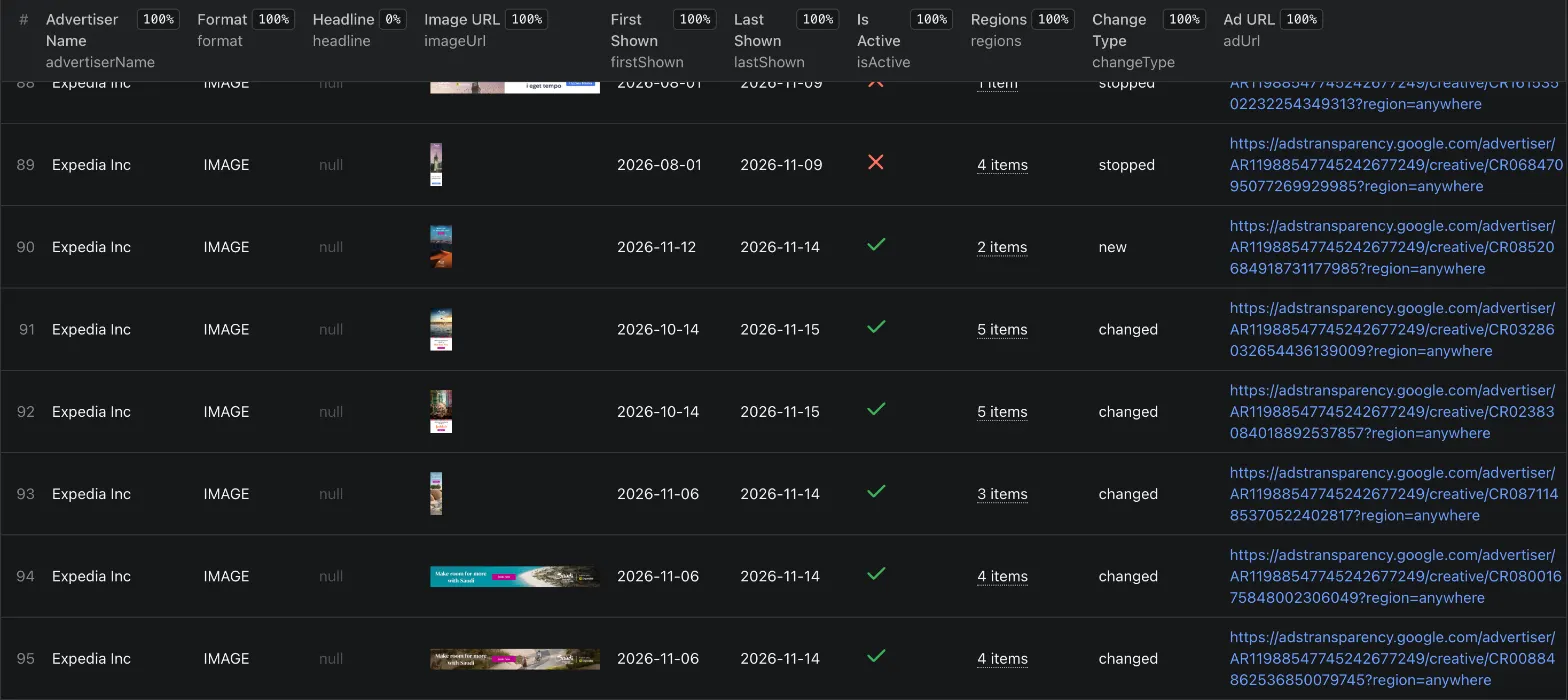
The Expedia feed's later day in the Output tab: the last stopped row, the new ad, then ads changed by a new country.
You never pay for
- Advertisers that return no ads: names that match nobody, advertisers with no ads in your filters, and requests Google blocks or that fail.
- Ad text we could not find: only ads with a headline or body found are charged for text.
- Stopped-ad rows, which tell you an ad stopped running.
- The business a Local Services card shows (
businessShown). - The advertiser summary: launch pace, surges, longest-running ads, countries and new countries.
- Ads you already got in an earlier run, when only changes is on.
- Ads left out of a feed's first run by a per-advertiser limit.
👥 Who uses Google Ads Transparency Scraper?
PPC agencies: what competitors launch and keep running
What a competitor keeps paying for is what works.
- Paste your client's competitors.
- Run it every morning with only changes turned on (
onlyChanges). - Act on surges and proven ads: the creatives a competitor is backing.
Brand and affiliate teams: who advertises on your name
Affiliates and lookalike sites bidding on your brand cost you clicks.
- Watch your domain (
domains) and get told when a new advertiser account starts running ads for it. - Spot lookalike domains: for each website, the domains Google lists with your brand in them (for
shopify.com:propershopify.com,lojas-shopify.comand more), and on a schedule the new ones since the last run. Free, in the run's advertiser summary. - Keep the evidence: each ad's link on the Transparency Center, its dates and countries.
Ad intelligence tools: a clean daily feed
A feed is only useful if its columns never change.
- The same columns for every advertiser, with every field present on every row.
- A ready-made feed: the latest-run link of a saved task.
Researchers and journalists: who ran what, where, and for how long
Google keeps the record; this makes it a table you can sort.
- Pull every ad an advertiser ran in a country (
regions,shownWithinDays). - Sort by days running (
daysShown).
🛠️ For developers: input and output examples
Everything below is the technical detail: example inputs, one full output row, limits, the FAQ and the field reference.
Example input: a few competitors, once
Example input: a daily feed of changes
Example input: video ads in Germany from the last 30 days
Output example: one row
One row, from the run on November 13, 2026 (a Nike ad whose text Google publishes only for its fifth version):
- Every row has every field, in the same order. A value Google does not publish is
null. - Text as the ad's page shows it. Some search ads insert a value per search, such as the searcher's location. The ad's page leaves that spot blank, and so does the row (
Goods On Sale In). - Shopping ads give the product's title as the headline, as on the ad's card. The price is not read: Google's preview often shows "[Price]" in its place. A product image ad (one product's photo and name, like Samsung's phone ads) gives the product's name the same way, when Google publishes it whole.
- App-install ads give the app's name as the headline and, when the ad has no copy of its own, the app's store line as the description ("Book packages & activities for your trip"). Google's preview may print only the store line, in the headline's place.
- Dynamic Search Ads have no fixed headline. Google writes their headline per search. The ad's page may show one example headline; the row leaves
headlineempty, marksadTextStatusdynamicand does not charge for text. textVariationsays which version the text came from. Google publishes text for some versions only, and the ad's page opens on version 1, so the page can show a different headline.imageUrlstays the first version's picture.
❓ Limits and FAQ
What does it not do?
- No keyword search of ad copy. The Transparency Center searches advertisers and websites, not words in ads.
- No text from image-only ads. Google shows most text ads as one picture; we do not read text out of images.
- No age-restricted ads. Google shows them only to signed-in users, and we never log in.
- A single-ad link gives fewer fields.
daysShownandadvertiserCountrycome from Google's advertiser list, so they arenullfor an ad read by its link. - Product photos need ad text on. Shopping and dynamic product ads keep their product photo in the same preview as their text, so
imageUrlis filled for them only withincludeAdTexton. A retailer's image ads are mostly of this kind: of Lampenwelt's image ads, none of 28 had animageUrlwith text off, and 27 of 27 had one with text on, all product photos (measured November 16, 2026). The photo itself is free; text is charged only where it is found. - Image links can expire. Download images you want to keep.
- The oldest first-shown dates mean "on or before". Google's history stops at a fixed date per advertiser: 40 of 200 Shopify ads show 2022-08-13 and 59 of 200 Nike ads show 2022-11-30 (measured November 12, 2026).
daysShowncan be one more than the dates suggest. It is Google's own day count, which runs one past its dates on some ads (for example 6 days for an ad shown November 8 to 12).- One name can be several accounts. "Largest first" means the largest account with that name among the 50 Google suggests for it.
- A shorter list can leave a big account out. For "Expedia Inc", Google's 10 suggestions leave out the account with over 700,000 ads; the 50 the Actor reads list it first (measured November 14, 2026).
- A name shared by more than 50 accounts can still miss one. To be sure, use the website or the
ARID. - A scheduled feed keeps the account its first run found, as above.
- Very large advertisers are read in part. Per run, an advertiser's 5,000 most recently shown ads are read (Shopify showed over 50,000 in 30 days).
- A new ad that has not run since the last run can be missed, and stopped ads are not checked for an advertiser read in part. The run says so.
- In a feed, an older ad outside the 5,000 is not yet known. If it is shown again and moves into the 5,000, it comes as new, and is charged then.
- Stopped ads come from advertisers and ad links, not websites. A website search (
domains) reports new, changed and proven ads and new advertiser accounts, not stopped ones. - Google sometimes refuses a request. 5 of 982 requests (0.5%) were refused in our tests; each was retried on a new connection and succeeded (measured November 12, 2026).
- No contact data, and no AI enrichment. Fields are copied from Google or derived by fixed rules.
What happens when an advertiser cannot be read?
The run says why, instead of failing silently.
| Status | Meaning | Charged |
|---|---|---|
ok | Read in full | For each ad delivered |
no_match | The name or website matched no advertiser (near matches listed) | No |
no_ads | The advertiser has no ads in your filters | No |
blocked | Google kept refusing the request | No |
failed | Timeouts or server errors after 3 retries | No |
truncated | Fewer ads than Google's own count, or your limit reached | Only for the ads delivered |
skipped | Not started: the ad limit, spending limit or time limit came first | No |
- Where to find the summary: in the run's status message, and in the key-value store as
RUN_SUMMARY(run totals) andADVERTISERS(one row per advertiser). - Outages are not stops. An advertiser that comes back empty or broken never marks its ads stopped.
Which countries does an advertiser run ads in?
Each ADVERTISERS row lists the countries of the ads read in full this run. No extra requests, no charge.
| Field | Type | Description |
|---|---|---|
adsReadInDetail | integer | Ads whose countries were read this run: the ads delivered, and in a feed also the known ads re-checked for changes. Compare with adsRead (ads listed) and googleAdCountMin. |
regions | array | The advertiser's countries (ISO codes), most ads first. |
regionsShown | array | Per country: region, ads (how many of the ads read were shown there), firstShown and lastShown (ISO), as the ads' own regionsShown give them. |
newRegions | array | Feed mode only: countries no earlier run saw for this advertiser or website, where an ad read this run started showing within the run's window. Null otherwise, and when the run left ads shown in that window unread (see notes). |
- It covers only the ads read in full. With a per-advertiser limit of 20 we read 20 of 35 Mr. Rooter ads, 20 of 1,000 to 2,000 Expedia ads and 20 of over 70,000 Shopify ads. A feed reads every ad shown since the last run (up to 1,000 known ones re-checked), so its countries are complete for that window: 28 of 28 Mr. Rooter ads on a first run (measured 2026-11-14). For a fuller picture of a large advertiser, raise
maxAdsPerAdvertiseror run it as a feed. firstShownis often null. Google gives a country's first-shown date mainly for EU countries. 66 of Shopify's 100 countries had none, and its 34 EU countries all showed "on or before" 2023-03-01 (measured 2026-11-14).- New countries need a first run. A feed's first run is the baseline and reports none; a feed started before this field existed learns its countries on its next run. A country whose first-shown date is older than the run's window is learnt, not reported: an older ad read for the first time is not an expansion. Outside the EU Google gives no such date, so the ad's own first-shown date stands in: a country first seen on an ad that started before the window is learnt too.
- New countries need the whole window read. The memory knows only the countries of ads it read. A run that leaves some ads shown since the last run unread (a
maxAdsormaxAdsPerAdvertisercut, an advertiser with more ads than one run lists, a stop) reports no new countries for that advertiser: an unread ad may have shown there all along. It learns them and says so innotes. A capped feed on Shopify (5 ads a run, of over 50,000) called 36 countries new that its older ads had shown in since 2022; it now reports none (measured 2026-11-16, #427).
Which platforms was an ad shown on?
For ads shown in the EU or Turkey, impressionsByPlatform lists how often the ad was shown on each platform in each country: Google Search (SEARCH), Google Shopping (SHOPPING) and YouTube (YOUTUBE).
These are the figures on the ad's page, in the country view, under "Times shown" > "Times shown by platform". No extra requests, no charge.
- How often it is filled: 99 of 121 ads shown in the EU, nearby countries or Turkey had it: 70 of 71 text ads, 21 of 38 image ads and 8 of 12 video ads. That is every ad that had a per-country impressions range. The 22 without one were all first shown after September 9, 2026: Google adds the figures a few months after an ad starts (Shopify, Zalando and Expedia, measured November 14, 2026).
- Only the platforms Google gives a figure for. The page lists all five (also Google Maps and Google Play) and shows "0 - 1K" for any with no figure. The row leaves those out rather than copying "0 - 1K".
- Per country, not in total. The page shows platform figures only in a country view, so that is what the row gives. To total a platform, add up its countries' ranges.
- Nearby countries count too. Google also gives the figures for Norway, Iceland, Liechtenstein and France's overseas regions (such as Réunion).
- Different dates from the total. The box covers its own date range ("Data between Sep 4, 2023 and ..."), which can differ from the country's "Times shown", so platform figures need not add up to it.
- A platform not yet named: we name a platform only after matching it on the page. A platform number we have not matched keeps its
platformCodewithplatformset tonull.
How are new, changed, stopped and proven decided?
- New: an ad not seen before under this memory.
- Changed: its versions, countries or text changed. A moved "last shown" date alone is not a change.
- Stopped: it was running, and Google has not shown it for 3 days (
stoppedAfterDays). Free, and the row says which ad it was: its headline, image, landing domain, countries and days running, as last delivered.- A link to one ad (
startUrls) comes as stopped on the first run after Google stops showing that ad, without waiting 3 days. Free, and sent once.
- A link to one ad (
- Proven: we sent it as new while it was under 14 days old, and it is still running 14 days after it was first shown. Sent once. Old ads from a feed's first run never come back as proven.
- Left out of a capped first run: remembered, so it never comes as new. It also never comes as changed, stopped or proven.
Why is the ad text empty?
The status column (adTextStatus) says why.
image_only: Google shows this ad only as a picture: a text ad drawn as one image, or a video shown only by its thumbnail. Not charged.dynamic: a Dynamic Search Ad. Google writes its headline for each search, so there is no fixed headline; the description is kept and text is not charged.not_requested: ad text was off for this run (includeAdText).none: the preview carries no text to read, or is in a layout we do not read yet (travel ads). Not charged. A product image ad isnonewhen Google cuts the product's name short ("Samsung Galaxy Z Fold8,…") or shows several products at once: no one full name to give.noneon a Local Services card: the card is a business profile (name, rating, category) with no ad copy, so it stays empty and is not charged. When it names a different business from the account, as resellers' accounts do, its link and picture are left out too.businessShownnames the business on the card, free. It can be the advertiser itself, or a client the account advertises for: the "Mr. Rooter" account (Val-Pak, by its legal name) shows cards for Runland Renovations, Cleveland Exteriors and others.
error: Google did not answer the preview request. The ad row is kept; run again for the text.
Why did I get 0 ads?
Look at the run summary first.
no_match: try the exact name Google shows, the website, or theARID.no_ads: pinning a country can return nothing for an advertiser that targets "anywhere". Try withoutregions.blockedorfailed: usually temporary. Run again.
How does Google Ads Transparency Scraper work?
- Reads Google's own data, the same the Transparency Center website loads, with no browser.
- Stays polite. A few requests at a time, through residential connections; a refused request is retried on a new connection, up to 3 times, with pauses.
- Remembers what it sent, per memory name (
memoryName), so a scheduled run returns only what changed. It also remembers which account each name found, and keeps reading that account.
Why not just use the Transparency Center website?
- One advertiser at a time on the website; here, a whole list in one run.
- No export, no schedule on the website; here, a table you can download or feed into other tools every morning.
- No "what changed" on the website: no new, stopped or proven ads, and no launch-pace summary.
How do I run it on a schedule?
- Turn on
onlyChangesand give the feed a memory name (memoryName). - Save your input as a task.
- In Apify Console, add a schedule to the task (Schedules, for example every day at 07:00).
Is it legal to scrape the Google Ads Transparency Center?
- Public data only. Google Ads Transparency Scraper reads only what Google publishes for anyone to view, without logging in.
- Google publishes it for that purpose. Its Ads transparency policy describes the Ads Transparency Center as "a searchable repository of advertisers and the ads they’ve served".
- Advertisers are businesses and verified entities. Some sole traders advertise under their own name, and Google publishes it.
- Personal data can still appear. The GDPR protects it in the EU, and similar laws apply elsewhere.
Do not collect or process personal data without a legitimate reason, and ask a lawyer if you are unsure. This is not legal advice.
Can I use it from Make, Zapier, Google Sheets, an AI agent or my own code?
Yes.
- No-code tools: Apify connects runs to Make, Zapier, n8n, Google Sheets, Slack, webhooks and more (https://apify.com/integrations).
- n8n: a ready workflow for this Actor (https://api.apify.com/v2/key-value-stores/u9cNr4EkNS51rZPUt/records/n8n-google-ads-transparency-scraper.json). In n8n, choose Import from URL and paste the link, then add your Apify API token to the Run Actor node as a Header Auth credential (
Authorization=Bearer <token>). - AI agents: through the Apify MCP server.
- CSV and Excel downloads: Apify sorts the columns alphabetically and splits lists into numbered columns (
regions/0,regionsShown/0/region, ...). Useregionsin a sheet, and JSON to keepregionsShownandaudienceTargetingwhole. - Your own code: the API tab has ready snippets.
- A feed URL: the latest run of a task is always at
https://api.apify.com/v2/actor-tasks/<TASK_ID>/runs/last/dataset/items?format=csv(alsojson,xlsx,xml), with your API token.
🧇 More tools from us and support
- Jobs: Career Page Jobs Scraper. Every open job from company careers pages, only new ones each run.
- Jobs: Greenhouse Jobs Scraper. Every open job from Greenhouse job boards, with salaries read from the job text.
- Jobs: Lever Jobs Scraper. Every open job from Lever job boards, with remote or hybrid and salaries.
- Keywords: Keyword Search Volume. Search volume, CPC, difficulty and intent for a keyword list.
- App Reviews: Google Play Reviews Scraper. Every Google Play review for any app, with developer replies and no reviewer names.
- App Reviews: App Store Reviews Scraper. App Store reviews in any country, newest first, with developer replies and no reviewer names.
- Apps: Google Play Scraper. App details, search, developer catalogs and similar apps from Google Play, in every country.
- Transcripts: YouTube Transcript Scraper. Transcripts of YouTube videos, with chapters and timestamps.
- Transcripts: TikTok Transcript Scraper. Transcripts of TikTok videos, with AI speech-to-text when there are no captions.
- All our tools: apify.com/waffle-iron.
- Found a bug, or need a field we do not cover? Open an issue on the Issues tab and include the run link.
- Did it save you time? A short review helps other buyers find it.
📖 Field reference
Input fields
| Field | Type | Default | Description |
|---|---|---|---|
advertiserNames | array | none | Advertiser names as Google shows them, e.g. Nike, Inc. (not keywords). Exact match by default; see exactMatch. |
domains | array | none | Websites, e.g. nike.com: every ad that links there, from any advertiser account (resellers and affiliates included). |
advertiserIds | array | none | Google advertiser ids (AR and 20 digits), from a Transparency Center link. |
startUrls | array | none | Links to an advertiser, a single ad, or a website search on adstransparency.google.com. |
regions | array | none | Only ads shown in these countries (ISO codes, e.g. US, DE). Empty means anywhere. An advertiser with no ads in a country returns nothing for it. |
formats | array | none | Only TEXT, IMAGE or VIDEO ads. Empty means all. |
shownWithinDays | integer | none | Only ads shown in the last N days. |
maxAdsPerAdvertiser | integer | 0 | Stop after this many ads from one advertiser (most recently shown first). 0 means no limit. On a feed's first run for an advertiser or website, the other ads read are remembered as seen and never charged, unless another of your inputs (say, the advertiser's website) returns it within its own limit. |
maxAds | integer | 0 | Stop after this many ads in the run. 0 means no limit. |
includeAdText | boolean | false | Read the headline, body, landing page and YouTube id where Google publishes them as text, and the product photo of Shopping and dynamic product ads. Charged per ad only when text is found. |
onlyChanges | boolean | false | Return only ads that are new, changed, stopped or proven since the last run with the same input or memoryName. Stopped ads are free. |
memoryName | string | none | Name for the feed's memory, so editing the advertiser list does not reset it. |
stoppedAfterDays | integer | 3 | An ad not shown for this many days counts as stopped. |
exactMatch | boolean | true | Match advertiser names exactly (case and punctuation ignored). Off: take Google's top suggestion. |
nameCountry | string | none | Only match advertisers registered in this country (ISO code), e.g. US. |
maxAdvertisersPerName | integer | 1 | How many accounts to read when several match one name (the largest first). |
proxy | object | {"useApifyProxy": true, "apifyProxyGroups": ["RESIDENTIAL"]} | Residential proxy by default: Google blocks datacenter addresses often. |
Output fields
| Field | Type | Description |
|---|---|---|
id | string | Stable key: <advertiserId>:<creativeId>. Use it to dedupe across runs. |
advertiserId | string | Google's advertiser id (AR...). |
advertiserName | string | Advertiser name as Google publishes it (verified legal name). |
advertiserCountry | string | Advertiser's country (ISO code), where Google's search gives it. |
creativeId | string | Google's ad id (CR...). |
format | string | TEXT, IMAGE or VIDEO, as the Transparency Center labels it. |
firstShown | string | First day shown, ISO date: the earliest date Google gives for the ad. |
lastShown | string | Last day shown, ISO date: the latest date Google gives for the ad. |
daysShown | integer | Days the ad was actually shown (not the span between the two dates). |
isActive | boolean | Shown within the last stoppedAfterDays days (default 3). |
adUrl | string | The ad's page on the Google Ads Transparency Center. |
imageUrl | string | The ad image. For most text ads this is Google's picture of the ad, not text. For Shopping and dynamic product ads it is the product photo, which comes only with includeAdText on. |
videoUrl | string | YouTube link, for video ads where found. |
youtubeId | string | YouTube video id, for video ads where found. |
videoDuration | string | Video length as shown, e.g. 0:14. |
headline | string | Headline, where Google publishes the ad as text. |
textVariation | integer | Which version the text was read from (1 = the one the ad's page shows first; see variationCount). Google publishes text for some versions only, so the page can open on another. |
longHeadline | string | Long headline, where published. |
description | string | Body text, where published. |
callToAction | string | Button text, e.g. Learn More. |
displayUrl | string | The URL shown on the ad. |
landingUrl | string | Where the ad links to, where published. |
landingDomain | string | Domain of the landing page. |
businessShown | string | Local Services cards only: the business the card shows, by name. On an agency's or reseller's account it is often a client, not the advertiser. Read with the ad text (includeAdText on); free, as the card has no ad copy (adTextStatus none). Null for every other ad. |
adTextStatus | string | found (text read; charged), image_only (Google publishes only a picture of the ad), dynamic (a Dynamic Search Ad: Google writes the headline per search; not charged), none (no readable text, such as a Local Services card's business profile; not charged), error (the preview could not be fetched), not_requested (includeAdText off). |
variationCount | integer | Versions of this ad Google shows. |
regions | array | Countries the ad was shown in (ISO codes). |
regionsShown | array | Per country: region, firstShown, lastShown (ISO) and that country's impressionsMin/impressionsMax (the range its page shows); null where Google gives none, and a null max with a min set is Google's open "Over 10M" band. |
impressionsMin | integer | Lower end of the ad's impressions range (EU- and TR-shown ads): Google's total, or where Google gives none, the sum of the countries it publishes a range for. |
impressionsMax | integer | Upper end of the ad's impressions range (EU- and TR-shown ads): Google's total, or where Google gives none, the sum of the countries it publishes a range for. Null with impressionsMin set means no upper bound: Google shows its top band as "Over 10M". |
impressionsByPlatform | array | Per country and platform (EU- and TR-shown ads): region, platform (SEARCH, SHOPPING or YOUTUBE), platformCode (Google's number) and impressionsMin/impressionsMax, as that country's "Times shown by platform" box shows them. Only the platforms Google gives a range for; a code not yet matched to a name keeps its number with platform null. Null where Google gives none. |
audienceTargeting | object | Which audience categories the ad included or excluded (demographics, locations, contextualSignals, topicsOfInterest, customerLists). Google publishes it mainly for ads shown in the EU. |
changeType | string | Feed mode only: new, changed (versions, countries or text; never the daily last-shown update), stopped (free), proven (new and still running 14 days on). Null otherwise. |
changedFields | array | For changed: variations, regions or text. Null otherwise. |
matchedVia | string | How the advertiser was found: name, domain, id or url. |
searchQuery | string | The input that found this ad. |
scrapedAt | string | When the row was produced, ISO 8601 UTC. |


