


RedNote (Xiaohongshu) Note Detail Scraper - 500 Notes/60s
Pricing
from $7.99 / 1,000 note details
RedNote (Xiaohongshu) Note Detail Scraper - 500 Notes/60s
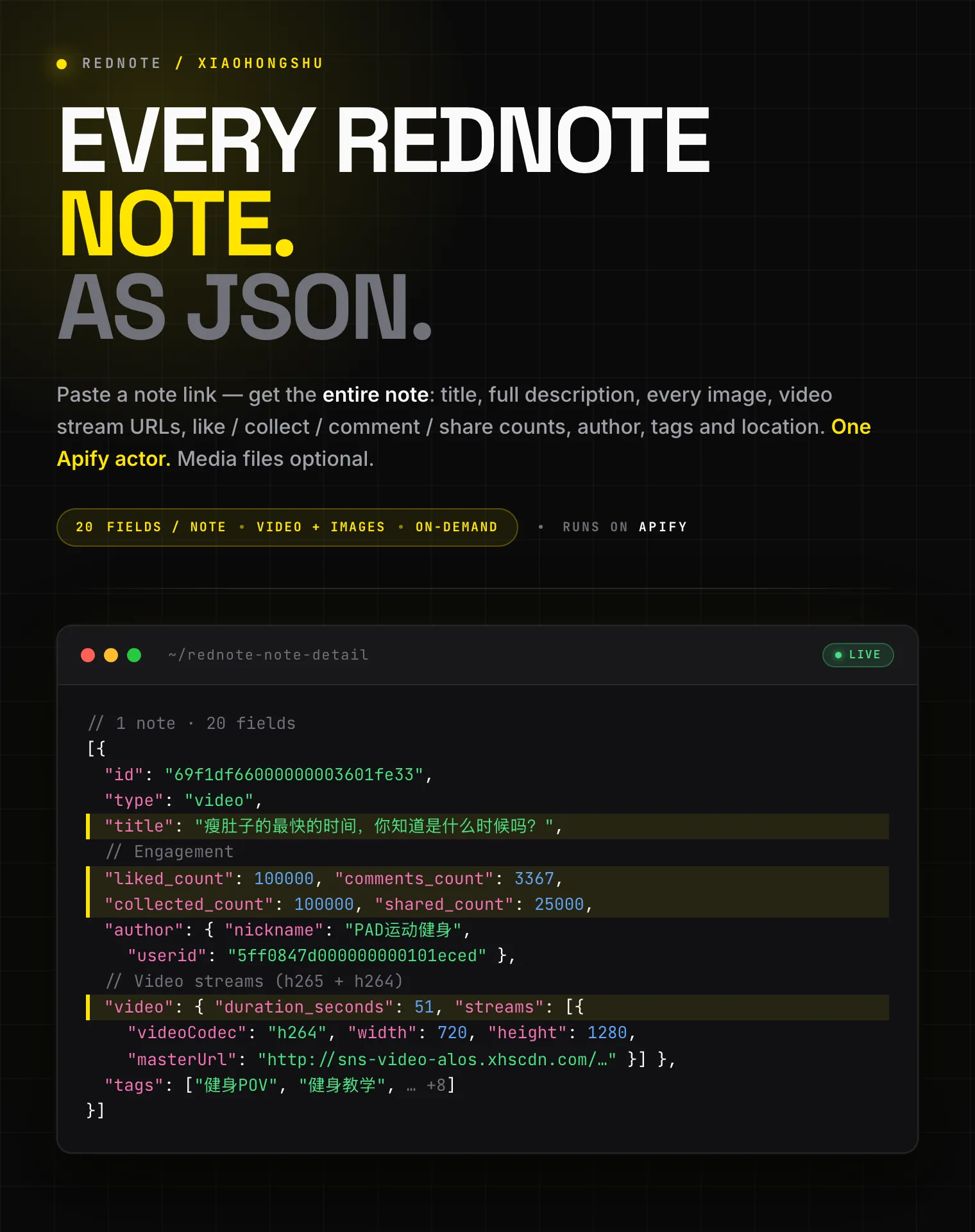
Get the full detail of any Xiaohongshu (RedNote) note from one link: title, description, images, video stream URLs, like, collect, comment and share counts, author profile, tags, and location. Optionally download the MP4, cover, and gallery images to your storage. Export to JSON, CSV, or Excel.
Pricing
from $7.99 / 1,000 note details
Rating
0.0
(0)
Developer

Zen Studio
Maintained by CommunityActor stats
0
Bookmarked
3
Total users
2
Monthly active users
3 days ago
Last modified
Categories
Share
RedNote (Xiaohongshu / 小红书) Note Detail Scraper | Full Note, Video Streams, Subtitles, Image Downloads (2026)
20 fields per note: title, full description, every image URL, video stream URLs (h265 + h264), native video subtitles (original transcript + auto-translated English), like / collect / comment / share counts, author profile, tags, and location from any Xiaohongshu (小红书) note. Optional MP4 and image file download.
| Zen Studio · RedNote (小红书) suite • Search, note detail, comments, and profiles from Xiaohongshu | |||
 RedNote Note Detail RedNote Note Detail➤ You are here |
RedNote Search 500 notes / 30s, 24 fields |
 RedNote Comments RedNote CommentsNested replies, IP city |
RedNote User Profile Profile + every post, 68 fields |
Copy to your AI assistant
Key Features
- 20 structured fields per note: title, description, every image, video streams, engagement counts, author, tags, location
- Video stream URLs: direct MP4 links in h265 and h264, with a
url_720pconvenience link and per-stream codec, bitrate, and resolution - Native video subtitles: the video's built-in subtitle track as timestamped
.srtlinks, with the original-language transcript plus auto-translated English and Chinese, whenever the video has them - Optional media download: save the actual MP4, cover frame, and gallery images to your key-value store before the source links expire
- One link in, one row out: paste a share link or note URL; each note runs independently and counts as one result
- Free tier: 25 lifetime runs, up to 20 notes per run, no credit card
How to Scrape a Xiaohongshu Note
Basic: single note from a share link
Multiple notes from full URLs
Download the video and its cover
Download a photo note's full gallery to a reusable store
Get a video's subtitles (transcript) as SRT files
Video Subtitles & Transcripts
Many Xiaohongshu videos ship with a built-in subtitle track: the spoken words, timestamped. This scraper surfaces them on every video note, free.
- In the data:
video.subtitleslists the available tracks keyed by language.sourceis the original-language transcript;en-USandzh-CNare auto-translated versions. Each track is a timestamped.srtlink. - As files: turn on Download subtitles to save those
.srtfiles straight to your key-value store, so you keep the transcript even after the source links roll over. This download is free. - Use cases: full-text search across a creator's videos, translation, captioning, summarizing, or feeding video speech into an LLM.
Subtitles depend on the video itself: talking, tutorial, and how-to videos almost always have them; purely visual clips set to music often don't. When a video has no subtitle track, video.subtitles is an empty object and no files are produced.
Where Do I Get a Note Link?
Note links must include their access token. The easiest source is the app's Share → Copy link, which gives you an xhslink.com link. A full xiaohongshu.com URL works too, as long as it still contains xsec_token=.
| Format | Example | Works |
|---|---|---|
| Share link | http://xhslink.com/o/6oKW7wkJf09 | ✅ |
| Full URL with token | https://www.xiaohongshu.com/discovery/item/<id>?xsec_token=... | ✅ |
/explore/<id> with token | https://www.xiaohongshu.com/explore/<id>?xsec_token=... | ✅ |
| Bare 24-character ID | 6a06c9360000000036001d5a | ❌ no access token |
You can also paste the whole share-text the app copies; the link inside it is detected automatically.
Input Parameters
| Parameter | Type | Default | Description |
|---|---|---|---|
noteUrls | array | required | Xiaohongshu share links or full note URLs that include their xsec_token. Each note runs independently and counts as one result. |
downloadVideos | boolean | false | Save each video note's MP4 to your key-value store. Image notes have no video. |
downloadCovers | boolean | false | Save each video note's cover image (JPEG). |
downloadImages | boolean | false | For image notes, save every gallery image (JPEG). No effect on video notes. |
downloadSubtitles | boolean | false | Save each video note's subtitle tracks as .srt files (original transcript + any auto-translations). Free. |
mediaKvStoreName | string | "" | Save downloaded media to a named, persistent key-value store. Leave blank to use the run's default store. Letters, digits, and dashes only. |
What Data Can You Extract from a Xiaohongshu Note?
Every dataset row is one note with rich, structured fields.
Core fields:
id,type(normalorvideo),title,desc,url,xsec_tokentimestamp,last_update_time(Unix milliseconds),ip_locationai_generated_flag,at_user_list
Engagement (engagement):
liked_count,comments_count,collected_count,shared_count
Author (author):
userid,nickname,avatar(CDN URL),xsec_token
Media:
images[]: every image withurl,url_pre,width,height,live_photo,live_photo_urlvideo:duration_seconds,streams[](codec,quality, resolution,fps,url,backup_urls), aurl_720pconvenience link, andsubtitlesvideo.subtitles: native subtitle tracks keyed by language.sourceis the original-language transcript;en-USandzh-CNare auto-translations. Each is a list of{ language, url, type, format }whereurlis a timestamped.srt. Present when the video has subtitles, otherwise{}tags[]: topic and other tags withid,name,type
Downloaded files (when enabled):
videoFile,coverFile,imageFiles[]: key-value store key, size, MIME type, and the source URL for each saved filesubtitleFiles[]: one entry per saved.srttrack, same fields. Free to download. The track is in the key, e.g.<id>_subtitle_source.srt(original),<id>_subtitle_en-US.srt,<id>_subtitle_zh-CN.srt
Output Example
videoFile, coverFile, imageFiles, and subtitleFiles are null unless you turn on the matching download toggle.
Advanced Usage
Archive a video note before its links expire
Bulk-fetch a known set of notes
Pull just the metadata, skip media files
Pricing: Pay Per Event (PPE)
From $7.99 to $9.99 per 1,000 notes, depending on your Apify plan. Each note returned counts as one billable result. Media downloads are optional add-ons, billed only for files actually saved.
| Your Apify plan | Per 1,000 notes |
|---|---|
| Free | $9.99 |
| Bronze | $8.99 |
| Silver | $8.79 |
| Gold and above | $7.99 |
Optional media downloads (Free-plan rate; higher plans get the same tier discount):
| Add-on | Per 1,000 |
|---|---|
| Video downloaded (MP4) | $4.99 |
| Image downloaded (cover or gallery, JPEG) | $1.99 |
| Subtitle file downloaded (SRT) | Free |
FAQ
What is RedNote (Xiaohongshu / Little Red Book)? RedNote is the international name of Xiaohongshu (小红书, literally "Little Red Book", often abbreviated XHS), China's leading lifestyle and social-commerce platform. A "note" is its core content unit: a short video or image gallery with a caption, comments, and engagement counts.
Which note link formats are accepted?
xhslink.com share links and full xiaohongshu.com URLs (/discovery/item/<id> or /explore/<id>) that include an xsec_token. You can also paste the whole share-text the app copies. Bare 24-character IDs can't be opened because they carry no access token.
Why do I need the access token? The token is the credential that unlocks a note's full detail. Without it, the note can't be opened. The app's Share → Copy link always includes one.
What's the difference between a video note and an image note?
Video notes have a populated video object with stream URLs; their images array holds a single cover frame. Image notes have video: null and a multi-image images gallery.
Why are the media URLs time-limited? Xiaohongshu's image and video CDN links are signed and expire a few hours after they are issued. Turn on the download toggles to save the actual files to your key-value store while the links are still valid.
Are engagement counts exact?
Counts are returned as integers. Large counts that Xiaohongshu rounds for display (e.g. 10万+) become best-effort integers (100000).
Where do downloaded files go?
Into your run's key-value store by default, or a named store you set with mediaKvStoreName. Each videoFile / coverFile / imageFiles[] entry includes the store key and a direct record URL.
Can I download images from a video note?
downloadCovers saves a video note's cover frame. downloadImages applies to image notes only.
Do videos include subtitles or a transcript?
Yes, when the video has them. Each video note carries a video.subtitles map with the original-language transcript (source) plus auto-translated en-US and zh-CN tracks, each a timestamped .srt link. Turn on Download subtitles to also save the .srt files to your key-value store, free. Talking and tutorial videos almost always have subtitles; purely visual clips set to music often don't, in which case video.subtitles is empty.
Does downloading subtitles cost extra?
No. Subtitle .srt files are saved free of charge. Only video and image downloads carry a per-file fee.
What happens if a note is removed or the link expired? That note is skipped with a short note in the log, and the run continues with the rest.
How fresh is the data? Live from Xiaohongshu at run time, no cache.
Do I need a Xiaohongshu account or cookies? No. Paste share links and run; no account, cookie export, or QR login is involved. The access token inside each share link is all the actor needs.
How do I export the data? The dataset downloads as JSON, CSV, Excel, XML, or HTML from the run's Storage tab, or via the Apify API. Downloaded media files sit in your key-value store with direct record URLs.
How do I find notes at scale, or get comments and author history?
Chain the suite: RedNote Search Scraper finds notes by keyword and its url field already carries the required xsec_token, this actor fetches the full detail, RedNote Comments Scraper pulls the threads, and RedNote User Profile Scraper returns the author's complete back-catalogue.
Is it legal to scrape Xiaohongshu notes? The actor fetches publicly shared notes only, via their own share links. You are responsible for complying with Xiaohongshu's terms of service and applicable data protection law (GDPR, CCPA, PIPL), and for respecting creators' rights when storing or reusing downloaded media.
More Zen Studio scrapers for Chinese platforms
🎬 Short-video & social
 RedNote 小红书
 Douyin 抖音
 Xigua 西瓜视频
🛒 E-commerce
 Taobao 淘宝
 JD.com 京东
 1688 阿里巴巴
 Goofish 闲鱼
🏠 Real estate & autos
 Anjuke 安居客
 58.com 58同城
 Autohome 汽车之家
Support
- Bugs: Issues tab
- Features: Issues tab
Legal Compliance
Extracts publicly available data. Users must comply with Xiaohongshu's terms and data protection regulations (GDPR, CCPA, PIPL).
Get the full detail of any Xiaohongshu (小红书) note from its share link: title, description, every image, video stream URLs, engagement counts, author profile, tags, location, with optional MP4 and image download.


