

Ticombo Scraper - Event Tickets, Seller Listings, EUR Prices
Pricing
from $4.99 / 1,000 events
Ticombo Scraper - Event Tickets, Seller Listings, EUR Prices
Extract event tickets from ticombo.com with venue, dates, EUR prices, availability, and seat-level seller listings. 33+ fields per event: section/row inventory, ticket types, geo, image, sales status. Search by keyword, paste URLs, or browse by category (sports, music, theatre). Export JSON or CSV.
Pricing
from $4.99 / 1,000 events
Rating
0.0
(0)
Developer

Zen Studio
Maintained by CommunityActor stats
0
Bookmarked
8
Total users
1
Monthly active users
14 days ago
Last modified
Categories
Share
Ticombo Tickets Scraper — European Event Tickets, Seller Listings, EUR Prices (2026)
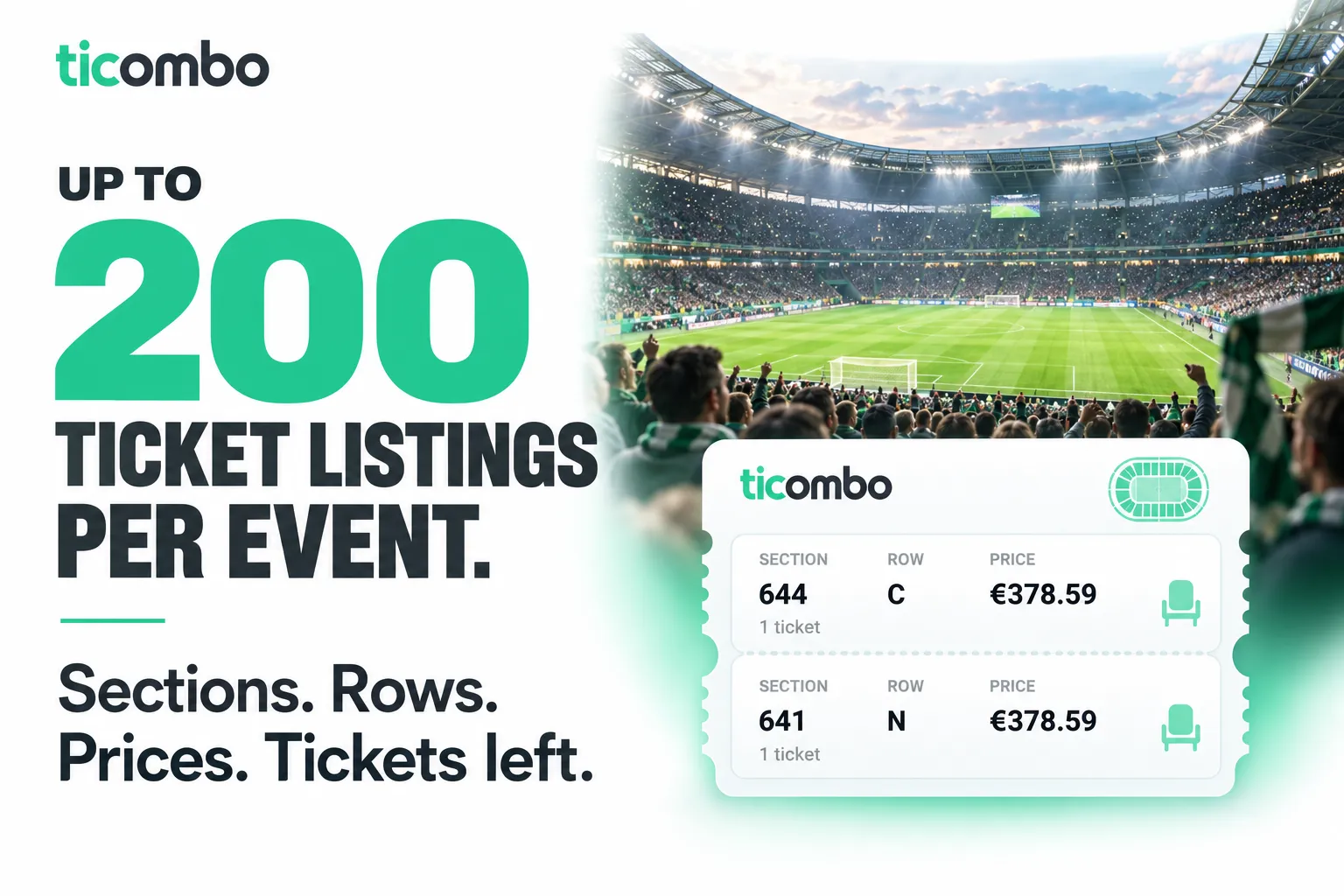
From Zen Studio, creators of 10times Events and Eventim, with 20,000+ combined lifetime runs across those two actors. Event discovery and ticket data for research and monitoring.
Why choose this actor?
- Compare up to 200 ticket listings per event. Collect individual offers with asking prices, quantities, sections and rows where provided. Compare seats and inventory instead of relying only on an event's starting price.
- See both the asking price and original price. Each listing can include both prices, ticket type and delivery methods. Event summaries add minimum, average and maximum prices, plus the total number of available tickets.
- Start with an event, venue or competition. Search by keyword, paste a Ticombo URL, or browse sports, music and theatre. Keep prices in EUR or choose from 28 supported output currencies.

Try 3 events with ticket listings
Open the actor's input page, switch to JSON and paste:
includeListings enables the ticket-level detail shown above. This small example requests up to 10 listings per event; raise maxListingsPerEvent to 200 for greater coverage. Availability and seat details vary by event and offer.
Each collected listing carries an additional charge unless a day or monthly pass is active. Export JSON to preserve listings within each event, or CSV and Excel for event-level comparison.
| Zen Studio · Events & Tickets | ||
 Ticombo TicomboYou are here |  Eventim EventimPrices & availability |  10times 10timesTrade shows & conferences |
Copy to your AI assistant
How to Scrape Ticombo Events
Basic — search by keyword
Browse an entire category
Scrape a specific event by URL
Filter by date and price, enrich with seller listings
Input Parameters
| Parameter | Type | Default | Description |
|---|---|---|---|
searchTerms | array | ["champions league final"] | Keywords to search. Results are merged across all terms. |
eventUrls | array | — | Any Ticombo URL: event, competition, venue, or search-result page. |
category | string | "" | One of sports, music, theatre. Browse a whole category. |
subcategory | string | — | Narrow the category browse (e.g. football, tennis, rock). |
dateFrom | string | — | ISO date. Only events on or after this day. |
dateTo | string | — | ISO date. Inclusive — covers every event on the selected day. |
priceMin | integer | — | Minimum EUR price. |
priceMax | integer | — | Maximum EUR price. |
language | string | en | Output language for name and description. en, de, fr, es, it. |
currency | string | EUR | Output currency for every price field. 28 supported (EUR/USD/GBP/CHF/JPY/CNY/...). |
maxResults | integer | 50 | Total unique events across all input modes. |
includeListings | boolean | false | Embed per-event seller listings. Each listing is billed separately (or free with an active pass). |
maxListingsPerEvent | integer | 200 | Per-event cap on collected seller listings (max 200). |
dayPassPurchase | boolean | false | Set true (alone) to buy a $4.99 24-hour day pass. |
monthlyPassPurchase | boolean | false | Set true (alone) to buy a $49 30-day monthly pass. |
What Data Can You Extract from Ticombo?
Every event row includes:
- Identity & URL —
eventId,slug,altSlugs, deep-linkurl. - Naming & taxonomy —
name,descriptionTitle,description,category,subcategory,tags,filters(artist, team, competition, genre). - Timing —
dateStart,dateEnd,timezone,inHandDate,createdDate,updatedDate. - Venue & location —
venue(id, name, slug),location(city, state, country, address, zip). - Inventory & price band —
availableTickets,startPrice,avgPrice,maxPrice,finalStartPrice,finalMaxPrice,currency(reflects yourcurrencyinput),ticketsWanted,lowRiskTickets. - Ticket structure —
ticketTypes[]with names and section lists. - Trust signals —
ticketProtection,status,salesStatus,imageUrl. - Optional seller listings —
listings[]withlistingId,price,originalPrice,currency,facePercentage,quantity,category,section,row,ticketType,splitType,deliveryCity,deliveryCountry,deliveryMethods,instantDownload,sellerName,sellerTrusted,status.
Output Example
Advanced Usage
German output for German-speaking users
Whole-venue scrape (every upcoming event at one venue)
Cheap inventory check (price band only, no listings)
Full seller-level data for one competition
USD-priced output for US dashboards
Buy a 24-hour day pass for active hunting
Buy a 30-day monthly pass for always-on monitoring
High-frequency hunt under an active day pass
Once a pass is active, simply run normally — no flag needed. Schedule the Apify scheduler to run this every 15 or 30 minutes during the hunt:
Pricing
Two ways to pay: metered (Pay Per Event) for casual use, or flat-fee passes for active hunting and always-on monitoring. Pick whichever is cheaper for your usage pattern — passes waive every per-event and per-listing charge while active.
Pay Per Event (default, metered)
| Item | Per 1,000 collected |
|---|---|
| Events | $6.99 on the Free plan; $4.99–$5.99 on paid plans |
| Ticket listings (opt-in) | $1.50 |
See the Pricing tab for your plan’s rate.
Best for: one-shot scrapes, price research, occasional checks.
Day pass — $4.99 / 24 hours
Unlimited events, unlimited listings, unlimited runs for 24 hours after activation. No per-event or per-listing fees during the window.
Best for: actively hunting tickets for one or more specific events. Poll every minute if you want — the actor can handle it. The pass pays for itself almost immediately at any polling rate above a handful of runs per day.
No auto-renew. When the 24-hour window ends, billing returns to pay-per-event automatically. You'll never be silently charged for another pass — buy it again only when you want another one.
Monthly pass — $49.00 / 30 days
Unlimited events, unlimited listings, unlimited runs for 30 days. No per-event or per-listing fees during the window.
Best for: resellers, market analysts, aggregators, and always-on monitoring. Cheaper than the day pass if you'll run the actor on more than 10 distinct days per month.
No auto-renew. When the 30-day window ends, billing returns to pay-per-event automatically. You decide when (or if) to buy the next pass — there are no recurring subscription charges.
How to buy a pass
Run the actor once with the matching flag set to true. No other input is needed.
The first run charges the flat fee and writes a record against your Apify user id. Every subsequent run within the window automatically detects the pass and waives charges — no flag needed on those runs. The output of the purchase run is a single status row telling you when the pass expires.
Free tier
20 events per run, 100 events lifetime, no credit card. Upgrade your Apify plan for unlimited metered usage, or buy a pass.
FAQ
How many results can I extract per run?
Up to your maxResults. There is no hard upper bound on paying tiers. Free tier caps at 20 events per run and 100 events lifetime.
How fresh is the data? Each run hits Ticombo live. Prices, availability, and listings reflect the current state at scrape time.
What currency are prices in?
EUR by default. Pick any of 28 supported currencies via the currency input (USD, GBP, CHF, JPY, CNY, and 23 more). Conversion uses the same live EUR-based rate Ticombo's own frontend uses, so output matches what users see on the site.
Why does my Taylor-Swift-style search return nothing or unrelated results? Ticombo is a European resale marketplace. Inventory is bounded — popular US-only artists may not be listed. Searches return Ticombo's actual catalogue, not a wishlist.
What is "ticket protection"?
A Ticombo guarantee flag on the event. When true, eligible tickets are covered by their replacement-or-refund policy.
Can I scrape an entire venue?
Yes. Paste any Ticombo venue URL into eventUrls and the actor will collect every upcoming event listed at that venue.
Why does each event have at most ~200 seller listings, even for huge events? Ticombo's public catalogue caps anonymous paginations at ~200 listings per event. This is a Ticombo platform limit, not a scraper limit.
Where does the actor route traffic from? Apify Residential, Germany — fixed. Ticombo only serves EU visitors, so the route is hardcoded to avoid accidental misconfiguration.
What languages are supported? English, German, French, Spanish, Italian. Other languages fall back to English when a translation is missing.
Can I get notifications when new events appear? Not yet — this is a batch scraper. Schedule a recurring run from the Apify Console (a day pass makes high-frequency polling free during the 24-hour window), then diff the dataset rows yourself.
When should I buy a day pass vs a monthly pass vs pay-as-you-go?
- Pay-as-you-go (PPE) if you scrape once in a while, or run small one-shot queries. A 100-event scrape costs $0.50.
- Day pass ($4.99) if you're actively hunting one or more events and want to poll aggressively — every minute if you want, the actor can handle it. The pass pays for itself within the first few hundred listings.
- Monthly pass ($49) if you'll run the actor on more than 10 distinct days per month — typical for resellers, aggregators, and continuous monitoring.
How does the pass apply to subsequent runs? The pass is tied to your Apify user account, not to a single run. Buy it once, then every run from your account within the window automatically detects the pass and waives all per-event and per-listing charges. You don't need to set any flag on follow-up runs.
Do passes auto-renew? No. Both the day pass and the monthly pass are one-shot purchases. When the window ends, billing returns to pay-per-event and that's it — no silent renewal, no recurring subscription charge. You buy the next pass only when (and if) you want one. This is deliberate: ticket hunting is bursty, and surprise monthly charges suck.
What happens if I buy a pass and it doesn't activate? The purchase run will fail loudly with a status row explaining why (insufficient Apify plan budget, free tier user, or the pass feature is still being activated by Apify after a price change). No partial charge is recorded — either the pass is active for the full window or no money moves.
Why does the purchase say "Day pass is not yet available"? Apify takes 7-14 days to activate new pricing events on the platform after they're added or changed. During that window pass purchases are intentionally blocked to prevent charge errors. Regular pay-per-event billing continues to work normally; you'll be notified or can re-check when the passes go live.
Can I have both a day pass and a monthly pass active at the same time? Yes. The actor checks both. If either is active, charges are waived. Useful if you have a monthly pass and want a "boost" on a heavy day, though typically a monthly pass alone is enough.
Support
- Bugs: Issues tab
- Features: Issues tab
Legal Compliance
Extracts publicly available data. Users must comply with Ticombo terms of service and data protection regulations (GDPR, CCPA).
Scrape European event tickets, venues, and seller listings from ticombo.com — structured events with EUR-normalized prices, ticket types, and section-level inventory.


