

Company Lookup — Website & GLEIF Evidence
Pricing
from $4.25 / 1,000 company evidence cards
Company Lookup — Website & GLEIF Evidence
Turn domains, company names, or exact LEIs into evidence-linked website and GLEIF observations with confidence, gaps, billing semantics, and a manual review action. Name matches never claim domain ownership, KYC, a complete tech stack, or buying intent.
Pricing
from $4.25 / 1,000 company evidence cards
Rating
5.0
(1)
Developer

Tim Zinin
Maintained by CommunityActor stats
0
Bookmarked
2
Total users
1
Monthly active users
2 months ago
Last modified
Categories
Security
Limited permissionsShare
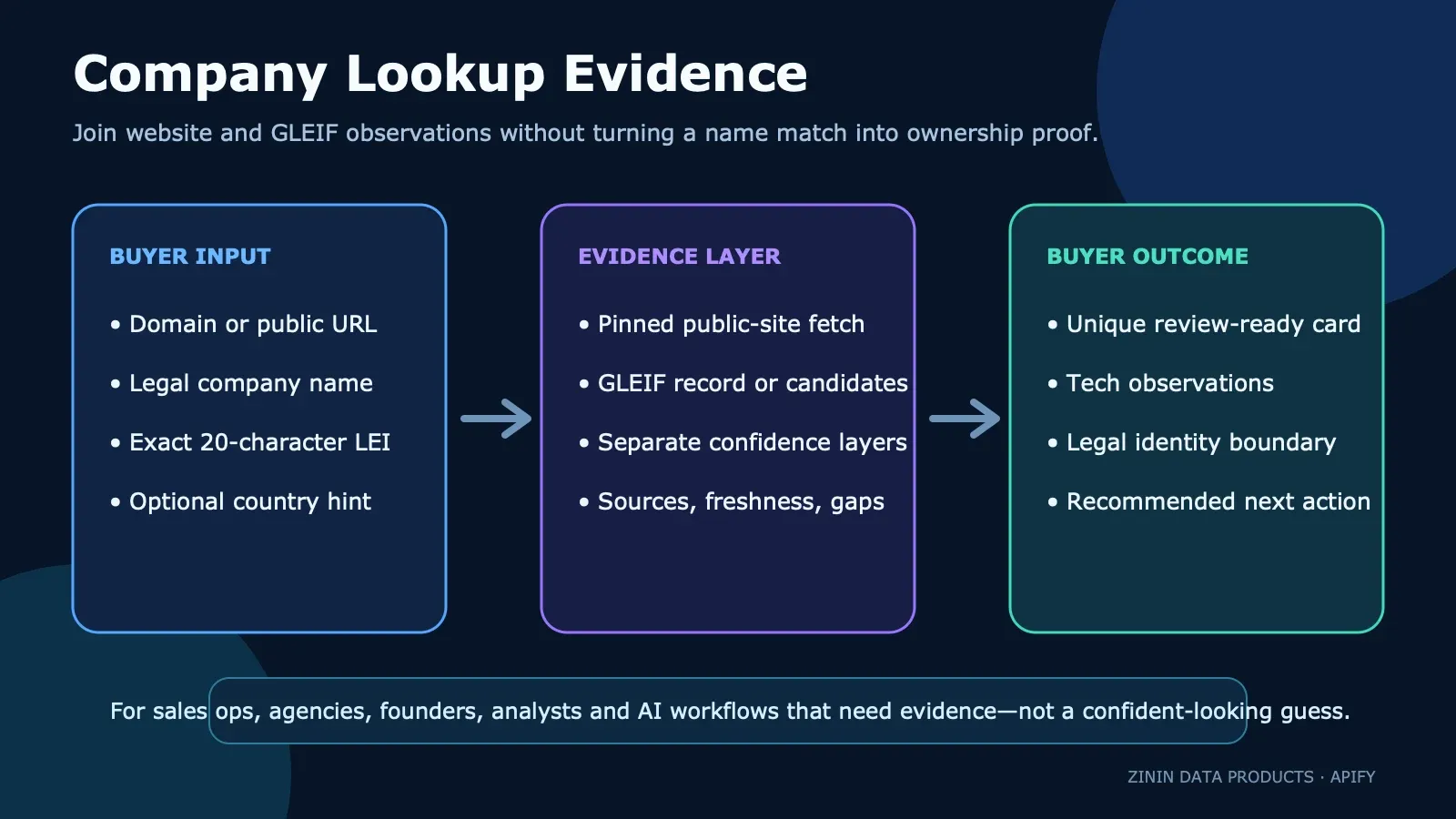
Turn a domain, legal company name, or exact LEI into a review-ready public evidence row. The Actor observes the submitted website, searches or retrieves GLEIF legal-entity records, keeps fuzzy candidates separate from accepted matches, and returns direct sources, freshness, confidence, identity gaps, billing semantics, and a recommended next action.
This is intentionally narrower and more useful than a generic “one true company profile.” A website, a brand name, and a legal entity are related concepts, but they are not interchangeable identities. A strong GLEIF name match does not prove that the legal entity owns the submitted domain. A detected script does not prove a vendor contract, budget, intent, or a complete technology stack.
Use this Actor when you need evidence that a person, spreadsheet, CRM workflow, or AI agent can inspect before enrichment, segmentation, outreach, compliance review, or research.
What you get
Every unique requested input produces one outcome row:
- a reachable public-domain observation with final URL, homepage description, and detected technology signatures;
- an exact GLEIF record when the buyer supplied an LEI;
- a scored GLEIF legal-name match when exactly one entity clears the acceptance rule;
- a free candidate shortlist when a name is ambiguous;
- or a free, structured failure row when no billable company card was established.
Successful rows add a decision layer designed for downstream use:
- stable
entityIdandobservationId; evidence[]with direct website and GLEIF URLs;freshnessand single-observation semantics;- overall
confidenceplus separate website, registry-entity, and domain-to-registry confidence; domainRegistryLinkStatusso a name match cannot silently become ownership proof;- explicit
dataGaps; recommendedAction, priority, and reason;safeToAutomate: falsefor identity-sensitive downstream actions;- exact
billingmeaning on every paid or free row.
Run-level completeness is written to the OUTPUT Key-Value Store record: requested and unique items, duplicate suppression, source attempts, delivered/paid/free/withheld rows, linked receipt count, partial state, fatal error, and replay safety.
What this Actor is — and is not
The Actor supports three evidence modes:
- Domain or public URL. It fetches the public homepage with redirect-by-redirect SSRF checks and DNS pinning, observes initial HTML and response headers, extracts public page metadata, and detects known technology signatures. It may also search GLEIF using public website-name candidates.
- Legal company name. It searches GLEIF, scores returned legal names against the submitted name, applies an optional two-letter country constraint, and accepts only one entity that clears the threshold.
- Exact LEI. It retrieves that record directly and verifies that the returned LEI equals the requested identifier.
It is not:
- a KYC, AML, sanctions, litigation, credit, beneficial-ownership, or investment report;
- proof that a domain belongs to a matched legal entity;
- proof that a technology is currently contracted, paid for, or used across the whole organization;
- proof of company size, revenue, budget, intent, growth, or willingness to buy;
- a browser-rendered crawl of every page or application route;
- a historical change detector unless you compare separate observations yourself.
The safest reusable statement is:
At the recorded observation time, the submitted public website returned these page-level signals and/or GLEIF returned this legal-entity record or candidate set. The evidence does not, by itself, prove domain ownership, commercial intent, KYC status, or a complete technology stack.
Why the identity boundary matters
GLEIF legal-name search is relevance-based. A brand, subsidiary, parent, holding company, and same-named entity in another country can all appear close to one another. Taking the first result creates a confident-looking error: the address and LEI are official, but they may belong to the wrong entity.
This Actor therefore separates three questions:
- Did the submitted hostname respond?
websiteIdentityConfidenceaddresses only that public-site observation. - Did one GLEIF entity clear the legal-name rule?
registryEntityConfidenceaddresses only that registry match. - Is the website proven to belong to that legal entity?
domainRegistryAssociationConfidenceremains low for a name-based association, anddomainRegistryLinkStatussays it is unverified.
For high-stakes joins, verify the link with first-party legal pages, regulatory disclosures, a known LEI, a registry identifier published by the company, or another authoritative source.
Who buys this data
Sales operations and RevOps
Normalize messy account inputs before routing them into a CRM. Keep website observations, legal-entity candidates, and uncertainty in separate columns. Use tech evidence for manual segmentation, not as an automatic purchase-intent score.
Lead-generation and research agencies
Deliver auditable enrichment instead of a black-box “company matched” flag. Include the input, direct source URL, matched legal name, confidence, gaps, and recommended review action in the client export.
Founders and small B2B teams
Check a small account list without buying another monthly seat. Use exact LEIs where available; otherwise add a country hint and review the identity boundary before outreach.
Market and investment researchers
Build a reproducible first-pass company sheet from public evidence. Treat it as collection and triage, not as investment, ownership, or credit analysis.
Compliance and procurement support teams
Use the row to prepare a human review queue or discover the LEI that needs deeper screening. Do not treat it as completed KYC, AML, sanctions, beneficial-ownership, or counterparty approval.
AI-agent and automation builders
Give an agent structured evidence and a forced review boundary. Require the agent to cite evidence[].sourceUrl, preserve dataGaps, and obey recommendedAction; never allow a fuzzy candidate or name-based domain association to become an asserted fact.
High-value use cases
1. CRM account normalization
Input domains and legal names from a spreadsheet. Store entityId, registry.lei, registryMatch, domainRegistryLinkStatus, confidence, and evidence URLs. Route ambiguous or domain-linked matches to review instead of silently merging accounts.
2. Territory and market segmentation
Use registry.jurisdiction, registry.status, and observed technologies as review inputs. Preserve the source and observation time, and do not infer revenue, employee count, or buying intent.
3. Agency enrichment deliverables
Export one row per unique requested input to CSV or Excel. Include candidate lists for unresolved names so the client can choose the correct entity rather than receiving a fabricated exact match.
4. Website technology research
Use the domain mode as a bounded homepage observation. tech.technologies is useful for research and manual targeting, while dataGaps makes clear that client-rendered, subpage-only, server-side, and unrecognized tools can be missed.
5. Exact LEI retrieval
Pass a 20-character LEI when legal identity is already known. The Actor verifies the returned identifier and provides the current GLEIF record without fuzzy name selection.
6. Human-in-the-loop company resolution
For ambiguous names, display registryCandidates with legal name, jurisdiction, LEI, and score. Ask the reviewer for an exact LEI or stronger legal name before continuing.
7. Evidence-grounded AI research
Let an agent summarize rows but force it to distinguish website evidence, registry evidence, and the unverified relationship between them. This reduces hallucinated ownership and false certainty.
How it works
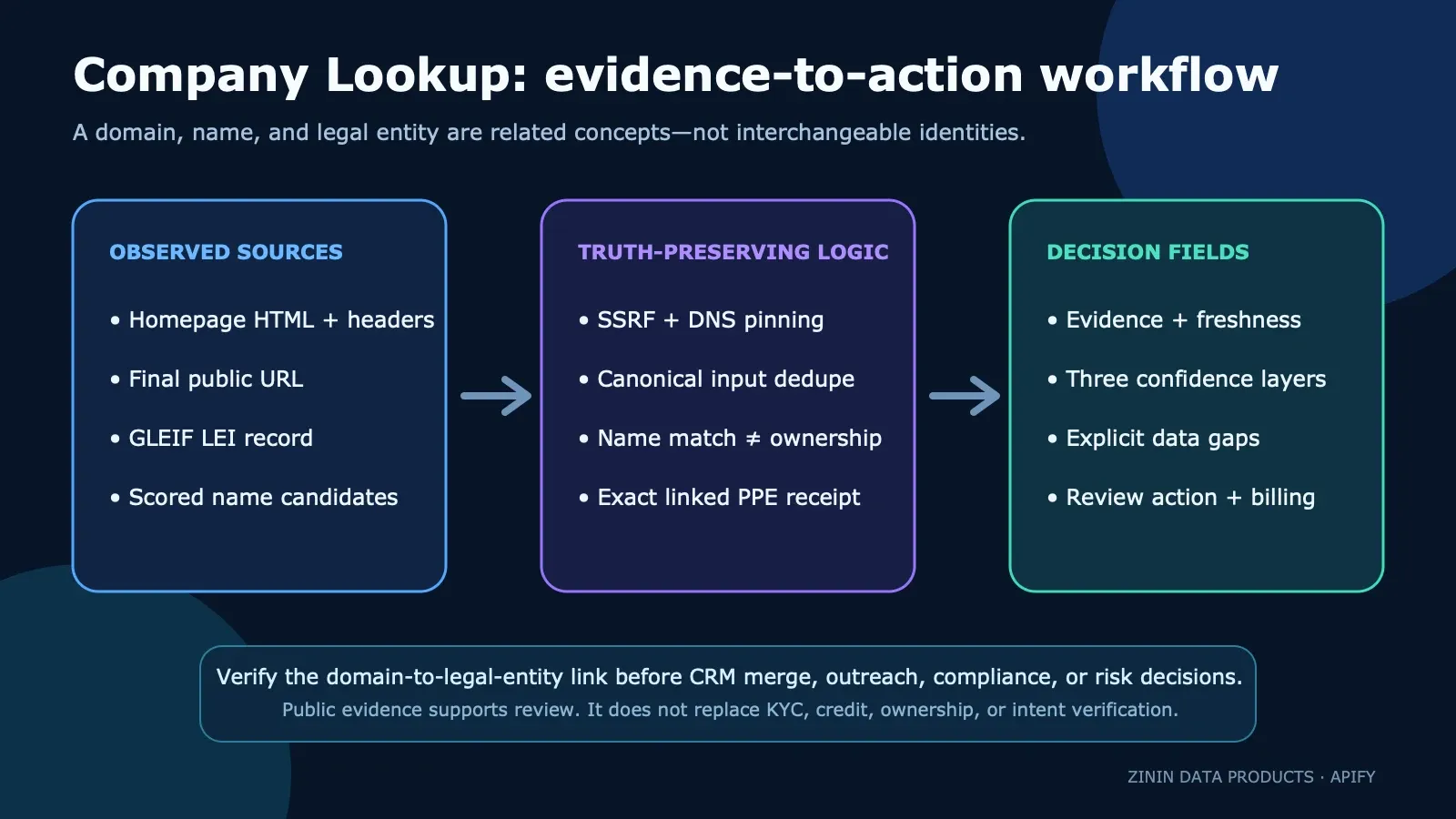
- Runtime validates the JSON object without coercing strings, integers, arrays, or malformed country hints.
- Domain, URL, name, and LEI variants are canonicalized before duplicate suppression.
stripe.comandhttps://STRIPE.com/pricingwith the same country hint are one requested domain identity. - Website inputs resolve to public IP addresses. Private, loopback, link-local, multicast, CGNAT, metadata, mixed public/private DNS, unsafe schemes, and unsafe redirect hops are refused.
- The connection is pinned to the verified address set, reducing DNS-rebinding risk.
- HTML reads are bounded to 600,000 bytes and record truncation. Non-HTML responses and unsuccessful HTTP status codes are not sold as website evidence.
- Fixed-origin GLEIF responses must be successful JSON with the expected root shape and a hard byte limit.
- Name matches are scored. One accepted entity becomes
registry; unresolved results remainregistryCandidatesand free. - Source work may run concurrently, but delivery and billing happen sequentially in normalized input order.
- A paid row is delivered through one linked Dataset/PPE operation. The receipt must prove both linked operations; ambiguity is fatal and
replaySafebecomes false. - Dataset rows and run-level
OUTPUTpreserve what succeeded, what failed, what was free, what was withheld, and what still needs review.
Input
| Field | Required | Type | Limits | Meaning |
|---|---|---|---|---|
companies | yes | array of strings | 1–100 | Domain, public HTTP(S) URL, legal company name, or exact 20-character LEI. Add ` |
maxConcurrency | no | integer | 1–30, default 10 | Parallel source lookups. Delivery and billing remain sequential. |
Example:
Input notes:
- Use the full legal name rather than a short brand when searching the registry.
- Use a country hint when the same name may exist in several jurisdictions.
- Use an LEI when you already know the entity and need exact retrieval.
- URL paths are accepted for convenience, but domain identity is canonicalized to the hostname.
- Duplicate domain/URL variants and case-only name or LEI variants are searched and billed once.
- Non-string items, control characters, malformed hints, oversized items, and numeric strings in integer fields are rejected instead of silently coerced.
Output example
Field dictionary
Compatibility fields
| Field | Meaning |
|---|---|
input | Normalized buyer-visible input retained for traceability. |
found | Whether a billable website or registry observation was established. |
error | Free outcome reason when found is false. |
companyName | GLEIF legal name only after an accepted match; otherwise a public site name or title-derived label. |
domain | Final observed hostname for domain input. |
description | Public homepage meta description, bounded to 300 characters. |
registry | Accepted GLEIF card, or null. |
registryMatch | Match confidence and basis: exact LEI, name, name+country, ambiguous, or none. |
registryCandidates | Up to five scored candidates when no single entity is accepted. |
tech | Page-level observed CMS, ecommerce, and technology signatures. |
summary | Human-readable one-line synopsis; not a substitute for structured fields. |
checkedAt | Source retrieval time for compatibility. |
Website and registry evidence
| Field | Meaning |
|---|---|
websiteUrl | Final public URL that produced the homepage observation. |
websiteResponseTruncated | Whether the HTML hit the 600,000-byte cap. |
registrySearchUrl | Bounded GLEIF query URL for a name-search observation. |
evidence[] | Direct source observations with type, URL, scope, and timestamp. |
evidenceScope | Compact list of source scopes represented by the row. |
evidenceCoverage | Coverage of this row’s narrow evidence contract, not overall company-data completeness. |
Identity and decision fields
| Field | Meaning |
|---|---|
entityId | Stable legal-entity, website, or company-query identity. |
observationId | Stable identity for this source state at this observation time. |
inputKind | domain, name, or lei. |
countryHint | Optional normalized two-letter constraint. |
confidence | Overall confidence in the row’s narrow identity claim, with reasons and risks. |
websiteIdentityConfidence | Confidence that the submitted hostname produced the public response—not business ownership. |
registryEntityConfidence | Confidence in the GLEIF entity selection. |
domainRegistryAssociationConfidence | Separate confidence in joining a domain to a legal entity; intentionally low for name-only association. |
domainRegistryLinkStatus | Whether the domain/legal-entity link is unverified, absent, or not applicable. |
dataGaps | Facts the observed sources do not establish. |
recommendedAction | Review step appropriate to the evidence state. |
actionPriority / actionReason | Why the next step matters. |
safeToAutomate | Always false for identity-sensitive downstream action without workflow-specific review. |
failureDiagnostics | Failure type, retryability, and partial status. |
Observation, change, and billing fields
| Field | Meaning |
|---|---|
observedAt / firstSeenAt / lastSeenAt | Timestamps for this single run observation. |
freshness | Fresh, unknown, cache state, and age semantics. |
observationSemantics | States that one run is an observation, not a historical change claim. |
change | not_computed unless prior accepted evidence is supplied by another workflow. |
billing.event | result-found only for paid rows. |
billing.billable | Whether this row consumes the result event. |
billing.unit | Exact unit delivered. |
billing.reason | Why the row is paid or free. |
Confidence model
Confidence is layered because one number cannot honestly answer three different identity questions.
Exact LEI input
If GLEIF returns the same LEI requested by the buyer, registryEntityConfidence is 100. This proves which GLEIF record was retrieved. It does not prove website ownership, beneficial ownership, creditworthiness, or compliance approval.
Legal-name input
The Actor normalizes punctuation, case, common legal forms, accents, and word order, then combines token overlap and character similarity. One entity must clear the 0.85 rule. A country hint is a hard source filter. Multiple accepted entities remain ambiguous rather than becoming a first-hit guess.
Domain input
A successful pinned public response supports websiteIdentityConfidence. If a scraped public site name also clears the registry match rule, the GLEIF record is shown—but the domain-to-entity association stays explicitly unverified and receives separate low confidence.
Pricing and billing
The Actor uses pay per event:
- one
apify-actor-startevent when the run starts; - one
result-foundevent for each unique requested company card successfully delivered.
At the current public rate, the free-tier price is $0.005 per start and $0.005 per successful result, with lower account-tier rates where Apify applies them.
Free outcomes include:
- invalid or unreachable website observations after input validation;
- GLEIF source failures;
- name searches with no accepted entity;
- ambiguous candidate shortlists;
- a budget-stop explanation row.
Delivery and billing use one linked Dataset/PPE operation. On a monetized run, the receipt must report the expected two linked operations. If the platform response is ambiguous, the run fails and OUTPUT.replaySafe becomes false so an operator does not blindly retry and risk duplication.
The Actor checks money before each paid delivery. When the run’s charge cap cannot cover another result, remaining paid rows are withheld, not given away and not charged. OUTPUT records the exact state.
Run-level OUTPUT
Read OUTPUT from the default Key-Value Store when completeness matters:
COMPLETE means every unique input reached a successful billable observation. PARTIAL can mean one or more free source outcomes or budget withholding. FAILED means a fatal budget or ambiguous-delivery condition. Always inspect replaySafe before retrying a failed run.
API
Start a run:
For a synchronous integration, use the Apify run-sync endpoint within your own timeout budget. For larger lists, start asynchronously, wait for terminal status, then read both Dataset items and the OUTPUT record.
JavaScript
Python
Google Sheets and Excel
Run the Actor from Apify Console, open the Dataset, and export JSON, CSV, or Excel. For review queues, keep these columns visible:
inputcompanyNamedomainregistry.leiregistryMatchregistryCandidatesdomainRegistryLinkStatusconfidencedataGapsrecommendedActionevidence
Flatten nested fields in your integration only after preserving the source URLs and identity boundary.
n8n
A practical workflow:
- Trigger from a CRM export, form, or scheduled spreadsheet read.
- Split the list into Actor inputs of at most 100 items.
- Run
zinin/company-lookup. - Wait for terminal run status.
- Read Dataset rows and
OUTPUT. - Route
registryMatch.basis = ambiguousordomainRegistryLinkStatus = unverified_name_based_associationto a review queue. - Write accepted reviewed identifiers back to the CRM.
Do not auto-merge companies merely because registryMatch.confidence is high. That score is about the legal-name match, not domain ownership.
Make
Use an HTTP module to start the Actor, poll the run endpoint, and retrieve Dataset items. Add a filter:
- continue automatically only for your workflow’s explicitly reviewed evidence state;
- send candidate lists and domain/legal-entity joins to manual review;
- stop and alert when
OUTPUT.replaySafeis false.
MCP and AI agents
Expose the Actor through the Apify MCP server when an agent needs company evidence. A safe agent policy is:
- cite at least one
evidence[].sourceUrlfor every company statement; - never convert
registryCandidatesinto an accepted entity; - never describe
unverified_name_based_associationas ownership; - preserve
dataGapsin the final answer; - ask for an LEI or authoritative legal page when
recommendedActionrequires verification; - never interpret observed technologies as purchase intent.
Scheduling and monitoring
This Actor is stateless: each run observes the current public sources. Schedule it when you need refreshed evidence, then compare rows in your own database or use dedicated change-monitor Actors.
When scheduling:
- use stable, canonical inputs;
- store
entityId,observationId, andobservedAt; - compare source-specific fields separately;
- do not call a difference a change unless both observations are accepted and comparable;
- alert on
PARTIAL,FAILED, orreplaySafe:falseOUTPUT.
Decision recipes
Safe CRM preparation
Website-tech research
Domain-to-entity join
Privacy, security, and responsible use
The Actor processes buyer-supplied domains, company names, country hints, and LEIs. It reads public website responses and public GLEIF data. It does not require a website login, proxy, LLM key, or GLEIF key.
Security controls include:
- fixed-origin GLEIF requests;
- redirect-by-redirect scheme and address checks for buyer-supplied websites;
- rejection of private, loopback, metadata, link-local, multicast, CGNAT, and mixed DNS answers;
- DNS pinning for the actual connection;
- bounded source bodies;
- content-type and HTTP-status validation;
- strict input without hidden coercion;
- exact linked delivery receipts and fail-closed billing.
Public availability does not remove your obligations around privacy, lawful basis, outreach rules, suppression lists, discrimination, financial promotions, data retention, and jurisdiction-specific regulation. Minimize stored inputs and outputs, restrict access, define retention, and keep a human review step for identity-sensitive actions.
Troubleshooting
hostIsBlocked is not defined
That was a historical domain-runtime defect. The current Commercial115 build imports the pinned network client and contains a regression test for the executable domain path. If you see this exact message, verify that your run uses the current production build and share the run ID in an Actor issue.
I received registryCandidates and found: false
No single legal entity cleared the acceptance rule. Use the full legal name, add a two-letter country hint, pass the exact LEI, or ask a reviewer to select a candidate. The row is free.
A domain row has registry: null
The website observation can still be valid and billable. It means no GLEIF entity cleared the name rule. Use the tech and website evidence without attaching a legal identity.
A domain row has a registry match, but domainRegistryAssociationConfidence is low
That is intentional. The legal name may be a strong match while the domain-to-entity relationship remains unproven. Verify the association before joining records.
Technology list is empty
The homepage responded, but no catalog signature was observed. This is not proof that the company uses no technology. Client rendering, subpages, server-side tools, blocked scripts, and unknown signatures can all be missing.
The website returned an error or unexpected content type
The Actor does not sell an HTTP error or binary response as evidence. Check whether the site is publicly reachable and returns HTML without login or anti-bot interstitials.
The run is PARTIAL
At least one unique input produced a free source outcome or a budget stop. Inspect Dataset rows and OUTPUT.source, OUTPUT.delivery, and OUTPUT.fatalError.
The run says replaySafe: false
Do not retry blindly. A linked Dataset/PPE delivery response was ambiguous and the row may already exist. Inspect the Dataset and charged events first.
Why was a duplicate not run twice?
The Actor canonicalizes domain/URL variants, LEI case, legal-name case, and country-hint case before source work. OUTPUT.input shows requested, unique, and duplicate counts.
FAQ
Does a GLEIF name match prove the website belongs to that company?
No. The Actor exposes the candidate record and separate association confidence, but a name match alone does not prove ownership or operation of a domain.
Is an LEI exact?
The identifier lookup is exact: the Actor verifies that GLEIF returned the requested LEI. Broader business, ownership, compliance, and website claims still require their own evidence.
Is this a company database?
It is a bounded public-evidence lookup for inputs you already have. It does not enumerate every company or replace a full commercial database.
Is this KYC or AML screening?
No. Use dedicated official and licensed sources, policies, and human review for regulated decisions.
Does it detect every technology?
No. It detects a maintained catalog of signatures in initial homepage HTML, headers, and the final URL. It does not render client-side applications or crawl every page.
Can I use it for lead scoring?
Use observed evidence as one reviewed feature. Do not equate technology, registry status, or domain activity with buying intent or eligibility.
Are ambiguous rows billed?
No. Candidate-only and failure outcomes are pushed as free rows when the active pricing contract confirms Dataset writes are unpriced.
Does it need a proxy or API key?
No website proxy, GLEIF key, login, or LLM key is required. Apify authentication is required to run through the API.
How many companies can I send?
Up to 100 strings per run. Duplicate variants are normalized before source work.
Can I preserve the old fields?
Yes. The original company-card fields remain. The evidence and decision layer is additive.
What should I store for reproducibility?
Store the full row, especially input, entityId, observedAt, evidence, confidence, gaps, decision fields, and billing. Store OUTPUT with the run ID.
Related tools
| Actor | When to use it |
|---|---|
| Company Registry Enricher | Use a registry-focused workflow for legal names, LEIs, and supported company numbers. |
| Website Tech Stack Detector | Use a dedicated, richer page-level technology evidence workflow. |
| B2B Lead Enricher | Add broader website-based sales-research fields with explicit evidence limits. |
| Tech Stack Change Detector | Compare accepted current and previous website technology observations. |
| Counterparty Risk Rollup | Combine dedicated public risk sources after legal identity is reviewed. |
Support
Open an issue on this Actor page and include:
- the Apify run ID;
- whether the input was a domain, URL, legal name, or LEI;
- the relevant Dataset row;
- the
OUTPUTrecord; - the expected identity boundary;
- and whether retry safety is true or false.
Do not paste API tokens, private credentials, or non-public personal data into an issue.
Built by zinin. The product promise is evidence with boundaries: enough structure to act carefully, never a confident-looking guess presented as fact.
OUTPUT.delivery.linkedChargedCount counts confirmed result-found events only. It excludes automatic starts and zero-price Dataset-write events. websiteResponseTruncated: true means the bounded website fetch ended at its size limit; website-derived fields may be incomplete even when the registry lookup succeeded.


