

License Plate Reader — ANPR / LPR for Photos & Video
Pricing
from $2.10 / 1,000 image processeds
License Plate Reader — ANPR / LPR for Photos & Video
Read license plates from photos and CCTV videos: plate text, confidence, plate box, vehicle make, model and color. Trained on real Brazilian road cameras (old and Mercosur plates). Video: one row per vehicle passing. No GPU, pay per image or minute.
Pricing
from $2.10 / 1,000 image processeds
Rating
0.0
(0)
Developer

Leandro Zanatta
Maintained by CommunityActor stats
0
Bookmarked
2
Total users
1
Monthly active users
12 days ago
Last modified
Categories
Share
License Plate Reader — ANPR / LPR API for Photos & Video
Read license plates from photos, camera snapshots and CCTV videos. For every plate you get the plate text, a confidence score, the plate box, and the vehicle that carries it: type, make and model and color. Videos return one row per vehicle passing, with the time it appeared and left, instead of hundreds of duplicate reads.
The models were trained on real Brazilian road and street cameras and read old Brazilian plates (ABC-1234) and Mercosur plates (ABC1D23), plus Argentina, Paraguay and Uruguay layouts. Runs on CPU, no GPU or SDK to install.
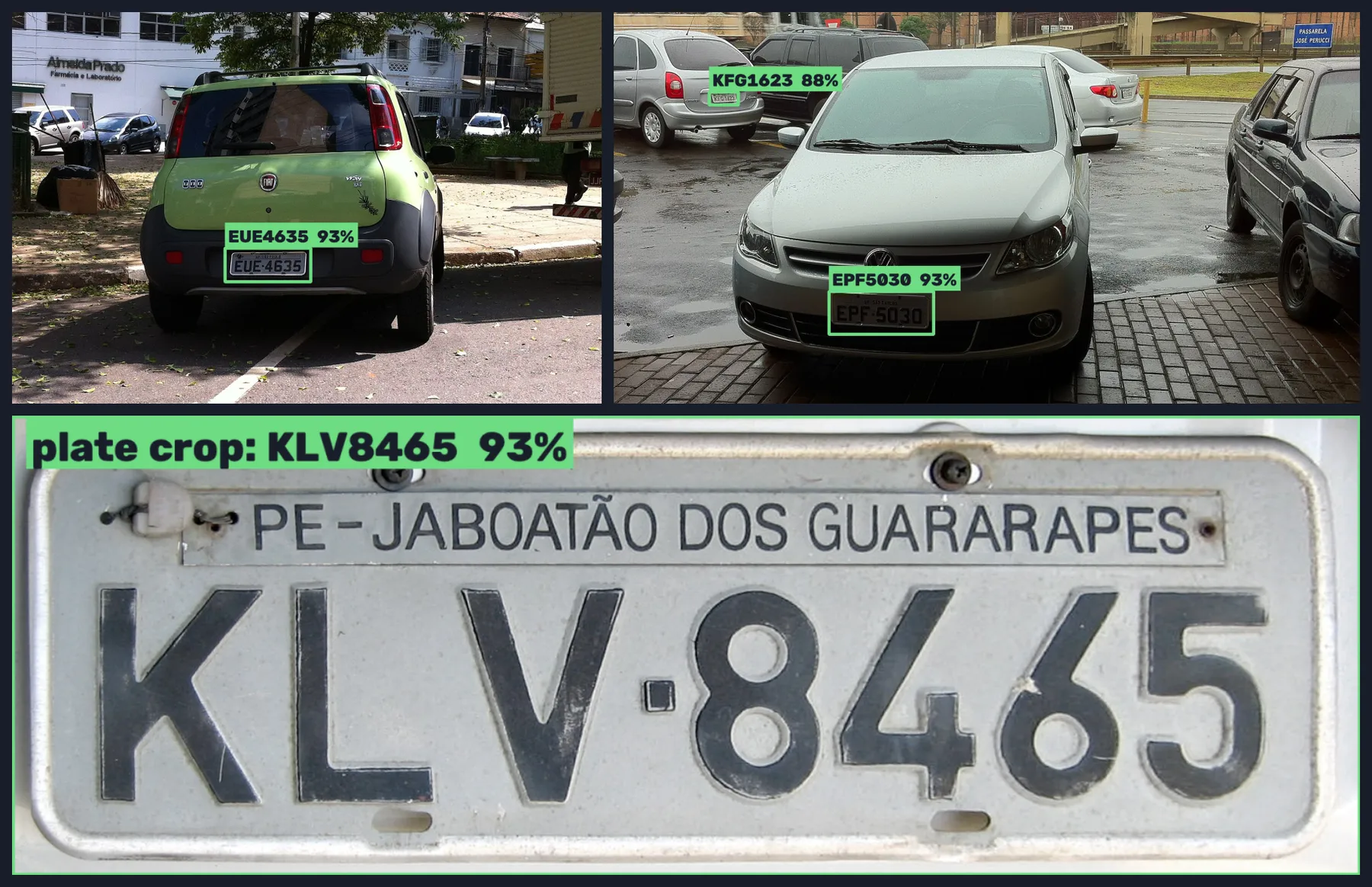
Real output of this Actor on public photos from Wikimedia Commons (CC BY 2.0 and public domain).
Why use it
- 🎯 Accurate on real cameras: 98% of plates read exactly right (every character) on held-out crops from Brazilian road cameras, 95.6% on a larger mixed sample. Letter/digit mix-ups (O/0, I/1, B/8) are corrected using the plate layout.
- 🚗 More than the plate: vehicle type, make and model (over 200 cars, trucks and buses common in Brazil, plus motorcycles) and color, linked to each plate.
- 🎞️ Video-aware: the same plate seen in many frames becomes one sighting with first/last time, number of reads and the best crop.
- 🧹 Clean results: only reads that match a real plate format are returned (switch off to get everything).
- 💸 Pay per use: per image or per minute of video. No subscription, no per-camera licence. Failed files are free.
- 🧩 Works anywhere: API, schedules, webhooks, Make, Zapier, n8n and AI agents (MCP).
Who uses it
| Sector | Typical use |
|---|---|
| Parking lots, garages & condominiums | Log entries and exits from gate cameras, check registered vehicles |
| Logistics, yards & fleets | Record trucks arriving at docks and yards, match them with orders |
| Security companies & monitoring centres | Search recorded footage for a plate after an incident |
| Car washes, workshops & dealerships | Identify returning customers' vehicles automatically |
| Insurance & claims | Extract plate, make, model and color from claim photos |
| Toll, traffic & smart-city projects | Count and classify vehicles, build origin-destination studies |
| AI & data teams | Label datasets, evaluate own models, pre-filter footage |
What you get per plate
| Field | Meaning |
|---|---|
plate | Plate text without dash, e.g. EUE4635 or RDY7G98 |
format | BR (old Brazil), BR-MERCOSUR, AR-MERCOSUR, AR, PY/UY |
confidence | Average character confidence (0–1) |
detectionConfidence | How sure the detector is that the box is a plate |
box | Plate position in pixels (x1, y1, x2, y2) |
rawText | The read before layout correction (only when it changed) |
vehicle | type (car, truck, van, bus, motorcycle…), make, model, color, their confidences and box |
plateImageUrl, vehicleImageUrl | Crops, when Save plate images is on |
Make and model are only named when the detector is confident (about 81% right at that level); otherwise you still get the vehicle box and color.
Input
| Field | Type | Default | Description |
|---|---|---|---|
Photos (imageUrls) | array | — | JPEG, PNG, WebP, BMP, TIFF up to 50 MB. Plate close-ups and crops work too |
Videos (videoUrls) | array | — | MP4, MKV, AVI, MOV, TS… up to 4 GB. Google Drive and Dropbox links work |
Frames read per second (framesPerSecond) | string | 2 | 2 for gates, parking and city traffic; 4–5 for fast highway traffic |
Max minutes per video (maxDurationMinutes) | integer | 120 | Only the first N minutes are read and billed |
Vehicle make, model and color (includeVehicle) | boolean | true | Add the vehicle carrying each plate |
Save plate images (savePlateImages) | boolean | false | Store crops of plates (and vehicles in videos) |
Only plates in a known format (onlyValidPlates) | boolean | true | Drop partial and unknown-layout reads |
Minimum read confidence (minTextConfidence) | string | 0.5 | Raise to 0.8 for fewer, surer reads |
Minimum plate detection confidence (minPlateConfidence) | string | 0.25 | Detector threshold |
Output
Photos: one row per image.
Videos: one row per plate sighting (a vehicle passing), plus a SUMMARY-video001 record in the key-value store with all plate numbers, minutes read and billed.
Failed files return an error field and are not billed.
Pricing
Pay per image processed or per started minute of video read, plus a tiny per-run start fee. Apify plan discounts apply automatically (see the Pricing tab).
| Example | Billed |
|---|---|
| 1 photo | 1 image |
| 1,000 claim photos | 1,000 images |
| 1 hour of a gate camera | 60 video minutes |
Use Max minutes per video or the run's maximum cost to cap spending; the Actor stops cleanly at the limit.
Use it from code or an AI agent
Python: plates entering a gate last night
JavaScript: read plates in photos
HTTP (synchronous, one call)
No-code and agents: send camera snapshots from Make, Zapier or n8n, trigger runs from webhooks or schedules, or let an AI agent read plates through the Apify MCP server.
Tips for best results
- The plate should be at least about 80 px wide in the image; zoom the camera on the lane, not the whole street.
- Avoid strong motion blur: use a short shutter on gate cameras, or raise Frames read per second for fast traffic.
- At night, infrared cameras work well; headlight glare on the plate does not.
- Plates of other countries are detected, but the reader is tuned for Brazil and Mercosur. Turn off Only plates in a known format to see every read.
FAQ
Does it look up the owner or the vehicle registration? No. It reads what is visible in your images. It does not query any registry or database.
Which countries? Brazil (old and Mercosur), Argentina, Paraguay and Uruguay layouts are validated. Other plates can be read with the format filter off, with lower accuracy.
Can it read motorcycle plates (two rows)? Yes, characters are ordered row by row.
Can I use live RTSP camera streams? Not directly: send recorded clips or periodic snapshots (e.g. every few seconds from your NVR, scheduled through the API).
Is my footage kept? Files are processed inside your run and stored only in your own Apify storage, under your account's data-retention settings. Nothing is sent to third parties.
Responsible use
License plates are personal data under LGPD (Brazil) and GDPR (EU). Process only images you are allowed to process, for a legitimate purpose (access control, security, logistics, claims), keep results only as long as needed, and inform people where the law requires it (e.g. signs at camera-monitored entrances). Do not use this Actor to track or profile individuals.
Related Actors
- CCTV Motion Clipper — cut long recordings down to the moments with movement, then read plates only there
- Image & Video Anonymizer — blur faces and plates before sharing footage
- Video Frame Extractor for AI — frames for datasets and inspection
- Image Quality Checker — find blurry or dark camera snapshots
Support
A plate read wrong? Open an issue in the Issues tab with the image (or a crop) and the correct text: it helps improve the models.
Need a different tool? Request it
Missing a feature, an input or output format, or a whole different tool for your workflow? Open an issue in the Issues tab and describe what you need:
- what goes in (files, URLs, data) and what should come out,
- roughly how much you process (per day or month),
- one example, if you can share it.
Requests with a real use case get built, either as a new option in this Actor or as a new Actor in this collection, and you get notified in the issue when it's live. Every request is read.


![Bilibili Downloader [💰$2.5] | Videos | Streams | Batch DL avatar](https://images.apifyusercontent.com/iRvq2mMo24sC7S77b-cz_mdL8AdAPQpp0vEDLTAkfNs/rs:fill:76:76/cb:1/aHR0cHM6Ly9hcGlmeS1pbWFnZS11cGxvYWRzLXByb2QuczMudXMtZWFzdC0xLmFtYXpvbmF3cy5jb20vZHRSN3FuVGJRck5pU0NtajctYWN0b3Itd0tyNVFEbEJ3MVVmN3k5dzktRVNPZU9aNmJzMy12RUxjOXFUVGk0UEZxTnRGVS1hY3Rvci1iQXlkZGNxb1A4TVZQUURldi1vS0FoUzBjRzBaLWJpbGliaWxpLWxv.webp)


