CCTV Motion Clipper — Keep Only the Moments with Motion
Pricing
from $7.00 / 1,000 video minute scanneds
CCTV Motion Clipper — Keep Only the Moments with Motion
Turn hours of security-camera footage into minutes: finds motion in CCTV/NVR videos, returns a timeline with thumbnails and a summary video of only the moving parts, with source time burned in. Ignores clock overlays and noise.
Pricing
from $7.00 / 1,000 video minute scanneds
Rating
0.0
(0)
Developer

Leandro Zanatta
Maintained by CommunityActor stats
0
Bookmarked
2
Total users
1
Monthly active users
14 days ago
Last modified
Categories
Share
Turn hours of security-camera footage into minutes. Send CCTV / NVR / DVR video exports and get back a timeline of every motion event (start, end, peak, thumbnail), a summary video with only the moving parts back to back, and optional clips per event, all with the original time burned in so every frame can be traced back to the source.
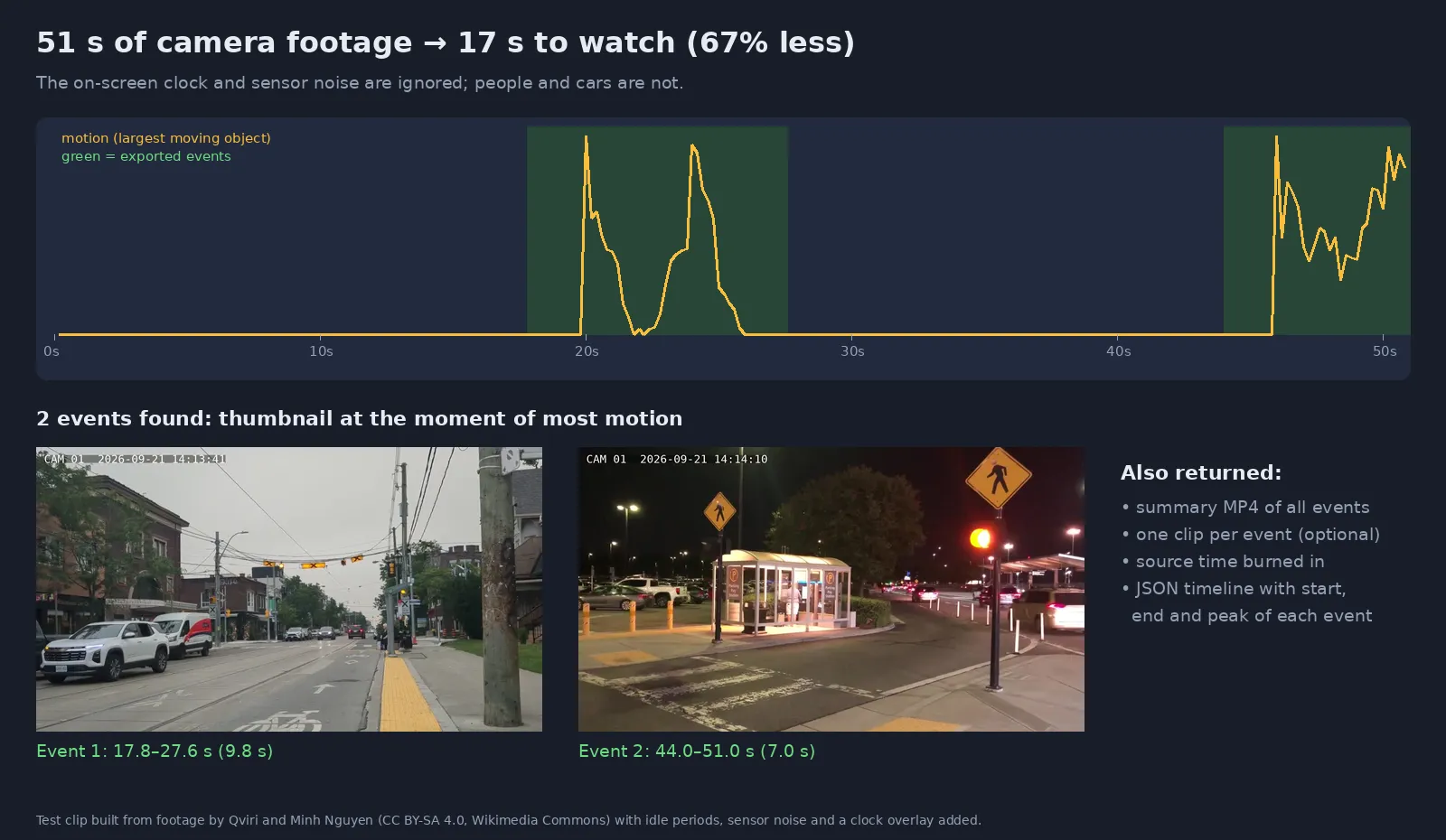
Real output of this Actor on a test clip with idle periods, sensor noise and an on-screen clock.
Why use it
- ⏱️ Review footage in a fraction of the time: a night of a quiet camera can shrink from hours to a few minutes of events.
- 🕒 Ignores what is not motion: the camera's on-screen clock, sensor noise and small flicker do not trigger events; whole-picture changes (lights switching, IR mode) are ignored too.
- 🎯 Tunable: sensitivity presets, minimum object size, ignore regions (trees, flags, a busy road), minimum event length and merge gap.
- 🧾 Evidence-friendly: each exported frame shows its source time, and the JSON timeline lists exact start and end seconds of every event.
- 📦 Bulk and automated: many files per run; schedule it every morning on the night's exports or trigger it from your storage via webhook.
- 🧩 No software to install: no VMS licence, no FFmpeg or OpenCV setup. Video URLs in, timeline and videos out.
Who uses it
| Sector | Typical use |
|---|---|
| Security companies & monitoring centres | Review client cameras after an incident, deliver only the relevant footage |
| Condominiums, schools & retail | Find when someone entered a room, garage or stockroom without watching the whole night |
| Insurance & loss prevention | Extract the moments that matter from claim footage |
| Investigations & legal | Build a timeline from long recordings, with traceable timestamps |
| Wildlife & research cameras | Keep only the clips where animals appear |
| Construction & facilities | Summarize site cameras for daily reports |
| AI teams | Pre-filter footage before running detection or tracking models (less GPU time) |
How it works
- The video is decoded at 5 frames per second in low resolution (fast and cheap, enough for motion).
- Each frame is compared with the previous one; small noise is removed and the largest moving object is measured as a % of the picture.
- Samples above the sensitivity threshold become motion; whole-picture changes (> 60% of the frame) are treated as lighting changes and ignored.
- Nearby motions are merged, very short ones are dropped, and pre/post roll seconds are added.
- Events are exported from the original video (thumbnail, clip and summary), downscaled to 720p by default, with the source time written in the corner.
Input
| Field | Type | Default | Description |
|---|---|---|---|
Video URLs (videoUrls) | array | — | CCTV/NVR exports (MP4, MKV, AVI, MOV, TS…), up to 4 GB each. Google Drive and Dropbox links work |
Sensitivity (sensitivity) | string | medium | high (small or distant objects), medium (people and vehicles), low (large, close movements) |
Custom minimum object size (minMotionPercent) | string | — | Overrides sensitivity, in % of the frame (high = 0.08, medium = 0.2, low = 0.6) |
Ignore regions (ignoreRegions) | array | — | Rectangles in % of the picture, e.g. [{"x":0,"y":0,"width":40,"height":8}] |
Minimum event length (minEventSeconds) | string | 0.6 | Drop shorter motions |
Merge events closer than (mergeGapSeconds) | string | 3 | Join motions separated by less than this |
Seconds before / after (preRollSeconds, postRollSeconds) | string | 2 / 2 | Context kept around each event |
Create summary video (createSummaryVideo) | boolean | true | One MP4 with every event back to back |
Create one clip per event (createClips) | boolean | false | Separate MP4 per event |
Create thumbnails (createThumbnails) | boolean | true | JPEG at the peak of each event |
Show source time on video (burnTimestamp) | boolean | true | Original position written on exported frames |
Export resolution (maxHeight) | integer | 720 | Max height of exported videos |
Max minutes per video (maxDurationMinutes) | integer | 720 | Scan and bill only the first N minutes |
Max events per video (maxEventsPerVideo) | integer | 300 | Safety limit for very busy scenes |
Example: a garage camera where a road in the top third of the picture should be ignored:
Output
One dataset row per video:
peakMotionPercent is the size of the largest moving object at the peak, in % of the picture: use it to tune Custom minimum object size. Failed videos return an error field and are free.
Pricing
Pay per started minute of video scanned (exports included), plus a tiny per-run start fee. No subscription. Failed videos are free. Apify plan discounts apply automatically (see the Pricing tab).
| Example | Minutes billed |
|---|---|
| 51-second test clip | 1 |
| 1 hour of a parking-lot camera | 60 |
| 12-hour night recording | 720 |
Speed: on the default 4 GB of memory a 20-minute 720p recording was scanned and exported in about 4 minutes. Give the run more memory (more CPU) for long recordings, and raise the run timeout (Run options) for files of many hours.
Use it from code or an AI agent
Python: get the events of last night's export
JavaScript
No-code and agents: schedule a daily run, send the summary link to Slack or e-mail with Make, Zapier or n8n, or let an AI agent call it through the Apify MCP server.
FAQ
My camera has a clock or logo on screen. Will it trigger events? Usually not: the clock changes only a tiny area. If it is large, add it to Ignore regions.
Trees, rain or a busy road create too many events. Add those areas to Ignore regions, use Low sensitivity, or raise Minimum event length.
It missed a person far away. Use High sensitivity or set Custom minimum object size to about half the peakMotionPercent you see for similar events.
Does it detect what moved (person, car, animal)? No, it detects motion. Run the thumbnails or summary through a detector if you need classes, or anonymize faces and plates before sharing with the related Actor below.
Is the footage kept? Only in your own Apify storage for the run, following your account's data-retention settings. Nothing is sent to third parties.
Which formats? Any common container and codec (H.264, H.265/HEVC, MJPEG, MPEG-4…). Proprietary NVR formats must be exported to MP4/AVI first. Outputs are H.264 MP4 at 15 fps.
Related Actors
- Image & Video Anonymizer — blur faces and license plates before sharing footage (GDPR / LGPD)
- Video Optimizer — shrink CCTV archives (5 fps, 720p, 90%+ smaller)
- Video Frame Extractor for AI — frames for datasets and inspection
- Face Compare — face verification and embeddings
Support
A camera that triggers too much or too little? Open an issue in the Issues tab with the settings you used.
Need a different tool? Request it
Missing a feature, an input or output format, or a whole different tool for your workflow? Open an issue in the Issues tab and describe what you need:
- what goes in (files, URLs, data) and what should come out,
- roughly how much you process (per day or month),
- one example, if you can share it.
Requests with a real use case get built, either as a new option in this Actor or as a new Actor in this collection, and you get notified in the issue when it's live. Every request is read.