

LinkedIn Jobs Scraper and Indeed Scraper
Pricing
from $0.28 / 1,000 full linkedin jobs
LinkedIn Jobs Scraper and Indeed Scraper
LinkedIn Jobs scraper plus Indeed scraper in one run, $0.35 per 1,000 LinkedIn jobs and $0.10 per 1,000 Indeed jobs, full descriptions included, no account, no cookies: one table with title, company, location, remote or hybrid, posted date, salary, seniority, applicants and apply link.
Pricing
from $0.28 / 1,000 full linkedin jobs
Rating
0.0
(0)
Developer

AgentToolWorks
Maintained by CommunityActor stats
0
Bookmarked
21
Total users
8
Monthly active users
5 days ago
Last modified
Categories
Share
What is this LinkedIn Jobs scraper and Indeed scraper?
This Actor is a LinkedIn Jobs scraper and an Indeed scraper in one run. Type a job title, a skill or a company, a city and a country once, and get the public job listings of LinkedIn Jobs and Indeed back in one table, one row format: title, company, location, posting date, salary (parsed into min, max, currency and period), employment type, seniority, applicant count, remote or hybrid where the board says so, the full job description, and links to the job and to apply.
In short
- What you get: LinkedIn Jobs and Indeed in one run, one row per job in the same format, with the full description, salary parsed into min and max, posting date and apply link.
- What it costs: $0.35 per 1,000 LinkedIn jobs with description ($0.28 on Apify Business plans), $0.10 per 1,000 Indeed jobs with description, charged per job delivered. Card-only rows are cheaper ($0.15 and $0.05).
- Why this one (same searches, measured 2026-10-02 and 2026-10-05): LinkedIn at $0.35 per 1,000 where curious_coder and bebity charge $1.00 to $2.00; Indeed past the 1,000-result cap (1,812 of the 1,821 jobs Indeed counted for "data engineer" in Paris); the employer's own posting date, not the date a job was scraped; and a run that says per board when it could not read everything, instead of a silent success.
No LinkedIn account, no Indeed account, no cookies: the Actor reads what both boards show any logged-out visitor.
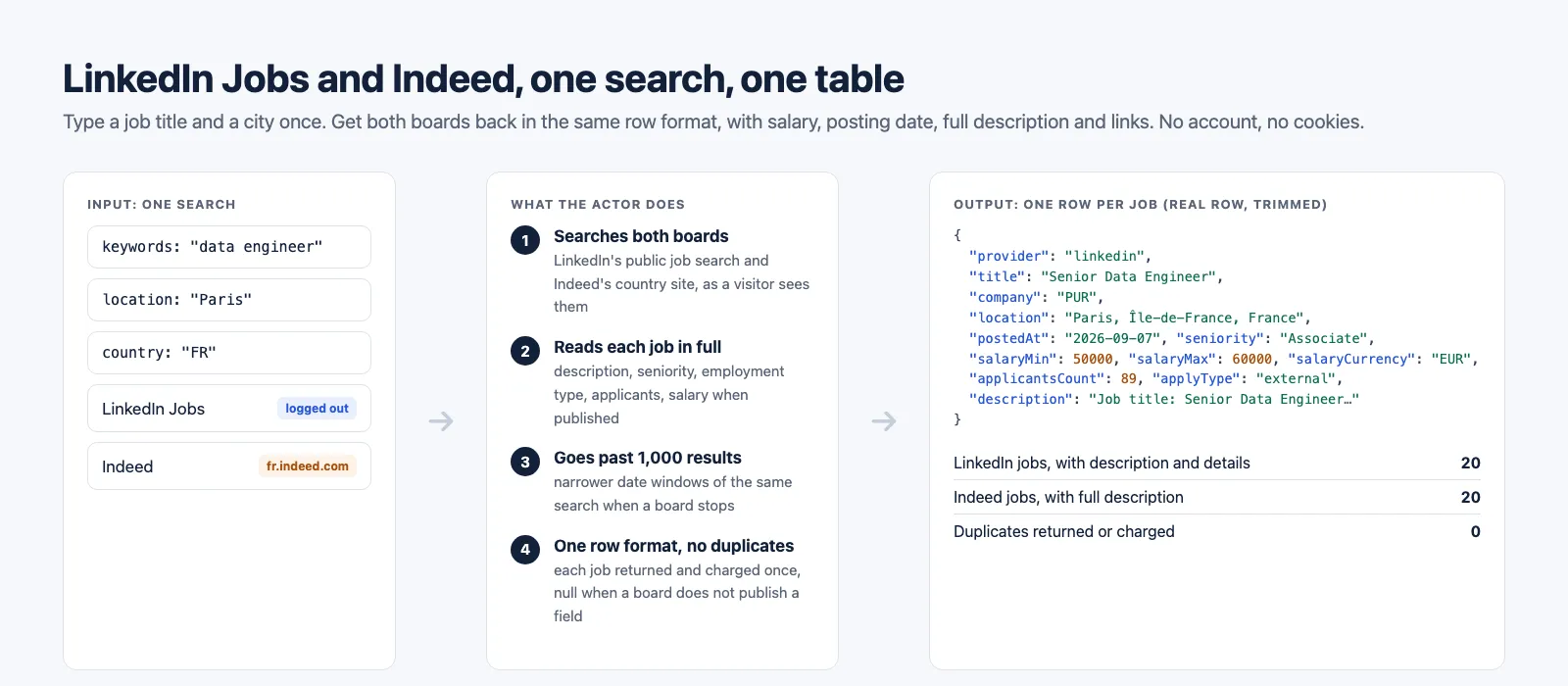
What data can you extract from LinkedIn Jobs and Indeed?
One row per job, the same fields on both boards. Where a board does not publish a field, it is null, never guessed.
| Job data | Pay and conditions | Links and context |
|---|---|---|
| Job ID, title, company, location | Salary as published (salaryText) | Job page on the board (jobUrl) |
City, postcode and country code, as Indeed gives them apart (city, postalCode, countryCode; null on LinkedIn, which prints one location string) | Parsed salary: salaryMin, salaryMax, salaryCurrency, salaryPeriod | Apply link (applyUrl) and apply type on LinkedIn (external or easy-apply) |
The employer's own posting on its careers site or applicant tracking system, as Indeed links it (employerJobUrl, Indeed only, see the limits below) | ||
| Full description, as text and HTML | Employment type (full-time, contract, CDI...) | Company page and company logo |
Posting date, the employer's date (postedAt) | Workplace type: remote, hybrid or on-site, where the board says so | Applicant count (LinkedIn) |
| Seniority and industries (LinkedIn) | Benefits (where listed) | The search that found it (and its startUrl, when you pasted one), and when it was read |
Indeed's own attributes for the job: skills, education, benefits, schedule, as Indeed labels them (attributes, one list in Indeed's order; null on LinkedIn) | ||
Board (provider: linkedin or indeed) |
What can you use LinkedIn and Indeed job data for?
- Job market and salary research: what a role pays in a city, how many employers hire for it, which skills they ask for.
- Recruiting and sales prospecting: which companies are hiring for a function right now, with the company page and the applicant count.
- Job boards and aggregators: fresh listings from both boards, deduplicated, in one format.
- Job alerts: schedule a search and get the new jobs every morning.
- Data for AI agents and pipelines: one predictable JSON row whatever the board.
Need the employers' own career pages too (Greenhouse, Lever, Ashby, Workable and more)? Pair it with JobsRadar: same first columns, so the two outputs stack into one table.
How to scrape LinkedIn Jobs and Indeed
- Click Try for free (or Start) on this page and sign in to Apify.
- Type the Keywords (
data engineer), the Location (Paris) and pick the Country (France). - Keep both Job boards or pick one.
- Set Max jobs per board. You pay per job returned, so start small to look at the data.
- Click Start. When the run finishes, open the Output tab, pick the Jobs, Salaries or Descriptions view, and export as JSON, CSV, Excel or XML, or read it through the API.
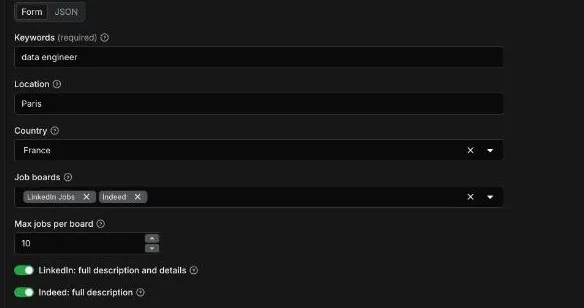
Input
| Field | What it does |
|---|---|
keywords | What to search, as you would type it on LinkedIn or Indeed: a job title, a skill or a company. Required unless you paste startUrls. |
location | A city, region or postcode. Empty searches the whole country. |
country | Picks Indeed's country site (fr.indeed.com, uk.indeed.com...) and completes the location for LinkedIn. 30 countries. Pick one from the list, or type a two-letter code (IN) or an English name (India, United Kingdom) in any case; a country outside the 30 fails the run before any request, with the list. |
boards | linkedin, indeed. Both by default. The boards the keywords search runs on; a start URL runs on its own board. |
startUrls | LinkedIn or Indeed search URLs copied from your browser, filters included, and LinkedIn job URLs. Each is its own search, run in addition to the keywords: clear keywords to run only your URLs (the run summary says so when both ran). The FAQ below lists the filters each board keeps. |
maxResultsPerBoard | Stop after this many jobs on each board, for each search: the keywords and each start URL (default 100, up to 5,000). |
includeDescription | LinkedIn: read each job's own page for the full description, seniority, employment type, industries, applicant count and base pay (default on). Off returns the search card only, at the lower price, pasted LinkedIn job URLs included. |
indeedDescriptions | Indeed: the full description on every row (default on). Off returns the same rows without it, at the lower price. |
strictLocation | Both boards widen a city to its area (a London search returns Teddington). On, only jobs whose location names the searched place are returned and charged. |
datePosted | any, 24h, 3d, week, 2weeks, month. Like jobTypes, workplaceTypes, experienceLevels and strictLocation, it filters the keywords search: a start URL carries its own filters. |
jobTypes | Full-time, part-time, contract, temporary, internship, volunteer. Indeed filters in its own search; on LinkedIn each job's page is read to check it (slower, and capped, see below). |
workplaceTypes | Remote, hybrid, on-site. |
experienceLevels | Internship to executive, checked on each LinkedIn job's page (seniority; slower, and capped, see below). Not applied on Indeed: with it set, Indeed is not searched. |
proxy | auto (recommended): LinkedIn through Apify datacenter proxy, Indeed through Apify residential proxy in the searched country, which is what worked in our cloud runs. |
Example: data engineer jobs in Paris on both boards, 20 per board (the run shown on this page).
Example: remote Python jobs posted in the past week in the United States, LinkedIn only, search cards only (the cheapest LinkedIn rows).
Example: nurses in London itself, not the commuter belt, Indeed only, 1,000 jobs.
Example: your own searches, pasted from the address bar. Easy Apply data engineer jobs in Paris posted in the past week on LinkedIn, nurses in London posted in the past week on Indeed, and one LinkedIn job, up to 200 jobs per search. A job both searches find is returned and charged once.
Output
The dataset holds one row per job, with three ready-made views in Apify Console and in the API:
- Jobs: board, title, company, location with its city, postcode and country, workplace, type, seniority, posting date, salary, applicants, apply type, links and Indeed's attributes.
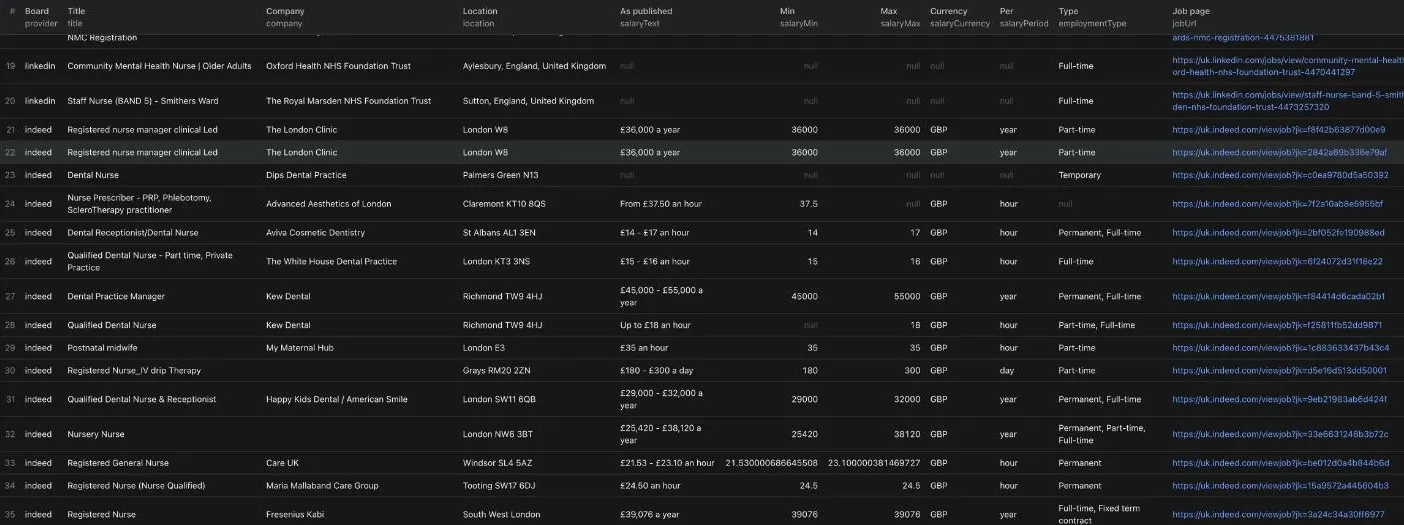
- Salaries: the salary as published and parsed into min, max, currency and period.
- Descriptions: the full description of every job, with Indeed's attributes.
No duplicates: a job is returned and charged once per run, keyed by board and job ID, across pages, date windows and searches (two start URLs that find the same job return it once, from the first). An employer that posts the same role twice under two IDs gets two rows, as on the board. With startUrls, each row's startUrl names the URL that found it (null for the keywords search). On the keywords search, country is the searched country on every row. A LinkedIn start URL is not bound to one country (a geoId, a bare city, a job page), so its rows carry the country the job's own location names (Vélizy-Villacoublay, Île-de-France, France is FR, San Francisco, CA is US), else the one the URL's location names, else the Country input.
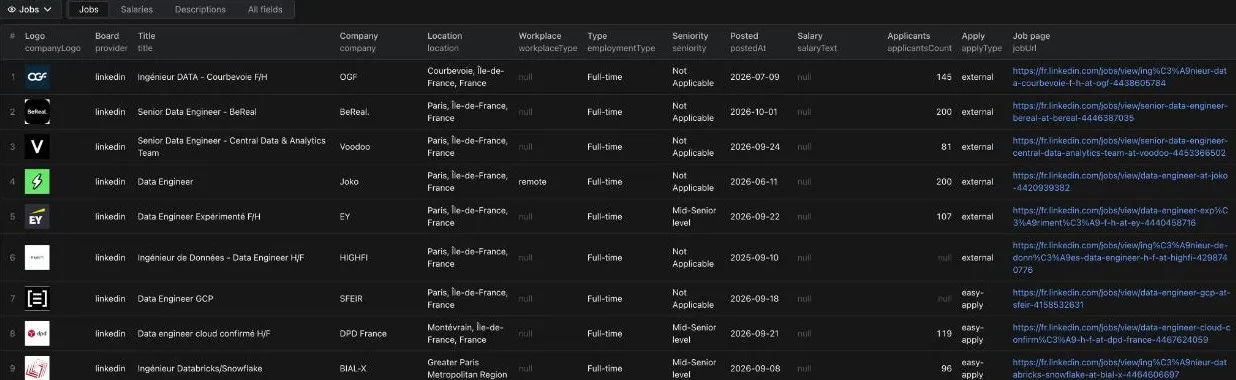
A LinkedIn row from a cloud run (data engineer, Paris, 2026-10-05; description and logo URL shortened):
An Indeed row from a cloud run (nurse, London, 2026-10-05), with a one-sided salary kept ("From £37.50 an hour": salaryMax stays null rather than guessed):
employerJobUrl is null on this job because Indeed's API linked its own job page for it. On most jobs it links the employer's: https://apply.workable.com/j/29B8D9B2C9 or https://careers.jdhealthcare.com/jobs/8551784-fertility-nurse among the nurse jobs in London of 2026-10-26.
Run summary
The run's key-value store holds a SUMMARY record with one status per board: ok, partial (fewer jobs than asked while the board shows more, with the reason), or failed, plus how many jobs each board returned, how many requests it took and how long. With startUrls, searches gives the same for each search: a URL not searched because of a filter the Actor cannot apply is there with status skipped and the reason. notes lists the URLs that are no LinkedIn or Indeed search or job page, and what else in the input changed nothing or ran in addition (keywords searched beside start URLs). A short result is never silent: a run can succeed on Apify while a board returned nothing, and the summary is where you see it.
When a board returns fewer jobs than you asked and nothing on your side stopped it (no spending limit, no filter bound), its notes start with Fewer jobs than asked and say what each step brought, for example: Fewer jobs than asked (40 of 100): LinkedIn's search ended at 40 jobs, before its 1000-result limit; the next 2 narrower date windows (past month and past 2 weeks) brought no new job, so this looks like every job LinkedIn shows logged out for this search. The run's status message, the line you see on the run in Apify Console, repeats it (or the partial reason), board by board.
Limits worth knowing before you run it
- LinkedIn does not show the employer's external apply URL to logged-out visitors: its Apply button opens a sign-in page. So on LinkedIn rows
applyUrlis the LinkedIn job page,employerJobUrlisnull, andapplyTypesays whether the job applies on the employer's site (external) or through LinkedIn (easy-apply). We checked from datacenter and residential addresses in the US and France: 0 of 4,440 cloud rows carried an external URL. The Actor never logs in to get it. - Indeed's link to the employer's own posting (
employerJobUrl) is what Indeed's API gives as the job's address when it leads off Indeed: the employer's careers site or its applicant tracking system (apply.workable.com,careers.pah.nhs.ukandpeoplebank.comamong the recorded ones) on 86 of 100 nurse jobs in London (2026-10-26), Indeed's own job page on the other 14, where it isnull. It is output as Indeed gives it and never opened.nullon rows read with Indeed's page method (the fallback when the API is unavailable), whose apply link goes through Indeed. - Indeed's attributes are one list, as Indeed gives it (
attributes): skills, education, benefits, schedule, job type and workplace labels together, in Indeed's order, each label once (8 to 45 per job on 16 recorded nurse jobs in London). They are not sorted into skills or benefits: Indeed's API does not group them, and sorting by the words would be guessing. That API has no separate benefits field, sobenefitsis empty on its rows and the benefits are inattributes. On rows read with Indeed's page method,benefitskeeps the search card's benefits andattributeslists only what the card shows (job types, shifts, remote, benefits, schedules). - LinkedIn workplace type is partial: LinkedIn publishes no remote or hybrid field to visitors, so the Actor reads it from the title, the location and explicit phrases in the description. Filled on 0 to 13% of LinkedIn rows in our runs. Indeed labels it itself (16 to 30% of rows).
- LinkedIn salary is filled when the employer publishes it: 5 to 15% of LinkedIn rows in our runs, the same share as the other LinkedIn scrapers we measured. On Indeed, 22 to 29% in Paris and 86 to 88% in London.
- Indeed is read through Apify residential proxy in the searched country: Indeed refused Apify's cloud without proxy and challenged its datacenter proxy in our tests.
proxy: autodoes this for you. It is part of what the Indeed price pays for. - Indeed's search is broad: it matches the keywords anywhere in the job, so a "data engineer" search also returns data scientists and other engineers (7 of the first 20 Indeed titles in Paris named data). That is what Indeed's own site returns. LinkedIn's titles matched on 20 of 20.
- Past 1,000 results, and searches that end early: LinkedIn shows visitors about 1,000 per search, Indeed's search stops at 1,000. The Actor then reads narrower date windows of the same search (on Indeed also other sort orders, job types and remote) and unions them by job ID: 1,812 Indeed jobs for a search Indeed counts at 1,821, and 1,299 LinkedIn cards for a London search. On broad searches both boards can also end well before 1,000 (697 LinkedIn jobs for "software engineer" in the United States while the past week alone held 238 more; 702 Indeed jobs for "nurse" in the United Kingdom with 541 more in the past week, both measured 2026-10-29), so the Actor reads the narrower searches whenever a search leaves your request short, until they stop bringing new jobs: 2 narrower searches in a row with nothing new (8 on Indeed once one of them has found more). On a small search that costs a few extra requests and no extra charge: you pay per job delivered, never per request, and a job two searches find is charged once. The summary says
partialwhen it stops short of what the board shows, and every short result says why.
How it compares with the leaders (measured)
Same queries on every Actor: "data engineer" in Paris and "nurse" in London, 100 jobs each. The leaders' figures are Apify cloud runs of 2026-10-02 (our teardown); ours are Apify cloud runs of 2026-10-05 (builds 0.1.1 and 0.1.2). Prices are the FREE-tier Store prices of 2026-10-02.
| curious_coder LinkedIn | bebity LinkedIn | valig LinkedIn | valig Indeed | borderline Indeed | misceres Indeed | This Actor | |
|---|---|---|---|---|---|---|---|
| Price per 1,000 jobs | $2.00 | $1.50 | $0.40 | $0.10 | $5.00 | $6.00 | LinkedIn $0.35 ($0.15 cards only), Indeed $0.10 ($0.05 without descriptions) |
| Both boards in one run | no | no | no | no | no | no | yes |
| Run time for 100 jobs | 71 to 87 s | 33 to 44 s | 46 to 54 s | 3 to 4 s | 18 to 23 s | 9 to 17 s | LinkedIn 23 to 36 s, Indeed 10 to 11 s |
| Salary filled, Paris / London | 6% / 14% | 10% / 12% | 6% / 14% | 20% / 58% | 55% / 80% | 22% / 90% | LinkedIn 5% / 15%, Indeed 22% / 88% |
| One-sided salary ("From £X") kept | no | yes | |||||
| Posting date | employer's | employer's | employer's | Indeed's ingestion date | none | employer's, both boards | |
| External apply URL, LinkedIn | 0% | 58 to 93% | 0% | 0%, apply type flagged instead | |||
| Applicant count, LinkedIn | yes | ||||||
| Past 1,000 results | top complaint in its issues | "hardcapped at 1000" (its reviews) | yes, by date windows | ||||
| Duplicate rows | 0 | 0 | 0 | 0 | 0 | 0 | 0 |
The external apply URL is the one LinkedIn field we do not deliver and bebity does; we have not found where it comes from on any logged-out page.
How much does it cost to scrape LinkedIn Jobs and Indeed?
Pay per event, no subscription, platform usage included. You pay per job returned:
| Event | Price |
|---|---|
| LinkedIn job with its full description and details (the default) | $0.35 per 1,000 LinkedIn jobs |
LinkedIn job, search card only (includeDescription off) | $0.15 per 1,000 LinkedIn jobs |
| Indeed job with its full description (the default) | $0.10 per 1,000 Indeed jobs |
Indeed job without description (indeedDescriptions off) | $0.05 per 1,000 Indeed jobs |
Examples:
- 1,000 LinkedIn jobs and 1,000 Indeed jobs, descriptions included: $0.45.
- The 40 jobs on this page (20 per board, with descriptions): under one cent.
- A duplicate, a job past your maximum, or a job left out by a filter (strict city, date, job type) is never charged.
- Apify's free plan includes $5 of monthly usage (apify.com/pricing), enough for about 14,000 LinkedIn jobs or 50,000 Indeed jobs with descriptions a month.
Set a maximum cost per run in the run options and the Actor stops cleanly when it is reached.
Use the Actor through the Apify API
Run it and get the jobs in one HTTP call (replace YOUR_APIFY_TOKEN, from Settings > API & Integrations in Apify Console):
Node.js, with the official apify-client:
Python, with the official apify-client:
The API tab on this page has ready-made snippets for every language and endpoint.
FAQ
Do I need a LinkedIn or Indeed account?
No. The Actor reads the public job search of both boards the way a logged-out visitor sees it. It never logs in and uses no account or cookies, which also means your own LinkedIn account is never at risk.
Does it return the full job description?
Yes, by default, on both boards: as plain text (description) and as HTML (descriptionHtml). Turn the descriptions off for a cheaper, faster list.
Which countries does it cover?
30: the United States, the United Kingdom, Canada, Australia, India, most of Europe, and more (the Country list in the input). The country picks Indeed's country site and completes the location on LinkedIn.
How many jobs can I get per search?
Up to 5,000 per board per run. Both boards stop at about 1,000 results per search, and on broad searches sometimes at about 700; whenever a search leaves your request short, the Actor reads narrower date windows of the same search (and, on Indeed, other sort orders, job types and remote) until they stop bringing new jobs. The run summary and the run's status message say why a board returned fewer jobs than you asked, and partial when the board shows more than was read.
How fast is it?
Measured on Apify, 2026-10-05 and again on 2026-10-29: 100 LinkedIn jobs with descriptions in 23 to 36 seconds (24 s on 2026-10-29) and 1,000 in about 5.5 to 6 minutes; 100 Indeed jobs in 10 to 13 seconds and 1,000 in 45 to 63 seconds, or about 100 seconds when the search ends early and the narrower searches fill the request ("nurse" in the United Kingdom, 2026-10-29). The run on this page (20 per board, both boards) took 13 seconds.
Can I get only remote jobs, or only jobs from this week?
Yes: workplaceTypes (remote, hybrid, on-site), datePosted (24 hours to a month), jobTypes and experienceLevels. Filtered-out jobs are not charged.
LinkedIn's logged-out search ignores job type and experience level, so the Actor reads each LinkedIn job's own page to check them. A narrow filter can take dozens of job pages per match (entry level among developers in Berlin: 15 of 515 pages matched on 2026-10-13), so the LinkedIn search stops once the job pages that do not match reach 10, or take about 5 seconds, per job asked (at least 300 pages and 2 minutes), shows its progress in the run's status message, and reports partial in the run summary with how many pages it checked and what to do. Indeed applies job types in its own search. It cannot filter by experience level, so with experienceLevels set the Indeed search is skipped: no Indeed rows and no Indeed charge, rather than rows of every level billed as if they matched.
Can I paste LinkedIn or Indeed search URLs?
Yes, in startUrls: run the search on LinkedIn or Indeed in your browser, set its filters there, and paste the URL from the address bar. Each URL is its own search, up to maxResultsPerBoard jobs, and a job two searches find is returned and charged once. A LinkedIn job URL (linkedin.com/jobs/view/...) reads that one job: with its description by default (charged as a LinkedIn job with description), or its card fields only with includeDescription off (charged as a card). On a search URL, currentJobId (the job LinkedIn's page had open) is ignored and the search is read: paste linkedin.com/jobs/view/<id> to read that job alone.
What each board keeps from the URL (measured 2026-10-26 against the same search without the parameter):
- LinkedIn:
keywords,location(as LinkedIn wrote it),geoId,distance(in whole miles), the date windowf_TPR(anyr<seconds>, sor3600is the past hour), Easy Apply onlyf_AL=true, under 10 applicantsf_EA=trueand one companyf_Care sent to LinkedIn as written. Each one changed the result set in our test: all 5 Easy Apply job pages we read apply on LinkedIn (applyTypeeasy-apply); a company filter returned that company's jobs only (10 of 10 Thales cards, against 2 of 10 without it); for under 10 applicants, LinkedIn shows logged-out visitors no count below 25, so we could see the results change but not count the applicants. Experience levelf_Eand job typef_JTare ignored by LinkedIn's logged-out search, so they are checked on each job's page, like the input fields. Remotef_WTis ignored too, and LinkedIn shows visitors no workplace field, so a job counts as remote or hybrid when its title or location says so, as for the input field.sortByis ignored by LinkedIn too: jobs come in its relevance order. - Indeed:
q,l,fromage,radius,jt, and thescattributes for job type, remote and hybrid. An experience level (explvl) cannot be applied, so that URL is not searched; neither is one with anotherscattribute (education, schedule, benefits...), which we have not measured on the Indeed search the Actor reads. - Not searched, with the reason in the summary: a URL with a filter the Actor cannot apply, or with a filter value it does not read (
fromage=last,distance=far, several companies in onef_C), since its rows would ignore that filter and you would pay for them. Single Indeed job pages are not read either (Indeed answers them with its sign-in page).
The Date posted, Job type, Remote and Experience level fields apply to the keywords search, not to your URLs.
Can I use it with Make, Zapier, n8n or Google Sheets?
Yes, through Apify's integrations: the dataset works with every Apify integration, and a webhook can fire when a run finishes. Save your input as a task and schedule it for a daily job alert.
Can AI agents use it through MCP?
Yes. Apify's hosted MCP server exposes Store Actors to MCP clients such as Claude or Cursor: https://mcp.apify.com?tools=agenttoolworks/linkedin-indeed-jobs-scraper.
Is it legal to scrape LinkedIn Jobs and Indeed?
The Actor reads only job listings that LinkedIn and Indeed show to any visitor without logging in: jobs and the companies that post them. It never logs in, uses no account and collects no data about job seekers or recruiters' profiles. Both boards' terms restrict automated collection in some form; how you use the data is your responsibility.
Something is missing or broken?
Open an issue in the Issues tab: we read every one.
Other Actors by AgentToolWorks
- Shopify & WooCommerce Scraper and Price Tracker: every product of any Shopify or WooCommerce store, with variants, barcodes and stock, plus price and stock change tracking.
- AliExpress Scraper: Products, Prices and Shipping per Country: AliExpress products by keyword, category or product URL, with every SKU's price and stock and the shipping cost to each country you list, plus a price tracker mode that returns only the changes.
- Facebook Ad Library Scraper: ads from the Meta, Google and Microsoft ad libraries in one table.
- Job Scraper for Greenhouse, Lever, Ashby & Workable (JobsRadar): open roles from the public boards of seven applicant tracking systems, deduplicated into one list.
- Google Maps Scraper: every place inside a city's real boundary, with phone, website, rating, review count, opening hours and emails.
- Google Trends Scraper: interest over time, by region and related queries for terms and comparisons, plus each country's Trending now list.
Learn more
- What this LinkedIn Jobs and Indeed scraper returns, board by board
- How to scrape LinkedIn Jobs and Indeed without an account: what each board shows logged out
- JobsRadar: employers' own job boards for AI agents, as an MCP server
Built by AgentToolWorks. Not affiliated with LinkedIn or Indeed.


