

Google Trends Scraper: Interest, Related and Trending Now
Pricing
from $1.20 / 1,000 search terms
Google Trends Scraper: Interest, Related and Trending Now
Google Trends scraper: one row per search term or comparison, with interest over time, interest by region and related queries, plus the full Trending now list per country. Platform usage included, terms with no data free, up to 2,000 terms per run.
Pricing
from $1.20 / 1,000 search terms
Rating
0.0
(0)
Developer

AgentToolWorks
Maintained by CommunityActor stats
0
Bookmarked
1
Total users
1
Monthly active users
8 days ago
Last modified
Share
What is this Google Trends scraper?
This Google Trends scraper, usable as a Google Trends API, returns one row per search term or comparison of up to 5 terms, with interest over time, interest by region and related queries (top and rising), as on the explore page. Or a country's whole Trending now list, one row per search.
In short
- What it costs: $1.50 per 1,000 search terms ($1.35 on Scale, $1.20 on Business), platform usage included, plus $0.003 per run. A comparison counts as one term; a term with no data is free.
- Same unit as the leader: apify/google-trends-scraper (2,760 users in 30 days) also returns one row per term, with the timeline, regions and related queries inside (its README). Its row costs less from Starter up, and you pay its platform usage on top, at a 4 GB default.
| Per 1,000 search terms, Store API 2026-10-26 | Free | Starter (Bronze) | Scale (Silver) | Business (Gold) | Platinum | Diamond |
|---|---|---|---|---|---|---|
| This Actor, usage included | $1.50 | $1.50 | $1.35 | $1.20 | $1.20 | $1.20 |
| apify/google-trends-scraper | $3.00 + usage | $1.00 + usage | $0.50 + usage | $0.30 + usage | $0.15 + usage | $0.10 + usage |
Its usage closes the gap once 1,000 terms take more than about 38 minutes on Starter (worked out below).
- Why this one: 55.2% of the leader's 25,495 runs in the last 30 days succeeded; 5,859 were aborted and 5,094 timed out (Store API, 2026-10-26; its Store page shows 96.8% because it leaves those out). This Actor: 13 of 14 public runs in the same 30 days (Store API, 2026-10-26), and 0 failed queries in 1,297 in our cloud tests (2026-10-05).
Up to 2,000 terms per run. No Google account, API key or cookies.
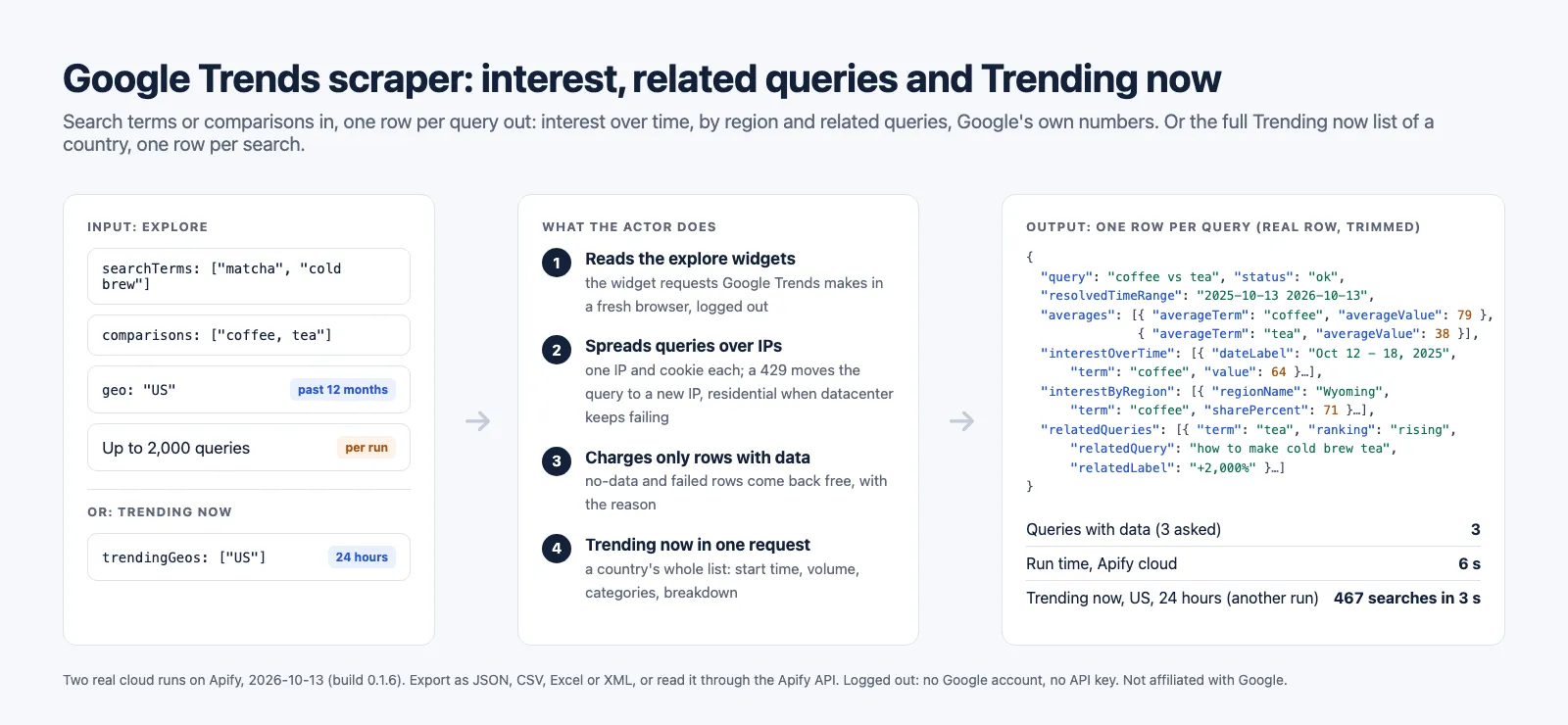
What data can you extract from Google Trends?
Two modes, one row type each.
Explore (one row per search term or comparison):
| Section | What you get |
|---|---|
| Interest over time | One point per date (or hour, or minute) and term, 0 to 100 relative to the chart's highest point, with Google's own date label and a flag on the last, still partial, point |
| Averages | Google's average per term over the period, for comparisons |
| Interest by region | One point per region and term: countries, regions or states, US metro areas (DMA) or cities with coordinates, plus each term's share in a comparison |
| Related queries | Top (0 to 100) and rising (+2,000% or Breakout) for each term, with a link to each one on Google Trends |
| Related topics | Opt-in, see the limits: Google sends logged-out visitors an empty list for most queries |
| Context | The time range Google resolved (2025-10-13 2026-10-13), the bucket it chose (WEEK), category, search type, a link to the same chart on trends.google.com, and a status (ok, partial, no_data, failed, or invalid for an input line that could not be read) with notes |
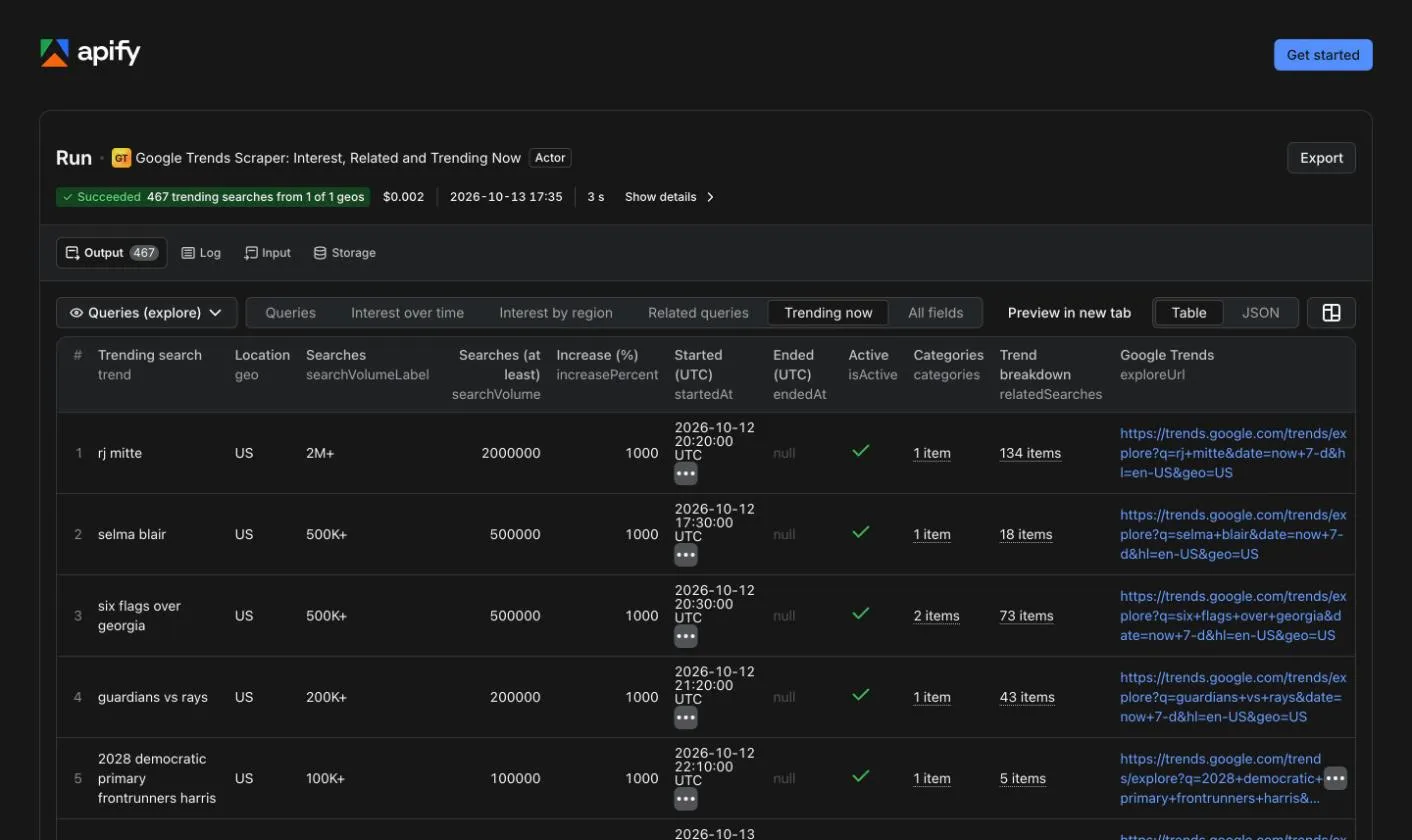
Trending now (one row per trending search): the search, country or region, Google's volume bucket (2M+) and its lower bound as a number, increase in percent, when it started trending and when it stopped (or null while active), active flag, categories, the searches Google groups under it (its trend breakdown), and a link to it on Google Trends.
Every key is on every row, null or an empty list when Google gives nothing, so a CSV export always has the same columns.
What can you use Google Trends data for?
- Keyword and content research: rising queries around a topic, before they show up in keyword tools.
- Product and market research: compare brands, products or categories on one 0 to 100 scale, by state or metro.
- Seasonality: five years of weekly interest, or every month since 2004, for each term of a list.
- News and social monitoring: what is trending in a country right now, refreshed on a schedule.
- Data for AI agents and pipelines: one predictable JSON row per query, in long format (one element per date and term), the same shape for one term or five.
How to scrape Google Trends
- Click Try for free (or Start) on this page and sign in to Apify.
- Keep What to read on Explore search terms. Type one search term per line, or a comparison of 2 to 5 terms separated by commas.
- Pick the Location (empty for worldwide,
US,US-CA), the Time range and, if you want, a category or a search type (web, images, news, YouTube, Shopping). - Click Start. When the run finishes, open the Output tab and pick the Queries, Interest over time, Interest by region or Related queries view, then export as JSON, CSV, Excel or XML, or read it through the API.
- For Trending now, set What to read to Trending now, list the countries, and open the Trending now view.
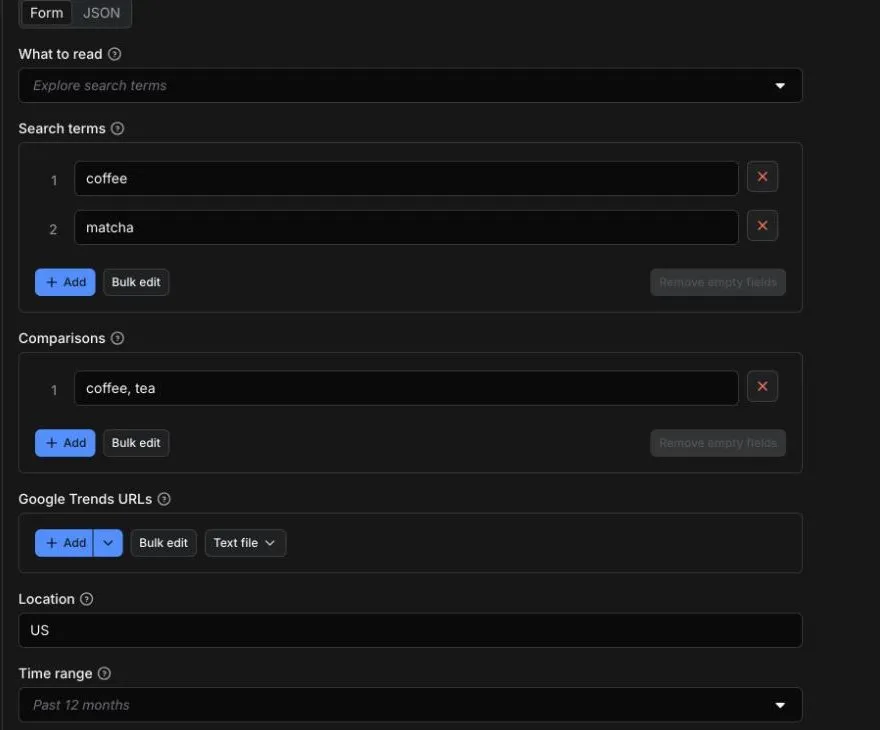
Input
| Field | What it does |
|---|---|
mode | explore (default) or trendingNow. |
searchTerms | One term per line, each read on its own. A topic ID such as /m/02vqfm works too. |
comparisons | 2 to 5 terms per line, separated by commas, compared on one scale as on the Google Trends page. |
startUrls | Google Trends explore URLs (https://trends.google.com/trends/explore?q=...). Each keeps its own terms, location, dates, category and search type. |
geo | Empty for worldwide, a country as a code (US, FR) or an English name (India, United Kingdom) in any case, a region (US-CA) or a US metro (US-CA-807). England, Scotland, Wales and Northern Ireland by name are Google's own regions (GB-ENG, GB-SCT, GB-WLS, GB-NIR), not the whole UK. |
timeRange, customTimeRange | Past hour to "2004 to present", as on the page, or exact dates (2024-01-01 2024-12-31). |
category, property | A Google Trends category ID (71 is Food & Drink) and the search type: web, images, news, YouTube or Shopping. |
sections | Interest over time, interest by region and related queries by default; related topics opt-in. Same price whatever you pick. |
regionResolution, includeLowVolumeRegions | Countries, regions, US metros or cities, and Google's own low-volume checkbox. |
language, timezoneOffsetMinutes | Language of Google's labels, and the time zone of hourly and daily buckets. |
trendingGeos, trendingHours, trendingCategories, trendingActiveOnly, maxTrendingPerGeo | Trending now mode: countries (codes or English names) or regions, past 4, 24 or 48 hours or 7 days, Google's 19 categories, the "Active" filter, and an optional cap per country. A line that is not a country or region is left out, and the run says so in its log and SUMMARY. |
proxy | auto (default): Apify datacenter IPs, one per parallel session, with residential IPs taking over a session that keeps failing. none is one IP, paced, and suited to a few queries only. |
A mistake in one line of searchTerms, comparisons or startUrls (a comparison with one term, a URL from another site, a date Google does not offer, a location that does not exist) does not stop the run: that line comes back as a free row with status invalid and the reason in notes, and every other line is read. A wrong geo, customTimeRange, category, property or timezoneOffsetMinutes, or a regionResolution that does not fit the location, is checked the same way, with each line: every line that uses it is an invalid row (an explore URL uses its own location, dates, category and search type when it carries them). The run fails only when no line is left to read, or when mode, a preset timeRange, sections, regionResolution or proxy is not one of the values listed, which is checked before any request.
Up to 2,000 explore queries per run.
Example: two terms and a comparison in the United States, past 12 months (the run on this page).
Example: five years of weekly interest for a list of products, worldwide, YouTube search.
Example: interest by US metro area for one term.
Example: Trending now in three countries over the past 24 hours, sports only.
Output
The dataset holds one row per query (explore) or one row per trending search (Trending now), with five ready-made views in Apify Console and in the API:
- Queries: query, status, location, time range, the period and bucket Google resolved, averages and notes.
- Interest over time: one row per date and term, ready for a chart or a spreadsheet.
- Interest by region: one row per region and term, with the share of each term in a comparison.
- Related queries: one row per related query, top and rising.
- Trending now: one row per trending search (Trending now runs).
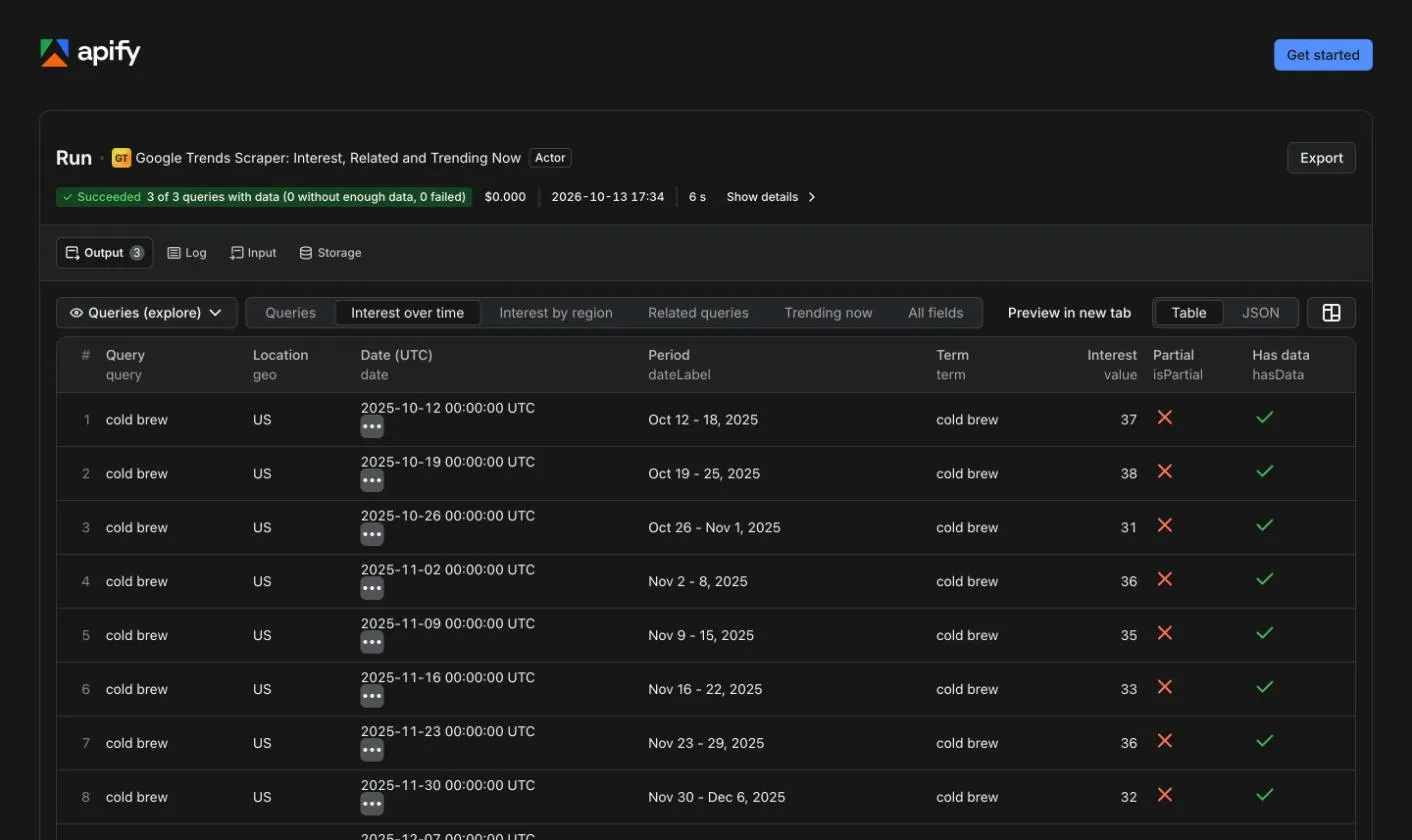
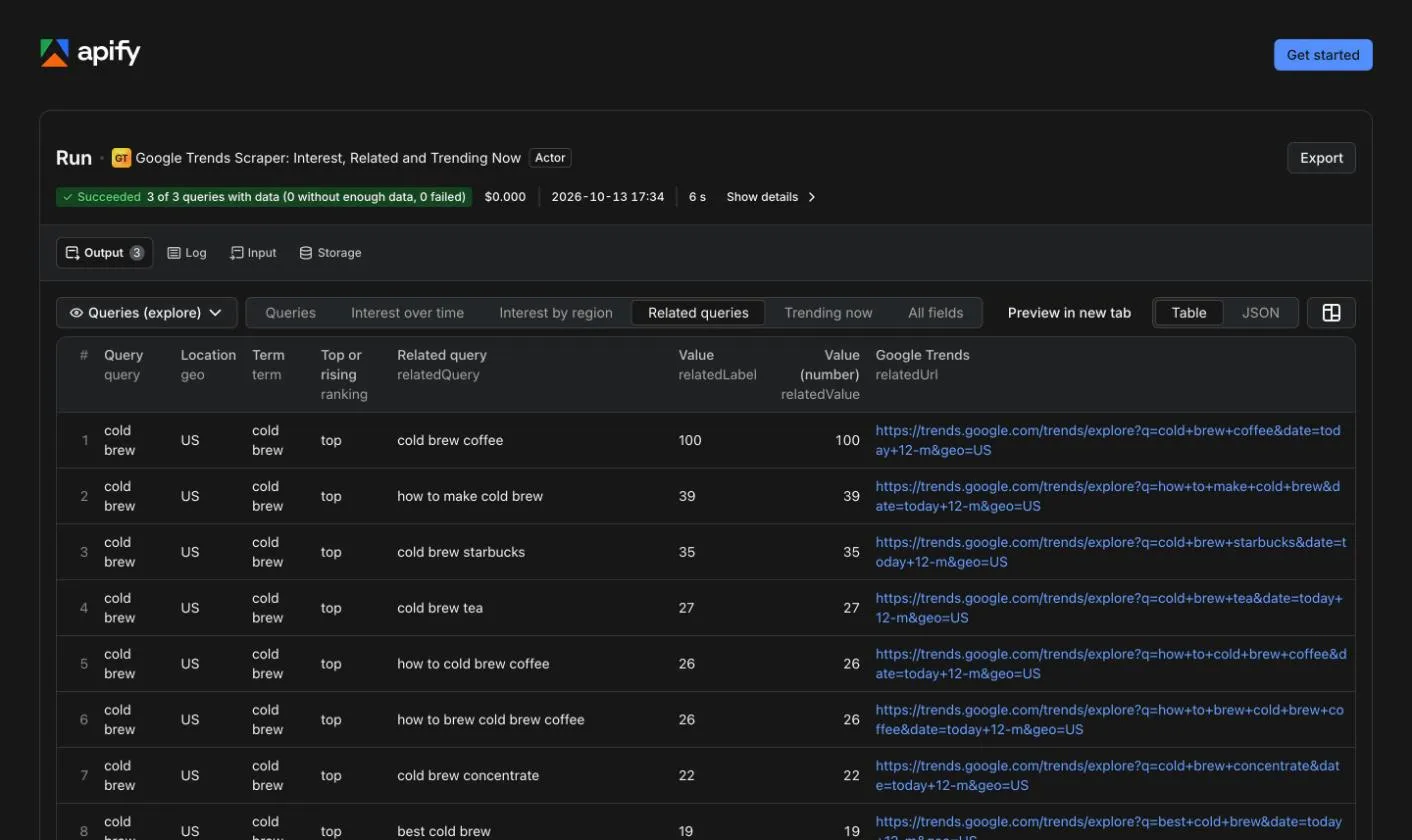
A row from the cloud run on this page (coffee, tea, United States, past 12 months, 2026-10-13; series shortened to their first and last points):
A Trending now row from the other run on this page (United States, past 24 hours, 467 searches; breakdown shortened):
Run summary
The run's key-value store holds a SUMMARY record: one report per query (status, reason, requests, HTTP 429 answers, seconds), the counts of ok, partial, no_data, failed and invalid, how many rows were charged and how many were free, duplicates skipped, requests sent through residential IPs, and bytes read. An explore line that could not be read is both a queries report and a dataset row with status invalid, each with the reason; inputNotes lists the trendingGeos lines left out. A missing result is never silent.
Limits worth knowing before you run it
- Related topics are empty for logged-out visitors. Google sent an empty related-topics list to every logged-out client we tried (plain HTTP, headless and headful Chrome, Apify datacenter and residential IPs), while a signed-in browser showed topics for the same query. The Actor never signs in, so related topics are off by default; turned on, they are returned only when Google sends them, and a note says so. Related queries, interest over time and by region matched what a signed-in browser showed.
- City-level regions can be thinner than a signed-in browser sees. When Google has too little data, the row says so.
- Google Trends numbers are samples. The same query read twice can move by a point:
coffee, teagave averages of 78 and 37 at 14:15 UTC and 79 and 38 at 14:34 on 2026-10-13 (a signed-in browser showed 78 and 37), and the order of rising queries changed between two loads in the same signed-in browser. Values are relative (0 to 100), never search volumes. - Rising queries are Google's, noise included. For
coffeein the US over 12 months, Google listedhome workout routinesandsports scores todayamong the top rising queries, in our logged-out answers and in a signed-in browser alike. The Actor returns what Google lists. - Speed depends on Google's rate limit. Google answers HTTP 429 per IP. The same three queries took 126 s (27 of 79 requests answered 429, residential fallback used) and then 6 s (no 429) nineteen minutes apart on 2026-10-13. Every query still ends with a row and a status.
- No proxy means one IP, paced at one request per second: Google refuses a single IP for over an hour after about 140 quick requests. Keep
autofor more than a few queries. - Trending now needs a country: Google offers no worldwide list.
- Five terms per comparison, as on Google Trends.
How it compares with the most used Google Trends scrapers
The four Google Trends Actors with the most users in the last 30 days, read on 2026-10-26 from the public Store API (https://api.apify.com/v2/acts/<user>~<name>: the current price entry, users, 30-day run statistics, default memory) and from their READMEs (https://apify.com/<user>/<name>.md). We ran none of them. Our figures are our own Apify cloud runs.
The same job on each: 1,000 search terms, a year of weekly interest each. How many rows one term makes is taken from each Actor's own README; prices are its current Store prices.
| Actor (users in 30 days) | Rows per search term | Free plan | Starter plan (Bronze) | Business plan (Gold) | Platform usage |
|---|---|---|---|---|---|
| This Actor | 1, regions and related queries inside | $1.50 + $0.003 start | $1.50 + $0.003 start | $1.20 + $0.003 start | included |
| apify/google-trends-scraper (2,760) | 1, regions, related queries and topics inside | $3.00 | $1.00 | $0.30 | billed to you, 4 GB default |
| data_xplorer/google-trends-fast-scraper (860) | 1, regions inside, no related queries; one keyword per run, so 1,000 runs | $27.00 ($0.025 start and $0.002 for its one result, per run) | $26.00 | $25.50 | included |
| agenscrape/google-trends-scraper (324) | 1, regions and related queries inside | $25.10 in one run: $25.00 + $0.10 per run start at its 4 GB default | same | same | included |
| khadinakbar/google-trends-scraper (303) | 52 for the weekly timeline alone, about 50 more for US states, one per related query | $260 for the timelines alone, one term per run (free-plan runs stop at 60 rows) | $260 for the timelines alone ($0.005 per row) | $260 for the timelines alone | billed to you |
What the leader's usage adds. Apify bills compute at $0.20 per compute unit (1 GB of memory for one hour) on the Free and Starter plans, $0.16 on Scale and $0.13 on Business (apify.com/pricing, read 2026-10-26). At the leader's 4 GB default, one hour of run time is $0.80 of compute on Free and Starter, $0.64 on Scale and $0.52 on Business. For 1,000 terms its price is below ours by $0.503 on Starter, $0.853 on Scale and $0.903 on Business (our $0.003 start included). So, on compute alone, 1,000 terms cost more there than here once they take longer than about 38 minutes on Starter, 80 on Scale or 104 on Business; on the Free plan it costs more before any usage. It does not publish its run time and we did not run it, so we cannot tell you which side of that line it falls on.
| apify/google-trends-scraper | data_xplorer/google-trends-fast-scraper | This Actor | |
|---|---|---|---|
| Runs in the last 30 days that succeeded (Store API, 2026-10-26) | 55.2%: 14,075 of 25,495 (5,859 aborted, 5,094 timed out, 467 failed) | 99.3%: 53,172 of 53,551 | 13 of 14; in our own cloud tests, 109 of 110 runs and 0 failed queries in 1,297 (2026-10-05) |
| A run that returns nothing | its platform usage is billed to you all the same | its $0.025 start fee | its $0.003 start fee; no_data, failed and invalid rows are free |
| Comparison of terms | yes, with the isMultiple checkbox | no | 2 to 5 terms per line, in their own field |
| Related queries | yes | no (related terms on Trending now items only) | top and rising, per term |
| Related topics | yes | no | opt-in; Google sends a logged-out visitor none (see the limits) |
| Interest by region | country, subregion and city; metro through a URL | inside one country | country, region, US metro, city, with shares in a comparison |
| Search type (web, images, news, YouTube, Shopping) | not an input | no | yes |
| Batch | list, public Google Sheet, URLs | one keyword per run | up to 2,000 queries, URLs, duplicates dropped |
| Trending now | no | yes, 50 items by default and up to 1,000, in one row per run | yes, the whole list, one row per search |
| Default memory and timeout | 4 GB, 7 days | 256 MB, 1 hour | 256 MB, 1 hour |
| Time per query | not published | not published | a one-query run: median 12 s, worst 183 s in our 33-input pass; 100 queries in 74 to 159 s |
The leader's Store page shows "96.8% runs succeeded": that figure counts succeeded runs against failed ones only (14,075 against 467) and leaves out the 10,953 aborted or timed out. Counted the same way, this Actor shows 92.9% (13 against 1).
Where we lose: from Starter up, the leader's price per term is below ours before its usage is added; it has run since 2020 for 16,940 users and reads a public Google Sheet; and it lists related topics, which Google does not send a logged-out visitor (see the limits). data_xplorer's success rate is measured over 53,551 runs, ours over 14 public runs and 110 of our own.
How much does it cost to scrape Google Trends?
Pay per event, no subscription, platform usage included:
| Event | Price |
|---|---|
Explore query with data (status ok or partial): a search term or a comparison of up to 5 terms, every section included | $1.50 per 1,000 queries ($0.0015 per query; $1.35 on Scale, $1.20 on Business and above, Apify's Store discounts) |
| Trending now row | $0.02 per 1,000 Trending now rows ($0.00002 per row) |
| Run start | $0.003 per run (Apify's start event, one per GB of memory; the Actor runs at 256 MB) |
Examples:
- One keyword: $0.0045 ($0.003 to start, $0.0015 for the query).
- The prefilled run (two terms and a comparison): $0.0075.
- 1,000 keywords in one run: $1.503.
- The full Trending now list of the United States (467 searches on 2026-10-13): about $0.012.
- A query with no data, a failed query, an input line that could not be read, a duplicate or anything past your spending limit is never charged.
- Apify's free plan includes $5 of monthly usage (apify.com/pricing), enough for about 3,300 queries a month in batches.
Set a maximum cost per run in the run options and the Actor stops cleanly when it is reached.
Use the Actor through the Apify API
Run it and get the rows in one HTTP call (replace YOUR_APIFY_TOKEN, from Settings > API & Integrations in Apify Console):
To get the flat table of one view instead of the nested rows, read the run's dataset with view=timeline (or regions, related, trending): https://api.apify.com/v2/datasets/DATASET_ID/items?view=timeline&format=csv.
Node.js, with the official apify-client:
Python, with the official apify-client:
The API tab on this page has ready-made snippets for every language and endpoint.
FAQ
Is there an official Google Trends API?
Google announced its own Trends API as an alpha with access by application (developers.google.com/search/apis/trends). This Actor needs no application: it reads the same requests the public Google Trends page makes, logged out, and returns them as JSON rows.
Do I need a Google account or an API key?
No. No account, no API key, no cookie from a signed-in browser. The only cookie is the one Google gives any visitor on a first page view.
Why are the values between 0 and 100?
That is what Google Trends publishes: interest relative to the highest point of the chart (or the region with the most interest), not a count of searches. Terms compared in one row share the same scale; terms read in separate rows do not.
Can I compare more than five terms?
Google compares up to five terms on one scale. For more, put a common reference term in each comparison (coffee, tea, matcha, cold brew, espresso, then coffee, chai, ...) and scale with it.
How fast is it?
Measured on Apify: a one-query run took 12 s in the median and 183 s at worst (a five-term comparison under Google's rate limit); 100 queries took 74 to 159 s, 200 queries 329 to 516 s; a full Trending now list takes a few seconds. Google's rate limit decides most of it: the same three queries took 6 s or 126 s nineteen minutes apart.
Can I schedule it, or use it with Make, Zapier, n8n or Google Sheets?
Yes, through Apify's scheduler and integrations: save your input as a task, schedule it, and send the dataset wherever you need it, or fire a webhook when a run finishes.
Can AI agents use it through MCP?
Yes. Apify's hosted MCP server exposes Store Actors to MCP clients such as Claude or Cursor: https://mcp.apify.com?tools=agenttoolworks/google-trends-scraper.
Is it legal to scrape Google Trends?
The Actor reads public, aggregated and anonymized search interest that Google Trends shows any visitor, without logging in, on endpoints Google's robots.txt does not disallow (it disallows only the explore page itself, which the Actor never requests). No personal data is read. How you use the data is your responsibility.
Something is missing or broken?
Open an issue in the Issues tab: we read every one.
If this Actor was useful to you, please leave a review on its Reviews tab.
Other Actors by AgentToolWorks
- Shopify & WooCommerce Scraper and Price Tracker: every product of any Shopify or WooCommerce store, with variants, barcodes and stock, plus price and stock change tracking.
- AliExpress Scraper: Products, Prices and Shipping per Country: AliExpress products by keyword, category or product URL, with every SKU's price and stock and the shipping cost to each country you list, plus a price tracker mode that returns only the changes.
- Facebook Ad Library Scraper: ads from the Meta, Google and Microsoft ad libraries in one table.
- LinkedIn Jobs Scraper and Indeed Scraper: public job listings of both boards in one row format.
- Job Scraper for Greenhouse, Lever, Ashby & Workable (JobsRadar): open roles from the public boards of seven applicant tracking systems, deduplicated into one list.
- Google Maps Scraper: every place inside a city's real boundary, with phone, website, rating, review count, opening hours and emails.
Learn more
- What this Google Trends scraper returns, and how it compares
- How to scrape Google Trends: the explore widgets, the Trending now request, the 429 wall, and what we measured
Built by AgentToolWorks. Not affiliated with Google.


