

Google Maps Scraper and Email Extractor for Leads
Pricing
from $1.20 / 1,000 places
Google Maps Scraper and Email Extractor for Leads
Google Maps scraper and email extractor for leads: every place inside a city's real boundary, with phone, website, rating, review count, opening hours and, optionally, emails and social profiles from each website. $1.50 per 1,000 places on Free and Starter plans, emails and filters included.
Pricing
from $1.20 / 1,000 places
Rating
0.0
(0)
Developer

AgentToolWorks
Maintained by CommunityActor stats
0
Bookmarked
7
Total users
4
Monthly active users
8 days ago
Last modified
Categories
Share
What is this Google Maps scraper and email extractor?
This Google Maps scraper turns a search such as dentist in Lyon, France into one row for every place Google Maps lists inside that city's real boundary, plus the emails and social profiles on each place's own website when you switch them on.
- What you get: name, category, address, coordinates, phone, website, rating, review count, the week's opening hours and Google's place ID. No Google account or API key.
- What it costs: $1.50 per 1,000 places on Apify's Free and Starter plans ($1.20 on Business), emails and filters included. Places outside your area and repeats are dropped before the charge.
- Why this one: the same 1,000 places with hours, review count and emails cost about $5.50 on the Free plan with compass/crawler-google-places, the most used Google Maps scraper (up to $6.00: its emails are charged per place with a website, three in four in our runs; Store prices read 2026-10-26). Measured in our cloud runs: 1,000 places in 230 to 346 s, 0 duplicates in 6,000 rows.
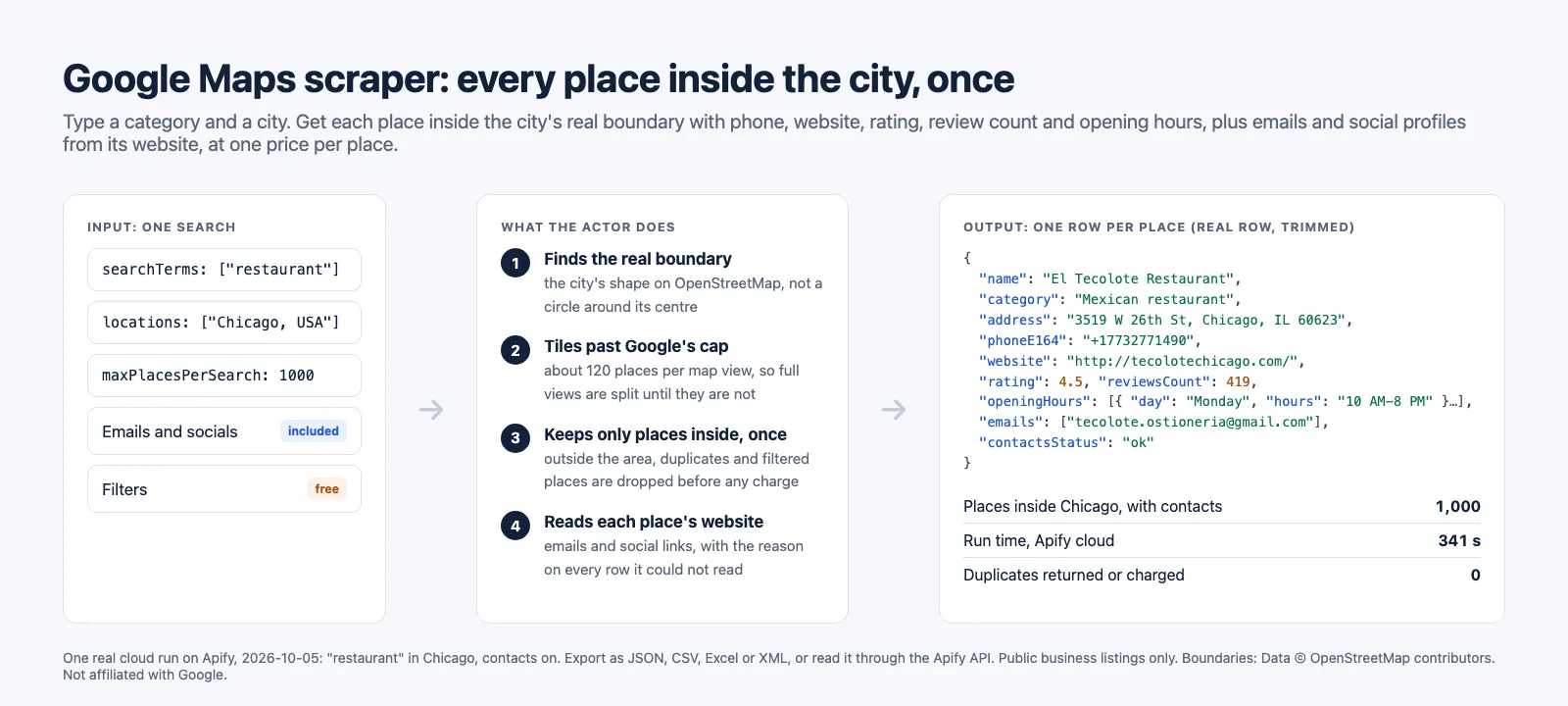
What data can you extract from Google Maps?
One row per place. Where Google Maps shows nothing, the field is null (or an empty list), never guessed.
| Place | Contact | Context |
|---|---|---|
| Name, primary category, all categories | Phone as displayed and in E.164 (+17732771490) | Rating (1 to 5) and review count |
| Full address, street, neighborhood, city, postcode, state, country code | Website | Opening hours for each day of the week, and today's status ("Closed · Opens 10 AM") |
| Latitude and longitude, time zone | Emails found on the website (opt-in) | Permanently or temporarily closed |
| Place ID, CID, Knowledge Graph ID, Google Maps URL | Facebook, Instagram, LinkedIn, X, YouTube, TikTok, Pinterest links from the website (opt-in) | Google's short description, where it has one |
| The search term and the area that found it | Whether the website was read (contactsStatus) and why not (contactsError) | Price range, only where Google shows one (rare, see the limits) |
Measured fill on three 1,000-place cloud runs (Lyon restaurants, Berlin dentists, Chicago restaurants): phone 88% to 97%, website 73% to 78%, review count 87% to 96%, opening hours for the full week 82% to 92%; name, category, address, coordinates and IDs 100%.
What can you use Google Maps data for?
- Lead generation: every dentist, gym, restaurant or contractor in a city, with phone, website and the emails on their site.
- Local market research: how many competitors in an area, how they are rated, how many reviews they have, when they open.
- Sales territories and field teams: places with coordinates, inside the exact city or a polygon you draw.
- Directories and local SEO: names, categories, addresses and hours, refreshed on a schedule.
- Data for AI agents and pipelines: one predictable JSON row per place.
How to scrape Google Maps
- Click Try for free (or Start) on this page and sign in to Apify.
- Type one or more Search terms (
dentist) and one or more Locations (Lyon, France). Every term is searched in every location. - Set Max places per search. You pay per place returned, so start small to look at the data.
- Turn on Emails and social profiles from websites if you want contacts (same price per place).
- Click Start. When the run finishes, open the Output tab, pick the Places, Contacts or Location view, and export as JSON, CSV, Excel or XML, or read it through the API.
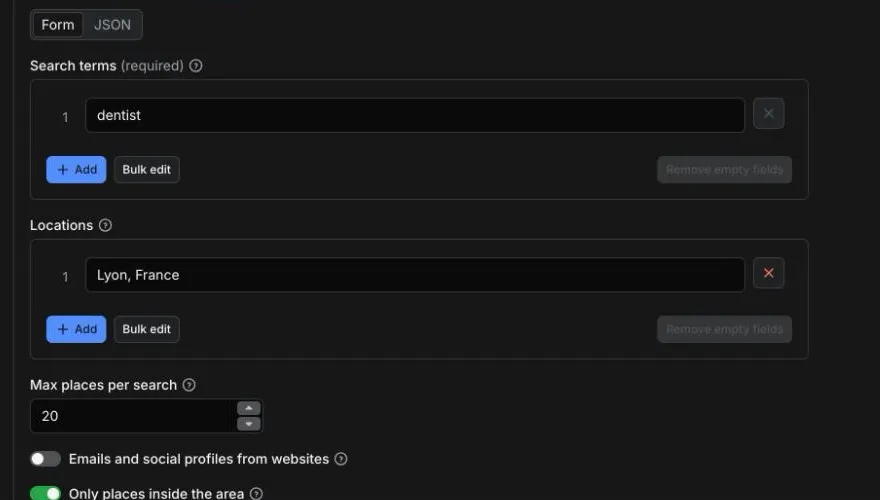
Input
| Field | What it does |
|---|---|
searchTerms | What to look for, as you would type it in Google Maps: a category or a keyword. Required. Up to 50 per run. |
locations | Cities, regions or postcodes, one per line. Each is resolved to its real boundary on OpenStreetMap. City plus country works best. Up to 50 per run. |
maxPlacesPerSearch | Stop after this many places for each term in each location (default 100, up to 50,000). |
scrapeContacts | Read each place's website for emails and social profile links. Off by default. Same price per place. |
strictBoundary | On by default: places outside the location's boundary (Google pads results with places nearby) are dropped before they are charged. |
language | Language of categories, hours and status lines (en, fr, de, pt-br...). |
skipClosedPlaces, minRating, requireWebsite, requirePhone, categoryFilterWords | Free filters: a place they drop is never charged. categoryFilterWords keeps a place only if one of its categories contains one of the words (dent for a dentist search). |
customGeolocation | An exact area instead of, or in addition to, the locations: GeoJSON Polygon, MultiPolygon, Feature, FeatureCollection, or a Point with radiusKm. |
proxy | residential (default, Apify residential proxy with US exits): Google answers in full. datacenter: Google caps some datacenter IPs at about 20 places per view, so dense areas come back short (the run says partial). none: the run's own address. |
Example: dentists in Lyon, 20 places (the prefilled input).
Example: 1,000 restaurants in Chicago with emails and social profiles (the run on this page).
Example: plumbers and electricians in three cities, rated 4 or more, with a website.
Example: cafes within 2 km of a point (GeoJSON is [longitude, latitude]).
Output
The dataset holds one row per place, with three ready-made views in Apify Console and in the API:
- Places: name, category, address, phone, website, rating, review count, today's status, search term and Maps link.
- Contacts: phone, website, emails, social profiles, and whether the website was read (
ok,no-website,failedwith the reason). - Location: address parts, coordinates, place ID, CID and the area searched.
No duplicates: a place is returned and charged once per run, across every search term, every location and every overlapping map view.
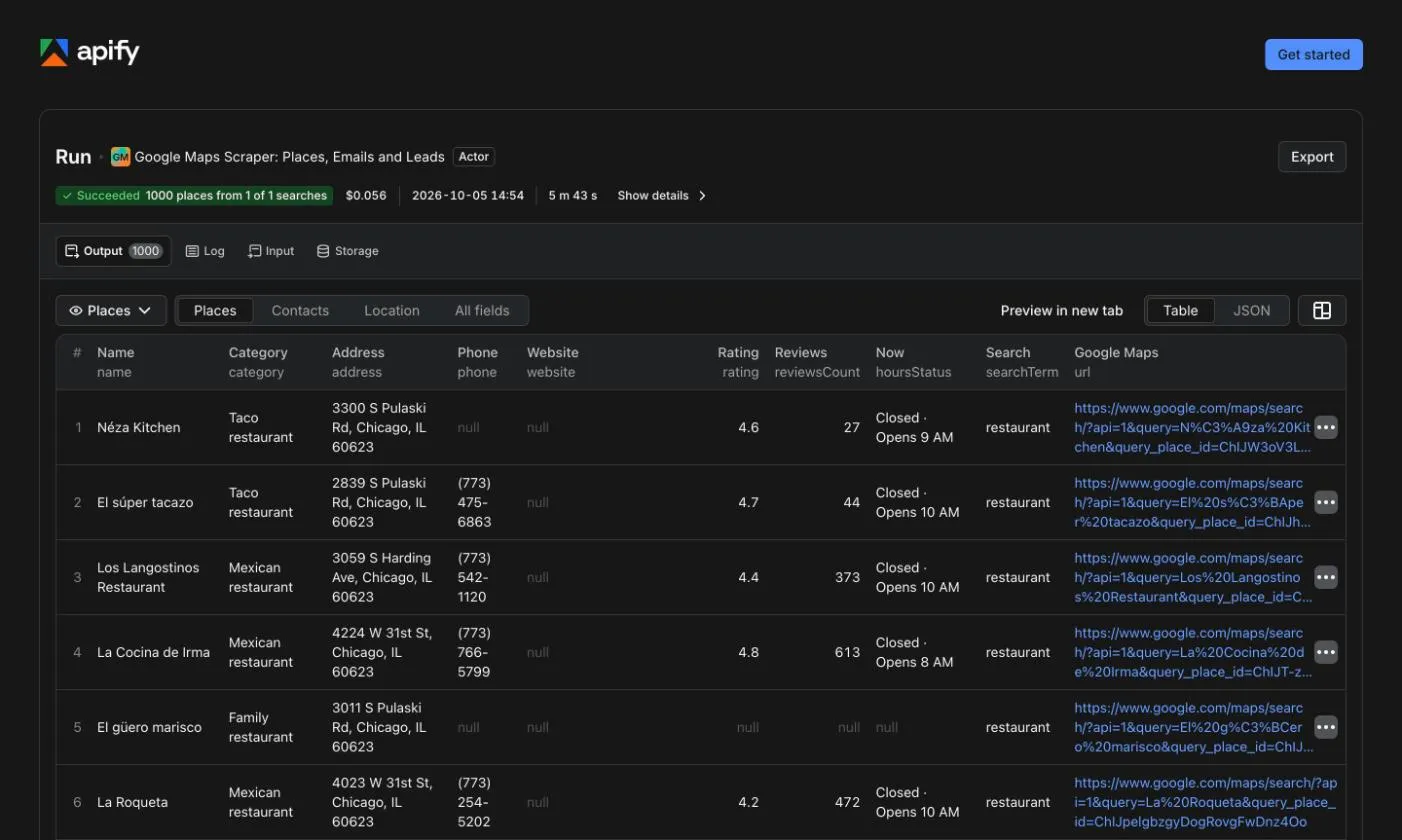
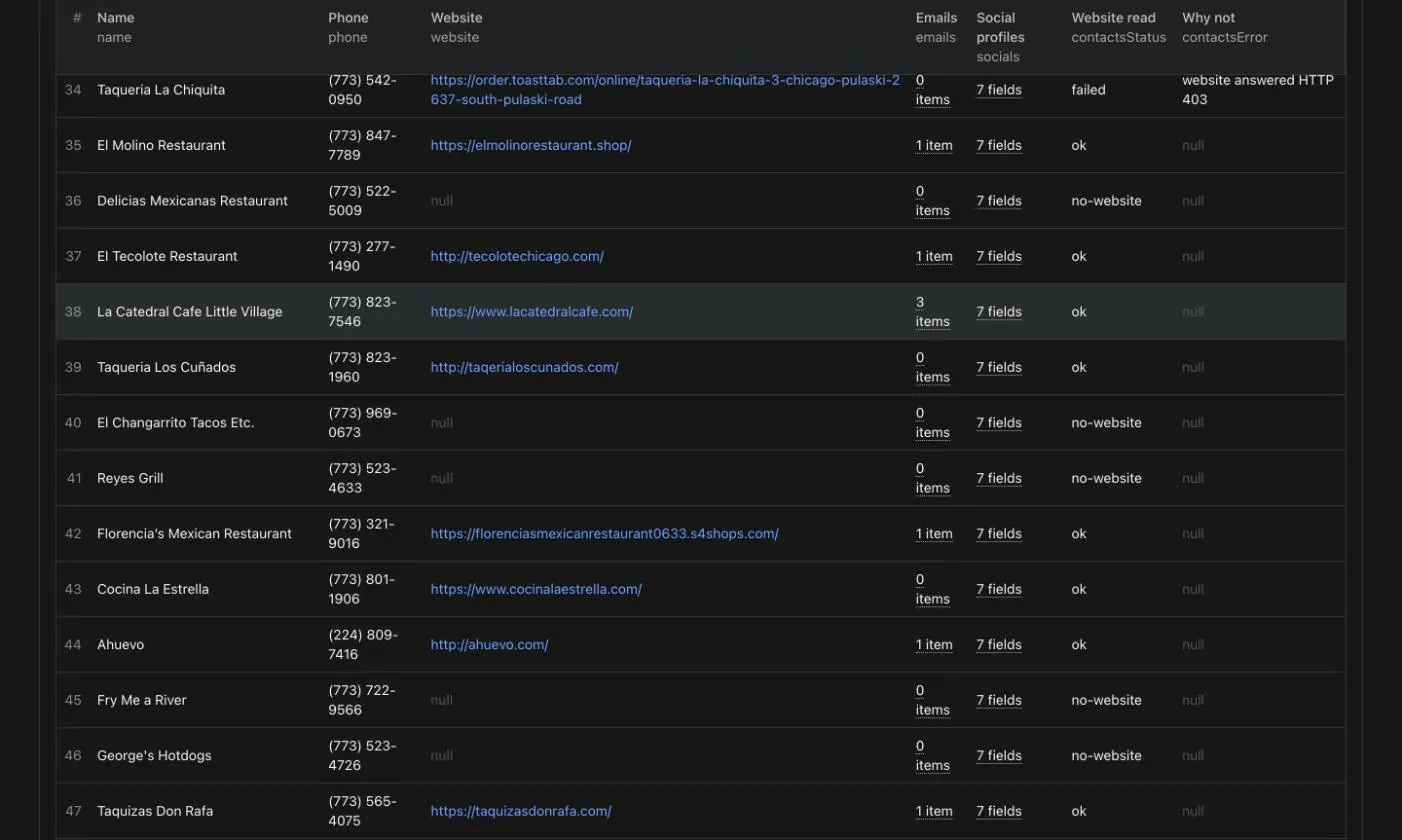
A row from the cloud run on this page (restaurant, Chicago, contacts on, 2026-10-05; hours shortened to two days):
Run summary
The run's key-value store holds a SUMMARY record with one status per search (term and location): ok, partial (fewer places than asked while the area may hold more, with the reason), or failed. It also says which area each location resolved to, how many places fell outside it, how many duplicates were skipped, how many places each filter dropped, how many websites were read, and how many places carried a price range. A short result is never silent. When the run stopped early, the top-level status is partial with a reason (run timeout or spending limit); after a run timeout, runTimeout lists the searches completed, the ones cut part way (with the places each delivered and the places it found but could not deliver, never charged) and the ones not started.
Limits worth knowing before you run it
- Price range is almost never there. Google's search answer carries it for very few places: 4 of 4,658 rows across our cloud runs. The field stays
nullrather than guessed, andSUMMARYsays how many places had it. - No reviews, images, popular times, Q&A or menus in this version. The row has the rating and the review count, not the reviews themselves.
- Residential proxy by default. Google answers some datacenter IPs with a capped list of about 20 places per view. On datacenter, a dense city came back with 196 to 635 places of 1,000 in our tests; residential returned 1,000. If you pick datacenter and Google caps it, the search is reported
partialwith the reason. - A Google challenge stops the search. If Google answers with its unusual-traffic page or a consent page, the search is reported
failedwith the reason. The Actor never solves a challenge and never logs in. - Emails depend on the website. In our Chicago restaurant run, 80.5% of websites were read and 27.2% carried an email; Berlin dentists reached 77% to 78%. Some sites refuse automated visits (84 HTTP 403 of 740 in Chicago, hotel and restaurant chains among them): the row says so in
contactsError. A website read gives up after 80 seconds in all, every page and redirect counted: a homepage not loaded by then is a failed read, with that reason incontactsError. Emails are the ones printed on the site, own domain first; a site can also print its web agency's or ordering platform's address, which is listed after. - Google's answer has a ceiling per view (about 120 to 170 places). The Actor splits the area into smaller views to go past it; when a view is still full at the smallest split, the search says
partial. - The run stops itself before its timeout. Two minutes before the run's timeout (less on a run shorter than four minutes), the Actor starts no new search, map tile or website read, lets the work in flight finish or drops it, and ends as succeeded with the places already in the dataset. Only those places are charged.
SUMMARYthen sayspartialwith the reasonrun timeoutand lists what was not covered; for many locations or search terms, raise the run timeout in the run options.
How it compares with the leader
Read on 2026-10-26 from the public Apify Store API (each Actor's current pricingInfos entry and its stats) and each Actor's README and input schema; we did not run either Actor. compass/crawler-google-places is the most used Google Maps scraper on the Store: 44,778 users in 30 days, where the next one in a "google maps" Store search, compass's own reviews scraper, has 8,609. lukaskrivka/google-maps-with-contact-details, titled Google Maps Email Extractor, has 2,473; its contacts add-on is on by default and its input has no switch to turn it off. Opening hours and review count are in both Actors' base row: neither is among the fields their input schemas list as needing the details add-on. Apify plans and price tiers: Free, Starter (Bronze), Scale (Silver), Business (Gold), per apify.com/pricing.
Price per 1,000 places with opening hours, review count, emails and social links (the place event plus the contacts add-on). compass charges its contacts add-on only for places that have a website ("We won't charge you any additional fees for places that don't have websites", Apify's help article on its pricing, read 2026-10-26); the table assumes every place has one:
| Apify plan | compass/crawler-google-places | lukaskrivka/google-maps-with-contact-details | This Actor |
|---|---|---|---|
| Free | $6.00 ($4.00 + $2.00) | $7.50 ($5.00 + $2.50) | $1.50 |
| Starter | $5.00 ($3.00 + $2.00) | $6.00 ($4.00 + $2.00) | $1.50 |
| Scale | $3.50 ($2.00 + $1.50) | $4.50 ($3.00 + $1.50) | $1.35 |
| Business | $2.55 ($1.50 + $1.05) | $3.10 ($2.10 + $1.00) | $1.20 |
| Each filter (minimum rating, website, category, closed places), Free and Starter | $1.00 more per 1,000 places | $1.50 on Free, $1.00 on Starter | free |
Without emails, compass charges $4.00 on Free and $3.00 on Starter; this Actor charges the same $1.50 with or without them. The Store card's "from" price is the Business price on all three cards: compass's "from $1.50" is its place without emails, ours "from $1.20" includes them.
| compass/crawler-google-places | This Actor | |
|---|---|---|
| Opening hours and review count | in the base row | in every row (week of hours on 82% to 92%, review count on 87% to 96%) |
| Locations per run | one location query; more through drawn polygons or its separate Orchestrator Actor (its README) | up to 50 locations times 50 search terms, plus drawn areas |
| Input by Google Maps URL or place ID | yes, charged with the details add-on | no |
| Reviews, images, popular times, Q&A, business leads | add-ons | not in this version |
| Price range | in its output | rare (4 of 4,658 rows), never estimated |
| Run time for 1,000 places | no figure in its README | 230 to 346 s |
| Public runs in the last 30 days | 3,919,119 of 4,074,995 SUCCEEDED (96.2%) | 21 of 25 SUCCEEDED, 4 TIMED-OUT; since build 0.1.20 (2026-10-26) a run stops itself before its timeout and ends SUCCEEDED with the places delivered |
How much does it cost to scrape Google Maps?
Pay per event, no subscription, platform usage included. You pay per place returned:
| Event | Price |
|---|---|
| Place, with opening hours, review count and (when asked) emails and social profiles | $1.50 per 1,000 places ($0.0015 per place) |
Examples:
- 1,000 restaurants in Chicago with contacts: $1.50.
- The prefilled run (20 dentists in Lyon): $0.03.
- A place outside the area, a duplicate, a place dropped by a filter or anything past your maximum is never charged.
- Apify's free plan includes $5 of monthly usage (apify.com/pricing), enough for about 3,300 places a month.
Set a maximum cost per run in the run options and the Actor stops cleanly when it is reached.
Use the Actor through the Apify API
Run it and get the places in one HTTP call (replace YOUR_APIFY_TOKEN, from Settings > API & Integrations in Apify Console):
Node.js, with the official apify-client:
Python, with the official apify-client:
The API tab on this page has ready-made snippets for every language and endpoint.
FAQ
Do I need a Google account or a Google Maps API key?
No. The Actor reads what Google Maps shows a logged-out visitor. It uses no account, no cookies and no API key.
Can I get more than 120 results from Google Maps?
Yes. Google stops at about 120 to 170 places per map view; the Actor cuts the area into smaller views and splits every view that comes back full. 1,000 restaurants in Lyon, Berlin dentists and Chicago restaurants each came back in full in our cloud runs.
Does it return emails?
Yes, with Emails and social profiles from websites on, at no extra cost: it reads each place's homepage and, if no email is there, up to three contact, imprint or about pages the site links. Every row says whether the website was read and, if not, why.
How fast is it?
Measured on Apify, 2026-10-05: 1,000 places in 230 to 346 seconds, contacts included; 100 dentists in Berlin with contacts in 55 seconds.
Can I search several cities in one run?
Yes: up to 50 locations and 50 search terms per run. Each term is searched in each location, and a place found twice is returned and charged once.
Can I search an exact area?
Yes: draw it as GeoJSON in customGeolocation (a polygon, or a point with a radius in km).
Can I use it with Make, Zapier, n8n or Google Sheets?
Yes, through Apify's integrations: the dataset works with every Apify integration, and a webhook can fire when a run finishes. Save your input as a task and schedule it.
Can AI agents use it through MCP?
Yes. Apify's hosted MCP server exposes Store Actors to MCP clients such as Claude or Cursor: https://mcp.apify.com?tools=agenttoolworks/google-maps-places-scraper.
Is it legal to scrape Google Maps?
The Actor reads public business listings that Google Maps shows any visitor, on paths Google's robots.txt allows, without logging in and without solving any challenge. Google's Maps terms restrict bulk downloads and building business-listing databases, and how you use the data is your responsibility. Contact data is personal data when it names a person (a sole trader's email, for example): you are the controller of what you do with it. In the EU, the GDPR requires you to inform people whose data you collected this way (Article 14) at the latest at your first contact, and to respect objections.
Something is missing or broken?
Open an issue in the Issues tab: we read every one.
If this Actor was useful to you, please leave a review on its Reviews tab.
Other Actors by AgentToolWorks
- Shopify & WooCommerce Scraper and Price Tracker: every product of any Shopify or WooCommerce store, with variants, barcodes and stock, plus price and stock change tracking.
- AliExpress Scraper: Products, Prices and Shipping per Country: AliExpress products by keyword, category or product URL, with every SKU's price and stock and the shipping cost to each country you list, plus a price tracker mode that returns only the changes.
- Facebook Ad Library Scraper: ads from the Meta, Google and Microsoft ad libraries in one table.
- LinkedIn Jobs Scraper and Indeed Scraper: public job listings of both boards in one row format.
- Job Scraper for Greenhouse, Lever, Ashby & Workable (JobsRadar): open roles from the public boards of seven applicant tracking systems, deduplicated into one list.
- Google Trends Scraper: interest over time, by region and related queries for terms and comparisons, plus each country's Trending now list.
Learn more
- What this Google Maps scraper returns, and how it compares
- How to scrape Google Maps: the request Google's own page makes, its cap, and what we measured
Boundaries: Data © OpenStreetMap contributors. Built by AgentToolWorks. Not affiliated with Google.


