
Facebook Ad Library Scraper: Meta, Google and Bing Ads
Pricing
from $0.40 / 1,000 ads
Facebook Ad Library Scraper: Meta, Google and Bing Ads
Facebook Ad Library scraper plus Google Ads Transparency Center and Microsoft (Bing) Ad Library in one run, $0.50 per 1,000 ads: search a brand, keyword or domain and get every platform's ads in one table, with advertiser, payer, dates, EU reach, targeting and creative links.
Pricing
from $0.40 / 1,000 ads
Rating
0.0
(0)
Developer

AgentToolWorks
Maintained by CommunityActor stats
0
Bookmarked
18
Total users
7
Monthly active users
8 days ago
Last modified
Categories
Share
What is this Facebook Ad Library scraper?
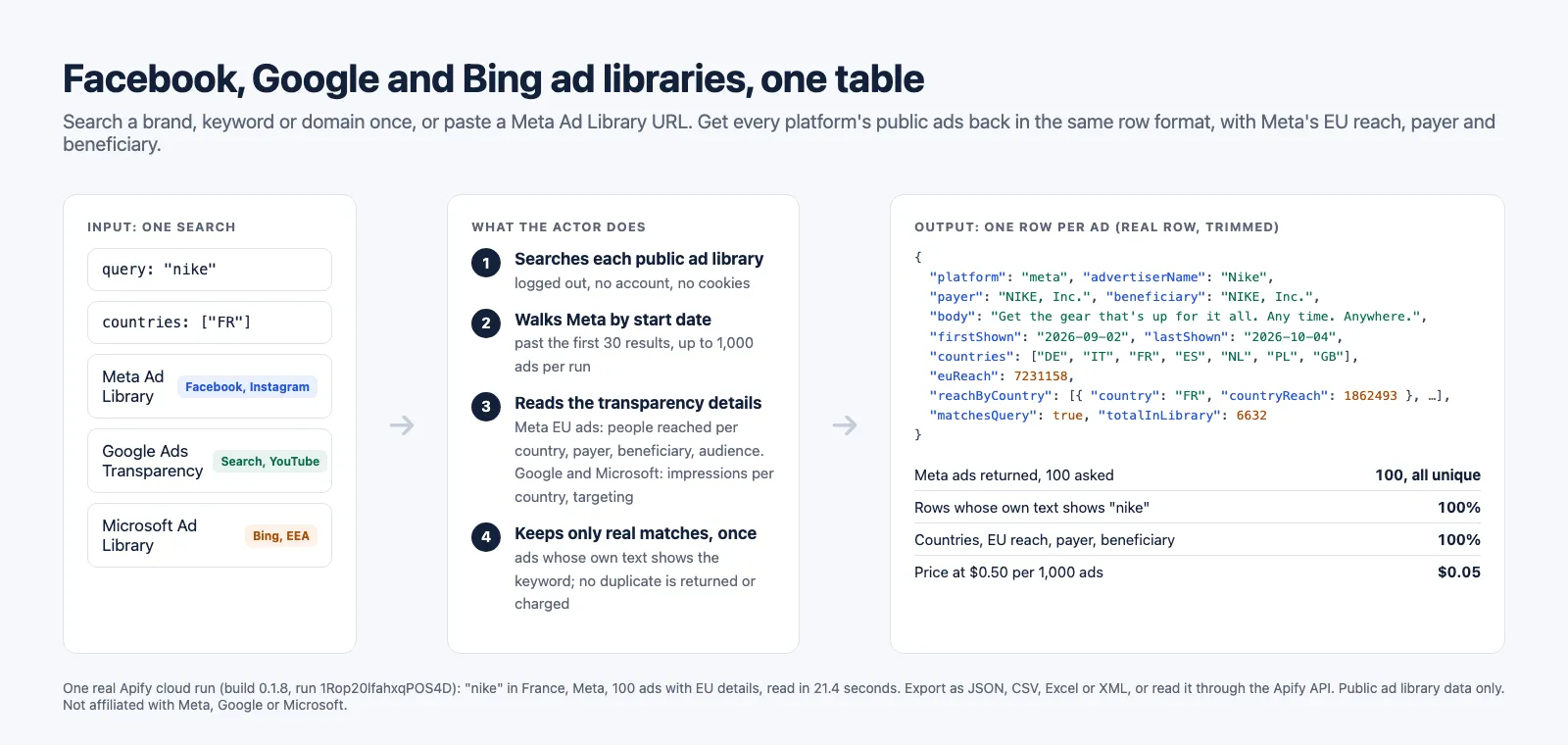
This Actor is a Facebook Ad Library scraper (Meta Ad Library: Facebook, Instagram, Messenger, Threads) that also reads the Google Ads Transparency Center and the Microsoft (Bing) Ad Library in the same run. Search a brand, a keyword or an advertiser's domain once, or paste the Meta Ad Library URL or Facebook Page you already have, and get every platform's public ads back in one table, one row format: advertiser, ad text, creative images and videos, landing page, first and last day shown, reach and impressions, targeting, and a link to the ad in its library. For Meta ads shown in the EU, each row also carries Meta's EU transparency data: people reached per country, payer, beneficiary and audience.
In short
- What you get: Meta (Facebook, Instagram, Messenger, Threads), Google Ads Transparency Center and Microsoft (Bing) Ad Library ads from one search, one row per ad in the same format, with creatives, landing page, dates and, for Meta ads shown in the EU, reach per country, payer and beneficiary.
- What it costs: $0.50 per 1,000 ads on any platform ($0.40 on Apify Business plans), charged per ad delivered. A repeated ad, or one left out by
strictMatch, is never charged. - Why this one (same search, measured 2026-10-01 and 2026-10-05, prices read again 2026-10-13): Meta ads at $0.50 per 1,000 where curious_coder charges $0.75 and apify/facebook-ads-scraper $5.80; country, EU reach, payer and beneficiary filled on 100 of 100 ads where both leaders filled none; and Google and Microsoft ads in the same run, which neither offers.
Use it as a competitor ad spy tool without an account: no Facebook login, no Meta API token, no identity check.
What data can you extract from the ad libraries?
One row per ad, the same fields on every platform. Where a platform does not publish a field, it is null, never guessed.
| Ad data | Reach and targeting | Search and advertiser data |
|---|---|---|
| Ad ID and link to the ad in its library | Meta, EU ads: people reached in the EU (euReach) and per country | Advertiser name and ID |
| Title and body text (Meta, Microsoft; Google text ads where Google renders the text) | Impressions range (Google, Microsoft; Meta where it shows one) | totalInLibrary: how many ads the library reports for your search (Meta, Microsoft) |
| Every card of a carousel or dynamic ad (Meta) | Countries, with countriesBasis saying what they mean | matchesQuery: whether the row's own text shows your keyword |
| Creative image URLs, video URLs, preview URL | Reach per country: people reached (Meta), impressions with first and last day (Google), share of impressions (Microsoft) | Optional advertiser records (maxAdvertisers): the brand's footprint per platform |
| Landing page and display URL | Targeting: audience locations, ages and gender (Meta, EU ads); criteria used and excluded (Google, Microsoft) | |
| Call to action (Meta) | Payer and beneficiary (Meta, EU ads; Microsoft where named) | |
| Format, first shown, last shown, active today (Meta) | ||
| Publisher platforms: Facebook, Instagram, Audience Network, Messenger, Threads, Bing; on Google, the platforms of its breakdown of impressions (Search, YouTube, Maps, Play, Shopping, for ads shown in the EU) |
The fields follow what the EU's Digital Services Act requires very large platforms to publish in their ad repositories (Regulation (EU) 2022/2065, Article 39): the content, who it was presented for, who paid, the period, the targeting parameters and the recipients reached.
Which ad libraries does it cover?
| Platform | What it reads | Countries |
|---|---|---|
| Meta Ad Library (Facebook, Instagram, Messenger, Threads, Audience Network) | The public Ad Library search page, logged out, in a real browser, and each ad's "See ad details" panel (EU transparency) | Every country the Ad Library offers; one search per country |
| Google Ads Transparency Center (Search, YouTube, Display, Shopping) | The Transparency Center's public pages, plus each ad's details. For Google alone, with platform and format filters, advertiser IDs, Transparency Center URLs and an only-new-ads monitor, see our Google Ads Transparency Scraper | Every region; reach figures for the EEA |
| Microsoft Ad Library (Bing) | Microsoft's official public Ad Library API, no key | EEA only: Microsoft publishes only ads served in the European Economic Area |
What can you use ad library data for?
- Competitor ad research: every ad a competitor runs on Facebook, Instagram, Google and Bing, in one export.
- Creative inspiration and swipe files: ad copy, images and videos, sorted by start date.
- Market and campaign monitoring: schedule a search and see which ads started or stopped since last week.
- Agency reporting: how many ads a brand runs, where, since when, with which landing pages.
- Compliance and research: who paid, which targeting, reach per EU country, for DSA and political ad research.
- Data for AI agents and pipelines: one predictable JSON row whatever the platform.
How to scrape the Facebook Ad Library
- Click Try for free (or Start) on this page and sign in to Apify.
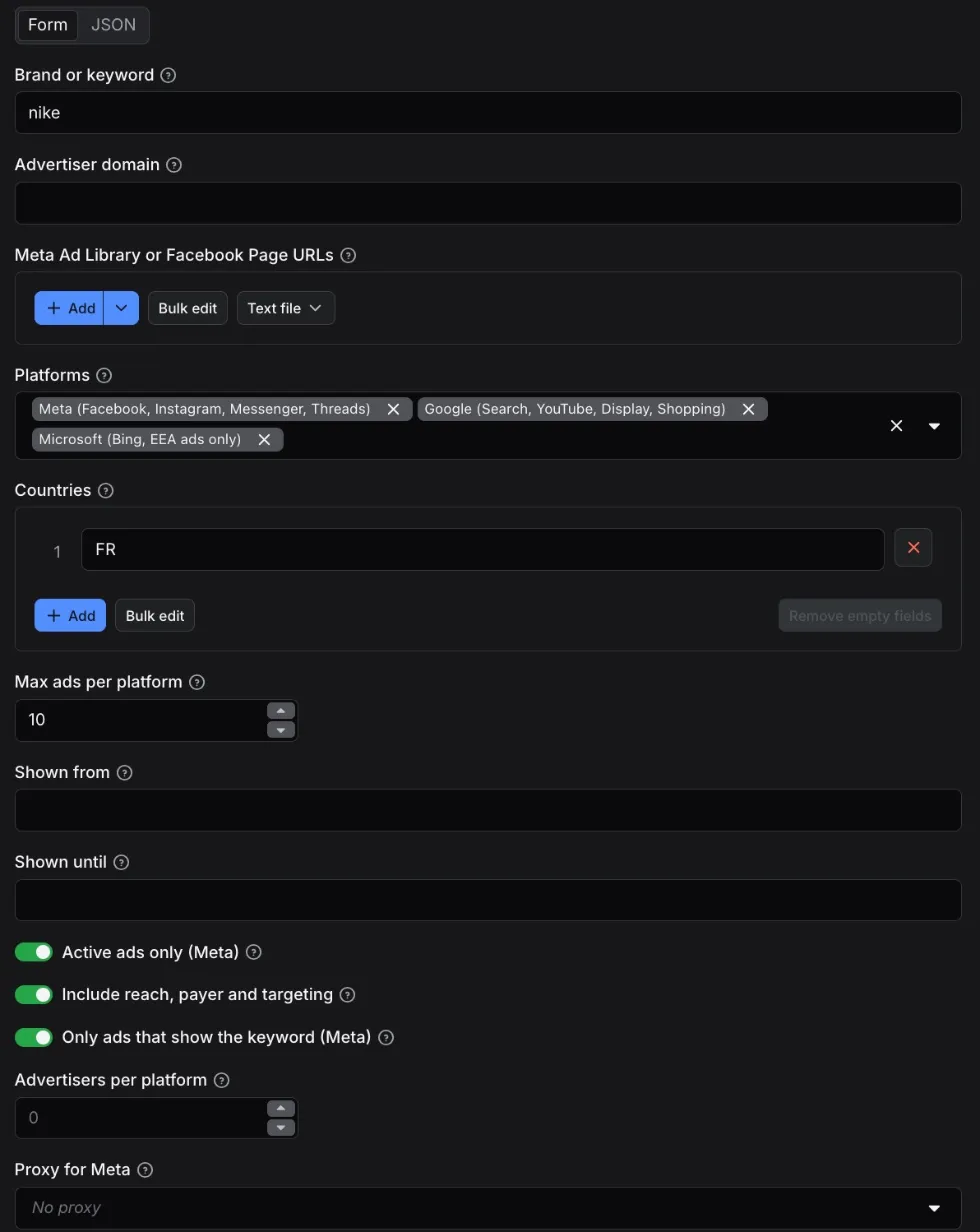
- Type a Brand or keyword (
nike) or an Advertiser domain (nike.com), or paste Meta Ad Library or Facebook Page URLs. - Pick the Platforms (all three by default) and the Countries (
FR,DE,US... or English names such asFrance; empty means all). - Set Max ads per platform. You pay per ad returned, so start small to look at the data.
- Click Start. When the run finishes, open the Output tab, pick the Ads or Reach by country (DSA) view, and export as JSON, CSV, Excel or XML, or read it through the API.
Input
| Field | What it does |
|---|---|
query | Brand or keyword. Meta and Microsoft search the ad text and the advertiser for it (when Microsoft's keyword search does not answer, Microsoft returns the ads of the advertisers named like it, and says so). Google has no text search: the Actor finds the Google advertisers whose name contains the word (nike finds "Nike, Inc." and "NIKE SRL") and returns their ads. A brand that advertises under its company name (temu) is read through its own domain (temu.com) when Google suggests it, and the run summary says so. |
domain | An advertiser's website, for example nike.com. Google returns the ads that point to it; Meta and Microsoft use it as the keyword when query is empty. |
startUrls | Meta Ad Library search URLs (the keyword, country, active status, ad type, media type and dates set on Meta's page are kept), a page's ads URL (view_all_page_id=), Facebook Page URLs (facebook.com/nike, profile.php?id=) or page IDs. Each is its own Meta search, up to maxResultsPerPlatform ads. A page alias is resolved to its page ID through the library itself. Up to 20 per run. |
platforms | meta, google, microsoft. All three by default. |
countries | Two-letter codes (IN) or English names (India, United Kingdom), in any case. Empty means all countries. An entry that is not a country is left out and the run says so in its log and SUMMARY; the run fails only when no country is left, rather than search all countries instead. Meta runs one search per country; Microsoft is skipped when no requested country is in the EEA. |
maxResultsPerPlatform | Stop after this many ads on each platform (default 100, up to 1,000). |
startDate, endDate | YYYY-MM-DD. Only ads shown in that window, on every platform. |
activeOnly | Meta only: ads running today (default). Turn off to include stopped ads. |
includeDetails | One more request per ad for the transparency details (default on). Meta: EU reach per country, payer, beneficiary, audience. Google: impressions per country, dates, targeting, and the text of text ads where Google renders it. Microsoft: impressions per country, dates, targeting, payer. Off gives a fast list of creatives. |
strictMatch | Meta: keep only ads whose own text (advertiser, title, body, cards, link) shows the keyword (default on). Meta also matches words inside images and videos; those ads are left out before they are returned or charged, and the Actor reads further to fill your request. Off keeps them, flagged matchesQuery: false. |
maxAdvertisers | Optional advertiser records per platform (default 0: off). Stored in the key-value store, not the ads dataset. |
proxy | Meta only: none (default, the cheapest, read 1,000 Meta ads in our tests), datacenter or residential (Apify Proxy). |
Example: every Nike ad shown in France on the three platforms, 20 per platform (60 ads in 22.5 seconds on Apify, 2026-10-02).
Example: Meta only, 1,000 ads, one country.
Example: paste what you already have in Meta's Ad Library, and a brand's Facebook Page.
Measured locally on 2026-10-05: 26 ads for the first URL (Meta reported 39; the 13 left out by strictMatch were other advertisers' "non slip" yoga mat and watch ads) and 30 for the Nike page (resolved to page 15087023444), 20 seconds in all. Google and Microsoft are reported as skipped, since URLs are Meta searches.
Output
The dataset holds ads only, one row per ad, with two ready-made views in Apify Console and in the API:
- Ads: one row per ad, all platforms in one table.
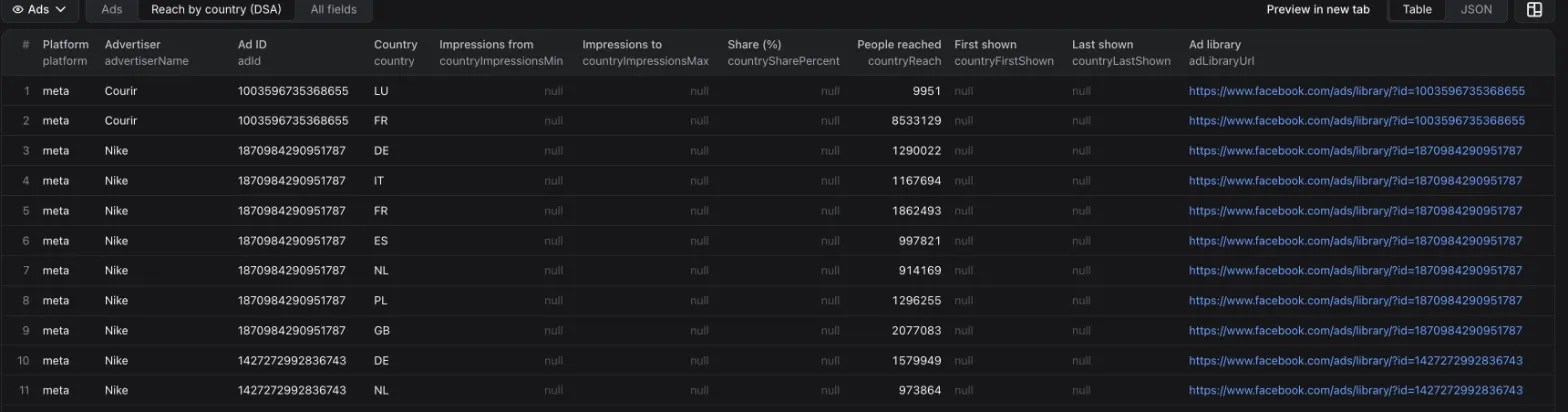
- Reach by country (DSA): one row per ad and country, with the people reached (Meta, EU and UK), impressions (Google, Microsoft) or share of impressions (Microsoft) each platform publishes, with details on.
No duplicates: an ad is returned and charged once per run, keyed by platform and ad ID across pages, countries and searches (Microsoft's list repeats ads across pages; the run summary says how many repeats were skipped).
Countries: countriesBasis says what countries means. reach means the platform reports delivery in those countries (Google, Microsoft, and Meta when its EU or UK transparency data was read). search_filter means Meta listed the ad when its library was filtered on that country, which is how Meta defines "shown in" a country, with no per-country figures.
Advertiser records (opt-in with maxAdvertisers) are in the run's key-value store, record ADVERTISERS, so they never mix with ad rows in a view.
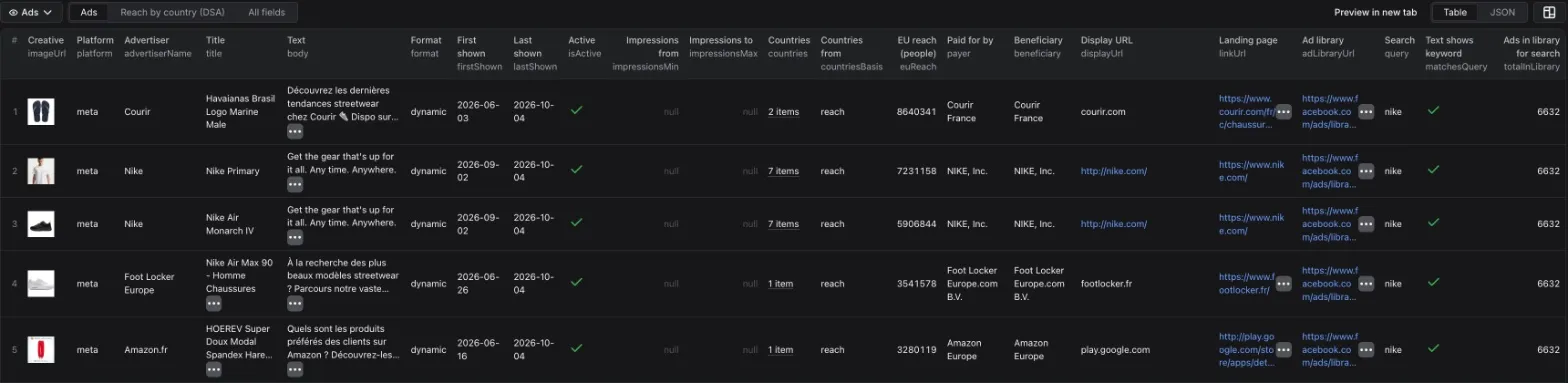
A Meta ad row from the cloud run shown above (build 0.1.8, search nike, France, 2026-10-05; image URLs, cards and countries shortened):
A Google text ad row from a local run (nike, France, 2026-10-05), with details on (preview URL and country list shortened, null fields left out):
A Microsoft (Bing) ad row from the same run (fields left out when null; every real row carries every key):
An advertiser record (Google, from the 2026-10-02 cloud run; opt-in with maxAdvertisers, stored in the key-value store record ADVERTISERS):
That cloud run returned 60 ads (20 per platform) and 9 advertiser records in 22.5 seconds.
Run summary
The run's key-value store holds a SUMMARY record with one status per platform: ok, partial (fewer ads than asked while the library shows more, with the reason), skipped (for example Microsoft with no EEA country) or failed, plus how many ads Meta reports for the search, how many ads strictMatch left out, how many repeats were skipped, how many EU transparency panels were read, and how many requests each platform took. A short result is never silent. When the run stopped early, the top-level status is partial with a reason (run timeout or spending limit); after a run timeout, runTimeout lists the searches cut part way and the ones not started.
Limits worth knowing before you run it
- Meta, logged out, shows the first 30 results of a search and refuses further pages. The Actor goes past that by walking back through start dates with the page's own "most recent" order: the top 30 by impressions first, then up to 30 newer ads per page load, day by day. Measured on Apify: 1,000 Nike ads in France in a 139-second run. Its one blind spot: a start day with more than 30 new ads shows only its first 30, and the summary says so when it makes the result short.
- Meta reach, payer, beneficiary and audience are published by Meta for ads shown in the EU (and UK reach), through each ad's "See ad details" panel, which the Actor reads logged out, one request per ad. Ads shown only outside the EU and UK have none: Meta does not publish it. Spend is not published for commercial ads. In a cloud run of this build, 100 of 100 Nike ads searched in France had EU reach, payer and beneficiary (local runs: 300 of 300 Nike, 100 of 100 Adidas); a page searched in all countries had it on 2 of 30.
- Meta keyword matches you cannot see: Meta also matches words inside images and videos, and its "most recent" pages beyond the first 30 ads hold many such matches (48 of 100 Nike FR rows in a local run with
strictMatchoff).strictMatch(default) leaves them out before charging, so a small brand can return fewer ads than Meta's count:le slip françaisreturned 26 of the 39 Meta reported, the other 13 being "non slip" yoga mats and a watch shop. - Google ad text is read where Google renders the ad as text (its local text ads): 36 of 83 Nike text ads in a local run. Text ads that Google archives as an image carry their text only in the image (the row links it). Google publishes no landing URL, only the display domain, so
linkUrlisnullon Google rows. Google's preview host answers HTTP 429 at about one request a second, so text reading is paced and adds about a second per text ad. - Google has no keyword search:
querymatches advertiser names as whole words, sonikecan also match a person's account named "Nike Klara". Advertisers are ranked by ad count and capped bymaxAdvertisers. When no advertiser bears the brand's name, the Actor reads the ads that point to the brand's own domain if Google suggests one (temugives temu.com). Usedomainfor an exact brand. - Microsoft covers the EEA only, because Microsoft publishes only ads served there. Its list repeats ads across pages (64 repeats skipped on a 100-ad read); each ad is returned and charged once.
- Microsoft's keyword search is slow on Microsoft's side. On 2026-10-13 a keyword search page took 20 to 130 seconds, and some searches (
booking.com) never answered, from Apify and on Microsoft's own Ad Library site alike. When the first page does not answer within about a minute, the Actor reads the ads of the Microsoft advertisers named like your keyword instead (forbooking.com: Booking.com B.V.), with Microsoft's own country filter, and the run summary marks Microsoftpartialwith that reason: these are that brand's own ads, not every ad that mentions the word. - Microsoft put a firewall in front of its Ad Library on 2026-10-13. It refuses scripts that announce themselves; the Actor reads the API with the request a visitor's browser sends, and if the firewall ever refuses that, it moves the rest of the search to a real browser. If that is refused too, Microsoft is reported
failedwith the firewall's answer as the reason, never as an empty success. - Microsoft rate-limits repeated reads (HTTP 429). The Actor paces its requests and retries, but when Microsoft keeps refusing, it stops and says so: a 100-ad Microsoft read on Apify returned 91 ads in a 160-second run, status
partial, reason "Rate limited (HTTP 429)". Smaller reads (10 to 20 ads) were not throttled in our cloud runs. - The run stops itself before its timeout. Two minutes before the run's timeout (less on a run shorter than four minutes), the Actor starts no new search, page or request, gives up the requests still waiting, stores the ads already read, and ends as succeeded. Only the ads in the dataset are charged. A platform not reached by then is reported
skippedwith the reasonrun timeout; a platform cut part way returns what it read,partialwith that reason (failedwhen it had read nothing yet); andSUMMARYsayspartialwith the reasonrun timeout. For large requests, or when Microsoft is slow, raise the run timeout in the run options. - Image and video URLs depend on the format. Meta video ads have
imageUrlempty: the video file is invideoUrlsand its poster image inpreviewUrl(21 of 100 rows in the Nike run above; the 79 others carryimageUrl). Google video ads, and some Google image ads, carry onlypreviewUrl, Google's preview script, with no direct image or video file. Microsoft ads are text ads, with no media.
How it compares with the Meta leaders (measured)
Same input on every Actor: keyword nike, country FR, active ads, 100 ads, Meta only. Every figure is an Apify cloud run: the leaders' on 2026-10-01 (runs WifMYQ8g9j4Is7WK4 and aQPqwfH2TxYFBYqP6, from our competitor teardown), ours on 2026-10-05 on build 0.1.8 with EU details on (run 1Rop20lfahxqPOS4D, no proxy). Store prices are the FREE-tier list prices of 2026-10-01.
| curious_coder/facebook-ads-library-scraper | apify/facebook-ads-scraper | This Actor | |
|---|---|---|---|
| Price per 1,000 Meta ads | $0.75 + $0.00005 per run | $5.80 | $0.50 |
| Ads returned of 100 asked | 100 | 100 | 100 |
| Duplicate rows | 0 | 0 | 0 |
| Rows whose own text shows "nike" | 84 of 100 | same 100 ads as curious_coder | 100 of 100 (strictMatch left out 75 that did not) |
| Countries filled | 0% | 0% | 100% |
| EU reach, payer, beneficiary | 0% | 0% | 100% |
| Body text | 94% | 94% | 93% (the rest have no body in Meta's data) |
| Media | 100% | 100% | 100% (79 image, 21 video) |
| Landing link | 99% | 99% | 96% (the rest have no link in Meta's data) |
| Start and end dates | 100% | 100% | 100% |
| Meta's total for the search on each row | yes | not measured | yes (totalInLibrary) |
| Ad Library and Page URLs as input | yes | yes | yes |
| Run time, 100 Meta ads | 38 s | 77 s | 45 s with EU details for every ad (Meta read in 21.4 s) |
| Google and Microsoft ads in the same run | no | no | yes |
The three Actors do not return the same ads after the first 30: the leaders read Meta's default ranking, which the logged-out page serves only for its first page, and this Actor walks start dates. Body, link and media shares are therefore over different ads.
How much does it cost to scrape the Facebook Ad Library?
Pay per event, no subscription, platform usage included:
| Event | Price |
|---|---|
| Ad returned, any platform | $0.50 per 1,000 ads ($0.0005 each) |
Advertiser record returned (only if you set maxAdvertisers) | $0.003 per advertiser row |
| Run start | $0.00005 |
Examples:
- 1,000 Meta ads: $0.50, EU transparency included.
- 100 Meta ads (the comparison run above): $0.05.
- 60 ads on three platforms: $0.03.
- A repeated ad, or an ad left out by
strictMatch, is never charged. - Apify's free plan includes $5 of monthly usage (apify.com/pricing), enough for about 10,000 ads a month.
Set a maximum cost per run in the run options and the Actor stops cleanly when it is reached.
Use the Actor through the Apify API
Run it and get the ads in one HTTP call (replace YOUR_APIFY_TOKEN, from Settings > API & Integrations in Apify Console):
Node.js, with the official apify-client:
Python, with the official apify-client:
The API tab on this page has ready-made snippets for every language and endpoint.
FAQ
Do I need a Facebook account or a Meta API token?
No. The Actor reads the Ad Library the way a logged-out visitor sees it. Meta's own Ad Library API requires a Facebook account and an identity confirmation, and it returns commercial ads only when they reached the EU; the public page shows every active ad.
Can I get ads from the United States or other countries outside the EU?
On Meta and Google, yes: set the country (US) or leave countries empty. Microsoft publishes only ads served in the EEA. Reach and targeting figures are published for the EU and EEA (and the UK on Meta), so rows from elsewhere carry dates, creatives and landing pages without them.
Can I get every ad an advertiser runs?
Up to 1,000 per platform per run. On Meta, paste the advertiser's Facebook Page URL to read its page only; a brand with more than 30 new ads on a single day loses the rest of that day (see the limits above). On Google, use domain for the exact advertiser.
Can I get inactive ads?
On Meta, turn off Active ads only: Meta keeps ads that ran in the EU for a year after they stop, and political ads for seven years. On Google and Microsoft, use Shown from and Shown until.
How fast is it?
Measured on Apify with the current build (0.1.8, 2026-10-05): 100 Meta ads with the EU transparency panel of every ad in a 45-second run (Meta read in 21.4 seconds); the default input (10 ads per platform, three platforms, details on) in a 34-second run. Earlier builds on Apify (2026-10-02): 60 ads with details on three platforms in 22.5 seconds; 1,000 Meta ads without EU details in a 139-second run; 500 in 69 seconds. Google with details takes about one second per ad. Microsoft did too until 2026-10-12; since 2026-10-13 its servers answer much more slowly (keyword search pages of 20 to 130 seconds or none at all, details of 10 to 15 seconds each), so the Actor gives Microsoft at most 3.5 minutes plus 3 seconds per ad found in a run, then returns what it has, marked partial with the reason. On build 0.1.13 (2026-10-13): the default input in an 85-second run with 10 ads from each platform; 50 Booking.com ads shown in Germany, every one with its details, in a 266-second run; asked for 1,000 Nike ads, Microsoft gave 323 (318 with details) before the allowance ran out, in a 20-minute run. Microsoft also throttles repeated reads (HTTP 429); the Actor waits and retries.
Can I use it with Make, Zapier, n8n or Google Sheets?
Yes, through Apify's integrations: the dataset works with every Apify integration, and a webhook can fire when a run finishes. Save your input as a task and schedule it to follow a competitor every week.
Can AI agents use it through MCP?
Yes. Apify's hosted MCP server exposes Store Actors to MCP clients such as Claude or Cursor: https://mcp.apify.com?tools=agenttoolworks/ad-library-scraper.
Is it legal to scrape the Facebook Ad Library?
The Actor reads only what the ad libraries show to any visitor without logging in: ads and the businesses behind them, which the platforms publish to meet their transparency obligations. It never logs in, uses no account and collects no data about the people who saw the ads. Each platform's terms restrict automated collection or reuse in some form; how you use the data is your responsibility.
Something is missing or broken?
Open an issue in the Issues tab: we read every one.
Other Actors by AgentToolWorks
- Google Ads Transparency Scraper: Ads, Text and Reach: Google's ads alone, by brand, website, advertiser ID or Transparency Center URL, with platform and format filters and an only-new-ads monitor. Same row format and the same Google reader as this Actor.
- Shopify & WooCommerce Scraper and Price Tracker: every product of any Shopify or WooCommerce store, with variants, barcodes and stock, plus price and stock change tracking.
- AliExpress Scraper: Products, Prices and Shipping per Country: AliExpress products by keyword, category or product URL, with every SKU's price and stock and the shipping cost to each country you list, plus a price tracker mode that returns only the changes.
- LinkedIn Jobs Scraper and Indeed Scraper: public job listings of both boards in one row format.
- Job Scraper for Greenhouse, Lever, Ashby & Workable (JobsRadar): open roles from the public boards of seven applicant tracking systems, deduplicated into one list.
- Google Maps Scraper: every place inside a city's real boundary, with phone, website, rating, review count, opening hours and emails.
- Google Trends Scraper: interest over time, by region and related queries for terms and comparisons, plus each country's Trending now list.
Learn more
- What this Facebook Ad Library scraper returns, platform by platform
- How to scrape the Facebook Ad Library: what the page shows logged out, and how to go past 30 ads
- The Google Ads Transparency Scraper: Google's ads alone, with platform and format filters
Built by AgentToolWorks. Not affiliated with Meta, Google or Microsoft.


