

Shopify & WooCommerce Scraper and Price Tracker
Pricing
from $0.72 / 1,000 product returneds
Shopify & WooCommerce Scraper and Price Tracker
Shopify scraper and WooCommerce scraper in one: export every product (prices, sale prices, variants, SKUs, barcodes, stock, weights, images) to JSON, CSV or Excel, and track price drops, restocks, new and removed products between runs.
Pricing
from $0.72 / 1,000 product returneds
Rating
0.0
(0)
Developer

AgentToolWorks
Maintained by CommunityActor stats
0
Bookmarked
1
Total users
0
Monthly active users
5 days ago
Last modified
Categories
Share
What is this Shopify and WooCommerce scraper?
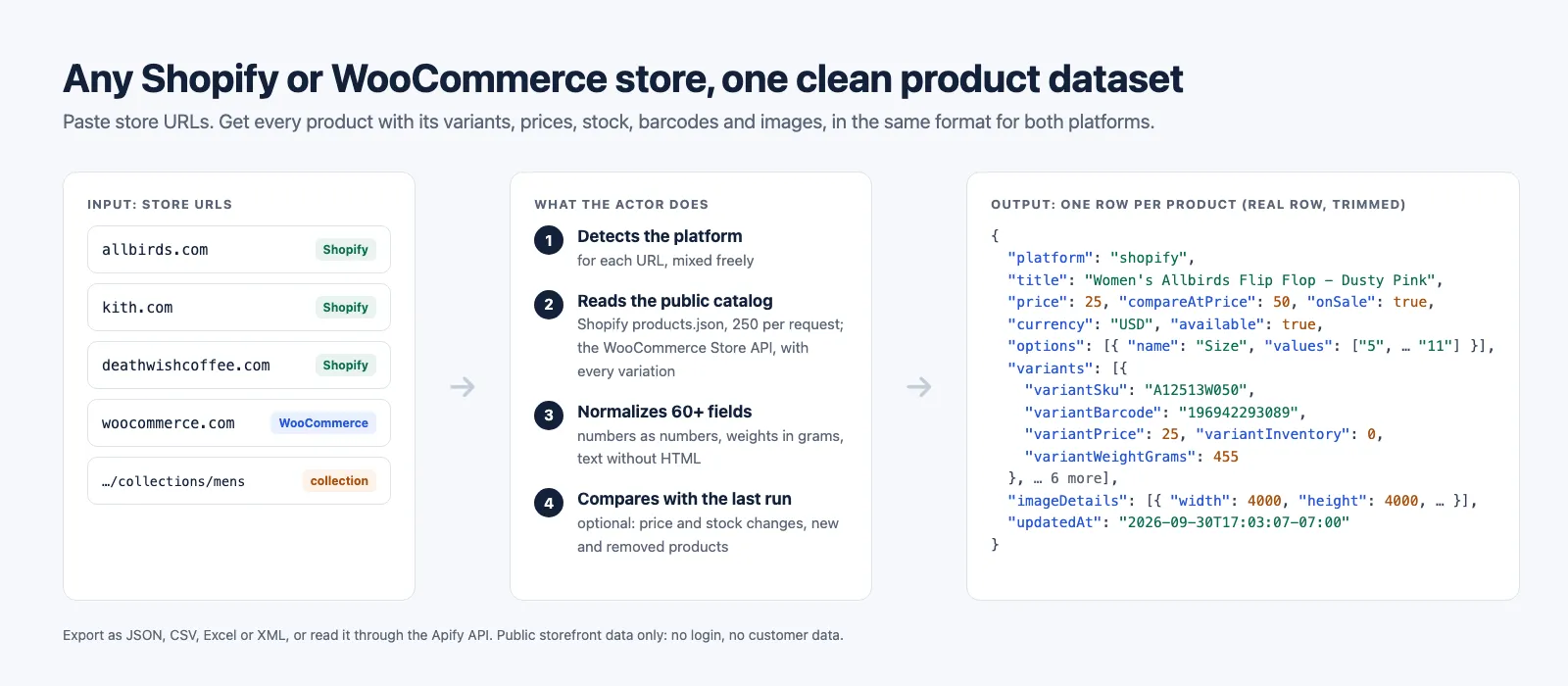
This Actor is a Shopify scraper and WooCommerce scraper in one, with a built-in price tracker. Paste the URLs of any Shopify or WooCommerce stores, mixed in one list, and get every product back in the same clean format: titles, prices, sale prices, variants, SKUs, barcodes (GTIN/UPC/EAN), stock, weights, options, images with their sizes and alt text, tags, categories and dates.
In short
- What you get: every product of any Shopify or WooCommerce store, both platforms mixed in one run, one row per product in the same format, with variants, SKUs, barcodes, stock, weights and images; with change tracking on, only what changed since the last run.
- What it costs: $0.90 per 1,000 products ($0.72 on Apify Business plans), platform usage included, charged per product delivered; $0.005 per change detected when you track changes.
- Why this one (Store prices read 2026-10-13): $0.90 per 1,000 where trovevault, the most used Shopify product scraper, charges $1.00 plus $0.001 per run and autofacts $1.20; Shopify and WooCommerce in one run, where trovevault sells one Actor per platform; and price drops, restocks, new and removed products tracked between runs, built in.
Turn on change tracking and schedule it, and it becomes a competitor price monitor: each run outputs only what changed since the previous one (price drops, price increases, back in stock, out of stock, new products, removed products).
What data can you extract from Shopify and WooCommerce stores?
One row per product, with its variants nested (or one row per variant, see Output). Every row has the same fields whichever platform the store runs on.
| Product data | Variant data | Store data |
|---|---|---|
| Title, handle, URL | Variant title and options (Size, Color) | Platform detected (Shopify or WooCommerce) |
| Vendor or brand, product type | SKU and barcode (GTIN, UPC, EAN) | Store domain and URL |
| Categories and tags | Price and compare-at (sale) price | Currency |
| Lowest and highest price, compare-at price, on sale | In stock, stock quantity where public | Collection or category read |
| Options with all their values | Backorder policy | Run summary per store |
| Images: URL, width, height, alt text, linked variants | Weight in grams | |
| Description as plain text and as HTML | Requires shipping, taxable | |
| Rating and review count (WooCommerce) | Variant image and position | |
| Created, updated and published dates | Created and updated dates (Shopify) |
Everything comes from the store's own public storefront: Shopify's products.json and Ajax product endpoints, and the public WooCommerce Store API. No login, no account, no customer data.
Headless Shopify stores work too. Many big brands run a custom storefront (Hydrogen, Next.js) in front of Shopify, or put a bot wall on their main domain, so their own address does not serve products.json. Their Shopify Online Store still does, on another public host: the myshopify.com domain their home page names, or shop. on the same domain. The Actor finds it, checks that its /meta.json names the brand's domain before reading anything, and says in the run summary which host it read and why. Measured on 2026-10-17: Gymshark, Fashion Nova, Ruggable, Bombas, SKIMS, Chubbies, Dr. Squatch, Vuori and Rhone, all read this way, with the same fields as any other Shopify store.
What can you use Shopify and WooCommerce product data for?
- Competitor price monitoring: track price changes and discounts across many stores, daily or hourly.
- Restock alerts: know when a sold-out product or size is back in stock.
- Product research and dropshipping: see what a brand sells, at what price, and what it launches.
- Price comparison and product feeds: match products across stores by barcode (GTIN) and build a feed.
- Catalog audits: missing SKUs or barcodes, out-of-stock share, sale depth, image alt text coverage.
- Data for AI agents and pipelines: one predictable JSON schema for any Shopify or WooCommerce store.
How to scrape a Shopify or WooCommerce store
- Click Try for free (or Start) on this page and sign in to Apify.
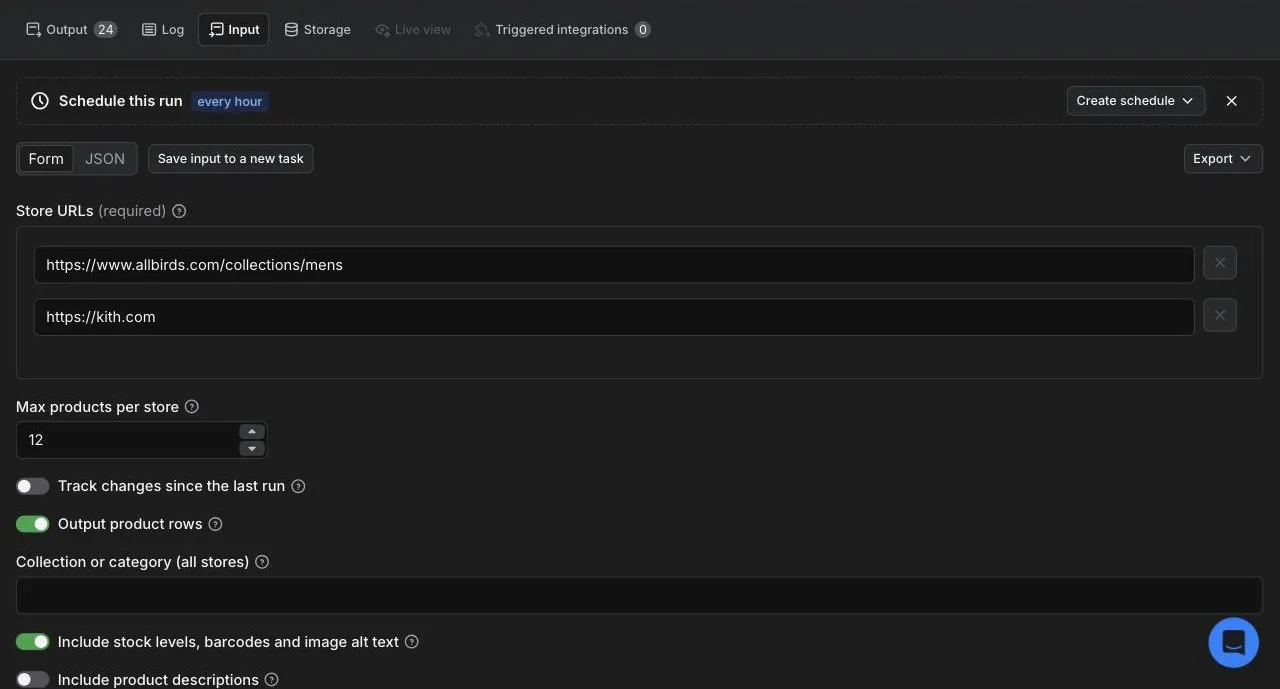
- Paste one or more store URLs in Store URLs: a home page (
https://www.allbirds.com), a Shopify collection (https://www.allbirds.com/collections/mens) or a WooCommerce category page. - Set Max products per store. You pay per product returned, so start small to look at the data.
- Turn on Include stock levels, barcodes and image alt text if you need them (Shopify; slower).
- Click Start. When the run finishes, open the Output tab, pick the Products or Variants view, and export as JSON, CSV, Excel or XML, or read it through the API.
Input
| Field | What it does |
|---|---|
storeUrls | Shopify or WooCommerce store URLs, mixed. A home page, a Shopify collection page or a WooCommerce category page. Up to 100 stores per run. |
maxProductsPerStore | Stop after this many products per store (default 1,000, up to 100,000). You pay per product returned. |
trackChanges | Save a snapshot per store and output what changed since the last run. |
outputProducts | Turn off to output only the changes (for scheduled monitoring). |
collection | A Shopify collection handle or WooCommerce category slug, for every store whose URL does not already name one. |
includeInventory | Shopify: read each product's public Ajax endpoint for stock counts, barcodes, backorder policy and image alt text. Slower: at most 500 products per store per run. |
includeDescription | Add description (plain text) and descriptionHtml (the store's HTML), plus shortDescription on WooCommerce. |
proxy | none (default) or datacenter (Apify Proxy) if a store rate-limits your runs. |
Example: one Shopify collection and one WooCommerce store, with barcodes and stock.
Example: a daily price and stock monitor that outputs only changes.
Output
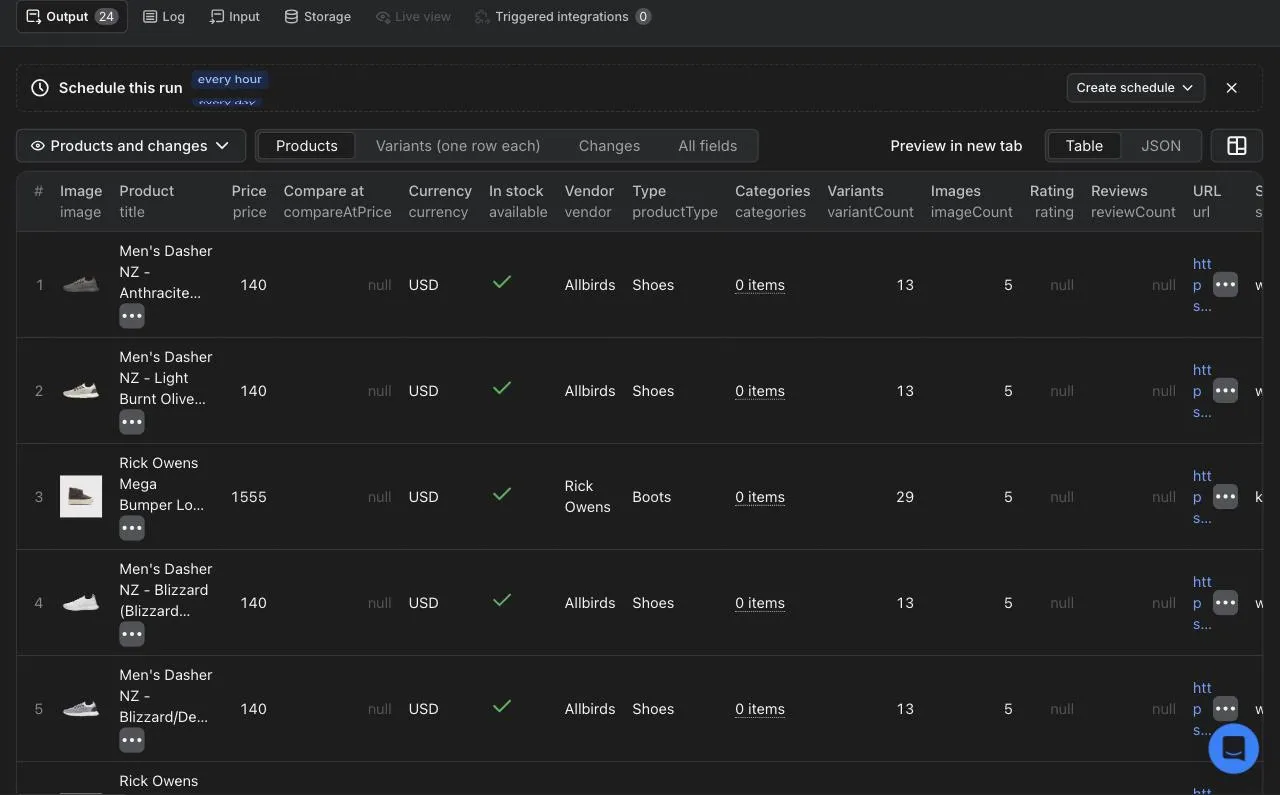
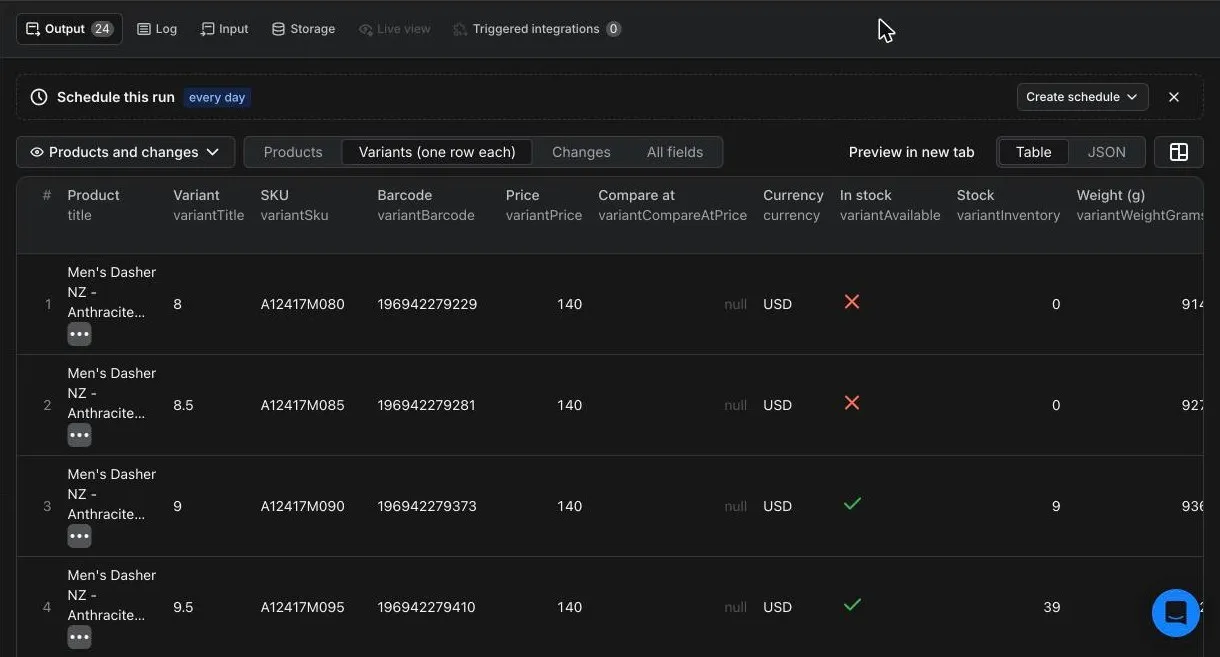
The dataset has three ready-made views in Apify Console and in the API:
- Products: one row per product.
- Variants (one row each): one row per variant, with SKU, barcode, price, stock and weight. The same as adding
unwind=variantsto the dataset API. - Changes: the change rows, when change tracking is on.
A Shopify product row from a real run (variants and images shortened):
A WooCommerce product row has exactly the same fields. Where the WooCommerce Store API publishes nothing, the field is null rather than guessed: no creation or update dates, no barcodes, no shipping or tax flags. In exchange, WooCommerce rows carry rating and reviewCount.
Prices are numbers in the row's currency (25 means 25.00), so they sort and chart directly. On Shopify they are always in the shop's own currency, from its /meta.json: stores using Shopify Markets would otherwise convert them to the currency of whatever country the request comes from, under the same label. Weights are always grams, whatever unit the store uses.
Change rows
With trackChanges on, each run also outputs one row per change since the previous run. A real one: two sizes of a sneaker came back in stock at Kith between two runs 46 minutes apart.
changeType is one of new_product, removed_product, price_up, price_down, back_in_stock, out_of_stock. Price changes fill oldPrice and newPrice (compared to the cent); stock changes leave them null and give the current price. A change on a single variant carries its variantId and variantTitle; a new or removed product has them null.
Run summary
The run's key-value store holds a SUMMARY record with the status of each store: ok, partial (stopped part way, with the reason; the products read are kept), blocked (the site refused the request, a bot challenge or an HTTP 403, and no Shopify Online Store host confirmed itself for it), unsupported (neither a Shopify store nor a WooCommerce store with its Store API open), refused (not a public https address) or failed (for example a collection that does not exist, with the store's real collections listed). It also says whether a store had more products than your limit, so a cut catalog is never silent.
For Shopify stores it also gives route and catalogHost, where the catalog was read: products.json on the address you gave, or for a headless or walled storefront myshopify-domain, sibling-domain (such as shop.bombas.com) or label-myshopify, with a note saying why. storeName and storeCountry come from the store's /meta.json: a brand with several regional Shopify stores (Gymshark US is gymsharkusa.myshopify.com) shows which one was read.
How to monitor competitor prices with a schedule
- Run the Actor once with Track changes since the last run on. This first run saves a baseline for each store and reports no changes.
- On the input page, click Save as a new task. Turn off Output product rows in the task if you only want the changes.
- Open Schedules, create a schedule (daily, or every few hours) and add the task to it.
- Every scheduled run outputs only what changed since the previous run. Add an integration (email, Slack, Google Sheets, a webhook, Make, Zapier or n8n) to be notified when a run has rows.
Snapshots are kept in your account's named key-value store storecatalog-state, one record per store and per collection or category. Delete a record to start that store over from a new baseline.
Two things worth knowing:
- Cover the whole catalog (
maxProductsPerStoreabove the store's size) to detect new and removed products. When a run stops at your limit, a product it did not reach may still exist, so the run reports only price and stock changes for that store and says so in the summary. - If a run stops at your spending limit before every change is delivered, that store's snapshot is not updated, so the next run reports those changes again instead of losing them.
How much does it cost to scrape a Shopify store?
Pay per event, no subscription, platform usage included:
| Event | Price |
|---|---|
| Product returned | $0.90 per 1,000 products ($0.0009 each); $0.81 on Apify Scale plans, $0.72 on Business plans and above |
| Change detected | $0.005 per change |
| Run start | $0.00005 |
Examples:
- A 1,000 product store: $0.90.
- Apify's free plan includes $5 of monthly usage (apify.com/pricing), enough for about 5,500 products a month.
- A daily monitor of a 2,000 product store with Output product rows off pays only for changes: a day with 12 price or stock changes costs $0.06.
A run that finds nothing to output costs only the start fee. Set a maximum cost per run in the run options and the Actor stops cleanly when it is reached.
Use the Actor through the Apify API
Run it and get the products in one HTTP call (replace YOUR_APIFY_TOKEN, from Settings > API & Integrations in Apify Console):
Node.js, with the official apify-client:
Python, with the official apify-client:
The API tab on this page has ready-made snippets for every language and endpoint.
FAQ
Does it work on every Shopify store?
On nearly every one: products.json is part of every Shopify Online Store. When the address you paste does not serve it (a headless storefront, or a bot wall in front of the main domain), the Actor reads it on the store's Online Store host instead, once that host's /meta.json confirms it belongs to the same brand. In our 2026-10-17 tests, Gymshark, Fashion Nova, Ruggable and Bombas were read this way.
Which stores does it not work on?
Sites that refuse automated requests on every host and name no Shopify store we can confirm as theirs: in our 2026-10-17 tests, www.hellomolly.com (Vercel's bot checkpoint) and www.tesla.com (HTTP 403). Also WooCommerce stores whose Store API is closed or behind a firewall, and collection URLs that are not collections (kith.com/collections/mens redirects to an editorial page; the run summary lists the store's real collections instead). The run summary names every store that failed and why.
Does it work on every WooCommerce store?
On WooCommerce stores whose Store API is open, which is the default in recent WooCommerce versions. Stores that close it are reported as unsupported, and stores behind a firewall as blocked.
How fast is it?
Measured on Apify: Allbirds (692 products, 3 catalog requests) in 3 seconds, the first 5,000 Kith products in 29 seconds. A headless store costs a few requests more to find: 1,000 Gymshark products read in 5.5 seconds and 1,000 Bombas products in 7.4 seconds through their Online Store hosts (2026-10-17). With Include stock levels, barcodes and image alt text, each product needs one more request, so plan about 1.5 minutes per 300 products (measured: 300 Allbirds products in 90 seconds). WooCommerce speed depends mostly on the store's server.
Can I get stock quantities and barcodes?
Shopify: turn on Include stock levels, barcodes and image alt text. Barcodes come back for every product that has one; stock counts only for stores that track inventory publicly. WooCommerce publishes a stock count only when stock is low, and never barcodes.
Can I get one row per variant, for a spreadsheet?
Yes: choose the Variants (one row each) view before exporting, or add unwind=variants to the dataset items API.
Can I scrape only one collection or category?
Yes: paste the collection URL (/collections/sale) or the WooCommerce category URL, or set Collection or category to apply the same one to every store. The Actor checks the collection exists first: Shopify answers an empty list for a collection that does not exist, so a wrong handle is reported as not found, with the collections the store's own search finds, rather than as an empty catalog. A product URL reads the whole store.
Can I use it with Make, Zapier, n8n or Google Sheets?
Yes, through Apify's integrations: the Actor's dataset works with every Apify integration, and a webhook can fire when a run finishes.
Can AI agents use it through MCP?
Yes. Apify's hosted MCP server exposes Store Actors to MCP clients such as Claude or Cursor: https://mcp.apify.com?tools=agenttoolworks/shopify-woocommerce-scraper.
Is it legal to scrape Shopify and WooCommerce stores?
The Actor reads only the product information a store publishes to every visitor, through the storefront's public endpoints, without logging in, and it collects no personal data. As with any data, how you use it is your responsibility.
Something is missing or broken?
Open an issue in the Issues tab: we read every one, and fields asked for by users get added.
Other Actors by AgentToolWorks
- Facebook Ad Library Scraper: ads from the Meta, Google and Microsoft ad libraries in one table.
- LinkedIn Jobs and Indeed Scraper: public job listings of both boards in one row format.
- Job Scraper for Greenhouse, Lever, Ashby & Workable (JobsRadar): open roles from the public boards of seven applicant tracking systems, deduplicated into one list.
- Google Maps Scraper: every place inside a city's real boundary, with phone, website, rating, review count, opening hours and emails.
- Google Trends Scraper: interest over time, by region and related queries for terms and comparisons, plus each country's Trending now list.
Learn more
- What this Shopify and WooCommerce scraper returns, platform by platform
- How to scrape a Shopify store: products.json, the Ajax API and their traps
Built by AgentToolWorks. Not affiliated with Shopify or with WooCommerce.


