
PDF to Markdown & Text Extractor: Word, HTML, OCR for RAG
Pricing
from $2.00 / 1,000 document converteds
PDF to Markdown & Text Extractor: Word, HTML, OCR for RAG
Convert PDF, Word, PowerPoint, Excel, web pages and images to clean, LLM-ready Markdown. Paste links or upload files, click Start. Headings, lists and tables kept, optional OCR for scans, RAG chunks. No start fee.
Pricing
from $2.00 / 1,000 document converteds
Rating
0.0
(0)
Developer

Alpine Data Labs
Maintained by CommunityActor stats
0
Bookmarked
2
Total users
1
Monthly active users
3 days ago
Last modified
Categories
Share
PDF to Markdown Converter & Text Extractor (Word, PowerPoint, Excel, HTML, OCR)
Convert PDF, Word (.docx), PowerPoint (.pptx), Excel (.xlsx), web pages and images into clean Markdown that you can feed straight into ChatGPT, Claude, an LLM pipeline or a RAG vector database. The converter keeps headings, lists and tables, removes page headers, footers and web page clutter, and can read scanned PDFs and images with OCR. You can get one Markdown document per file, RAG-ready chunks, or one row per page. Results come as JSON, CSV or Excel, or as downloadable .md files.
How to use it (no code, 4 steps)
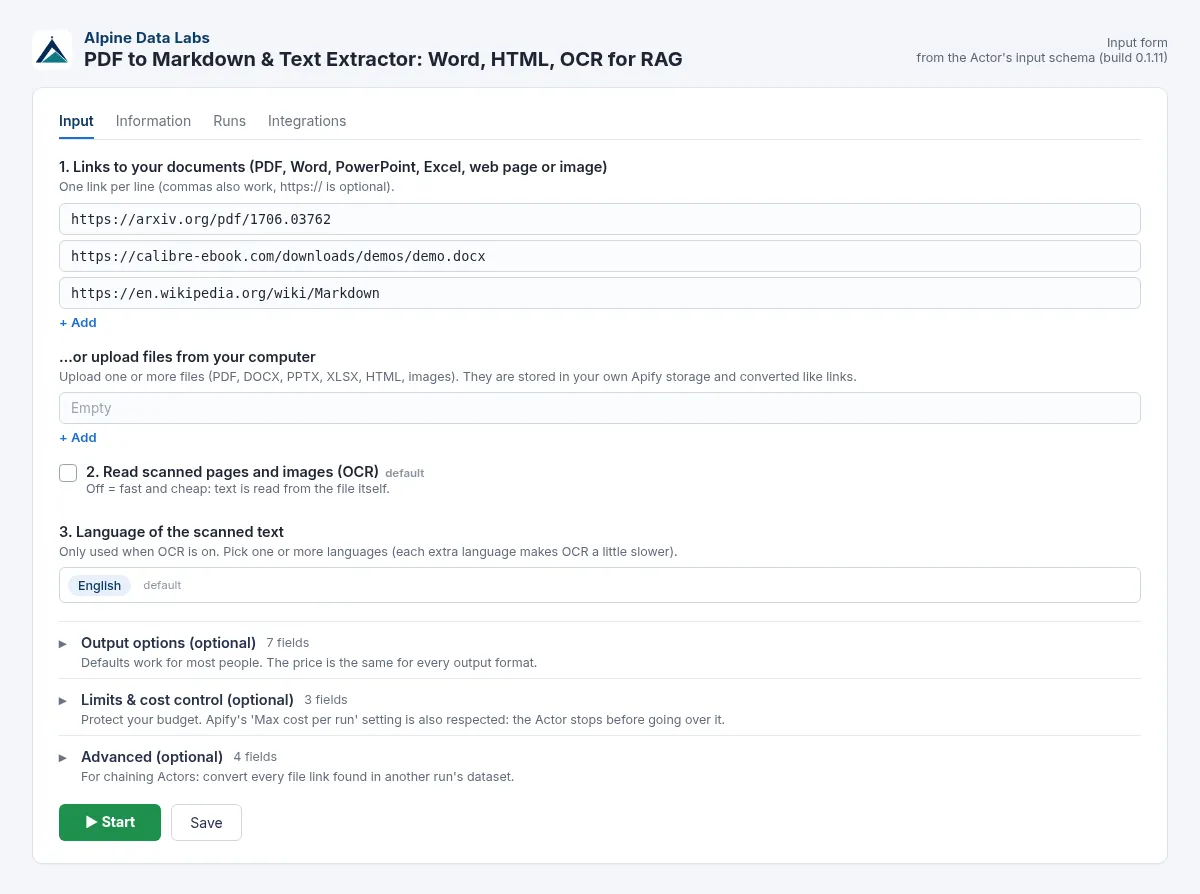
- Paste links to your documents into field 1, one per line. You can also upload files from your computer. Links with or without
https://, separated by commas, spaces or new lines, all work. Google Drive, Google Docs, Dropbox, GitHub and arXiv links are converted to direct downloads automatically. - Scanned documents or photos? Switch on Read scanned pages and images (OCR) and pick the language. Leave it off for normal PDFs; it is faster and cheaper.
- Click Start. Note: Start with the pre-filled example is a small paid run: about $0.02 (3 documents, about 26 pages: 3 × $0.0035 + 26 × $0.0004). OCR pages cost $0.0075 each instead of $0.0004. An empty input (no links, files or dataset) also starts a small paid example run: 1 sample PDF (15 pages), measured charge $0.0095 (1 × $0.0035 + 15 × $0.0004). Then open the Output tab to read the Markdown, download the dataset as JSON/CSV/Excel, or download the
.mdfiles (one per document plusALL_DOCUMENTS.md). - Optional: automate it. Save your settings as a Task and add a Schedule (e.g. daily), or connect Google Drive, Make, Zapier or n8n in the Integrations tab. No code needed.
What you get
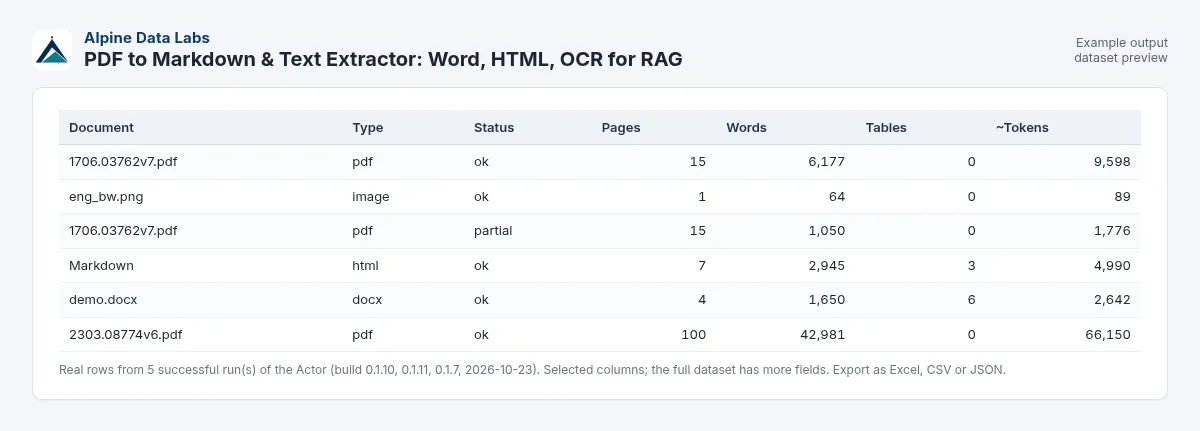
These are real rows from a test run of the default input on 2026-10-23:
| url | fileType | title | pages | words | approxTokens | tables | status |
|---|---|---|---|---|---|---|---|
| https://arxiv.org/pdf/1706.03762 | Attention Is All You Need | 15 | 6,177 | 9,598 | 0 | ok | |
| https://calibre-ebook.com/downloads/demos/demo.docx | docx | DOCX Demo | 4 | 1,650 | 2,642 | 6 | ok |
| https://en.wikipedia.org/wiki/Markdown | html | Markdown | 7 | 2,945 | 4,990 | 3 | ok |
Each row also contains the full markdown, a markdownFileUrl to the .md file, characters, ocrPages, billedPages, warnings and document metadata (author, creation date and so on, when the file has them).
The Markdown starts like this:
Convert documents automatically
Use a schedule or call the Actor from the API, n8n, Make or Zapier to convert new files as they arrive. You can also chain it after another Actor: under Advanced, pick that run's dataset and the field that contains the document links.
Use cases
- PDF to Markdown for RAG: split reports, manuals and papers into token-sized chunks for a vector database (Pinecone, Qdrant, pgvector, Weaviate).
- LLM-ready Markdown: give ChatGPT, Claude or a local model a clean text version of a long PDF instead of an upload it cannot read well.
- PDF text extractor: pull the text and tables out of invoices, contracts, datasheets and research papers.
- Word to Markdown / DOCX to Markdown: move documentation into Git, a wiki, Notion or a static site.
- HTML to Markdown: turn articles and documentation pages into clean Markdown without menus and cookie banners.
- OCR PDF to text: make scanned PDFs, faxes and photos of documents searchable.
Input fields
| Field | What it does | Default |
|---|---|---|
| Links to your documents | Links to PDF, DOCX, PPTX, XLSX, HTML, TXT/MD/CSV or image files (PNG, JPG, TIFF, WebP, BMP, GIF) | 3 examples |
| …or upload files | Upload files from your computer (stored in your Apify storage) | empty |
| Read scanned pages and images (OCR) | Reads pages that have no text layer, and images | off |
| Language of the scanned text | OCR language(s): English, German, French, Spanish, Italian, Portuguese, Dutch, Polish, Czech, Turkish, Nordic and other European languages | English |
| What do you want back? | document = one row per file, chunks = RAG chunks, pages = one row per page | document |
| Chunk size / overlap | Chunk size and overlap in tokens (chunks mode) | 800 / 80 |
| Keep hyperlinks | Keep [text](url) links in the Markdown | off |
| Web pages: main content only | Drops menus, footers and sidebars | on |
| PowerPoint: include speaker notes | Adds the notes under each slide | on |
| Save .md files | Also saves one .md file per document | on |
| Max pages per document | Stops after this many pages per file (cost control) | 300 |
| Max documents / Max file size | Further limits | 1000 / 50 MB |
| Read links from a dataset | Takes the links from another run's dataset | empty |
| OCR every page | OCR even pages that already have text (for broken text layers) | off |
| Detect tables in PDFs | Turns PDF tables into Markdown tables | on |
Example output (chunks mode, shortened)
Pricing
You pay per result, with no monthly fee:
| Event | Price | Per 1,000 |
|---|---|---|
| Document converted | $0.0035 | $3.50 |
| Page converted | $0.0004 | $0.40 |
| OCR page (instead of a normal page) | $0.0075 | $7.50 |
Higher Apify plans pay less: SILVER 10 % off, GOLD and above 20 % off (all three events).
For PDFs and PowerPoint, a page is a PDF page or a slide. For Word, Excel, web pages and text files, a page is each started 3,000 characters of Markdown (about one printed page). Each image counts as one OCR page.
Examples:
- A 15-page PDF costs $0.0035 + 15 × $0.0004 = $0.0095.
- 1,000 PDFs with 10 pages each cost 1,000 × $0.0035 + 10,000 × $0.0004 = $7.50.
- A 10-page scanned PDF with OCR costs $0.0035 + 10 × $0.0075 = $0.0785.
- The default input (3 documents, 26 pages) costs about $0.021.
Free: links that are invalid, not found, unreachable, blocked or password-protected (a link to a domain that does not exist fails at once, a server that does not answer after about 20–40 seconds); unsupported formats; files without readable text; and images when OCR is off. You are never charged for anything that was not converted. Set Max charge per run in the run options for a hard spending limit; the Actor stops cleanly when it is reached.
You only pay for the events above; the price per document and page is the same at any memory size.
FAQ and common mistakes
How do I convert a PDF to Markdown?
Paste the PDF link into field 1 and click Start. The Markdown is in the markdown column and in a downloadable .md file.
Can I convert Word (DOCX) or HTML to Markdown too? Yes. DOCX to Markdown works like PDF: paste the link to the .docx file (or upload it) and click Start. Headings, lists, bold/italic text and tables become Markdown. PPTX, XLSX, HTML web pages, TXT, CSV and Markdown files work the same way, so you can use it as a general document to Markdown converter for mixed folders. Old binary formats (.doc, .xls, .ppt) are not supported. Save them as .docx/.xlsx/.pptx or PDF first.
How do I extract text from a scanned PDF (OCR PDF to text)? Switch on OCR and choose the language. Only pages without a text layer are OCR'd and charged as OCR pages; the other pages are charged as normal pages.
Is the output good for RAG and LLMs?
Choose chunks. Each chunk keeps its heading path (for example Attention Is All You Need > Abstract), so your retriever knows where the text came from. Chunks have about 800 tokens with 80 tokens of overlap by default.
My file is on Google Drive or Dropbox. Does that work? Yes, if the link is shared as "anyone with the link". Google Docs, Sheets and Slides are exported automatically. Private files return an "access denied" message and are not charged.
Can I use it from n8n, Make, Zapier or my own code?
Yes. Use the Apify integration or call the API (run-sync-get-dataset-items) with the same JSON input (see For developers below).
It says "no text found". What now? The PDF is probably a scan. Turn on OCR.
Why was a page slow? At 256 MB the Actor gets a small share of a CPU. A 100-page PDF takes about 3 minutes at 256 MB. For big batches, set memory to 1024 MB in the run options. The run is then several times faster, and the price per document and page does not change.
Auf Deutsch: PDF in Markdown umwandeln
Links zu PDF-, Word-, PowerPoint- oder Excel-Dateien oder Webseiten einfügen, bei gescannten Dokumenten OCR einschalten und die Sprache „Deutsch“ wählen, dann auf Start klicken. Sie erhalten sauberes Markdown mit Überschriften und Tabellen, als JSON, CSV oder Excel oder als .md-Datei. Preis: $0,0035 pro Dokument plus $0,0004 pro Seite ($0,0075 pro OCR-Seite). Höhere Apify-Pläne zahlen weniger: SILVER 10 % und GOLD und höher 20 % Rabatt. Fehlgeschlagene Links sind kostenlos. Hinweis: Eine leere Eingabe (keine Links, Dateien oder Datensatz) startet einen kleinen kostenpflichtigen Beispiellauf mit 1 Beispiel-PDF (15 Seiten), gemessen $0,0095.
Limits
- Images inside documents are not extracted or described; only their text is read (with OCR on, for scans and image files).
- Complex PDF layouts (multi-column magazines, forms, rotated tables) may come out in a less than perfect reading order. Math formulas come out as plain text, not LaTeX.
- Pages that need JavaScript or a login to show their content cannot be converted. Use a direct link to the file.
- OCR accuracy depends on scan quality. Handwriting is not supported. OCR is slower (a few seconds per page at 256 MB).
- Password-protected and DRM files are skipped (free).
- Max 50 MB per file by default (up to 200 MB), and up to 300 pages per document by default.
- The
markdownfield is cut at 3 million characters (or 7.5 MB) per row; the full text is always in the.mdfile. - One document is cut at about 10 million characters at 512 MB memory (20 million at 1024 MB) so a huge file cannot crash the whole run; the row then has a warning.
ALL_DOCUMENTS.mdkeeps about 5 million characters at 512 MB (10 million at 1024 MB); later documents are still saved as their own files. - Only public internet links are fetched. Links to local or private network addresses are rejected (free); this is checked again on every redirect, and each download connects only to the checked address. One download may take at most 60 s plus about 4 s per MB of your file-size limit.
- Each file is converted in its own process with a memory and time limit. Files that would unpack to an extreme size (zip bombs) or exhaust the run's memory fail on their own, free of charge, and the other files continue.
Data and legal notes
The Actor only downloads the files and pages you give it, the same way a browser would. It does not crawl or store anything else. Only convert documents that you are allowed to use, and respect the copyright and terms of the source. Uploaded files stay in your own Apify storage. Trademarks belong to their owners; this Actor is not affiliated with Adobe, Microsoft, Google or any website.
Related tools from Alpine Data Labs
- Crypto Arbitrage Scanner: exchange spreads for one coin on 20 exchanges, net of fees, as Excel.
- Honeypot & Rug Pull Checker: token risk score (0-100) and honeypot/rug pull flags for Ethereum, BSC, Base and Solana.
- Zefix Scraper: Swiss Company Register: Swiss company lists with UID, legal form and address (Handelsregister Schweiz).
- TED Tenders Scraper: EU public procurement notices and daily tender alerts as Excel.
- Career Page Job Scraper: every open job from Greenhouse, Lever, Workday, Ashby and Personio, plus hiring signals.
- All tools from Alpine Data Labs: no-code data tools for public data, business research and monitoring.
For developers: API & integrations
Everything in the form is also available via the API, with the same field names. Old inputs keep working; new fields are optional.
Input JSON example
cURL (run and get the results in one call):
JavaScript (npm i apify-client):
Python (pip install apify-client):
Webhooks, schedules and no-code tools: add a webhook (event Run succeeded) in the Integrations tab to call your own URL when a run finishes, or use the official Apify apps for Make, Zapier and n8n (action Run Actor, then Get dataset items). Schedules work for API users too. AI agents can call this Actor via the Apify MCP server (mcp.apify.com).
Support
Found a file that does not convert well? Open an issue in the Issues tab with the link (if it is public), and we will look at it. Made by Alpine Data Labs.


