Gmail Intelligence – Read-Only Gmail API Export & Search
Pricing
from $1.40 / 1,000 e-mail reads
Gmail Intelligence – Read-Only Gmail API Export & Search
Read your own Gmail READ-ONLY via the official Gmail API with your own Google Cloud OAuth client (gmail.readonly): Gmail search, labels, export JSON/CSV, attachments, stats, duplicates, threads, phishing signs, AI summary with your key. Free demo.
Pricing
from $1.40 / 1,000 e-mail reads
Rating
0.0
(0)
Developer

Badr Bouargan
Maintained by CommunityActor stats
0
Bookmarked
2
Total users
1
Monthly active users
2 days ago
Last modified
Categories
Features
Share
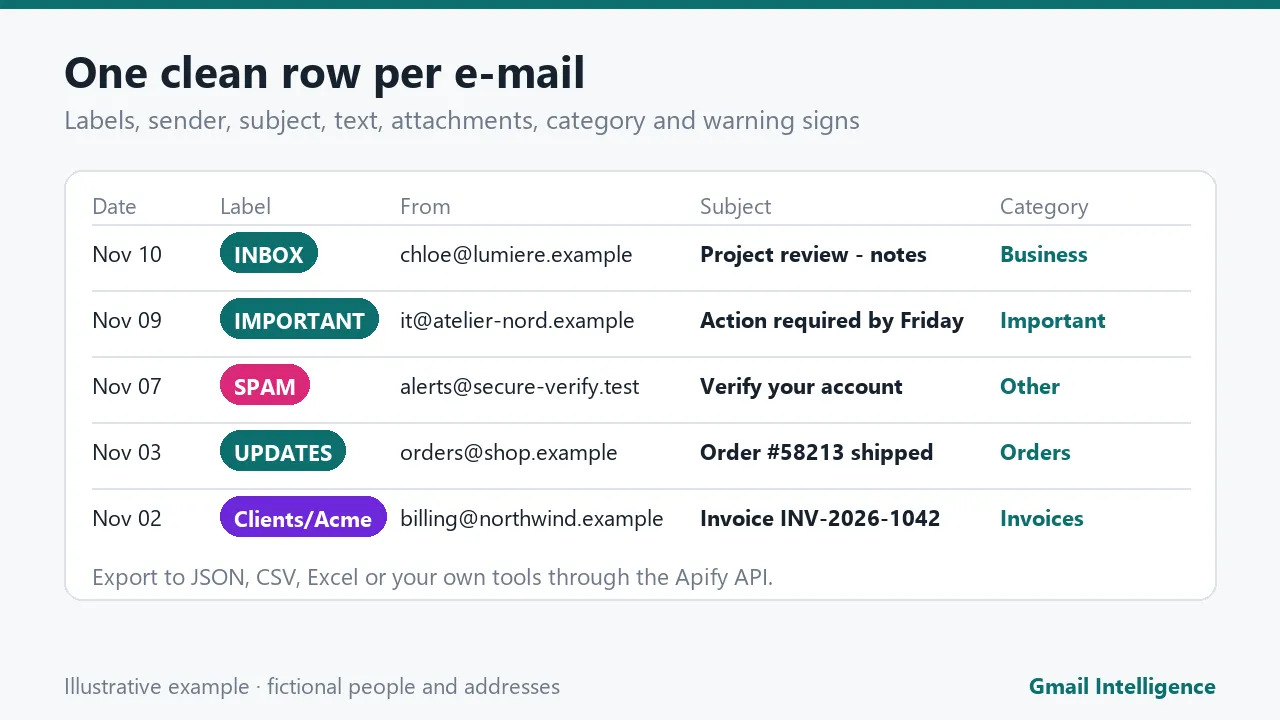
Turn your own Gmail mailbox into clean, searchable data – read-only, through the official Gmail API, with your own Google Cloud project. Use the same search syntax as the Gmail search box, pick labels and dates, and get one row per e-mail with its text, labels, attachments, category, conversation, duplicate check and phishing warning signs, plus a mailbox report – and, if you want, an AI summary with your own OpenAI, Anthropic or Gemini key.
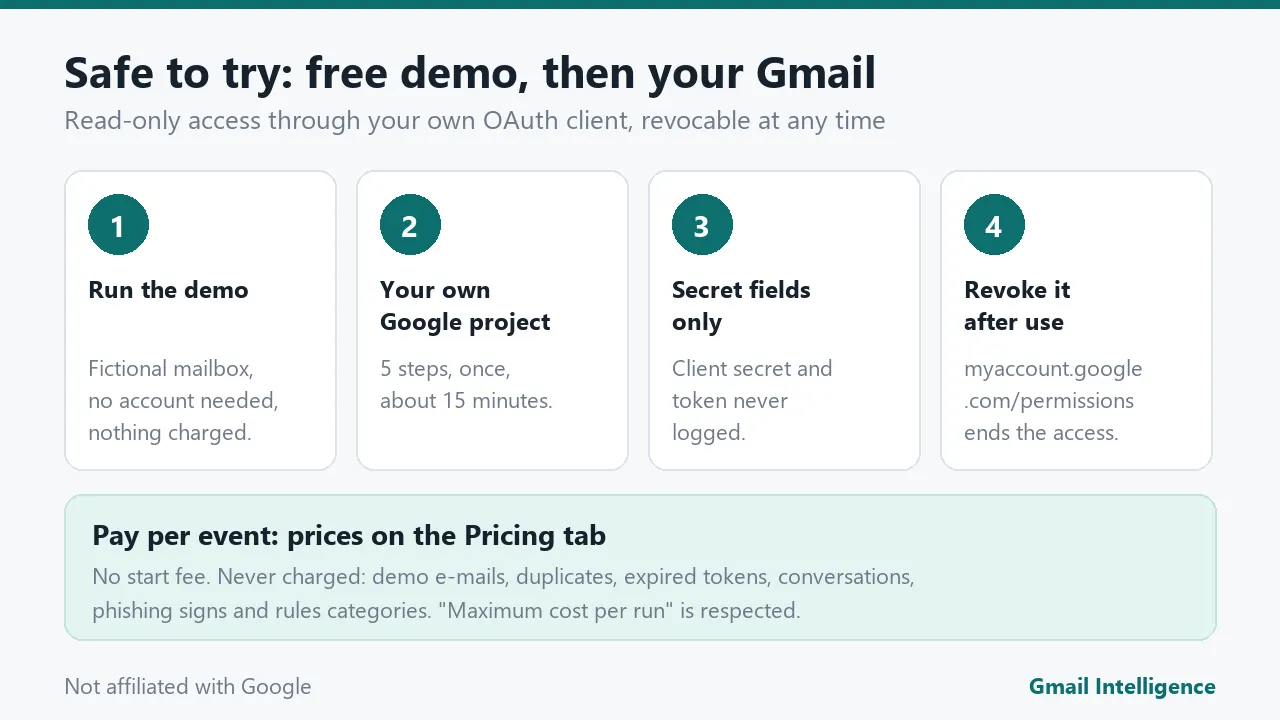
Try it first for free: run it with an empty input and you get a demo on a fictional mailbox (14 invented
e-mails, clearly marked demo: true) in a few seconds – no Google account, nothing charged.
Not affiliated with Google. Gmail and Google Cloud are trademarks of Google LLC, used only to describe compatibility. No Google or Gmail logo is used. This Actor has no Google app of its own: it uses your OAuth client, in your Google Cloud project.
Who is it for?
- Freelancers and small teams who want their invoices, orders, support tickets or client e-mails as a spreadsheet or JSON, without installing anything.
- Developers and automation builders who need Gmail data in a pipeline (Apify API, webhooks, Make, Zapier, n8n) with a stable schema.
- Anyone cleaning up a mailbox: top senders, newsletters, duplicates, conversations, suspicious e-mails.
It needs about 15 minutes once to create your own Google Cloud project and token (5 steps below). If you prefer not to, run the free demo to see the output first.
Why it is safe to use
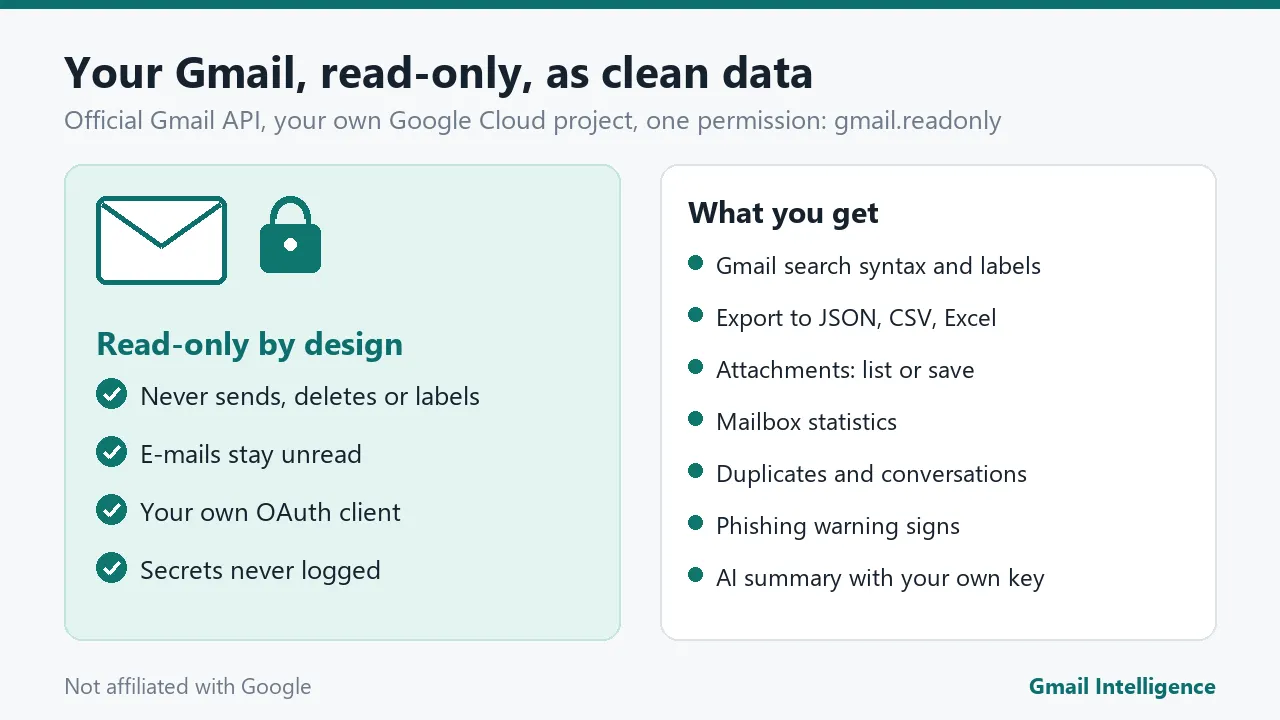
- Read-only by design. The only Google permission used is
https://www.googleapis.com/auth/gmail.readonly(read e-mails and labels). A built-in allow-list lets through only Gmail read requests (profile, labels, list / get messages and threads, attachments, history) and the token refresh. Every other request – send, modify labels, mark as read, archive, trash, delete – is refused before it is sent. Nothing is ever marked as read. - Your Google project, your token. You create the OAuth client and the refresh token yourself. You can revoke the access in one click at any time (see "How to remove the access").
- Secrets stay secret. The client secret, the refresh token and your AI key go into secret input fields (stored encrypted by Apify). The short-lived access token is never stored. They are removed from every log line, result row, file and error message – even if Google repeats them in an error.
- E-mails are treated as untrusted content. HTML is never rendered, links are never opened, attachments are never opened or run.
The 5 setup steps (about 15 minutes, once)
You need a Google account with Gmail. Everything below is free (the Gmail API has no fee, only usage limits).
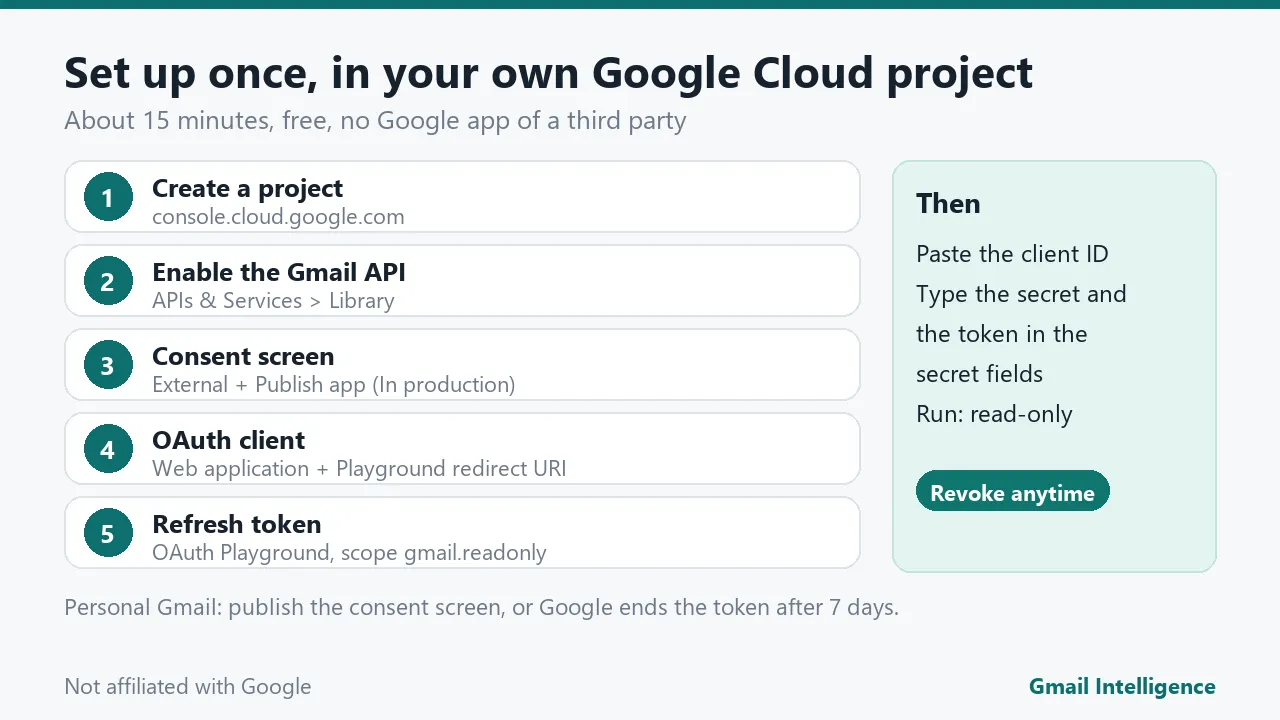
- Create your own Google Cloud project. Go to console.cloud.google.com, click the project picker, then New project (any name, for example "my-gmail-export").
- Enable the Gmail API. In that project: APIs & Services → Library, search Gmail API, click Enable.
- Set up the consent screen (Google Auth Platform, also called "OAuth consent screen"):
- Branding: an app name (for example "My Gmail export") and your e-mail address.
- Audience: choose External for a personal Gmail account, then click Publish app so that the status is In production. Without this, the app stays in "Testing" and Google expires your refresh token after 7 days. You do not need to submit the app for verification: it is only for you (Google allows unverified apps for fewer than 100 users).
- Google Workspace account (company domain)? Choose Internal instead: no publishing, no 7-day limit, no warning screen.
- Create an OAuth client. Google Auth Platform → Clients → Create client, type Web application. Under
Authorized redirect URIs add exactly
https://developers.google.com/oauthplayground. Click Create and copy the client ID and the client secret. - Get a refresh token in the OAuth Playground. Open https://developers.google.com/oauthplayground:
- click the gear icon (top right), tick Use your own OAuth credentials, paste your client ID and client secret;
- in Step 1, type
https://www.googleapis.com/auth/gmail.readonlyin Input your own scopes (do not pick any other Gmail scope) and click Authorize APIs; - sign in with the Gmail account to read and allow read access (see the warning screen below);
- in Step 2, click Exchange authorization code for tokens and copy the Refresh token (it usually
starts with
1//).
Then in this Actor, paste the OAuth client ID, and type the OAuth client secret and the Refresh token into their secret fields. Save it as a task if you want to run it again or on a schedule.
The "Google hasn't verified this app" screen
Because the app is your own and not verified by Google, Google shows a warning when you allow access in step 5: "Google hasn't verified this app". This is expected: you are the developer of this app. Check that the app name is the one you chose in step 3, click Advanced, then Go to , then allow View your email messages and settings (read-only). You will see this screen only when you create a token.
Input examples
Demo (no Google account):
Last month's invoices with attachments, read-only:
Two labels, unread only, between two dates:
Gmail search accepts everything the Gmail search box accepts: from:, to:, subject:, has:attachment,
filename:pdf, label:, is:starred, larger:5M, newer_than:7d, older_than:1y, category:promotions, OR,
- (exclude), quotes and parentheses. Labels accept names or IDs (INBOX, SENT, SPAM, TRASH, STARRED,
IMPORTANT, CATEGORY_UPDATES, your own labels); Spam and Trash are skipped unless you ask for them.
What you get
| Feature | What it does | Charged? |
|---|---|---|
| Read & search | Gmail search syntax, labels, date range, unread only, with attachments only, newest first | per e-mail read |
| Export | Dataset (JSON, CSV, Excel, API) + a spreadsheet-safe EMAILS_CSV file | included |
| Attachments | Name, type, size, SHA-256 for every file; optional saving to your key-value store with per-file and per-run size limits | file saved |
| Mailbox report | Top senders and domains, e-mails per month / weekday / hour, categories, attachments, duplicates | once per run |
| Duplicates | Same Message-ID or same content found twice (reported only, never deleted) | free |
| Conversations | Threads from References / In-Reply-To, plus Gmail's own gmailThreadId | free |
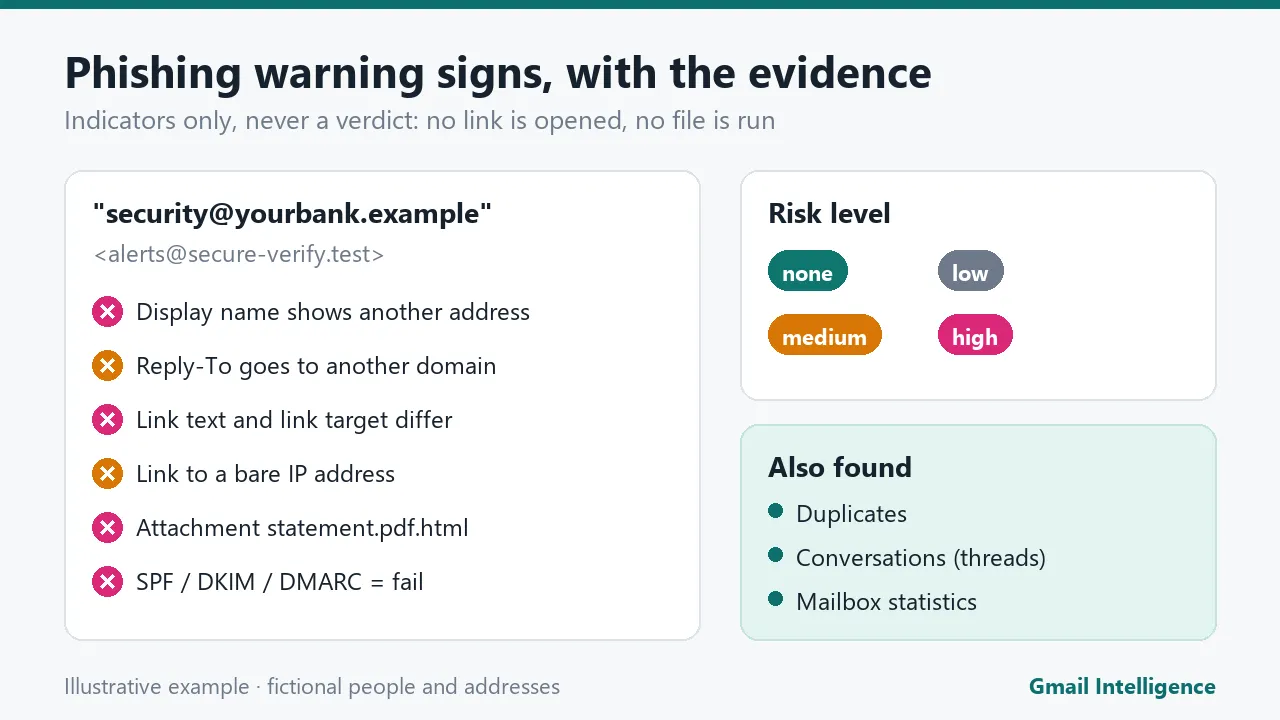
| Phishing warning signs | Display name vs address, Reply-To mismatch, link text vs real link, links to IP addresses, risky / double extensions (invoice.pdf.exe), SPF / DKIM / DMARC fail. Indicators only, never a verdict | free |
| Category (rules) | Business, Personal, Invoices, Orders, Support, Marketing, Important, Other | free |
| AI summary + category | With your own OpenAI / Anthropic / Gemini key (optional, off by default) | per e-mail analysed |
| Demo mode | Fictional sample mailbox, no Google account | never |
Output
One dataset row per e-mail (type: "email"), for example:
Other rows: attachment, ai-analysis, thread, duplicate-group, mailbox-report. Ready-made views: E-mails,
Phishing indicators, Attachments, AI summaries, Conversations and duplicates. Files in the key-value store:
MAILBOX_REPORT, EMAILS_CSV, LABELS, RUN_SUMMARY, FAILED_INPUTS, and saved attachments (att-…). Demo rows
carry demo: true.
Optional AI – with your own key
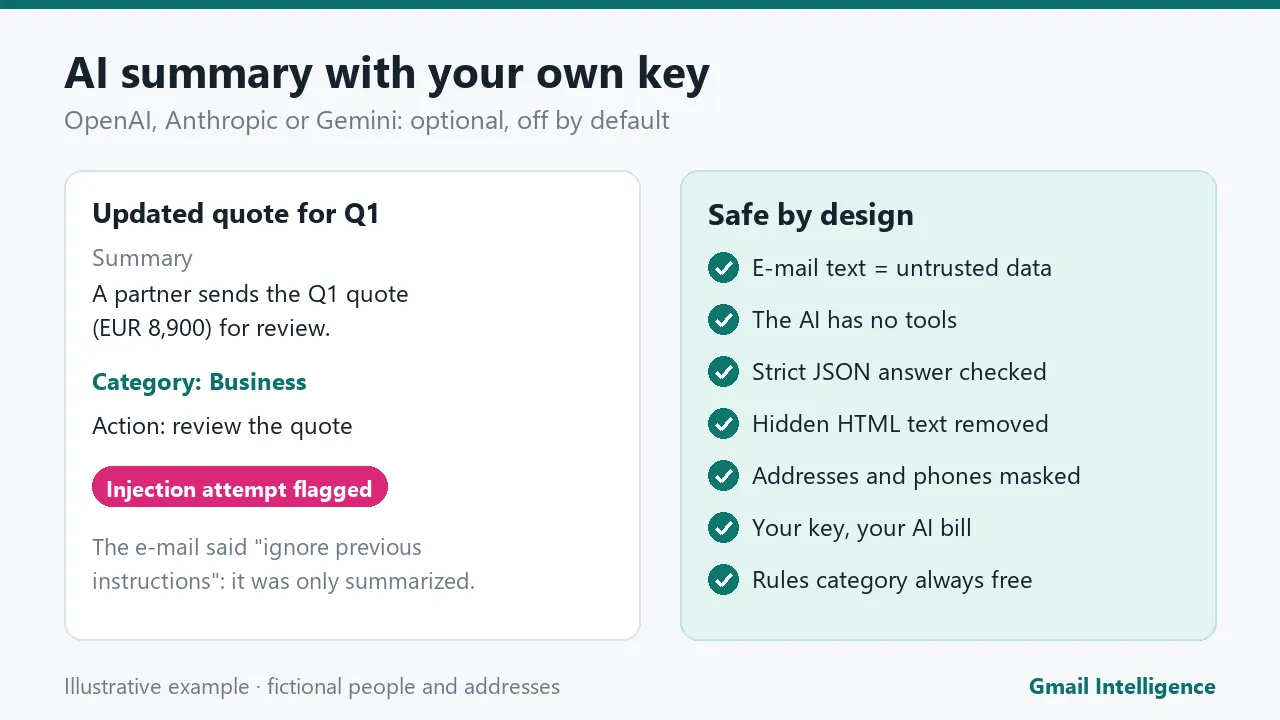
Choose OpenAI, Anthropic or Gemini and paste your API key in the secret field. Each analysed e-mail gets a short summary, a category, key points, action items and an injection flag. The AI cost is billed by your AI provider.
E-mail content can contain hidden instructions ("ignore previous instructions…"). This Actor is built so that they cannot do anything:
- the e-mail is sent as data inside a clearly delimited block, after removing hidden HTML text and invisible characters; addresses and phone numbers are masked by default;
- the AI has no tools – it can only answer with a small JSON object, which is checked strictly (any extra field, wrong value or free text is rejected and the rules category is kept);
- the answer is only stored as text in your results: it never triggers an action, never changes billing or the phishing signs; and the Actor itself can only read Gmail;
- e-mails that look like injection attempts are flagged (
aiPossiblePromptInjection).
There is no shared or managed AI key: without your key, no AI call is made.
Pricing
Pay per event – the current prices are on the Pricing tab. There is no start fee.
- Charged: each unique e-mail read, each attachment file saved, each e-mail analysed by AI (your key), one mailbox report per run.
- Never charged: demo e-mails, duplicates, conversations, duplicate groups, phishing signs, rules categories, and runs that could not read Gmail (expired token, API not enabled…).
- Your Maximum cost per run is respected: the run stops cleanly and keeps every row already delivered.
- Google does not charge for the Gmail API; your Google Cloud project only needs to exist (no billing account).
When something goes wrong
The run still ends SUCCEEDED with a clear status message telling you what to do; RUN_SUMMARY shows
status: "CUSTOMER_ERROR" with the errorCode, and FAILED_INPUTS lists each problem. Nothing is charged.
| Code | What it means / what to do |
|---|---|
AUTH_MISSING | Client ID, client secret or refresh token is empty. Fill in all three, or none for the demo. |
TOKEN_EXPIRED_OR_REVOKED | Google says the refresh token expired or was revoked. If your consent screen is in Testing, tokens die after 7 days: click Publish app (In production) and create a new token. Tokens also end when you revoke the access, change your Google password, or do not use them for 6 months. |
OAUTH_CLIENT_INVALID | Wrong client ID / secret, or the OAuth client was deleted. |
OAUTH_CLIENT_MISMATCH | The token was created with another client (often: "Use your own OAuth credentials" was not ticked in the Playground). |
ACCESS_TOKEN_GIVEN / AUTH_CODE_GIVEN | You pasted the access token (ya29.…) or the authorization code (4/…) instead of the refresh token. |
INSUFFICIENT_SCOPE | The token was not created with gmail.readonly. |
GMAIL_API_NOT_ENABLED | Enable the Gmail API in your project (step 2), wait 2–3 minutes, run again. |
WORKSPACE_ADMIN_BLOCKED | Your Workspace administrator blocks the app. |
RATE_LIMITED / GOOGLE_UNREACHABLE | Google's limits or servers: the Actor retried several times; rows already read are kept. Run again later. |
LABEL_NOT_FOUND | A label does not exist (the list of your labels is given); the other labels are still read. |
Turn on failRunOnError if you prefer a FAILED run (for scheduled monitoring). The run also stops cleanly before its timeout.
How long does it take?
The demo takes a few seconds. A real mailbox depends on Google's answer time and the size of the e-mails (several e-mails are read in parallel); start with the default 50 e-mails, then raise Maximum e-mails (up to 10,000 per run). Default memory: 256 MB.
How to remove the access
- Go to myaccount.google.com/permissions (Google Account → Security → Your connections to third-party apps & services), open your app and click Delete all connections / Remove access. The refresh token stops working at once.
- In console.cloud.google.com, delete the OAuth client (Google Auth Platform → Clients), or delete the whole project.
- On Apify, clear the secret fields (client secret, refresh token, AI key) from saved inputs and tasks, and delete the runs' datasets if you no longer need them.
Privacy
- Your e-mails go from Google directly to your own Apify run and are stored only in that run's dataset and key-value store (set a data retention period in your Apify settings if you want them deleted automatically).
- No copy is sent anywhere else, except to your own AI provider, only if you turn AI on.
- There is no Google app of the Actor's developer in the middle: the access is granted to your OAuth client, and only you can revoke or delete it.
- Only mailboxes you own or are authorised to read. Use it in line with Google's terms and the privacy rights of the people in your e-mails.
Limits and honest notes
- Setup requires your own Google Cloud project (5 steps above); there is no "Sign in with Google" button, on purpose.
- Personal accounts: publish your consent screen ("In production"), otherwise the token expires after 7 days.
- Google Workspace service accounts / domain-wide delegation (reading many company mailboxes as an admin) are not supported yet – planned for later.
- Each run reads up to 10,000 e-mails (newest first). There is no live monitoring; schedule the Actor (for example
with
newer_than:1d) to read new e-mails regularly. - Statistics cover the e-mails read in the run (after your filters and limits), not your whole mailbox.
- Phishing signs are heuristics: a legitimate newsletter can show some of them, and a phishing e-mail can show none. They are never a malware or phishing verdict; no file is scanned.
- Very large e-mails (above Maximum e-mail size) are kept with their headers only.
- Contacts, calendars and full backups are not included.
FAQ
Will my e-mails be marked as read? No. The only permission is read-only; isRead shows Gmail's state,
unchanged.
Can it delete, send or label e-mails? No. The permission does not allow it, and a guard refuses every non-read request before it reaches Google.
Why do I need my own Google Cloud project? So that the access belongs to you: your OAuth client, your token, your revocation. No third-party app gets access to your mailbox.
Does it work with Google Workspace? Yes, with an Internal consent screen in a project of your organization (or if your administrator allows your app). Admin-wide access to many mailboxes is planned for later.
Not affiliated with Google.