

Glovo Scraper
Pricing
from $0.00005 / actor start
Glovo Scraper
Glovo stores, restaurant menus and grocery aisles across 21 countries: product, price, section, store, rating, delivery fee, ETA and opening status. Shop aisles too, not only food. Prices compared between runs. Example: Spain, one city, 10 stores and 50 products each, about a minute.
Pricing
from $0.00005 / actor start
Rating
0.0
(0)
Developer

Badr Bouargan
Maintained by CommunityActor stats
0
Bookmarked
3
Total users
1
Monthly active users
9 days ago
Last modified
Categories
Security
Limited permissionsShare
Glovo Scraper – Restaurant Menus, Grocery Prices & Stores
Turn any Glovo city, store or link into a clean spreadsheet of menus, prices, discounts and stores — in one click, no login, and you only pay for rows you get.
One row per dish or grocery product with its regular price, promo price and discount %, currency, options and photo, plus the store's rating, delivery fee, ETA and opening status. Built for food-delivery price monitoring, quick-commerce competitor tracking, deal feeds and market research in Morocco, Spain, Italy, Portugal, Poland and every other Glovo country.
21 countries and 233 cities are built in: Armenia · Bulgaria · Côte d'Ivoire · Croatia · Georgia · Italy · Kazakhstan · Kenya · Kyrgyzstan · Moldova · Montenegro · Morocco · Nigeria · Poland · Portugal · Romania · Serbia · Spain · Tunisia · Ukraine · Uganda. Any other Glovo city works by pasting its URL.
How to use it in 3 steps
- Say where: pick a Country (e.g. Spain), type a City (
Madrid,casablanca…) or paste any Glovo link — store, category, city or country page. - Set the size: keep Maximum stores per city and Maximum products per store small for a first run (the prefill reads 5 stores × 10 products ≈ 50 rows, a few cents, under a minute).
- Click Start, then download Excel, CSV or JSON, or send the rows to Google Sheets, Make, Zapier or n8n.
Nothing filled in at all? The Actor runs a small demo (5 stores in Casablanca) instead of failing, and tells you so in the log.
Paste links exactly as you copied them
The Start URLs field accepts every reasonable form and cleans it silently:
| You paste | The Actor reads |
|---|---|
https://glovoapp.com/es/es/madrid/stores/goiko-madrid?utm_source=google&gclid=… | the Goiko store page (tracking removed) |
www.glovoapp.com/fr/ma/casablanca/categories/restaurants_1?type=burger | that category with its burger sub-filter |
glovoapp.com/es/es/madrid/stores/a, glovoapp.com/es/es/madrid/stores/b (one line) | two stores |
https://glovoapp.com/es/es/madrid/mcdonalds-mad/ (old link format) | …/madrid/stores/mcdonalds-mad |
https://glovoapp.com/ma/fr/rabat/ (country and language swapped) | https://glovoapp.com/fr/ma/rabat/ |
https://glovoapp.com/it/it/ | the built-in cities of Italy (up to Maximum cities per country) |
Madrid, Las Palmas de Gran Canaria, Warsaw, Morocco | that city or country |
Duplicates are read once. In the Cities field, capitals, accents and madrid, sevilla on one line are fine, and a built-in city is sent to its own country automatically (casablanca with Spain selected is read in Morocco). Anything unusable — an Uber Eats link, an unknown place — is skipped with a clear reason in FAILED_INPUTS, never billed, and never fails the run.
What you can do with it
- Monitor restaurant and grocery prices: the same burger, pizza or bottle of oil across every store of a city, refreshed on a schedule.
- Build a deals feed: Only products on promotion or Minimum discount (%) keeps just the -30 %, -50 % and 2x1 offers, with regular and promo price side by side.
- Track competitors in quick commerce: supermarket aisles (Carrefour Market, local grocers…) with prices and promotions, not only restaurant menus.
- Detect price changes and new products: with price tracking, every row gets the previous price, the change and the percentage.
- Map delivery coverage: every store of a city with rating, delivery fee (standard and actual), ETA and open/closed status.
- Follow one brand: filter by store name to watch a chain across cities and countries.
Why this Actor
- Pay only for results. Only successful rows are saved to the dataset — the only thing you are billed for. Failed pages, empty menus, duplicates, filtered-out products and invalid inputs are free; they are listed in
FAILED_INPUTS. - Exact limits and your budget respected. Maximum results stops the run at exactly that number, and the run stops cleanly when your Max cost per run is reached.
- Real promo prices.
priceis the regular price,promoPricethe discounted one,finalPricewhat a customer pays for one unit,discountPercentthe discount. - Restaurants and supermarkets. Menus come with sections, options and extras; shops and supermarkets are read aisle by aisle.
- Clean, flat rows. Prices and fees are numbers, every row has an ISO currency code (
MAD,EUR…) and an ISO 8601 date. - Fast and light. Plain HTTP requests, no browser; a 5–10 store run finishes in about a minute.
- Respectful crawling. Identified bot, rate-limited, public pages only.
Input example
All fields are optional. With an API call, a missing field takes the same default as the form (1 city per country, 10 stores per city, 50 products per store).
Output example
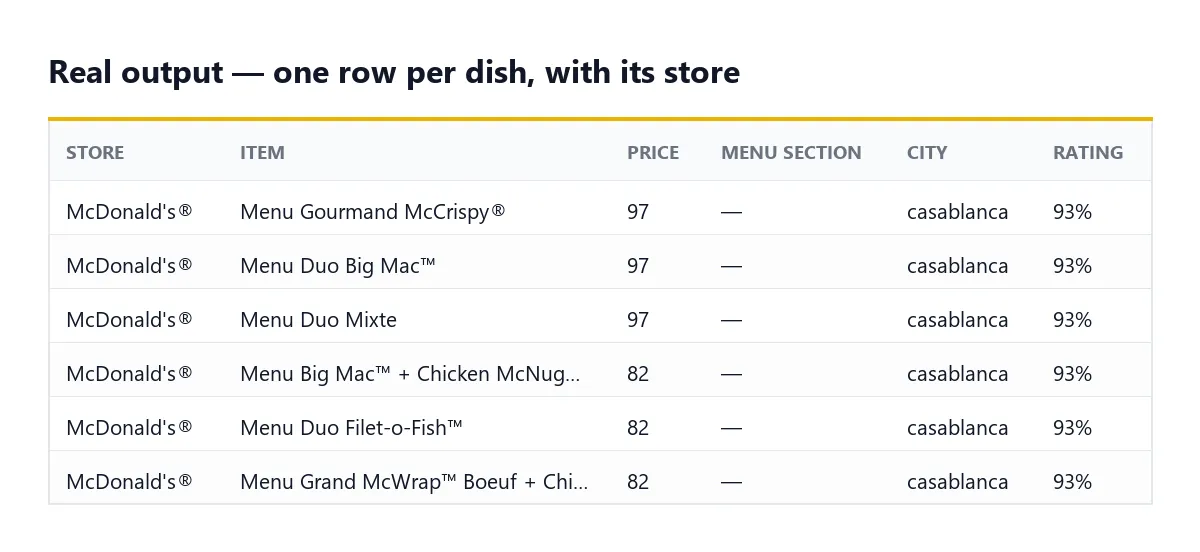
A real product row from a local test run (options shortened):
Stores found by browsing a city (rather than pasted as a link) also carry eta, distance, deliveryFee (what the customer pays now), standardDeliveryFee (the normal fee), deliveryFeeText, isFreeDelivery, storeRatingVotes, isNew, isTopRated, isSponsored and source. A 2x1 offer has promotionLabel: "2x1", promoPrice: null and finalPrice equal to price. With Track prices between runs, rows also get previousPrice, priceChange, priceChangePercent, isNewProduct and lastSeenAt. In store-only mode, each row is a store (rowType: "store").
The dataset has an Overview table (photo, product, store, price, promo price, discount, rating, delivery fee, ETA, link) and a Stores table. The key-value store holds RUN_SUMMARY (totals, stop reason, charged amount) and FAILED_INPUTS (what failed and why).
Pricing
Pay per result: you are charged for each row saved to the dataset, nothing else. Proxy and compute are included.
| Apify plan | Price per result | Price per 1,000 results |
|---|---|---|
| Free | $0.003 | $3.00 |
| Starter | $0.0024 | $2.40 |
| Scale | $0.00195 | $1.95 |
| Business and above | $0.0015 | $1.50 |
A tiny start fee of $0.00005 per run (per GB of memory) also applies. Examples on the Free plan: the 50-row prefill costs about $0.15; 1,000 menu items cost $3.00. Failed pages, empty menus, duplicates and filtered-out products are never billed. Set Max cost per run in the run options and the Actor stops cleanly at that amount.
What it can and cannot do
Can: public menus and grocery aisles of any Glovo store; regular price, promo price and discount; options and extras; store rating, fees, ETA and opening status; every Glovo city; price history between runs; e-mail alerts when run with full permissions.
Cannot: anything behind a login (orders, account, Prime-only prices), customer reviews text, live stock per item, delivery prices for a specific street address (fees are the ones Glovo shows for the city), or other apps such as Uber Eats, Deliveroo or Talabat.
FAQ
Which cities can I scrape? Any Glovo city. 233 are built in; for any other one paste its Glovo URL in Start URLs, or type its slug in Cities together with its country.
Can I get only the stores, without menus? Yes — switch off Get menus and products for one row per store with rating, fees, ETA and opening status. It is the cheapest mode.
Is price the discounted price? No. price is the regular price shown struck through on Glovo; promoPrice is the discounted price and finalPrice is what a customer pays for one unit.
Does it scrape supermarkets and grocery stores? Yes. Stores whose products live in aisles (supermarkets, shops, pharmacies) are explored aisle by aisle, up to Aisle depth.
How does price tracking work? Each product price is remembered between runs in a named key-value store. The next run adds previousPrice, priceChange and priceChangePercent. With Only changed products, you only get (and pay for) what moved.
Do I pay for errors? No. Only successful rows reach the dataset. Anything that failed after several retries is listed in FAILED_INPUTS with the reason, at no cost.
Why did an e-mail alert not arrive? Actors started from Apify Store run with limited permissions and cannot send e-mail on your behalf. Use a Slack, webhook, Make or Zapier integration instead; the changes are always in the dataset.
Troubleshooting
- The run finished with 0 results. Open
FAILED_INPUTS: it says which link or city could not be read and why (not a Glovo page, unknown city, empty menu…). - I typed several cities but only one was read. Maximum cities per country also limits the Cities list (a warning in the log says so). Set it to
0to read them all. - Glovo answers 403 or 429. Small runs need no proxy and blocked requests are retried automatically. For many cities or countries, switch on Apify Proxy and pick the RESIDENTIAL group, or lower Requests per minute.
- The log says "Unknown input field". A setting pasted from another Actor has no effect here; remove it in the JSON view of the input.
- Price tracking is "unavailable". Run the Actor with full permissions so it can open its named history store.
Use it via API
Python (apify-client):
JavaScript (apify-client):
cURL (run and get the rows in one call):
Integrations
- Google Sheets: send each run's rows to a sheet from the Integrations tab — a live price board with no code.
- Make, Zapier and n8n: trigger a scenario when a run finishes, e.g. post price drops to Slack or update a product database.
- MCP (AI agents): connect Claude, Cursor or any MCP client to Apify's MCP server (
https://mcp.apify.com) and ask for Glovo menus in plain language; the agent callsbadr_xba/glovo-scraperfor you. - Webhooks: call your own endpoint when a run succeeds or fails.
- Schedules: a daily or weekly run turns menus into a price history. Combine with Only changed products to pay only for what moved.
Support
Open an issue on the Actor's Issues tab for a bug, a missing field or a city that fails — include the run link.
Did this Actor do the job? A short review on its Store page helps other people find it and tells me what to build next.
Legal
This Actor reads public Glovo pages, identifies itself honestly in its user agent and limits its request rate. It collects store and product data, not personal data. How you reuse prices and menus is your responsibility; check Glovo's terms for your use case.
En français
Glovo Scraper extrait les menus, les prix, les promotions et les magasins de Glovo dans 21 pays et 233 villes, dont le Maroc (Casablanca, Rabat, Marrakech, Tanger, Agadir, Fès…) : restaurants, supermarchés, pharmacies et boutiques. Une ligne par plat ou par produit, avec son prix habituel, son prix promo et sa remise en %, sa devise (MAD, EUR…), ses options et sa photo, plus la note du magasin, les frais de livraison, le délai et l'ouverture.
Pour démarrer : choisissez un pays, tapez une ville (casablanca, Madrid…) ou collez n'importe quel lien Glovo — même avec des paramètres de suivi ou plusieurs liens sur une ligne : tout est nettoyé automatiquement. Gardez 5 à 10 magasins et 10 à 50 produits par magasin, puis cliquez sur Start. Pour un suivi quotidien, activez Track prices between runs et Only changed products, puis créez un Schedule.
Vous ne payez que les résultats réussis : les pages en échec, les entrées invalides, les menus vides et les doublons ne sont pas facturés ; ils sont listés dans FAILED_INPUTS. La limite Maximum results est respectée à l'unité, et le run s'arrête proprement quand votre budget maximal (Max cost per run) est atteint. Le bilan du run est dans RUN_SUMMARY.
Tarif : 3,00 $ pour 1 000 résultats sur le plan gratuit, 2,40 $ (Starter), 1,95 $ (Scale), 1,50 $ (Business). Exports Excel, CSV, JSON, Google Sheets, Make, Zapier, n8n, MCP, API et webhooks.


