

Ultimate SEO Audit & Website Analyzer
Pricing
from $10.00 / 1,000 page auditeds
Ultimate SEO Audit & Website Analyzer
Renders every page in Chromium and audits meta tags, headings, content, technical SEO, structured data, lab performance, links, images, accessibility (axe-core), mobile, hreflang and AI-search visibility. Traceable scores, site action plan, run-to-run history, HTML/PDF/CSV reports.
Pricing
from $10.00 / 1,000 page auditeds
Rating
0.0
(0)
Developer

Badr Bouargan
Maintained by CommunityActor stats
0
Bookmarked
2
Total users
1
Monthly active users
2 days ago
Last modified
Categories
Features
Share
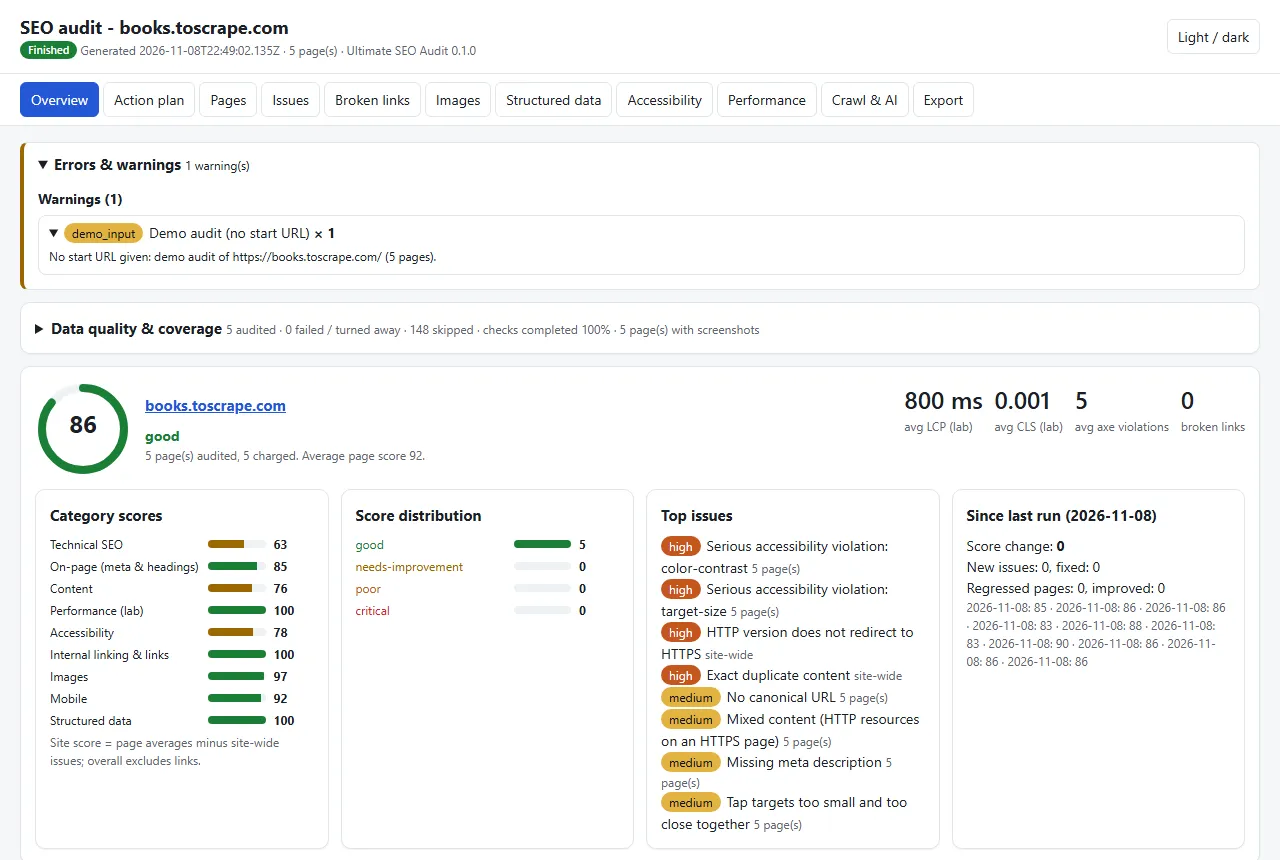
Audit one website or compare several. Every page is rendered in a real Chromium browser, checked by twelve modules, scored with traceable points, and summarised in an action plan, an interactive HTML report, a PDF, a CSV of issues and a run-to-run history.
What you get per run
| Output | Where | What it contains |
|---|---|---|
| Page records | Dataset (recordType: "page") | Score, band, 9 category scores, every lost point, issues with explanation + fix + example, and the raw data of each module |
| Site summaries | Dataset (recordType: "site-summary") | Site score, action plan, top issues, duplicates, broken links/images, non-indexable pages, coverage, robots/sitemaps, AI-bot permissions, history diff |
REPORT | Key-value store, text/html | Self-contained interactive report: overview with gauges, action plan, page explorer (search, filter, sort, pagination, page detail), issues, broken links, image gallery, schema inspector, accessibility, performance, crawl & AI, multi-site comparison, history, JSON/CSV export. While the crawl runs it shows live progress (pages processed / total, refreshed at most once a minute); an Errors & warnings panel groups pages and inputs that were not audited by code; a Data quality & coverage panel shows audited / failed / skipped pages and how many pages each check category could score |
REPORT_PDF | Key-value store, application/pdf | Printable summary per site |
ISSUES | Key-value store, text/csv | One row per issue per page (and site-wide issues) with recommendation |
RUN_SUMMARY | Key-value store, application/json | Totals, per-site comparison, timing, outputs |
FAILED_INPUTS | Key-value store, application/json | Invalid inputs, robots-blocked start URLs, failed and turned-away pages (none of them charged) |
What is checked
- Meta: title and description length in characters and estimated pixels (Arial metrics), duplicates across the site, several titles/descriptions, charset,
lang, Open Graph, Twitter card (with Open Graph fallback), head elements that ended up in<body>. - Headings: outline, missing/empty/multiple H1, skipped levels, H1 vs title overlap.
- Content: words (Unicode aware, CJK per character), paragraphs, sentences, average sentence length, reading ease for EN/DE/FR/ES/IT/NL/PT, top keywords and phrases, keyword stuffing, placeholder text, exact duplicates (SHA-1) and near duplicates (SimHash of distinct 5-word shingles).
- Technical: status, HTTPS, TLS certificate, http->https redirect, redirect chains and loops, robots.txt (RFC 9309), sitemaps (index, gzip, text), indexability (meta robots, googlebot,
X-Robots-Tag), canonical (HTML + Link header, multiple, relative, outside head, target broken/redirecting/noindex, chains), soft 404 (error wording, or same content as a random missing URL), JavaScript dependence (server HTML vs rendered DOM), mixed content, compression, URL length, pagination targets, orphan pages (sitemap vs links, only when the crawl covered the whole site). - International: hreflang from the HTML, the HTTP
Linkheader and the XML sitemap; invalid codes (validated with the runtime's Unicode data, e.g.en-UK->en-GB), relative URLs, missing self-reference, conflicts between sources, x-default, broken targets, missing return links. - Structured data: JSON-LD (including
@graph), microdata and RDFa; parse errors; required properties for Product, Breadcrumb, Event, Recipe, Job posting, Video, Local business, Software app, FAQ, Q&A, Review, Course, Dataset. - Performance (lab): LCP, CLS, TBT, FCP, TTFB, DOMContentLoaded, load, transfer weight and requests by type.
- Links: internal/external, nofollow, empty anchors, too many links, insecure internal links, and every unique link checked once per run (HEAD, then GET when HEAD fails), redirects.
- Images: alt coverage, decorative images, broken images, real weight (browser network data, else Content-Length, else a bounded download), format, dimensions attributes, images much larger than displayed.
- Accessibility: axe-core 4.11 with WCAG 2.0/2.1/2.2 A and AA rules plus best practices; "needs review" items listed separately.
- Mobile: viewport, zoom blocking, horizontal overflow, tap targets (WCAG 2.5.8 size + spacing test) and small text, measured at a 375 px viewport.
- AI search visibility: robots.txt permissions for search bots (OAI-SearchBot, Claude-SearchBot, PerplexityBot...), training bots (GPTBot, ClaudeBot, CCBot, meta-externalagent...), control tokens (Google-Extended, Applebot-Extended) and user-triggered fetchers, per start URL and as a share of the audited URLs;
/llms.txtpresence (informational).
Honest limits
- Lab, not field data. Performance comes from one unthrottled desktop load in headless Chromium close to the crawler. Real-user Core Web Vitals (CrUX) can be very different, especially on phones. The Core Web Vitals thresholds are used only as guidance.
- Accessibility: automated rules catch only part of the problems. Results are never a conformance claim.
- robots.txt permission is not access. A bot allowed by robots.txt can still be blocked by a firewall or CDN, and user-triggered fetchers may not read robots.txt.
- Rich results: having the required properties does not guarantee that a search engine shows a rich result.
- Pixel widths of titles/descriptions are estimates.
- Broken vs unverified: hosts that refuse automated checks (401/403/429/999, timeouts) are reported as "unverified", never as broken.
- Turned away: bot challenges, CAPTCHAs, login walls and 401/403/429 answers are reported as "turned away". They are never bypassed, never scored and never charged.
- Orphan pages are only reported when the crawl reached every page (no page/depth limit hit, not start-URLs-only, not seeded from the sitemap). Otherwise the report says why the check was not possible.
- Mobile checks re-lay out the page at 375 px without touch emulation.
Scores (formulas)
- Every issue type has a severity and points (critical 30, high 15, medium 8, low 3, info 0; a few documented exceptions such as accessibility impacts 15/8/4/1, best-practice-only axe rules count half).
- Category score (per page) =
max(0, 100 - sum of the points of the issues in that category). Categories: technical, on-page, content, performance, accessibility, internal linking & links, images, mobile, schema. - A category that was not measured (module off, metric unavailable, page without images, axe error) is left out, never counted as 0.
- Page score = rounded mean of the scored categories except links (links mostly reflect other websites). Pages that are not indexable (4xx/5xx, noindex) are capped at 39.
- Bands: good 80+, needs improvement 60-79, poor 40-59, critical below 40.
- Site category score = mean of the page category scores minus the points of site-wide issues in that category (floor 0). Site score = mean of the site category scores except links.
- Every deduction is stored in
deductions(page) andsiteDeductions(site) with the issue id, rule and points. - Priority in the action plan: critical severity -> critical; high -> high; medium -> medium (long-term when the fix effort is high); low -> long-term.
Input
| Field | Default | Notes |
|---|---|---|
startUrls | demo: books.toscrape.com | One report per website; several websites are compared |
crawlPages | true | Off = audit only the start URLs |
maxPages | 5 | Per website; this is what you pay for |
maxDepth | 5 | Clicks from a start URL |
seedFromSitemap | false | Queue sitemap URLs too |
includeSubdomains | false | |
includeUrlPatterns / excludeUrlPatterns | [] | Glob (/blog/**, **?sort=*) or /regex/ |
respectRobotsTxt | true | Crawl-delay honoured (max 10 s) |
maxConcurrency | 3 | Pages rendered in parallel |
pageTimeoutSecs | 45 | |
checkExternalLinks | true | |
maxLinkChecksPerSite | 1000 | Unique URLs checked per website (0 = none) |
maxImagesPerPage | 100 | |
soft404Probe | true | One request to a random missing URL per website |
auditMeta ... auditAiVisibility | true | 12 module switches |
generateHtmlReport, generatePdfReport | true | |
pageScreenshots | true | Small above-the-fold JPEG per audited page (desktop, plus phone when the mobile check runs) taken from the render the audit already does; stored as SHOT-... records in the key-value store, shown in the page explorer and page detail (max 3 per page). Not charged. |
useHistory, historyStoreName | true, seo-audit-history | Named key-value store with the last 10 runs per website |
Empty input runs a quick 5-page demo audit. Invalid values fall back to defaults and are listed in FAILED_INPUTS.
Examples
Ready-made inputs are in tasks/ (quick audit, full site, technical, Core Web Vitals lab, accessibility, AI search visibility, multi-site comparison, deep audit).
History & regressions
With useHistory on, each run stores a compact snapshot per website (score, category scores, page scores, issue keys) in the named store. The next run reports the score change, new issues, fixed issues (only for pages audited in both runs), regressed and improved pages (5+ points), and flags a regression. Schedule the Actor to monitor a site.
Pricing
Pay per event: page-audited = one rendered and analysed page with a 2xx/3xx answer. Not charged: robots-blocked, excluded, duplicate, file, failed, error (4xx/5xx) and turned-away URLs, site summaries and reports. Plus a tiny $0.00005 start fee per run (one event per GB of memory). Price per 1,000 audited pages by Apify plan: Free $20 ($0.02 per page), Starter $16, Scale $13, Business and above $10 ($0.01 per page). Free-plan examples: 20 pages = $0.40, 100 pages = $2, 500 pages = $10. Apify platform usage (compute) is included in this price. A run stops cleanly when the maximum cost per run is reached; pages after the limit are neither audited nor charged.
FAQ
Why does my score differ from PageSpeed Insights? PSI uses throttled mobile lab runs and real-user data; this Actor measures one unthrottled desktop load. Use the values to compare pages and runs, not as field data.
Why is a link "unverified"? The target refused automated requests (for example 403 or 429). It may work fine in a browser.
Does it log in or solve CAPTCHAs? No. Those pages are reported as turned away.
Why are some categories "n/a"? They were not measured (module switched off, no images on the page, metric unavailable). They do not lower the score.
How much memory? Each parallel page needs roughly 300-500 MB; 4 GB is enough for the default 3 parallel pages.
What the results look like
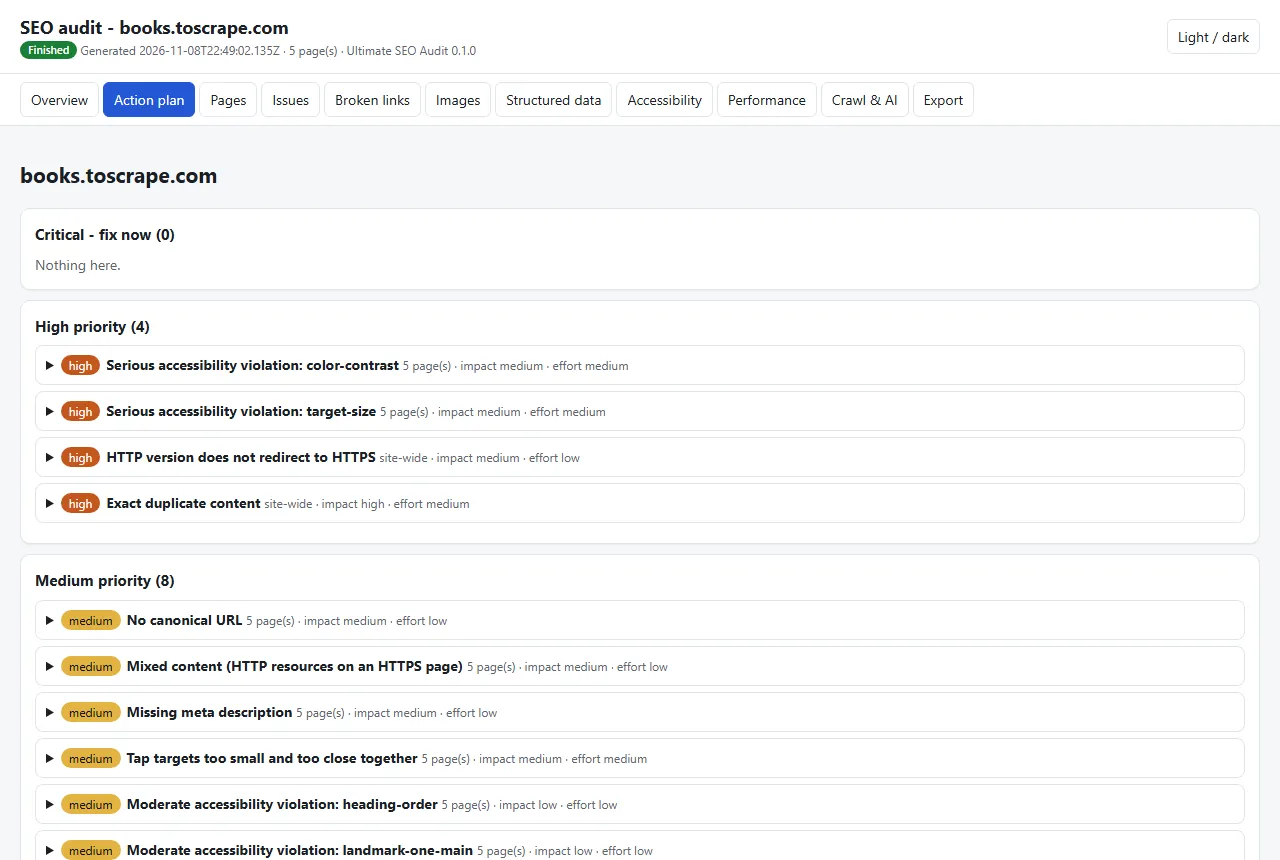
Screenshots from a real platform run.
Feedback and reviews
If this Actor saved you time, a short review on its Store page helps other users find it. If something did not work as expected, please open an issue on the Issues tab with your run ID: we read every issue.


