

Listing Quality Checker: Product Page Audit & Score
Pricing
from $4.00 / 1,000 page audits
Listing Quality Checker: Product Page Audit & Score
Audit any product page or Amazon listing: a 0–100 score and pass, warn or fail checks with a fix for each. Structured data (Product, Offer, GTIN), titles, images and alt text, attributes, shipping and returns, meta tags, canonical, page weight. Compare against competitors; watch for changes.
Pricing
from $4.00 / 1,000 page audits
Rating
0.0
(0)
Developer

CleanPull
Maintained by CommunityActor stats
0
Bookmarked
2
Total users
1
Monthly active users
2 days ago
Last modified
Categories
Features
Share
This listing quality checker is a product page audit for any online shop or Amazon listing: give it product page URLs and get a score from 0 to 100 for each, with every check marked pass, warn or fail and a concrete fix. Store pages are checked against Google's product structured-data rules (Product and Offer, GTIN, availability, priceValidUntil, review markup, shipping and return policy), Merchant Center's product data specification (title, brand, colour, size, material) and on-page basics (title tag, meta description, canonical, image alt text, page weight). Amazon listings are checked against Amazon's own guidance: title length and rules, bullet points, images, A+ content, description and attributes. Add a competitor's page and get a comparison row: the score gap and the checks where they do better, with your fix. Run it once, on a schedule or through the API.
How to audit product pages
- Open Listing Quality Checker on Apify and go to its input form.
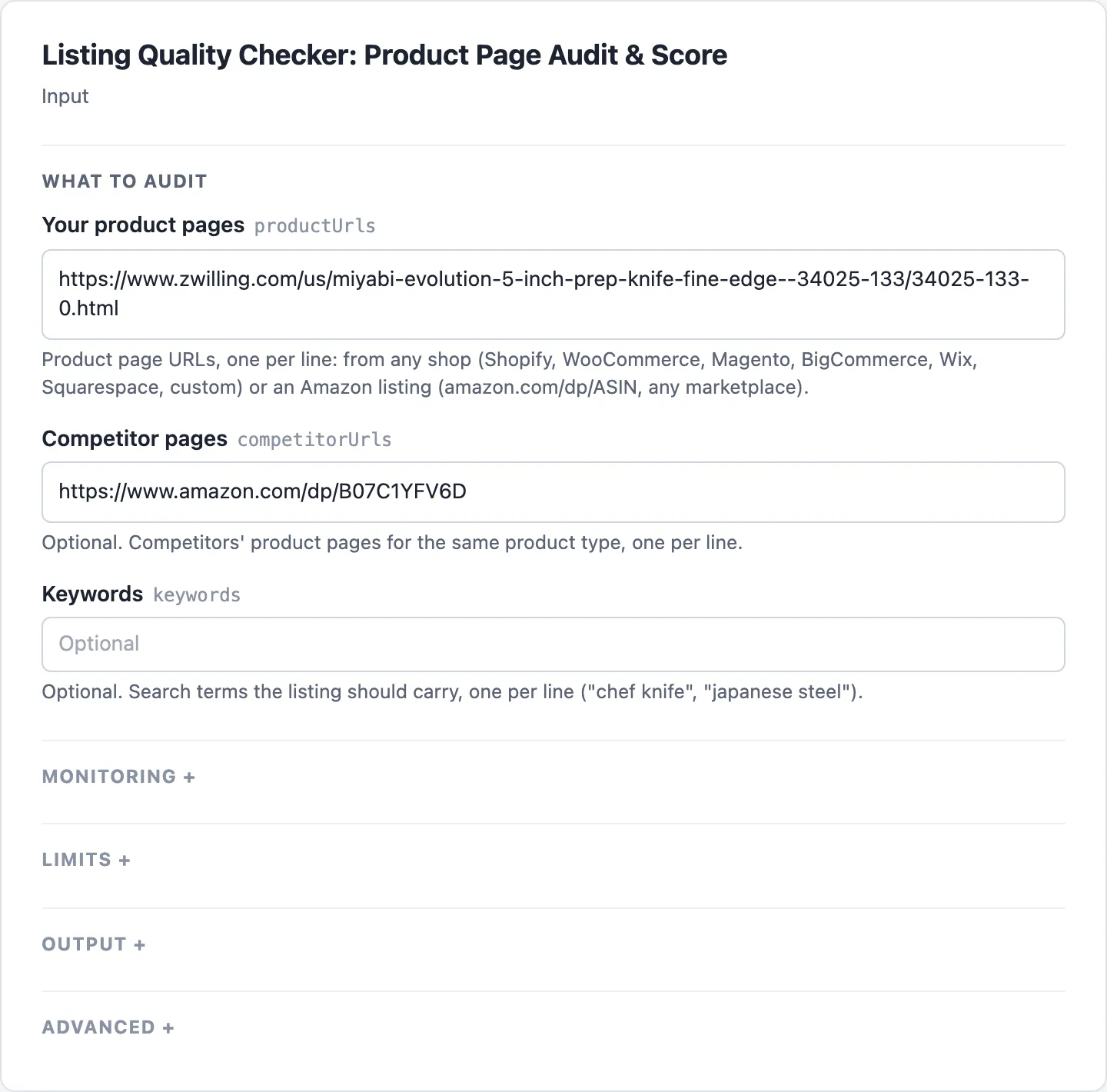
- Enter your product page URLs in Your product pages, one per line: any shop, or Amazon listings (
amazon.<marketplace>/dp/ASIN). - Add rivals' pages in Competitor pages for a comparison, and the search terms your titles should carry in Keywords.
- Start the run. Open the Scores view to read each page's Score, Grade, Pass, Warn and Fail, the Fixes view for its Top fixes, and the Comparisons view for the Gap and where you are Behind on.
- To catch listings that break, turn on Changes only, give it a Watchlist name, save it as a task and schedule it weekly. A page then comes back only when a check or its score moved, or once it is confirmed removed.
What the listing quality checker gives you
- "Why doesn't Google show my product with price and stars?" The structured-data checks name exactly what is missing from the Product and Offer markup, and what to add.
- "Fix my listings before a launch or a theme change." Every failed check has its fix, and
topFixeslists the five worth the most points. - "How does my page compare with the competitor that outranks me?" Give both URLs: the comparison row shows where they do better and what to change.
- "Is my Amazon listing following Amazon's rules?" Title length and forbidden characters, repeated words, promotional wording, five bullets, images, A+ content.
- "Are my keywords in my titles?" Give the search terms; each audit names the ones present and the ones missing.
- "Tell me when a listing breaks." A weekly watchlist with Changes only returns a page only when a check moved (a theme update dropped the GTIN, a sale date expired) or a page was removed.
- "Feed audits to an AI agent or a spreadsheet." Compact JSON with the same check ids on every page, a field picker and dataset views.
Product page audit checks
Each URL is read once (an Amazon page served without its lower half gets one sections request and one more read). Store pages get 16 checks; Amazon listings 8. Each check has a weight; a pass earns its full weight, a warn half, a fail nothing. The total is the score (store weights and Amazon weights each add up to 100), with a grade from A (90+) to F (below 40).
Store page checks
| Store page check | Weight | Passes when | Based on |
|---|---|---|---|
| Product structured data | 14 | a JSON-LD Product (or ProductGroup) with name, image and offers, in the HTML; every JSON-LD block parses | Google merchant listings |
| Offer price and currency | 10 | the Offer has a price above 0 and an ISO 4217 currency (an AggregateOffer warns: merchant listings need an Offer) | Google merchant listings |
| GTIN | 8 | a GTIN-8/12/13/14 with a valid check digit (missing: warn, as it is required only for products that have one; a bad check digit fails) | Merchant Center specification |
| Attributes | 8 | brand, plus colour, size or material (from markup or variant options) | Merchant Center specification |
| Shipping and returns | 8 | shippingDetails and hasMerchantReturnPolicy are marked up (only mentioned in text: warn) | Google return policy markup |
| Title length | 7 | the product name is 20 to 110 characters (a rule of thumb; over 150 fails: Merchant Center's limit) | Merchant Center specification |
| Product images | 7 | 3 or more product images in the markup | Google merchant listings |
| Availability | 6 | each offer has a schema.org availability (missing: warn; Google recommends it) | Google merchant listings |
| Title keywords | 6 | your keywords are in the title or title tag; no word used more than twice | Google title links |
| Review markup | 5 | aggregateRating or review on the Product, or no rating shown on the page (a rating in the HTML without markup warns) | Google product snippets |
| Image alt text | 5 | 80% of the product's image tags have descriptive alt text | Google image SEO |
| Title tag | 4 | 15 to 70 characters, no repeated words (a rule of thumb: Google sets no limit and cuts to the screen) | Google title links |
| Meta description | 4 | 50 to 320 characters (a rule of thumb: Google sets no limit and cuts as needed) | Google snippets |
| Canonical | 3 | points to this page (the home page or noindex fails) | Google canonical URLs |
| priceValidUntil | 3 | not set (it is optional), or set and in the future (a past date fails) | Google merchant listings |
| Page weight | 2 | HTML under 2 MB and under 4,200 elements (product markup after the first 2 MB fails) | Googlebot, Lighthouse DOM size |
Amazon listing checks
| Amazon check | Weight | Passes when |
|---|---|---|
| Title length | 15 | 80 characters or fewer (Amazon: a 200-character limit and "we recommend no more than 60"; the warning above 80 is a rule of thumb; over 200 fails) |
| Title rules | 15 | no ! $ ? _ { } ^ ¬ ¦ outside the brand, no word more than twice, no promotional wording |
| Bullet points | 15 | five bullets, none over 500 characters |
| Images | 15 | six or more, a video counting as one (Amazon: "at least one image, and we recommend having at least six"); none fails |
| A+ content | 10 | A+ modules below the bullets |
| Title keywords | 10 | your keywords in the title (else in the bullets: warn); brand first when no keywords are given |
| Attributes | 10 | brand, plus at least two of colour, size, material in the details |
| Description | 10 | 200 characters or more, or A+ content in its place |
In a test of 27 product pages from 23 shops on 10 platforms and Amazon (US, UK, Germany), read from Apify's servers, all 27 were audited. A watchlist of 16 of them audited twice, minutes apart, reported no false changes.
Product page audit accuracy
- Every finding names what was found.
foundsays what the page has ("1 GTIN(s), e.g. 4009839334917", "0 of 4 product image tags have alt text");fixsays what to change;sourcenames the guidance. - What Google reads, not what a browser draws. Checks read the page's HTML, as Google's shopping crawl does. Product markup that only a script writes after load is reported as such, since Google says it makes shopping crawls less reliable.
- A product page, not just any page. A page is audited only when it has Product markup, an Offer or a price. A store that now redirects the address to a category or its home page has dropped the product: it is reported as removed on the second run in a row, and never charged as an audit.
- A block is never a bad score. Each site gets its own proxy ladder (direct, then datacenter, then residential only for sites that block the others). A page that cannot be read is listed in the run summary with the reason and never charged.
- Changes are real changes. Page weight moves with every theme deploy, so only reaching or leaving fail counts; scores that move by less than the threshold are ignored; a page is reported removed only after two runs without it.
- Only public addresses are read. A URL or redirect pointing into a private network is never fetched.
- Runs do not fail for one bad entry. An invalid URL is skipped with a warning; an empty input runs the form's example.
Listing quality checker input
| Field | Key | What it does |
|---|---|---|
| Your product pages | productUrls | Your product pages: any shop, or Amazon (amazon.<marketplace>/dp/ASIN), one per line |
| Competitor pages | competitorUrls | Optional. Competitors' pages: audited too, with one comparison row per page of yours |
| Keywords | keywords | Optional. Search terms the titles should carry |
| Changes only | changesOnly | Return a page only when a check or the score moved since the last run with the same watchlist name; the first run is the baseline |
| Watchlist name | monitorName | Runs with the same name compare against each other (default default) |
| Score change to report | minScoreChange | With Changes only: a score that moved by fewer points, with no check changing, is not reported (default 5) |
| Max cost per run (USD) | maxRunCostUsd | Optional. Stop once this run's charges would pass this amount (for scheduled runs); pages not audited are audited on the next run |
| Only these fields | fields | Optional. Keep only these fields in each row |
| Pages at a time | maxConcurrency | Pages read in parallel (default 4, up to 10); one site gets at most two requests at a time |
| Proxy | proxyConfiguration | Optional; the actor picks proxies itself per site |
| Start URLs | startUrls | Optional. Accepted for compatibility with other actors: product pages, same as Your product pages |
| History store | stateStoreName | The key-value store that keeps each watchlist (default: its own store, cleanpull-listing-quality); pick one when you run with a scoped API token |
Example inputs
The form's example: a Zwilling knife page (the audit row below) against an Amazon listing:
Audit your page against a competitor's, with keywords:
Amazon listings in two marketplaces:
A weekly listing watch, capped at 50 cents a run:
Listing quality checker output
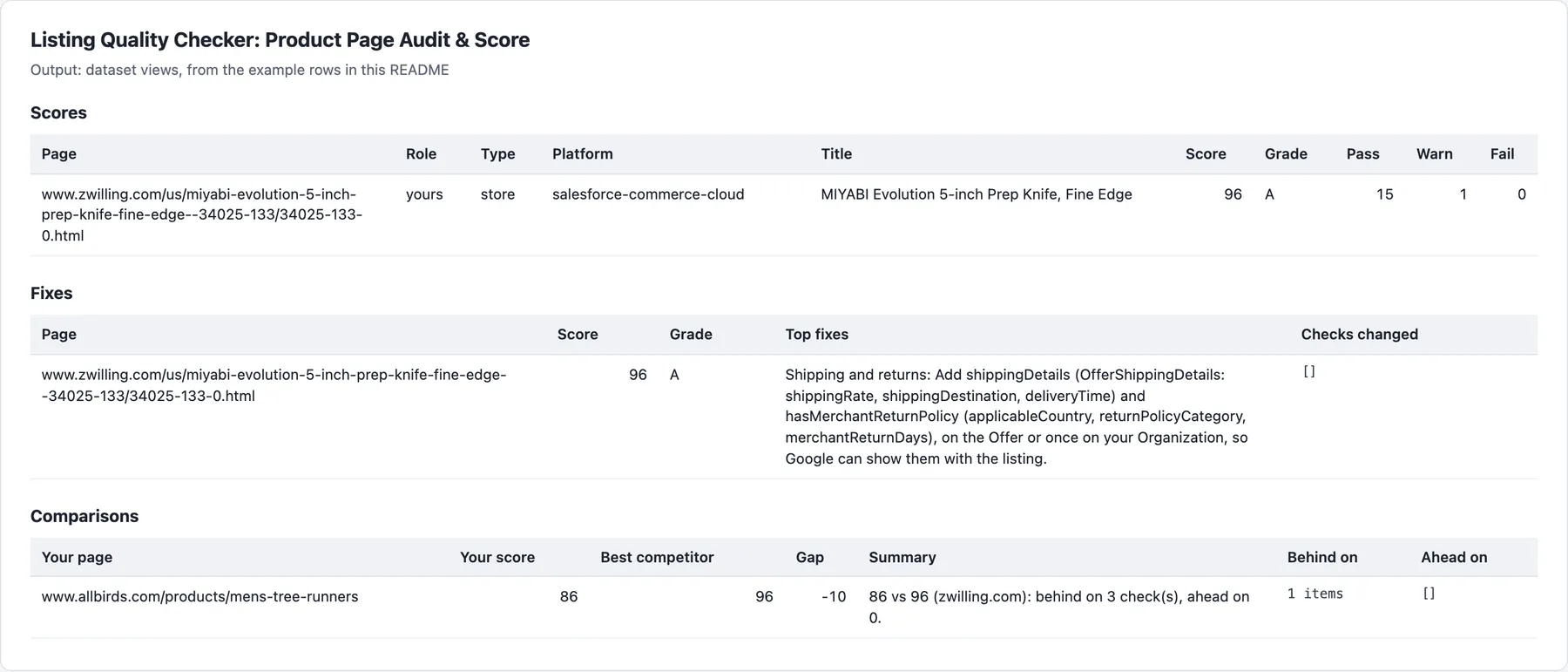
One audit row per page, shown in the Scores and Fixes views; with competitors, comparison rows in the Comparisons view.
Example rows
A real audit row (two of its 16 checks shown):
Comparison rows
With competitors, one comparison row per page of yours (illustrative: the shape of the row, with shortened text):
Watchlist changes and Amazon rows
A store page and an Amazon listing are compared on what they share: title length and keywords, images and attributes. On a watchlist, changedChecks lists each check that moved ({ "check": "gtin", "from": "pass", "to": "fail", "fix": "…" }); a page gone on two runs in a row gives one change row with "change": "removed", removedHow (not-found or redirected) and redirectedTo.
Amazon rows also have marketplace, asin, bullets and aplusModules. Amazon sometimes serves a listing without its lower half; the actor then asks for the page's sections (as Amazon Product Scraper does) and reads the page once more. If the lower half still is not there, the row has "partial": true and notChecked: the attributes, A+ and description checks are left out of the score (not failed), and a watchlist does not count them as changes on the next run. RUN_SUMMARY in the key-value store gives the outcome (COMPLETE, PARTIAL, NO_CHANGES, EMPTY, FAILED), each page's score, charges, and every page that could not be audited, with the reason.
Pricing
| Event | Free and Bronze | Silver | Gold and above |
|---|---|---|---|
| Audit (a delivered audit row) | $5.00 | $4.50 | $4.00 |
| Page checked, unchanged (Changes only), or confirmed removed | $0.60 | $0.55 | $0.50 |
| Page through residential addresses (add-on, only for sites that block the others) | $7.00 | $7.00 | $7.00 |
Per 1,000 pages. Each run also has a $0.00005 start fee. Comparison rows are free. A page read through residential addresses may transfer at most 600 KB, compressed as sent, over all its attempts together (a larger one is not read or charged). A weekly watch of 100 product pages with Changes only is about 430 checks a month: $0.26 on the Free and Bronze plans, plus the pages that changed ($0.005 each) and the residential add-on where a site needs it (with Changes only it is billed on unchanged pages too).
Guidance the checks follow
- Google Search Central: Merchant listing structured data (Product: name, image, offers required; Offer: price above 0 and priceCurrency; availability, priceValidUntil, shippingDetails, hasMerchantReturnPolicy recommended)
- Google Search Central: Product snippet structured data (review and aggregateRating)
- Google Search Central: Merchant return policy and shipping policy structured data
- Google Merchant Center: Product data specification (title up to 150 characters; GTIN and brand for new products; colour and size for apparel; material where it tells variants apart)
- Google Search Central: Title links, Snippets and meta descriptions, Canonical URLs, Image SEO, Googlebot (reads the first 2 MB of an HTML file)
- Chrome Lighthouse: Avoid an excessive DOM size
- schema.org: Product, Offer, OfferShippingDetails, MerchantReturnPolicy
- Amazon: Product photos (at least one image required, at least six recommended, 500 to 10,000 pixels, over 1,000 for zoom)
- Amazon: Amazon SEO (title limit 200 characters, "we recommend no more than 60"; bullets led by a one- or two-word feature and 100 characters or fewer; plain white backgrounds; A+ content); Seller Central product title requirements (no special characters such as
! $ ? _ { } ^ ¬ ¦unless part of the brand, no word more than twice)
Limits
- What the HTML holds. Markup and images that only scripts add after the page loads are not run; the checks say when that is the case.
- Image sizes are not measured (that would take a request per image); counts and alt text are.
- Some retailers are not read: Walmart, Target, Best Buy, REI, Hydro Flask and Patagonia block automated visitors or draw their pages with scripts only; they are skipped with a note and never charged.
- Amazon: the listing is read as a signed-out shopper sees it; Seller Central data (search terms, suppressed attributes) is not visible.
- The score is a guide, not a ranking promise. It weighs documented requirements and recommendations; search engines use many other signals.
- Up to 200 pages a run.
- Nothing found: when the run audits nothing and every page was missing (a page that answers 404 on a watchlist's first sight of it, a site that does not exist) or left at the time limit, the run still succeeds, with one free
recordType: "unreadable"row per page giving thereason; nothing is charged. Input naming no page it can read gets one such row. When other pages were audited, the missing ones are listed inRUN_SUMMARYwith the reason instead. A run near its time limit stops starting pages, delivers what it read and lists the rest inRUN_SUMMARY. A page with no product in its HTML, or a site that refused on every route, is never charged; when no page at all could be audited for such a reason, the run fails.
FAQ
How much does a product page audit cost per page?
One page costs $0.005 on the Free and Bronze plans: 100 pages are $0.50. A page from a site that blocks the other routes is read through residential addresses and adds $0.007 (readThroughResidentialProxy: true). Comparison rows are free. On a watchlist with Changes only, the first run bills every page as an audit; after that an unchanged page costs $0.0006 (100 pages a week: $0.06), a changed page $0.005, and a page confirmed removed $0.0006, with the residential add-on on any of them where the site needs it. A page that cannot be read, or shows no product, is never charged, and higher Apify plans pay less (see Pricing above).
How often should I re-audit my listings?
Weekly suits most stores, and after every theme, app or feed change. With Changes only, a page comes back only when a check moved or its score moved by at least Score change to report (5 points by default). Page weight counts only when it reaches or leaves fail, since it moves with every theme deploy. A page gone (404 or redirected away) is reported removed only after two runs in a row, so one bad read never reads as a removal.
What is the difference between a warn and a fail?
A pass earns a check's full weight, a warn half, a fail nothing. A warn is a recommendation not met or a weak signal: a GTIN missing (required only for products that have one), shipping or returns mentioned only in the page text, a title past the rule-of-thumb length. A fail breaks a documented rule: a GTIN with a bad check digit, a priceValidUntil in the past, a title over Merchant Center's 150 characters or Amazon's 200, an Amazon listing with no image.
Why is a page missing or not fully scored?
- No product in the HTML: a page without Product markup, an Offer or a price, or one drawn by scripts only, is not audited and is listed in
RUN_SUMMARYwith the reason. - Blocked retailers: Walmart, Target, Best Buy, REI, Hydro Flask and Patagonia are skipped with a note.
- Amazon without its lower half: the row has
"partial": trueandnotChecked; the attributes, A+ and description checks are left out of the score. - Gone pages: a page that answers 404 or redirects away is reported removed on the second run in a row (a
changerow withremovedHow). - Over 200 pages: only the first 200 are audited in one run.
- Internal addresses: a URL pointing into a private network is never fetched.
Which shops and Amazon marketplaces does it support?
Product pages from any shop whose HTML shows the product: Shopify, WooCommerce, Magento, BigCommerce, Wix, Squarespace, Salesforce Commerce Cloud and custom stores, except the retailers named in Limits. Amazon listings (/dp/ASIN) on amazon.com, .co.uk, .de, .fr, .it, .es, .ca, .com.mx, .com.br, .co.jp, .in, .com.au, .nl, .se, .pl, .com.be, .com.tr, .ae, .sa, .sg, .eg and .ie.
Can I use the listing quality checker through the API?
Yes. Start runs through the Apify API or an API client, and read the dataset through its Scores, Fixes and Comparisons views, or the RUN_SUMMARY record with the outcome, each page's score, the charges and every page that could not be audited. Only these fields (fields) trims each row to the keys you need, for example url, score, grade and topFixes.
Does it work with Google Sheets, Make, Zapier or Claude?
Yes. Apify's integrations send each run's results to Google Sheets, Make, Zapier, webhooks and other tools, and a schedule keeps them updated. From Claude, the MarketMage plugin audits a product page or Amazon listing and compares it with a competitor's, in a chat.
Is it allowed to audit product pages?
The actor reads public product pages and Amazon listings as a signed-out visitor sees them: no login, no account and no customer data. How you use the data, and following the laws and terms that apply to you, is your responsibility. This is not legal advice.
Related actors
Other CleanPull actors for marketplace:
- Amazon Product Scraper: Amazon price, Buy Box, every seller's offer and Best Sellers Rank by ASIN.
- Amazon Keyword Rank Tracker: where your products rank on Amazon search for your keywords.
- Reviews Monitor: new reviews and rating moves on Shopify review apps, Amazon and Trustpilot.
- Catalog Matcher: match your catalogue to competitors' and find price gaps.
Use it from Claude
The MarketMage plugin runs these actors from a Claude chat.
Found it useful? A rating on the Store helps others find it.
Changelog
- 0.1.x, reliability (2026-11-01): a page address on a site that does not exist (no such domain) now ends with a free
unreadable'not found' row instead of a failed run; the address is checked before any proxy is used, so it costs nothing. Prices and events unchanged. - 0.1.x, reliability (2026-10-24): runs that find nothing (a page that answers 404, or input naming no page) end SUCCEEDED with a free
unreadablerow per item saying why, instead of FAILED; a run stops starting pages before its time limit and ends with what it read, never TIMED-OUT. A run where the site refused on every route for every page still fails. Prices and events unchanged. - 0.1 (October 2026): audits of store product pages (16 checks) and Amazon listings (8 checks) with a 0–100 score and a fix per check; keyword coverage; comparison rows against competitors; Changes only watchlists with removal confirmed on a second run; Max cost per run.


