

Email List Validator & Cleaner - 99% Accuracy, Bulk API
Pricing
from $6.00 / 1,000 emails
Email List Validator & Cleaner - 99% Accuracy, Bulk API
Validate email lists with 99% accuracy: SMTP checks, catch-all detection, disposable filtering. 50K emails per batch. Returns deliverability scores and risk levels. Upload CSV from Apollo.io or any source. REST API ready.
Pricing
from $6.00 / 1,000 emails
Rating
5.0
(1)
Developer

ClearPath
Maintained by CommunityActor stats
4
Bookmarked
256
Total users
20
Monthly active users
9 days ago
Last modified
Categories
Share
Bulk Email Validator & Verification API [50K Emails] 🚀 (2026)
Built by Clearpath, creators of Email Finder, with 130,000+ lifetime runs, and Newsletter List Cleaner. Find, validate and clean your contacts with one specialist suite.
Why choose this actor?
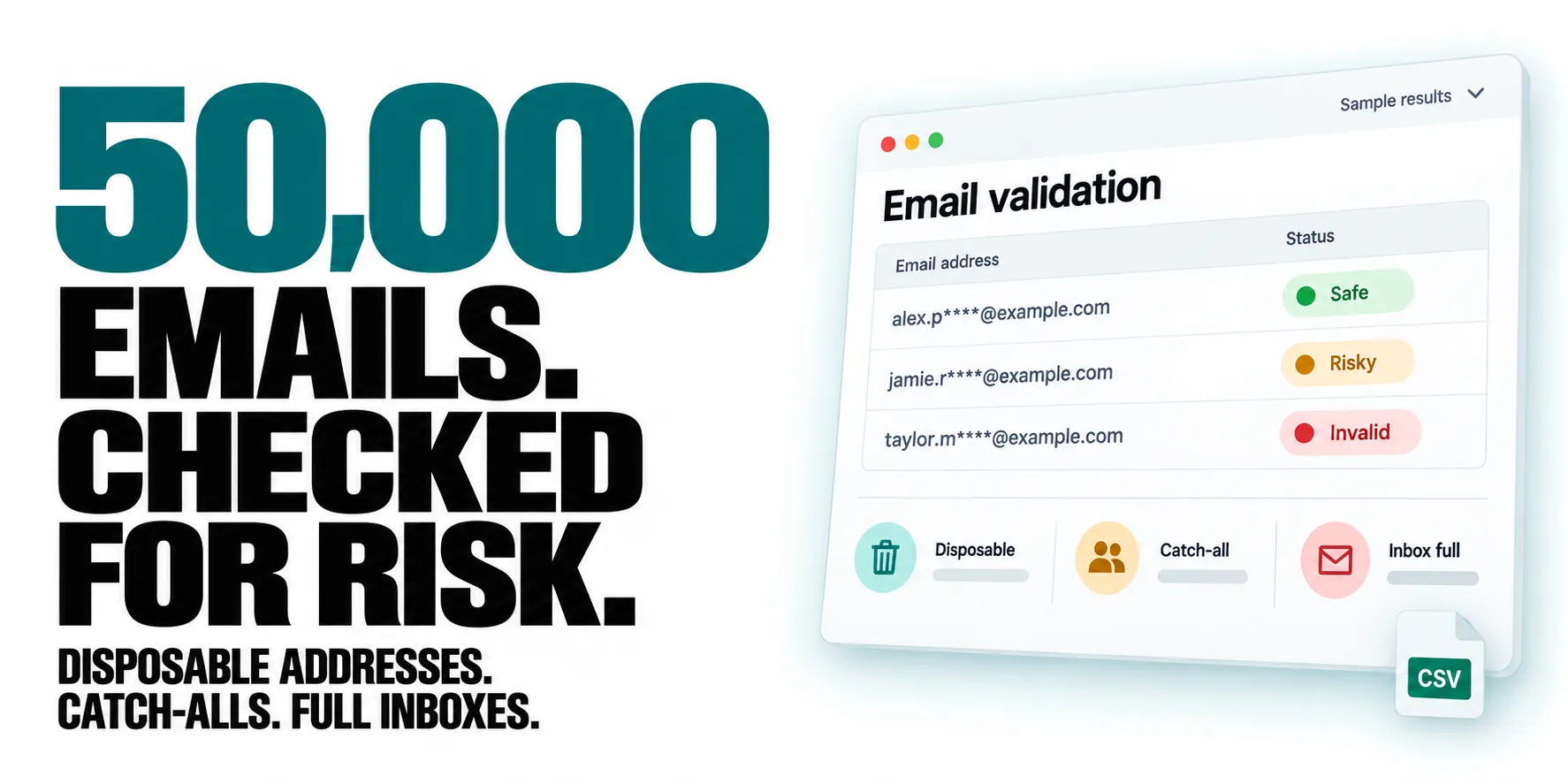
Check large lists for more than invalid addresses. Validate 50,000 emails from a CSV with the bulk settings below. Get a status and score for each address, plus flags for disposable emails, catch-all domains, role accounts, disabled mailboxes and full inboxes.
Get the results in useful groups. Export individual email records and a summary with score-based clean, risky and invalid lists. Separate status groups and the safe_to_send field help you choose which contacts to keep or review.
Start with your existing CRM export. Upload a CSV or provide its URL. The actor finds the email column, can combine multiple email columns, and removes duplicate addresses across your file and direct input.

Quick start
Upload your own CSV in the input form, or replace the example URL below with your file URL in the JSON input. Start with 10 addresses to inspect the output.
Open actor input to provide your list. For a 50,000-address run, use CSV input and set "maxItems": 50000 in the JSON input. This requires a paid Apify plan and a sufficient run budget; leaving maxItems out defaults to 1,000 addresses.
Free-tier accounts have one trial run of up to 10 addresses. A run budget below $1 also caps processing at 10 addresses. Results describe validation signals, not a guarantee that a message will reach the inbox.
| Clearpath · Email Tools | ||||
 Email Validator Email ValidatorYou are here |  Email Finder Email FinderFind business emails |  Newsletter Cleaner Newsletter CleanerScore subscribers |  Business Leads Business LeadsFind local contacts |  Account Checker Account CheckerCheck registrations |
Copy to your AI assistant
Copy this block into ChatGPT, Claude, Cursor, or any LLM to start using this actor.
Why Your Domain Reputation Depends on This
Every bounced email is a strike against your domain reputation. Too many strikes? Your legitimate emails start landing in spam folders—or worse, your domain gets blacklisted.
This Email Validator prevents that disaster before it happens.
The Hidden Cost of Invalid Emails:
- 5% bounce rate = Mail services flag you as risky
- 10% bounce rate = Your domain reputation plummets
- 15% bounce rate = Welcome to the blacklist
Why Choose This Email Validator?
🛡️ Protect Your Domain Reputation
Your domain is your digital identity. High bounce rates destroy it. We validate emails BEFORE you send, keeping your bounce rate under 2%.
📈 Save Your Email Campaigns
Invalid emails don't just bounce—they poison your entire campaign. Clean lists mean better deliverability for ALL your emails.
🚫 Stop Fraud & Fake Signups
Detect disposable emails, role accounts, and honeypots before they infiltrate your database.
🎯 Enterprise-Grade Accuracy
Multiple verification layers ensure confidence in every validation. No guesswork, just data.
⚡ Bulk Processing Power
Validate up to 50,000 emails in a single batch. Perfect for large-scale list cleaning.
Features
- ✅ 15+ Validation Checks: Comprehensive verification including syntax, SMTP, MX records, and catch-all detection
- ✅ Smart Email Classification: Instantly identify free, disposable, and role-based emails
- ✅ Quality Scoring System: 0-100 confidence scores help you make informed decisions
- ✅ Catch-All Detection: Know when domains accept all emails (high-risk for bounces)
- ✅ Full MX Records: Complete mail exchange server information for transparency
- ✅ Spamtrap Detection: Avoid emails that damage sender reputation
- ✅ Risk Assessment: Clear categorization (safe/risky/invalid/disposable/catch-all)
- ✅ Bulk Processing: Handle massive email lists efficiently
- ✅ No Cookies Required: Clean, straightforward validation
Input
Simple and straightforward - just provide your email list:
With optional parameters:
CSV File Support
📝 Combining CSV and Direct Input
You can provide emails through BOTH methods simultaneously! When you supply both emailAddresses and csvFile, the actor automatically merges them:
- CSV emails are processed first (given priority)
- Direct input emails are added next (from
emailAddressesparameter) - Duplicates are automatically removed (case-insensitive matching)
- Perfect for adding specific emails to your CSV list
Example:
🎯 Automatic Email Column Detection
The actor automatically detects your email column! No configuration needed - just upload your CSV and let the intelligent detection system handle the rest. The actor will fail gracefully with a clear error message if no email column can be detected, ensuring you're always aware of any issues.
📤 Upload Your CRM Exports
Upload your CSVs with leads from Apollo, HubSpot, Salesforce, or any other CRM tool! This validator is designed to work seamlessly with exports from popular sales and marketing platforms:
- Apollo.io: Direct support for contact export format
- HubSpot: Works with contact and company exports
- Salesforce: Compatible with lead and contact reports
- LinkedIn Sales Navigator: Process your saved lead lists
- Any CSV format: Supports comma, semicolon, tab, and pipe delimiters
How to Use CSV Files
- Upload directly: Use the file upload button in Apify Console
- Provide a URL: Link to your CSV file hosted anywhere
- Auto-detection: The actor scans your file and identifies email columns by:
- Common header names (email, contact_email, primary_email, etc.)
- Content analysis (looking for @ symbols and email patterns)
- Smart pattern matching across multiple languages
- Validation: All detected emails are validated comprehensively
- Results: Get detailed validation results for each email address
CSV Input Example
With advanced options:
Supported CSV Formats
- File Types:
.csvfiles with various encodings (UTF-8, ASCII, Latin-1) - Delimiters: Automatically detects comma (
,), semicolon (;), tab (\t), or pipe (|) - Headers: Works with or without headers - the actor adapts automatically
- Quoted Fields: Handles complex CSVs with quoted fields containing delimiters
Output Examples
Individual Email Results
Each email gets detailed validation data:
📊 Summary Report (Final Dataset Entry)
After all emails are processed, you'll get a summary report with cleaned lists:
Pricing
Simple, transparent pricing based on volume:
| Volume | Price per 1000 emails |
|---|---|
| Standard | $8.00 |
| Bronze Discount | $7.50 |
| Silver Discount | $7.00 |
| Gold Discount | $6.00 |
Contact us for custom enterprise pricing on volumes above 1M emails.
Understanding Your Results
Status Indicators
| Status | Symbol | Meaning | Action |
|---|---|---|---|
| safe | ✅ | Email is valid and safe to send | Send with confidence |
| risky | ⚠️ | Email might have deliverability issues | Consider removing |
| invalid | ❌ | Email will bounce | Remove immediately |
| unknown | ❓ | Validation couldn't be completed | See section below |
| disposable | 🗑️ | Temporary email address | Remove for quality |
| catch_all | 🎣 | Domain accepts all emails | Use with caution |
Understanding "Unknown" Status
What does "unknown" mean? The validation service couldn't definitively verify this email address. This doesn't mean the email is invalid - it means verification couldn't be completed due to the recipient server's security measures.
Common reasons for "unknown" status:
- Corporate firewalls - Enterprise domains might block validation attempts
- Greylisting - Servers temporarily reject checks to prevent spam
- Anti-validation measures - Some mail systems intentionally hide mailbox existence
- Strict security policies - Government, financial, and healthcare domains might often return unknown
How to handle unknown emails: These emails often belong to legitimate business contacts, especially from large corporations. Consider your use case:
- B2B outreach: Often worth keeping (many corporate emails return unknown)
- Consumer marketing: Higher risk, consider your tolerance
- Critical communications: Test with a small batch first
Quality Score Interpretation
- 90-100: Excellent quality, definitely send
- 70-89: Good quality, safe to send
- 50-69: Moderate risk, review before sending
- 30-49: High risk, likely to bounce
- 0-29: Do not send, will damage reputation
Validation Checks Explained
| Check | What It Means | Why It Matters |
|---|---|---|
| valid_syntax | Email format is correct | Malformed emails always bounce |
| mx_accepts_mail | Domain can receive emails | No MX records = guaranteed bounce |
| smtp_connection_success | Mail server responds | Confirms server is active |
| deliverable | Email can be delivered | Combined validation result |
| safe_to_send | Low risk of bounce/spam | Protects your reputation |
| catch_all | Domain accepts any address | Higher bounce risk |
| disposable | Temporary email service | Often used for fraud/spam |
| role_account | Generic address (info@, admin@) | Lower engagement rates |
| free_email | Gmail, Yahoo, etc. | May indicate personal vs business |
| spamtrap | Honeypot address | Sending here = instant blacklist |
| inbox_full | Mailbox at capacity | Temporary delivery failure |
Use Cases by Industry
📧 Email Marketing Teams
Clean your lists before every campaign. A 2% reduction in bounce rate can improve overall deliverability by 15%.
🚀 SaaS Companies
Validate emails at signup to prevent fake accounts and improve user quality metrics.
🛒 E-commerce Platforms
Stop fraudulent orders by detecting disposable emails used for one-time purchases.
📊 CRM Managers
Maintain database hygiene by regularly validating and removing invalid contacts.
🎯 Lead Generation Agencies
Qualify leads instantly by validating emails in real-time during collection.
🏢 Enterprise Sales Teams
Verify prospect emails before outreach to maximize connection rates.
Performance & Limits
- Batch Size: Up to 2,500 emails per run
- Accuracy Rate: 99%+ for syntax, 95%+ for deliverability
- Response Time: Results typically available within a few minutes for 1000 emails
Security & Compliance
- ✅ GDPR Compliant
- ✅ No data retention after processing
- ✅ Encrypted data transmission
- ✅ No cookies or tracking
Pro Tips for Best Results
- Clean regularly: Validate your entire list quarterly to maintain hygiene
- Pre-campaign validation: Always validate before major email campaigns
- Real-time validation: Integrate validation at the point of email collection
- Score thresholds: Set minimum score requirements (we recommend 70+)
- Segment by status: Create separate lists for safe, risky, and invalid emails
When to Use This Validator
Before You Send
- Email marketing campaigns
- Cold outreach sequences
- Newsletter distributions
- Transactional email batches
During Collection
- User registration forms
- Lead capture pages
- Webinar signups
- Newsletter subscriptions
For Maintenance
- Quarterly list cleaning
- Database migration
- CRM deduplication
- Post-campaign hygiene
Programmatic Access - Get Your Clean Email List
Accessing the Summary Report
The validator creates a special summary_report entry at the end of the dataset containing your cleaned email lists. Here's how to access it programmatically:
JavaScript/Node.js
Python
Direct API Access
Using the Clean List
Once you have the clean emails, you can:
- Import directly into your email marketing platform
- Filter further by specific criteria (e.g., only non-catch-all)
- Export to CSV for manual review
- Integrate into your CRM or automation workflows
Quick Copy-Paste
The clean_emails array is ready to copy and paste into any email platform that accepts comma-separated or line-separated email lists.
ROI Calculator
For every 1000 emails validated:
- Prevent ~50-200 bounces (5-20% typical invalid rate)
- Save domain reputation from damage
- Improve deliverability for ALL future emails
- Avoid blacklist recovery costs ($1000s in lost revenue)
Get Started
- Add your email list to the input
- Configure your validation preferences
- Run the validator
- Download your clean, validated list
- Send with confidence!
Related Actors
More from Clearpath (Phone intelligence):
- WhatsApp Phone Number Validator - Bulk validate phone numbers for WhatsApp accounts.
- Telegram Phone Number Validator - Bulk validate phone numbers for Telegram accounts.
- WhatsApp Profile Avatar, Age & Gender - Enrich WhatsApp numbers with avatar, inferred age, and gender.
- Phone Number Active Status Checker - Bulk carrier-level active, inactive, or unknown status checks.
- MAX Messenger Number Checker - Bulk MAX messenger registration checks.
- Social & Crypto Phone Number Checker - Bulk account checks across 25 platforms (Instagram, Facebook, Binance, and more).
Support
- 📧 Email: max@mapa.slmail.me
- 🐛 Issues: Use the Issues tab for bug reports and feature requests
- 💬 Response time: Usually within 24 hours
- 🔧 Custom features: Available upon request
Stop guessing. Start knowing. Your domain reputation is too valuable to risk on unvalidated emails.


