

Fast Business Leads Scraper - Up to 1,000 in 30 Seconds
Pricing
from $1.99 / 1,000 business records
Fast Business Leads Scraper - Up to 1,000 in 30 Seconds
Extract fresh business contacts from live map listings by category and city. Get phone numbers and websites in seconds, or add published emails.
Pricing
from $1.99 / 1,000 business records
Rating
0.0
(0)
Developer

ClearPath
Maintained by CommunityActor stats
0
Bookmarked
1
Total users
1
Monthly active users
6 days ago
Last modified
Categories
Share
Fast Business Leads Scraper | Up to 1,000 in 30 Seconds (2026)
From Clearpath, creators of Email Finder and Shopify Store Leads. Business discovery, contact collection and email research from the same team.
Why choose this actor?
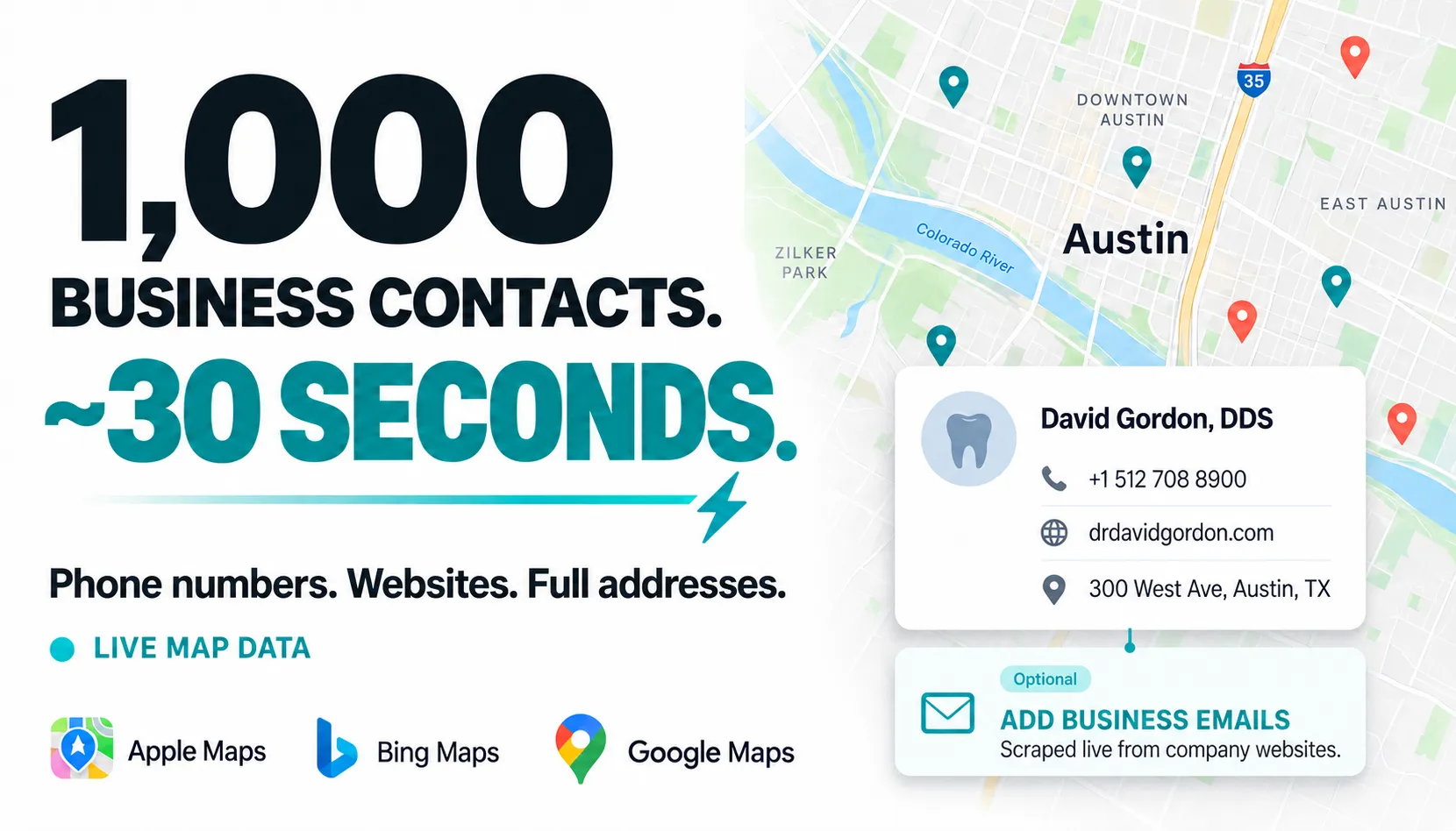
Build a contact list in seconds. Collect up to 1,000 business contacts in about 30 seconds, with a phone number and website in every fast record. Full addresses, business categories and coordinates give you useful detail for your CRM, directories and local market research.
Fresh contacts from live map listings. Search by business type and city across Apple Maps, Bing Maps and Google Maps. The actor collects data when you run it; the source mix depends on your search and result mode. Keep skipPreviouslyScraped enabled to continue the same search without paying for businesses already returned.
Scrape business websites live for emails. Choose complete_leads to get a phone number and an email published on the business website in every returned lead. Websites are visited during your run; results include the email’s source link and confidence score. Email collection takes longer and adds a successful-email charge.
Quick start
Start with up to 25 dentists in Austin. Change the business type and location to your target market.
Open actor input to enter your search. The example uses fast phone-and-website records. For published emails, select complete_leads; successful email collection is billed in addition to the business record. Free accounts get four runs with up to 25 results each. Export CSV or Excel for a contact list, or JSON to preserve nested fields.
| Business Contacts & Research | ||||
 Business Leads Business LeadsYou are here |  Email Finder Email FinderScored email results |  Shopify Leads Shopify LeadsStore contacts |  Tripadvisor Places Tripadvisor PlacesPlaces with emails |  Google Maps Google MapsPlaces & details |
Copy to your AI assistant
Copy this block into ChatGPT, Claude, Cursor, or another LLM to generate working integration code.
How to scrape business leads by category and city
- Open the Fast Business Leads Scraper input page.
- Enter one business type and one location in the Input tab.
- Choose fast records or complete leads, then click Start.
- Open the dataset to export or integrate the results.
For fast phone and website records:
For complete leads with published emails:
The contract is deliberately simple: one business type and one location per run. This makes the result limit, continuation history, cost, and progress easy to understand.
Business lead scraper inputs and continuation
| Parameter | Type | Default | Description |
|---|---|---|---|
searchTerm | string | required | One business category, such as Dentist, Lawyer, Restaurant, or Auto repair. |
location | string | required | One city, neighborhood, or address. Include the country when the name is ambiguous. |
resultType | string | business_records | business_records for phone and website, or complete_leads to add a published email. |
maxResults | integer | 100 | Maximum deduplicated results to return, from 1 to 1,000. A narrow market may contain fewer. |
searchRadiusKm | number | 10 | Search radius from 1 to 50 km. Use 20 to 50 km for large metro areas. |
skipPreviouslyScraped | boolean | true | Exclude leads already returned for the same business type and location. |
How do I continue a business lead search without duplicates?
Keep skipPreviouslyScraped enabled to resume a collection. For example, request 1,000 dentists in New York today, then request another 500 tomorrow with the same searchTerm, location, and resultType. The second run excludes previously delivered business identities.
Each result type has separate continuation history. A fast record never prevents the same business from appearing later as a complete email lead. History stays in a named key-value store in the account running the Actor; it is not a shared lead database.
Changing maxResults or searchRadiusKm continues the same collection. Changing the business type, location, or result type starts a separate collection. Interrupted runs are reconciled from already delivered dataset rows before the next continuation.
Turn skipPreviouslyScraped off only when you intentionally want a fresh result set.
What business contact data can you extract?
Every fast business record contains a phone number and website. It also includes address data, categories, coordinates, source provenance, and a stable place ID. This mode favors speed and does not verify the website against the business.
Every complete lead adds an email taken from public website content, never guessed. It also adds confidence, evidence, DNS eligibility, and website-identity fields. DNS eligibility does not guarantee that a mailbox accepts delivery.
Websites with a hard identity conflict are excluded. An unresolved identity verdict means the Actor found no contradiction but could not strongly confirm the match. It does not mean the email was invented.
| Field | Description |
|---|---|
recordType | business_record or complete_lead. |
placeId | Stable, namespaced business identity used for deduplication. |
name | Business name. |
searchLocation, searchTerm | Input that produced the lead. |
primaryCategory, categories | Primary and additional business categories. |
address, addressComponents | Full address and structured street, city, region, postal code, and country values. |
latitude, longitude | Geographic coordinates. |
website, phone | Public business website and phone number. |
mapSource, sourceUrl | Map listing source and public source URL. |
email, emails | Complete leads only: best published email and all accepted published emails. |
emailDetails | Evidence for every accepted email, including confidence, source URL, domain status, and domain relationship. |
emailConfidence | high, medium, or low. |
emailSource, emailSourceUrl | How and where the selected email was found. |
emailDomainStatus | Mail-domain DNS eligibility status. |
identityVerdict | Website-to-business match verdict. Hard conflicts are not emitted. |
Example fast business record
This is an unmodified result from a live run with the following input:
The matching dataset row:
Example complete lead
This is an unmodified result from a live run with the following input:
The matching dataset row:
Use the business leads API
Every run can be started through the Apify API. Results are stored in the run's default dataset.
You can also run it from Apify Console, JavaScript, Make, Zapier, n8n, webhooks, or any HTTP client. Send the finished dataset to Google Sheets, Airtable, a CRM, or your own database.
Automate recurring local lead generation
For ongoing prospecting, save the input as an Apify Task and schedule it weekly or monthly. Leave continuation enabled so each scheduled run returns new leads instead of repeating the previous dataset.
Apify's official scheduling walkthrough:
How much does a business leads scraper cost?
Every returned result has the base business-record charge. Complete mode adds the published-email enrichment charge only after a matching email is found. Candidates that produce no result are not charged.
| Charge | When it applies | Per 1,000 |
|---|---|---|
| Business record | Every returned result | $1.99 |
| Published email enrichment | Added only to complete leads | +$5.99 |
| Complete lead total | Business record + published email | $7.98 |
The prices are cumulative only in complete mode. A fast business record costs $1.99 per 1,000; a complete lead costs $7.98 per 1,000 total.
Free Apify users can make four runs with up to 25 results per run. Upgrade the Apify subscription to use the full 1,000-result input limit.
Is business lead scraping legal and accurate?
Business websites change, emails expire, and local search inventory varies. The Actor returns evidence and confidence metadata so you can apply your own acceptance rules. For important outreach, validate addresses shortly before sending and monitor bounce rates.
Use the data only for lawful purposes. Public availability does not automatically make every form of processing or outreach lawful. Follow applicable privacy, electronic communications, anti-spam, and data protection rules, including GDPR, CCPA, LGPD, CAN-SPAM, and local equivalents. Respect opt-outs and suppression lists.
Business leads scraper FAQ
What is a business leads scraper?
It turns public business information from a defined area into a structured prospect list. This Actor supports local business lead generation with fast phone and website records or complete leads containing published emails.
Does every result include an email and phone number?
Every result includes a phone number and website. Choose complete_leads when every result must also include an email published on the matched business website. Emails are never guessed from common patterns.
Is published-email enrichment added to the business-record price?
Yes, for complete leads only. The $1.99 per 1,000 base charge plus the $5.99 successful-email enrichment charge totals $7.98 per 1,000 complete leads. Businesses without a published email are not returned or charged in complete mode.
Does DNS eligibility prove an email is deliverable?
No. It shows that the domain is configured to receive mail. It does not prove that the individual mailbox exists or will accept a message.
Why can a run return fewer leads than requested?
The selected area may not contain enough matching businesses with the required contact fields. A small radius, narrow category, and continuation history can reduce the available count. Complete leads can also be limited by businesses that do not publish an email.
How do I get more leads from the same search?
Increase maxResults or searchRadiusKm, keep the same business type and location, and leave skipPreviouslyScraped enabled. The Actor continues from the customer-owned history and excludes prior leads.
Can I search multiple cities in one run?
No. Use one city and one business type per run. Run separate inputs or tasks for separate markets. This keeps limits and continuation behavior predictable.
How are duplicates handled?
The Actor deduplicates stable place and contact identities while preserving distinct business branches. With continuation enabled, it also checks previously delivered identities for the same search and result type.
Can I export the leads to CSV or Excel?
Yes. Open the run dataset and export it as CSV, Excel, JSON, XML, or RSS. You can also retrieve it through the API.
Can I connect the business leads API to a CRM or automation tool?
Yes. The same structured input and output are available through Apify's REST API, official Python and JavaScript clients, webhooks, Make, Zapier, and n8n. Fast records suit CRM enrichment; complete leads add published-email evidence.
Can I build a business email list?
Yes. Choose complete_leads to build a business email list with one published address per result, plus confidence, DNS status, and source evidence. Export the finished list as CSV, Excel, or JSON.
Can a Google Maps scraper find business emails and phone numbers?
Map listings usually provide phone numbers and websites, but not email addresses. Complete mode adds published emails from matched business websites. Fast mode skips that step for lower cost and much faster output.
Does Google Maps have an API for business leads?
Google offers a Places API for place details such as addresses, phone numbers, and websites. This Actor is designed for batch contact lists, published-email enrichment, ready-to-export datasets, and continuation without duplicates.
Is an Apify Actor better than a Google Maps scraper extension?
Use an extension for a small manual export. Use this Actor when you need an API, scheduled runs, datasets, integrations, up to 1,000 results per run, and continuation without duplicates.
How do I qualify business leads after scraping?
Filter by emailConfidence, emailDomainStatus, and identityVerdict. Keep the source URLs as evidence, then apply your own geographic, category, and outreach criteria.
Is it legal to use these leads for outreach?
That depends on your location, audience, message, and lawful basis. The Actor collects public business contact data, but you remain responsible for compliance, consent requirements, suppression lists, and opt-outs.
Where can I get support for the business leads scraper?
Use the Issues tab and include the run URL plus the exact input. For a private or custom lead workflow, use the support email below. Never include your Apify token.
Support
For reproducible issues, use the Issues tab on the Actor page and include the run URL. For private support or a custom lead workflow, contact max@mapa.slmail.me.
More Clearpath & Zen Studio business tools
- Shopify Store Leads for ecommerce prospecting.
- Email Finder API for name and domain based B2B email discovery.
- Email Validator for cleaning and validating an email list before outreach.
🔗 Review aggregators
 Place reviews
Fast Business Leads Scraper turns category and city searches into phone and website records or published-email leads for CRM, directories, outreach, and automation.


![Fast PagineGialle Italy Business Leads Scraper [No Proxy] avatar](https://images.apifyusercontent.com/QJd8-xZ4xrqUSGSaE6vbaz7Rem9hByyhgYQ_tgLvAZ0/rs:fill:76:76/cb:1/aHR0cHM6Ly9hcGlmeS1pbWFnZS11cGxvYWRzLXByb2QuczMudXMtZWFzdC0xLmFtYXpvbmF3cy5jb20vMXNZVVJsVWtXdjNYcmNjYlQtYWN0b3Itbno1aGx0WUtiZ1ZncDg4VzMtb0MxdDNBcmFaRC1wZ3ItYXBwbGUtaWNvbi0xODB4MTgwLnBuZw.webp)


