

Allegro Products Scraper (Poland) - No Login
Pricing
from $1.82 / 1,000 offers
Allegro Products Scraper (Poland) - No Login
Scrape Allegro offers by keyword, category, seller or link to track prices: price, delivery cost, seller, rating, photos. No login. Only-new mode to monitor.
Pricing
from $1.82 / 1,000 offers
Rating
0.0
(0)
Developer

Cliqto Media
Maintained by CommunityActor stats
0
Bookmarked
1
Total users
0
Monthly active users
8 days ago
Last modified
Categories
Features
Share
Allegro Products Scraper reads public offers from Allegro.pl, the largest Polish marketplace, by keyword, category, seller page or offer link and returns one table with price, delivery cost, seller, rating and photos, with no login or API key. A typical run of 10 offers takes under two minutes and costs $0.041 on the Free plan.
Use it to watch prices and competitors on Allegro or to fill a product list; for the smallest run, keep the prefilled keyword słuchawki and press Start.
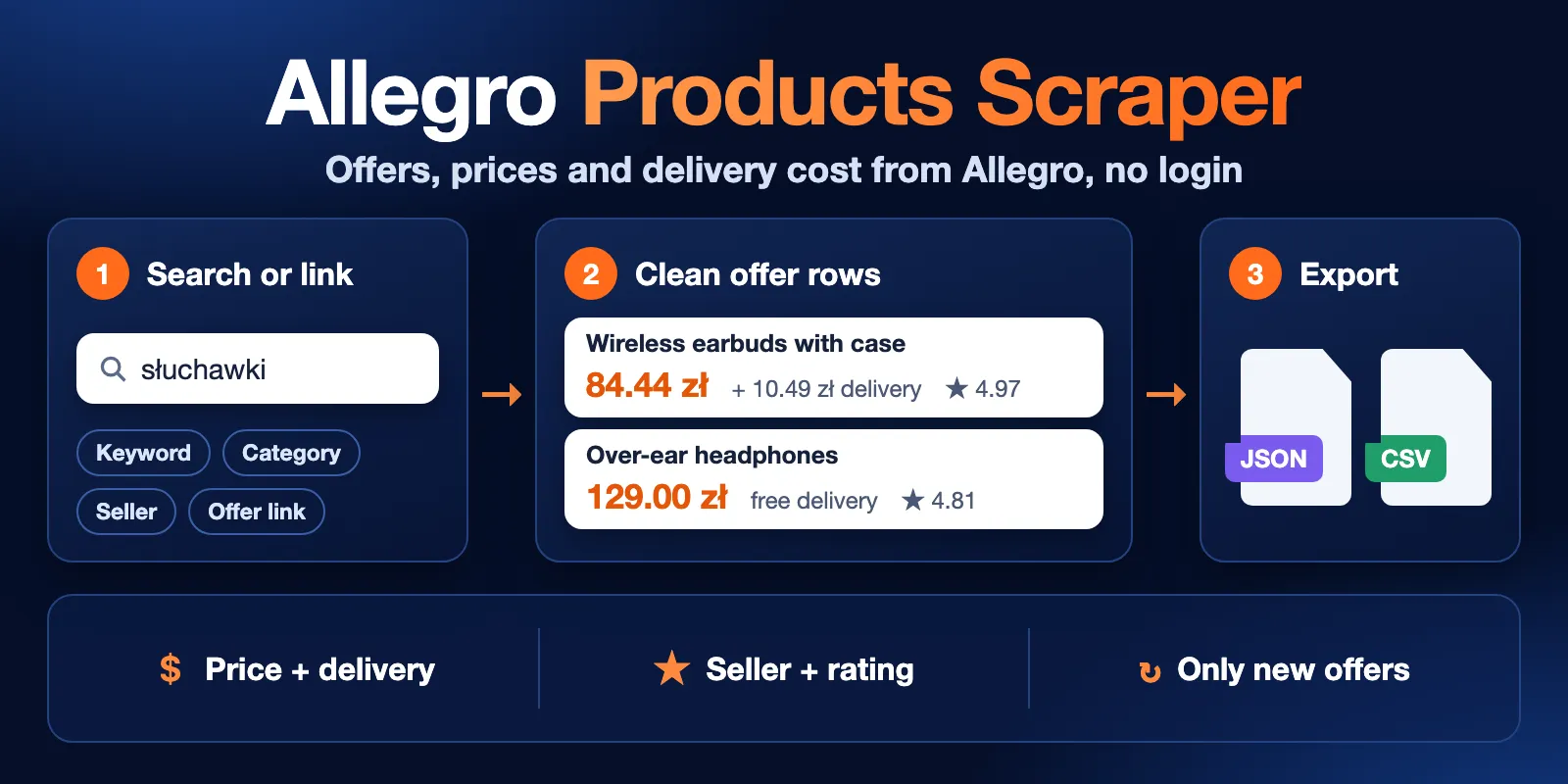
Table of contents
- What it does
- How it works
- Quick start
- Use cases
- Input
- Output
- Pricing
- Limits
- API, export and integrations
- Troubleshooting
- FAQ
- Related Actors
- Support
What it does
The Actor opens the same public pages a visitor sees on Allegro and saves each offer as one row. A row has the offer ID, title, link, price, lowest delivery cost, price with delivery, seller, product rating, photos and the time it was read. You can also open every offer page to add all photos, parameters, EAN, SKU, availability and stock.
It works with a keyword, a list link (search result, category or seller page) or a direct offer link. One run can mix all three. An offer found twice in one run is saved and charged once.
The main boundary: it reads only what Allegro shows to everyone. It does not use an account, does not read messages or orders, and never saves a private seller's identity or contact details.
Good fit
- Track your competitors' prices and delivery costs on Allegro every day.
- Get only offers that are new since your last run, with Only new offers.
- Export one seller's or one category's offers to a spreadsheet.
- Add EAN, SKU and stock to a list of offer links.
How it works
- You give keywords, list links or offer links. Keywords and filters become a normal Allegro search.
- The Actor reads the result pages in order and takes the offers from them. If you ask for details or give an offer link, it also opens the offer page.
- It saves one row per offer in the Dataset. It also writes a short run summary that says how the run ended and why.
If Allegro does not serve a page, the Actor asks again at no charge. A page it never gets is reported in the run summary, not shown as an empty result.
Quick start
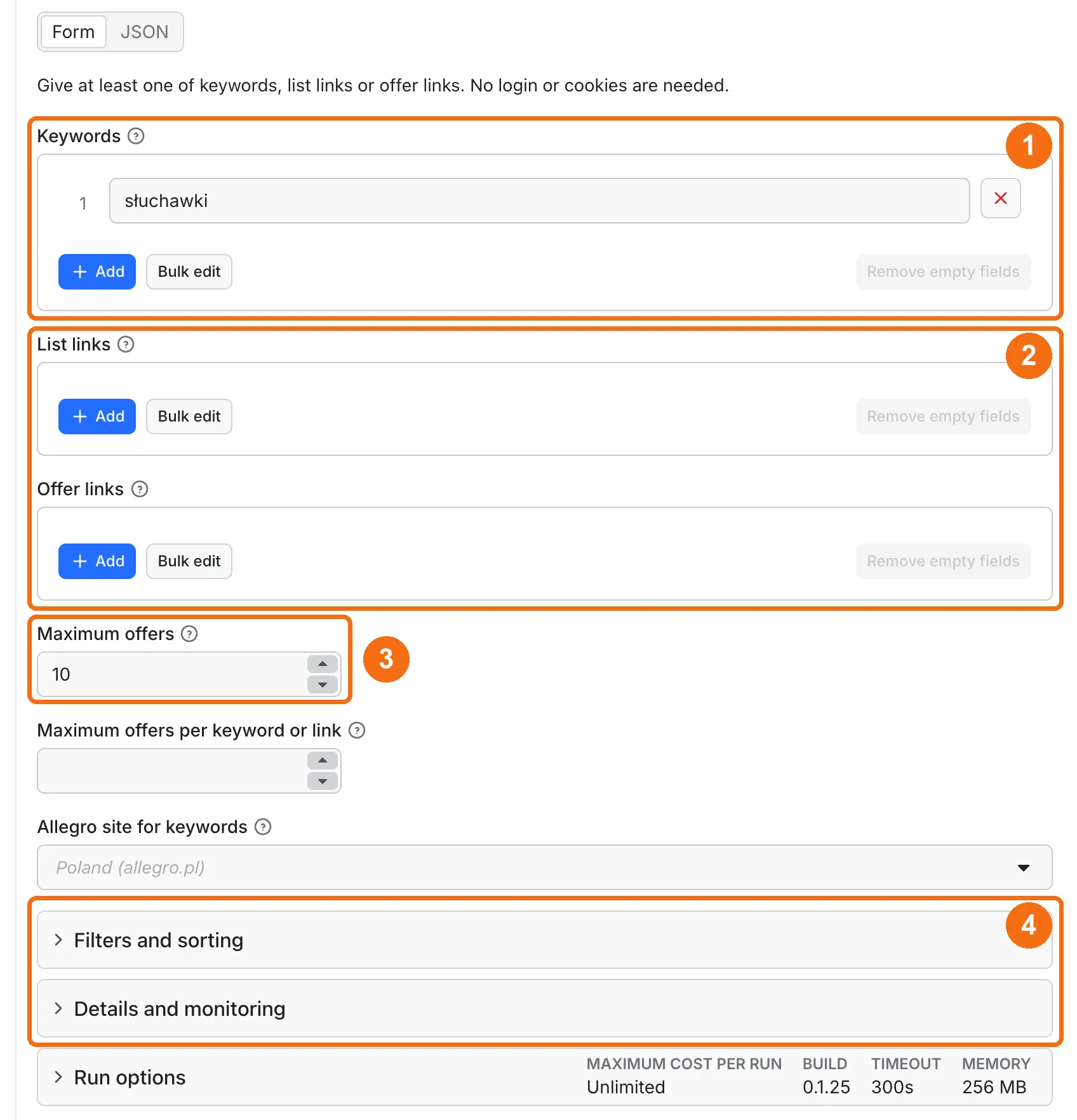
-
Open the Input tab. Keywords already has
słuchawki(box 1 in the picture). -
You can add List links or Offer links instead of or next to keywords (box 2).
-
Keep Maximum offers at the prefilled 10, or set your own number (box 3).
-
Open Filters and sorting or Details and monitoring only if you need them (box 4). Then click Start.
-
Open the Output tab. Check price and delivery (box 1 below) and seller and rating (box 2). Use Export for CSV, Excel or JSON (box 3).
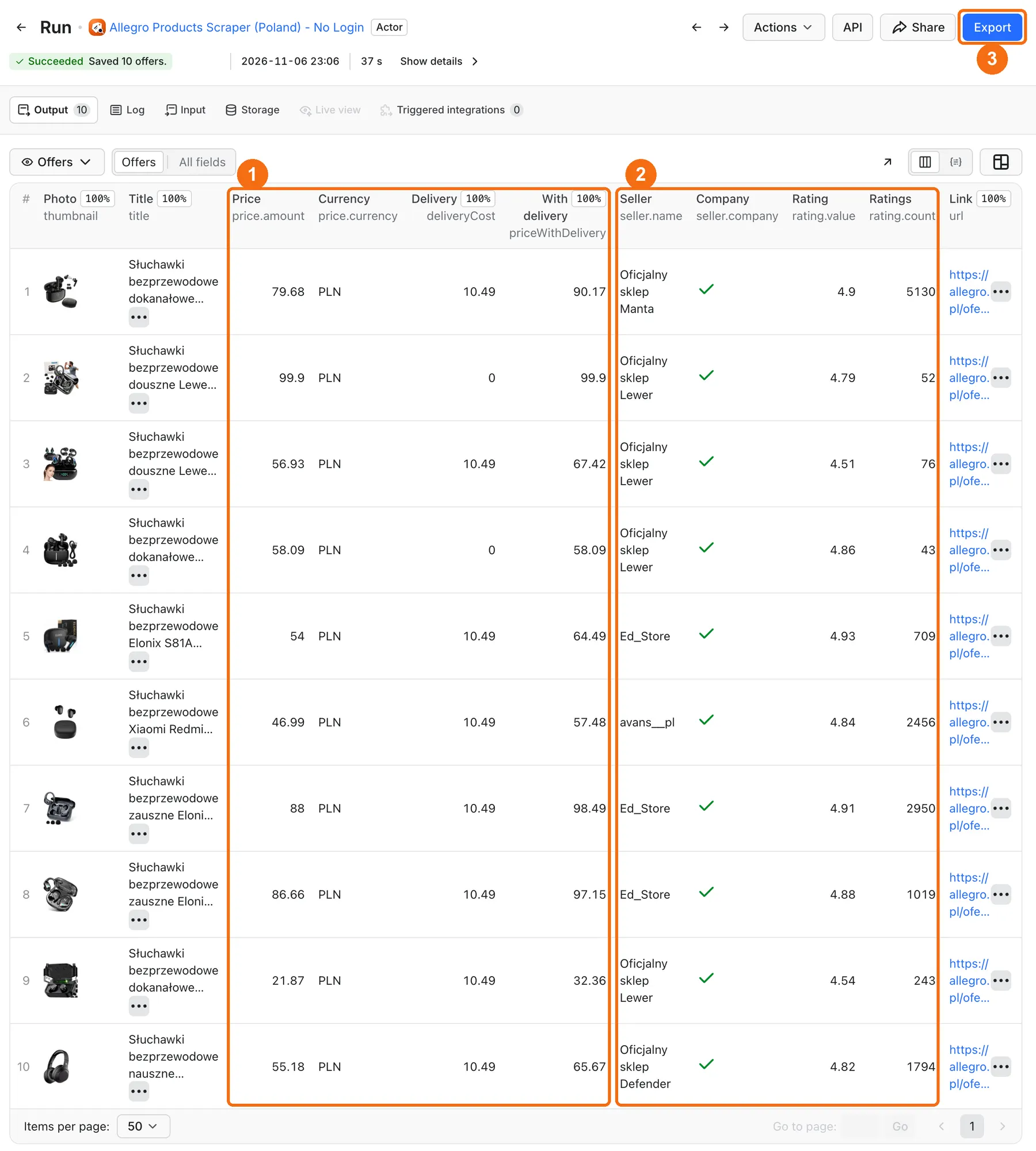
Expected result: 10 rows with status = complete, each with price, deliveryCost, seller, rating and url.
Use cases
| Buyer job | Input path | Output entity | Key fields | Next integration |
|---|---|---|---|---|
| Watch competitor prices | searchUrls with a seller page, on a schedule | Offer | offerId, price, deliveryCost, fetchedAt | Schedule, then Google Sheets or a webhook |
| Find new offers in a niche | queries with onlyNew | Offer | offerId, title, price, seller | Slack or Notion summary |
| Compare the real price with delivery | queries with sortBy = priceWithDeliveryAsc | Offer | priceWithDelivery, deliveryCost, smart | CSV or Excel export |
| Research a category | searchUrls with a category link | Offer | title, price, rating, popularity | Dataset API |
| Match offers to your catalog | productUrls | Offer page | gtin, sku, stock, parameters | Dataset API |
Input
Input fields
| Field | Plain name | Type | Required | Default / prefill | Allowed values | Effect | Example | Recommendation |
|---|---|---|---|---|---|---|---|---|
queries | Keywords | array of strings | one of three | prefill ["słuchawki"] | up to 20 | Runs an Allegro search for each word or phrase | ["słuchawki"] | Use the words you would type on Allegro |
searchUrls | List links | array of strings | one of three | empty | up to 20 Allegro links | Reads a search, category, seller or product offers page (/oferty-produktu/, all offers of one product); filters in the link are kept | ["https://allegro.pl/kategoria/sluchawki-122642"] | Use it for a seller or a category |
productUrls | Offer links | array of strings | one of three | empty | up to 100 Allegro offer links or offer numbers | Opens each offer page and returns full details; a product offers link (/oferty-produktu/) is read as a search of all its offers | ["https://allegro.pl/oferta/12345678901"] or ["12345678901"] | Use it when you already know the offers |
maxItems | Maximum offers | integer | no | default 100, prefill 10 | 1 to 3,000 | Total offers for the run | 10 | Set the smallest number you need |
maxItemsPerQuery | Maximum offers per keyword or link | integer | no | empty, no separate limit | 1 to 3,000 | Limit for each keyword or link | 50 | Use it when you mix several searches |
market | Allegro site for keywords | string | no | default pl | pl, cz, sk, hu | Which site keywords run on | pl | Links always use the site in the link |
minPrice | Minimum price | number | no | empty | 0 or more | Keeps offers at or above this price | 50 | In the currency of the site |
maxPrice | Maximum price | number | no | empty | 0 or more | Keeps offers at or below this price | 200 | In the currency of the site |
condition | Condition | string | no | default any | any, new, used | Filters by item condition | new | allegro.pl only; other sites are not filtered |
freeDeliveryOnly | Free delivery only | boolean | no | default false | true, false | Keeps offers with free delivery | true | Keywords and list links only |
superSellerOnly | Super Seller only | boolean | no | default false | true, false | Uses the Allegro Super Seller filter | true | Keywords and list links only |
sortBy | Sort by | string | no | default relevance | relevance, priceAsc, priceDesc, priceWithDeliveryAsc, priceWithDeliveryDesc, newest, popularity | Order of results | priceAsc | Sponsored offers can stay on top |
includeDetails | Open each offer page | boolean | no | default false | true, false | Adds all photos, parameters, EAN, SKU, availability and stock | true | Works with maxItems up to 100; costs more and takes longer per row |
maxDetailAgeHours | Reuse offer pages read in the last … hours | integer | no | default 0 | 0 to 720 | An offer page one of your runs read within this many hours is taken from that run, with no new request | 24 | For repeated runs with details; the row says detailFromCache |
onlyNew | Only new offers | boolean | no | default false | true, false | Saves and charges only offers that earlier runs of the same search did not return | true | For scheduled runs; keywords and list links only |
stateName | Memory name for only new offers | string | no | default allegro-seen | lowercase letters, digits, hyphens | Where the Actor remembers offers it has seen | my-monitor | Use a separate name for each monitor |
deliveryConnector | Send results to (optional) | string | no | empty | your MCP connector | Posts a short summary after the run | See Send results to Slack or Notion | |
deliveryTarget | Notion page or channel (optional) | string | no | empty | Notion page link or Slack channel ID | Where the summary goes | Leave empty to let the connector decide |
Give at least one of queries, searchUrls or productUrls. With none of them, the run stops at once with a clear message and reads nothing from Allegro. A repeated offer in one run is saved once. maxItems also limits offer links, so raise it when you give more links than the form's prefilled 10. If you set Max items in the run options too, the smaller number applies and RUN_SUMMARY says limitReached = MAX_ITEMS.
One bad link among good ones does not stop the run: it becomes a free row with status = invalid_input and the field name in error, and the other links are read. Field names from other Allegro scrapers are understood too: startUrls, urls, searchQueries, keywords, maxResults, limit, scrapeProductDetails, offerIds and similar; your own field wins when both are given. Unknown fields are listed in RUN_SUMMARY.ignoredInputFields.
Interacting settings
| When | Input A | Input B | Effective behavior | Example | Cost/result effect |
|---|---|---|---|---|---|
| Both limits set | maxItems | maxItemsPerQuery | The per-search limit applies first; the run stops at the total | 3 keywords, 50 each, 100 total | Fewer rows, fewer page and offer events |
| Monitoring offer links | onlyNew | productUrls | onlyNew does not apply to offer links; a warning says so | Links are read every time | Each link is charged every time |
| Details on a search | includeDetails | queries | Every saved row also opens its offer page | 10 keyword rows | Adds offer-detail per page read |
| Too many rows with details | includeDetails | maxItems | Above 100 offers the run stops at once with a clear message | maxItems = 200 | Only the start is charged |
| Filters and offer links | freeDeliveryOnly, superSellerOnly, prices | productUrls | Filters apply to keywords and list links; each offer link is read anyway | One link, free delivery only | Each link is charged |
| A link with its own filters | searchUrls | sortBy, minPrice | Form values are added to the link | Category link with sortBy | No extra cost |
| Details again within hours | includeDetails or productUrls | maxDetailAgeHours | An offer page read by one of your runs within that time is reused | Same 5 offers twice in a day | The second run charges offer instead of offer-detail for those rows |
| Keywords on another site | market | condition | condition is not applied outside allegro.pl | cz with new | Rows are not filtered |
Input examples
Smallest run
Expected behavior: reads the first result page and stops after 10 offers.
Expected output: 10 offers with price, deliveryCost, seller, rating, images.
Limit or cost note: under two minutes, $0.041 on the Free plan.
Daily check of one seller
Expected behavior: the first run returns the seller's offers up to the limit; later runs return only offers not seen before.
Expected output: offers with offerId, title, price, fetchedAt.
Limit or cost note: a run with nothing new has no offer events. See Pricing.
Details for known offers
Expected behavior: opens the offer page.
Expected output: one offer with gtin, sku, stock, parameters, or status = not_found if the offer no longer exists.
Limit or cost note: $0.007 per offer page.
Output
Output fields
| Field | Meaning | Type | Can be empty? | Example / enum | Source / notes |
|---|---|---|---|---|---|
offerId | Allegro offer ID | string | only on an error row | 19029207754 | List or offer page |
status | State of the row | string | no | complete, partial, not_found, error, invalid_input | Set by the Actor |
title | Offer title | string | yes | Słuchawki bezprzewodowe… | List or offer page |
url | Clean offer link | string | no | https://allegro.pl/oferta/19029207754 | Built from the offer ID |
price | Price and currency | object | yes | {"amount":84.44,"currency":"PLN"} | List or offer page |
deliveryCost | Lowest delivery price | number | yes | 10.49 | 0 means free; null means unknown |
priceWithDelivery | Price with the lowest delivery | number | yes | 94.93 | Shown by Allegro or added up |
delivery | Delivery details | object | yes | {"free":false,"lowestCost":10.49} | List page |
originalPrice, discountPercent | Price before a discount and its size | number | yes | null | When Allegro shows a discount |
seller | ID, login, name, company flag, feedback, link | object | yes | {"login":"Ed_Store","company":true} | Identity fields are null for a private person |
rating | Product rating and count | object | yes | {"value":4.97,"count":37} | null means not shown, not zero |
images, thumbnail | Photo links and main photo | array, string | yes | https://a.allegroimg.com/… | All photos with details on |
condition, brand, productId | Condition, brand, Allegro product ID | string | yes | new | Offer page gives more of these |
gtin, sku, stock, availability, parameters | EAN, SKU, stock, availability, parameters | mixed | yes | 5906651783192 | Offer page only |
sponsored, sponsoredAndOrganic, promoted, smart | Ad mark, same page shows the offer as an ad and among regular results, other marks | boolean | yes | true | List page |
position, organicPosition, page | First place on the page counting ads, place among regular results, page number | integer | yes | 3 | List page; organicPosition is null when the offer appears only as an ad |
categoryId, productOffersCount, popularity | Allegro category ID, offers of the product, popularity text | mixed | yes | 85166 | List page |
market, searchQuery, sourceUrl, source | Site, keyword, page and source of the row | string | source no | pl, allegro.pl | Set by the Actor |
fetchedAt | When the row was read | string | no | 2026-11-06T10:18:03.000Z | ISO 8601 in UTC |
detailFetchedAt, detailFromCache | When the offer page was read, and whether it came from an earlier run | string, boolean | yes | true | With details or offer links; see maxDetailAgeHours |
error | Error code on an error row, or what is wrong on an invalid_input row | string | yes | SOURCE_TIMEOUT | Set by the Actor |
Output entities and surfaces
| Situation | Dataset/API/KVS/live view | Result shape | User action |
|---|---|---|---|
| Normal item | Dataset, table view Offers | One row per offer, status = complete | Open or export |
| Domain-empty result | Dataset empty; RUN_SUMMARY in the Key-value store | status = empty, run succeeds | Check the words or filters |
| Partial result | Dataset and RUN_SUMMARY | Row status = partial with null fields, or run status = partial with a reason | Read reason and warnings; run again or raise the limit |
| Technical failure or retry | RUN_SUMMARY, run log | Run fails with a code such as SOURCE_BLOCKED or SOURCE_UNAVAILABLE; not an empty result | Run again later; open an issue if it repeats |
Output example
This example is trimmed and contains one offer from the smallest run. null means Allegro did not show the value on that page; it does not mean zero. deliveryCost = 0 means free delivery. The table can differ between runs, because prices and offers on Allegro change all the time.
Send results to Slack or Notion
Pick your connector in the optional deliveryConnector field. After the run saves its data, the Actor posts a short summary (up to 25 rows and a link to the full dataset) there. Put a Notion page link or a Slack channel ID in deliveryTarget: in Notion every run is added on top of that one page, so your workspace does not fill up with new pages. A delivery error never fails the run and costs nothing extra. Connect a service once in Apify Console → MCP connectors.
Use case → fields
| Buyer job | Input path | Output entity | Key fields | Next integration |
|---|---|---|---|---|
| Price watch | searchUrls, queries | Offer | offerId, price, priceWithDelivery, fetchedAt | Schedule, webhook |
| New offers | onlyNew | Offer | offerId, title, url | Slack or Notion summary |
| Seller research | searchUrls | Offer | seller, rating, price | CSV or Excel |
| Catalog matching | productUrls | Offer page | gtin, sku, stock | Dataset API |
Pricing
Pricing unit
You pay per event. Platform usage is included.
| Event | When | Free | Bronze | Silver | Gold and above |
|---|---|---|---|---|---|
offer | One offer saved from a list page | $0.0026 | $0.00234 | $0.00208 | $0.00182 |
search-page | One result page served by Allegro | $0.01 | $0.01 | $0.01 | $0.01 |
offer-detail | One offer page read | $0.007 | $0.007 | $0.007 | $0.007 |
apify-actor-start | Run start | $0.005 | $0.005 | $0.005 | $0.005 |
- The start fee is per GB of run memory, minimum one. At the default 256 MB it is one event, $0.005.
- A search with no results costs the start fee and one
search-page: the page was served and it is the honest answer. - A filter with no matches costs the same way. After 3 pages in a row with nothing to save, the search stops, so you do not keep paying for pages.
- A monitoring run with nothing new has no
offerevents. You pay the start fee and the pages it read. - A repeated offer is saved and charged once. A page Allegro does not serve is not charged.
- An offer link that no longer exists returns
not_foundand is charged as oneoffer-detail, because the page was read. - An offer page reused with
maxDetailAgeHoursis charged as oneoffer, notoffer-detail, because nothing is read again. A row withstatus=invalid_inputis free. - On a partial or failed run you pay only for what was served and saved, plus the start fee. If details cannot be read for an offer, that offer page is not charged.
Cost examples
Amounts are for the Free plan at the default 256 MB.
| Scenario | Input scope | Expected item/event count | Base charge | Optional charge | Stop/cap behavior |
|---|---|---|---|---|---|
| Smallest run | słuchawki, 10 offers | 1 page, 10 offers | $0.041 | none | Stops at maxItems |
| Keyword with no results | one keyword | 1 page, 0 offers | $0.015 | none | Run succeeds, status = empty |
| Medium search | one keyword, 500 offers | about 9 pages, 500 offers | $1.395 | none | Stops at maxItems |
| Large search | one keyword, 2,000 offers | about 35 pages, 2,000 offers | $5.555 | none | Needs a longer timeout |
| With details | one keyword, 100 offers | 2 pages, 100 offers, 100 offer pages | $0.285 | $0.70 | Needs a longer timeout |
| Offer links | 100 links | 100 offer pages | $0.005 | $0.70 | Needs a longer timeout |
Each offer with details costs $0.0096 on the Free plan, because every offer page needs a separate request to Allegro.
To cap a run, set Maximum cost per run in the run options. The Actor stops before the cap, keeps what it saved and reports CHARGE_LIMIT in the run summary.
Limits
- The maximum is 3,000 offers per run. In our largest test, 3,000 offers from one broad keyword took about 35 minutes at 256 MB of memory, with Timeout raised.
- The default timeout is 300 seconds. That is enough for about 400 offers: in our tests 400 to 500 offers took 2 to 3 minutes and 2,000 offers took 8 to 15 minutes. For more, raise Timeout in the run options; if time runs out, the Actor saves what it has and reports
DEADLINE. - With a short timeout (under two minutes), the Actor sends a second request when Allegro is silent, so one hanging answer does not end the run empty. A removed offer is then confirmed in seconds through a small backup request.
- Offer pages are much slower than list pages. In our tests, 100 offer links took about 11 minutes, 100 offers with details took about 8 minutes and 30 links to offers that no longer exist took about 12 minutes. The default timeout fits about 25 live links, so raise Timeout for more.
- Allegro shows at most 100 pages per search. If a search has fewer pages than offers you asked for, the run reports reason
SOURCE_DEPTH_LIMIT. To go further, split the search by category or price. - If the main route to Allegro hangs, the Actor reads list pages through a backup route. The backup page has no delivery costs, so those rows are
partialwithdeliveryCostasnull, and the run summary has a warning. Offer links are not read through the backup route. - On very broad keywords Allegro often answers with empty or repeated pages from about page 8 on. The Actor asks again for free, but some pages may stay missing: the run is
partialwith reasonSOURCE_ENDED_EARLY, andpagesSkippedshows how many. - Allegro answers even a nonsense keyword with similar offers, so a strange query can still return rows. The Actor does not filter them.
- Delivery costs are for allegro.pl. On allegro.cz, .sk and .hu
deliveryCostanddelivery.freearenulland rows arepartial; there Free delivery only relies on the Allegro filter, so the row itself does not confirm it. Condition filter works on allegro.pl only. - Super Seller only uses the Allegro filter on every site. On allegro.cz most rows under this filter still show
seller.superSellerasfalse, because Allegro's filter and the offer's badge disagree there. - Allegro Lokalnie offers in a list have no seller, rating or delivery: those rows are
partial. Allegro Lokalnie is a separate site: anallegrolokalnie.pllink in the input becomes a freeinvalid_inputrow and the other links are read. - Sponsored offers can stay on top of sorted results, so price sorting may not be strict for the first rows. Check
sponsored. - A private seller's identity and contact details are never saved. There are no reviews, order data or anything behind a login.
API, export and integrations
- API: start a run with the input above through the Apify API, then read the rows from the run's Dataset. The next system uses
offerIdas the key andprice,deliveryCostas values. - Export: download the Dataset as JSON, CSV, Excel, XML or RSS from the Export button or the API.
- Scheduling: save your input as a task and add an Apify schedule. Use
onlyNewto receive only new offers. - Webhooks / no-code: use Apify integrations to call your system when a run ends; it reads the Dataset by the run's
defaultDatasetId. - Slack or Notion: set
deliveryConnectoranddeliveryTarget; a short summary with a link to the Dataset arrives after each run.
Use with AI agents (MCP)
- MCP server URL with only this Actor:
https://mcp.apify.com?tools=cliqtomedia/allegro-scraper. Setup is in the Apify MCP docs. - Smallest useful input:
- Key output fields:
offerId(offer ID),price(amount and currency),deliveryCost(lowest delivery,nullif unknown),seller(who sells),status(complete,partial,not_foundorerror). - This input takes under two minutes and costs $0.041 on the Free plan.
- Limits: read
statusinRUN_SUMMARYfirst, becauseemptyand a source failure are different results. The default timeout fits about 400 offers.
Troubleshooting
The run ended with fewer offers than I asked for
Symptom: the run succeeded, but the table has fewer rows than Maximum offers.
Likely reason: Allegro did not serve some pages, the time ran out, or the search has fewer offers.
Check: open RUN_SUMMARY and read reason: SOURCE_ENDED_EARLY, DEADLINE, CHARGE_LIMIT or SOURCE_DEPTH_LIMIT.
Action: run again with a longer timeout or a higher cost cap, or split the search by category or price.
The table is empty
Symptom: 0 rows, the run succeeded, status = empty.
Likely reason: no offers match, or with onlyNew there is nothing new.
Check: open the same search on Allegro in a browser and compare. Read skippedSeen and skippedFiltered in RUN_SUMMARY.
Action: make the words or filters wider, or use another stateName.
The run failed
Symptom: run status is Failed with a code such as SOURCE_BLOCKED, SOURCE_UNAVAILABLE or SOURCE_TIMEOUT, or with the message that no offers were saved before the time limit.
Likely reason: Allegro did not answer in time, or the run timeout was too short for one offer page. This is not an empty result.
Check: read the message in the run log.
Action: run again later, and give the run at least 60 seconds. If it repeats, open an issue with the run ID.
Delivery cost is empty
Symptom: deliveryCost is null and status is partial.
Likely reason: the offer is from allegro.cz, .sk or .hu, or from Allegro Lokalnie.
Check: read market and url of the row.
Action: use allegro.pl for delivery costs. null means unknown, not free.
FAQ
Do I need an Allegro account or API key?
No. The Actor reads public pages with no login, no cookies and no key.
How often does the price change in the data?
Each row shows what Allegro displayed at fetchedAt. Every run reads list pages again. Offer pages are reused from your earlier runs only when you set maxDetailAgeHours; such a row has detailFromCache = true and the time in detailFetchedAt.
Why did a run cost more than rows × offer price?
Result pages and the start have their own events. For small runs they are a big part of the cost: 10 offers cost $0.041, not $0.026. See Pricing.
Why is an offer with details more expensive?
Each offer page is a separate request to Allegro, charged as offer-detail. If list fields are enough, keep includeDetails off.
Is the output complete for a whole category?
Not always. Allegro shows at most 100 pages per search and may skip pages on broad searches. The run summary says when this happened, so check status and reason.
Does it return the private seller's name or phone?
No. For a private person, identity fields are null, and contact details are never collected.
Related Actors
- OLX Listings Scraper: Poland, Ukraine, Romania & More — classified ads in Poland, next to Allegro's marketplace offers.
- Idealo Price Scraper: All Shop Offers, 6 Countries, No Login — shop offers from a price comparison site in other European countries.
- Amazon Product Scraper: Prices, Reviews, BSR, No Login — the same kind of price and rating data from Amazon.
- AliExpress Scraper: Products, Prices & Reviews, No Login — prices and reviews from AliExpress for import price checks.
Support
For a bug, question or feature request, open the Issues tab of this Actor on Apify. Include the run ID, the input mode you used and the error text. Never send tokens, cookies or private data.
⭐ Found it useful? Rate this Actor. Something wrong? Report a problem — we fix reported problems.


