

CENDOJ Spanish Case Law Search: Court Decisions & ECLI
Pricing
from $0.63 / 1,000 decisions
CENDOJ Spanish Case Law Search: Court Decisions & ECLI
Search Spanish court decisions in CENDOJ by phrase, court, region, decision type and date. Export ROJ, ECLI, summaries, PDF links, key passages and full judgment text for legal research.
Pricing
from $0.63 / 1,000 decisions
Rating
0.0
(0)
Developer

Cliqto Media
Maintained by CommunityActor stats
0
Bookmarked
2
Total users
1
Monthly active users
4 days ago
Last modified
Categories
Features
Share
Search Spanish case law in CENDOJ, the official judicial documentation centre of the General Council of the Judiciary, by phrase, ROJ, ECLI, court, jurisdiction, region, decision type and date. Get one row per court decision with ROJ, ECLI, court, date, summary, PDF link and, if you want, the full judgment text and key passages.
It is for lawyers, legal researchers, compliance teams and legal-tech builders. The smallest run is one search phrase, such as despido improcedente, with 10 decisions.
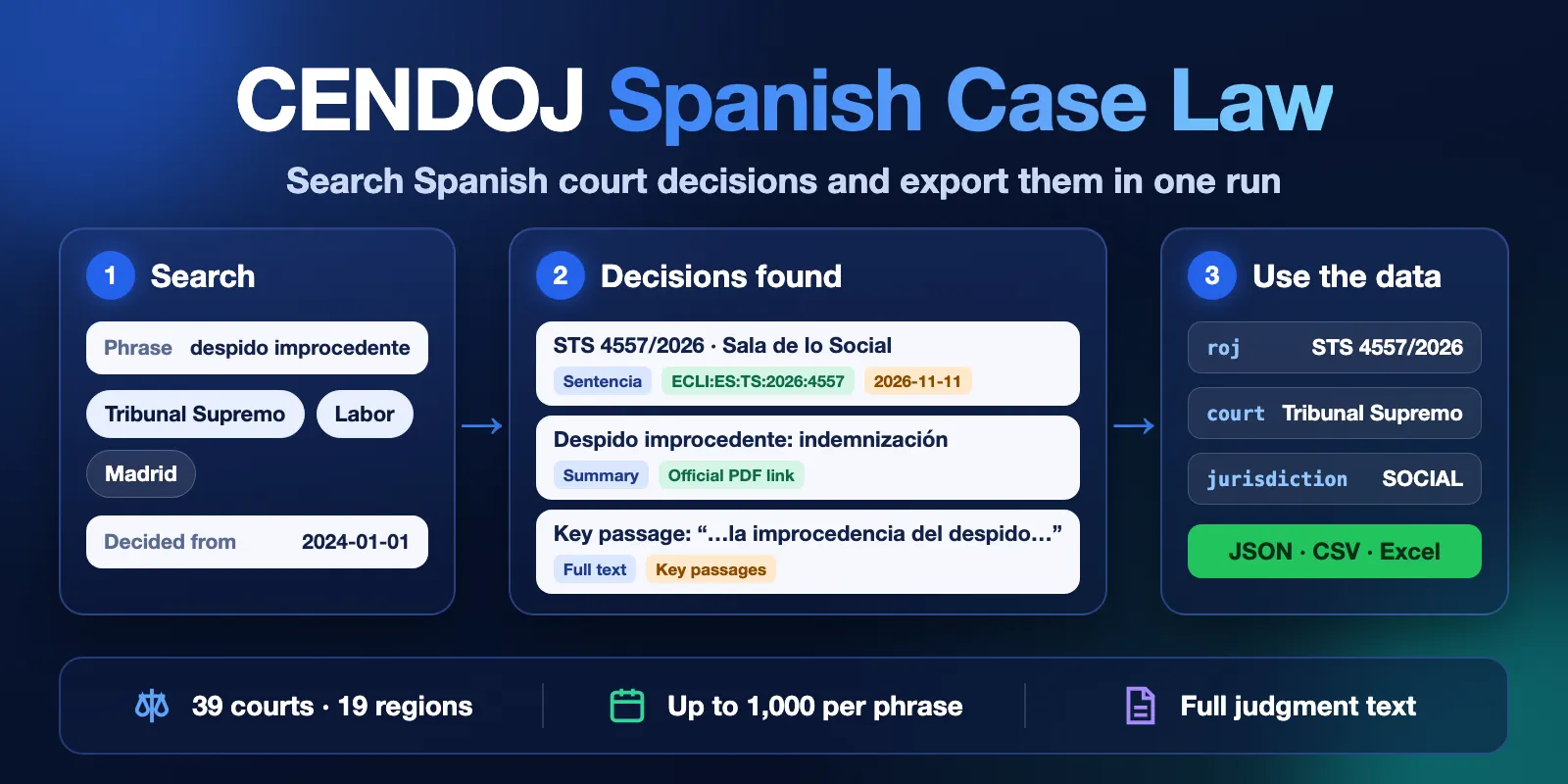
Table of contents
- What it does
- How it works
- Quick start
- Use cases
- Input
- Output
- Pricing
- Limits
- API, export and integrations
- Troubleshooting
- FAQ
- Support
What it does
The Actor runs your search in the public CENDOJ case-law search at poderjudicial.es. It saves each Spanish court decision it finds as one Dataset row. A row has the ROJ and ECLI identifiers, the court, the decision date, the decision type (Sentencia, Auto and others), the CENDOJ summary and the official PDF link.
You can narrow the search by court, jurisdiction (area of law), autonomous community, decision type and date range. You can run up to 20 search phrases in one run. With Include full judgment text on, the Actor also reads the official PDF and returns the selectable text and the paragraphs that contain your search words.
The Actor reads only public decisions. It does not log in, and it does not add decisions that CENDOJ does not publish.
Good fit
- Find recent Supreme Court or regional court decisions on one legal issue, such as unfair dismissal or mortgage costs.
- Build a list of decisions with ROJ, ECLI and PDF links for a legal memo or a case-law database.
- Get the full text and key paragraphs of known decisions from their CENDOJ links.
- Track new decisions on a topic with a scheduled run sorted by newest first.
How it works
- The Actor opens the public CENDOJ search form and sends your phrase and filters to it.
- It reads the result pages. CENDOJ shows at most 200 results for one search, so for more than 200 decisions the Actor splits your date range into smaller searches.
- It saves each decision once (no duplicates by ROJ, ECLI or link). With full text on, it downloads the official PDF and extracts its text.
- It writes a run summary with the number of CENDOJ matches, saved decisions and the reason the run stopped.
Quick start
-
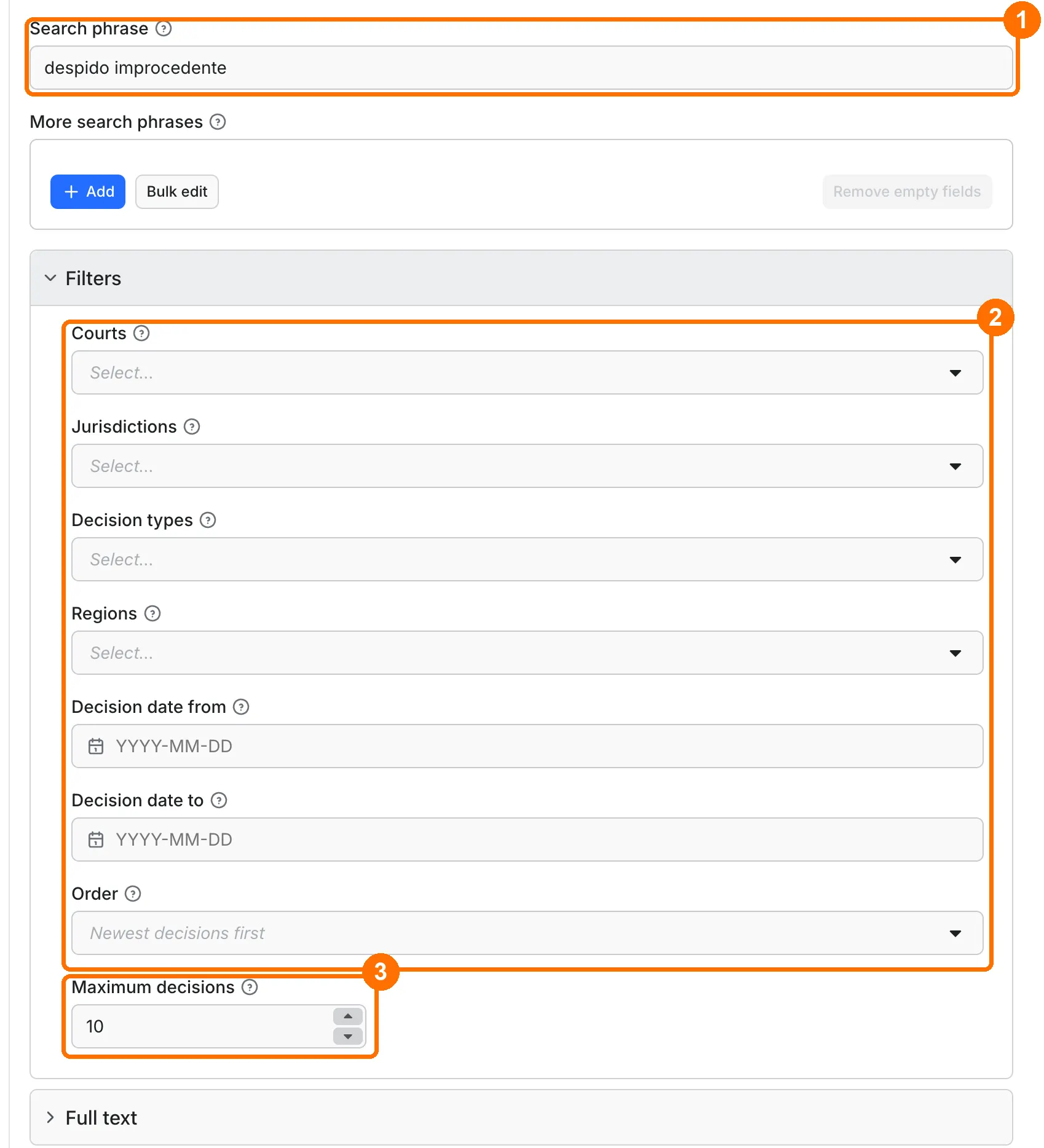
Search phrase (box 1) is already filled with
despido improcedente. Change it to your topic, a ROJ or an ECLI. -
Optional: open Filters and pick courts, jurisdictions, decision types, regions, dates or the order (box 2). Leave them empty to search all of CENDOJ.
-
Keep Maximum decisions at 10 for a first test (box 3).
-
Start the run.
-
Open the Output tab. Check the ROJ and ECLI columns (box 1), read the Summary column (box 2) and use Export to download the table (box 3).
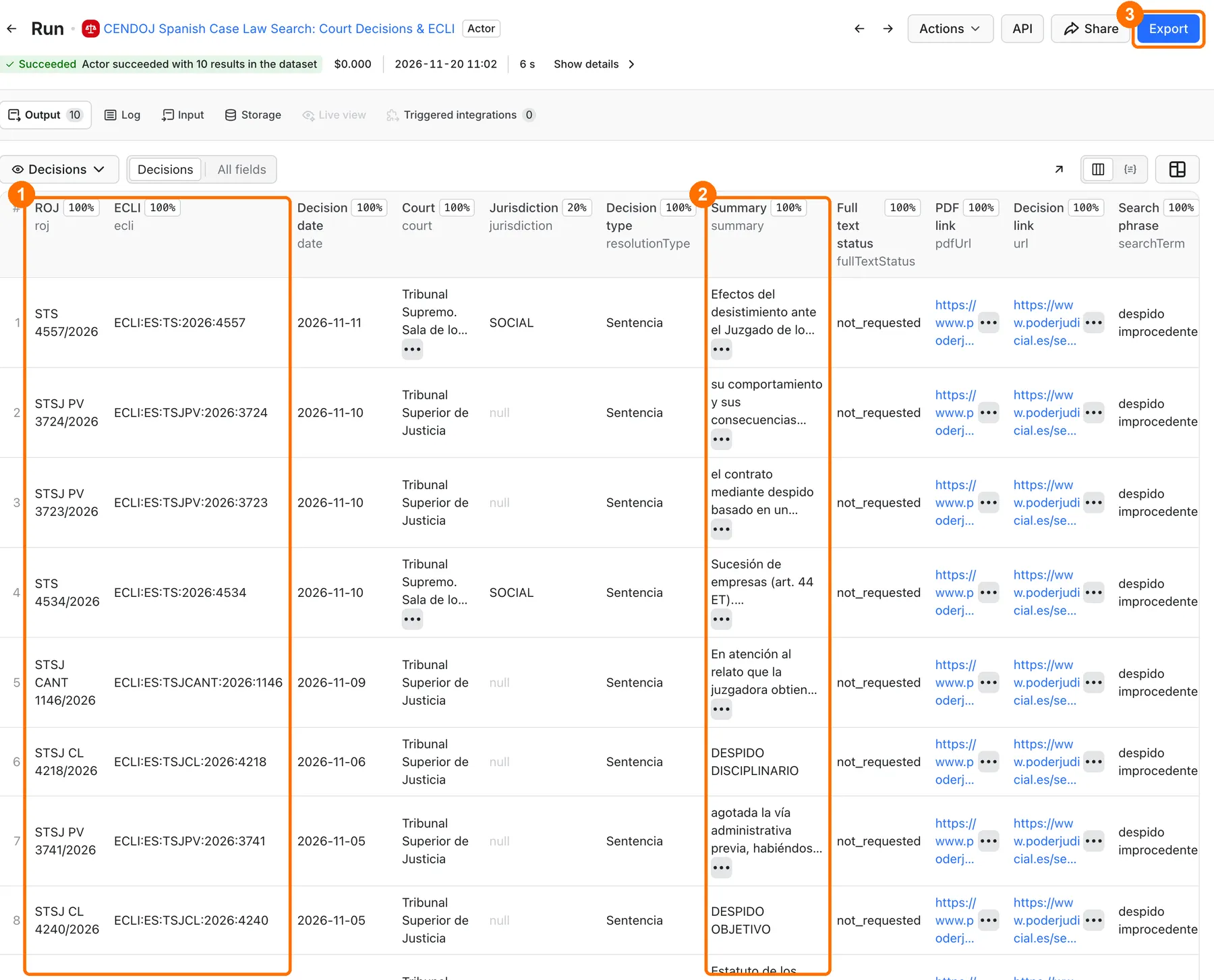
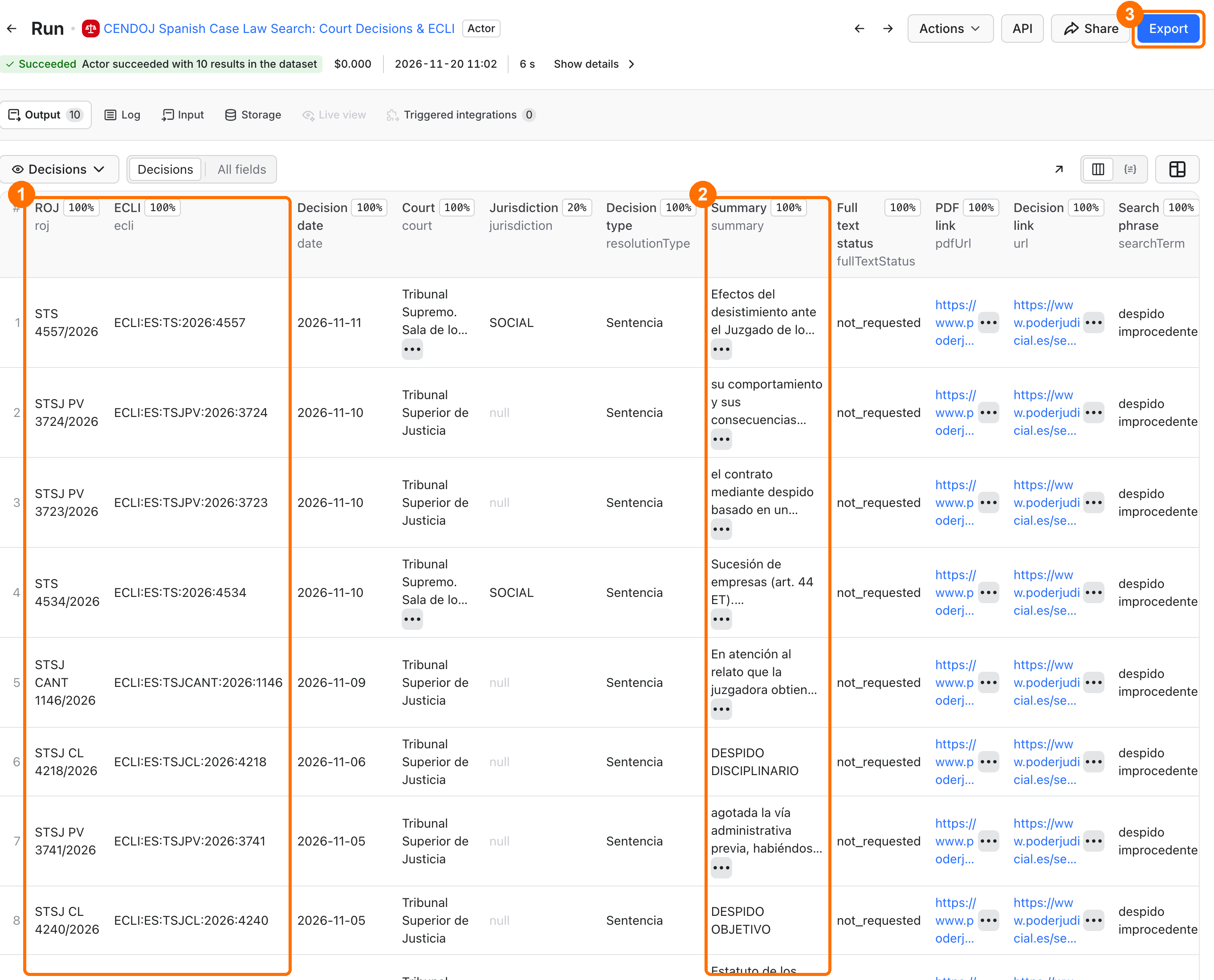
Expected result: 10 rows, newest decisions first, each with a ROJ, ECLI, date, court, summary and an official PDF link. In our test runs this usually took about 10 seconds, and up to a minute when CENDOJ was slow.
Use cases
| Buyer job | Input path | Output entity | Key fields | Next integration |
|---|---|---|---|---|
| Research case law on one legal issue | query, courts, jurisdictions | Court decision | roj, ecli, court, date, summary | Export to Excel or CSV |
| Collect Supreme Court doctrine for a period | courts, dateFrom, dateTo, maxItems | Court decision | roj, date, resolutionType, pdfUrl | Legal research database via API |
| Read the reasoning of known decisions | decisionUrls, keyPassages, passageTerms | Decision with full text | fullText, keyPassages, ecli | Your own review or AI summary step |
| Feed a legal AI assistant with sources | query, includeFullText, keyPassages | Decision with full text | fullText, keyPassages, url | MCP or API |
| Watch for new decisions on a topic | query, sortOrder: recentlyAdded | Court decision | roj, date, url | Apify schedule and Slack or Notion summary |
Input
Input fields
| Field | Plain name | Type | Required | Default / prefill | Allowed values | Effect | Example | Recommendation |
|---|---|---|---|---|---|---|---|---|
query | Search phrase | string | no | prefill despido improcedente | text up to 500 characters | Full-text search in CENDOJ. A ROJ or ECLI searches that exact identifier. | cláusula suelo | Use Spanish legal terms. |
searchTerms | More search phrases | array of strings | no | empty | up to 20 phrases | Each phrase is a separate search with its own maxItems. | ["gastos hipotecarios"] | Group related topics in one run. |
courts | Courts | array | no | empty (all courts) | CENDOJ court codes from the list | Limits the search to these courts. | ["11|12|13|14|15|16"] (Tribunal Supremo, all chambers) | Pick from the list in the form. |
jurisdictions | Jurisdictions | array | no | empty (all) | CIVIL, PENAL, CONTENCIOSO, SOCIAL, MILITAR, ESPECIAL | Limits the area of law. | ["SOCIAL"] | Use with a phrase for precise results. |
resolutionTypes | Decision types | array | no | empty (all) | SENTENCIA, SENTENCIA CASACION, SENTENCIA OTRAS, AUTO, AUTO RECURSO, AUTO ADMISION, AUTO INADMISION, AUTO ACLARATORIO, AUTO OTROS, ACUERDO | Limits the type of decision. | ["SENTENCIA"] | Choose SENTENCIA for judgments only. |
regions | Regions | array | no | empty (all of Spain) | 19 autonomous communities and cities, such as MADRID, CATALUÑA, PAÍS VASCO | Limits to courts in these regions. | ["MADRID"] | Use for regional courts (TSJ, Audiencia Provincial). |
dateFrom | Decision date from | string | no | empty | YYYY-MM-DD | Decisions on or after this date. | 2024-01-01 | Set a range for large topics. |
dateTo | Decision date to | string | no | empty (today) | YYYY-MM-DD, not before dateFrom | Decisions on or before this date. | 2024-12-31 | |
sortOrder | Order | string | no | newest | newest, oldest, relevance, recentlyAdded | Order of decisions in each search. | oldest | recentlyAdded is best for monitoring. |
maxItems | Maximum decisions | integer | no | default 10, prefill 10 | 1–300; 1–20 with full text | Maximum saved decisions for each search phrase. | 250 | Start with 10. |
includeFullText | Include full judgment text | boolean | no | false | true, false | Downloads the official PDF and returns its text. | true | Costs more; use for decisions you will read. |
keyPassages | Key passages per decision | integer | no | 0 | 0–10 | Returns this many paragraphs that contain your search words. | 2 | Needs full text or decision links. |
passageTerms | Words for key passages | array of strings | no | empty | up to 20 words or phrases | Picks passages by these words instead of the search phrase. | ["indemnización"] | Use when the search phrase is broad. |
decisionUrls | Decision links | array of strings | no | empty | up to 20 CENDOJ openDocument links | Gets the full text of these exact decisions. | ["https://www.poderjudicial.es/search/AN/openDocument/0ee79af283d5d4baa0a8778d75e36f0d/20261119"] | Clear the search phrase to fetch only these. |
deliveryConnector | Send results to | MCP connector | no | empty | your Slack, Notion or other connector | Posts a short summary after the run. | Optional. | |
deliveryTarget | Notion page or channel | string | no | empty | Notion page link or Slack channel ID | Where the summary goes. | Needed for Notion. |
Empty input runs the example search despido improcedente with 10 decisions. Filters without a phrase search all decisions that match the filters. Repeated phrases and links are used once. Unknown fields are ignored and listed in the run summary.
Interacting settings
| When | Input A | Input B | Effective behavior | Example | Cost/result effect |
|---|---|---|---|---|---|
| Several phrases | query | searchTerms | Each phrase is its own search; each gets up to maxItems decisions. A decision found by two phrases is saved once. | 2 phrases, maxItems 10 | Up to 20 rows |
| More than 200 results | maxItems above 200 | dateFrom / dateTo | The Actor splits the date range into smaller searches until it has enough decisions. | maxItems 250 | Tested: 250 rows from date slices in 26–55 s |
| Full text | includeFullText | maxItems | maxItems must be 20 or less. | maxItems 5 | Each row with text is charged as a full-text decision |
| Key passages | keyPassages | includeFullText or decisionUrls | Passages come from the full text, so one of those is needed. | keyPassages 2 | No extra charge |
| Passage words | passageTerms | query | passageTerms replace the search phrase for picking passages. | ["indemnización"] | None |
| Decision links only | decisionUrls | query empty | Only the linked decisions are fetched; no search runs. | 2 links | 2 full-text rows |
| Charge limit | Max cost per run | maxItems | The run stops at your cost limit and keeps the rows already saved. | stopReason is CHARGE_LIMIT |
Input examples
First search
Expected behavior: one CENDOJ search, newest decisions first.
Expected output: 10 decisions with roj, ecli, court, date and summary.
Limit or cost note: no PDF is downloaded; each row is one decision event.
Supreme Court decisions with full text
Expected behavior: searches the Tribunal Supremo, then reads each PDF.
Expected output: 5 decisions with fullText, 2 keyPassages each and fullTextStatus: "available".
Limit or cost note: up to 20 decisions per phrase in this mode; each row with text is one decision-full-text event.
Known decisions by link
Expected behavior: no search; the Actor reads the linked PDF.
Expected output: one decision with roj, ecli, court, fullText and 2 passages about indemnización.
Limit or cost note: up to 20 links. A link that gives no text is saved for free with fullTextStatus: "unavailable".
Output
Output fields
| Field | Meaning | Type | Can be empty? | Example / enum | Source / notes |
|---|---|---|---|---|---|
roj | ROJ, the Spanish case-law identifier | string | rarely | STS 4557/2026 | CENDOJ result row |
ecli | European Case Law Identifier | string | rarely | ECLI:ES:TS:2026:4557 | CENDOJ result row |
court | Court, with chamber when known | string | rarely | Tribunal Supremo. Sala de lo Social | For regional courts the search row has no chamber, so it shows the court only, such as Tribunal Superior de Justicia. Full text adds the chamber. |
jurisdiction | Area of law | string | yes | SOCIAL | Filled for Tribunal Supremo rows, when you filter by one jurisdiction, or from the full text. Otherwise null. |
date | Decision date | string | rarely | 2026-11-11 | YYYY-MM-DD |
resolutionType | Decision type | string | rarely | Sentencia, Auto | CENDOJ result row |
summary | CENDOJ summary or matching excerpt | string | yes | Efectos del desistimiento… | Text from the result page |
keyPassages | Paragraphs with your search words | array | yes | ["2. En la demanda…"] | Only with keyPassages above 0 and full text |
fullText | Selectable text of the official PDF | string | yes | JURISPRUDENCIA Roj: STS 4557/2026… | Only with full text or decision links |
fullTextStatus | Full-text result | string | no | not_requested, available, unavailable | unavailable means the PDF could not be read |
pdfUrl | Official PDF link | string | no | https://www.poderjudicial.es/search/AN/openDocument/… | poderjudicial.es only |
url | Decision link | string | no | same as pdfUrl | Use this to open the decision |
searchTerm | Phrase that found the row | string | yes | despido improcedente | null for decision links |
source | Source name | string | no | CENDOJ | |
fetchedAt | When the row was saved | string | no | 2026-11-20T04:08:22.357Z | ISO time |
Output entities and surfaces
| Situation | Dataset/API/KVS/live view | Result shape | User action |
|---|---|---|---|
| Normal item | Dataset, table view Decisions | One decision per row | Open, export or use url |
| Domain-empty result | Dataset empty; RUN_SUMMARY in the Key-value store | status: "not_found", sourceMatches: 0 | Check the phrase spelling and filters |
| Partial result | Dataset rows and RUN_SUMMARY | status: "partial", stopReason such as FULL_TEXT_UNAVAILABLE or CHARGE_LIMIT; some rows have fullTextStatus: "unavailable" | Read stopReason; retry the missing links with decisionUrls |
| Technical failure or retry | Run status Failed and RUN_SUMMARY | status: "error" and a stopReason code, such as PROXY_UNAVAILABLE or UNEXPECTED_SEARCH_RESPONSE | Run again later; open an issue with the run ID if it repeats |
RUN_SUMMARY also shows sourceMatches (how many decisions CENDOJ found), savedCount, terms (matches and saved rows for each phrase) and dateSlices (how many date splits were used). The run fails only when an error happens before any row is saved.
Output example
This is one trimmed row from the "Supreme Court decisions with full text" example. Long text is cut with …. Without full text, keyPassages and fullText are null and fullTextStatus is not_requested. A null field means CENDOJ did not show that value for this decision.
Send results to Slack or Notion
Pick your connector in the optional deliveryConnector field. After the run saves its data, the Actor posts a short summary (up to 25 decisions with ROJ and date, and a link to the full dataset) there. Put a Notion page link or a Slack channel ID in deliveryTarget: in Notion every run is added on top of that one page, so your workspace does not fill up with new pages. Without a page link, Notion delivery is skipped and the run summary says so. A delivery error never fails the run and costs nothing extra. Connect a service once in Apify Console → MCP connectors.
Use case → fields
| Buyer job | Input path | Output entity | Key fields | Next integration |
|---|---|---|---|---|
| Legal memo with sources | query, courts | Court decision | roj, ecli, url | Export to Excel |
| Read the reasoning | includeFullText, keyPassages | Decision with full text | keyPassages, fullText | Your review or AI step |
| Topic monitoring | query, sortOrder | Court decision | roj, date, summary | Slack or Notion summary |
Pricing
Pricing unit
You pay per saved decision, plus a small start fee. Platform usage is included in these prices.
| Event | When it is charged | Free plan | Bronze | Silver | Gold and above |
|---|---|---|---|---|---|
| Actor start | Once per run, one event per GB of memory (minimum one) | $0.009 | $0.009 | $0.009 | $0.009 |
| Decision | A saved decision with metadata and links | $0.0009 | $0.00081 | $0.00072 | $0.00063 |
| Decision with full text | A saved decision with extracted PDF text | $0.01 | $0.009 | $0.008 | $0.007 |
The start fee scales with run memory: the default 256 MB run is one start event. A search with no matches costs only the start fee. If a PDF cannot be read, the row is charged as a normal decision, not as full text. A decision link that gives no text is saved for free. Key passages cost nothing extra. A failed run is charged only for the start and for rows already saved.
Cost examples
Prices below use the Free plan.
| Scenario | Input scope | Expected item/event count | Base charge | Optional charge | Stop/cap behavior |
|---|---|---|---|---|---|
| First search | 1 phrase, maxItems 10 | 10 decisions | $0.009 + 10 × $0.0009 = $0.018 | none | Stops at 10 |
| Large export | 1 phrase, maxItems 250 | 250 decisions | $0.009 + 250 × $0.0009 = $0.234 | none | Tested: 26–55 s |
| Full text | 1 phrase, maxItems 5, full text on | 5 full-text decisions | $0.009 | 5 × $0.01 = $0.05 | Up to 20 per phrase |
| No matches | phrase with no results | 0 | $0.009 | none | status: "not_found" |
Set Maximum cost per run in the run options to stop the run at your budget. The rows saved before the limit stay in the Dataset.
Limits
- The Actor reads only what the public CENDOJ search shows. It does not include unpublished or anonymised-away data, and it does not log in.
- CENDOJ shows at most 200 results for one search. Above 200, the Actor splits the date range. A single day with more than 200 matching decisions can still give fewer rows than
maxItems; the run summary then showslimitReached: "SOURCE_WINDOW". maxItemsis per phrase: up to 300 without full text and up to 20 with full text. This is the size we tested: 900 decisions (3 phrases × 300) in 3–4 minutes. For larger exports, run several date ranges. You pay only for decisions that were saved.- Each request waits up to 12 seconds (search pages up to 30 seconds). Search pages are capped at 2 MiB; a larger answer stops the run with
RESPONSE_LIMIT. - When CENDOJ does not answer, the Actor retries the request up to 3 times in a row on new proxy sessions, the third time through a Spanish residential proxy. A run allows 10 retries in total. If CENDOJ still does not answer, the run stops with
SOURCE_NETWORK_ERRORand keeps the decisions already saved. - A full-text PDF that fails with a network error is downloaded once more (
fullTextRetriesin the run summary). If it fails again, the row is saved withfullTextStatus: "unavailable"at the price of a decision without full text. - The run also stops at the run timeout (300 seconds by default) or at your maximum charge, and keeps what it saved. The run summary shows
limitReached: "CHARGE_LIMIT"for the charge limit. - For regional and lower courts (TSJ, Audiencia Provincial and others), the search row has no chamber.
courtthen shows only the court name andjurisdictionisnull. Filter by one jurisdiction or turn on full text to fill them. - Full text works only for PDFs with selectable text. A scanned or very large PDF (over 120 pages or 512 KB) returns
fullTextStatus: "unavailable". - Decision links must be official
poderjudicial.esopenDocumentlinks. Other links are saved for free withfullTextStatus: "unavailable". - The summary is the text CENDOJ shows. It is not a legal analysis.
- This Actor is not made by or linked to CENDOJ or the General Council of the Judiciary (CGPJ). Check the CENDOJ terms for how you may reuse decisions.
API, export and integrations
- API: start a run with the Apify API and the same JSON input as in the form. Rows are in the run's default Dataset; the summary is the
RUN_SUMMARYrecord in its Key-value store. - Export: download the Dataset as JSON, CSV, Excel, XML or HTML from the Output tab or the API.
- Scheduling: create an Apify schedule with
sortOrder: "recentlyAdded"to get new decisions on a topic every day or week. - Webhooks / no-code: use an Apify webhook on run success to send the Dataset to Make, Zapier, n8n or your own endpoint. Use
urlandeclias stable keys. - SDK / MCP / agent: call the Actor from the Apify JavaScript or Python client, or from an AI agent through the Apify MCP server.
Use with AI agents (MCP)
-
MCP server URL with only this Actor:
https://mcp.apify.com?tools=cliqtomedia/cendoj-case-law. -
Smallest useful input:
{ "query": "despido improcedente", "maxItems": 10 } -
Key output fields:
rojandecli(decision identifiers),courtanddate(who decided and when),summary(short text),keyPassages(paragraphs with the search words, with full text on) andurl(official decision link). -
Measured runs: 10 decisions for $0.018 and 5 decisions with full text for $0.059 (Free plan). Most runs took 10–15 seconds, and up to a minute when CENDOJ was slow.
-
Limits: up to 20 phrases per run;
maxItemsup to 300, or 20 with full text;keyPassagesneeds full text ordecisionUrls.
Troubleshooting
No decisions found
Symptom: the Dataset is empty and RUN_SUMMARY shows status: "not_found".
Likely reason: no CENDOJ decision matches the phrase and filters.
Check: try the same phrase in Spanish with fewer filters, or a wider date range.
Action: remove a filter or change the phrase. This run costs only the start fee.
Fewer rows than Maximum decisions
Symptom: the run saved fewer rows than maxItems.
Likely reason: CENDOJ has fewer matches, more than 200 matches fall on one day, or the run reached your cost limit.
Check: sourceMatches, terms[].sourceMatches, limitReached and stopReason in RUN_SUMMARY.
Action: narrow the date range, raise Maximum cost per run or split the search into several phrases.
Full text is missing
Symptom: some rows have fullTextStatus: "unavailable" and stopReason is FULL_TEXT_UNAVAILABLE.
Likely reason: the PDF is scanned, too large, or CENDOJ did not send it in time. After repeated PDF errors the Actor stops trying and saves metadata rows.
Check: open the url of that row in your browser.
Action: run again later with those links in decisionUrls. These rows were charged as normal decisions, not full text.
The run failed
Symptom: the run status is Failed and RUN_SUMMARY shows status: "error".
Likely reason: CENDOJ was unavailable or changed its search page (for example PROXY_UNAVAILABLE, UNEXPECTED_SEARCH_RESPONSE or FILTER_UNAVAILABLE), or the input is not valid (INVALID_INPUT, with a message that names the field).
Check: the stopReason and message fields in RUN_SUMMARY.
Action: fix the named input field, or run again later. If it repeats, open an issue with the run ID.
FAQ
Do I need a CENDOJ account or an API key?
No. CENDOJ case law is public. You need only an Apify account.
Can I search by ROJ or ECLI?
Yes. Put the ROJ (for example STS 4557/2026) or the ECLI (for example ECLI:ES:TS:2026:4557) in Search phrase. The Actor sends it to the exact identifier field of CENDOJ.
Why is jurisdiction empty for some rows?
CENDOJ result rows for regional and lower courts do not name the chamber. Filter by one jurisdiction, or turn on full text, and the field is filled.
How fresh are the results?
Each run reads the live CENDOJ search, so you get what CENDOJ shows at that moment. CENDOJ adds decisions some days or weeks after the decision date. Use sortOrder: "recentlyAdded" to see the newest additions.
Does a search with no results cost money?
Only the start fee ($0.009 at the default memory). No decision is charged.
Can I get more than 300 decisions?
One phrase saves up to 300 decisions per run, and one run can have up to 20 phrases. For more decisions on one topic, split the date range across several runs with dateFrom and dateTo.
Support
For a bug, question or feature request, open the Actor's Issues tab on Apify. Include the run ID, your input (without private data) and the stopReason from RUN_SUMMARY. Never send tokens, cookies or billing data.
⭐ Found it useful? Rate this Actor. Something wrong? Report a problem — we fix reported problems.


