
DataCite Dataset Search: DOI Metadata & Licenses
Pricing
from $0.95 / 1,000 dataset metadata records
DataCite Dataset Search: DOI Metadata & Licenses
Search DataCite research datasets by topic, publisher, funder, year and license. Export DOI metadata, creators, rights, related identifiers and citation counts.
Pricing
from $0.95 / 1,000 dataset metadata records
Rating
0.0
(0)
Developer

Cliqto Media
Maintained by CommunityActor stats
0
Bookmarked
2
Total users
1
Monthly active users
5 days ago
Last modified
Categories
Features
Share
Search DataCite for research datasets by topic, publisher, funder, publication year and license. The Actor returns one row per DOI with title, creators, rights, related identifiers and DataCite citation counts.
Use it to build a reading list, check dataset licenses or collect DOIs for a review. The smallest run is the example input: 25 climate datasets in a few seconds for $0.04175 on the Free plan. No DataCite key is needed.
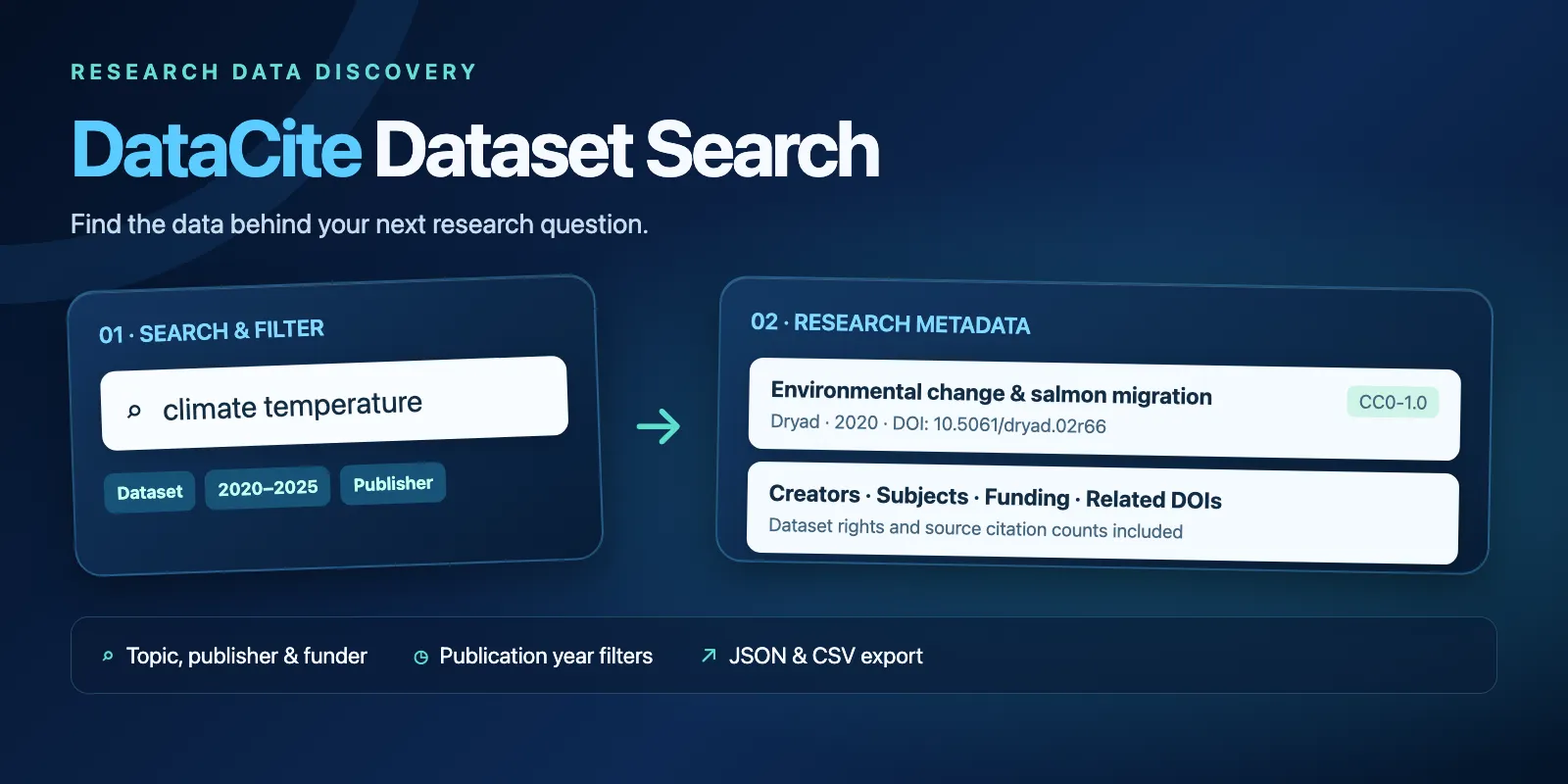
Table of contents
- What it does
- Quick start
- Input
- Output
- Pricing and limits
- Use with AI agents (MCP)
- Troubleshooting
- FAQ
- Source and rights
- Support
What it does
The Actor sends your search to the public DataCite REST API. It reads up to 500 matching DOI records and saves each one as a Dataset row. By default the best matches come first. If DataCite sends many duplicate DOIs, the run can stop earlier with partial and PAGINATION_BUDGET (see Troubleshooting).
Good fit
- Find datasets on a topic from 2020 to 2025 and export DOIs and titles.
- Find datasets from one repository (for example Zenodo or Dryad) or one funder.
- Check which datasets have an open license, such as
cc-by-4.0.
Not a fit / limits
- It does not download dataset files. It returns metadata and links.
- It returns at most 500 records per run, not the whole DataCite catalog.
- DataCite only. Crossref DOIs (most journal articles) are not included.
Quick start
- Open the Input tab.
- Keep the example in Search query:
climate temperature. - Keep Resource type =
Dataset, years 2020–2025 and Maximum results = 25. - Click Start.
- Open the Research datasets view in the Output tab and check the first DOI and title.
Expected result: up to 25 rows, most relevant first, each with a DOI link.
The form shows this example. If you start the Actor by API with an empty input, the query is blank: it searches all Dataset records and saves 25. With a blank query every record has the same relevance, so the rows can differ between runs. Choose newest or oldest for a stable order.
Input
Input fields
| Field | Plain name | Type | Default | Allowed values | Effect |
|---|---|---|---|---|---|
query | Search query | text | blank | up to 500 characters | Topic words or DataCite query syntax. Blank = all records that pass the filters. |
resourceTypeGeneral | Resource type | choice | Dataset | Dataset, Software, Text, Collection, Image, Audiovisual, Model, Other | Keeps only this type. |
sortBy | Sort order | choice | relevance | relevance, newest, oldest | Relevance = best matches first. Newest/oldest = by DOI creation date. |
publisher | Publisher | text | none | phrase | Keeps records whose publisher contains this phrase, for example Zenodo. |
funder | Funder | text | none | phrase | Keeps records with this phrase in the funder name, for example National Science Foundation. |
yearFrom / yearTo | Publication years | number | none | 1000–2100 | Inclusive year range. yearFrom must not be after yearTo. |
license | Dataset license | text | none | SPDX ID, URI or name | Keeps records with this license anywhere in rights, for example cc-by-4.0. |
maxResults | Maximum results | number | 25 | 1–500 | Number of rows to save. |
How the query works
- Plain words must all match:
climate temperaturefinds records with both words. - Use
ORto match any word:climate OR temperature. - Use quotes for an exact phrase:
"sea surface temperature". - Filter fields (publisher, funder, license) match a phrase in DataCite's search index. They are not case-sensitive and are not exact string equality.
Filters combine with AND. Unknown input fields stop the run with UNKNOWN_INPUT_FIELD.
Input example
Expected behavior: one search page, 25 Dataset records from 2020–2025, best matches first.
Output
Output example
One row from the input example (lists shortened):
Output fields
| Field | Meaning | Type | Can be empty? |
|---|---|---|---|
doi | DOI; unique in one run | text | no |
title | First title as plain text: HTML tags removed (also tags written as <b>), entities like & decoded, control characters dropped. A plain < can remain, so escape it before you put it into a web page. Known limit: text that looks like a tag, such as a<b and c>d, is removed as a tag; titles keeps the original | text | null if blank |
titles | All titles exactly as DataCite returns them (may contain HTML) | list | empty list |
creators | Names, ORCID and other identifiers, affiliations | list | empty list |
publisher | Publisher or repository | text | null |
year | Publication year | number | null |
resourceType / resourceTypeDetail | General type / publisher's own type text | text | detail can be null |
subjects | Keywords and classification codes | list | empty list |
license | First license in rights (ID, else URI, else name) | text | null if no rights |
rights | All licenses and rights statements | list | empty list |
sizes, formats | Size and format strings as supplied | list | empty list |
relatedIdentifiers | Related works, for example IsCitedBy, IsVersionOf | list | empty list |
fundingReferences | Funder name, funder ID, award | list | empty list |
url | Publisher landing page | text | null |
doiUrl | https://doi.org/ link | text | no |
citationCount | Citations reported by DataCite; 0 is a real value | number | null if unknown |
provider, sourceUrl, fetchedAt, sourceUpdatedAt, metadataLicense | Source, API record link, read time, last source update, CC0-1.0 | text | sourceUpdatedAt can be null |
Null means the source did not supply the value. An empty list means the source supplied no items.
Where to find results
| Situation | Where | What you see | What to do |
|---|---|---|---|
| Normal run | Dataset, Research datasets view | DOI, title, publisher, year, resource type, license, citations, DOI URL, source updated time | Export JSON for all nested fields, or CSV/Excel |
| No matches | Dataset is empty; Run summary status: not_found | 0 rows | Broaden the query, filters or years |
| Spending limit reached | Run summary status: partial, error: CHARGE_LIMIT; run is Succeeded | Saved rows stay (can be 0) | Raise the limit or lower maxResults |
| Stopped early for another reason | Run summary status: partial (rows saved) or error (0 rows); run is Failed | Saved rows stay | Read error, then run again |
| Technical failure | Run summary status: error; run is Failed | error code | See Troubleshooting |
The Run summary (key-value store record RUN_SUMMARY) also shows errorCode (same as error), statusReason (a short explanation), totalMatches, savedResults, pages and requests. A failed run, including one with invalid input, has the same fields. With invalid input, maxResults shows your value if it is a whole number, otherwise null. complete means the Actor saved maxResults rows or all matches; it does not mean the whole catalog. The OUTPUT record holds links to the Dataset view and the summary.
Pricing and limits
Pricing unit
Pay per event: $0.008 for each run start, plus a price for each saved row.
| Plan | Price per 1,000 rows |
|---|---|
| Free | $1.35 |
| Bronze | $1.28 |
| Silver | $1.20 |
| Gold, Platinum, Diamond | $1.10 |
A search with no matches costs only the start, $0.008. A failed run (for example a query syntax error or a DataCite outage) also costs the start, plus any rows already saved. Your spending limit can stop the run early; rows saved before the stop are kept.
Cost examples (Free plan)
| Rows saved | Cost |
|---|---|
| 0 (no matches) | $0.008 |
| 10 | $0.0215 |
| 25 | $0.04175 |
| 100 | $0.143 |
| 500 | $0.683 |
Limits
- 1–500 rows per run, 50 rows per source page, at most 12 pages.
- Each request has 15 seconds. Temporary 429 and 5xx errors get up to three attempts. All source work stops after 150 seconds.
- Runs use 256 MB and a 300-second timeout. A larger timeout does not add more source work.
- Rows are saved one source page at a time. If the run restarts (for example after Apify moves it to another server, or after a resurrect), it first reads the DOIs already in its Dataset and skips them, so a row is not saved twice and is not charged again. Tested on Apify with a run restarted through the API in the middle of a page and with a resurrected finished run; the platform's own move to another server is covered by automated tests only.
- The source limits count across all processes of a run: 150 seconds of source time, 18 requests and 6 MiB of responses in total. A restarted or manually resurrected run continues with the requests and time it has already used, so it can end
partialwithSOURCE_BUDGET_EXHAUSTEDorPAGINATION_BUDGETsooner than a new run would. - While a move to another server is in progress, the summary shows
MIGRATING. The run waits at most 90 seconds in total (shared by all its processes) to be restarted; if it is not, it ends as Failed withMIGRATION_FAILEDand keeps the saved rows. - A run uses at most 3 processes (the first start plus two restarts). A 4th start stops at once with
RESTART_LIMIT, without requests, new rows or row charges; the saved rows are kept. - A resurrected finished run repeats its last summary and saves and charges no new rows; Apify still charges the start fee for the new start. This includes a run stopped by your spending limit (
partialCHARGE_LIMIT): a resurrect does not continue it, even with a higher limit. To get more records, start a new run with a higher limit. A run stopped before it finished (aborted, or ended withMIGRATION_FAILED) continues where it stopped when resurrected, within the shared limits above. - Each Dataset belongs to one input. If the input of a run is changed and the run is resurrected while its Dataset already has rows, it stops with
INPUT_CHANGEDand saves and charges nothing. The key-value store keeps aSEARCH_STATErecord for restarts. - Each saved page is charged with its own charge key. If a run stops right after saving a page, a restart within 2 minutes re-sends that page's charge with the same key, and Apify ignores a repeated key for about 3 minutes, so a charge that already arrived is not counted again. A later restart does not re-send the charge, because Apify may no longer recognise the key; that page (at most one, up to 50 rows) may stay unpaid, and that cost is ours, not yours. You are never charged for a row that was not saved. Tested on Apify with a restart through the API in the middle of a run (charged rows equal unique saved rows) and with a resurrected finished run. A stop between saving a page and charging it, the 2-minute rule and the spending limit after a restart are covered by automated tests (a fake Apify API) only, not by a Cloud run.
Use with AI agents (MCP)
- MCP server with only this Actor:
https://mcp.apify.com?tools=cliqtomedia/datacite-dataset-search(open). - Smallest useful input: the input example above.
- Key output fields:
doi(identifier),title,year,license(first dataset license, null = unknown),citationCount(DataCite-reported citations). - Typical run: 25 rows in about 5 seconds for $0.04175 (Free). 500 rows take about 20 seconds. Read
RUN_SUMMARY.statusbefore you use the rows. - The Actor runs with limited permissions in batch mode.
Troubleshooting
The run failed with INVALID_QUERY_SYNTAX
Symptom: the run is Failed and saved 0 rows. Likely reason: DataCite rejected the query, for example an open bracket or quote. Action: fix the query, for example foo AND (bar) instead of foo AND (.
not_found with 0 rows
Likely reason: the words or filters are too narrow. Plain words must all match. Action: remove a filter, widen the years or use OR.
partial with CHARGE_LIMIT
Likely reason: your spending limit for the run was reached. The run still ends as Succeeded and keeps the saved rows. Action: raise the limit or lower maxResults. If the limit cannot pay for even one row, the summary is partial with CHARGE_LIMIT and 0 saved rows; only the start is charged.
SOURCE_*, RATE_LIMIT_*, BODY_TOO_LARGE or PAGINATION_BUDGET
Examples: SOURCE_HTTP_503, SOURCE_TIMEOUT, SOURCE_RETRY_EXHAUSTED, SOURCE_NETWORK_ERROR, SOURCE_BUDGET_EXHAUSTED (150-second or 18-request limit), BODY_TOO_LARGE (2 MiB per response, 6 MiB per run), SOURCE_SCHEMA_DRIFT (DataCite changed its response format), PAGINATION_BUDGET (12 pages read). Likely reason: DataCite returned an error, was slow or sent many duplicates. The run is Failed. If some rows were saved, they are kept and the summary says partial; with 0 rows it says error. Action: wait a few minutes and run again. A failed request never becomes an empty result.
DATASET_READ_FAILED
Likely reason: on a restart, the rows already saved could not be read back, so the run stopped instead of risking duplicates. Saved rows are kept; savedResults is the Dataset item count when it was available, otherwise the last saved progress (a lower bound). Action: start a new run.
INPUT_CHANGED
Likely reason: the run was resurrected with a different input while its Dataset already had rows from the old input, or the Dataset holds more rows than maxResults allows. The run stops before any request; nothing is saved or charged and the old rows are kept. Action: start a new run with the new input.
DATASET_WRITE_FAILED, CHARGE_FAILED or STATE_WRITE_FAILED
Likely reason: Apify storage or the charging service did not accept a write. The run is Failed; rows saved before are kept and the summary says partial (or error with 0 rows). A page that was saved but not charged is charged once if the same run restarts within 2 minutes; otherwise it is not charged. Action: start a new run.
MIGRATION_FAILED or RESTART_LIMIT
Likely reason: Apify moved the run to another server and did not restart it within 90 seconds, or the run was restarted more than twice. The run is Failed; saved rows are kept and the summary says partial (or error with 0 rows). Action: start a new run.
CANCELLED
Likely reason: the run was aborted. The run is Failed; with rows saved the summary says partial, with 0 rows it says error. Action: start a new run.
INVALID_* or UNKNOWN_INPUT_FIELD
Likely reason: an input value is outside the allowed range or a field name is wrong. Action: compare your input with the Input fields table.
RESOURCE_MEMORY_TOO_LOW, RESOURCE_MEMORY_TOO_HIGH or RESOURCE_TIMEOUT_TOO_LOW
Likely reason: the run options were changed. The Actor needs exactly 256 MB memory and a timeout of at least 60 seconds. Action: start the run with the default options (256 MB, 300 seconds).
FAQ
Do I need a DataCite account or key?
No. The Actor uses the public DataCite REST API.
Why do I see two rows with the same title?
Repositories like Zenodo give each version its own DOI. Each DOI is a separate row. Check relatedIdentifiers for IsVersionOf.
Does license show every license?
No. license is the first entry in rights. A record can have more, and the license filter can match a later one. Check rights for the full list. An empty rights list means the reuse terms are unknown, not that reuse is allowed.
Is citationCount complete?
No. It is the number DataCite reports from its own links. Other citation indexes can show more.
How fresh is the data?
Each run reads DataCite live. sourceUpdatedAt shows when DataCite last changed the record.
Source and rights
Metadata comes from the DataCite REST API. DataCite metadata is CC0. The dataset itself can have a different license or restricted access, so check rights and the landing page. This Actor is not an official DataCite product. It follows the DataCite API rate limits.
Support
For a bug or question, open the Actor's Issues tab. Include the run ID, your input and the RUN_SUMMARY error. Never post tokens or passwords.


