

Shopee Products Scraper: Prices, Reviews, No Login
Pricing
from $0.25 / 1,000 products
Shopee Products Scraper: Prices, Reviews, No Login
Track rival prices on Shopee with no login. Get products, prices, sellers, shop reviews and flash sales from public pages, see what changed since your last run, and export JSON or CSV. Keyword search covers 9 countries.
Pricing
from $0.25 / 1,000 products
Rating
0.0
(0)
Developer

Cliqto Media
Maintained by CommunityActor stats
0
Bookmarked
3
Total users
2
Monthly active users
2 days ago
Last modified
Categories
Security
Limited permissionsShare
Type keywords or paste Shopee links, and get Shopee products as rows with price, original price, discount, rating, seller name and seller rating. No login and no Shopee account are needed. The prefilled search for 10 phone cases in Thailand takes 20 to 40 seconds and costs about $0.006 on the Free plan.
Use it to track rival prices on Shopee, see what changed since your last run, read shop reviews and watch flash sales. Export the rows as JSON or CSV, or read them by API.
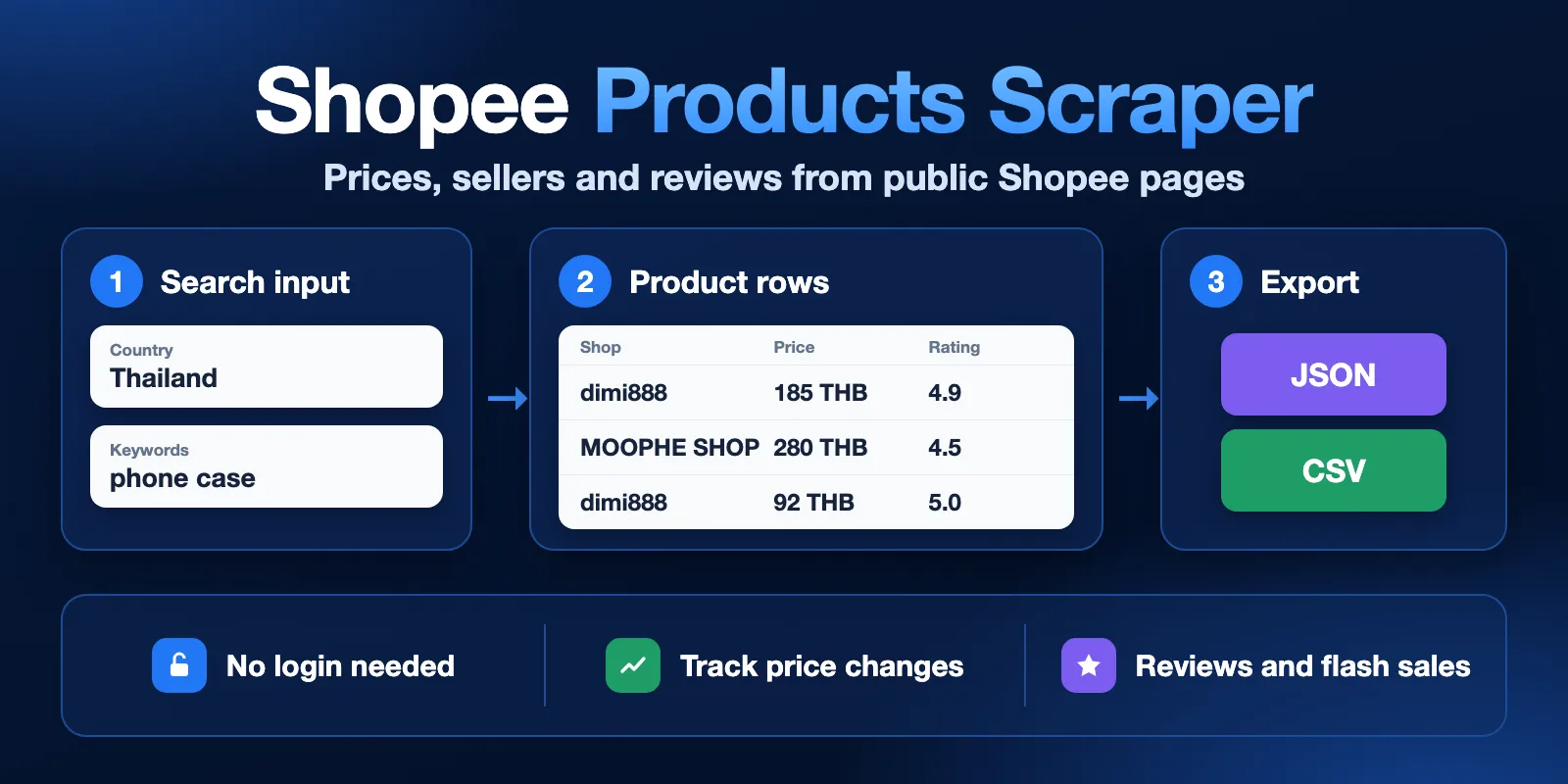
The rows in this picture are samples. Your results depend on the search and the day.
Table of contents
- What it does
- How it works
- Quick start
- Use cases
- Input
- Output
- Pricing
- Limits
- API, export and integrations
- Troubleshooting
- FAQ
- Related Actors
- Support
What it does
The Actor reads public Shopee pages as a guest and returns one row for each result. It can collect:
- Products from keywords, search links, shop links and category links.
- Product details such as description, gallery, categories, attributes and variants.
- Seller data: name and rating, and on request followers, response rate and other shop metrics.
- Shop reviews with stars, text, seller reply and a summary row.
- Flash sales with promotion time, sale price and remaining promotional stock.
- Keyword hints and the category tree of a market.
- Changes since your last run: new products and new prices.
Good fit
- You sell on Shopee and want to check rival prices and discounts each day.
- You research a product niche in Southeast Asia, Taiwan, Brazil or Mexico.
- You want to read what buyers say about a shop.
Not a good fit
- You need order data, your own seller account data or buyer contacts. The Actor reads only public guest pages.
- You need exact stock and exact sold counts for every product. Shopee often hides these from guests, so these fields can be empty.
How it works
- You choose what to collect. Enter keywords, paste Shopee links or enter IDs, then set a result limit.
- The Actor reads public pages. It waits about one second between normal requests, so large runs take time. Links run first, then keywords.
- You get the rows. Open the Output tab, export the data or read it by API. The run also saves a
RUN_SUMMARYrecord with counts and the reason it stopped.
Quick start
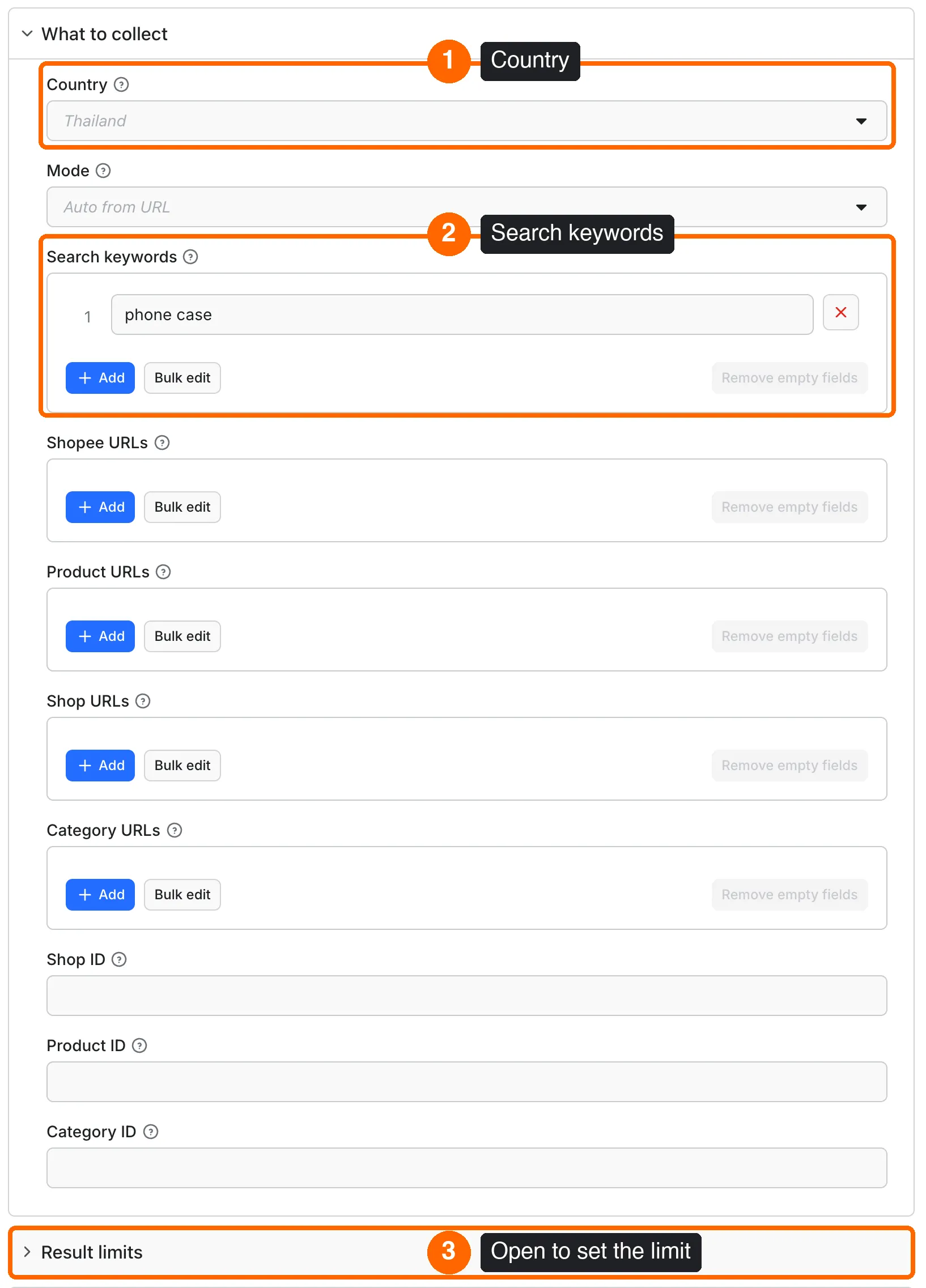
- Open the Input tab and keep Country set to
Thailand. - Keep
phone casein Search keywords. - Open Result limits and keep Maximum results at
10. - Run the Actor.
- When the run ends, open Output and choose the Products view.
- Check
price,originalPriceanddiscountPercent. - Check
shopNameandshopRating.
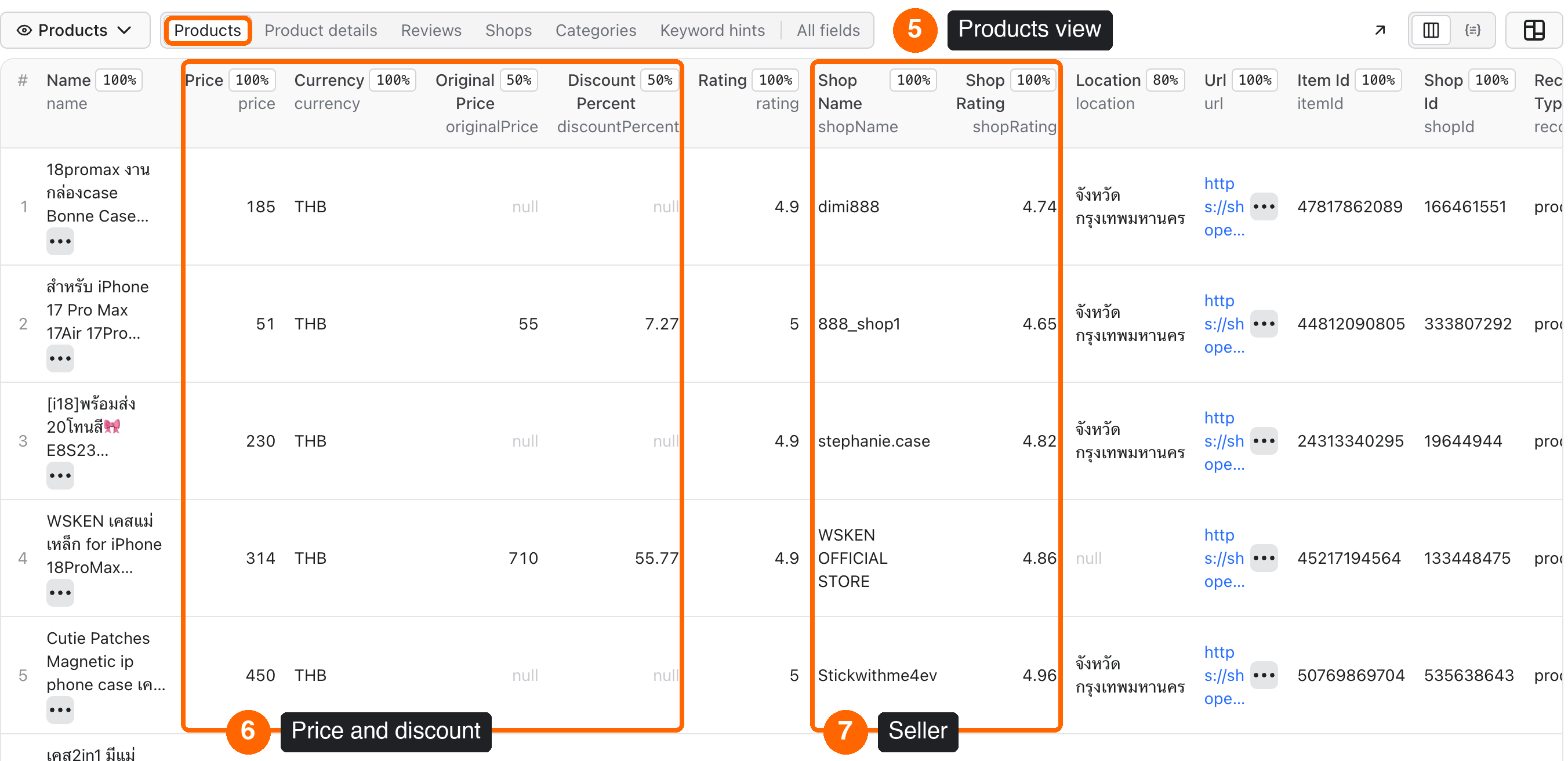
Expected result: 10 product rows in Thai baht (THB) in 20 to 40 seconds. The cost is about $0.006 on the Free plan. Search results change from run to run, so your products will differ from the picture.
Use cases
| Buyer job | Input path | Output entity | Key fields | Next integration |
|---|---|---|---|---|
| Watch rival prices each day | keywords or shopUrls with onlyChanges: true | Product | price, previousPrice, changeStatus, discountPercent, shopName | Schedule the run, then send a summary to Slack |
| Research a product niche | keywords, country, minRating, sortBy | Product | price, rating, location, shopRating | Export CSV to a spreadsheet |
| Read what buyers say about a shop | mode: reviews with shopUrls | Review and summary | rating, comment, sellerReply, ratingCountsByStar | Send the rows to a text analysis tool |
| Check a shop before you work with it | mode: profile with shopUrls | Shop | shopRating, shopFollowers, shopResponseRate, shopProductCount | Add the rows to a supplier sheet |
| Watch the current flash sale | mode: flash_sale, country | Flash-sale product | price, stockRemainingPercent, promotionEnd | Run on a schedule and export JSON |
Input
Only one thing is needed: something to search for. No field is strictly required.
- Empty input: if you send
{}or empty lists, such as{"keywords":[]}, through the API, the Actor has no work to do. The run ends with 0 rows and only the start fee. The Console form starts withphone casealready filled in. - Practical maximum: 5,000 products per run. See Limits for time and cost.
- Duplicates: repeated keywords and links are removed. A product that appears twice in results is delivered once.
- Bad links: a bad link is skipped and reported. The run fails only if no valid target is left.
Input fields
| Field | Plain name | Type | Required | Default / prefill | Allowed values | Effect | Example | Recommendation |
|---|---|---|---|---|---|---|---|---|
country | Country | string | No | th | th, id, sg, my, ph, vn, tw, br, mx | Market for keywords, categories and flash sales. Each pasted link keeps its own market. | th | Reviews, details and flash sales were tested only in Thailand. |
mode | Mode | string | No | auto | auto, search, product, shop, reviews, hints, profile, categories, flash_sale | What to collect. auto reads the link type. | reviews | Keep auto for keywords and normal links. |
keywords | Search keywords | string list | No | default empty; prefill phone case | Any text | Search terms. They share one result limit. | ["desk lamp"] | Use more keywords for large runs. |
startUrls | Shopee URLs | link list | No | empty | HTTPS Shopee search, category, shop or product links | Any Shopee link. | https://shopee.co.th/search?keyword=phone%20case | Use this if you have mixed links. |
productUrls | Product URLs | link list | No | empty | HTTPS product links with shop and product IDs | Opens each product page. | https://shopee.co.th/product/333239573/56366098260 | Costs more than a search row. |
shopUrls | Shop URLs | link list | No | empty | HTTPS shop links | Products of each shop. | https://shopee.co.th/shop/333239573 | Good for watching one rival. |
categoryUrls | Category URLs | link list | No | empty | HTTPS category links | Products of each category. | https://shopee.co.th/Mobile-Gadgets-cat.11044458 | Add filters to keep rows useful. |
shopId | Shop ID | string | No | none | Digits only | One shop, or one product with itemId. | 333239573 | Use with country. |
itemId | Product ID | string | With shopId | none | Digits only | One product. | 56366098260 | Needs shopId. |
categoryId | Category ID | string | No | none | Digits only | One category of the chosen market. | 11044458 | Find IDs with mode: categories. |
maxItems | Maximum results | integer | No | 10 / 10 | 1 to 5,000 | Stops after this many products, categories or hints. | 100 | Start small, then raise it. |
includeSellerDetails | Add seller name and rating | boolean | No | true | true, false | One shop lookup per seller. | false | Turn off for large runs: much faster. |
includeShopMetrics | Add detailed shop metrics | boolean | No | false | true, false | Followers, response rate and more. One profile lookup per shop, and page data may apply. | true | Use for small runs. |
ongoingOnly | Current flash sale only | boolean | No | true | true, false | Off also visits the other listed sessions. | true | Keep on for today's prices. |
promotionId | Flash sale promotion ID | string | No | none | Public promotion ID | Reads one flash-sale session. | promotionId from a flash row | Leave empty for the current session. |
includeShopProfile | Add shop profile row | boolean | No | true | true, false | For shop links, adds one shop row. | true | It does not count toward maxItems. |
includeListingPrice | Look up hidden prices | boolean | No | true | true, false | If a product page hides the price, looks for the same product ID on listing pages. Listing pages are charged. | true | Turn off if you only need the text. |
includeDetails | Add product details | boolean | No | false | true, false | Opens each product page for the description, gallery, attributes and variants. | true | Costs more. Try with a few products first. |
sortBy | Sort by | string | No | relevancy | relevancy, sales, latest, price_asc, price_desc | Asks Shopee to sort the results. | price_asc | Sponsored cards can change the order. |
minPrice | Minimum price | number | No | none | 0 or more, local currency | Removes lower prices and products with no price. | 100 | Use local money, not USD. |
maxPrice | Maximum price | number | No | none | 0 or more, local currency | Removes higher prices and products with no price. | 500 | Must not be below minPrice. |
minRating | Minimum rating | number | No | none | 0 to 5 | Removes lower ratings and products with no rating. | 4.5 | Good for finding strong sellers. |
minSold | Minimum units sold | number | No | none | 0 or more | Adds a detail lookup. Removes products with a hidden sold count. | 100 | Use only if needed: it costs more and removes many rows. |
condition | Condition | string | No | any | any, new, used | Asks Shopee for this condition. | new | Keep any by default. |
discountedOnly | Discounted only | boolean | No | false | true, false | Keeps products with a discount. | true | Good for promotion checks. |
freeShippingOnly | Free shipping only | boolean | No | false | true, false | Asks Shopee for free-shipping listings. | true | Shipping depends on destination. |
officialShopOnly | Shopee Mall only | boolean | No | false | true, false | Asks Shopee for Shopee Mall listings. | true | Use for brand checks. |
preferredSellerOnly | Preferred sellers only | boolean | No | false | true, false | Asks Shopee for preferred sellers. | true | Optional. |
codAvailableOnly | Cash on delivery only | boolean | No | false | true, false | Asks Shopee for cash-on-delivery listings. | true | Optional. |
wholesaleOnly | Wholesale only | boolean | No | false | true, false | Asks Shopee for wholesale listings. | true | Optional. |
genuineOnly | Authentic products only | boolean | No | false | true, false | Asks Shopee for listings it marks as authentic. | true | Optional. |
withVideoOnly | With video only | boolean | No | false | true, false | Asks Shopee for listings with video. | true | Optional. |
shippedFrom | Shipped from | string list | No | empty | Location labels of the market | Asks Shopee for these locations. | ["Bangkok"] | Copy the label from Shopee. |
brand | Brand | string list | No | empty | Brand names or IDs | Adds detail lookups. Removes products with no reported brand. | ["Samsung"] | Costs more. Use a few products first. |
includeText | Name contains | string | No | none | Any text | Keeps names with this text. Letter case is ignored. | magnetic | Use the language of the market. |
excludeText | Name does not contain | string | No | none | Any text | Removes names with this text. | used | Use the language of the market. |
includeReviews | Add reviews | boolean | No | false | true, false | Adds reviews from the public shop feed. | true | Set maxReviewsPerShop first. |
includeShopSummary | Add review summary row | boolean | No | true | true, false | Adds one free summary row per target. | true | Keep on. |
maxReviewsPerShop | Maximum reviews per shop | integer | No | 100 | 0 to 100,000; 0 means until the feed ends | Limit of delivered reviews per shop or product link. | 50 | Do not use 0 without a spending limit. |
starRatings | Star ratings | string list | No | 1 to 5 | 1, 2, 3, 4, 5 | Reads these stars in the order you give. | ["1","2"] | Use low stars to find problems. |
onlyWithText | Reviews with text only | boolean | No | false | true, false | Keeps reviews with a comment. | true | Scans more of the feed. |
onlyWithMedia | Reviews with media only | boolean | No | false | true, false | Keeps reviews with photos or videos. | true | Scans more of the feed. |
reviewsSince | Reviews since | string | No | none | ISO date and time | Keeps newer reviews. | 2026-01-01T00:00:00Z | Use with scheduled runs. |
hintExpansion | Hint expansion | string | No | none | none, alphabet, alphanumeric | Also tries each letter, or letter and digit, after the keyword. | alphabet | More prefixes cost more. |
onlyNew | New products only | boolean | No | false | true, false | Returns only products this history has not seen. | true | Use with a schedule. |
onlyChanges | New products and price changes | boolean | No | false | true, false | Returns new products and new prices. | true | The first run creates the history. |
stateName | History name | string | No | default | 1 to 40 letters, digits, _ or - | The name of your watchlist history. | rival-cases | Use one name per watchlist. |
stateRetentionDays | History retention days | integer | No | 30 | 1 to 3,650 | Older history expires. | 90 | Set longer than your schedule gap. |
proxyConfiguration | Proxy | object | No | direct connection | Datacenter or your own proxy | Connection for normal requests. Residential and Unblocker selections are not accepted. | {"useApifyProxy":false} | Leave as it is. |
deliveryConnector | Send results to | string | No | none | Your Slack, Notion or other MCP connector | Posts a short summary after the run. | Pick it in the form | See below. |
deliveryTarget | Notion page or channel | string | No | none | A Notion page link or a Slack channel ID | Where the summary goes. | C0123456789 | See below. |
Interacting settings
| When | Input A | Input B | Effective behavior | Example | Cost/result effect |
|---|---|---|---|---|---|
| Many keywords | keywords | maxItems | The limit is shared. Each keyword gets a share before the rest is collected. | 3 keywords and 300 results | About 100 products per keyword if Shopee has them. |
| Links and keywords together | links | keywords | Links run first, and keywords use what is left of the limit. | 1 shop link and 1 keyword | Keywords may get few rows or none. |
| Pasted link in another market | country | link | The link keeps its own market. | th and a .vn link | Rows from that link use vn and its currency. |
| Reviews with no target | mode: reviews | keywords only | The run fails at the start with REVIEWS_NEED_SHOP_OR_PRODUCT_URLS. | mode: reviews, no link | Start fee only. |
| Reviews with a target | mode: reviews | links and keywords | Keywords are ignored. | A shop link and a keyword | Only reviews of the shop. |
| Product link with reviews | productUrls | includeReviews | The shop feed is filtered to that product. Old reviews can be outside the feed. | One product link | Review pages are charged even if few match. |
| Filters that need the product page | minSold or brand | maxItems | Each product read gets a detail lookup. Numeric brand IDs go to Shopee directly; names are checked after the lookup. | minSold: 100 | Costs more, and hidden sold counts remove rows. |
| Strict filters | filters | maxItems | maxItems counts delivered rows, not pages read. The Actor keeps reading pages to find matches. | A filter with no matches over 20 pages | $0.0288 with 0 rows. Set a spending limit. |
| Large run | maxItems | includeSellerDetails | Seller lookups slow the run to about 20 products a minute. Without them, about 250 a minute. | 5,000 products | Turn the option off and raise the timeout. |
| Short timeout | Run timeout | maxItems | The run stops before the timeout and keeps the rows it has. | Default 300 seconds | Partial result with DEADLINE. You pay only for delivered rows and pages read. |
| Monitoring with no changes | onlyChanges | stateName | Only new or changed rows are returned, and history fees apply. | A repeat run, no price changes | $0.0018 with 0 rows. |
Input examples
Search in one market
- Expected behavior: reads one search page, then looks up sellers.
- Expected output: 10
productrows. - Limit or cost note: about $0.006 and 20 to 40 seconds.
Daily check of rival prices
- Expected behavior: the first run saves all rows to the history. Later runs return only new products and new prices.
- Expected output:
productrows withchangeStatusandpreviousPrice. - Limit or cost note: a repeat run with no changes costs $0.0018 in our test.
Reviews of one shop
- Expected behavior: reads the public review feed of the shop.
- Expected output: 10
reviewrows and 1 freereview_summaryrow. - Limit or cost note: about $0.03 for 10 reviews.
Current flash sale
- Expected behavior: reads the current session.
- Expected output:
productrows with promotion fields. - Limit or cost note: a run with 53 flash-sale rows cost $0.09875 in our test.
Output
Each row has a recordType: product, shop, review, review_summary, keyword or category. The Output tab has views for each: Products, Product details, Reviews, Shops, Categories and Keyword hints.
About empty values: a field is null when Shopee does not show it to a guest or when you did not ask for it. null never means zero. For example, sold: null with soldStatus: "not_reported" means the count is hidden, not that nothing was sold. In our Thai search test, originalPrice and discountPercent were filled in about half of the rows and location in about 80%. description, brand, categories, attributes and variants need includeDetails. shopFollowers needs includeShopMetrics.
Output fields
| Field | Meaning | Type | Can be empty? | Example / enum | Source / notes |
|---|---|---|---|---|---|
recordType | Row type | string | No | product, shop, review, review_summary, keyword, category | Added by the Actor |
status | Product state | string | Yes | complete, not_found | not_found means the product is no longer listed |
country | Market code | string | No | th | From input or link |
currency | Currency of the prices. Prices are not converted. | string | Yes | THB | Shopee |
itemId, shopId | Product ID and shop ID | string | Yes | 45217194564 | Shopee |
name | Product name | string | Yes | Magnetic case | Shopee |
price | Shown price in local money | number | Yes | 314 | null if hidden |
priceStatus | Was a price shown? | string | Yes | reported, not_reported | Added by the Actor |
priceLookupStatus, priceLookupRoute | Result and place of the hidden-price lookup | string | Yes | matched, not_found_in_listings, unavailable, charge_limit | Matches only the same product and shop ID |
originalPrice | Price before discount | number | Yes | 710 | Shopee |
discountPercent | Discount in percent | number | Yes | 55.77 | Shopee, or worked out from the two prices |
rating, ratingCount | Product stars and number of ratings | number | Yes | 4.9 | Shopee |
sold, soldStatus | Units sold, and whether Shopee reported them | number, string | Yes | reported, not_reported | Never estimated |
stock, stockStatus | Stock, and why it may be missing | number, string | Yes | not_reported, masked_by_source, flash_sale_remaining | Often hidden from guests |
location | Shipping location on the card | string | Yes | Bangkok | Local language |
images, videos | Image links and video data | array | Yes | Image link | Details give the full gallery |
url, shopUrl | Product link and shop link | string | Yes | https://shopee.co.th/shop/133448475 | Shopee |
searchTerm | Keyword that found this product | string | Yes | phone case | null for a pasted link |
description, brand, brandId | Text and brand | string | Yes | Samsung | With details |
categoryId, categories | Category ID and path | string, array | Yes | 11044458 | With details |
attributes | Product specifications | array | Yes | {"name":"Material","value":"TPU"} | With details |
variants, tierVariations | Variants and their options | array | Yes | modelId, name, price | With details. Variant prices can be hidden. |
likedCount, createdAt, condition, isPreOrder, estimatedDeliveryDays | More product data | number, string, boolean | Yes | true | With details, when Shopee reports them |
isFreeShipping, isCashOnDelivery, isWholesale, isGenuine, hasVideo | Shopee flags for the product | boolean | Yes | true | null if not reported |
isOfficialShop, isPreferredSeller | Shopee flags for the shop | boolean | Yes | true | null if not reported |
detailsStatus | Were details added? | string | Yes | reported | Added by the Actor |
source, sourceRoute, fetchedAt | Source, page type and time of the read | string | Yes | shopee, social_crawler_html | Added by the Actor. Time in UTC. |
changeStatus, previousPrice | Monitoring result and last known price | string | Yes | new, price_changed, unchanged | With onlyNew or onlyChanges |
shopName, shopRating, shopRatingCount, shopLookupStatus | Seller name, rating and lookup result | string, number | Yes | reported, unavailable, charge_limit | One failed lookup leaves these empty and keeps the product |
shopFollowers, shopFollowing, shopProductCount, shopResponseRate, shopResponseTimeSeconds, shopCancellationRate, shopCreatedAt, shopLastActiveAt, isOnVacation, sellerId, shopUsername | Shop metrics | number, string, boolean | Yes | 1200 | With includeShopMetrics or shop rows |
flashSaleStock, stockRemainingPercent, flashDetailsStatus | Flash-sale stock data | number, string | Yes | 40 | Flash sales only |
promotionId, promotionName, promotionIsOngoing, promotionStart, promotionEnd, promotionTimeZone | Flash-sale session | string, boolean | Yes | UTC | Flash sales only |
reviewId, productName, productUrl, reviewedProducts, variation | Review and its product | string, array | Yes | 115923903493 | Reviews only |
comment, hasText, hasMedia, updatedAt, sellerReply | Review text, media flag, time and seller reply | string, boolean, object | Yes | true | Contact details are removed |
productQualityRating, sellerServiceRating, deliveryServiceRating | Star ratings of the review | number | Yes | 5 | Reviews only |
reviewerAnonymous, buyerRegion | Anonymous flag and region of the buyer | boolean, string | Yes | TH | No buyer account IDs are saved |
reviewScope, targetItemId | Whole shop feed or one product in the feed | string | Yes | shop_feed, product_in_shop_feed | Reviews only |
reviewsCollected, reviewsScanned, sourceReviewTotal, ratingCountsByStar, coverage | Review summary | number, object, string | Yes | reviewsCollected: 10, coverage: limited | Free summary row |
prefix, keyword, categoryName, rankPosition | Keyword hint data | string, number | Yes | phone | Hints only |
parentCategoryId, categoryLevel, categoryPath, childCount, isLeaf | Category tree data | string, number, array, boolean | Yes | 2 | Categories only |
Output entities and surfaces
| Situation | Dataset/API/KVS/live view | Result shape | User action |
|---|---|---|---|
| Normal item | Dataset, API and the Output tab | One row per result. RUN_SUMMARY in the key-value store has status: complete. | Use the rows. |
| Domain-empty result | Empty dataset and RUN_SUMMARY | 0 rows, run SUCCEEDED, stopReason: SOURCE_EXHAUSTED. | Change the keyword or filters. |
| Partial result | Dataset and RUN_SUMMARY | Rows are saved. status: partial with a stopReason such as DEADLINE, CHARGE_LIMIT or INVALID_URL_SKIPPED. | Read the reason, then raise the limit or fix the link. |
| Technical failure or retry | Run status FAILED, RUN_SUMMARY and log | An error code such as SOURCE_BLOCKED. Up to 2 retries are made per request. | See Troubleshooting. |
Output example
The example uses the input {"country":"th","keywords":["phone case"],"maxItems":10}. It is a real row from a test run. Search results change from run to run.
Send results to Slack or Notion
Pick your connector in the optional deliveryConnector field. After the run saves its data, the Actor posts a short summary (up to 25 rows and a link to the full dataset) there. Put a Notion page link or a Slack channel ID in deliveryTarget: in Notion every run is added on top of that one page, so your workspace does not fill up with new pages. A delivery error never fails the run and costs nothing extra. Connect a service once in Apify Console → MCP connectors.
Use case → fields
| Use case | Fields to read |
|---|---|
| Price watch | itemId, name, price, originalPrice, discountPercent, previousPrice, changeStatus, url |
| Niche research | name, price, rating, location, shopName, shopRating, searchTerm |
| Shop check | shopName, shopRating, shopRatingCount, shopFollowers, shopResponseRate, shopProductCount |
| Review reading | rating, comment, productName, sellerReply, updatedAt, ratingCountsByStar |
| Flash-sale watch | name, price, stockRemainingPercent, promotionName, promotionStart, promotionEnd |
Pricing
You pay per event. Apify platform usage is included in the event prices. The Free-plan prices are below, and Bronze, Silver and Gold plans pay 10%, 20% and 30% less. The start fee is the same on every plan.
Pricing unit
| Event | When it is charged | Free-plan price |
|---|---|---|
product | One product row from search, shop or category | $0.36 per 1,000 |
product-detail | One product row with details | $0.60 per 1,000 |
detail-lookup | One product page read | $0.60 per 1,000 |
listing-page | One search, shop or category page read | $1.40 per 1,000 |
shop-lookup | One seller name and rating lookup | $0.05 per 1,000 |
profile-lookup | One full shop profile read | $1.00 per 1,000 |
review | One review row | $2.70 per 1,000 |
review-page | One review feed page read | $0.90 per 1,000 |
keyword | One keyword hint row | $0.45 per 1,000 |
category | One category row | $0.45 per 1,000 |
hint-page | One hint request | $0.30 per 1,000 |
category-page | One category tree request | $0.30 per 1,000 |
flash-page | One flash-sale page read | $0.30 per 1,000 |
flash-product | One flash-sale row | $1.80 per 1,000 |
detail-data | Each started 100 KiB of data when a product or shop page needs the automatic connection, at least one block per request | $4.50 per 1,000 |
monitor-history | One history read or write | $0.50 per 1,000 |
apify-actor-start | Once per run. The start fee grows with memory, one start per GB, but the allowed 256 to 512 MB always counts as one start. | $0.0008 per start |
- Valid run with 0 rows: you pay the start fee and the pages read. An empty request costs $0.0008. A filter with no matches on 1 page costs $0.0022.
- Monitoring with no changes: you pay the start fee and two history events, $0.0018 in our test.
- Partial result: you pay for the rows delivered and the pages read. Rows are saved before the run stops.
- Failed run: invalid input costs only the start fee, $0.0008. If Shopee blocks the run, you pay the start fee and the requests already made, and a failed page never costs more than the same page that worked.
Cost examples
We counted the events in real test runs and priced them at Free plan rates. Paid plans cost less per event, except the start fee.
| Scenario | Input scope | Expected item/event count | Base charge | Optional charge | Stop/cap behavior |
|---|---|---|---|---|---|
| Prefilled search | 1 keyword, 10 products | 10 products, 1 page, up to 10 sellers, 20 to 40 s | $0.0058 | Sellers up to $0.0005 | Total up to $0.0063, MAX_ITEMS |
| Medium search with sellers | 3 keywords, 300 products | 300 products, 11 pages, 232 sellers, 751 s | $0.1242 | Sellers $0.0116 | Total $0.1358. Timeout set to 900 s. |
| Largest search, no sellers | 198 keywords, 5,000 products | 5,000 products, 198 pages, 1,230 s | $2.078 | None | MAX_ITEMS. Needs a longer timeout. |
| One product with details | 1 product link | 1 product, 1 detail lookup, 3 data blocks | $0.0169 | Included | Total $0.01695 |
| Reviews of one shop | 1 shop, 10 reviews | 10 reviews, 5 pages, 1 free summary | $0.03235 | None | Stops at your limit |
| Reviews of one shop, larger | 1 shop, 200 reviews | 200 reviews, 12 pages, 21 s | $0.55165 | None | Stops at your limit |
| Reviews of one shop, whole feed | 1 shop, maxReviewsPerShop: 0 | 1,134 reviews, 60 pages, 95 s | $3.11665 | None | Feed ended |
| Shop profile | 1 shop with metrics | 1 shop row | $0.0108 | Included | Done |
| Flash sale | Current session | 53 rows, 39 sellers | $0.0968 | Sellers $0.00195 | Total $0.09875. Session ended |
| Keyword hints | 1 keyword, limit 20 | 12 keywords, 1 page | $0.0065 | None | Source ended |
| Category tree | 264 categories | 264 categories | $0.1199 | None | maxItems |
| First monitoring run | Small search | Products and history | $0.01895 | History included | Done |
| Monitoring, no changes | Same search | 0 rows, 2 history events | $0.0018 | Included | Done |
| Filter with no matches | 1 page, 20 pages | 0 rows | $0.0022, $0.0288 | None | Source ended |
A spending limit works: in a test with a $0.02 limit on the Bronze plan, the run delivered 51 products and stopped with CHARGE_LIMIT. With a $5 limit on the same plan and maxReviewsPerShop: 0, a larger shop stopped at 2,022 reviews.
Limits
- Markets: keyword search was confirmed in 9 markets: Thailand, Indonesia, Singapore, Malaysia, Philippines, Vietnam, Taiwan, Brazil and Mexico. Rich product pages, reviews and flash sales were confirmed only in Thailand. Colombia and Chile are not supported.
- Result limit: 5,000 products per run.
maxItemscounts rows, not pages read, so strict filters can read many pages. - Speed: with sellers on, expect about 20 products a minute. In tests, 300 products took 751 s, and a run with 6 keywords and a limit of 1,000 stopped at 313 products when it reached its 900 s timeout. With sellers off, expect about 250 a minute: 5,000 products took 1,230 s. Product links and
includeDetailsread a full product page, so expect about 2 products a minute: 3 links took 92 s, and a list of 20 links stopped at 11 products at the default timeout. - Default timeout: 300 s fit 99 products with sellers on, 1,040 with sellers off, and 11 full product pages. For more, raise the timeout. If the timeout comes first, you keep the rows with
DEADLINE. - Page depth: one results page gave about 25 new products in tests. Use many keywords for large runs: the 5,000-product test used 198 keywords.
- Memory: 256 MB by default. The highest we saw in the final test series was 149 MB, and an earlier run reached 205 MB. The Actor allows up to 512 MB.
- Hidden data: guests may not see stock, sold counts or variant prices. These stay
null, not0. - Hidden prices: the lookup fills a price only if the same product ID and shop ID are found on a listing page.
- Reviews: the Actor reads the public shop feed. A product link filters the recent part of this feed, so older reviews of the product may be missing. We read one whole feed of 1,134 reviews. Longer feeds were not tested to the end, so set a spending limit with
maxReviewsPerShop: 0. - History:
onlyChangescompares the shown price only.onlyNewcan skip a known product link before reading it. Old records leave the history afterstateRetentionDays, or sooner if storage fills. If history is not available, the run ends as partial withSTATE_UNAVAILABLEand never marks a row as new by mistake. - Failures in a row: one failed product, shop or link is skipped and reported. After 3 failures in a row, the Actor stops that kind of request. Seller lookups stop without removing products. Other work stops with
SOURCE_FAILED_REPEATEDLY. - Requests: up to 2 retries per request, a 25-second timeout, and a 5 MB limit on one response. If Shopee asks to wait more than 10 seconds, the request is treated as failed.
- Terms and privacy: Shopee's terms limit automated access, so check them before you use this for your business. Cookies, third-party keys and buyer IDs or contacts are not saved.
API, export and integrations
API. Start a run and get the rows, using your own Apify token:
Export. Download the dataset as JSON, CSV, Excel, XML or RSS from the Output tab or the API. Add ?view=products to the dataset items link to get only the Products columns.
Scheduling. Use Apify Schedules to run a price check each day. Use onlyChanges so you get only what changed.
Webhooks. Use Apify webhooks to call your system when a run ends. Read RUN_SUMMARY to see if the run was complete or partial.
SDK.
Use with AI agents (MCP)
Connect this Actor as a tool through https://mcp.apify.com?tools=cliqtomedia/shopee-scraper.
The smallest input is:
- Main fields:
country,keywords,maxItems,includeSellerDetails,onlyChanges. - Time and cost: 20 to 40 seconds and about $0.006 on the Free plan.
- Limits: 5,000 products per run, and about 20 products a minute with sellers on. For large requests, set
includeSellerDetailstofalse, and set a timeout and a spending limit.
Troubleshooting
The run has fewer rows than maxItems
- Symptom: the status is
partialwithstopReason: DEADLINE. - Likely reason: the timeout came first. Seller lookups make the run slow.
- Check:
stopReasoninRUN_SUMMARY. - Action: raise the timeout or set
includeSellerDetailstofalse.
The run stopped at the spending limit
- Symptom:
stopReason: CHARGE_LIMIT. - Likely reason: the maximum cost you set for the run was reached.
- Check: the run's charged events.
- Action: raise the limit. The delivered rows are kept.
No rows
- Symptom: run
SUCCEEDEDwith 0 rows andstopReason: SOURCE_EXHAUSTED. - Likely reason: no product passed the filters, or the keyword has no results in this market. With the API, a misspelled field can also cause this: the Actor ignores unknown fields, so
keywordinstead ofkeywordsmeans an empty request, and you pay the start fee. - Check: your filters and field names. Use words in the language of the market.
- Action: fix the field names, remove filters and run again with a small limit.
Some links were skipped
- Symptom:
INVALID_URL_SKIPPEDand errors such asINVALID_URLwithproductUrls[1]. - Likely reason: the link is not a Shopee link of a supported market, or a product link has no shop ID.
- Check: the
errorslist inRUN_SUMMARY. - Action: fix that link. The other links still ran.
The run failed with SOURCE_BLOCKED or SOURCE_FAILED_REPEATEDLY
- Symptom: run
FAILEDorpartial, and these codes inRUN_SUMMARY. - Likely reason: Shopee refused the requests or was not available for some time.
- Check: whether the rows delivered before the stop are enough for you.
- Action: try again later or with a smaller scope. If it repeats, open an Issue with the run ID.
A product is missing or has no data
- Symptom:
DETAIL_UNAVAILABLEorPRODUCT_PAYLOAD_UNAVAILABLE. - Likely reason: the product page was not available for a guest. It may no longer be listed.
- Check: open the link in a private browser window.
- Action: the other products are kept. Retry this one later.
A link went to another page
- Symptom:
INVALID_REDIRECTorCROSS_MARKET_REDIRECT. - Likely reason: Shopee sent the request to a page outside the expected site or market.
- Check: the link and its country domain.
- Action: use the full product link from that market.
Seller fields are empty
- Symptom:
shopLookupStatus: unavailableandOPTIONAL_SELLER_UNAVAILABLE. - Likely reason: the seller lookup failed for this shop.
- Check:
optionalSellerErrorsinRUN_SUMMARY. - Action: the product rows are kept. Run again later for those sellers.
The input was refused
- Symptom: run
FAILEDwith an error code such asITEM_NEEDS_SHOP_ID,INVALID_ID,INVALID_PRICE_RANGEorPAID_PROXY_SELECTION_UNSUPPORTED. - Likely reason: the product ID has no shop ID, an ID has more than digits,
minPriceis abovemaxPrice, or the proxy is Residential or Unblocker. - Check: the code in
RUN_SUMMARY. - Action: fix that field. The run costs only the start fee.
FAQ
Do I need a Shopee login or cookies?
No. The Actor reads public guest pages only. Do not add a login, cookies or any Shopee keys.
How many products can I get, and what will it cost?
Up to 5,000 per run. The 5,000-product test cost $2.078 on the Free plan with sellers off. If nothing is found, you pay only for the start and the pages read. An empty request costs $0.0008.
Why are sold and stock empty?
Shopee hides them from guests on many products. The Actor returns null and never guesses or returns 0. Check soldStatus and stockStatus.
Are the rows complete and fresh?
The rows show what a guest sees at the time of the run, and fetchedAt gives that time. Prices can change at any moment, and sponsored cards can change the order. Search does not promise every product on Shopee.
Can I watch prices over time?
Yes. Use onlyChanges with a stateName and an Apify schedule. The first run saves the history, and later runs return only new products and price changes.
Related Actors
- AliExpress Scraper: Products, Prices & Reviews, No Login: compare prices with AliExpress products.
- Trendyol Scraper: Products, Prices & Reviews (No login): the same job for Trendyol.
- Wildberries Scraper: Products, Prices, Reviews, No Login: the same job for Wildberries.
- eBay Search Scraper: Active Listings & Prices, No Login: check active listing prices on eBay.
Support
Open a request in the Issues tab of this Actor. Include the run ID, the mode you used and the error code or the row that looks wrong. Do not send your Apify token or any other secret.


