

Text Translator: 50 Languages, No API Key
Pricing
from $2.10 / 1,000 1,000 translated characters
Text Translator: 50 Languages, No API Key
Translate a list of texts into 50 languages with open-source Argos Translate models. No API key, no login. Detects the source language, keeps HTML tags and line breaks, one row per text. Pay per 1,000 translated characters.
Pricing
from $2.10 / 1,000 1,000 translated characters
Rating
0.0
(0)
Developer

Cliqto Media
Maintained by CommunityActor stats
0
Bookmarked
2
Total users
1
Monthly active users
11 days ago
Last modified
Categories
Security
Limited permissionsShare
Text Translator turns a list of texts into translations in 50 languages with open-source Argos Translate models that run inside the Actor. No API key, no login and no Google or DeepL account are needed. Each text becomes one Dataset row with the translation, the detected source language and a status.
Use it to translate product descriptions, reviews, support messages or UI strings in bulk. The smallest run is one text, for example ["Hello world"] into Spanish, and it finishes in about 20 seconds.
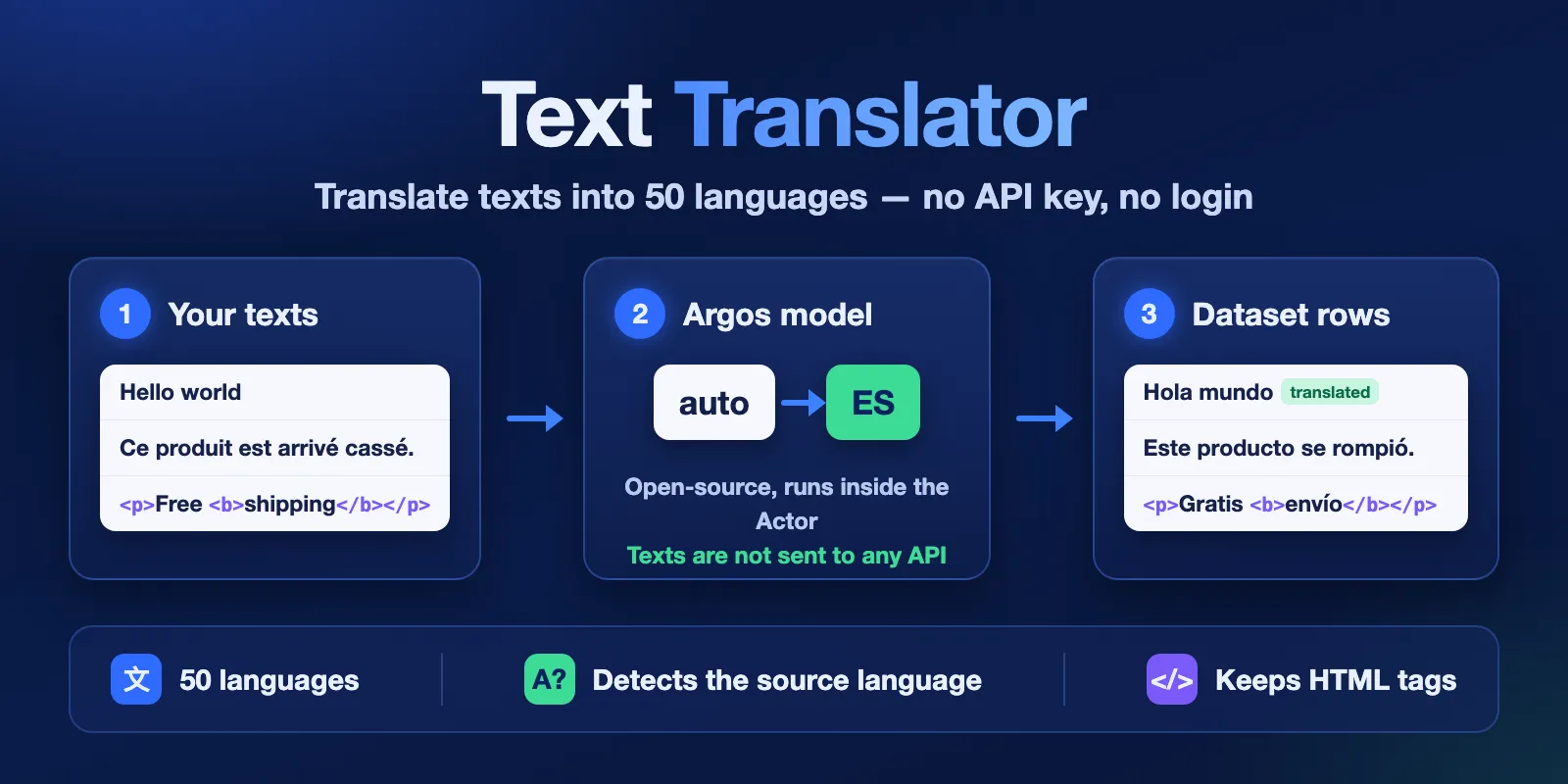
Table of contents
- What it does
- Quick start
- Input
- Output
- Pricing and limits
- Use cases
- API, export and integrations
- Limits and partial results
- Troubleshooting
- FAQ
- Support
What it does
You add texts and choose one target language. The Actor detects the language of each text (or uses the one you set), translates it with an Argos Translate model and saves one row per text in the same order as your input.
- 50 languages, from Albanian to Vietnamese. When there is no direct model for a pair, the text goes through English, and the row shows
pivot: "en". - No API key and no login. The models are open source (MIT licence) and run on the Apify server. Your texts are not sent to any translation API.
- Line breaks and HTML tags stay.
<p>Free <b>shipping</b></p>becomes<p>Gratis <b>envío</b></p>. - Clear status per text. Texts already in the target language, empty texts and numbers are not translated and not billed by characters.
Good fit
- Bulk translation of short and medium texts: product data, reviews, tickets, survey answers.
- Pipelines that need translation without managing an API key or quota.
- Teams that do not want to send texts to Google, DeepL or another translation API.
Not a fit
- Legal, medical or marketing copy that needs human quality. Open-source models are less accurate than Google or DeepL on difficult texts.
- Translating whole web pages or documents (PDF, DOCX). The input is plain text or simple HTML strings.
- More than one target language in one run. Start one run per target language.
Quick start
- Open the Input tab.
- In Texts to translate (
texts), add one text per line item, for exampleHello world. - Keep Target language (
targetLanguage) at the prefilledes(Spanish) or choose another language. - Click Start.
- Open the Output tab, view Translations, and check the
translationcolumn.
Expected result: one row with "translation": "Hola mundo" and "status": "translated".
Input
Input fields
| Field | Plain name | Type | Required | Default / prefill | Allowed values | Effect | Example |
|---|---|---|---|---|---|---|---|
texts | Texts to translate | array of strings | yes | prefill ["Hello world"] | up to 5,000 texts, 50,000 characters per text, 1,000,000 characters in total | each text becomes one output row, in the same order | ["Hello world", "Ce produit est arrivé cassé."] |
targetLanguage | Target language | string (select) | yes | default and prefill es | 50 language codes, for example es, de, fr, ja, pb (Portuguese, Brazil), zt (Chinese, traditional) | language of every translation | "de" |
sourceLanguage | Source language | string (select) | no | default auto | auto or one of the 50 codes | auto detects the language of each text; a code skips detection | "auto" |
- A single string in
textsis also accepted and treated as one text. - Duplicate texts are translated and billed one by one; each gets its own row.
- An empty string gives an
emptyrow. - Set
sourceLanguagewhen all texts share one language, especially for texts of one or two words. Detection is less reliable on very short texts. - A text longer than 50,000 characters, more than 5,000 texts or more than 1,000,000 characters in total makes the run fail at once with
INVALID_INPUT, before any charge for characters.
Input examples
Translate product reviews into Spanish
Expected behavior: the Actor detects English, English and French, translates each text into Spanish and keeps the HTML tags.
Expected output: three rows with translation, sourceLanguage, status.
Output
Each text gives one Dataset item. The Translations view shows the main columns. A RUN_SUMMARY record in the default key-value store has the counts for the whole run.
Output example
Real rows from test run V3LaVICidbmrTE8mr with these three texts among others (trimmed to the main fields, index renumbered to match the example):
Output fields
| Field | Meaning | Type | Can be empty? | Example |
|---|---|---|---|---|
index | Position of the text in your input, from 0 | integer | no | 0 |
text | Original text | string | no | "Hello world" |
translation | Translated text with the original line breaks. For unchanged and empty rows it is the original text | string | null when the text was not translated (error, skipped, unsupported_language) | "Hola mundo" |
sourceLanguage | Language code used for the source, given or detected | string | null when no language was found | "en" |
detectedLanguage | Language found by detection | string | null when you set sourceLanguage | "en" |
detectionConfidence | Detection confidence from 0 to 1; low for texts of a few words, even when the language is right | number | null when detection did not run | 0.19 for "Hello world" |
targetLanguage | Target language code | string | no | "es" |
engine | Always argos-translate | string | no | "argos-translate" |
model | Model or models used, with versions | string | null when no model was used | "en→es 1.0" |
pivot | en when the text went through English | string | null for direct pairs | "en" |
chars | Characters in the original text; translated rows are billed by these characters | integer | no | 11 |
status | translated, unchanged, empty, unsupported_language, skipped or error | string | no | "translated" |
error | {code, message} when the text was not translated | object | null on success | {"code": "CHARGE_LIMIT", ...} |
translatedAt | Time the row was finished, ISO 8601 UTC | string | null for skipped and error rows | "2026-10-17T08:01:12Z" |
Status values
| Status | What it means | Characters billed? | Text fee? |
|---|---|---|---|
translated | The model translated the text | yes | yes |
unchanged | The text is already in the target language or has no letters (numbers, symbols) | no | yes |
empty | The text was an empty string | no | yes |
unsupported_language | The language was not recognised, or no model covers the pair | no | yes |
skipped | Not started: the run reached your maximum cost, its timeout, or was aborted | no | no |
error | The model for this pair could not be loaded | no | no |
Output surfaces
| Situation | Where to look | What you see |
|---|---|---|
| Normal run | Dataset, Translations view | one row per text, status: "translated" |
| Some texts not translated | Dataset and RUN_SUMMARY | rows with status and error.code; RUN_SUMMARY.status is PARTIAL |
| Cost limit or timeout reached | Dataset and RUN_SUMMARY | finished rows plus skipped rows with CHARGE_LIMIT or RUN_TIME_LIMIT; the run still ends as SUCCEEDED |
| Invalid input | Run status and RUN_SUMMARY | run FAILED, RUN_SUMMARY.status is INVALID_INPUT, no rows |
Pricing and limits
Pricing unit
This Actor uses pay per event. You pay for:
| Event | Price | When |
|---|---|---|
| Actor start | $0.005 per GB of memory, so $0.01 at the default 2,048 MB | once per run |
| 1,000 translated characters | Free plan $0.003, Bronze $0.0027, Silver $0.0024, Gold $0.0021 | for the characters of translated rows, added up over the whole run and rounded up to the next 1,000 |
| Text processed | $0.00002 | once for each row with a result (translated, unchanged, empty, unsupported_language) |
| Model downloaded | $0.005 | once per run for each language model that is not built in and has translated at least one saved row. Pairs between English and Spanish, French, German or Portuguese are built in and never pay it |
Platform usage (compute, storage) is included in these prices.
- A run where every text is already in the target language pays the start and the text fee only, with no character charge.
skippedanderrorrows are free. A model that failed to download or translated nothing is free.- Rows are saved first and charged after. When the run reaches your Maximum cost per run, it stops, marks the remaining texts
skippedwithCHARGE_LIMITand ends as SUCCEEDED.
Cost examples
Free plan prices, default memory 2,048 MB.
| Scenario | Input | Characters charged | Price |
|---|---|---|---|
| One short text | ["Hello world"] | 1,000 (11 rounded up) | $0.01 + $0.003 + $0.00002 = $0.01302 |
| 100 reviews of 500 characters | 50,000 characters | 50,000 | $0.01 + $0.15 + $0.002 = $0.162 |
| Maximum run | 5,000 texts, 1,000,000 characters | 1,000,000 | $0.01 + $3.00 + $0.10 = $3.11 |
| All texts already in the target language | 3,400 texts | 0 | $0.01 + $0.068 = $0.078 |
| Japanese and Russian reviews into English | 3 short texts | 1,000 | $0.01 + $0.003 + $0.00006 + 2 models × $0.005 = $0.02306 |
Speed and limits
- Up to 5,000 texts, 50,000 characters per text and 1,000,000 characters per run.
- Speed at 2,048 MB: about 550 characters per second for English into another language and about 300 characters per second for some sources such as Spanish into English. A run of about one million characters takes 30 to 55 minutes. Set the run Timeout high enough for big batches; the default timeout is 7,200 seconds.
- Pairs between English and Spanish, French, German or Portuguese are ready at start. Other languages download their model during the run (usually under 30 seconds) and add the model fee.
- More memory (4,096 MB) is about 1.4 times faster but uses more compute; the default 2,048 MB is the cheapest per character. Less than 2,048 MB is not allowed.
Use cases
| Buyer job | Input | Output | Key fields | Next step |
|---|---|---|---|---|
| Translate product descriptions for a new market | texts, targetLanguage | one row per description | translation, status | export CSV or JSON, import into your shop |
| Read customer reviews in one language | texts, sourceLanguage: "auto" | one row per review | sourceLanguage, translation | sentiment or keyword analysis |
| Translate support tickets for an agent team | texts from your helpdesk export | one row per ticket | index, translation | match rows back by index |
API, export and integrations
- API: start the Actor with the Apify API and read the default Dataset. Rows keep the input order, so
indexmatches your list. - Export: download the Dataset as JSON, CSV, Excel or XML from the Output tab or the API.
- Scheduling and webhooks: use Apify schedules and integrations to run it on a timer or pass results to other tools.
Use with AI agents (MCP)
- MCP server URL with only this Actor:
https://mcp.apify.com?tools=cliqtomedia/text-translator. - Smallest useful input:
- Key output fields:
translation(the result),status(translated,unchanged,empty,unsupported_language,skipped,error),sourceLanguage,pivot,error.code. - A one-text run takes about 20 seconds and costs about $0.013. Limits: 5,000 texts, 1,000,000 characters per run, one target language per run.
Limits and partial results
- Quality is lower than Google Translate or DeepL on long or difficult sentences. Check important texts.
- Single words and very short texts can be detected as the wrong language. Set
sourceLanguageif you know it. - A single Japanese word can get a wrong translation. Short sentences work better than single words.
- Repeated symbols can change, for example
★★★★★can come back with a different number of stars. - Inline HTML fragments are translated one by one, so word order around tags can be less natural.
- Pairs that go through English (
pivot: "en") are slower and can lose some meaning.
Troubleshooting
Some rows are skipped with CHARGE_LIMIT
Symptom: the run SUCCEEDED, but the last rows have no translation. Likely reason: the run reached your Maximum cost per run. Action: raise the maximum cost and run only the skipped texts again.
Some rows are skipped with RUN_TIME_LIMIT
Symptom: the run SUCCEEDED, but the last rows have no translation. Likely reason: the run timeout was too short for the number of characters. Action: raise Timeout in the run options (see the speed above) and run the skipped texts again.
A text came back unchanged but it is not in the target language
Likely reason: detection thought the text was already in the target language. This happens with very short texts.
Action: set sourceLanguage to the real language.
A row has unsupported_language
Likely reason: the text is in a language that the models do not cover, or it has no clear language.
Action: check the text. If you know the language and it is in the list, set sourceLanguage.
The run FAILED with INVALID_INPUT
Likely reason: too many texts, a text over 50,000 characters, or more than 1,000,000 characters in total. Action: split the input into smaller runs.
FAQ
Do I need an API key or a login?
No. The Actor uses open-source models inside the run. You only need an Apify account to start it.
Are my texts sent to Google, DeepL or another service?
No. Texts are translated on the Apify server. The Actor only downloads model files from the public Argos Translate package server when a pair is not ready at start.
What do I pay for a text that is already in the target language?
Only the text fee of $0.00002. It is not billed by characters.
Can I translate into several languages at once?
Not in one run. Start one run for each target language.
How good is the quality?
It is good for everyday sentences and short product texts. It is lower than paid services on complex texts. Try a small sample first.
Support
For bugs, questions or feature requests, open an issue on the Issues tab of this Actor. Add the run ID, the target language and a short sample text that shows the problem. Do not share tokens or private customer data.


