

Trip.com Hotels Prices Scraper: Rates by Date, No Login
Pricing
from $1.89 / 1,000 hotel saveds
Trip.com Hotels Prices Scraper: Rates by Date, No Login
Scrape Trip.com hotel prices for your dates, with taxes, ratings, coordinates and full addresses, to compare rates across cities and track price changes. No login. Search any city, read exact hotels or collect guest reviews.
Pricing
from $1.89 / 1,000 hotel saveds
Rating
0.0
(0)
Developer

Cliqto Media
Maintained by CommunityActor stats
0
Bookmarked
2
Total users
1
Monthly active users
5 days ago
Last modified
Categories
Features
Share
Trip.com Hotels Prices Scraper reads Trip.com hotel search results and hotel pages and gives you prices for your dates, with taxes, ratings, addresses and coordinates. No login. 10 hotels cost about $0.028 on the Free plan.
It is for travel analysts, revenue managers and agencies who compare hotel rates across cities and dates. Your first run can be one city with 10 hotels: it takes under a minute.
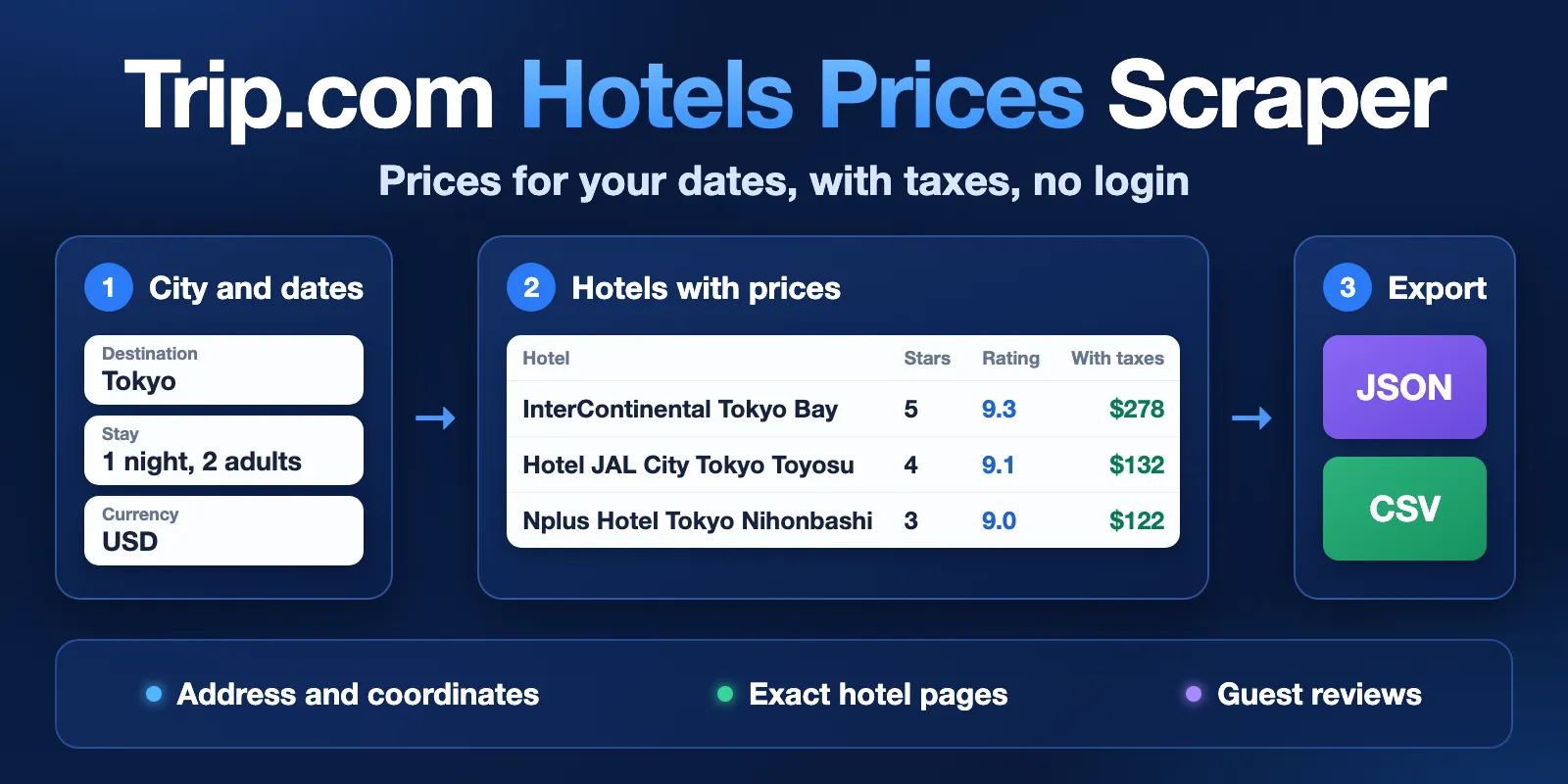
Table of contents
- What it does
- How it works
- Quick start
- Use cases
- Input
- Output
- Pricing
- Limits
- API, export and integrations
- Troubleshooting
- FAQ
- Related Actors
- Support
What it does
The Actor has three modes, set in mode:
- Hotels with prices (
hotels): lists hotels for a place and dates, with the nightly price, the total with taxes, the rating and the room. It also opens each hotel page for the address, description, amenities and check-in times, at no extra charge. - Hotel details (
hotelDetails): reads exact hotels by ID or link. These rows have no price. - Guest reviews (
reviews): collects reviews of exact hotels, with score, text, date and traveler type.
Set stateName in hotels mode to run a price monitor: the next run saves only new hotels and changed prices.
Good fit
- Comparing hotel rates between cities, areas or dates.
- Tracking price changes for one place and fixed dates.
- Building a list of hotels with coordinates and addresses for a map or a database.
- Collecting guest reviews of hotels you already know.
It is not a fit for booking rooms, reading data behind a login, or flights.
How it works
- You enter a place, a Trip.com link or a hotel ID, plus your dates and guests.
- The Actor reads the public Trip.com search pages for those dates, then opens hotel pages for the details you asked for.
- It saves one row per hotel or review to a dataset, and a run summary with what was found, skipped or stopped.
Quick start
-
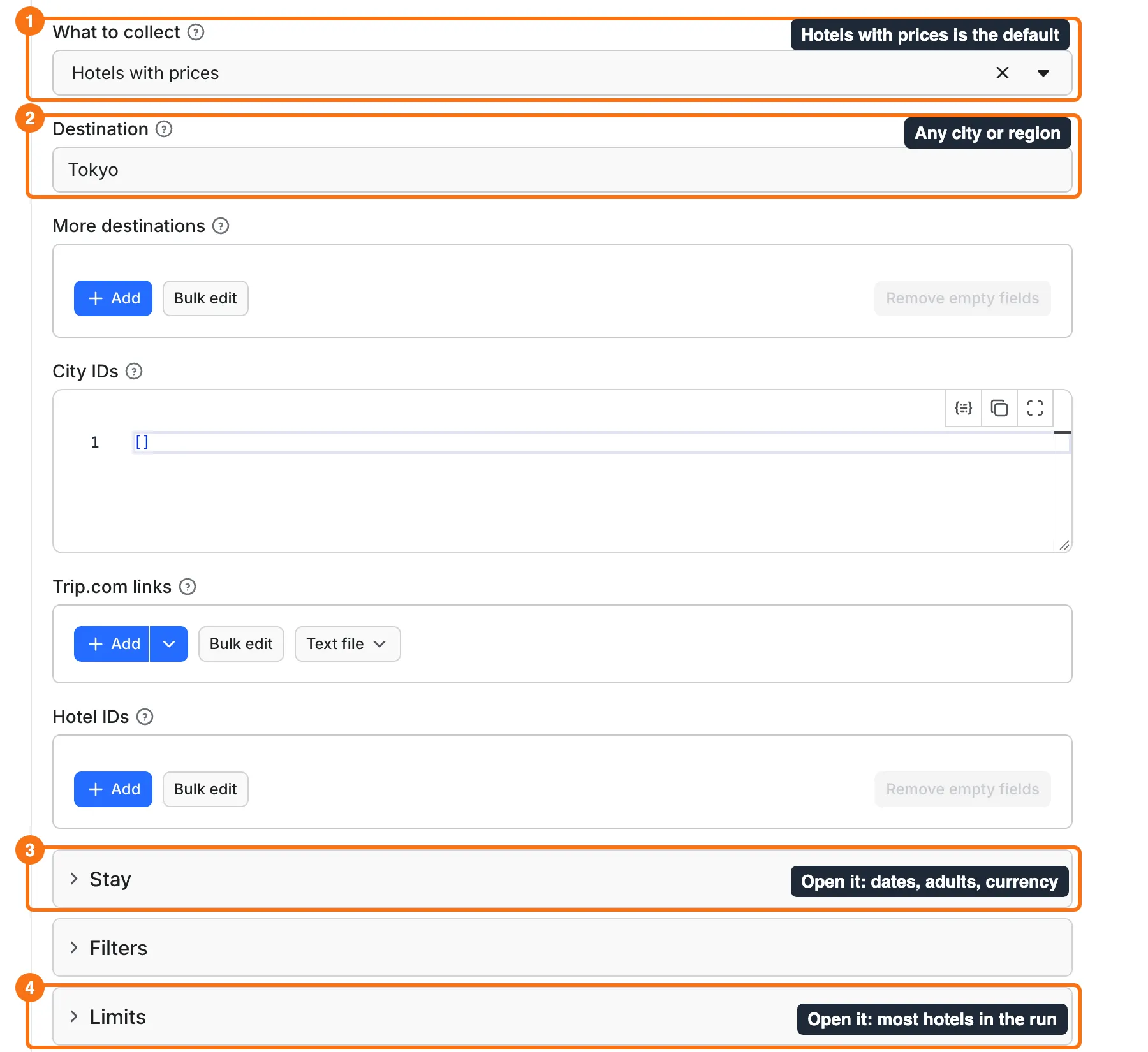
In What to collect, keep Hotels.
-
In Destination, type a city or region, for example
Tokyo. -
Open Stay. Set the dates, adults and currency.
-
Open Limits. Set Most hotels in the run, for example
10. -
Click Start at the bottom of the form.
-
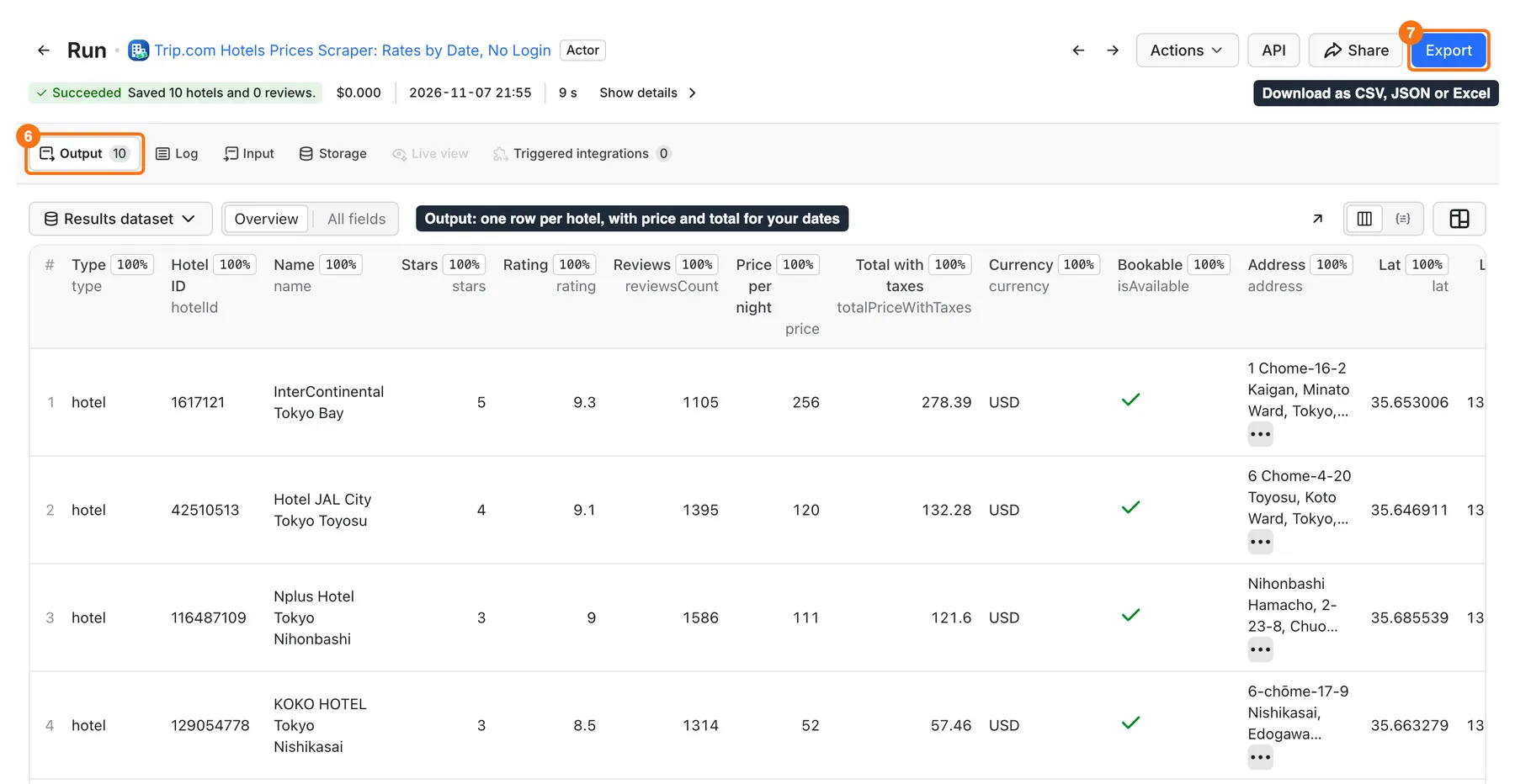
When the run ends, open the Output tab. You get one row per hotel.
-
Click Export to download CSV, JSON or Excel.
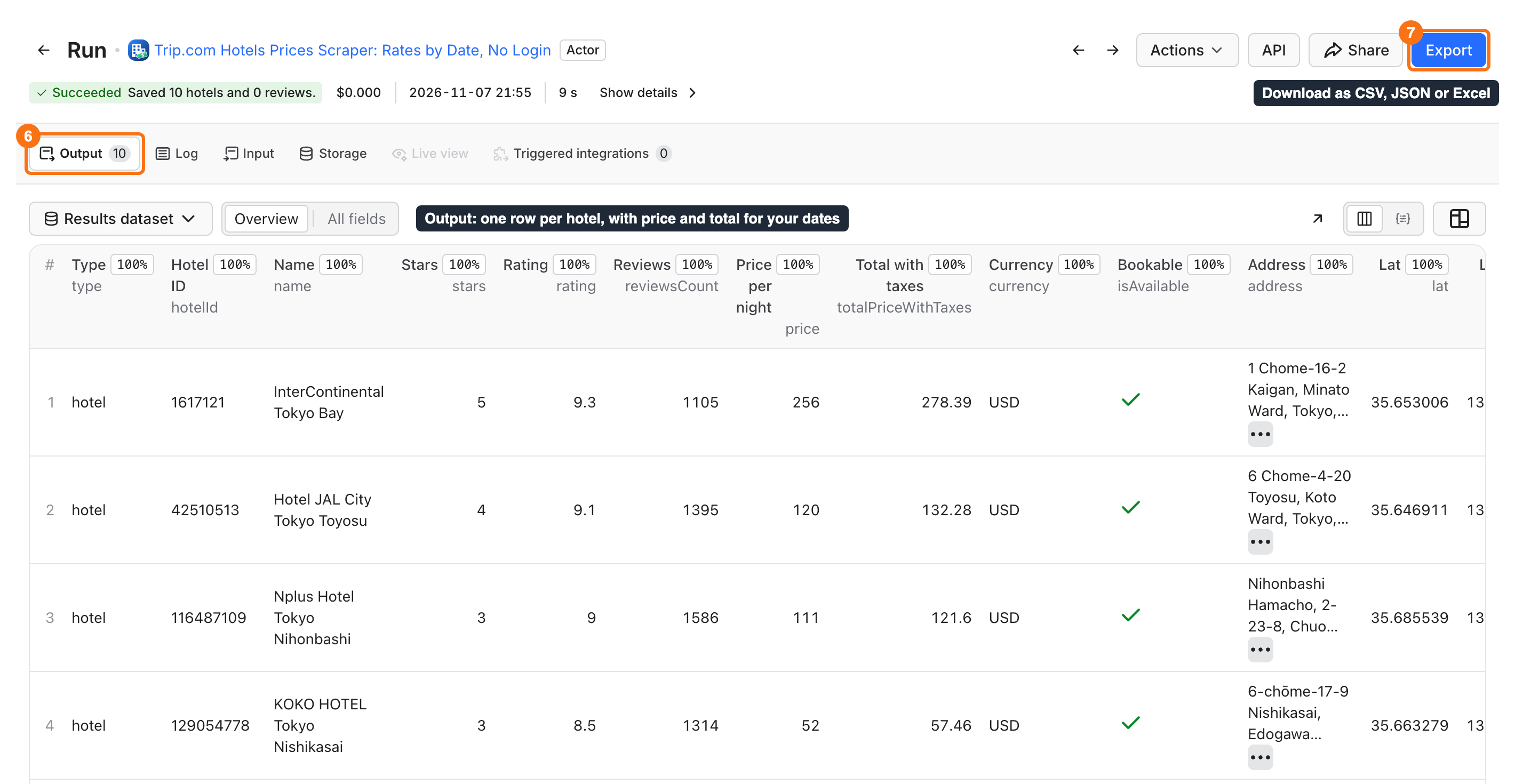
Expected result: with the prefilled input you get 10 Tokyo hotels for a stay 30 days from today, in under a minute.
Use cases
| Buyer job | Input path | Output entity | Key fields | Next integration |
|---|---|---|---|---|
| Compare rates across cities | destination, extraDestinations, checkIn, checkOut | Hotel row | name, price, totalPriceWithTaxes, currency, rating | Excel or a BI tool through CSV |
| Hotel price alert for fixed dates | destination, fixed dates, stateName | Changed or new hotel row | changeType, price, previousPrice, url | Slack or Notion through deliveryConnector, or a schedule with a webhook |
| Map hotels in an area | destination, starRatings, includeHotelDetails | Hotel row | address, lat, lng, stars, amenities | GIS tool or database through the API |
| Enrich your own hotel list | hotelIds or startUrls in hotelDetails mode | Hotel row without a price | hotelId, name, address, description, checkInTime | CRM or database through the API |
| Study what guests say | hotelIds in reviews mode, reviewsFrom, reviewLanguages | Review row | rating, text, reviewDate, travelType, language | Text analysis through JSON |
Input
Give at least one of destination, extraDestinations, cityIds, startUrls or hotelIds. Without them, the run stops with INVALID_INPUT and the message "Add a destination, a city ID, a Trip.com link or a hotel ID."
Input fields
No single field is required by itself. "Default" is used through the API when you leave a field out. "Prefill" is what the form shows.
| Field | Plain name | Type | Required | Default / prefill | Allowed values | Effect | Example | Recommendation |
|---|---|---|---|---|---|---|---|---|
mode | What to collect | string | no | default hotels, prefill hotels | hotels, hotelDetails, reviews | Picks what the run saves | hotels | Start with hotels |
destination | Destination | string | one source needed | prefill Tokyo | up to 100 characters | City, area, station or hotel to search | Tokyo | Check matchedPlace in the results |
extraDestinations | More destinations | array of strings | no | empty | up to 50 items, 100 characters each | Adds more places to the same run | ["Osaka","Kyoto"] | Set maxItemsPerDestination too |
cityIds | City IDs | array of integers | no | empty | up to 50 | Searches by Trip.com city ID | [228] | Use it when a name is ambiguous. 228 is Tokyo |
startUrls | Trip.com links | array of link objects | no | empty | up to 200, trip.com only | Reads list or hotel page links | [{"url":"https://us.trip.com/hotels/list?city=228"}] | Clear the dates in the form to use the dates of the link |
hotelIds | Hotel IDs | array of strings | no | empty | up to 500, digits, up to 20 characters | Reads exact hotels | ["704030"] | The ID follows hotel-detail- in a hotel link |
checkIn | Check-in date | string | no | empty means 30 days from the run day; prefill 30 days | a date or a relative value | First night of the stay | 2026-12-07 | Past dates are rejected |
checkOut | Check-out date | string | no | empty means the day after check-in; prefill 31 days | a date or a relative value, up to 30 nights | Last day of the stay | 2026-12-08 | Use fixed dates for a monitor |
adults | Adults | integer | no | empty means the number in the link, else 2 | 1 to 36, at least one per room | Guests used for the price | 2 | Prices change with guests |
rooms | Rooms | integer | no | 1 | 1 to 9 | Rooms used for the price | 1 | |
childrenAges | Children's ages | array of integers | no | empty | up to 8 ages, 0 to 17 | Adds children to the search | [6,9] | |
currency | Currency | string | no | USD | USD, EUR, GBP, JPY, AUD, CAD, SGD, HKD, KRW, THB, CNY, TWD, MYR, IDR, PHP, VND, INR, NZD, CHF, SEK, NOK, DKK, AED, SAR, RUB, BRL, MXN | Currency of prices | EUR | |
locale | Language and market | string | no | en-US | en-US, en-GB, en-SG, en-AU, ja-JP, ko-KR, zh-HK, th-TH, de-DE, fr-FR, es-ES, ru-RU | Language and how prices are shown | en-US | See Interacting settings for markets that show only a total |
sortBy | Sort by | string | no | recommended | recommended, priceLow, priceHigh, topReviewed, stars | Order of results | priceLow | |
starRatings | Stars | array of integers | no | empty | 1 to 5 | Keeps these star levels. Hotels without stars are left out | [4,5] | |
minRating | Lowest guest rating | number | no | empty | 0 to 10 | Unrated hotels are left out | 8 | |
minReviews | Fewest reviews | integer | no | empty | 0 or more | Keeps hotels with enough reviews | 100 | |
minPrice | Lowest nightly price | number | no | empty | 0 or more, not above maxPrice | Per night before taxes, in currency | 50 | |
maxPrice | Highest nightly price | number | no | empty | 0 or more | Per night before taxes, in currency | 200 | |
freeCancellation | Free cancellation only | boolean | no | false | true, false | Keeps such rates. price becomes that rate | true | |
breakfastIncluded | Breakfast included only | boolean | no | false | true, false | Keeps such rates. price becomes that rate | true | |
propertyTypes | Property types | array of strings | no | empty keeps all | hotel, resort, inn, motel, hostel, capsule, servicedApartment, loveHotel | Keeps these types | ["hotel","resort"] | |
includeSponsored | Keep sponsored places | boolean | no | true | true, false | Off removes rows with isAd: true | false | |
includeUnavailable | Keep hotels you cannot book | boolean | no | false | true, false | On keeps hotels that are sold out or have no rate for your dates. Each one is charged as a hotel | true | Keep it off unless you study availability |
includeHotelDetails | Add address and details | boolean | no | true | true, false | Opens hotel pages for address, description, amenities and check-in times. No extra charge | false | Turn off when coordinates and prices are enough |
maxItems | Most hotels in the run | integer | no | default 100, prefill 10 | 1 to 100000 | Run limit. In reviews mode it limits all reviews. With a monitor it limits hotels checked | 10 | Start small |
maxItemsPerDestination | Most hotels per destination | integer | no | empty | 1 or more | Limit for each place | 50 | Use with several places |
maxPages | Most pages per destination | integer | no | 500 | 1 to 500 | Pages read per place, and review pages per hotel | 500 | Keep the default for large limits. A list page gives about 5 new hotels |
maxReviewsPerHotel | Reviews per hotel | integer | no | 0 | 0 to 5000 | In hotels mode adds paid review rows. In reviews mode 0 means 100 | 20 | |
reviewsSortBy | Sort reviews by | string | no | newest | relevant, newest, ratingHigh, ratingLow | Order of reviews | newest | |
minReviewScore | Lowest review score | number | no | empty | 0 to 10, not above maxReviewScore | Filters reviews by score | 8 | |
maxReviewScore | Highest review score | number | no | empty | 0 to 10 | Filters reviews by score | 4 | |
reviewsFrom | Reviews from | string | no | empty | a date, not after reviewsTo | Oldest review date | 2026-01-01 | |
reviewsTo | Reviews to | string | no | empty | a date | Latest review date | 2026-06-30 | |
reviewLanguages | Review languages | array of strings | no | empty | up to 50 two-letter codes | Keeps reviews in these languages | ["en","ja"] | |
onlyWithMedia | Only reviews with photos | boolean | no | false | true, false | Keeps reviews with photos | true | |
stateName | Monitor name | string | no | empty | lowercase letters, digits and hyphens, up to 50 | Saves only new hotels and changed prices. Works in hotels mode | tokyo-december | Use fixed dates |
proxyConfiguration | Proxy | object | no | {"useApifyProxy":true} | Apify Proxy settings | Proxy for the run | {"useApifyProxy":true} | Keep the default |
deliveryConnector | Send results to (optional) | connector | no | empty | a connected service | Posts a summary after the run | See Send results to Slack or Notion | |
deliveryTarget | Notion page or channel (optional) | string | no | empty | Notion page link or Slack channel ID | Where the summary goes |
Duplicates: each hotelId is saved once per run, even if it comes from two places or links.
Practical maximum: the largest checked run saved 700 hotels with details in 13 to 20 minutes on the default memory, so allow up to 25. Tokyo's list held about 1950 to 2170 hotels when read to the end. Other places end earlier: two New York runs asked for 700 and saved 551 and 601.
Interacting settings
| When | Input A | Input B | Effective behavior | Example | Cost/result effect |
|---|---|---|---|---|---|
| A link has dates | startUrls | checkIn, checkOut empty | Dates from the link are used | List link with checkin=2026-12-07 | None |
| The form shows prefilled dates | startUrls | checkIn 30 days | The date fields win. Clear them to use the dates of the link | Clear both fields | Different dates, different prices |
| A list link has filters | startUrls | Filters in the form | Filters in the link always apply | Link with a star filter | Fewer rows |
| Adults is empty | adults empty | Link with adult=1 | The number from the link is used, else 2 | Different price | |
| Two limits | maxItems | maxItemsPerDestination | The run stops at whichever comes first | 100 and 20 | Fewer paid rows |
| Rate filters | freeCancellation or breakfastIncluded | price | price becomes the matching rate | Price can be higher | |
| Total-only market | locale en-GB, en-AU, de-DE, fr-FR, es-ES | price | price is null, totalPriceWithTaxes has the total | locale: de-DE | Row is still charged |
| Japanese market | locale ja-JP | One-night stay | price is null, totalPriceWithTaxes has the total | Row is still charged | |
| Reviews in hotels mode | mode hotels | maxReviewsPerHotel 20 | Each hotel adds up to 20 review rows | Each review is charged | |
| Reviews mode | mode reviews | maxReviewsPerHotel 0 | Each hotel gives up to 100 reviews | Each review is charged | |
| Exact hotels | mode hotelDetails or reviews | destination | Places are ignored with a warning. List links are rejected | None | |
| Monitor | stateName | mode other than hotels | The monitor is ignored with a warning | Every row is charged | |
| Monitor and limit | stateName | maxItems | Limits hotels checked, not rows saved | maxItems: 100 | Only new or changed rows are charged |
| Hotels you cannot book | includeUnavailable off | maxItems | They are skipped and do not use up maxItems, so the run reads further | maxItems: 100 | Not charged as rows. A read with no new rows costs $0.0005, and the first in a run is free |
| Monitor and no rate | stateName | A known hotel loses its rate | No row is saved. When the rate returns at a new price, the row shows price_changed. At the same price it counts as unchanged | Not charged while it has no rate | |
| Costly proxy groups | proxyConfiguration with residential or SERP group | The Actor uses the default Apify Proxy and warns you in the run summary | None |
Input examples
Smallest run: 10 Tokyo hotels
Expected behavior: searches Tokyo for one night 30 days from today, for 2 adults in USD.
Expected output: 10 hotel rows with price, total, address and coordinates. See the Output example.
Limit or cost note: about 20 seconds and $0.028 on the Free plan.
Compare two cities with filters
Expected behavior: searches both cities and keeps 4 and 5 star hotels rated 8 or higher.
Expected output: up to 50 hotel rows per city, in EUR.
Limit or cost note: up to $0.271 on the Free plan, and about 2 minutes with details.
Monitor price changes
Expected behavior: the first run saves up to 50 hotels. Later runs save only new hotels and changed prices.
Expected output: rows with changeType (new or price_changed) and previousPrice. A run with no changes saves no rows and says so.
Limit or cost note: a run with no changes costs $0.001, plus $0.0005 for each further page read without new rows.
Reviews of an exact hotel
Expected behavior: collects the newest English reviews of this hotel.
Expected output: up to 100 rows with type: review.
Limit or cost note: $0.181 for 100 reviews on the Free plan.
Output
Output fields
Fields a mode does not use are empty or missing. The Source column says where the value comes from: search results, the hotel page, the review list or the Actor.
| Field | Meaning | Type | Can be empty? | Example / enum | Source / notes |
|---|---|---|---|---|---|
type | Row type | string | no | hotel, review | Actor |
hotelId | Trip.com hotel ID | string | no | 1617121 | Search or hotel page |
masterHotelId | Parent hotel ID | string | yes | 1617121 | Search |
name | Hotel name in the chosen language | string | no | InterContinental Tokyo Bay | Search |
nameEn | English name | string | yes | InterContinental Tokyo Bay | Search |
category | Property type | string | yes | Hotel, Resort | Search |
stars | Star level | number | yes | 5 | Search. null means no stars are shown, not 0 |
rating | Guest score, or the review score on a review row | number | yes | 9.3 | Search or review. null means not rated |
ratingText | Score in words | string | yes | Great | Search |
ratingScale | Top of the score scale | number | yes | 10 | Search. Usually 10 |
reviewsCount | Number of reviews | number | yes | 1105 | Search |
subScores | Scores by topic | array | yes | [{"name":"Location","score":9.3}] | Search |
price | Price per room and night as shown, usually before taxes | number | yes | 256 | Search. null when the market shows only a total, or when the hotel has no rate for your dates (see isAvailable) |
currency | Price currency | string | yes | USD | Input |
priceText | Price as shown | string | yes | $256 | Search |
totalPriceWithTaxes | Total for all rooms and nights, with taxes and fees | number | yes | 278.39 | Search |
priceNote | Price note word for word | string | yes | Total (incl. taxes & fees): $278 | Search |
originalPrice | Crossed-out price | number | yes | 265 | Search |
freeCancellation | Rate has free cancellation | boolean | yes | false | Search |
dealTags | Deal labels | array | yes | ["$9 Off"] | Search |
reviewTags | Short review labels | array | yes | ["Large rooms"] | Search |
featuredReview | Highlighted review | string | yes | Exceptional prime location | Search |
address | Full address | string | yes | 1 Chome-16-2 Kaigan, Minato Ward, Tokyo, 105-8576, Japan | Hotel page |
postalCode | Postal code | string | yes | 105-8576 | Hotel page |
addressRegion | Region | string | yes | Tokyo | Hotel page |
country | Country | string | yes | Japan | Hotel page |
district | Area | string | yes | Tokyo Tower Area | Search |
location | Area and nearby place | string | yes | Tokyo Tower Area | Near Hamamatsucho Station | Search |
lat | Latitude, WGS84 | number | yes | 35.653006 | Search |
lng | Longitude, WGS84 | number | yes | 139.762375 | Search |
cityId | Trip.com city ID | number | yes | 228 | Search |
countryId | Trip.com country ID | number | yes | 78 | Search |
cityName | City | string | yes | Tokyo | Search |
isAd | Sponsored place | boolean | yes | false | Search |
status | Words on the hotel button, not the run status | string | yes | Check Availability, Sold out, Stay at least 5 consecutive nights to book | Search. The site words it, and the words follow locale. Use isAvailable to filter |
isAvailable | Whether the hotel has a rate you can book for these dates | boolean | yes | true | Actor, from the search result. null in hotelDetails mode. false appears only with includeUnavailable on |
imageUrl | Hotel image | string | yes | Search | |
roomName | Room for the shown price | string | yes | 1 King Classic River View | Search |
roomId | Room ID | string | yes | 1552478178 | Search |
bedType | Bed | string | yes | 1 king bed | Search |
description | Hotel description | string | yes | Hotel page | |
amenities | Amenities | array | yes | ["Spa","Gym"] | Hotel page |
checkInTime | Check-in time | string | yes | 15:00 | Hotel page |
checkOutTime | Check-out time | string | yes | 12:00 | Hotel page |
detailStatus | Result of reading the hotel page | string | yes | ok, not_requested, failed, not_found | Actor. not_found means the hotel page has no details for this hotel |
adults | Adults searched | number | yes | 2 | Input |
rooms | Rooms searched | number | yes | 1 | Input |
childrenAges | Children's ages searched | array | yes | [] | Input |
checkIn | Check-in used | string | yes | 2026-12-07 | Input or link |
checkOut | Check-out used | string | yes | 2026-12-08 | Input or link |
destination | Your text | string | yes | Tokyo | Input |
matchedPlace | Place the site searched | string | yes | Tokyo, Japan | Search |
position | Place in the results | number | yes | 1 | Search |
url | Hotel page for your dates | string | yes | Actor | |
source | Source | string | no | trip.com | Actor |
sourceUrl | Page the row was read from | string | yes | Actor | |
fetchedAt | Time the row was read | string | no | 2026-11-07T09:45:02.646Z | Actor |
changeType | Monitor result | string | yes | new, price_changed | Actor |
previousPrice | Price in the last monitor run | number | yes | 240 | Actor |
reviewId | Review ID | string | yes | Review | |
subRatings | Review scores by topic | object | yes | Review | |
text | Review text | string | yes | Review | |
translatedText | Translated review text | string | yes | Review | |
language | Review language | string | yes | en | Review |
reviewDate | Review date | string | yes | Review | |
stayDate | Stay date | string | yes | Review | |
travelType | Traveler type | string | yes | Couple | Review |
photosCount | Photos in the review | number | yes | 2 | Review |
Output entities and surfaces
| Situation | Dataset | API | KVS | Live view | Result shape | User action |
|---|---|---|---|---|---|---|
| Normal item | Hotel or review rows | Dataset items | RUN_SUMMARY with status: complete | Status: "Saved N hotels and M reviews." | One row per hotel or review | Use the rows |
| Domain-empty result | No rows | Empty list | RUN_SUMMARY with status: not_found and notFoundInputs | Status: "Nothing found: ..." with a hint | No fake rows for places or IDs not found | Widen filters or change the place |
| Partial result | Rows found so far | Dataset items | RUN_SUMMARY with status: partial, reasons, unprocessed | Status: "... Partial result: REASONS." | Rows are valid and the list is not complete | Read reasons, run again for unprocessed |
| Technical failure or retry | Rows found before the failure, or none | Run status FAILED | RUN_SUMMARY with status: error or partial, reasons | Status: "Failed: REASON." | A source failure is never shown as an empty result | Run again. If it repeats, open an issue |
A monitor with no changes saves no rows and has unchanged in RUN_SUMMARY. The status says "No new hotels or price changes: N hotels unchanged."
Output example
One row from the smallest run above. It is trimmed: description and imageUrl are removed, and amenities is shortened. A null value means the source does not show this value. It never means 0.
Send results to Slack or Notion
Pick your connector in the optional deliveryConnector field. After the run saves its data, the Actor posts a short summary (up to 25 rows and a link to the full dataset) there. Put a Notion page link or a Slack channel ID in deliveryTarget: in Notion every run is added on top of that one page, so your workspace does not fill up with new pages. A delivery error never fails the run and costs nothing extra. Connect a service once in Apify Console → MCP connectors.
Use case → fields
| Use case | Fields to read |
|---|---|
| Rate comparison | name, price, totalPriceWithTaxes, currency, checkIn, checkOut, rating |
| Price monitor | hotelId, changeType, price, previousPrice, fetchedAt, url |
| Map or database | hotelId, name, address, lat, lng, stars, amenities |
| Review analysis | hotelId, rating, text, language, reviewDate, travelType |
Pricing
Pricing unit
This Actor uses pay per event. You pay for what it saves. Platform usage and proxy traffic are included in these prices.
| Event | What it means | Free | Bronze | Silver | Gold and above |
|---|---|---|---|---|---|
| Actor start | Once per run | $0.001 | $0.001 | $0.001 | $0.001 |
| Hotel saved | One hotel row, with address and details included | $0.0027 | $0.00243 | $0.00216 | $0.00189 |
| Review saved | One review row | $0.0018 | $0.00162 | $0.00144 | $0.00126 |
| Page read without new rows | A read that saved nothing. The first one in a run is free | $0.0005 | $0.0005 | $0.0005 | $0.0005 |
The start fee covers run memory up to 1 GB, and each extra GB adds one more. This Actor uses at most 512 MB, so it is always one start.
- Included: the address, description, amenities and check-in times from the hotel page.
- Optional: review rows in
hotelsmode, set bymaxReviewsPerHotel. - Nothing found or filters with no matches: you pay the start, plus the page read fee for each read after the first.
- Monitor with no changes: the same. Unchanged hotels are not charged as rows.
- Hotels you cannot book: hotels that are sold out or have no rate for your dates are skipped and not charged. A page read that saved nothing costs $0.0005, and the first such read in a run is free. Turn on
includeUnavailableto keep them as paid rows. - Partial or failed runs: you pay for the rows saved. Rows that were not saved are not charged.
- Cost limit: set Max cost per run in the run options. The Actor stops at this limit and keeps what it saved, with
CHARGE_LIMITinreasons. The smallest useful limit is $0.0037.
| Hotels | Free | Bronze | Silver | Gold and above |
|---|---|---|---|---|
| 1 | $0.0037 | $0.00343 | $0.00316 | $0.00289 |
| 10 | $0.028 | $0.0253 | $0.0226 | $0.0199 |
| 100 | $0.271 | $0.244 | $0.217 | $0.19 |
| 1000 | $2.701 | $2.431 | $2.161 | $1.891 |
Cost examples
Prices below are for the Free plan.
| Scenario | Input scope | Expected item/event count | Base charge | Optional charge | Stop/cap behavior |
|---|---|---|---|---|---|
| First run | Tokyo, maxItems 10 | 10 hotels, 1 start | $0.028 | none | Stops at 10 |
| One city | maxItems 100 | 100 hotels, 1 start | $0.271 | none | Stops at 100 |
| Large city | maxItems 1000 | up to 1000 hotels, 1 start | $2.701 | none | Stops earlier if the source runs out. Largest checked run: 700 hotels |
| Hotels with reviews | maxItems 10, maxReviewsPerHotel 10 | 10 hotels, up to 100 reviews | $0.028 | up to $0.18 | Stops at the limits |
| 100 reviews | reviews mode, maxItems 100 | 100 reviews, 1 start | $0.181 | none | Stops at 100 |
| Filters with no matches | No hotel passes, default maxPages | 1 start, the whole list | $0.001 | $0.0005 per read after the first | Reads to the last page. An impossible filter on Tokyo read 350 to 430 pages: $0.18 to $0.22. Set maxPages to cap it |
| Input error | No place given | 1 start | $0.001 | none | Fails with INVALID_INPUT |
Limits
- Trip.com shows a limited number of hotels for one place. In tests, Tokyo's list ended at about 1950 to 2170 hotels. Other places end earlier. To get more, split large areas into districts or city IDs.
- Runs above 700 saved hotels were not tested.
- With details, a saved hotel usually takes about 1 to 2 seconds: 100 hotels take about 2 minutes, 300 take 5 to 7 minutes, 700 take 13 to 20 minutes, so allow up to 25. Trip.com sets the pace, so the same run can differ. For a large list, leave time to spare in the timeout.
- Hotels you cannot book for your dates are skipped at no charge, and they sit mostly deep in a list. So a place can end below
maxItems, and reading past them takes time. In two checks for a single December night, New York had 110 and 132 such hotels in its first 700. Two runs asked for 700 saved 551 and 601 from about 1100 to 1200 checked, in 15 and 26 minutes. Tokyo had 53 and 63 in its whole list. Turn onincludeUnavailableto keep them. - The default timeout is 3600 seconds and the default memory is 256 MB, with a maximum of 512 MB. The memory you pick does not change what you pay.
- 30 seconds before the timeout, the Actor stops, saves what it has and ends as
partialwithDEADLINE. - A stay can be up to 30 nights. A check-in date in the past is rejected.
minPricemust not be abovemaxPrice,minReviewScorenot abovemaxReviewScore,reviewsFromnot afterreviewsTo, andadultsnot belowrooms.- Only trip.com links are accepted.
hotelDetailsandreviewsneed hotel links, not list links. - Each search and review request has up to 6 attempts, and each hotel page up to 3. Every attempt has a 30 second timeout. After 8 rate limit answers in a row, the run stops with
SOURCE_RATE_LIMITand keeps its rows. - A run makes at most 100000 requests. A source answer above 8 MB is rejected.
- A list stops at its last page, or after 8 pages with no new hotels. Hotels your filters skip count as new, so narrow filters read further.
maxPagesstops at 500 pages. If the limit cuts the list,truncatedistrueand the run warns you. - Reviews load 50 per page. When
maxPages× 50 is below your limit, the review list is cut andtruncatedistrue.maxReviewsPerHotelaccepts up to 5000, and the largest checked read was 100 reviews of one hotel. - If hotel pages fail 10 times in a row, the run stops reading details, and the rest of the hotels have no address. The rows have
detailStatus: failed. InhotelDetailsandreviewsmodes, failed hotels go tounprocessedwithDETAIL_FAILED, and 10 failures in a row stop the run. - Lists in
RUN_SUMMARYhold up to 200 entries. - A monitor compares prices only. A known hotel that loses its rate gives no row, so a sold-out hotel is not reported. A hotel that returns at a new price shows as
price_changed. - Monitor state has an 8 MB limit. If it grows past that, the run warns you and the next run compares with the older state.
- Delivery to Slack or Notion sends up to 25 rows.
- Prices move during the day, and they depend on the market, guests and dates. Each row keeps its
fetchedAtand its dates. - The Actor reads only public pages. It does not book rooms or log in.
- Flights are not included.
- This Actor is independent and is not affiliated with Trip.com.
API, export and integrations
API: start a run with the input from Input examples, then read the rows.
This call waits up to 300 seconds. For larger runs, use /runs and read the dataset when the run ends. The run summary is the RUN_SUMMARY record in the default key-value store.
Export: download CSV, JSON, Excel, XML or HTML from the Output tab or the dataset API.
Scheduling: create a schedule in Apify Console. Use fixed dates and stateName for a price monitor. Join rows across runs by hotelId.
Webhooks / no-code: add a webhook for a finished run in Apify Console, or use the Apify integrations for Make, Zapier and n8n. Read totalPriceWithTaxes, price and url in the next step.
SDK / MCP / agent: use the Apify JavaScript or Python client with the Actor ID cliqtomedia/trip-com-scraper. The next system usually keys on hotelId with checkIn and checkOut.
Use with AI agents (MCP)
Server: https://mcp.apify.com?tools=cliqtomedia/trip-com-scraper
Smallest input:
Key fields: name, price, totalPriceWithTaxes, currency, url.
Typical time and cost: 10 hotels take about 20 seconds and cost $0.028 on the Free plan.
Limits: the largest checked run saved 700 hotels. price can be null in markets that show only a total. Hotels you cannot book for these dates are skipped unless includeUnavailable is on. An empty dataset with status: not_found means the source has no such hotels, and status: error means the read failed.
Troubleshooting
The run found nothing
Symptom: the status says "Nothing found", and the dataset is empty.
Likely reason: filters are too narrow, the dates have no rooms, or the text is a country or a large region.
Check: notFoundInputs and warnings in RUN_SUMMARY.
Action: widen the filters, or search by city or area. Use cityIds for an exact city.
The run ended with no rows and says no hotels passed your filters
Symptom: status is complete, the dataset is empty, and warnings says the source had hotels, but none passed your filters.
Likely reason: the filters exclude every hotel in that place. The Actor applies some filters itself, so it reads the list to the end to be sure. That costs $0.0005 per page after the first.
Check: filtered in RUN_SUMMARY shows how many hotels were skipped.
Action: widen the filters. Try new filters with maxPages 5 first, so a filter that matches nothing costs less.
Fewer hotels than maxItems, or none
Symptom: the run saved fewer hotels than you asked for, or the status says "No hotels with a rate for your dates".
Likely reason: those hotels are sold out or have no rate for your dates, for example because of a minimum stay. They are skipped and not charged.
Check: unavailable and filtered in RUN_SUMMARY.
Action: try other dates or a longer stay. Turn on includeUnavailable to keep these hotels as paid rows.
The results are for the wrong place
Symptom: hotels are from a different city.
Likely reason: Trip.com matched your text to a similar place. Text with tags or odd symbols can do this, and the run warns you.
Check: matchedPlace in the rows and matchedPlaces in RUN_SUMMARY.
Action: write the place more exactly, or use cityIds.
Price is empty
Symptom: price is null.
Likely reason: if totalPriceWithTaxes has a value, the market shows only the total. This happens with en-GB, en-AU, de-DE, fr-FR, es-ES, and with ja-JP for one night. If both are empty and isAvailable is false, the hotel has no rate for your dates. hotelDetails mode has no prices at all.
Check: locale, mode and includeUnavailable in your input, and isAvailable in the row.
Action: use en-US or read totalPriceWithTaxes. For a hotel with no rate, try other dates.
The dates in my link were ignored
Symptom: rows have other dates than your link.
Likely reason: the date fields in the form are filled in, and they win.
Check: checkIn and checkOut in your input.
Action: clear both date fields.
Address is empty
Symptom: address is null, and detailStatus is failed, not_found or not_requested.
Likely reason: the hotel page failed, the page has no details for this hotel, or includeHotelDetails is off. The row is charged, because it has the price and rating from search.
Check: detailsFailed and warnings in RUN_SUMMARY.
Action: run again with these hotels in hotelIds, in hotelDetails mode.
The run ended as partial
Symptom: status is partial.
Likely reason: reasons names it. CHARGE_LIMIT is your cost limit, DEADLINE is the timeout, and SOURCE_RATE_LIMIT means the source slowed the run down.
Check: reasons and unprocessed in RUN_SUMMARY.
Action: raise the limit or timeout, or run again later with a smaller scope. The rows you have are valid.
The monitor saves nothing
Symptom: later runs have no rows.
Likely reason: prices did not change. A relative date also moves every day, which makes comparisons mean little.
Check: unchanged in RUN_SUMMARY.
Action: use fixed dates in checkIn and checkOut.
The run warns about the proxy
Symptom: a warning says that residential or SERP proxy was replaced.
Likely reason: these groups are not covered by the price.
Check: warnings in RUN_SUMMARY.
Action: keep the default proxy setting.
FAQ
Do I need a Trip.com login or API key?
No. The Actor reads public pages. The Trip.com partner API is for approved affiliates, and you do not need it here.
How do I set up a Trip.com hotel price alert?
Set stateName, use fixed dates, and add a schedule in Apify Console. Each run saves only new hotels and changed prices. Add deliveryConnector to get them in Slack or Notion.
What do I pay if nothing is found?
$0.001 for the start, plus $0.0005 for each page read without new rows after the first one. An unknown place costs about $0.001. A filter that matches nothing can read the whole list: on Tokyo that was 350 to 430 pages and $0.18 to $0.22. Set maxPages to cap it.
How many hotels can I get?
It depends on what Trip.com shows for the place. The largest checked run saved 700 hotels. Tokyo's list held about 1950 to 2170 when read to the end. Two New York runs asked for 700 and saved 551 and 601, because the rest could not be booked for those dates. See Limits.
How fresh are the prices?
They are read during your run. fetchedAt holds the time of each row. Prices can change later, and the final price is on the Trip.com page in url.
Are the prices with taxes?
price is usually before taxes. totalPriceWithTaxes is the total for all rooms and nights with taxes and fees, as Trip.com shows it. priceNote keeps the words of the source.
Can it read all reviews of a hotel?
The setting allows up to 5000 per hotel, and the largest checked read was 100. The list is limited by what Trip.com shows, by maxReviewsPerHotel and by maxPages.
Related Actors
- Booking.com Scraper: compare the same city and dates on Booking.com.
- Airbnb Scraper: add short-term rentals to your comparison.
- Tripadvisor Scraper: add ratings and reviews from Tripadvisor.
- Google Flights Scraper: add flight prices for the same trip.
Support
Open the Issues tab of this Actor. Include the run ID, the input mode and the error text if it is not sensitive. Do not include tokens, cookies, private source data or billing data.


