

TikTok Transcript Extractor
Pricing
from $1.70 / 1,000 videos
TikTok Transcript Extractor
Get TikTok transcripts and subtitles from any TikTok video. Download subtitles where available or add AI video-to-text transcription where captions are missing. Results include engagement data, ready for content analysis, trend tracking, AI pipelines, keyword research, and content repurposing.
Pricing
from $1.70 / 1,000 videos
Rating
5.0
(11)
Developer

Clockworks
Maintained by ApifyActor stats
3
Bookmarked
780
Total users
283
Monthly active users
15 hours ago
Last modified
Categories
Share
What is TikTok Transcript Extractor?
TikTok Transcript Extractor downloads subtitles and generates AI transcriptions from TikTok videos. Give it a list of video URLs, choose how to handle videos that lack built-in subtitles, and it outputs a downloadable subtitle file (.vtt) and plain-text transcription (.txt) for each video.
Each result includes:
- Subtitle file (.vtt) and/or plain-text transcription (.txt), depending on which mode you select and whether TikTok subtitles are available for the video
- Video ID, URL, caption text, detected language, and hashtags, publication metadata
- Engagement metrics: views, likes, comments, and shares
- Author metadata: username, display name, follower count, and verification status
TikTok subtitles vs. transcripts: what's the difference?
TikTok auto-generates subtitles (also called captions) for most videos using automatic speech recognition (ASR), but not all videos have them.
A transcript is a plain-text version of a video's spoken content, generated by the Actor's built-in AI speech-to-text engine. Unlike subtitles, transcripts aren't segmented by timestamp. They're a continuous block of text, useful for feeding into LLMs, search indexing, or content repurposing.
TikTok Transcript Extractor offers three modes:
DOWNLOAD_SUBTITLES: fetches TikTok's built-in subtitles only. Videos without subtitles return no text. Downloading existing subtitles comes with no extra cost on top of scraping the videos.DOWNLOAD_AND_TRANSCRIBE_VIDEOS_WITHOUT_SUBTITLES: uses TikTok's subtitles where they exist and runs AI speech-to-text on the rest. Recommended for most use cases.TRANSCRIBE_ALL_VIDEOS: runs AI speech-to-text on every video regardless of built-in subtitle availability. Useful when you need consistent output format or when TikTok's subtitles are inaccurate.
AI transcription modes take longer than subtitle-only runs, as each video's audio is processed through speech-to-text after scraping.
What can you use TikTok transcripts for?
📈 Trend and content performance analysis: Transcripts come paired with views, likes, comments, and shares, so you can analyze which keywords, hooks, and topics drive engagement.
🕵️ Competitor tracking: Monitor what creators in your niche are saying at scale.
♻️ Content repurposing: Turn TikTok videos into blog posts, newsletters, or social media copy without watching each video.
🖋 Content creation and script writing: Scrape popular videos in your niche, feed the transcripts to an AI for creative intelligence, and generate new scripts inspired by what's working.
🔍 SEO and keyword research: Extract spoken keywords and topics from high-performing videos to inform your content strategy.
🤖 AI pipelines: Feed transcripts into LLMs for summarization, classification, sentiment analysis, or Q&A workflows.
📰 Research and media monitoring: Archive spoken content from public TikTok accounts for academic and behavioral research, journalism, or open-source intelligence (OSINT).
How to get TikTok transcripts
You can run TikTok Transcript Extractor programmatically via the API or via the Apify MCP server directly from AI assistants like Claude or ChatGPT.
- Create a free Apify account using your email. The free plan includes $5 of monthly usage.
- Open TikTok Transcript Extractor.
- Add one or more TikTok video URLs.
- Choose your transcription mode.
- Click Start and wait for the run to finish.
- Download TikTok transcripts and/or subtitles in bulk from the Storage tab in Apify Console, or access individual file links in the Output tab under
videoMeta.subtitleLinks[].downloadLinkandvideoMeta.transcriptionLink. Each dataset also includes video metadata and can be exported as JSON, CSV, Excel, XML, or HTML. - Optionally connect to other tools via Apify integrations, run programmatically via the API, use the Apify MCP server to run this Actor directly from AI assistants like Claude or ChatGPT, or follow a complete workflow example.
How much does it cost to use TikTok Transcript Extractor?
This Actor uses pay-per-event pricing. You are charged a fee for each video processed depending on your Apify plan. See the pricing tab for current rates by plan. All Apify accounts include $5 of free monthly usage to get you started.
Subtitle download is free of charge and included in the per-video fee. If the AI transcription add-on is enabled, an extra cost applies per started minute of video transcribed.
If the DOWNLOAD_AND_TRANSCRIBE_VIDEOS_WITHOUT_SUBTITLES mode is selected, the Actor only transcribes videos where TikTok's built-in subtitles are unavailable, so you pay the transcription fee only for those videos.
For example, scraping 100 videos on the Business plan with ~70% subtitle coverage:
- Video fee: 100 videos × $1.70/1,000 = $0.17
- AI transcription: 30 videos × avg. 2 min = 60 started minutes × $0.027/min = $1.62
- Total: ~$1.79
Input
TikTok Transcript Extractor accepts a list of TikTok video URLs and a mode that controls how it handles subtitles and transcription. See the Input schema for the full specification.
If you don't have a list of URLs yet, use TikTok Scraper first to search videos by keyword, hashtag, or profile username and extract subtitles in the same run.
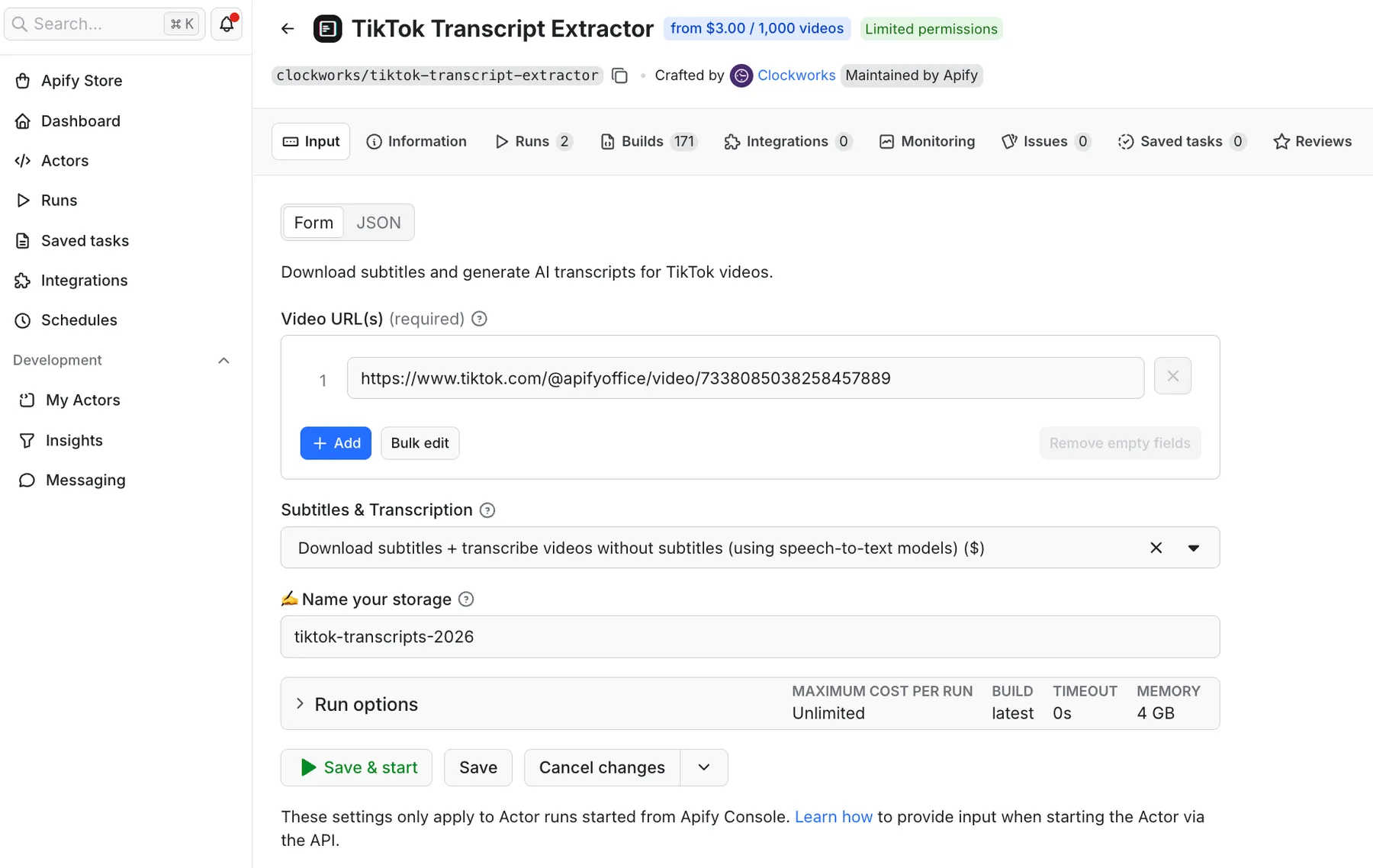
The same input in JSON:
| Field | Type | Description |
|---|---|---|
postURLs | array | Required. TikTok video URLs to process. Enter URLs one by one, or copy-paste them in bulk. |
downloadSubtitlesOptions | string | Optional. DOWNLOAD_SUBTITLES — fetches TikTok's built-in subtitles only. Videos without subtitles return no text. Default option. DOWNLOAD_AND_TRANSCRIBE_VIDEOS_WITHOUT_SUBTITLES — downloads TikTok subtitles where available, generates AI transcription for videos that don't have them. Extra cost applies based on your plan. Recommended for most use cases. TRANSCRIBE_ALL_VIDEOS — AI transcription for all videos, including those that already have TikTok subtitles. Extra cost applies based on your plan. |
videoKvStoreIdOrName | string | Optional. Custom name for the Apify Storage where subtitle and transcription files are saved. Key-value stores are unnamed by default and deleted at the end of your plan's data retention period. Naming your storage preserves it until deleted manually. Up to 63 characters; letters, digits, and hyphens only, no spaces (e.g. tiktok-transcripts-2026). |
What affects subtitle coverage?
Not all TikTok videos have built-in subtitles. Coverage across a broad, topic-diverse sample is on average 60–75%, but your actual rate will vary. Several factors affect it:
- Language: Non-English content typically has lower auto-generated subtitle coverage.
- Video age: Videos published before November 2023, when TikTok began rolling out auto-captions globally, are unlikely to have subtitles. Fresh content in the first 24–48 hours may also lack them while TikTok processes the video. Most videos that don't receive subtitles within 48 hours of upload won't receive them at all.
- Content type: Slideshows don't have spoken audio, so they return no subtitles or transcription. Videos with heavy music, minimal speech, or unclear audio are also less likely to be captioned. TikTok often doesn't generate subtitles for reposted content.
Note: A portion of videos may return empty transcript files as they don't contain any meaningful speech to transcribe (typically dance, lip-sync, or music-heavy content)
Output
Each result contains a subtitle file (.vtt) or transcription file (.txt) saved in Apify Storage, with direct download links included in the dataset (videoMeta.subtitleLinks[].downloadLink and videoMeta.transcriptionLink). To download files in bulk, go to the Key-value store inside the Storage tab after the run completes.
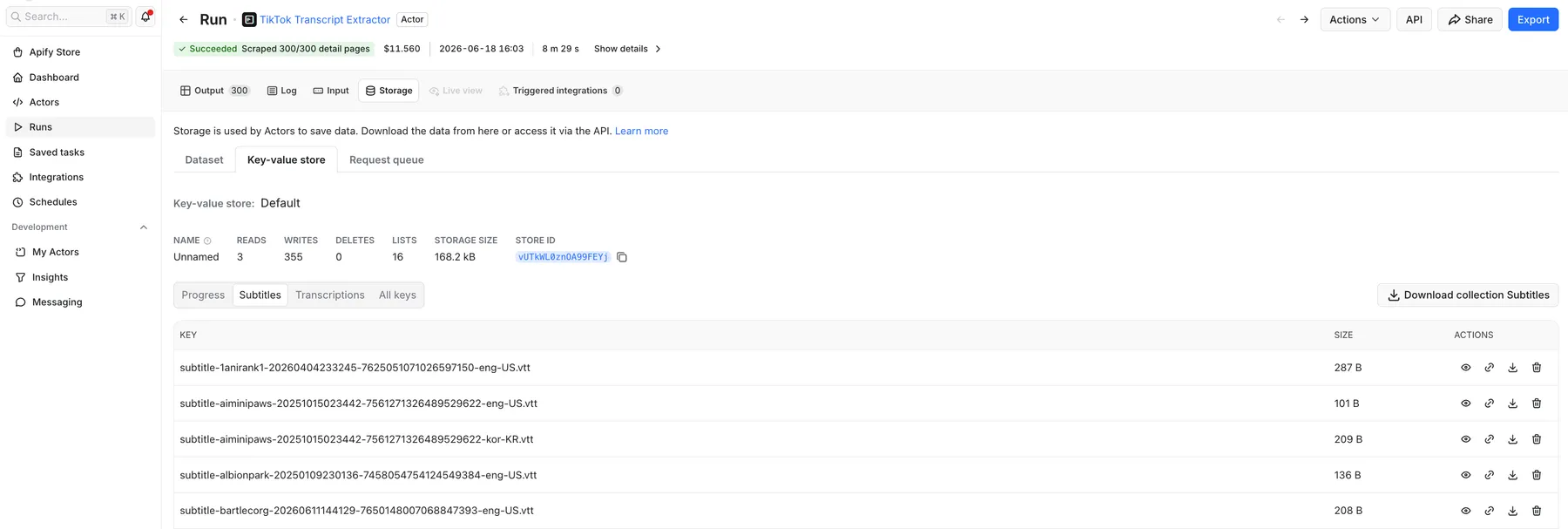
The dataset also includes video metadata and engagement stats: video URL, caption text, publish date, views, likes, comments, shares, author details, and music info. You can export the full dataset as JSON, CSV, Excel, XML, or HTML from the Output tab in Apify Console.
Example of output with TikTok subtitles
Example of output with AI-generated transcript
Each output item contains the following key fields (see the Output schema for the full list):
| Field | Type | Description |
|---|---|---|
text | string | Post description written by the creator, including hashtags. Not related to the video's spoken content. |
authorMeta | object | Creator profile data including name, nickName, verified, fans, following, heart, and video count. |
| Engagement metrics | number | playCount, diggCount, commentCount, shareCount |
videoMeta.subtitleLinks | array | Subtitle file links. Each entry has language, source (ASR = automatic speech recognition, MT = machine translation, LC = live captions), sourceUnabbreviated, and a downloadLink to the .vtt file in the key-value store. Empty array [] if no subtitles are available. |
videoMeta.transcriptionLink | string | Link to the plain-text AI transcription file in the Key-value store, or null if AI transcription was not run or produced no output. |
Other TikTok Actors
Use dedicated scrapers to extract specific TikTok data.
- 🎵 TikTok Scraper: the most comprehensive tool for scraping TikTok videos, hashtags, profiles, search results, comments, and transcripts at scale
- 📥 TikTok Data Extractor: download structured AI-ready datasets in bulk
- 🗣 TikTok Profile Scraper: extract videos, follower counts, and bio data for creator research and audience analysis
- 📹 TikTok Video Scraper: scrape views, likes, captions, and posting date from video URLs for tracking performance and creative analysis
- #️⃣ TikTok Hashtag Scraper: pull videos published under a hashtag with engagement stats and creator data
- 📊 TikTok Hashtag Analytics: analyze hashtag performance, reach, and content benchmarks
- 💬 TikTok Comments Scraper: ideal for sentiment analysis and audience research
- 👥 TikTok Followers Scraper: extract follower and following lists from any public TikTok account for influencer evaluation, audience analysis, and lead generation
- 🕵️ TikTok User Search Scraper: search TikTok users by keyword and extract profile data for influencer discovery and competitor research
- 🎸 TikTok Sound Scraper: track viral audio trends and music-driven campaigns by looking for videos using a specific sound
- 🧭 TikTok Explore Scraper: browse TikTok's Explore categories (Gaming, Food, Beauty, and more) to monitor trending content by vertical
- 🔍 TikTok Discover Scraper: enter a hashtag and get related videos, trending subtopics, and tag breadcrumbs for topic-level trend mapping
- 🛒 TikTok Shop Scraper: scrape product listings, prices, sales volume, and seller data from TikTok Shop by keyword
Your feedback
We're always working on improving TikTok Transcript Extractor. If you've found a bug or have a feature request, please create an issue on the Issues tab. We monitor it actively.
Error items
When the Actor cannot retrieve data for a given video URL (for example if the video has been deleted or set to private), it pushes an error item to the dataset instead of silently skipping it. Other videos in the same run are unaffected. You can identify error items by the presence of an errorCode field.
Example error item:
errorCode | Meaning |
|---|---|
POST_NOT_FOUND_OR_PRIVATE | The video has been deleted or set to private |
POST_SENSITIVE | TikTok has flagged the video as sensitive content and restricted access |
INVALID_URLS | One or more input URLs were malformed. Valid format: https://www.tiktok.com/@username/video/1234567890123456789 |
INVALID_INPUT | The Actor configuration is invalid (for example, a required field is missing or settings are incompatible). The entire run is terminated immediately. |
FAQ
Can I generate a transcript from any TikTok video?
Yes. TikTok Transcript Extractor generates plain-text transcripts from public TikTok video URLs using AI speech-to-text. Select a transcription mode that includes AI, and it outputs a .txt file with the spoken content.
Can I try TikTok Transcript Extractor for free?
Yes. All Apify accounts include $5 of free monthly usage, which resets every month. No credit card is required to sign up. See the pricing tab to estimate how many transcripts you can get for free.
How do I download TikTok transcripts in bulk?
After the run completes, go to the Storage tab in Apify Console and open the Key-value store linked to the run. All subtitle (.vtt) and transcription (.txt) files are stored there and can be downloaded at once. Individual download links are also available in the output dataset under videoMeta.subtitleLinks[].downloadLink and videoMeta.transcriptionLink.
Can I schedule TikTok transcript collection?
Yes. Use schedules to run TikTok Transcript Extractor automatically at any interval: hourly, daily, or on a custom cron expression.
Is there an official TikTok API for transcripts?
TikTok's official API does not expose subtitle or transcript data. TikTok Transcript Extractor accesses the same subtitle data TikTok's own apps use, so no TikTok API key is required.
Can I use TikTok Transcript Extractor via the API?
Yes. The Apify API gives you programmatic access to trigger runs, pass input, and retrieve results. You can also connect the Apify MCP server to run this Actor directly from AI assistants like Claude or ChatGPT. Just describe what you need, for example: "Give me subtitles for the TikTok videos from this list of links." The AI will handle input configuration and return the results.
Can I integrate TikTok Transcript Extractor with other apps?
Yes. TikTok Transcript Extractor connects with n8n, Make, Zapier, Slack, Google Drive, and more via Apify integrations.
Is it legal to scrape TikTok transcripts?
TikTok Transcript Extractor accesses only publicly available video content. It does not extract private user data. Your results may contain personal data subject to GDPR in the EU and similar regulations elsewhere. Only scrape data for legitimate purposes. Read more about the legality of web scraping and ethical web scraping practices.


